Custom AI Model Development: When You Need It and What It Costs

Custom AI model development is the process of building or training an AI model around your own data instead of using a general-purpose model as it is. That can mean fine-tuning an existing foundation model, training a domain-specific model largely on your own data, or, in rare cases, building something from scratch. This is the part of the work people usually get wrong first: they treat it as one project with one price tag. 

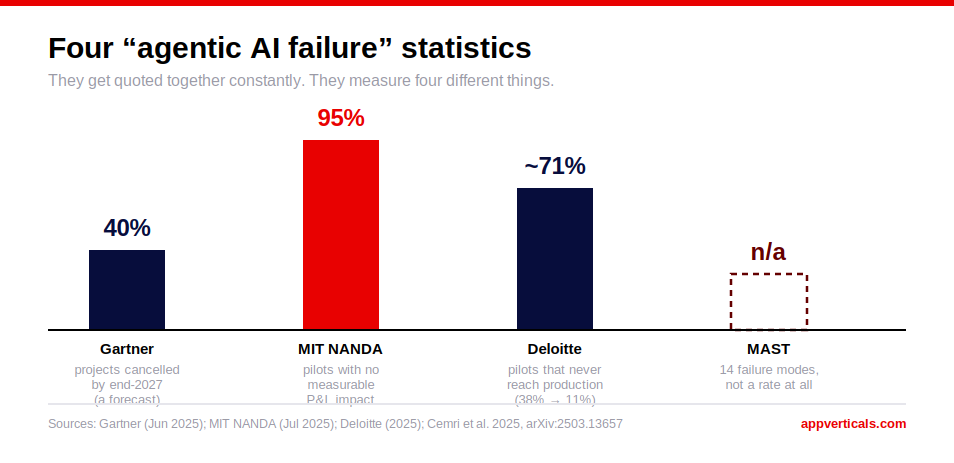
A fine-tune, a domain-specific model, and a from-scratch build are three different projects with three different budgets, timelines, and failure points. MIT’s Project NANDA found that 95 percent of enterprise generative AI pilots show no measurable return on investment, and most of those failures start with an unclear picture of which build type a team actually needs.

The real risk in custom AI model development sits before training starts and after the model ships. 

Key Takeaways

  • Custom AI model development splits into three build types: fine-tuning, a domain-specific model, and a from-scratch build, each with its own cost and timeline.
  • MIT’s Project NANDA found that 95 percent of enterprise generative AI pilots produce no measurable P&L impact, which makes a readiness check essential before committing to any build type.
  • Fine-tuning an existing foundation model typically costs $15,000 to $50,000. A domain-specific build typically costs $60,000 to $180,000. A from-scratch build starts around $250,000 and can exceed $1,000,000.
  • Data readiness and post-launch evaluation are the two stages most often left out of the original budget.
  • Menlo Ventures found that the enterprise build-versus-buy mix shifted from about 47 percent built and 53 percent bought in 2024 to about 24 percent built and 76 percent bought in 2025.
  • A model that is not monitored, evaluated, and retrained on a schedule will drift, regardless of build type.

What Custom AI Model Development Actually Means (And What It Does Not)

Custom AI model development is the practice of building or adapting an AI model so it performs a specific task using your own data, instead of relying on a general-purpose model exactly as a vendor ships it.

Most of what falls under custom AI model development today is custom generative AI model development: adapting a large language model rather than training a traditional classifier from raw tabular data. The traditional case still exists, for tasks like fraud detection or demand forecasting, but this guide focuses on the generative AI case, because that is where AppVerticals does most of its model-build work.

Some teams still mean something narrower and older when they say “build our own AI model”: training a traditional machine learning model on structured, tabular data for tasks like churn prediction or demand forecasting. That is a real and useful category of artificial intelligence work, and it uses a different toolchain, a different team, and a different cost structure than the generative AI case this guide covers. If that is what your project actually needs, the advice below does not transfer directly.

Custom AI model development is a narrower question than custom AI development overall. Custom AI development covers whether to build AI capability at all, and whether to use an API, an agent, or a model. This guide starts one step later, once you have already made that call or are close to it, and covers what actually happens once the model itself needs to be custom.

Signs You Are Actually Ready to Build One

Most companies are not ready for a custom build yet, and that is a normal place to be. McKinsey’s 2025 State of AI survey of nearly 2,000 organizations found that close to two-thirds have not yet begun scaling AI across the enterprise, with only about one-third reporting real production scale in any function. If your organization is still in that group, a custom AI model development project is usually premature.

A few honest checks before committing:

  • You have already tried an off-the-shelf API or a retrieval-augmented setup, and it falls short on accuracy, speed, or cost at your volume.
  • You have proprietary data that a general-purpose model has never seen, and that data gives you a real advantage.
  • The task is narrow enough to define success clearly. A support-ticket classifier is a good fit for a first custom build. A general-purpose assistant usually is not.
  • You have a budget for the stages that come after training: evaluation, monitoring, and retraining, alongside the initial build.

If none of these apply yet, start with an API and revisit this later. Custom AI Development vs. Using an API walks through that sequencing in more depth.

The Three Ways to Build a Custom Model: Fine-Tuning, Domain-Specific, or From-Scratch

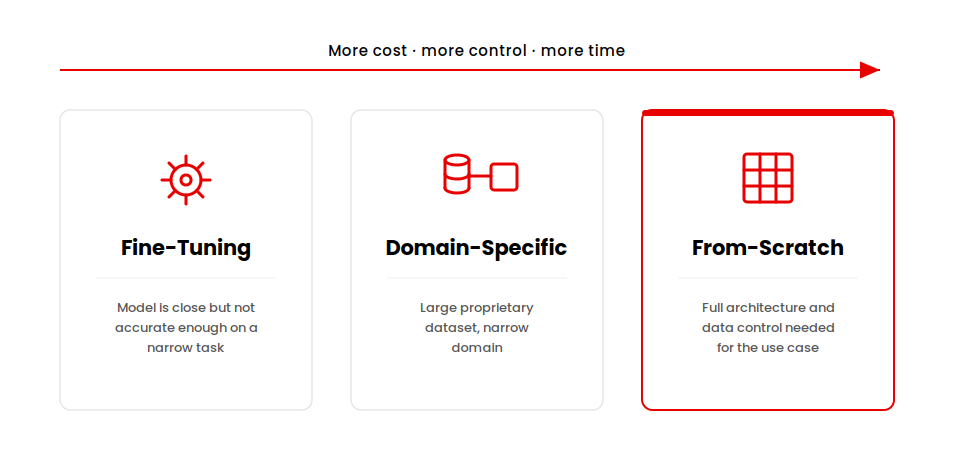
There are three ways to build a custom model, and each is a different project, with a different budget, timeline, and failure point.

Diagram showing three custom AI model development build types: fine-tuning an existing model, training a domain-specific model on proprietary data, and building a model from scratch.

Fine-tuning an existing foundation model

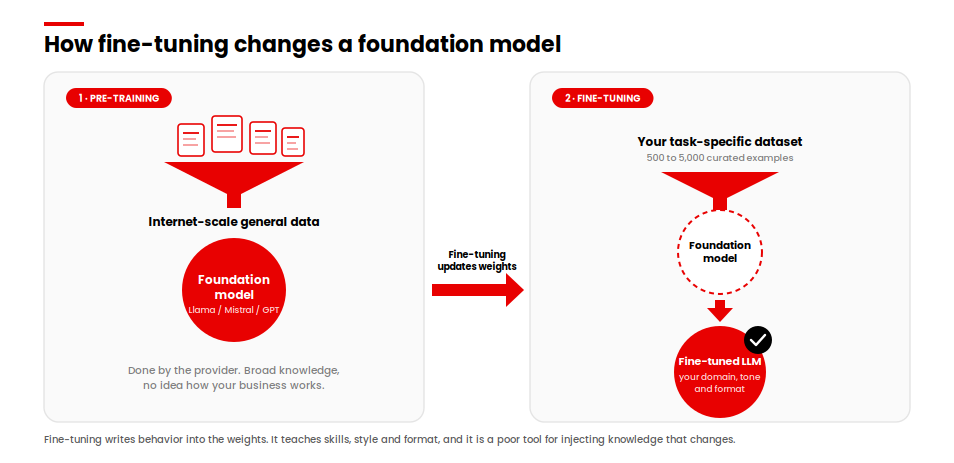
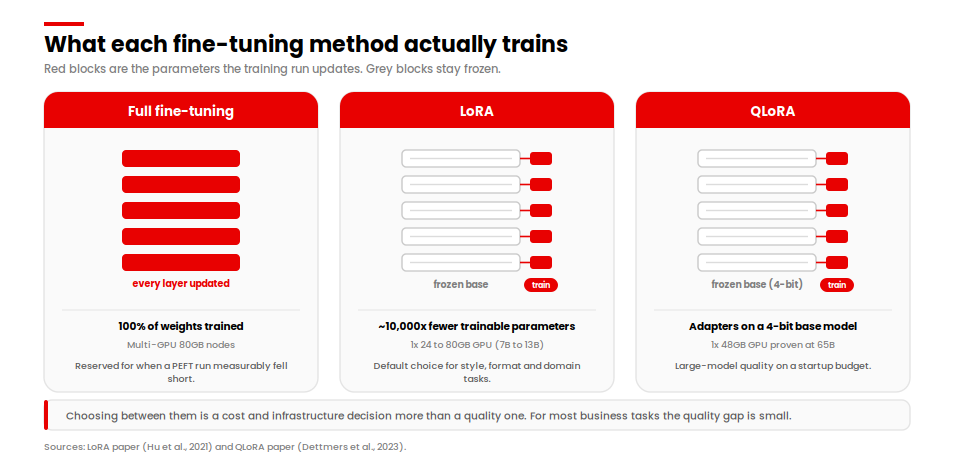
You take a foundation model, such as one from OpenAI or Anthropic, and continue training it on your own examples so it adapts to your task, without changing the base architecture. This is the fastest and cheapest of the three build types, and the right starting point for most companies that reach this stage. A common example is fine-tuning a model to write in a specific brand voice, follow a fixed output format, or handle a narrow set of support categories consistently.

A domain-specific custom model

You train a model largely on your own proprietary data for a narrow task, often building on an open-weight base model through platforms such as Hugging Face rather than starting pretraining from zero. This sits between fine-tuning and a full from-scratch build, and it is where most custom AI model development platforms marketed to enterprises actually operate. A common example is a model trained mostly on a company’s own technical documentation, contracts, or transaction history, handling a task general models get wrong because they were never trained on that kind of data at scale.

A from-scratch build

You define your own model architecture, assemble and clean your own training data at scale, and train from randomly initialized weights. This is the build type most people picture when they hear “custom AI model,” and it is also the one fewest companies actually need. Stanford HAI’s AI Index estimated GPT-4’s training compute at roughly $78 million and Gemini Ultra’s at roughly $191 million, and the report’s most recent edition notes that frontier labs including OpenAI, Anthropic, and Google have since stopped disclosing training details publicly. A business-scale from-scratch build is nowhere near that figure, but it remains the most expensive and slowest of the three options by a wide margin. This build type applies to teams building a genuinely new kind of model. A new use case for an existing architecture usually does not require it.

The signal for which one you need usually comes down to how far an off-the-shelf model and retrieval-augmented generation, or RAG, have already gotten you, and whether the remaining gap is about accuracy, latency, cost, or data ownership.

Custom AI Model Development, Stage by Stage

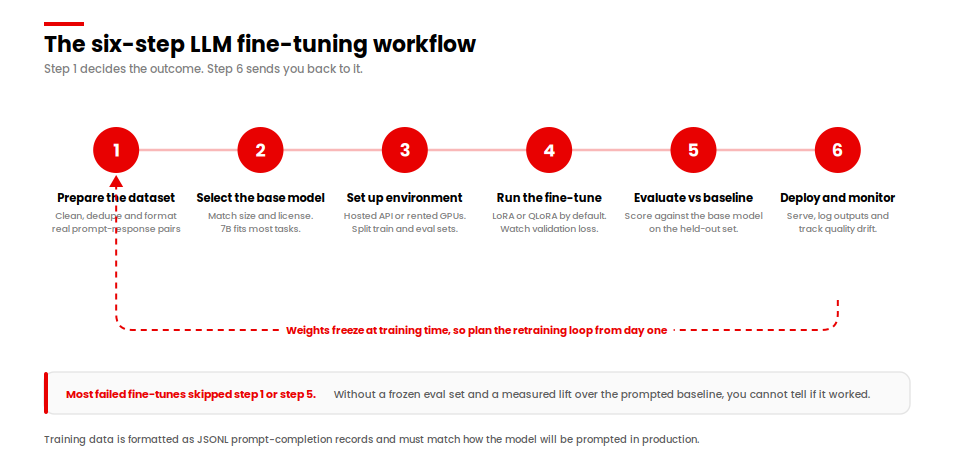
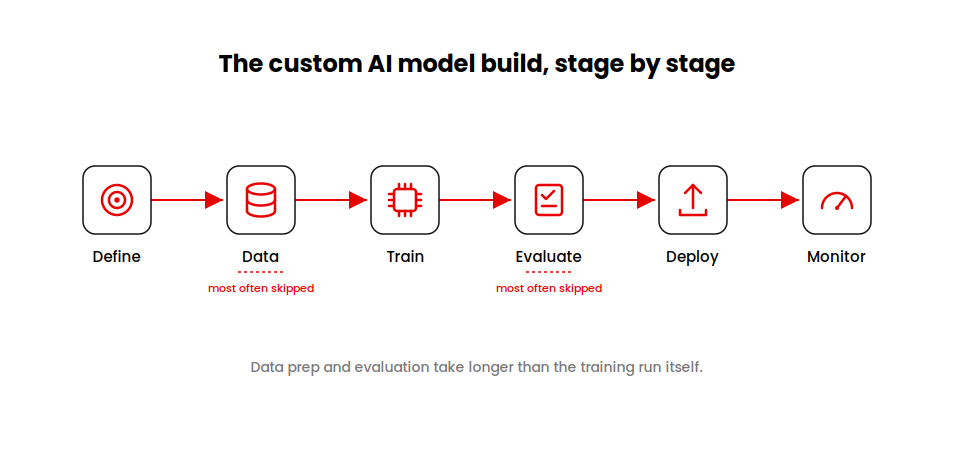
The custom AI model development process runs through six stages. The stages that get skipped most often are data preparation and post-launch evaluation. The training run itself rarely gets skipped.

Alt text: Six-stage flow diagram of the custom AI model development process: define, data, train, evaluate, deploy, and monitor

  1. Define the problem and the metric. Decide what counts as a correct answer before any data work starts.
  2. Collect and clean the data. This stage runs through the data pipeline work of collecting, labeling, and cleaning examples, and it typically takes longer than training itself.
  3. Train. Run the actual fine-tuning job or training run on a rented GPU compute, tracked through MLOps tooling for versioning and reproducibility.
  4. Evaluate. Test against real examples, not only a held-out slice of the training set, and set a bar the model has to clear before anyone calls it done. This model evaluation stage determines whether the build is actually ready to ship.
  5. Deploy. Ship behind a feature flag or to a limited user group first, with monitoring and a fallback path already in place.
  6. Monitor and retrain. Watch for model drift as real usage starts to look different from the training data, and set a retraining schedule before drift becomes visible to users.

What Custom AI Model Development Actually Costs

Real numbers, broken down by build type.

Build Type Typical Cost Typical Timeline Best Signal
Fine-tuning $15,000 to $50,000 3 to 6 weeks Off-the-shelf model is close but not accurate enough on a narrow task
Domain-specific custom model $60,000 to $180,000 2 to 4 months Large proprietary dataset, narrow domain, fine-tuning alone plateaus
From-scratch build $250,000 to $1,000,000+ 6 months or more Full architecture and data control needed for competitive or regulatory reasons

These figures cover the build itself: data preparation, training, and initial evaluation. They do not cover ongoing inference cost, monitoring tooling, or retraining, which are separate, recurring line items covered in the next section. For the full cost breakdown of an AI feature beyond the model itself, see what AI app development actually costs.

Not Sure Which Build Type Fits?

A short scoping call will tell you whether you need a fine-tune, a domain-specific model, or something bigger.


Talk to Our AI Team

What Drives the Price Up or Down

A few factors move the price more than anything else.

Data volume and quality. Clean, labeled, representative data is the single biggest cost driver in most model builds, ahead of model size or compute. Data that needs to be fixed mid-project costs more to repair than it would have cost to prepare properly at the start.

Model size and architecture choice. A domain-specific build on a smaller open-weight base model is cheaper to train and to run than a build on a very large base model, and it is often more accurate for a narrow task.

Compute and inference pricing trends. Epoch AI’s 2025 analysis found that the price to reach a fixed level of AI performance fell between 9 times and 900 times per year, depending on the benchmark. That mainly affects inference cost, what you pay per request once the model is live, rather than the one-time training cost. Falling API prices do not automatically make a custom build itself cheaper.

Team composition. A fine-tune can often run with one ML engineer working part time. A from-scratch build needs a dedicated data engineer, an ML engineer, and ongoing MLOps support, and that headcount is usually the largest line item in a from-scratch budget, ahead of compute itself.

Latency and deployment target. A model that needs to respond in under a second, running on-device or at the edge, costs more to optimize than one that can run asynchronously in the cloud with a few seconds of headroom.

Enterprise complexity. Enterprises custom AI model development services typically add compliance review, data governance sign-off, and integration work on top of the model build itself, which extends both cost and timeline for larger organizations.

How Long It Actually Takes

Fine-tuning is fast. Most fine-tuning projects go from data collection to a working model in three to six weeks, assuming the data is already reasonably clean.

A domain-specific custom model usually takes two to four months. Most of that time goes to data collection, cleaning, and the first few rounds of evaluation. Training itself is comparatively fast.

A from-scratch build takes six months or more, often closer to a year for anything close to production quality, and that estimate assumes the team is already in place on day one. Hiring a data science team from scratch adds months before the build timeline even starts.

Across all three build types, the training run itself is rarely the long pole. Data preparation and evaluation are.

The Mistake I See Most Often

The mistake I see most often is teams budgeting for the training run and skipping the budget for what comes before and after it.

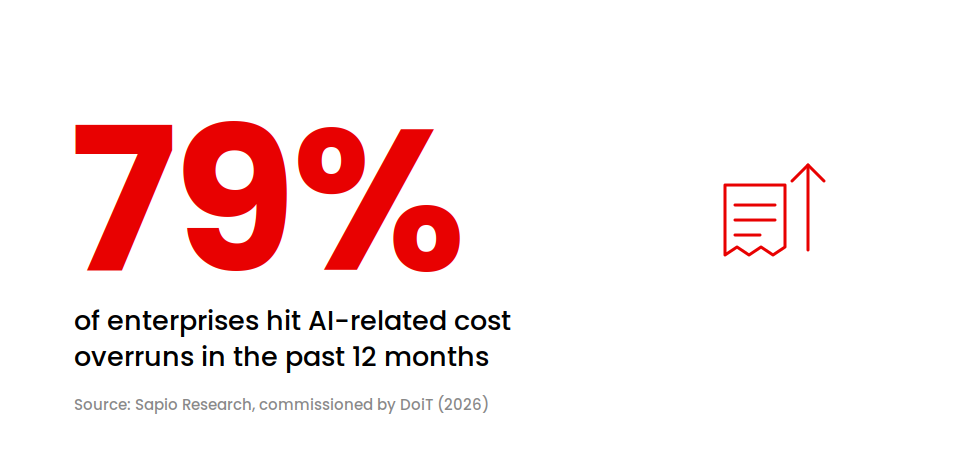
79 percent of enterprises hit AI-related cost overruns in the past 12 months, per Sapio Research and DoiT (95 chars)

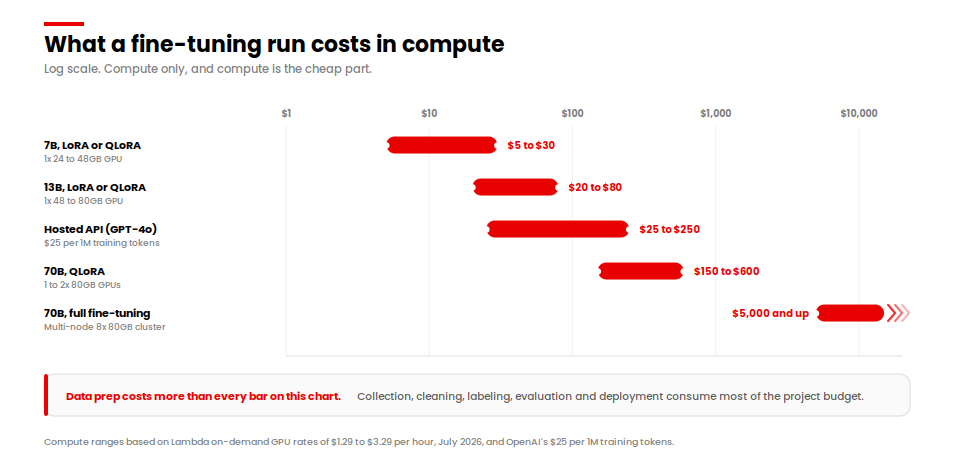
Data readiness gets underestimated almost every time. Teams assume they have enough clean, labeled data because they have a lot of data, and those are two different things. Cleaning and labeling data properly can take longer than training the model itself, and it rarely gets its own line item in the original budget.

Evaluation and monitoring get skipped even more often. A model that scores well on a held-out test set can still behave differently once real users send it real, messy input. Without a monitoring setup and a retraining schedule, model drift shows up as a slow decline in accuracy that nobody notices until a customer complains.

This is a budgeting and planning problem. Planning for it before the project starts fixes most of it. A survey of 500 finance leaders conducted by Sapio Research and commissioned by DoiT found that 79 percent of enterprises experienced AI-related cost overruns in the past 12 months, and only 15 percent could calculate AI return on investment without significant bottlenecks. Underscoped data and evaluation work is a common cause of that kind of overrun.

Building In-House vs. Working With a Custom AI Model Development Company

Building in-house and working with a custom AI model development company are both legitimate paths, and the market has been moving toward the second option.

Menlo Ventures’ 2025 State of Generative AI in the Enterprise report found that the enterprise build-versus-buy mix shifted from roughly 47 percent built and 53 percent bought in 2024 to about 24 percent built and 76 percent bought in 2025. Fewer companies are training and maintaining models fully in-house than a year ago. The specialized skill set required is expensive to hire and hard to retain, which pushes many teams toward a partner.

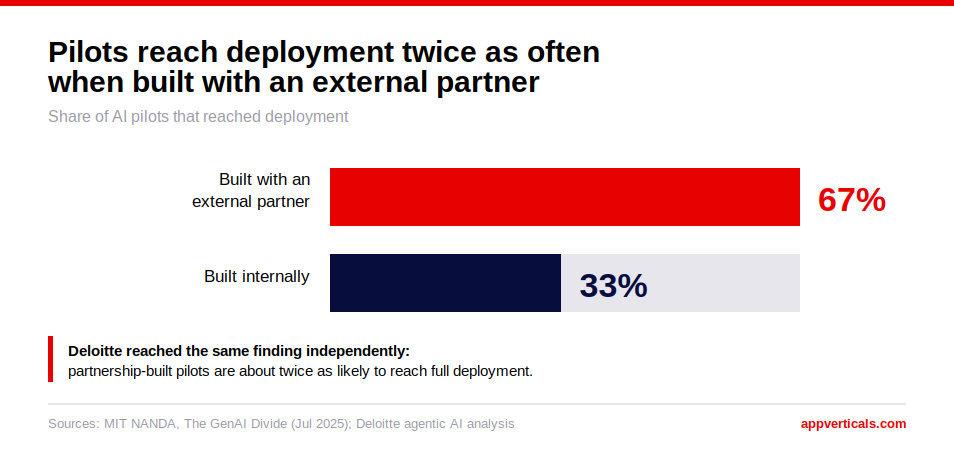
MIT’s Project NANDA research, covered by Fortune, backs this up from a different angle: purchasing AI tools from specialized vendors and building partnerships succeeded about 67 percent of the time, against roughly one-third of that rate for internal-only builds. A hybrid approach, an internal owner working with an external custom AI model development company, outperforms either extreme on its own.

Getting this choice wrong is not free. A company that builds in-house without the right team in place often ends up paying twice: once for the initial internal attempt, and again for the external custom AI model development company brought in afterward to fix or rebuild it.

If you are about to purchase custom AI model development services, a few things separate a real custom AI model development company from a reseller of the same off-the-shelf API you could call directly:

  • They show you evaluation results on your data. Benchmark scores on public datasets do not tell you how a model performs on your specific task.
  • They tell you honestly when fine-tuning solves the problem and a from-scratch build does not, even though the larger build type is the bigger line item for them to sell.
  • They own the production-hardening stage too: monitoring, guardrails, and drift detection.

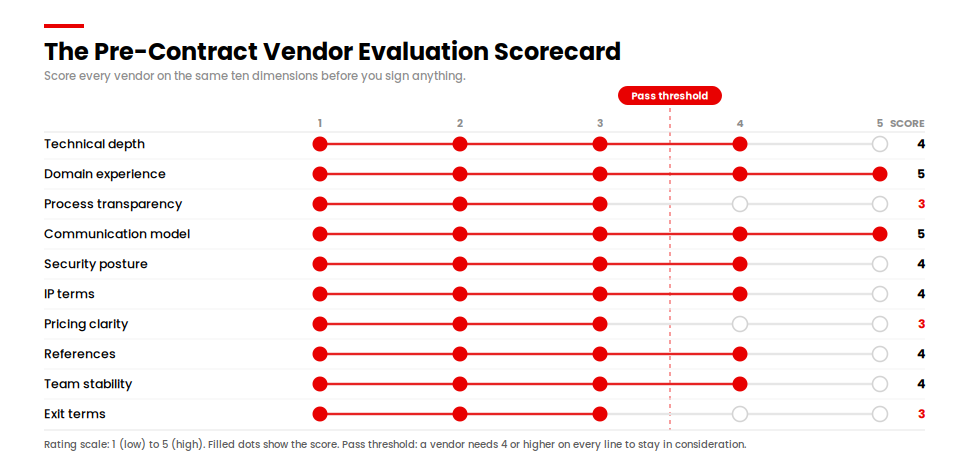
Whether you run this as an internal custom AI model development business function or hire it out, the same evaluation questions apply. Whether you build this capability in-house or bring in a custom AI model development company, the same evaluation questions apply. Ask each provider for a specific, checkable example of a model they have shipped.

Where This Leaves You

Knowing which of the three build types fits your problem gives you most of what you need to set a realistic budget and timeline. Fine-tuning, a domain-specific model, and a from-scratch build are priced and scheduled differently, and matching the build type to the actual gap in your current setup is the decision that determines the rest. If you are still not sure which one fits, that is a normal place to be, and it is a short conversation to sort out. 

Ready to Scope Your Build

Bring us the build type and the data you have. We will map out the cost, the timeline, and the first step.


Start With AppVerticals

Keep Reading

Still deciding whether to build at all? Custom AI Development vs. Using an API covers that decision first.

Build vs Buy Software: Why the AI Prototype Economy Changes the Decision 

Build vs buy software is the decision between developing a custom application your team owns and licensing a ready-made product from a vendor. The right answer depends on one factor above all others, which is how much the software differentiates your business. You build what sets you apart, you buy what every company needs and you combine the two wherever a vendor gets you most of the way there. What has shifted in 2026 is the cost of building because AI-assisted development has made custom work faster and cheaper than the old rule of thumb assumes.

That shift is measurable. McKinsey found that software developers can complete coding tasks up to twice as fast with generative AI, which lowers the single biggest cost that used to make buying the safe default.

Most teams can afford to build now. The real skill is deciding which parts of your software actually deserve to be built. 

Key Takeaways

  • Build vs buy software comes down to differentiation, so you build what makes you distinct, buy what everyone needs and combine the two everywhere else.
  • Building gives you control, IP ownership and exact fit, while buying gives you speed and a lower entry price with the tradeoff of vendor lock-in.
  • AI-assisted development has cut the time and cost of building well-defined software, which makes “buy by default” weaker advice than it was five years ago.
  • Over a 3 to 5 year horizon, licensing renewals, integration and customization often push the real cost of buying much closer to the cost of building than the sticker price suggests.
  • You should build when the software is a competitive differentiator or owns sensitive data and IP and buy when the need is a solved commodity.
  • A hybrid build-on-buy approach lets you license the commodity core and build only the differentiating layer on top through APIs.
  • The Differentiation-First framework scores each function on how differentiating and how commoditized it is, then routes it to build, buy or build-on-buy.
  • Run a real total cost of ownership comparison before you decide because the cheapest option in year one is frequently the most expensive by year three.

What Does Build vs Buy Software Actually Mean?

Building software means designing and developing a custom application that your organization owns end to end, from the source code to the roadmap. Buying software means licensing an existing product, usually delivered as SaaS and paying to use functionality that a vendor built and maintains for many customers at once. The build-or-buy concept is the structured comparison of those two paths against your budget, timeline, control needs and risk tolerance.

The distinction matters because the two paths create very different ownership positions. When you build, you own the asset, the data model and every future decision about it. When you buy, you rent capability and accept the vendor’s decisions about pricing, features and direction.

In practice, most real decisions are not a clean choice between the two. A finance team might buy an accounting platform, build a custom pricing engine and connect the two through an integration layer. The useful question is which category each function belongs in and I will come back to that with a framework later in this guide.

Build vs Buy Software: Pros and Cons

The pros and cons of build vs buy software split cleanly along five dimensions: cost, speed, control, fit and long-term risk. Buying wins on speed and upfront cost. Building wins on control, fit and ownership. The table below is the summary I walk clients through before we go any deeper.
Dimension Build (custom software) Buy (off-the-shelf or SaaS)
Upfront cost Higher, paid as development investment Lower, paid as subscription or license
Time to value Slower, weeks to months to first release Faster, often live in days
Control and roadmap Full control over features and priorities Vendor controls the roadmap
Fit to your process Exact, built around how you work Approximate, you adapt to the tool
Data and IP ownership You own the code and the data model Vendor holds the platform and terms
Long-term risk Maintenance and staffing responsibility Vendor lock-in and price changes

The old reading of this table was simple. Buying looked cheaper and faster on the two dimensions executives feel first, so buying became the default and building became the exception you justified. That reading is now incomplete and the reason is cost, which is the next section.

What Is the Real 3 to 5 Year Cost of Building vs Buying?

The real cost of building versus buying only becomes clear over a 3 to 5 year total cost of ownership window. Buying looks cheaper on day one because the subscription is small next to a development budget. Across several years, license renewals, per-seat increases, integration work and paid customization accumulate and the gap narrows or reverses.

Building carries the opposite shape. The investment is front-loaded, then the ongoing cost settles into maintenance, hosting and enhancement. This is where a real total cost of ownership analysis earns its keep because it compares the full multi-year picture rather than the first invoice.

Building has real risk on the cost side too and I want to be honest about it. McKinsey and the University of Oxford found that large IT projects run 45 percent over budget on average, with software projects carrying the highest risk of overrun. That is a strong argument for tight scope and a delivery partner who has shipped this kind of work before and it is a cost the framework later in this guide is designed to contain.

The table below shows the shape of a typical 3 to 5 year comparison for a mid-market business application. Treat the ranges as directional and size them against your own scope.

Cost Component Build Buy Build on Buy (Hybrid)
Year 1 upfront $60,000 to $250,000+ $5,000 to $40,000 $30,000 to $120,000
Annual ongoing 15% to 25% of build cost Renewals plus seat growth Platform fees plus custom layer upkeep
Integration and customization Included in build Often underestimated Shared across both
Cost driver over time Enhancement and staffing License and seat inflation Custom layer scope

The mistake I see most often lives inside this table. A team buys a platform to save time, then spends two or three years paying for integrations, add-on modules, extra seats and workarounds that the tool was never shaped for. By the time they add it up, they have paid more than a focused build would have cost and they still do not own the result. This is exactly the tradeoff we lay out in our SaaS vs custom software buyer’s guide for teams weighing a packaged product against a custom one.

How the AI Prototype Economy Changes the Build vs Buy Math

AI-assisted development has lowered the cost and time of building software, which weakens the historical case for buying by default. For most of the last decade, buying won on the numbers that leaders feel first, which were speed and upfront spend. Both of those numbers have moved.

The evidence is direct. GitHub’s controlled research found that developers using an AI pair programmer completed a task 55% faster than those without one. McKinsey’s broader analysis puts the potential impact of generative AI at 20 to 45 percent of current annual software development spending. When the cost of producing custom code drops by a meaningful fraction, the break-even line between build and buy moves in favor of building.

I want to be precise about where the gains land because this is where I see teams over-read the headlines. In my work leading AI transformation at AppVerticals, the acceleration shows up most on well-defined, boilerplate-heavy work, which covers scaffolding, integrations, tests and standard CRUD features. On genuinely novel or complex logic, the gains shrink and McKinsey’s own study confirms that time savings fall on high-complexity tasks. AI compresses the routine 70% of a build and that alone changes the economics.

There is a second force at work, which is the wider prototype economy. Low-code and no-code tooling has matured to the point where 70% of new applications will use low-code or no-code technologies by 2026.

Combined with AI code generation, this means a working prototype that once took a quarter can now take a sprint, which makes the early choice between a proof of concept, a prototype, and an MVP the practical first step. When you can build something real and testable in days, the case for locking into a vendor early gets weaker. For teams exploring this route, our guide on low-code vs no-code web development breaks down where each approach fits.

None of this makes buying obsolete. It makes the decision more balanced and it rewards teams who actually run the analysis instead of defaulting.

When Should You Build Software?

You should build software when it is a competitive differentiator, when it owns sensitive data or intellectual property or when no product on the market fits the way your business actually works. These are the cases where control and ownership pay for themselves.

Build when the answer to any of the following is a clear yes:

  • The software is your edge: If customers choose you partly because of how this system works, that logic belongs to you, not a vendor.
  • The workflow is genuinely yours: When your process is a real source of margin or speed, forcing it into a generic tool erodes the advantage you already have.
  • The data or IP is sensitive: Owning the codebase and data model gives you control over security, compliance and where information lives.
  • Integration is the whole point: When the value comes from connecting systems that no single vendor covers, a custom layer is often the cleanest path.

The counterweight is honest capacity. Building means you own maintenance, security patching and a roadmap, so you need the team or a partner, to carry that over time. Custom software building is a commitment and the AI tooling that speeds the build does not remove the responsibility for running it.

When Should You Buy Software?

You should buy software when the need is a solved commodity, when speed matters more than fit or when the function sits far from what makes your business distinct. Payroll, email, ticketing and standard accounting are rarely worth building because mature products already do them well and cheaply.

Buying is the stronger call in these situations:

  • The problem is universal: Thousands of companies need the same thing and a vendor has already refined it across all of them.
  • Speed is the priority: You need the capability to live this month and the cost of waiting for a build outweighs the benefit of a perfect fit.
  • The function is non-differentiating: No customer will ever choose you because of how your expense reports work.

The item to inspect carefully here is software licensing. The headline subscription is only part of the picture, so read the terms on seat growth, usage tiers, data export and renewal increases before you sign. Build vs buy software licensing decisions often turn on those clauses rather than the sticker price and they are the same clauses that create lock-in later. If part of your buy decision is whether to outsource the surrounding build work, our analysis of outsourcing SaaS development versus in-house covers the tradeoffs.

What About Vendor Lock-In, Licensing and IP Ownership?

Vendor lock-in is the risk that switching away from a purchased product becomes so expensive or disruptive that you effectively cannot leave. It is the hidden cost that a clean buy-vs-build analysis has to price in, alongside licensing terms and IP ownership. When you buy, the vendor holds the platform, the data format and the leverage at renewal.

Before you commit to a purchased product, pressure-test it against this checklist:

  • Data portability: Can you export your full data in a usable format, on your schedule, without a fee?
  • Integration openness: Does the product offer documented, stable APIs or does it wall your data off?
  • Pricing exposure: How much can per-seat and usage pricing rise at renewal and is there a cap?
  • Exit path: If you left in two years, what would the migration actually cost in time and money?
  • IP boundaries: For any custom work built on the platform, who owns it, you or the vendor?

Building inverts most of these risks because you own the code, the data model and the exit. That ownership is not free, since you take on the maintenance and security burden instead. The right move is to name the risk you prefer to carry rather than to pretend either path is risk-free.

The Modern Compromise: Build on Buy

Build on buy is a hybrid approach where you license a commodity platform for the parts everyone needs and build a custom layer on top for the parts that differentiate you. It captures the speed and low entry cost of buying while protecting the ownership and fit that matter most. For a growing number of the projects I see, this is the practical answer.

The pattern works like this. You buy the mature core, which might be a CRM, a payments platform or an ERP. Then you build a proprietary layer on top through the vendor’s APIs, which holds the workflow, logic or customer experience that sets you apart. The commodity work stays with the vendor and your engineering effort goes only where it creates advantage.

The line to draw is the differentiation line. The vendor’s API should stop where your competitive logic begins and your proprietary code should own everything past that point. Draw the line too generously toward the vendor and you hand your advantage to a platform. Draw it too far toward custom and you rebuild commodity features that were never worth your time.

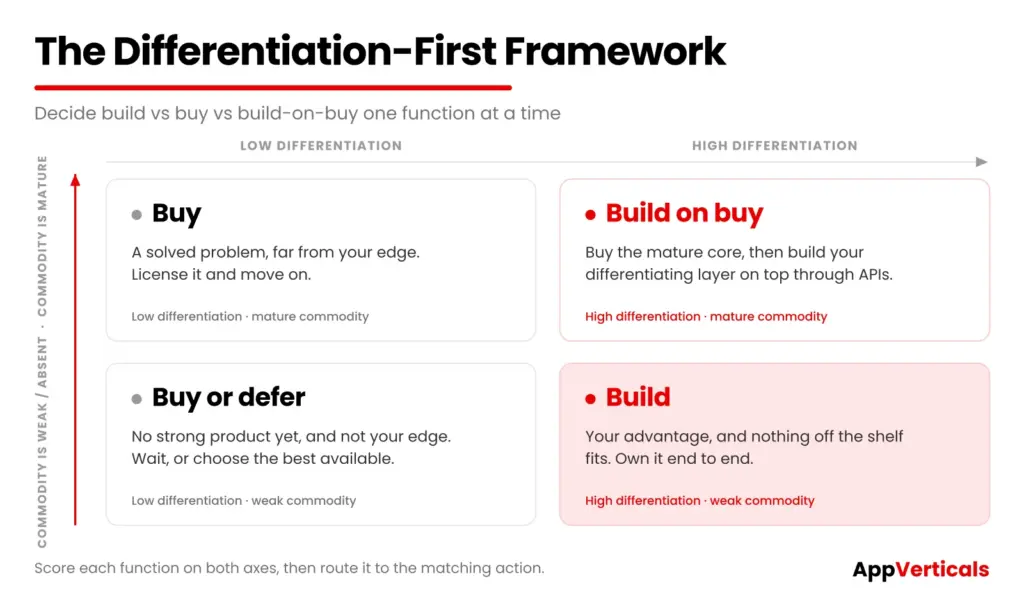
The Differentiation-First Build/Buy/Build-on-Buy Framework

The Differentiation-First framework decides build vs buy at the level of individual functions. It scores each function on two axes, which are how differentiating it is to your business and how commoditized it already is in the market, then routes it to build, buy or build-on-buy. This is the build vs buy software analysis I run with every client before we scope anything.

Score each function, then place it in the matrix below.

Differentiation-First-Framework

Low Differentiation High Differentiation
Commodity is mature Buy
A solved problem, far from your edge. License it and move on.
Build on buy
Buy the mature core, then build your differentiating layer on top through APIs.
Commodity is weak or absent Buy or defer
No strong product exists yet, but it is not your edge. Wait or pick the best available option.
Build
Your advantage is unique and nothing off the shelf fits. Own it end to end.

The framework forces a better conversation than a project-wide vote. Instead of asking “should we build or buy this system,” you ask “which functions in this system deserve to be built,” and the answer is usually a mix. Most software acquisition decisions get easier once you stop treating the whole platform as one choice.

Then run a quick decision checklist across the functions you plan to build:

  • Does this function differentiate us in a way a customer would notice?
  • Would owning the code and data give us a real security, compliance or speed advantage?
  • Do we have the team or a partner, to maintain it for the next three years?
  • Has AI-assisted development made the build small enough to justify the ownership?
  • Have we compared the full 3 to 5 year total cost of ownership, including license renewals, integration and maintenance beyond the first invoice?

If the answers point to build, you are building for the right reasons. If they point to buying, you are buying with your eyes open on licensing and lock-in.

See what your build would actually cost before you commit

Get a fast, scoped estimate for the functions you have decided to own, with no obligation.

Get Your Free Estimate

Final Thoughts

The strongest build vs buy software decisions come from teams who stop treating it as one choice and start deciding function by function. You buy the commodity work, you build the few things that set you apart and you use a hybrid layer wherever a vendor gets you most of the way there. That approach was always sound and AI-assisted development has now made the build side of it far more affordable than the old default assumed.

The real work is the analysis. Score your functions on differentiation, run a 3 to 5 year total cost of ownership comparison and read the licensing terms before you sign anything. Do that and the decision stops being a gamble and becomes a plan you can defend.

If you are weighing a build for the functions that matter most, that is the conversation worth having before the first sprint.

Ready to Build the Parts That Set You Apart?

We help teams decide what to build, scope it against real cost and ship custom software that reaches production.


Explore Our Custom Software Development Services

Still comparing packaged and custom options? Read our SaaS vs Custom Software buyer’s guide next.

AI Product Development: From Idea to Deployable Feature

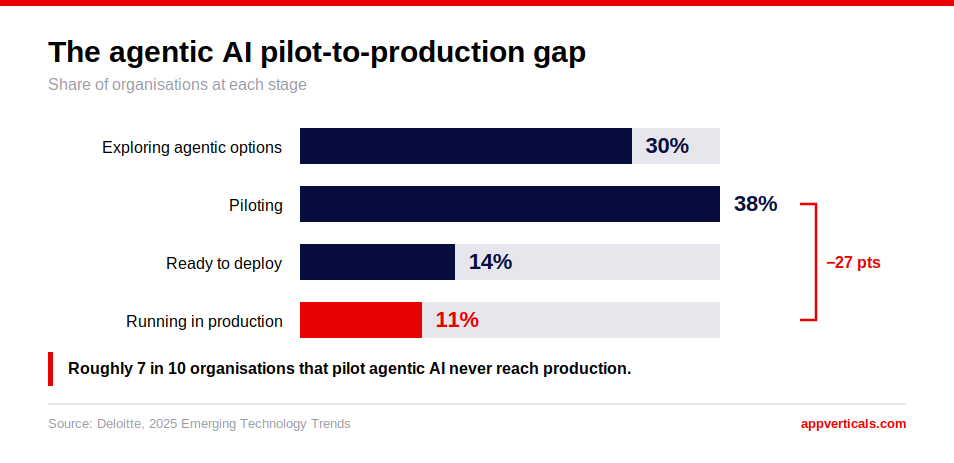
AI product development is the journey from an idea to a product that is safely in production, whether it is  a new product built from the ground up to be AI-native or a single AI feature added to a product you already ship. I have been working on AI features for real products for 6 years, and the model is never the most difficult part. The AI product development process moves through idea, data, build, test, launch, and monitoring, but rarely in a straight line. The moment things actually break is when the prototype becomes a feature ready for real users, real data, and real failure modes. Gartner reports that only 48 percent of AI projects reach production and that the average project takes eight months to get there. That gap between prototype and production is where most of the real work in AI product development needs to go.

The real risk in AI product development sits at the handoff between a working demo and a feature safe to put in front of real users.

 Key Takeaways

  • AI product development runs through six stages: idea, data and prototyping, building, production hardening, launch, and monitoring.
  • Only 48 percent of AI projects reach production, and the average project takes eight months to get there, according to Gartner.
  • The handoff between a working demo and a production-ready feature is where AI initiatives most often stall.
  • Start with an API. Add retrieval-augmented generation when the feature needs to be grounded in your own data. Reserve fine-tuning or a custom model for cases that justify the added cost.

  • A deployable AI feature needs monitoring, guardrails, a fallback path, and a named owner, not only a passing evaluation score.
  • The team matters as much as the model selected: product, AI engineering, data, and quality assurance working together from day one.

What Is AI Product Development, Really?

AI product development is the process of creating an AI feature or product that runs reliably for real users, past the demo and proof-of-concept stage.

It is  the same as product development: Identify a real problem, design a solution, and ship it. The middle section is the only thing that is different. The work is based on a model that may be incorrect in unexpected ways, on data that the team does not fully control, and on non-deterministic code. This is the fundamental concept behind generative AI product development: designing around a system that reasons probabilistically, not by fixed rules.


This is a different discipline from AI-powered product design, which is about the interface and the experience. It is the harder half of AI-powered product development. 

Product development is the entire journey from idea to data, prototype, production hardening, launch, and post-launch. The difference is important because each phase has a different type of risk. A design flaw is evident and can be fixed during a review. A model that silently fails in production, or that has different behavior on inputs that the team has never tested, can be missed for weeks. This guide focuses on building for that reality, rather than assuming that a model behaves like deterministic code.

The AI Product Development Lifecycle, Stage By Stage

The AI in product development lifecycle consists of six phases, from initial concept to post-launch.

ai-product-development-lifecycle

  1. Idea and problem definition. Choose a problem worth solving with AI, and confirm honestly that it actually is one.
  2. Data and prototype. Quickly develop a working version with real user input , typically on an existing API. 
  3. Build. Turn the prototype into a real feature with proper architecture, proper error handling, and a deployment path beyond a development notebook. 
  4. Production-hardening. Add monitoring, guardrails, and a fallback path. This stage decides whether the feature survives contact with real users.
  5. Launch. Ship to real users, usually in phases rather than all at once.
  6. Monitor and iterate. Observe the model’s behavior in the real world and continue fine-tuning.

Where Most AI Products Actually Stall (And Why)

S&P Global Market Intelligence’s 2025 enterprise survey found that the share of companies abandoning most of their AI initiatives before production rose from 17 percent to 42 percent in a single year, with the average organization scrapping close to half of its proofs of concept before anything shipped.

Very little of that abandonment occurs at the idea stage, and very little occurs at the prototype stage, since prototypes are now cheap and fast to make. That ease is exactly the trap. A working demo gets mistaken for a finished feature, when production is a different environment entirely, with messier data, adversarial users, higher volume, and a real cost attached to every request.

In my experience, the stall almost always comes down to one of three causes: nobody owns what the model does once it is live, no monitoring exists to catch it drifting, or the team never built a fallback for when the model is wrong.

These are ownership and process problems. They can be solved if planned for prior to the build. 

The cost of getting this wrong compounds over time. When an AI project is stuck, it does not usually remain a team project. Budget approved for one feature gets spent again on a second attempt, stakeholders lose confidence in future proposals, and a competitor that solved the same production-hardening problem earlier gets to market first. 

All of that is a planning cost, and it is far cheaper to plan for up front than to recover from later. 

Idea And Problem Definition: What Is Actually Worth Building

Not all features are suitable for AI. Before writing a line of code, check the idea against a few honest questions.

  • Is the failure mode tolerable? A wrong summary is recoverable. A wrong medical or financial answer usually is not.
  • Is there data to ground it? A model with no relevant data behind it is guessing with confidence.
  • Does an imperfect answer still help? Some tasks are useful even at 80 percent accuracy. Others are not worth shipping if they are below 99.
  • Is this really a good fit for a model, or is it being added because AI is in this year’s budget?
  • Can success be measured before launch? A problem without a clear metric for correct versus incorrect output is difficult to evaluate later.

The ideas that make it to production are usually the boring ones: a real, bounded problem, with a tolerable failure mode, and data to back it up. The more interesting the pitch, the more you need to double-check it against these questions. 

From Idea To Prototype: Proving It Works

Once a real problem is identified, prove it fast. Build against an existing model API before considering anything more custom. Very few ideas require special infrastructure to determine if they are viable.

Test the prototype against real examples: actual user queries, real documents, and messy data from the production environment. Learn how to scope this stage without overbuilding with our guide on planning an AI MVP.

The result of this stage should be a clear “go” or “no go” decision based on actual evidence and not on enthusiasm for the demo or a sunk-cost mentality that the work has already begun.

Decide the evaluation metric before the prototype exists. A support-ticket summarizer might be judged on whether a support representative accepts the summary without editing it. A pricing recommendation might be judged on how often it matches what an experienced analyst would have chosen. If this decision is not made beforehand, teams will evaluate the prototype based on how impressive it appears during a walkthrough.

From Prototype To Production: The Stage Nobody Explains

Everything changes between a demo and production: the data becomes messier, the volume increases, the cost per request becomes real, and someone other than the builder now depends on it working.

This exact pattern plays out repeatedly: a prototype that impressed everyone in the room, followed by months of unplanned work, because monitoring, guardrails, and a fallback plan were never part of the original scope.

Budget for this stage from the start. It usually takes as long as the original build, and skipping it is the single biggest reason a working demo never becomes a shipped feature.

Build Approach: API, Rag, Or Custom Model: When Each Is Right

Choosing generative AI for product development usually comes down to one mistake: many teams overbuild by default. The sequence covered in more depth in our guide to custom AI development is to escalate only when the simpler option has run out of road.

  • Start with an API such as OpenAI or Anthropic. These are the AI tools for product development most teams reach for first, the same category of tool GitHub’s own research found measurably speeds up developer output. 
  • Add retrieval-augmented generation when the model needs to answer using proprietary data rather than general knowledge.
  • Only fine-tune or build custom models when the accuracy, latency, or cost of the off-the-shelf model is insufficient or when the data is proprietary and provides a true competitive edge.

The more you go up this ladder, the more time, money, and maintenance it will require. Only take it when the step below has really come to an end.

Testing, Monitoring, And Guardrails Before You Ship

Before launch, build an evaluation set from real examples rather than invented ones, and set a bar the model must clear. Include the edge cases and adversarial inputs that are easy to overlook.

Guardrails catch known failure modes: content that should not be generated, actions the model should not take on its own, and inputs designed to break it. Evaluation and guardrail practices increasingly align with frameworks such as the NIST AI Risk Management Framework, which sets expectations for testing before deployment.

Monitoring catches what was not known in advance. Monitor accuracy, cost, and latency after the feature is deployed, and monitor for model drift as real usage deviates from the test set.

Red-teaming deserves a deliberate pass rather than an afterthought. Test the feature with a third party who is not part of the build team: contradictory instructions, attempts to extract system prompts, and inputs that elicit an unsafe or off-brand response. The exercise results should be added to the guardrail list before the exercise.

If the feature involves an AI agent taking actions rather than only answering questions, guardrails and human review matter even more. An AI agent that is wrong quietly is riskier than a chatbot that is wrong out loud. 

What A Deployable AI Feature Actually Needs (A Short Checklist)

These are the best practices for AI-driven product development that distinguish a shipped feature from a permanent demo. Run any AI feature against this list before you call it done.

ai-deployable-feature-checklist

  • An evaluation score, on real examples, that clears a bar set in advance.
  • Guardrails for the failure modes already known in advance.
  • Monitoring for accuracy, cost, and latency once the feature is live.
  • A fallback behavior for when the model is wrong or cannot answer.
  • A named owner who remains responsible for the feature’s behavior after launch, not only during the shipping sprint. 
  • A rollback plan if the feature needs to come back out of production.

A missing item on this list is a gap to close before real users find out first. 

Not Sure Where Your Feature Stands?

A short scoping conversation will identify whether it is ready to harden for production or still needs work.

Talk to Our AI Team

What AI-driven Product Development Actually Costs And Takes

A single, well-scoped AI feature built on an existing API usually reaches production in 6 to 12 weeks. A full AI-native product, or one requiring a custom or fine-tuned model, takes several months longer. RAND Corporation research puts the overall AI project failure rate above 80 percent, roughly twice the rate of comparable non-AI IT projects, which is exactly why the production-hardening stage above is worth the extra time. For the full cost breakdown by stage, see what AI app development actually costs.

ai-cost-scales

The number that matters more than the build cost is the ongoing one: inference cost per request, monitoring, and the team time required to maintain it. Budget for that figure before budgeting for the build itself.

Inference cost scales with usage in a way a one-time build cost does not. Agentic workflows can consume five to thirty times more tokens per task than a standard chatbot exchange, and Gartner expects overall enterprise inference spend to keep rising even as per-token prices fall.

A feature that looks cheap at a hundred requests a day can look very different at a hundred thousand, particularly if it calls a large model for every request instead of routing simpler queries to a smaller, cheaper one. Model routing by query complexity is one of the most reliable ways to keep that number under control as adoption grows.

Who You Need On The Team

A small team with the right people beats a large team with the wrong people.

  • A product owner who will say no to features that have drifted from the original problem definition. 
  • An AI/ML engineer who owns the model choice, evaluations, and guardrails.
  • A data engineer, if the feature depends on proprietary data, which most useful features do. 
  • A backend engineer to deal with integration, scaling, and anything that is not the model.
  • Someone in quality assurance who tests against real, messy inputs rather than only the happy path.
  • An owner after launch, the one who is responsible when the model starts acting weird after business hours.

The size of the team should be proportional to the complexity of the features, not the size of the company. Two to three people with multiple roles can manage one well-scoped feature of an existing API. A full AI-native product typically requires a dedicated role for each of the following tasks: evaluation and monitoring, which can be a full-time job once real users are involved. 

Where This Leaves You

Weak monitoring, missing guardrails, and no fallback plan cause more AI features to fail before shipping than a bad model does. If you are looking to invest more time or money into your next AI feature, test it against the above checklist and be honest about where it actually stands. If it is in between demo and production, that is a specific, solvable problem, and it is one I have helped teams work through more than once.

If that is the situation, the next step is a conversation.

Talk to Our AI Team

Have an AI feature stuck between demo and production? We will help identify exactly what it needs to ship.

Start with a scoping conversation

Keep reading

For readers scoping their own AI feature, these go deeper on the pieces that matter most: when to build custom AI versus using an API, how to integrate an AI agent into an existing product, and what AI app development actually costs.

Multi-Agent AI Systems: How to Build One That Does Not Fall Apart in Production

A multi-agent AI system uses two or more coordinated AI agents, each with its own role, to complete work a single agent handles poorly on its own. A working prototype can be running within days on a framework like LangGraph or CrewAI. The harder number is this one: Cemri et al.’s 2025 MAST taxonomy, the most rigorous public study on the subject, found that these systems fail in production at rates of 41% to 86.7%.

By the time a team asks for help building a multi-agent system, they have usually already decided they need one. They want to know which framework to use. The harder conversation is whether they need multiple agents at all. That is the one that actually prevents a rebuild six months later.

This guide gives you a scored way to decide. It covers the real failure modes to design around and what actually holds up once real users hit it.

Most teams who come to me wanting a multi-agent system do not need all of it built at once. They need one agent proven first, and coordination added only where the task genuinely earns it.

 Key Takeaways

  • A multi-agent AI system uses two or more coordinated AI agents. Start with one agent unless your task genuinely needs more.
  • Cemri et al.’s 2025 MAST taxonomy found failure rates of 41% to 86.7% across seven frameworks, driven by specification issues, inter-agent misalignment, and task verification gaps.
  • Run your use case through the four-factor single-agent versus multi-agent decision test before writing any orchestration code.
  • Three architecture decisions matter more than framework choice: agent memory, tool permissions, and observability.
  • A production multi-agent build typically costs $20,000 to $40,000 or more, over roughly 8 to 16 weeks.
  • Pick an orchestration pattern (supervisor, blackboard, or peer-to-peer) and a framework (LangGraph, CrewAI, Microsoft Agent Framework, or OpenAI Agents SDK) deliberately.

What Is a Multi-Agent AI System?

A multi-agent AI system is a group of AI agents that work together to complete a task. Each agent gets a defined role, a set of tools, and its own slice of context. The agents pass work between each other instead of one agent trying to do everything. A common example: one agent researches a topic, a second agent drafts content from that research, and a third agent checks the draft against the original brief before it ships.

Multi-agent systems sit one level above AI agent development in general. A single agent is still the right starting point for most teams. Multi-agent architecture becomes relevant once one agent is doing several unrelated jobs badly, or once a task genuinely splits into independent pieces that benefit from specialization.

Do You Actually Need Multi-Agent, or Will One Agent Do?

multi-agent-what-it-is

Multi-agent systems AI news coverage over the past year has swung between two extremes: breathless hype and flat dismissal. Most multi agent systems in AI get scoped the same way: someone assumes multi-agent is the upgrade path from a single agent, without checking whether the task actually needs it. Sometimes that assumption is right. Often a single agent with better tooling would have done the job.

The answer depends entirely on the task in front of you.

A single agent with more tools, an effective system prompt, and better context handling solves most problems that look like they need multiple agents. Adding agents adds coordination overhead: message passing, shared state, and new failure surfaces that a single agent never has to deal with. Every additional agent is a new place for the system to lose track of what it is doing.

Multi-agent architecture earns its complexity in a narrower set of cases: when a task splits into genuinely independent subtasks that can run in parallel, when different subtasks need different tools or different levels of model capability, or when a single agent’s context window and instruction set become unmanageable because it is doing too many unrelated jobs at once.

The mistake I see most often when scoping AI Transformation engagements at AppVerticals is teams reaching for a multi-agent architecture before a single, well-scoped agent has been tried and found lacking. Most teams over-build before they under-build. I see it most often when a client asks for coordination before a single agent has even been tried. 

The Single-Agent vs. Multi-Agent Decision Test

Run your use case through these four questions before you write any orchestration code.

  1. Task independence. Can the work be split into pieces that do not depend on each other’s output in real time? If every step needs the previous step’s full context, a single agent with good memory handling is usually simpler and more reliable than a handoff chain.
  2. Coordination need. Does the task require specialized skills, tools, or model capabilities that genuinely differ between subtasks? A research step and a code-generation step might justify separate agents, each with separate tool access. A single writing task rarely does.
  3. Latency tolerance. Multi-agent systems add round trips. Each handoff is another model call, another chance for a stall. If your use case needs a quick, single-turn response, added agents work against you.
  4. Team capacity. Multi-agent systems need someone who can debug distributed state, trace failures across agent boundaries, and maintain an orchestration layer over time. If nobody on the team can do that today, a single agent buys time to build that capability before adding coordination complexity.
Factor Points to Single-Agent Points to Multi-Agent
Task independence Steps depend on shared, evolving context Steps are genuinely parallel or independent
Coordination need One skill set covers the whole task Subtasks need different tools or capabilities
Latency tolerance Fast, single-turn response required Multi-step, asynchronous work is acceptable
Team capacity No one available to own an orchestration layer A team can maintain distributed state and tracing

If most of your answers land in the single-agent column, build one agent first. You can always split it into a multi-agent architecture later, once you know exactly where the seams should go.

Not sure where your use case lands? 

A short scoping call will tell you whether your task needs one agent or several before you write a line of orchestration code.

Talk to our AI Transformation team

Why Multi-Agent AI Systems Fail in Production: The MAST Taxonomy

multi-agent-why-they-fail

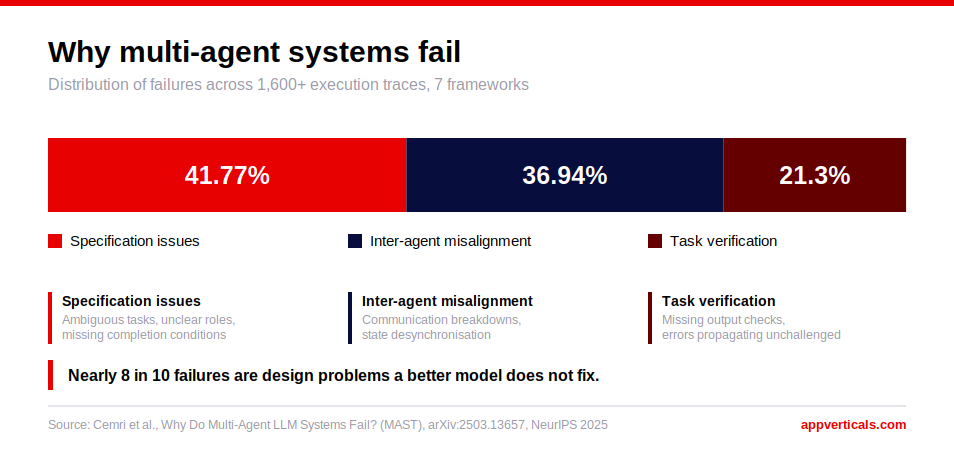
The most rigorous public data on why multi-agent systems fail comes from Cemri et al.’s 2025 paper, “Why Do Multi-Agent LLM Systems Fail?” The research team built MAST, the Multi-Agent System Failure Taxonomy, from 1,600+ annotated execution traces across seven open-source multi-agent frameworks: MetaGPT, ChatDev, HyperAgent, OpenManus, AppWorld, Magentic, and AG2. 

Their empirical analysis found task failure rates from 41% to 86.7% across those frameworks. MAST groups the failures into three categories:

  • Specification issues 
  • Inter-agent misalignment
  • Task verification
Category Share Example Failure Mode What It Looks Like How to Design Against It
Specification issues 41.77% Disobey task or role specifications An agent ignores stated constraints or acts outside its assigned role Add explicit constraint checks in each agent’s instructions and validate outputs before handoff
Inter-agent misalignment 36.94% Ignored input, reasoning-action mismatch An agent drops another agent’s context, or its stated reasoning contradicts the action it takes Pass structured, validated handoff data between agents instead of free-text summaries
Task verification 21.30% Inadequate output checking An output is accepted as complete without being checked against the original task Add an independent verifier agent that does not share a prompt or context with the producing agents

A useful pattern across all three categories: coordination problems cause most of these failures. Model quality is rarely the root cause. Better prompts and bigger models narrow specification issues, but they do very little for inter-agent misalignment or verification gaps. Those require deliberate design.

The Architecture Decisions That Determine Whether It Survives

(Alt text: )


Three architecture decisions do more to determine whether a multi-agent system survives production than the choice of framework.

Agent memory. Decide up front what state each agent can see and for how long. Shared memory that every agent can read and write invites race conditions, where two agents act on the same piece of state at the same moment and produce conflicting results. Scoped memory, where each agent only sees what it needs, is slower to build but far easier to debug later.

Tool calling and permissions. Every agent should have access to only the tools its role requires. An agent that can call any tool in the system is also an agent that can cause damage outside its intended scope when it misfires. Tool access should mirror the same boundaries you would set for a human employee with that job.

Observability. You cannot fix what you cannot see. Every agent handoff, every tool call, and every piece of reasoning should be logged in a way that lets you trace a failure back to the exact agent and step that caused it. Without this, debugging a multi-agent system means guessing.

Two open protocols are worth understanding before you design your architecture. The Model Context Protocol, or MCP, standardizes how a single agent connects to its tools, data sources, and external systems. The Agent-to-Agent protocol, or A2A, standardizes how independent agents discover each other and communicate across frameworks. MCP solves agent-to-tool communication. 

A2A solves agent-to-agent communication. Using both correctly from the start avoids rebuilding your integration layer later.

A well-designed system also has an explicit answer for nontermination: what happens when agents keep handing work back and forth without reaching a conclusion. Every orchestration loop needs a maximum number of turns, a timeout, or an escalation path to a human, or it will eventually run in a deadlock that nobody notices until the bill arrives.

Orchestration Patterns: Supervisor, Blackboard, and Peer-to-Peer

multi-agent-orchestration-patterns

Multi agent orchestration is the layer that decides which agent acts next, what it sees, and where its output goes. Three patterns cover most production systems.

Supervisor pattern. One orchestrator agent, sometimes called a supervisor agent, receives the task, breaks it into subtasks, and assigns each subtask to a specialized agent. The supervisor agent reviews the results and decides what happens next. This pattern is the easiest to reason about and debug, because there is one place that owns the overall flow.

Blackboard pattern. Agents read from and write to a shared workspace, the blackboard, instead of talking to each other directly. Any agent can act when it has something useful to contribute. This pattern suits problems where the right sequence of steps is not known ahead of time, but it makes race conditions more likely if the blackboard is not carefully scoped.

Peer-to-peer pattern. Agents communicate directly with each other without a central coordinator. This pattern scales well across frameworks when agents use an open protocol such as A2A to discover and message each other, but it is the hardest pattern to trace when something goes wrong, since there is no single place to look for the full picture.

Most production systems we build at AppVerticals start with a supervisor pattern. It gives you a single point of control while you are still learning where your system’s real failure points are. Moving to blackboard or peer-to-peer patterns makes sense once the supervisor becomes a bottleneck.

Framework Choice: LangGraph, CrewAI, Microsoft Agent Framework, and OpenAI Agents SDK

Framework choice matters less than most teams assume, but it still shapes how much control you have and how much the framework does for you by default. Anyone scoping multi ai agent systems for production ends up comparing the same handful of frameworks.

LangGraph models an agent system as a stateful, cyclic graph. Nodes represent agents or steps, edges define the flow between them, and the framework handles checkpointing and state persistence. It gives the most explicit control over execution paths, which makes it a common choice for regulated workflows that need an audit trail of every decision.

CrewAI models agents as a team, or crew, with defined roles, goals, and tasks. It is the fastest of the four to get a working prototype running, since you describe agents in natural language rather than defining a graph. Teams that start with CrewAI for a quick prototype sometimes migrate to a more explicit framework once they need finer control over execution paths in production.

Microsoft Agent Framework is the current, actively developed successor to AutoGen and Semantic Kernel, which Microsoft merged into a single 1.0 release in April 2026. Existing AutoGen projects continue to run, but new builds on the Microsoft stack should start on Agent Framework rather than standalone AutoGen. It combines AutoGen’s multi-agent conversation patterns with Semantic Kernel’s enterprise features, including session state management and native support for MCP and A2A.

The OpenAI Agents SDK uses an explicit handoff model: one agent finishes its part of the work and hands off to the next agent, carrying context through the transition. It is the most tightly integrated with OpenAI’s own models and tooling and the least flexible if your stack needs to run on multiple model providers.

Framework Coordination Model Best Fit Learning Curve
LangGraph Directed graph with explicit state and checkpointing Regulated or audit-heavy workflows needing precise control Moderate to steep
CrewAI Role-based crews with natural-language agent definitions Fast prototypes and role-based business workflows Low
Microsoft Agent Framework Multi-agent orchestration with enterprise session state, native MCP and A2A Azure-native enterprise teams and teams migrating off AutoGen Moderate
OpenAI Agents SDK Explicit agent-to-agent handoffs carrying context OpenAI-centric stacks that want a lightweight handoff model Low to moderate

None of these frameworks fixes the coordination and verification problems described in the MAST taxonomy above. They give you the plumbing. The failure modes still have to be designed against directly, regardless of which framework you choose.

What a Production Multi-Agent Build Actually Costs

Budgeting for multi agent systems AI starts with agent count and integration depth. Based on the delivery tiers we use internally at AppVerticals, a multi-agent system with agents delegating across domains typically runs $20,000 to $40,000 or more over roughly 8 to 16 weeks. That range covers a system with three to five coordinated agents, an orchestration layer, and basic observability. 

It does not include ongoing inference cost, which scales with usage the same way it does for any AI feature. Our AI app development cost guide breaks down that ongoing run cost separately from the build cost.

What pushes a build to the high end of that range: the number of agents, how much custom tool integration each agent needs, how much observability and guardrail work the project requires, and how tightly the system needs to integrate with existing internal systems and data. Cost scales with how many LLM agents are running and how many tools each one calls. 

A three-agent system reading from one data source costs far less than a five-agent system writing to multiple production systems with human approval gates in between.

One real example from our own delivery work: an AI Proposal Assistant we built used several specialized agents, a drafting agent, a review agent, a scoring agent, and a user-assistance agent, grounded in retrieval-augmented generation against the client’s own documents. That build sat in the $30,000 to $40,000 or more tier. The full architecture is described in our guide to integrating AI agents into an existing product.

Scope Typical Range Timeline
2 to 3 agents, single data source, basic observability $20,000 to $28,000 8 to 10 weeks
3 to 5 agents, multiple integrations, standard observability $28,000 to $35,000 10 to 13 weeks
5+ agents, human approval gates, full observability, and guardrails $35,000 to $40,000+ 13 to 16 weeks

 A Practical Build Checklist Before You Ship

A checklist matters more for multi agent AI systems than for a single agent, since there are more places for something to fail quietly. Before a multi-agent system goes into production, confirm each of the following:

  • You ran the single-agent versus multi-agent decision test above, and multi-agent genuinely won on the merits.
  • Every agent has a scoped set of tools that mirrors what a human in that role would be allowed to touch.
  • Memory boundaries are explicit: you know exactly what each agent can read and write and where race conditions could occur.
  • An independent verification step exists that does not share context with the agents producing the work.
  • Every agent handoff is logged well enough that you can trace a bad output back to the exact step that caused it.
  • There is a maximum turn count, timeout, or human escalation path to prevent non-termination and silent deadlocks. Treat this as one of your guardrails.
  • You picked an orchestration pattern, supervisor, blackboard, or peer-to-peer on purpose.

If any of these are missing, the system is not ready for real users, even if the demo looks convincing.

The Decision in Front of You

Multi-agent architectures work, in the right shape, for the right task. What decides your outcome is whether your task is one of them. Design for the failure modes that take these systems down once real traffic hits. Run your use case through the decision test above before you write orchestration code. If it clears the bar, the next step is scoping the architecture with a team that has shipped these into live client production instead of only a demo.

Talk to our AI Transformation team about your build

We will help you decide whether your task needs one agent or several and scope the architecture around the failure modes above before you commit engineering time to it.

Start with a scoping conversation.

Keep reading

If you are weighing this decision, these posts go deeper on the pieces that matter most: how to integrate an AI agent into an existing product, whether agentic AI fits your business at all, and the build-versus-buy decision for custom AI applied more broadly.

AI Is Writing Your Code: Now Who Owns the AI Technical Debt?

AI technical debt is the compounding cost that accumulates when a team ships AI-generated code from tools like GitHub Copilot, Cursor or Claude Code faster than it can review, test and understand that code. It behaves like traditional technical debt, but it accrues faster because AI produces large volumes of plausible-looking code that often hides duplication, weak structure and missing tests. Left unmanaged, that debt slows delivery, raises defect rates and quietly moves risk onto whoever maintains the system next.

GitClear’s 2025 analysis of 211 million lines of code found that duplicated code blocks rose eightfold in 2024, the clearest signal yet that AI-assisted development is piling on maintenance burden faster than teams are paying it down.

The teams that stay ahead treat every AI-generated commit as a loan and they decide up front who is going to pay it back.

 Key Takeaways

  • AI technical debt is the compounding cost of shipping AI-generated code faster than your team can review, test and understand it.
  • It accrues faster than traditional debt because AI produces plausible-looking code at high volume while masking structural flaws.
  • GitClear found duplicated code blocks rose eightfold in 2024 and refactoring fell below 10 percent of changes, both signatures of rising debt.
  • Google’s DORA research associates a 25 percent rise in AI adoption with a 7.2 percent drop in delivery stability.
  • You can measure AI technical debt with a short scorecard and a cost-of-debt formula that translates it into dollars for stakeholders.
  • Ownership is the missing control, so assign each debt source to a named role before the code ships rather than after an incident.
  • The fastest way to pay it down is smaller batches, mandatory review of AI output and tooling that flags duplication and drift automatically.

What Is AI Technical Debt?

AI technical debt is the accumulated rework and risk created when AI-generated code enters a codebase without the architectural planning, review and testing that keep software maintainable. The term extends the classic idea of technical debt in DevOps into the world of AI coding assistants and autonomous agents.

The mechanics are simple. An assistant suggests a block of code, a developer presses tab and the code compiles. It looks correct, so it merges.

The problem is that “compiles and looks correct” is a low bar. AI tools optimize for a plausible answer to the prompt in front of them and they rarely reuse an existing function elsewhere in your repository, partly because that function sits outside the model’s context window.

How Is AI Technical Debt Different From Traditional Technical Debt?

AI technical debt differs from traditional technical debt mainly in speed, visibility and origin. Traditional debt usually comes from a conscious tradeoff, such as a team choosing a shortcut to hit a deadline and documenting the decision. AI technical debt often arrives silently, in high volume, from code that no human fully authored or reviewed.

The table below shows where the two diverge in practice.

Dimension Traditional Technical Debt AI Technical Debt
Speed of accrual Gradual, one shortcut at a time Rapid, generated in large batches
Origin A deliberate human tradeoff A prompt accepted without full review
Visibility Often documented or known to the team Frequently invisible until it breaks
Root cause Time pressure or scope cuts Volume plus limited model context and weak reuse
Review load Matches human writing pace Far exceeds human review capacity
Security surface Understood by the author Unknown, since no one authored it end to end

This difference is why AI adoption can raise output and risk at the same time. Google’s 2024 DORA research found that a 25 percent increase in AI adoption was associated with an estimated 7.2 percent reduction in delivery stability and that 39 percent of developers reported little to no trust in AI-generated code. More code shipped does not mean more value delivered.

What Causes AI Technical Debt? How AI Coding Assistants and Generative AI Contribute

AI technical debt is caused by the mismatch between how fast AI writes code and how slowly humans review it. Generative AI and AI coding assistants contribute to it in specific, repeatable ways.

Sonar’s 2026 State of Code Developer Survey of more than 1,100 developers found that 88 percent report at least one negative effect from AI-generated code, most often code that looks correct but is unreliable (53 percent) or code that is unnecessary and duplicative (40 percent). 

Here is how AI contributes to technical debt in day-to-day work:

  1. It rewards adding over reusing: Inserting a new block is one keystroke, so assistants bias toward new code instead of consolidating existing functions. GitClear found that refactored or “moved,” lines fell below 10 percent of changes in 2024 and that copy-pasted code outnumbered refactored code for the first time on record.
  2. It produces “almost right” code: In the 2025 Stack Overflow Developer Survey, 66 percent of developers named “AI solutions that are almost right, but not quite” as their top frustration and only 33 percent said they trust the accuracy of AI output, while 46 percent distrust it. Almost-right code passes a quick glance and fails in production.
  3. It outpaces review capacity: LinearB’s 2026 Software Engineering Benchmarks Report, built from 8.1 million pull requests across 4,800 teams, found that AI-assisted pull requests run 2.6 times larger than unassisted ones and merge at less than half the rate of manual code. That combination pushes more code into review than teams can absorb, and unreviewed code is where debt hides. 
  4. It encourages larger changesets: Because AI helps developers write more code at once, pull requests get bigger and larger changes are harder to review and more likely to introduce defects.
  5. It hides missing context: The model does not know your architecture, your naming conventions or your compliance constraints, so it fills gaps with generic patterns that do not fit your system.

The speed itself is genuinely useful. GitHub’s controlled study with professional developers found AI assistance cut task completion time by 55 percent. The debt shows up when that speed runs ahead of review and testing.

What Are the 4 Types of Technical Debt and Where Does AI Make Each Worse?

The four types of technical debt most teams track are code debt, architectural debt, test debt and documentation debt. AI worsens each in a distinct way, which is why AI technical debt feels different from the debt teams managed a decade ago.

Type of Debt What It Means How AI Makes It Worse
Code debt Messy, duplicated or hard-to-read code AI generates duplicates and skips reuse, so bloat grows fast
Architectural debt Structural choices that block change AI works file by file and rarely respects system-wide design
Test debt Missing or inadequate tests Code arrives faster than tests, so coverage falls behind
Documentation debt Decisions no one recorded Prompt reasoning is lost, so the “why” disappears

Architectural debt is the one I worry about most. Code debt is visible and fixable. Architectural debt from AI is quiet, because each individual suggestion looks reasonable while the system as a whole drifts away from any coherent design.

What Are the Warning Signs That AI Technical Debt Is Building Up?

The clearest warning sign is that your code volume is rising while your team’s confidence in the codebase is falling. When I audit a team’s AI-generated code, these are the signals I look for first:

  • Rising short-term churn: New code gets rewritten within two weeks, which usually means it was incomplete or wrong when it was merged.
  • Duplicate blocks everywhere: The same logic appears in several files, so a single change now requires edits in many places.
  • Pull requests that are hard to review: Changesets are large and reviewers approve them because reading every line is impractical.
  • Tests that lag behind features: Coverage drops each sprint even as the codebase grows.
  • Bus-factor gaps: No one on the team can explain why a given AI-written module works the way it does.
  • Slower delivery despite faster coding: Individual tasks feel quick, yet releases get riskier and rollbacks get more common.

If three or more of these are true, you are carrying meaningful AI technical debt and it is worth measuring before it compounds further.

How Do You Measure and Quantify AI Technical Debt?

You measure AI technical debt by scoring a few observable signals and then translating that score into a dollar figure that stakeholders can act on. Engineering teams often struggle here, because stakeholders fund what they can measure. Give them a number and the conversation changes.

Start with a simple scorecard. Rate each signal from 1 (healthy) to 3 (high risk), then total the score. This is the kind of AI analysis for technical debt measurement that a team can run in an afternoon.

A total of 5 to 7 is manageable, 8 to 11 needs a plan and 12 or higher needs action this quarter.

Then convert the score into money with a cost-of-debt estimate:

Annual cost of debt = (remediation hours per month x blended hourly rate x 12) + risk-weighted incident cost 

As a worked example, a team spending 40 hours a month untangling AI-generated code at a blended rate of 80 dollars an hour carries about $38,400 a year in direct remediation cost, before you add the cost of any incident that the debt causes. That framing lands with a CFO in a way that a code-quality complaint never will. For context on scale, McKinsey found that CIOs estimate technical debt at 20 to 40 percent of the value of their entire technology estate.

Not sure how much AI technical debt your codebase is carrying?

 Our engineering team can score it and put a number on it, so you can prioritize with confidence.

Explore our Generative AI development services

What Is the Real Cost and Risk of Ignoring AI Technical Debt?

The real cost of ignoring AI technical debt shows up in three places: security, compliance and long-term maintainability. Each one turns a quiet code-quality issue into a business risk.

  • Security: Code that no human authored end to end is code whose vulnerabilities no human has reasoned through. Duplicated blocks make this worse, because a patch applied in one place often gets missed in the copies.
  • Compliance: In regulated industries, AI-generated code can conflict with disclosure, audit or data-handling requirements and undocumented decisions make it hard to prove what the system does and why.
  • Maintainability: This is where the interest compounds. McKinsey found that companies actively managing technical debt free engineers to spend up to 50 percent more of their time on value-generating work. Teams that ignore it spend that time firefighting instead.

The common client mistake I see is treating AI velocity as pure upside. A team ships a feature in days that used to take weeks, celebrates the win and then spends the next quarter paying for the parts nobody reviewed. The speed was real, but no one ran the numbers on what it left behind. 

Who Owns AI Technical Debt? An Ownership and Accountability Framework

Someone on your team is accountable for every line of AI-generated code the moment it merges. Assign that ownership before the code ships, not after an incident. This is the question almost every guide skips, and it is the one that actually determines whether debt gets paid down. 

To make that concrete, my team uses an ownership matrix that maps each source of debt to a responsible role. Assigning these roles up front is what turns “the AI wrote it” into “a named person is accountable for it.”

AI-Technical-Debt-Scorecard

The pattern that works is straightforward. Developers stay responsible for the code they accept from an assistant, tech leads own the standards, the platform team owns detection tooling and leadership owns the budget to pay debt down. When every one of these rows has a name next to it, AI technical debt stops being an orphan.

How Do You Manage and Pay Down AI Technical Debt With AI?

You manage and pay down AI technical debt with smaller batches, mandatory review of AI output and automated detection and you can use AI itself to help with the detection and remediation. The goal is to keep delivering features while steadily reducing the debt underneath them. Here is how to manage technical debt with AI, step by step:

  1. Make AI output reviewable: Cap changeset size so reviewers can actually read what merges. Smaller batches are the single most reliable lever DORA has identified for stability.
  2. Require human review of AI-generated code: Treat an AI suggestion the way you would treat a pull request from a new hire, with the same scrutiny and the same standards.
  3. Automate duplication and drift detection: Use tools that flag cloned blocks, rising churn and model drift so the platform team catches debt before it spreads.
  4. Use AI to help remediate: The same class of models that generated the debt can propose refactors and consolidate duplicated functions, with a human approving each change.
  5. Strengthen MLOps and data quality: For AI features and models, MLOps practices such as versioning, monitoring and retraining reduce the debt that comes from drift and clean, well-governed data prevents the “garbage in” problem that makes model output unreliable.
  6. Budget for paydown: Reserve a share of each cycle for debt reduction. A common pattern is two feature sprints followed by one refactoring sprint.

MLOps and data quality deserve emphasis. A model trained or grounded on messy data produces messy output at scale, so cleaning the data pipeline is often the highest-leverage way to reduce AI technical debt in AI features specifically. Our work on AI integration services covers how that plumbing comes together in production.

What Are the Best AI Tools and Platforms for Technical Debt Detection and Management?

The best AI tools for technical debt management are the ones that surface duplication, churn, coupling and drift automatically and then help prioritize what to fix. Rather than name a single winner, evaluate any platform against criteria that map to how debt actually forms. When comparing the top AI platforms for technical debt detection, look for:

  • Duplication and clone detection, so cloned blocks get flagged the moment they appear.
  • Churn and hotspot analysis, so you can focus on the code that changes most and breaks most.
  • Coupling and architecture insight, so structural drift becomes visible before it hardens.
  • Prioritized, risk-based remediation, so the tool tells you what to fix first based on impact.
  • CI and workflow integration, so detection runs on every pull request instead of during a quarterly cleanup.

A short evaluation table helps a team compare options on what matters:

Capability Why It Matters What Good Looks Like
Clone detection Duplication drives most AI debt Flags cloned blocks in the pull request
Churn analysis Churn signals unstable code Highlights code revised soon after commit
Remediation guidance Prioritization saves time Ranks fixes by risk and effort
Integration Catches debt early Runs automatically in CI

Tooling surfaces debt and the ownership framework decides who fixes it and when.

What Providers Reduce Technical Debt With AI?

The providers that reduce technical debt with AI are the ones that pair AI delivery speed with disciplined review, testing and ownership, rather than treating AI as a way to skip those steps. If you are evaluating an external partner, the most useful question to ask is how they keep AI-generated code maintainable over time. Vet a provider against this checklist:

  • They review AI output: Ask whether every AI-generated change goes through human review and what their standard is.
  • They measure debt: Ask how they detect duplication, churn and drift and whether they can score your codebase today.
  • They assign ownership: Ask who is accountable for the code after handoff and how that is documented.
  • They plan for paydown: Ask how remediation and refactoring are budgeted into the engagement.

At AppVerticals, this is how we approach generative AI development and larger AI transformation work. Speed matters and so does making sure the code we ship does not become someone else’s problem next quarter. Our work on agentic AI for businesses applies the same discipline to autonomous systems, where unreviewed decisions carry even higher stakes.

How Do You Stay Ahead of AI Technical Debt?

AI is now writing a large share of production code and it is doing so faster than most teams can review it. That speed is a genuine advantage when it is matched by discipline and a growing liability when it is not. AI technical debt is the gap between the two and it compounds quietly until delivery slows, defects rise and someone inherits a codebase no one fully understands.

The teams that win are the ones that measure this debt, assign a named owner to every source of it and reserve time to pay it down. You can keep your AI adoption at full speed and still do all three. The key is to treat AI-generated code as a reviewed input, held to the same standard as any other change. Get the ownership and the measurement right and the speed becomes a durable advantage instead of a future bill.

Worried about what AI is quietly adding to your codebase?

Get a Generative AI and code-quality assessment from AppVerticals’ engineering team and turn AI speed into a maintainable advantage

Explore our Generative AI development services

Internal link after primary CTA: Keep reading: AI Integration Services in 2026: How to Move from Pilot to Production


The Real Reason AI in Software Development Fails: Data and Context

AI in software development is the use of machine learning and generative AI across the software development lifecycle (SDLC), from generating and reviewing code to writing tests, documentation and release notes. Used well, it lets engineers spend less time typing and more time on architecture, validation and judgment. The raw capability is already here. On SWE-bench, a benchmark of real coding tasks, the AI solve rate jumped from 4.4% in 2023 to 71.7% in 2024. Yet most teams we work with do not see that lift in production and the reason sits upstream of the model, in the quality of the data and context the AI has to work with.

Adoption has run ahead of readiness. 84% of developers now use or plan to use AI tools, according to Stack Overflow’s 2025 survey, which means most codebases are already absorbing AI output whether or not they were prepared for it.

The teams that win with AI treat their codebase and their data as the product and the model as a commodity.

 Key Takeaways

  • AI in software development now spans the whole SDLC, from code generation to testing, review and documentation.
  • Model capability is no longer the bottleneck, with AI solving 71.7% of SWE-bench coding problems, up from 4.4% two years earlier.
  • Most failures trace to weak data and context, such as undocumented code, missing conventions and no retrieval layer.
  • The cost is measurable, with duplicated code up roughly eightfold and delivery stability down 7.2% as AI adoption rises.
  • AI code assistants suggest, while autonomous AI agents act, so each needs a different level of oversight.
  • AI writes production-ready code only inside a review and test system that reliably catches its errors.
  • The Data-Readiness Ladder gives teams five stages to move from ungoverned prompting to governed AI in CI/CD.
  • Fix the inputs first and AI compounds value across the codebase instead of technical debt.

What Is AI in Software Development?

AI in software development refers to systems that use machine learning and generative models to write, review, test, explain and maintain software. It covers everything from in-editor autocomplete and chat assistants to retrieval pipelines that ground answers in your own code and autonomous agents that carry a task from a ticket to a pull request.

The practical shift is in where engineers spend their attention. Instead of typing every line, a developer describes intent and the AI drafts an implementation the developer then shapes, corrects and approves. The craft moves toward specification, review and system design. That shift is real and useful. It also creates the exact failure mode this article is about: an AI that drafts confidently against poor context produces plausible, wrong output at speed.

How to Use AI in Software Development?

AI is used at every stage of the SDLC and the value it adds depends heavily on how well each stage is documented and instrumented. The table below maps the common applications we see in client work, along with the part of the job that stays human.

AI applications across the software development lifecycle

SDLC stage What AI does well What stays a human decision
Planning and requirements Drafts user stories, summarizes tickets, surfaces edge cases and ambiguities Prioritization, scope and trade-off calls
Coding Autocomplete, boilerplate, scaffolding, converting between languages Architecture, naming and whether to reuse or create
Testing and QA Generates unit tests, edge cases and synthetic test data Coverage strategy and reviewing assertions for intent
Code review Summarizes diffs, flags smells, proposes fixes Judging intent and approving the merge
Documentation Drafts docs, comments, changelogs and release notes Verifying accuracy against real behavior
Maintenance Explains legacy code and proposes refactors Deciding what to consolidate and what to leave

Notice the pattern. AI is strongest where the input is clear and the output is checkable and weakest where context is missing and correctness is subjective. That single observation predicts most of what follows.

Why AI in Software Development Underdelivers: The Data and Context Problem

The models are good. In my experience, the gap between a team that gets 2x leverage from AI and a team that quietly ships more defects comes down to what surrounds the model: the codebase, the conventions, the retrieval context and the review gates. An AI assistant sees a narrow window of your project and fills the rest from patterns in its training data. When your own context is thin, it guesses and it guesses in a way that looks right.

The measurable fallout is now well documented. GitClear analyzed 211 million changed lines of code and found that in 2024, duplicated code blocks appeared roughly eight times more often than before and copy-pasted code outpaced refactored code for the first time in their dataset. Duplication is the signature of an assistant that cannot see your existing helpers, so it re-implements them. Every clone becomes a place a future bug or security fix has to be applied again.

Delivery data tells the same story. Google’s 2024 DORA research found that for every 25% increase in AI adoption, teams saw an estimated 7.2% drop in delivery stability. The reason is not that the code is garbage. It is that AI makes it easy to ship larger, faster changes and larger changes strain teams that lack strong testing and review. The 2025 DORA report confirms the same tension, noting that AI adoption still carries a negative relationship with stability unless control systems catch up.

Even individual productivity is less obvious than the marketing suggests. In a randomized controlled trial, METR found that experienced open-source developers were actually 19% slower with early-2025 AI tools on their own mature repositories, even though they believed they were faster. On complex, well-understood code, the overhead of prompting, reading and correcting AI output can exceed the time it saves. That is a context problem.

The most expensive mistake we see. A team switches on AI autocomplete across an undocumented legacy codebase and ships a sprint of duplicated, lightly tested code. Three weeks later, the data the AI depended on turns out to live in five places with no consistent schema. That is not a bug you patch. It is a reset. The readiness conversation has to happen before the first sprint.

AI Code Assistant vs Autonomous AI Agent: What Is the Difference?

An AI code assistant suggests and an autonomous AI agent acts. That difference sounds small and changes almost everything about how you govern it. An assistant proposes a line or a block that a developer accepts or rejects in the editor. An agent takes a goal, plans steps, calls tools, edits multiple files, runs tests and reports back, with far less human input between steps.

How AI code assistants and autonomous AI agents differ

Dimension AI code assistant Autonomous AI agent
Core action Suggests code and answers Executes a multi-step task
Scope A line, function or file, in the editor Across files, tools and repositories
Human role Accept or reject each suggestion Set the goal, approve at checkpoints
Best for Autocomplete, boilerplate, explanations, tests Ticket-to-PR work, test-and-fix loops, migrations
Main risk Silent duplication and wrong context Small errors compounding across steps
Oversight needed Per-suggestion review Guardrails, approval gates and logging

The governance jump between the two is the part teams underestimate. An assistant’s mistakes are visible and local. An agent’s mistakes can propagate before anyone looks. We cover the operating model for this in more depth in my guide to agentic AI for businesses.

Which of the two you reach for also feeds a build-or-buy decision. An assistant usually rides on a commercial API, while heavier agent work on proprietary data can justify a tailored model. We walk through where that line sits and what it costs in custom AI development.

How Are AI Agents Used in Software Development?

AI agents are used to own repeatable, multi-step engineering tasks end to end, under supervision. The strongest current use cases are the ones where a person was already acting as glue between systems and where success is measurable. A few that hold up in production:

Agents triage a bug report, reproduce it, propose a fix, open a pull request and attach the failing and passing tests. They run dependency upgrades across a repository and fix the breakages. They convert a legacy module to a new framework, one reviewed pull request at a time. They generate and maintain documentation as code changes. In each case, the agent handles the mechanical breadth while an engineer sets the goal and approves the merge.

The teams getting value from agents keep scope narrow and instrument everything. The ones that struggle hand an agent a vague mandate and a messy codebase, then wonder why the demo never reached production. Moving from a promising pilot to a reliable system is its own discipline, which we break down in AI integration services.

Can AI Write Production-Ready Code?

AI can write production-ready code but only inside a system that reliably catches its mistakes. The model will produce code that compiles and looks correct. Whether that code is safe to merge depends on your tests, your review and your ability to trace what the AI assumed. Treat AI output as a confident draft from a fast junior engineer who has never seen your architecture.

The survey data backs the caution. In Stack Overflow’s 2025 survey, 45% of developers said debugging AI-generated code takes more time than expected and trust in AI accuracy fell even as usage rose. The lesson is not to slow down. It is to put the verification layer in place first, so speed does not turn into rework.

How to Use AI in Software Development: The Data Readiness Ladder

Over the last few years of shipping AI into live products, we kept seeing the same thing. The result an AI delivers is capped by the level of context and control around it. So we describe readiness as a ladder. Each rung raises the ceiling on what AI can safely do in your codebase. You do not need to reach the top to start but you should know which rung you are on before you scale.

The Data-Readiness Ladder (climb L0 to L4)

AppVerticals-Data-Readiness-Ladder

Most teams we meet are stuck between L0 and L1 and blame the model for weak results. The fix is unglamorous. Document the codebase, index your own context and put review and test gates in front of every AI-assisted change. In my experience, standing up L1 to L3 for a mid-sized codebase is usually a matter of a few focused engineering weeks, not a full quarter. 

Not sure which rung you are on?

We assess your codebase, data and review gates, then build the readiness layer AI needs to perform.


Explore our Generative AI Development services

Benefits of AI in Software Development When the Data Is Ready

Once a team is on the higher rungs, the benefits stop being anecdotal. AI removes the mechanical drag from engineering: it drafts boilerplate, generates first-pass tests, explains unfamiliar code and turns a change into a documented pull request. That frees senior engineers for the work that actually moves a product, which is design, trade-offs and correctness.

The same leverage shows up in specialized builds. On mobile teams, AI scaffolds platform-specific screens, generates test data for device edge cases and drafts the boilerplate that differs between iOS and Android, which frees the team to focus on performance and user experience. We look at those use cases in the AI in mobile apps guide.

McKinsey’s research on developer productivity found that AI can help engineers complete some tasks in roughly half the time, while also noting that the gains shrink or disappear on complex tasks unless developers know how to direct the tool. That caveat is the whole game. The benefit is available to teams that have done the context and review work and it stays out of reach for teams that have not. Generative AI is also reshaping how businesses build software more broadly, a theme we explore in generative AI in business.

Risks, Security and Copyright Considerations

The risks of AI-generated code are manageable once you name them. Hallucinated APIs and libraries slip into code that compiles but fails in edge cases. Duplicated logic spreads maintenance cost across the codebase. Security weaknesses appear when generated code copies insecure patterns from training data. Copyright and licensing exposure arises when output resembles protected source. And over-reliance quietly erodes the team’s ability to catch these problems at all.

Every one of these is a governance and testing question before it is a model question. High-stakes output gets a human review checkpoint. Generated code goes through the same tests and static analysis as any other code, ideally stricter. Provenance and logging make it possible to trace what the AI produced. Ownership is assigned, so a specific person is accountable for what merges. The DORA stability findings and GitClear’s duplication data are both symptoms of skipping this layer, not arguments against AI.

The Future of AI in Software Development

The near future is less about smarter models and more about teams learning to integrate them. The 2025 DORA report already shows this shift, with throughput recovering as organizations build the testing and platform foundations that let AI accelerate them without breaking stability. Agents will take on more multi-step work and the human role will keep moving toward specification, review and system design.

My prediction is simple. As models converge in capability, the durable advantage moves to whoever engineers their data and context best. The codebase that is documented, indexed, tested and governed will get compounding returns from each new model. The one that is not will keep paying interest on technical debt. That is why we treat readiness and not model selection as the first conversation with a client. It is also the groundwork covered in how to prepare your organization for AI adoption.

Final Thoughts

The capability question is settled. AI can read, write and reason about code well enough to change how software gets built. The open question for your team is whether the data and context around the model are ready to turn that capability into stable, maintainable software. On the low rungs of the ladder, AI compounds technical debt. On the high rungs, it compounds value.

If you are planning to embed AI across your SDLC, start with readiness and the results will follow. That is the work we do with clients before a single line of AI-assisted code ships.

Ready to make AI work in your SDLC?

We assess your data, context and review gates, then build AI into your delivery pipeline without trading speed for technical debt.


Explore our Generative AI Development services →

Keep reading: How to Prepare Your Organization for AI Adoption, the data, governance and workforce groundwork that has to be in place first.


AI in Mobile Apps: Which Are Worth Building (And Which Aren’t)

AI in mobile apps means using machine learning, generative AI and natural language processing to power features like chatbots, personalized recommendations, image recognition, voice input and fraud detection, either on-device or in the cloud. Roughly 72% of enterprises now use AI in at least one business function, so the hard part is no longer adoption. It is deciding which AI actually deserves a place in your product, and most of it does not. A recommendation engine or a well-grounded support chatbot can lift retention and revenue. A bolted-on “AI assistant” that no one opens just adds cost, latency and privacy risk. 

Even as adoption becomes near-universal, RAND finds that more than 80% of AI projects fail to deliver real business value, so in 2026 the gap between growth and wasted budget comes down to which features you actually choose to build.

This guide walks through how AI is genuinely used in mobile apps, scores the most common features as build, situational or skip and shows what each costs, so you spend your budget on the AI that moves your numbers, not the AI that looks good in a press release.

“I have built AI features into live products, trained custom models and deployed agents into real workflows. I have shipped most of the features on the list below and I have also watched a fair number of them quietly fail in production.”

Key Takeaways

  • AI adoption in apps is no longer the hard part. Roughly 72% of enterprises already use AI, so the competitive edge now comes from choosing the right features.
  • Personalized recommendations and a well-grounded support chatbot are the two AI features almost every app should build first because both move retention and revenue directly.
  • A generic “AI assistant” bolt-on is the most common feature I tell clients to skip, since it adds cost and latency without solving a defined user problem.
  • Roughly 70% of AI products fail to deliver value and the failure almost always traces back to a feature that was added for the demo rather than for the user.
  • On-device AI wins on speed, privacy and offline support, while cloud AI wins on heavy models and most strong apps use a hybrid of the two.
  • A single AI feature built on a pre-trained API typically costs between $8,000 and $40,000, while a custom multi-feature AI app can exceed $150,000.
  • The right way to start is with the one AI feature that solves your biggest user problem, prove it out, then expand from there.

How is AI Used in Mobile Apps? (the real use cases)

Strip away the marketing and AI in mobile apps comes down to a handful of jobs it does genuinely well. The first is personalization. The app learns from what a user taps, watches, buys, or skips, and reshapes the experience around them. This is what sits behind your feed, your “recommended for you” row, and the order in which search results appear.

The second is conversation. A support chatbot reads a user’s question, pulls the relevant answer from your knowledge base, and resolves the issue without a human in the loop. When it is built properly, grounded in your actual content rather than left to guess, it deflects a large share of support tickets and keeps users from rage-quitting at a dead end.

The third is perception. Computer vision lets an app understand images and the camera feed. That covers document scanning, receipt capture, product lookup, skin or plant identification, and the augmented reality try-on features common in retail and beauty apps.

The fourth is prediction and protection. Models forecast what a user is likely to do next and flag activity that looks wrong. Fraud detection in a fintech app, anomaly alerts in a banking app, and predictive restocking in commerce all live here.

Underneath all of this, AI quietly powers search ranking, dynamic content, voice input, translation, and security monitoring. The pattern worth remembering is that the best uses solve a specific, nameable problem. The weak ones exist because “we should have AI in here somewhere.” That single distinction predicts almost everything about whether a feature will pay off, and it is the lens I will use for the rest of this guide.

The 4 Types of AI in Mobile Apps (and which phone apps use them)

When clients ask which AI they need, I find it clearer to talk in terms of the four underlying types rather than the buzzwords. Each one maps to a different class of problem.

Machine learning is the workhorse

It powers recommendations, predictions, ranking, and personalization by learning patterns from data. Netflix and Spotify use it to decide what to surface next. Amazon uses it to rank products. Almost any app with a personalized feed is running ML behind the scenes.

Natural language processing handles text and speech

This is the engine behind chatbots, voice assistants, smart replies, and translation. Duolingo uses it for language practice, banking apps use it for conversational support, and Google Translate is essentially NLP in your pocket.

Computer vision lets an app interpret images and video

Google Lens identifies objects, banking apps read checks through the camera, retail apps power virtual try-on, and health apps analyze skin conditions or food photos.

Generative AI is the newest type

It creates content rather than just classifying it, drafting text, summarizing long threads, generating images, and powering the assistant features that have exploded since 2023. ChatGPT’s app is the obvious example, but generative AI now shows up inside email apps, note-takers, and design tools.

Most production apps combine two or three of these. An e-commerce app might use ML for recommendations, NLP for its support chatbot, and computer vision for visual product search. The type you need follows from the problem you are solving. Which one sounds most advanced is beside the point. I have seen teams reach for generative AI when a simple ML classifier would have done the job for a tenth of the cost, and the reverse far less often.

Which AI Features are Worth Building, The Worth-It Scorecard

Here is the part competitors leave out. Everyone lists the features. Almost no one tells you which ones actually deserve a place in your build. So I scored the most common mobile AI features against the four things that matter when you are the one paying for them: how much user value they create, how much they move retention, what they cost to build, and what they cost to maintain once they are live. The last column is the verdict, and the verdicts do not hedge.

These calls come from delivery experience, not theory. They reflect what has paid off in the apps my team has shipped.

ai-feature-worth-it-scorecard

I asked myself the question clients always ask me, and put the answer on the record next to the scorecard.

The feature clients ask for most and need least is the catch-all AI assistant. They have seen a competitor ship one and want parity, but it almost never maps to a job their users are actually trying to do, so it gets opened once and forgotten. The feature almost nobody asks for, and the one that quietly moves retention more than any other, is well-built personalization. It does not demo well, but it compounds. Every session it gets a little better at putting the right thing in front of the right person, and that is what brings people back.

A few notes on the calls.

1. Recommendations and personalization earn a clear Build 

This is the single most reliable AI investment in mobile. It compounds over time, it directly shapes the metrics you care about, and the cost is moderate because the patterns are well understood. If you only build one AI feature, build this one.

2. A RAG-grounded support chatbot is also a Build, with one condition 

The “RAG-grounded” part is not optional. Retrieval-augmented generation means the bot answers from your own documents and data rather than improvising. That is the difference between a chatbot that deflects tickets and one that confidently invents wrong answers and erodes trust. If you are going to build a chatbot, this is how to do it, and it is worth reading up on proper AI chatbot development before you scope it.

3. Fraud and anomaly detection is Situational because context decides everything 

For a fintech or payments app, it is close to mandatory and pays for itself the first time it stops a real loss. For a recipe app, it is irrelevant. The retention impact is indirect, you keep users by keeping them safe, and the maintenance load is high because the patterns you are chasing keep changing, so the verdict depends entirely on your domain.

4. Image recognition, voice and AR are Situational for the same reason

A scan feature is excellent in a banking, retail, or health app and pointless in most others. Voice interfaces sound impressive in demos but see low real-world usage outside of accessibility, hands-free, and specific in-car or kitchen contexts. AR is genuinely valuable for retail, furniture, and beauty, where a virtual try-on or place-in-room view removes real purchase friction, but its build and maintenance costs are high thanks to 3D assets and device fragmentation. Build any of these when your use case demands it. Building them because they look modern is how budgets get quietly drained.

The generic “AI assistant” bolt-on gets a Skip, and I will defend that one below, because it is the feature clients ask for most and regret most.

Curious what these verdicts cost in practice? 

Before you commit to any Build, it helps to see the numbers. Our feature-by-feature breakdown of AI app development cost prices each of these features so you can put a budget against your own shortlist.

AI Features that are Usually Hype (and what to do instead)

The most common request I get is some version of “can we add an AI assistant.” Almost every time, when I ask what specific problem it solves, the answer is a pause. That pause is the whole problem.

A generic assistant bolted onto an app that did not need one does three things, all bad. It adds engineering and inference cost. It adds latency, because every interaction now waits on a model. And it adds privacy surface, because you are routing user data to an AI system for no clear return. Meanwhile, users open it once out of curiosity and never again. The button sits there as a monument to a roadmap decision, not a user need.

This is where the adoption numbers get sobering. Enterprises have embraced AI, but embracing it and profiting from it turn out to be very different things. Gartner found that only 28% of AI use cases fully meet their ROI expectations, which lines up with the 80% failure rate we opened with. Buying or shipping AI is easy, and almost everyone has done it.

Getting a return is hard, and most have not. A large share of those failures are features that landed on the roadmap because AI was on a strategy slide, with no one able to name the metric they were supposed to move. Gartner traces much of the collapse to weak data foundations rather than the models themselves, forecasting that 60% of AI projects will be abandoned through 2026 for exactly that reason. The full picture of adoption climbing while value lags is laid out in our AI in app development statistics, and closing that gap is exactly what this scorecard is built to do.

So what do you do instead of a generic assistant? You take the underlying capability and aim it at a real job. Instead of “an AI assistant,” build the one thing your users actually struggle with. If they cannot find products, build AI-powered search and recommendations. If they get stuck and contact support, build a grounded chatbot. If they abandon a long form, build smart autofill or summarization for that exact flow. The capability is fine. The generic, unfocused packaging is what fails.

The test I apply to every proposed feature is one sentence: what specific problem does this solve, and how will we measure that it worked? If a feature cannot answer that cleanly, it does not go in the build. That single filter has saved clients more money than any optimization I have ever shipped.

On-Device vs Cloud AI: Cost, Speed and Privacy

Once you have chosen a feature, the next decision is where the AI actually runs. This choice quietly drives your cost, your speed, and your privacy posture, and it is worth making per feature rather than once for the whole app.

Factor On-device Cloud
Latency Instant, no round trip Depends on network and model
Cost One-time, no per-call fee Ongoing inference cost per call
Privacy Data stays on the phone Data leaves the device
Offline support Works without a connection Requires connectivity
Model size Limited by device hardware Effectively unlimited

On-device AI runs the model directly on the phone using frameworks like Apple Core ML and Google ML Kit. It is the right choice when you need instant response, offline support, or maximum privacy. Face unlock, keyboard prediction, basic image processing, and simple classification all belong here. There is no per-call fee and no network dependency, but you are constrained by what the hardware can hold.

Cloud AI runs the model on a server you call through an API. It is the right choice for heavy models, especially large language models, that no phone can run well. The tradeoff is an ongoing inference cost that scales with usage and a dependency on connectivity and latency. Every request also sends user data off the device, which matters for sensitive domains.

In practice, most strong apps use a hybrid. A small on-device model handles the fast, private, high-frequency tasks, and a cloud model handles the heavy lifting when it is genuinely needed. A photo app might run basic enhancement on-device and only call the cloud for a complex generative edit. The split should be decided by latency tolerance, data sensitivity, and cost per call, in that order.

How to Integrate AI into a Mobile App (APIs, models and effort)

The good news is that you almost never start by training a model from scratch. The fastest, cheapest path is to call a pre-trained model through an API. For generative and language tasks that means providers like OpenAI, Anthropic, and Google. For on-device tasks it means Apple Core ML and Google ML Kit. You wire the API into your app, handle the input and output, and you have a working feature in a fraction of the time a custom model would take.

The integration work itself usually breaks into a few stages. First you define the exact job and the data the model needs. Then you select the model, API for speed and breadth, on-device for privacy and offline, custom only when the off-the-shelf options genuinely fall short. Then comes the real engineering: connecting the model to your app, designing the prompts or inputs, handling errors and edge cases, managing latency, and building the fallback for when the model is unavailable or wrong. That last part, the graceful failure path, is where amateur integrations fall apart and production-grade ones earn their keep.

Custom AI development or model training enters the picture only when your problem is specific enough that no general model handles it well. I train custom models when a client’s domain data, accuracy requirements, or privacy constraints make the API route insufficient. It costs more and takes longer, so it should be a deliberate choice, not a default. For most teams shipping their first AI feature, a well-integrated API beats a mediocre custom model every time.

If you are scoping a build, it helps to think of the AI layer as one part of broader mobile app development rather than a bolt-on. The model is rarely the hard part. The integration, the data plumbing, and the failure handling are where the effort actually goes. For a wider view of the tooling and approach, our AI development work covers the patterns we reuse across projects.

What AI Features Cost to Build

Cost is where a lot of AI roadmaps meet reality, so let me give you real ranges rather than vague reassurances.

A single AI feature built on a pre-trained API typically lands between $8,000 and $40,000. That covers a recommendation engine, a grounded chatbot, or a scan feature wired into an existing app. The range is wide because it depends on integration depth, how much custom data work is involved, and how polished the experience needs to be.

A custom, multi-feature AI app, the kind where AI is the core of the product and several models work together, can exceed $150,000. Custom model training, complex data pipelines, and tight accuracy requirements all push you up the curve.

The biggest cost drivers are consistent. The first is whether you use an API or train a custom model, which can change the budget by an order of magnitude. The second is integration depth, since AI woven through many flows costs far more than a single contained feature. The third is ongoing inference cost, which is easy to forget at scoping time and scales directly with your usage. A cloud model that is cheap with a thousand users can become a meaningful line item with a million.

The cheapest sensible path is the one I recommend to almost every client. Start with one high-value feature on an API, ship it, measure it, and expand only once it proves out. You contain your risk, you learn what your users actually respond to, and you avoid spending six figures on AI before you know which AI matters. To put real numbers against your own shortlist, our breakdown of AI app development cost goes feature by feature.

AI in Mobile Apps: Trends for 2026 and Beyond

A few shifts are worth planning for rather than reacting to.

On-device AI is getting dramatically more capable. As phone chips add dedicated neural hardware, models that used to require the cloud now run locally. That trend pushes more features toward instant, private, offline operation, and it lowers the inference bill for tasks that move on-device. If a feature is borderline cloud today, it may be comfortably on-device within a release cycle or two.

Generative AI is maturing from novelty into utility. The winning implementations in 2026 are narrow and grounded, summarizing your content, drafting inside your specific workflow, answering from your data, rather than open-ended assistants that try to do everything. The hype is fading and the useful, scoped applications are what remain.

Agentic features are starting to appear in apps, where the AI does not just answer but completes multi-step tasks on the user’s behalf. This is early and should be approached carefully, but it is the direction of travel for the most ambitious products.

And the bar for personalization keeps rising. Users now expect apps to adapt to them, so the recommendation and personalization layer that was a differentiator a few years ago is becoming table stakes. The takeaway for 2026 is the same as the takeaway for the rest of this guide. The technology keeps getting cheaper and more capable, which makes choosing well more important, not less.

The Honest Takeaway

After shipping these features across a lot of products, my conclusion is simple. AI belongs in your mobile app where it solves a real user problem, a recommendation engine, a grounded support chatbot, fraud detection, where it matters. Drop it in as a checkbox feature and all you have added is cost and latency for no return. Adoption is no longer the hard part. Choosing well is.

Once you know which one or two AI features are worth building for your app, the next step is to pick them correctly and price them, and that is the exact call my team makes with clients every week.


See what your AI features would cost → Read: AI App Development Cost


Custom AI Development vs. Using an API: When to Build Your Own

Custom AI development means building specialized AI models, agents or systems tailored to your proprietary data, business logic and compliance needs, instead of relying solely on a general-purpose API like OpenAI or Anthropic. For most use cases, you start with a commercial API, add retrieval-augmented generation (RAG) to ground it in your data and only move to fine-tuning or a custom model when the API hits a wall on accuracy, cost at scale, data control or differentiation. 88% of organizations report regularly using AI, according to McKinsey, which shifts the real question from whether to adopt AI to whether you should build a custom system or buy one off the shelf. Custom AI development typically runs from around $40,000 for a focused build to well past $150,000 for an enterprise system, so the decision is as much financial as it is technical. 

This guide explains what custom AI development involves, walks through a build-vs-buy framework, covers real costs and ROI and shows exactly when building your own pays off and when it does not.

You should not build custom AI until a commercial API plus RAG has failed to clear your bar on accuracy, cost, data control, or differentiation. The right question is never custom versus API. It is the cheapest approach that meets the bar. 

 Key Takeaways

  • Custom AI development is the practice of building AI models, agents or systems around your own data, workflows and compliance needs rather than relying on an off-the-shelf tool alone.
  • The smart default is to start on a commercial API, add RAG to ground it in your data and graduate to fine-tuning or a custom model only when accuracy, scale, control or differentiation forces the move.
  • Build-vs-buy is a cost and risk decision, not a prestige one and the wrong call is what turns custom AI into an expensive science project.
  • Costs range from roughly $8,000 to $40,000 for an API-based start, up to $150,000 or more for a fully custom enterprise system and ongoing inference plus maintenance is the line most teams forget to budget.
  • Custom AI is worth it when the value created or cost saved clears the build-and-run cost within a sensible payback window and it is not worth it for generic tasks an API already handles well.
  • Data readiness, integration depth and evaluation drive most of the timeline and most of the risk, not model selection.
  • Roughly 42% of companies abandoned most of their AI initiatives in 2025, so an honest “when not to build” filter protects your budget more than any model choice.
  • The fastest path to value is a phased one: prove a narrow use case on the cheapest viable approach, then scale the investment once it earns the right to grow.

What Is Custom AI Development? (and How It Differs From AI, ML and Generative AI)

Custom AI development is the process of building AI models, agents or systems tailored to a specific business, its proprietary data, workflows and compliance requirements, rather than using a general-purpose tool exactly as it ships. In practice, that can mean fine-tuning an existing model on your data, building retrieval systems that ground a model in your knowledge base or training a model from scratch when nothing on the market fits.

The point of going custom is accuracy, control and differentiation that a generic API cannot provide on its own. When I scope a project with a client, “custom” is rarely the whole model. More often it is a deliberate combination of off-the-shelf components and a small amount of genuinely bespoke work placed exactly where it changes the outcome.

It helps to separate three terms that often get used interchangeably:

  • AI development: AI development is the broad practice of building systems that perform tasks normally requiring human intelligence. It is the umbrella over everything else here.
  • Machine learning (ML): ML is a subset of AI where models learn patterns from data to make predictions or classifications, think fraud scoring, demand forecasting or recommendation engines.
  • Generative AI: Generative AI is a newer subset that creates content such as text, images and code, usually powered by large language models (LLMs).

Custom AI development can draw on all three. A mature build chooses the right technique for the problem instead of defaulting to the trendiest one. Plenty of valuable systems I have shipped lean on classical ML, not a frontier LLM because that was the cheaper and more reliable way to hit the target.

How Does Custom AI Development Work? (the Process, Step by Step)

The build itself follows a fairly consistent path. The order matters because most failures I see trace back to teams skipping or rushing the early steps.

  1. Frame the business problem: Define the outcome you want in measurable terms before naming any technology. “Reduce first-response time on Tier 1 tickets by 30%” is a usable target. “Add AI” is not.
  2. Assess the data: Identify what data the system needs, where it lives, how clean it is and who owns it. This is where timelines get made or broken.
  3. Choose the approach: Decide between a commercial API, RAG on an API, fine-tuning or a fully custom model. This is the build-vs-buy decision and the framework below exists to make it deliberate.
  4. Build and integrate: Develop the model or pipeline and connect it to the systems it has to work with, such as your CRM, ERP, databases and internal workflows.
  5. Evaluate against the target: Test accuracy, latency, cost per request and failure behavior against the metric you set in step one, not against a demo prompt.
  6. Deploy with guardrails: Ship into production with monitoring, access controls, human review where the stakes justify it and a clear rollback plan.
  7. Monitor and improve: Watch real-world performance, retrain or refine as data and conditions change and keep an eye on inference cost as usage grows.

Notice that only one of these seven steps is about choosing a model. The work that actually decides whether a custom AI project succeeds sits in framing, data, integration and evaluation.

Custom AI vs. Using an API: The Build-vs-Buy Decision Framework

This is the decision the title promises, so I will take clear positions instead of hiding behind “it depends.” Over many engagements, I have boiled the choice down to a sequence I call the Build-vs-Buy AI Decision Framework. Run your use case through these five gates in order and the right approach usually reveals itself.

build-vs-buy-ai-decision-framework

Gate 1: (Data sensitivity and control) 

Can your data legally and safely leave your environment to be processed by a third-party API? If strict compliance, residency or confidentiality rules say no, a pure commercial API is off the table and you move toward self-hosted RAG, fine-tuning or a custom model.

Gate 2: (Accuracy needs) 

Will a strong general model, grounded in your data through RAG, get you to acceptable accuracy? If yes, stop there. If grounding alone cannot deliver the consistency, format or domain behavior you need, fine-tuning becomes the candidate.

Gate 3: (Differentiation) 

Is the model itself your competitive edge or core intellectual property? If the model is the product, a custom build can be justified. If the model is plumbing behind your product, buy it and spend your effort elsewhere.

Gate 4: (Volume and cost at scale) 

At very high request volumes, per-call API pricing can quietly grow past the amortized cost of a fine-tuned or owned model. If your usage is large and predictable, the economics start favoring a build.

Gate 5: (Budget and timeline)

Reconcile everything above with what you can fund and how fast you need to ship. The technically ideal approach is the wrong one if it cannot be financed or delivered in time to matter.

The framework routes you to one of four destinations: a commercial API, RAG on an API, fine-tuning or a fully custom model. Most teams who walk these gates honestly land on API or RAG. A smaller, well-justified group lands on fine-tuning or fully custom. Both outcomes are correct, the failure is choosing custom because it sounds impressive rather than because the gates pointed there.

Here is how that plays out in practice. A logistics client recently came to us certain they needed a custom model to answer operational questions from their internal documentation. We walked the gates together:

  1. Data sensitivity: Their data could stay within a private cloud, so Gate 1 did not force a full custom build. It only ruled out sending raw documents to a public endpoint.
  2. Accuracy: Their accuracy need was real but solvable with grounding, so Gate 2 pointed at RAG rather than fine-tuning.
  3. Differentiation: The model was not their competitive edge, so Gate 3 said buy, not build.
  4. Volume: Their usage was moderate, so Gate 4 did not change the math.

The result was a self-hosted RAG system on a commercial model, delivered in weeks instead of months, at a fraction of the custom price they had budgeted. Same problem, very different bill, because the gates were honest.

The framework is not there to push you toward a build or away from one. It is there to make the decision explicit, so the approach you choose can be defended to your finance team and revisited later as your needs change.

Want the gates applied to your specific use case?

We can walk your use case through this framework and tell you which approach actually fits, before you commit a dollar to a build.

Talk through your use case with our AI team

The Four Approaches: API, RAG, Fine-Tuning or Fully Custom (and When to Use Each)

Each gate above resolves into one of four delivery approaches. Here is how they compare on the dimensions that actually drive the decision.

Approach Best for Upfront cost Data control Time to launch
Commercial API Fast start, general tasks $8K to $40K Low (data leaves) Weeks
RAG on an API Your-data accuracy, current facts $30K to $120K Medium to High 6 to 14 weeks
Fine-tuning Consistent behavior, format or domain $50K to $150K High 8 to 16 weeks
Fully custom model Differentiation, IP, full control $150K to $300K+ Full 4 to 6+ months

Working benchmarks from our own AI delivery work. Treat them as ranges, not quotes.

A few practical notes on each:

  • Commercial API: 

The right starting point for most teams. You get frontier capability immediately and validate the use case cheaply before committing real money. The trade-off is limited control and data leaving your boundary.

  • RAG on an API:

This is where most “custom” projects should actually live. Retrieval grounds a general model in your documents, records and current facts, which fixes the majority of accuracy complaints without training anything. When clients describe wanting RAG-grounded systems, this is usually the sweet spot.

  • Fine-tuning:

Worth it when you need consistent tone, structured output or domain behavior that prompting and retrieval cannot reliably produce. It raises cost and data requirements, so it should follow evidence that RAG was not enough.

  • Fully custom model:

Reserved for cases where the model is your moat, your data is too sensitive to leave or your volume and control needs justify owning the whole stack. This is also where most agentic builds get serious, since production AI agents often need tighter control over behavior and tooling than a generic API allows.

Table is the heart of the decision. If you remember one thing, remember that you can move up this ladder over time. Starting on an API does not lock you out of a custom build later and it usually makes the eventual build smarter because you have real usage data to design against.

It is also worth saying that these four approaches are not mutually exclusive. The systems I am proudest of tend to be hybrids. A production assistant might use a commercial API for general reasoning, a RAG layer for grounding in company data, a small fine-tuned component for one stubborn formatting requirement and classical ML for a scoring step where an LLM would be overkill. The framework gets you to a primary approach. Good engineering then mixes in the others exactly where each earns its place. The mistake is treating “custom versus API” as a single binary switch when the real answer is almost always a thoughtful blend weighted toward the cheapest option that meets the bar.

How Much Does Custom AI Development Cost? (MVP vs. Enterprise + Ongoing)

Cost is the question every CTO asks first and it deserves a straight answer rather than a shrug.

A focused custom build typically runs $40,000 to $150,000, while a fully custom enterprise system runs $150,000 or more. Starting on a commercial API is far cheaper, often in the $8,000 to $40,000 range to validate a use case. RAG-grounded systems tend to sit in the middle. These figures line up with the broader custom AI development cost ranges we publish from our delivery data.

The biggest cost drivers are predictable:

  • Approach: API, RAG, fine-tuning or fully custom, in roughly ascending order of cost.
  • Data readiness: Clean, accessible, well-owned data is cheap to work with. Fragmented data is where budgets quietly double.
  • Integration depth: Connecting to one system is straightforward. Orchestrating across CRM, ERP and internal tools is where real engineering time goes.
  • Ongoing inference and maintenance: This is the line teams forget. A model in production keeps costing money through API or compute usage, monitoring and periodic retraining.
My standing advice is to phase the investment: Start small, prove the use case on the cheapest viable approach and scale the spend once the value is real. The most expensive projects I have seen were not the ambitious ones. They were the ones that committed a six-figure custom budget before anyone confirmed the problem was worth solving.

It also helps to separate an MVP from an enterprise build because they are different financial decisions. An MVP exists to answer one question cheaply: does this use case create value when real users touch it? That is usually an API or RAG build in the lower cost bands, designed to be measured. An enterprise build is what you fund after the MVP earns it, with the integration depth, governance and reliability that production at scale demands. Trying to skip the MVP and build the enterprise system first is how teams turn a $40,000 question into a $200,000 mistake.

One more line that surprises people: budget for life after launch. A custom AI system is not a one-time purchase. Plan for ongoing inference or compute cost, monitoring, periodic retraining and a support arrangement to handle drift and edge cases. As a rough rule, I tell clients to expect ongoing run-and-maintain cost to be a meaningful annual fraction of the build cost, not a rounding error. The teams that budget for it stay in production. The teams that do not quietly let the system rot.

Is Custom AI Worth It? Measuring ROI and Payback

Custom AI is worth it when it solves a high-value problem that off-the-shelf tools cannot and when the value it creates or the cost it saves exceeds the build-and-run cost within a reasonable payback period. It pays off fastest where accuracy, proprietary data or differentiation directly drive revenue or savings.

The honest market backdrop matters here. In McKinsey’s 2025 State of AI survey, 88% of organizations reported regularly using AI, yet only around 39% could point to any enterprise-level impact on EBIT and most of those put the figure below 5%. The takeaway is not that AI fails to pay off. It is that value comes from disciplined, well-scoped builds, not from adopting AI broadly and hoping.

Here is a simple payback model I use, with illustrative numbers so you can see the shape of it.

Worked example (illustrative):

  • A support team handles 8,000 tickets per month.
  • A RAG-grounded assistant reliably resolves or deflects 40% of them, which is 3,200 tickets, the kind of build thoroughly covered in our AI chatbot development services guide.
  • At an estimated $5 of agent time per ticket, that is $16,000 saved per month or about $192,000 per year.
  • The build costs $90,000 and ongoing inference plus maintenance runs about $3,000 per month or $36,000 per year.
  • Year-one net value is roughly $192,000 minus $36,000 minus $90,000, which is about $66,000, with payback landing around seven months.

Change the assumptions and the answer changes, which is exactly the point. The formula is always the same: value created or cost saved per month, set against build cost plus run cost, equals your payback period. If that math does not clear within a window your finance team accepts, the build is not worth it yet. You can pressure-test the inputs against broader AI adoption statistics before you commit.

In my experience, the returns land fastest in a few recognizable places. High-volume, repetitive work where a person currently acts as the connective tissue between systems is the clearest win because the time saved is large and easy to measure. Tasks where accuracy or speed directly affects revenue, such as lead qualification or fraud screening, tend to pay back quickly when they work. The slowest returns come from broad, vague mandates like “make the company more efficient with AI,” because there is no single number to move and therefore no clean payback to point at. When a use case resists a simple payback calculation, that is usually a sign the scope is too wide, not that the math is too hard.

Data, Integration, Accuracy and Security: What a Build Actually Requires

A custom AI project is only partly a modeling effort. The rest is the unglamorous work that determines whether it survives contact with production.

Data 

You need data that is relevant, reasonably clean, accessible and owned by someone accountable. Fine-tuning and custom models need more of it and at higher quality. RAG is more forgiving but it still depends on a well-maintained knowledge source. If your data is scattered across five systems with no consistent schema, fix that before you build, not during.

Integration

The model rarely works alone. It has to read from and write to your existing stack, including CRMs, ERPs, databases and workflow tools. In my experience, integration is where timelines and budgets are most often underestimated because no two companies have the same combination of systems.

Accuracy

Accuracy is set by your evaluation method, not by the model’s reputation. Define what “good enough” means for your use case, measure against real inputs and keep a human in the loop wherever a wrong answer is expensive. Grounding through RAG usually moves accuracy more than swapping models.

Security and Compliance

Decide early what data can leave your environment, what has to stay and what regulations apply. Access controls, audit logging and a clear policy on human review are deployment requirements, not afterthoughts. For regulated industries, these constraints often push the approach toward self-hosted or custom builds, which is a legitimate reason to spend more.

When NOT to Build Custom AI

This is the section competitors leave out and it is the most valuable thing I can tell you. People often ask me when I advise a client not to build custom AI and what it costs them if they build it anyway.

I tell clients not to build custom when a commercial API plus RAG already clears their accuracy bar. Building bespoke on top of a solved problem adds cost and maintenance without adding value. I also push back when the use case is generic, when the data is not ready or when no one can name the measurable outcome the system is supposed to move.

The cost of building anyway is not hypothetical. The bill shows up as months of engineering time, a six-figure spend and a system that is harder to maintain than the off-the-shelf option it replaced. Worse, it occupies the team that could have shipped three smaller wins in the same period.

The market data backs this up. Gartner predicts that over 40% of agentic AI projects will be canceled by the end of 2027, citing escalating costs, unclear business value and inadequate risk controls. On the broader picture, S&P Global Market Intelligence found that the share of companies abandoning most of their AI initiatives jumped from 17% to 42% in a single year, with the average organization scrapping 46% of its proof-of-concept projects before they reached production.

Almost none of those failures are model failures. They are scoping failures, data failures and the simple mistake of building custom when buying would have worked. The contrarian position is the responsible one: the goal is to solve the problem, not to own the most impressive model.

Two patterns come up again and again. The first is the prestige build. A team wants to say they trained their own model, so they commit to fine-tuning before testing whether grounding alone would have worked. Months later they have a model that performs about as well as the API plus RAG they skipped, except now they own the maintenance, the retraining and the inference bill forever.

The second is the premature build, where a team commits a large budget to a custom system before validating that the use case has value at all. When the use case turns out to be marginal and many do, the sunk cost is total. In both cases, the fix was the same and it was free: start cheap, prove value and only spend up when the gates and the numbers both point that way.

If you take nothing else from this section, take this. The most expensive AI decision is not choosing the wrong model. It is building a custom system you did not need to build.

How to Choose a Custom AI Development Company

If your use case does justify a build, the partner you pick matters as much as the approach. A few things I would look for if I were on the buying side:

  • They recommend the cheapest approach that works: A good partner will sometimes talk you out of a custom build. That is a signal of integrity, not weakness.
  • They lead with your business outcome: The first conversation should be about the problem and the metric, not about which model they want to sell you.
  • They are honest about data and integration: If a vendor promises a custom AI system that plugs in and just works with no data preparation, walk away.
  • They show production experience, not demos: Anyone can build a convincing prototype. Ask to hear about systems that reached production and what it took to keep them there.
  • They plan for life after launch: Monitoring, retraining, cost management and support should be part of the proposal, not a surprise later.

This is exactly how we approach AI development services at AppVerticals. We ship both off-the-shelf and custom, which means our recommendation is driven by your use case rather than by the one thing we know how to sell.

Final Thoughts

The real decision is not custom AI versus an API. It is matching the approach to the problem, the data and the budget. Most teams should start on an API, add RAG to ground it in their data and graduate to fine-tuning or a custom model only when accuracy, scale, control or differentiation demands it. Get that sequence right and custom AI pays for itself. Get it wrong and it becomes an expensive science project.

If you want a straight build-vs-buy recommendation for your specific use case, with a real cost, timeline and ROI estimate, talk to a team that ships both.

Get a build-vs-buy recommendation

We’ll assess your product, data, and scalability needs and recommend the most cost-effective AI approach for your use case.

Keep reading: what a custom AI build actually costs and how to put AI agents into your workflows.

Custom ERP Development vs Off-the-Shelf: Cost, Timeline, and When Custom Wins

Custom ERP development is the process of building an enterprise resource planning system around one company’s exact workflows, instead of bending the business to fit an off-the-shelf platform like SAP, Oracle NetSuite, Microsoft Dynamics 365, or Odoo. A full custom build usually costs $50,000 to $250,000 for a small-to-mid business and runs 6 to 12 months. Enterprise systems land between $250,000 and $750,000 over 12 to 24 months.

That is the answer most people arrive looking for. I want to give you something more useful.

By the time a company reaches me, they have usually decided they want a custom ERP and they want to know what it costs. The harder conversation, the one that actually saves them money, is whether they should build the whole thing at all. For a lot of teams the right answer is to buy and configure, or to build a hybrid on top of Odoo (check Odoo build cost) or ERPNext, and commit real custom development only to the parts that make them money. This guide gives you a scored way to decide, real cost and timeline ranges, and a clear test for when custom actually wins.

The demand context is real. Grand View Research puts the global ERP software market at $77.08 billion in 2025, growing to $157.07 billion by 2033. More companies are committing budget to this decision every year, which is exactly why getting the build-versus-buy call right matters before the spending starts.

Most companies who ask me for a custom ERP do not need to build all of it. They need to build the 20 percent that is genuinely theirs, and buy the 80 percent that every business already shares.

 Key Takeaways

  • Custom ERP development runs $50,000 to $250,000 and 6 to 12 months for a small-to-mid business; $250,000 to $750,000 and 12 to 24 months for an enterprise.
  • The real decision has three paths, not two: buy and configure off-the-shelf, build a hybrid on Odoo or ERPNext, or commit to full custom.
  • Score your situation on the six-factor ERP Build-vs-Buy Scorecard before spending anything. Most mid-market companies land on hybrid.
  • Custom wins when your core processes are a competitive advantage, when compliance or integration needs exceed configuration, and when you can maintain the system after launch.
  • Most ERP projects fail on over-customization, unclear requirements, and poor adoption, rather than on code.
  • Model five-year total cost of ownership, not just the upfront price. Off-the-shelf and custom trade places over time.

What custom ERP development actually means

An ERP is the system that runs the back of your business: finance, inventory, procurement, production, HR, and the reporting that sits on top. Enterprise resource planning earns its name because it ties those functions to one source of data instead of leaving them scattered across spreadsheets and disconnected apps.

Custom ERP development means building that system to match how your business already runs. Off-the-shelf software gives you a fixed set of modules and asks your team to adapt. A custom build inverts that: the software models your workflow, your approval chains, your product logic.

I want to be precise about a word people misuse, though. “Custom” rarely means writing every line from scratch anymore. In practice it sits on a spectrum, and knowing where you fall on that spectrum is the whole game.

Custom vs off-the-shelf vs hybrid: the real choice

The decision is almost never a clean binary. There are three paths, and most of the mistakes I see come from teams thinking they only had two.

erp-three-paths

Off-the-shelf means you license a platform and configure it. Fast and cheap to start. You live inside the vendor’s assumptions about how a business should work.

Full custom means you build the system on your own data model and codebase. Maximum fit, maximum control, highest upfront cost and longest timeline. You own it, and you own its maintenance.

Hybrid means you take a proven platform like Odoo or ERPNext for the parts every business shares (the ledger, the inventory tables, payroll) and build custom only on top, for the workflows that are actually yours. For a large share of the mid-market companies I talk to, this is the smartest path, and it is the one that gets skipped most often.

Here is how the three compare on the factors that decide cost and risk.

Factor Off-the-shelf Hybrid (build on Odoo/ERPNext) Full custom
Functionality fit Fixed to vendor’s model Platform core plus your custom workflows Exact fit to your business
Upfront cost Lowest Moderate Highest
5-year TCO Rises with per-seat licensing Moderate, fewer seats at premium tiers High upfront, flattens over time
Time to production Fastest Faster than full custom Slowest
Scalability Bounded by the platform Strong, platform plus custom layers Whatever you engineer
Integration Limited to supported connectors Platform connectors plus custom APIs Built to your stack
Ownership and control Vendor-dependent Shared: platform plus your code Full ownership
Maintenance burden Vendor handles core You maintain the custom layer You maintain everything
Best fit Standard processes Mostly standard, a few unique workflows Genuinely unique core operations

The ERP Build-vs-Buy Scorecard

I built this scorecard because the “should we build” conversation kept coming down to instinct, and instinct is expensive when the bill is six figures. Score your situation on six factors, one to five each, then add them up.

erp-build-vs-buy-scorecard

  1. Process uniqueness. How much of your core operation is genuinely different from your peers? A 1 means your processes are standard. A 5 means your way of working is a competitive advantage you would protect.
  2. Integration complexity. How many systems must this talk to, and how custom are those connections? A 1 is a couple of standard connectors. A 5 is a web of legacy systems and third-party APIs with no off-the-shelf integration.
  3. Compliance and regulatory load. How heavy are your audit, data-residency, or industry-compliance requirements? A 1 is light. A 5 is the kind of regime where a missed control is a real liability.
  4. Scale and multi-entity needs. Multiple companies, currencies, warehouses, or regions? A 1 is a single entity. A 5 is complex multi-entity consolidation.
  5. In-house technical capacity. Can you support and extend a system after launch? A 1 means no technical team. A 5 means a capable engineering function that can own software long term.
  6. Five-year budget ceiling. What can you actually spend over five years, including maintenance? A 1 is a tight budget that favours licensing. A 5 is a budget that can absorb a build and its upkeep.
Total score What it usually means
6 to 14 Buy and configure off-the-shelf. Building would be over-engineering.
15 to 22 Go hybrid. Adopt a platform, build custom only where you scored high.
23 to 30 Full custom is defensible. Your fit, scale, or compliance needs justify it.

The scorecard is a starting point, not a verdict. A single 5 on compliance can override a low total if a control requirement simply cannot be met inside a packaged product. Use it to make the conversation honest, not to outsource the judgment.

Not sure where your score lands?

A 30-minute scoping call will tell you whether your situation points to buy, hybrid, or full custom, before you commit a budget.

When custom ERP actually wins

Custom wins when your core processes are a real competitive advantage. If the way you schedule production, price a job, or route an order is something you would not want a competitor to copy, a packaged product will flatten it into a generic workflow. That flattening is the hidden cost of buying.

I saw this clearly on a manufacturing project. The client, a fiberglass travel-trailer maker, was running inventory, production scheduling, and finance on manual, paper-based ledgers. Warehouse managers had no real-time stock visibility, so they swung between stockouts and over-ordering. Production managers scheduled by hand, which meant idle labor and missed deadlines. Finance reconciled everything manually, which meant the numbers were always late.

No off-the-shelf ERP models a custom trailer configurator tied to a production line. That is the part of their business that is genuinely theirs. So the build centered on exactly that: a complete custom ERP with a trailer configurator and production-line management, with inventory and forecasting underneath it. The point of going custom was not the finance module, which any platform has. It was the 20 percent no platform could give them.

Custom also wins when compliance or integration needs exceed what configuration can handle, and when you have the budget and the technical capacity to own the system after launch. That last condition matters more than people expect. A custom ERP you cannot maintain becomes a liability the moment the team that built it moves on.

When you should buy or go hybrid instead

If your processes are fairly standard, building from scratch is usually the most expensive way to get something you could have licensed. Every business runs a general ledger, accounts payable, and basic inventory the same way at the core. Rebuilding that is paying to reinvent a solved problem.

The hybrid path is where most mid-market companies should look first, and I do not see it discussed enough. You adopt a platform like Odoo or ERPNext for the proven foundation, then build custom workflows and integrations on top for the parts that are yours. You get most of the fit of a full build at a fraction of the cost and risk, because the database, the finance engine, and the inventory tables already exist and are already tested.

I watched the hybrid logic play out on a B2B automotive-parts platform we built. The client needed custom customer and admin portals, automated invoicing, and a clean order lifecycle. They did not need to rebuild an ERP underneath it. We synced the platform to NetSuite for live inventory and transaction data instead. The custom effort went into the portals and the order experience, the part the buyer actually touches. The ERP stayed the ERP.

Buying or going hybrid is the honest recommendation more often than a development shop will admit. If your scorecard total lands below the low-twenties, that is your signal.

How much does custom ERP development cost?

Cost tracks scope, and scope tracks the modules, the integrations, and how much of the system is genuinely custom. Here is the range I work with for a full custom build, broken down by phase so you can see where the money goes.

Phase SMB range Mid-market range
Discovery and requirements $5,000 to $15,000 $15,000 to $35,000
Architecture and design $8,000 to $20,000 $20,000 to $50,000
Core modules build $20,000 to $90,000 $90,000 to $300,000
Integrations $5,000 to $30,000 $30,000 to $120,000
Data migration $4,000 to $20,000 $20,000 to $80,000
QA and testing $5,000 to $25,000 $25,000 to $90,000
Training and rollout $3,000 to $15,000 $15,000 to $50,000
Year-one support $5,000 to $25,000 $25,000 to $75,000

A full custom build for a small-to-mid business typically totals $50,000 to $250,000. Mid-to-large enterprises run $250,000 to $750,000, and genuinely complex enterprise systems go past that. A hybrid build on Odoo or ERPNext usually lands lower than a full custom equivalent, because you are paying to extend a platform, not to recreate one.

The build cost is rarely what should worry you most. The bigger risk is spending it on the wrong thing, or building far more than you needed.

Five-year total cost of ownership

Upfront cost is the number everyone compares. Five-year total cost of ownership is the number that should actually drive the decision, because it is where off-the-shelf and custom trade places.

erp-five-year-tco

Off-the-shelf is cheaper to start and stays cheap while your team is small. The cost climbs with per-seat licensing as you add users, and climbs again when you pay for customizations to force the platform to do something it was not designed for. A custom build is the reverse: heavy upfront, then it flattens, because you are not paying per seat to use software you own.

Somewhere in those five years the two lines cross. Where they cross depends on your user count and how hard you are pushing the platform past its defaults. A hybrid build usually sits between them, lower upfront than full custom and lower long-run than heavy per-seat licensing.

The practical move is to model all three over five years before you commit, with your real user numbers. A build that looks expensive in year one can be the cheaper option by year four. A license that looks cheap in year one can quietly become the most expensive line in your operations budget.

The return justifies the modeling work. Industry analyses of well-run ERP programs report operational cost reductions in the range of 20 to 30 percent within about two years of a proper implementation, as reporting cycles compress and inventory accuracy tightens. That return only shows up when the system fits the business and people actually use it, which is the whole point of getting the build-versus-buy call right first.

How long does it take?

Timeline tracks scope the same way cost does. A full custom ERP for a small-to-mid business usually takes 6 to 12 months. A large enterprise system runs 12 to 24 months, because the integration surface and the testing load grow with every entity, currency, and legacy system you connect.

A hybrid build reaches production faster. The finance, inventory, and HR modules already exist on the platform, so you are only building and testing the workflows that are unique to you. I have seen that cut months off a comparable full-custom timeline.

The phases that quietly stretch a schedule are data migration and user acceptance testing. Moving years of transactional data into a new system, cleanly, is slow and unglamorous, and skipping the validation is how projects go live with broken numbers. Budget real time for both.

The custom ERP development process, step by step

The process matters because most failed ERP projects do not fail at the coding stage. They fail at the start, when nobody mapped what the system actually had to do.

erp-development-process

  1. Requirements, mapped as current-state and future-state. Before anything gets designed, we document how each department works today and how it should work after launch. The gap between those two pictures is where you discover what needs custom work, what needs configuration, and what needs to change in the business itself.
  2. Architecture and design. The data model, the integration boundaries, the user roles, and the interface. This is where scalability and compliance get engineered in, not bolted on later.
  3. Build. The modules get developed against the approved design, in iterations with regular demos so the system stays aligned with what the business needs as it takes shape.
  4. Integrate. The ERP connects to the other systems it has to live with: payments, CRM, legacy databases, third-party APIs. Integration in SaaS is the work that decides whether anyone trusts the system enough to use it.
  5. Migrate and test. Transactional data moves across, gets validated for accuracy, and the whole system goes through functional, performance, and user-acceptance testing before anyone depends on it.
  6. Rollout and hypercare. Phased go-live, training, and a support window after launch when issues surface and get resolved fast while the team is still close to the build.

Core modules to scope, and which to skip first

A custom ERP can include almost anything. That is exactly why projects bloat. The discipline is deciding what to build first and what to leave for later.

The modules most builds genuinely need are financial management and the general ledger, inventory and supply-chain tracking, procurement, reporting and dashboards, and role-based access control so the right people see the right data. For many businesses, HR and payroll, CRM, and production or project management follow close behind.

The trap is building modules nobody asked for. I have seen teams commission elaborate features that sit unused because the actual users never needed them. A bloated system with low adoption is worse than a lean one people rely on, because the cost was real and the return never arrived.

My rule: build the modules that map to a workflow someone uses every day. Defer anything you are adding “because an ERP should have it.” You can always extend later, and a system people actually use is the only kind that returns its investment.

Why custom ERP projects fail, and how to de-risk

Most ERP projects that fail do not fail on code. They fail on over-customization, unclear requirements, and poor adoption. Independent ERP research done by the likes of Panorama Consulting consistently points to the same culprits: underestimating data-migration complexity, failing to map integrations upfront, and neglecting change management, with user-adoption failure often costing more than the implementation itself.

Over-customization is the most expensive one. Every custom module you build is something you then have to maintain, test against every update, and document. A useful discipline is to keep custom logic to a minority of the total system and lean on configuration wherever you can. The more of the platform you bend, the more fragile and costly it gets over its life.

Unclear requirements are the next killer. When nobody mapped current-state and future-state workflows properly, the build chases a moving target and the budget follows it. Treat the current-state and future-state mapping in step one as the cheapest insurance you can buy on the whole project.

Poor adoption is the quiet one. A technically perfect system that intimidates its users, or digitizes a broken process instead of fixing it first, will sit unused. Fix the process before you automate it, keep the interface clean, and train people properly. Adoption is what turns the build into a return. Read more on legacy system migration guide here

How to choose a custom ERP development company

When you evaluate a partner, look past the portfolio gloss at a few specific things.

Ask how they handle the requirements phase. A partner who wants to start building before mapping your workflows is a partner who will build the wrong thing efficiently. Ask what they would advise you *not* to build, and whether they will recommend a hybrid or off-the-shelf path when that is the honest answer. A partner who only ever recommends full custom is selling, not advising.

Ask about their experience with the platforms in play, Odoo, NetSuite, Dynamics, whichever fits, because hybrid competence is what lets them save you money instead of defaulting to a from-scratch build. And ask about life after launch: maintenance, support, and how they hand the system over so you are not dependent on them forever or stranded when they leave.

The right partner will tell you when not to build. That is the test.

The decision in front of you

The real choice runs across three paths, not two: buy and configure, build a hybrid on Odoo or ERPNext, or commit to full custom. Which one fits comes down to your process complexity, your budget, and your team. Run your situation through the scorecard before you spend anything. Most teams find their answer is the hybrid path, and that is a good outcome, because it means you are spending custom money only where it earns its keep.

If custom or hybrid clears the bar, the next step is scoping it with people who will tell you honestly when not to build.

Talk to our ERP team about your build

We will help you decide whether to build, buy, or go hybrid before you spend a dollar on development.

Keep reading

If you are weighing this decision, these go deeper on the pieces that matter most: how an Odoo implementation actually runs, the SaaS vs custom software buyer’s guide for the same build-versus-buy logic applied to SaaS, and connecting an ERP to the rest of your stack.

Odoo vs Microsoft Dynamics 365: Which ERP Is Right for Your Business?

Odoo vs Microsoft Dynamics 365 comes down to a single honest distinction: Odoo is a cost-effective, all-in-one modular ERP built for flexibility, while Microsoft Dynamics 365 is an enterprise-grade suite with native integration into the Microsoft ecosystem (Excel, Outlook, Teams, and Power BI). I have spent the last several years leading transformation work at AppVerticals, sitting in the room while operations and finance leaders weigh these two platforms, and the pattern is consistent. For most small and mid-market companies, Odoo wins on total cost and speed of adoption. For larger organizations already standardized on Microsoft, Dynamics 365 Business Central is often the safer fit.

This decision matters more now than it did a year ago. Industry research puts the share of ERP projects that fail to meet their objectives at 55 to 75 percent, and the cost math just shifted, because Microsoft raised Business Central pricing in November 2025 for the first time in over five years. Picking the wrong platform, or the wrong edition, is one of the most expensive mistakes a growing company can make right now.

Pricing tells only part of the story. Odoo starts lower per user and is transparent, but the real number that decides your budget is implementation, not the license. In this comparison, I break down both platforms on cost, customization, industry fit, integration, and AI, give you a clear recommendation by company size, and show where each one genuinely wins so you can shortlist with confidence. 

We implement both platforms, so I have no incentive to sell you one over the other. In fact, I have an incentive to get the decision right but the issue is: the platform you choose rarely decides whether an ERP project succeeds. Data, process, and change management do.

Key Takeaways

  1. Odoo is the cost-effective, modular, open-source choice for SMB and mid-market companies, while Dynamics 365 is the enterprise-grade pick for organizations standardized on Microsoft.
  2. License price is the wrong number to decide on, because implementation, migration and training make up 70 to 80 percent of total first-year cost.
  3. Odoo implementations typically run $15,000 to $40,000 for small businesses and $50,000 to $100,000 for mid-market, with Dynamics 365 generally higher.
  4. Dynamics 365 wins on native Microsoft 365 integration and mature Power BI and Copilot analytics, which matters most for Microsoft-centric enterprises.
  5. Odoo wins on transparent pricing, modular speed of deployment and open-source customization, which matters most for cost-sensitive, flexible operations.
  6. The biggest Odoo cost trap is choosing Community to save on licenses and then spending six figures rebuilding features that Enterprise already includes.
  7. ERP projects fail on data, process and change management, not technology, with industry research putting failure-to-meet-objectives rates at 55 to 75 percent.
  8. Use the ERP Fit Decision Framework to route by company size, Microsoft dependence, customization needs and budget before you shortlist a partner.

Odoo vs Microsoft Dynamics 365: The Key Differences at a Glance

odoo-vs-dynamics-at-a-glance

The fastest way to frame this decision is to stop thinking about features and start thinking about fit. Both platforms cover the ERP and CRM core that any growing company needs, including accounting, inventory, sales, purchasing and customer management. The differences that actually change the outcome of your project sit one level deeper, in how each platform is priced, customized and connected to the rest of your stack.

Odoo is open-source at its foundation. It ships as a modular suite where you switch on only the apps you need and pay per user, with pricing that is published and easy to model. Dynamics 365 Business Central is a Microsoft product sold through partners, priced per app and per user and built to sit inside the Microsoft ecosystem you may already be running. If your team lives in Excel, Outlook, Teams and Power BI every day, that native connection is a real advantage rather than a marketing line.

The table below is the version I sketch on a whiteboard when a leadership team asks me to cut through the noise. It is the same comparison structure that tends to get pulled into search summaries, so I have kept it clean and direct.

Table A. Odoo vs Dynamics 365 at a glance

Phase SMB range Mid-market range
Discovery and requirements $5,000 to $15,000 $15,000 to $35,000
Architecture and design $8,000 to $20,000 $20,000 to $50,000
Core modules build $20,000 to $90,000 $90,000 to $300,000
Integrations $5,000 to $30,000 $30,000 to $120,000
Data migration $4,000 to $20,000 $20,000 to $80,000
QA and testing $5,000 to $25,000 $25,000 to $90,000
Training and rollout $3,000 to $15,000 $15,000 to $50,000
Year-one support $5,000 to $25,000 $25,000 to $75,000

If you want a sense of how this same logic plays out against a heavier enterprise platform, our Odoo vs SAP comparison runs the decision through a similar lens. The headline holds across both comparisons. The platform rarely decides success. Scope, data and the partner who runs the rollout do.

Pricing and Total Cost of Ownership: License vs Implementation vs Maintenance

This is the section where most comparisons mislead you because they stop at the sticker price. License cost is the easiest number to find and the least important one to your budget. I have watched companies pick a platform on a per-user figure and then get surprised by an implementation bill three to five times larger than the annual license. So let me separate the three layers that actually make up your total cost of ownership: license, implementation and maintenance.

odoo-vs-dynamics-cost-by-size

On licensing, Odoo starts lower and is more transparent. The Community edition is free to self-host and Odoo Enterprise starts at roughly $24.90 per user per month depending on plan and region.

Dynamics 365 Business Central is higher and quote-driven. As of 2026, Microsoft lists Business Central Essentials at $80 per user per month and Premium at $110 per user per month, both billed annually. There is also a lighter Team Members license at $8 per user per month, meant for people who only need to view data and approve workflows.

But here is the part that matters. Across both platforms, licenses are usually only 20 to 30 percent of total first-year cost. Implementation services, data migration, integrations and training drive the rest. That is why a license comparison alone will steer you wrong. The real budget lives in execution.

Using AppVerticals delivery data for the Odoo side and current industry benchmarks for the Dynamics side, here is how total cost of ownership tends to break down by company size.

Company size Odoo (implementation and rollout) Microsoft Dynamics 365 (implementation and rollout) Notes
Small business $15,000 to $40,000 $30,000 to $60,000 Core finance, CRM and inventory with light customization
Mid-market $50,000 to $100,000 $70,000 to $120,000 Multiple departments, integrations and some custom workflows
Enterprise or multi-entity $120,000 to $250,000+ $150,000 to $300,000+ Multi-company, advanced compliance and deep integrations

The Odoo ranges come straight from our delivery experience and are documented in full in our guide to Odoo implementation cost. The Dynamics 365 ranges are industry benchmarks rather than fixed quotes and the right number for your business only emerges after a proper scoping exercise. The pattern across both, though, is the same. Implementation dominates the budget and the gap between a clean rollout and a costly overrun comes down to planning, not platform.

There is one cost trap I flag in almost every Odoo conversation and it is worth naming here. Teams often pick the free Odoo Community edition to save on licenses, then spend six figures building custom development to replicate features that ship inside Odoo Enterprise. I have seen a company save fifteen dollars per user per month and then spend a hundred thousand dollars rebuilding what Enterprise already included. The lesson is simple. Choose the edition based on the operational risk you can tolerate, not the license line on a spreadsheet.

Implementation Time and Difficulty: Which Deploys Faster

Speed of deployment is where Odoo’s modular design shows its strongest practical advantage, especially for smaller and mid-market companies. A focused Odoo rollout for a small business, covering Sales, CRM, Inventory and Accounting with minimal customization, can go live in roughly 6 to 12 weeks. Mid-market and more complex projects typically run 3 to 6 months. Dynamics 365 implementations are usually longer, particularly at enterprise scale with heavy customization and multiple integrations.

I want to be precise about why because the reason is not the software. In both platforms, the timeline is driven by data migration, process mapping and change management, not by the speed of the install. A clean dataset and a well-run team can take either platform live faster than a fragmented dataset and a distracted team ever will. I have seen a hundred-million-dollar manufacturer with disciplined master data go live faster than a five-million-dollar distributor running on spreadsheets and three disconnected tools.

Odoo tends to deploy faster for one structural reason. You can adopt it in phases, switching on a couple of modules first and expanding later without re-platforming. That phased path lowers the risk on any single go-live and lets your team build confidence module by module. Dynamics 365 can also be phased and a good partner will recommend it but enterprise Business Central projects with deep customization and governance requirements naturally carry a longer runway.

If your priority is a fast, contained first win, Odoo’s modular rollout has the edge. If your priority is a single deeply governed environment across a large, Microsoft-standardized organization, the longer Dynamics timeline often buys you stability that is worth the wait.

Customization and Flexibility: Which is Easier to Tailor

Customization is where the open-source question becomes real money. Odoo is built on Python and is open-source, which means there is almost nothing you cannot change. For a company with genuinely unusual workflows, that ceiling barely exists. You can build custom modules, rewire logic and shape the system to mirror how your operations actually run. That flexibility is Odoo’s superpower and, handled carelessly, its biggest cost risk.

Dynamics 365 approaches customization differently. Rather than open source code, you extend it through the Microsoft Power Platform, using Power Apps for custom apps, Power Automate for workflows and AL extensions for deeper changes. This is a more guardrailed model. You have less raw freedom than you do in Odoo but you also have a more standardized, upgrade-safe path, which larger organizations often prefer because it keeps custom work from breaking with each new release.

This is also the honest answer to a question buyers ask constantly, which is what the disadvantage of Odoo really is. The disadvantage is not capability. It is that the flexibility can become a cost trap if scope is not disciplined. Open source invites endless tailoring and without a firm line between what you configure and what you genuinely need to build, custom development costs compound quietly. The fix is not to avoid Odoo. The fix is disciplined scope and an implementation partner who pushes back on custom work that standard features already cover.

My rule of thumb is this. If your edge comes from doing something genuinely non-standard and you want full control of the code, Odoo gives you more room. If you value upgrade safety and a governed extension model inside the Microsoft world, Dynamics 365 gives you a cleaner path.

Industry Fit: Manufacturing, Inventory, Accounting and CRM

Both platforms are strong across the operational core, so the industry-fit question is rarely about whether a module exists. It is about depth, ecosystem and how the pieces connect.

For manufacturing and inventory, Odoo offers genuinely strong, all-in-one modules covering MRP, bills of materials, multi-warehouse inventory and purchasing, all inside one system. That single-suite design is a real advantage for SMB and mid-market manufacturers who want their shop floor, inventory and accounting speaking the same language without a web of integrations. Dynamics 365 Business Central is also strong here, with enterprise-grade manufacturing and service management available in its Premium tier and it tends to pull ahead as complexity, multi-entity structures and compliance demands grow.

For accounting, the deciding factor is usually your ecosystem and reporting needs rather than core ledger capability, since both handle the fundamentals well. Dynamics 365 has an advantage for finance teams that live in Excel and Power BI because the data flows natively into the tools they already use for close and reporting. Odoo’s accounting is capable and increasingly mature and for many mid-market finance teams it is more than enough, especially when paired with the rest of the suite.

For CRM, Odoo bundles a capable CRM directly into its suite, which is a meaningful cost and simplicity advantage if you want sales, inventory and accounting in one connected system. Dynamics 365 can deliver deeper, dedicated CRM through its broader application family, which matters most for sales-led organizations with complex pipelines and heavy customer-service operations. For a company that wants one connected system rather than a best-of-breed stack, Odoo’s all-in-one model is often the more practical choice.

Integration and the Microsoft 365 Question (Excel, Outlook, Teams, Power BI)

This is the question that most often tips the decision, so let me answer it plainly. Yes, Odoo integrates with Microsoft 365 through connectors and APIs. You can sync Outlook calendar and email, export to Excel and connect other Microsoft tools. For a lot of companies, that is entirely sufficient.

But the integration is not native the way it is in Dynamics 365. Business Central is built on the Microsoft stack, so it connects seamlessly to Teams, Excel and Power BI without the connector layer in between. For an organization that is deeply standardized on Microsoft, where Power BI is the reporting backbone and Teams is where work happens, that native connection removes friction you would otherwise have to engineer and maintain. This is the clearest example of a genuine Dynamics 365 advantage and I will not pretend otherwise.

So the integration question is really a question about your existing ecosystem. If Microsoft 365 is the daily operating environment for your whole company and that dependence is non-negotiable, Dynamics 365 has a real edge and should weigh heavily in your decision. If Microsoft 365 is one of several tools rather than the center of gravity, Odoo’s connector-based integration covers the practical needs without the premium.

Reporting, Analytics and AI Capabilities Compared

This is the part of the comparison I follow most closely because my day job at AppVerticals is building production-grade AI and agent systems into live products. So I am not evaluating AI features from a brochure. I am evaluating them by whether they hold up in real workflows.

On reporting and analytics, Dynamics 365 has the more mature story today, mostly because of Power BI. The native Power BI connection gives finance and operations teams enterprise-grade dashboards and self-service analytics on top of their ERP data with very little plumbing. Layer Microsoft Copilot on top, embedded across the Microsoft stack and you get an AI assistant that already understands the surrounding tools your team uses. For a Microsoft-centric enterprise, that combination is hard to beat right now.

Odoo’s analytics and built-in AI are growing quickly and are genuinely useful, with native reporting, dashboards and AI features baked into the suite. They are improving release over release. The honest read in 2026 is that Dynamics 365 holds the more mature analytics and AI position, especially for organizations already invested in Power BI and Copilot, while Odoo offers strong, integrated capability that fits most SMB and mid-market needs without an additional analytics stack.

Here is the part I tell every leadership team because it is the lesson from actually shipping AI. The value of AI in an ERP is not the feature list. It is the quality of the data and the processes underneath it. An AI assistant on top of messy, fragmented data produces confident, wrong answers. Whichever platform you choose, the AI only pays off if the implementation gets the data foundation right first. That is true for Copilot, it is true for Odoo’s AI and it is true for every agent system I have ever put into production.

Which is Better for Small Business vs Mid-Size vs Enterprise (the ERP Fit Decision Framework)

After enough of these selections, the decision compresses into a few questions. So rather than leave you with a feature dump, here is the framework I actually use to route a company to one platform or the other. I call it the ERP Fit Decision Framework and it runs on four inputs: company size, Microsoft-ecosystem dependence, customization needs and budget.

odoo-vs-dynamics-fit-framework

Start with the single most decisive question.

  1. Is your company deeply standardized on the Microsoft ecosystem, with Microsoft 365, Power BI and Teams as your daily operating backbone?
    • If yes and you are mid-market or enterprise with serious governance needs, route to Dynamics 365 Business Central. The native integration alone justifies the premium.
    • If yes but you are a budget-constrained small business, weigh both. Choose Dynamics 365 only if the Microsoft dependence is truly non-negotiable. Otherwise, continue to question 2.
    • If no, continue to question 2.
  2. What is your company size and structure?
    • Small business, cost-sensitive, wanting modular adoption, route to Odoo.
    • Mid-market, continue to question 3.
    • Enterprise or multi-entity with heavy process governance, lean Dynamics 365, unless deep custom control is your priority, in which case reconsider Odoo at question 3.
  3. How custom are your workflows and what is your budget posture?
    • Genuinely non-standard workflows where you want full control of the code and a leaner budget, route to Odoo.
    • Standard processes where upgrade safety and a governed Microsoft-native extension model matter more, route to Dynamics 365.

In plain terms, the defaults look like this. SMB, cost-sensitive and modular lead to Odoo. Microsoft-standardized and enterprise lead to Dynamics 365. Everything in the middle is decided by how dependent you are on Microsoft and how much custom control you need. If Odoo is where you land, our Odoo ERP development team can validate that fit and scope it properly before you commit.

A framework only de-risks the choice. It does not de-risk the rollout. For that, we map your current state and target state before a single module gets configured, which is the method described in our Odoo implementation process guide. That AS-IS to TO-BE mapping is where the real risk gets removed, regardless of which platform you pick.

Landed on Odoo? See what implementation actually costs for your company size in our Odoo implementation cost breakdown before you set a budget.

Migration and Implementation Risk: why ERP Projects Really Fail

I will end on the part of this decision that gets the least attention and causes the most damage because it is where I have seen budgets and timelines actually break. ERP projects rarely fail on technology. They fail on execution.

The research backs this up consistently. Panorama Consulting’s ERP research, one of the most cited independent studies of enterprise software outcomes, repeatedly finds that the dominant causes of trouble are organizational, including poor data migration, weak change management, scope creep and unclear requirements, rather than the software itself. Industry analysis puts the share of ERP projects that fail to meet their objectives in the range of 55 to 75 percent and the recurring theme is the same. Data, process and people decide the outcome.

That matches everything I have watched in delivery. The platform you choose, Odoo or Dynamics 365, is one of the lower-risk decisions in the whole project. The higher-risk decisions are whether your data is clean, whether your processes are mapped before configuration begins and whether your team is genuinely prepared for the change. The companies that struggle almost always underinvested in those three things while obsessing over the feature comparison.

This is why we map current state and target state before configuring anything. You cannot migrate a process you have not documented and you cannot improve one you have not questioned. Most failed rollouts I have reviewed skipped that step, lifted broken processes straight into the new system and then blamed the platform for problems they imported. The migration is not a technical task at the end. It is a business transformation that the technology happens to enable.

So when you weigh Odoo against Dynamics 365, give the platform comparison the weight it deserves, which is real but limited and give equal weight to the partner and the method that will carry the implementation. That is the variable that most reliably separates the projects that deliver from the ones that disappoint.

The Final Verdict

The honest answer is that neither ERP is universally better. The right choice depends on your size, your budget and how tied you are to the Microsoft ecosystem. If you are a small or mid-market company that wants lower cost, faster adoption and modular flexibility, Odoo is usually the stronger fit. If you are a Microsoft-standardized enterprise, Dynamics 365 earns its premium. Whichever way you lean, the project succeeds or fails on data, process and change management, not the logo, so the partner who implements it matters as much as the platform. 

Considering Odoo?

If Odoo is where your decision is landing, talk to our Odoo ERP team to validate fit, scope your modules and get a realistic implementation cost and timeline before you commit.

Talk to Our Odoo ERP Team

For a deeper look at what a rollout actually involves, see our guide to the Odoo implementation process.