


















 ChatGPT
 Perplexity
 Claude
 Google AI
AI cuts software development time by 10 to 50 percent, depending on the stage. Planning and coding see the biggest gains. Testing improves less. Review barely moves and can slow down on complex codebases. Knowing how to use AI in software development means knowing which of those numbers applies to your next sprint.
McKinsey, Google’s DORA research, and METR have each measured this stage by stage. Microsoft and Google’s CEOs now say roughly 30 percent of their new code is AI-written, per CNBC.
The AI revolution did not shrink your timeline. It moved your bottleneck.
Key Takeaways
- AI Delivers Uneven SDLC Gains:
AI significantly accelerates planning and coding, but its impact varies across the software development lifecycle, with testing and code review seeing much smaller improvements. - Productivity Depends on Context:
Research shows both productivity gains and slowdowns are possible, depending on factors such as development stage, repository maturity, and the team’s existing workflow. - Code Review Becomes the Bottleneck:
As AI speeds up code generation, review and quality assurance become the primary constraints, making strong validation processes more important than ever. - Adjust Delivery Expectations:
Teams should recalibrate project timelines using models like the AI Delivery Timeline Recalibration Model instead of assuming every SDLC phase benefits equally from AI. - Balance Speed with Governance:
AI agents can reduce overall delivery time more than coding assistants, but they require stricter review gates and oversight to maintain software quality and reliability.
How Far Up the AI Leverage Curve Is Your Team?
Where your team sits on McKinsey’s AI leverage curve determines what these numbers mean for you.
McKinsey’s own leverage framework, from its April 2026 excerpt from Rewired, sets four levels. Most teams sit at level 2, a faster pair programmer for individual tasks. Level 3 automates whole workflow steps. Level 4 runs full agent factories. One financial services firm running a full agent factory reported 40 to 70 percent higher productivity. LATAM Airlines reported 50 percent gains with smaller teams. Those are ceiling cases. Do not plan your next sprint around them.
On SWE-bench, a benchmark of real coding tasks, the AI solve rate jumped sharply. It went from 4.4 percent in 2023 to 71.7 percent in 2024, per Stanford’s AI Index Report. That is real model capability. It does not set your delivery date, since a benchmark score is not a shipped feature.
What AI speeds up, in order of impact:
- Coding: autocomplete, boilerplate, and multi-file agent edits.
- Planning: drafting user stories and specs from plain-language input.
- Documentation: first-draft docs, comments, and release notes.
- Testing: generating test cases and synthetic data quickly.
- Review: almost nothing, since a human still checks every change.
This holds whether you run generative AI software development in healthcare or a fintech product. The stage that speeds up does not shift by industry. What shifts is how ready your codebase is to use that speed.
Why Do AI Productivity Studies Contradict Each Other?
Two credible studies point in opposite directions on AI and developer speed. McKinsey found top performers gaining 16 to 30 percent on productivity. The same study found 31 to 45 percent gains on software quality, across nearly 300 public companies. METR found experienced developers were 19 percent slower with AI tools on their own mature repositories, in a 2025 trial of 16 developers across 246 tasks. A February 2026 follow-up on a larger cohort found a smaller, contested effect. Both studies are correct. The codebase explains the difference. The tool alone does not.
| Study | Finding | Codebase Condition | What It Means for You |
|---|---|---|---|
| McKinsey (Nov 2025) | 16 to 30 percent productivity gain; 31 to 45 percent quality gain, for top-quintile performers | Companies that rearchitected workflows around AI, not just gave developers a tool | Applies if you invest in process redesign alongside the tool |
| METR (2025 trial) | Experienced developers were 19 percent slower with AI tools (16 developers, 246 tasks) | Complex, mature repositories the developers already knew well | Applies if your codebase is legacy or complex and your team knows it cold |
| Google Cloud DORA (2024) | 7.2 percent drop in delivery stability per 25 percent rise in AI adoption | Teams that scaled AI coding without matching review and test capacity | Applies if review has not scaled with AI-assisted coding volume |
Google Cloud DORA (2025): AI adoption is now positively linked to delivery throughput but still negatively linked to delivery stability. Teams without strong testing and version-control practices struggle to absorb higher change volume. Throughput recovering does not mean stability has caught up, and review discipline still lags.
METR has since revised this. Its February 2026 follow-up found a smaller effect and flagged selection problems in the original design. The direction still holds on mature codebases; the magnitude is contested.
If your roadmap assumes one flat productivity percentage across every project, one of these studies will prove it wrong. Check which condition matches your codebase before you commit a date.
Where the Time Actually Moves: Planning and Coding
Planning and coding are where AI in software development earns its reputation.
AI drafts user stories, specs, and edge cases from plain-language input. That trims planning time by roughly 10 to 20 percent. Coding sees the largest gain, 20 to 50 percent faster in most engagements I have run. Autocomplete, boilerplate, and multi-file agent edits do the heavy lifting.
These are among the highest-impact generative AI use cases in software development, because they reduce repetitive work without replacing the engineering decisions that still require human judgement.
What stays a human decision at each stage:
- Planning: prioritization and scope trade-offs.
- Coding: architecture decisions and naming.
That coding-speed gain is real. It is also a ceiling most teams never reach without matching review capacity.
Does AI Speed Up Code Review?
Testing and review are where the AI revolution in software development quietly stalls.
Testing gets a real but smaller boost, 15 to 30 percent faster test generation. Review gets flat, or worse. A human still has to check every AI-generated change, line by line.
AI-assisted pull requests run 2.6 times larger than unassisted ones, per LinearB’s 2026 benchmarks report. That report covers 8.1 million pull requests. AI-assisted pull requests also merge at 32.7 percent, compared with 84.4 percent for manual code. More code is hitting review. Review capacity has not grown to match it.
Google’s DORA research found a 7.2 percent drop in delivery stability for every 25 percent rise in AI adoption, in its 2024 report. The code was not necessarily worse. Teams were shipping bigger, faster changes than their review process could safely absorb. The 2025 DORA report found throughput recovering as teams adapt, but delivery stability is still falling. Speed came back. Stability did not.
Signals that review is your real bottleneck:
- Pull requests grow faster than reviewers can read them.
- Coding feels faster while releases get riskier.
- Rollbacks become more common even as tickets close faster.
The AI Delivery Timeline Recalibration Model
I built the AI Delivery Timeline Recalibration Model to answer one question. Which SDLC stage actually shrinks your timeline, and which one quietly absorbs the time it saves?
| SDLC Stage | Typical Timeline Delta | What Drives It | Still Budget the Same Time For |
|---|---|---|---|
| Planning and Requirements | 10 to 20 percent faster | AI drafts user stories and specs from plain-language input | Prioritization and scope trade-off calls |
| Coding | 20 to 50 percent faster | AI-generated boilerplate, autocomplete, multi-file agent changes | Architecture decisions and naming |
| Testing and QA | 15 to 30 percent faster | AI generates test cases and synthetic data quickly | Coverage strategy and reviewing assertions |
| Code Review | Flat, or slower on complex codebases | A human still verifies every AI-generated change, line by line | The same review hours per line, now applied to more lines |
| Deployment and Maintenance | 10 to 20 percent faster | AI-assisted monitoring, documentation, and CI/CD automation | Incident response and rollback judgment |
Use this table stage by stage. Do not collapse it into one blended number. A 30 percent average across your whole SDLC hides the fact that review did not move at all.
Not Sure Your Codebase Is Even Ready for This?
Run it against our five-rung data-readiness ladder before you trust any of these numbers.
→ Check Your Data-Readiness ScoreHow to Apply This to Your Next Roadmap Cycle
Applying this to your own roadmap takes four steps.
- Map your next release to the five SDLC stages in the model above.
- Apply the timeline delta for each stage to your own estimates. Skip the single blended percentage.
- Add review and QA capacity before you add coding capacity.
- Track delivery stability and cycle time alongside sprint velocity.
Budget extra time for the stage that resists speeding up: review. AI-generated pull requests merge at 32.7 percent, compared with 84.4 percent for unassisted ones, per LinearB’s 2026 benchmarks. That gap, not a generic industry failure rate, is the real cost of skipping review-capacity planning.
If you are talking to an AI software development company in USA, ask for this same stage-by-stage breakdown. Do this before you sign anything. It applies directly to AI in software development for ISVs for their own product.
AI Agents Versus AI Assistants, and Why the Difference Changes Your Estimate
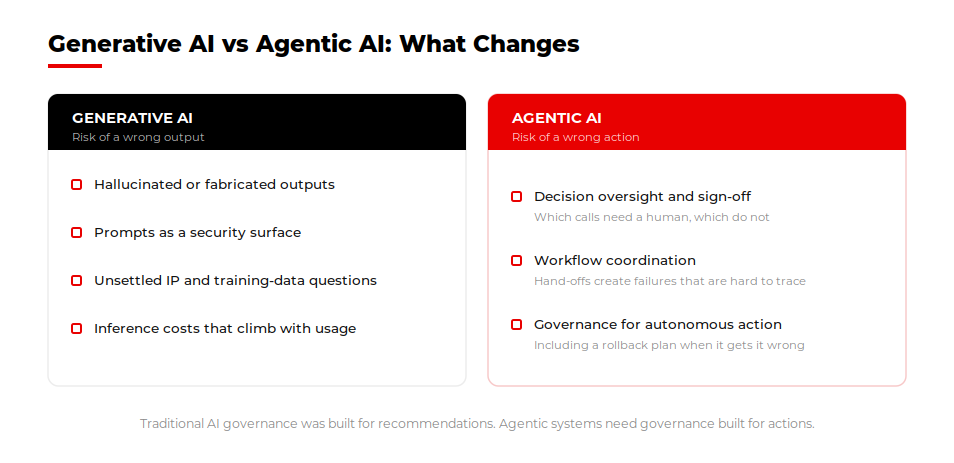
An AI coding assistant suggests code. An AI agent executes a multi-step task on its own. That difference changes your timeline estimate more than the productivity percentage does.This shift is driving the growth of agentic AI software development, where AI agents can plan tasks, modify code, run tests, and complete multi-step engineering workflows with limited human intervention.
- Assistant: suggests one line or block; a developer accepts or rejects it.
- Agent: plans steps, edits multiple files, runs tests, and reports back.
- Assistant risk: silent duplication if it cannot see your existing code.
- Agent risk: small errors compounding across steps before anyone looks.
Agents remove more calendar time from a roadmap than assistants do. They run without a person waiting on every suggestion. That time saving only holds with a strong review gate. Otherwise, the agent’s mistakes compound before anyone looks.
Developer trust in AI accuracy has fallen even as AI use has risen, per Stack Overflow’s 2025 Developer Survey. That trend is exactly why the review gate around an agent matters more than the one around an assistant. For the full workflow of wiring an agent into an existing product, see our guide to AI agent integration.
What Does a Codebase Need Before AI Speeds It Up?
None of these timeline deltas hold on a codebase AI cannot actually read. Undocumented code, missing conventions, and no retrieval layer cap what any model can safely do, regardless of the stage.
Before you apply this model, check the basics:
- Your codebase has documented conventions an AI tool can actually follow.
- Someone owns retrieval context, so AI is not guessing at your architecture.
- Review and test gates exist before AI-assisted coding volume increases.
- You are tracking deployment frequency and change failure rate, not just story points closed.
This is a data-readiness problem. See the data-readiness ladder behind AI-assisted development for the five rungs and how to climb them. Do not run this timeline model on a codebase below that first rung. The delivery date moves. The underlying risk does not.
Where This Leaves You
You now have real, stage-by-stage numbers instead of one productivity headline. Use the Recalibration Model on your next roadmap before you commit a date to leadership. For the readiness work behind these numbers, see our guide on why AI in software development stalls on data.
Ready to Recalibrate Your Own Roadmap?
Get a stage-by-stage timeline read on your own roadmap, not a generic AI estimate.
→ Talk to Our AI Development TeamKeep reading: AI Product Development: From Idea to Deployable Feature, for the process this timeline model feeds into.
















