AI integration services are the engineering and consulting work that embeds AI (large language models, retrieval pipelines, AI agents, computer vision, or generative AI) into the systems a business already runs on: its CRM, ERP, data warehouse, and day-to-day workflows. AI development builds the model. Integration makes it work, securely and at scale, inside real operations.
I spend most of my week on the second half of that sentence. By the time a founder or a VP of Engineering reaches me, they’ve usually stopped asking what AI is. They’ve run a pilot, watched it impress everyone in a demo, and then watched it quietly die on the way to production.
If you’ve also been there and want to know the why, what it will cost to do it properly, whether to build or buy, and how to spot a team that ships to production instead of to a slide deck, this guide covers exactly that.
The model is almost never the hard part. The integration, connecting AI to messy data and disconnected systems and then keeping it reliable, is where the value gets captured or lost.
Key Takeaways
The model isn’t the hard part, integration is. MIT found 95% of AI pilots deliver zero P&L impact, and it’s rarely the model’s fault. It’s messy data and no one owning the connection.
Demos lie; production tells the truth. Clean demo data hides the mess. With only 29% of enterprise apps integrated, most models land blind.
Check your data before you scope. Five tests: accessible, consistent, governed, maintained, traceable. Three “no” answers means fix data first.
Hybrid usually wins build-vs-buy. Buy the model, build the layer that touches your data. Go custom only for niche use cases, real data moats, or strict privacy.
Budget the whole lifecycle. $40k–$2M+ depending on scope, plus 15–25% of build cost per year to keep it running.
Pick a partner who ships to production, not demos. Ask for live references, integration depth, and clear ownership. Buyers succeed ~3x more than internal-only builds.
Why 95% of AI Pilots Never Reach Production
Let me start with the number that should shape your whole approach. In 2025, MIT’s NANDA initiative studied enterprise AI across 300 deployments, 150 leader interviews, and a survey of 350 employees. It found that95% of enterprise AI pilots delivered no measurable impact on the P&L. Not small returns. Zero.
When I read that the first time, the part that stood out wasn’t the failure rate. It was the cause. The MIT team was direct: the issue wasn’t the quality of the models. It was the learning gap: tools that couldn’t retain context, adapt to a workflow, orconnect to the systems where work actually happens.
I’ve sat in enough scope calls to recognize the pattern. A pilot runs on a clean, curated slice of data in a sandbox, operated by one motivated team. Production runs on years of inconsistent, half-governed data spread across systems nobody built to talk to each other. The model that looked brilliant on the demo data starts giving confident, wrong answers the moment it meets the real thing.
The failure is almost never the model. It’s that no one owned the layer connecting the model to the work, and the data underneath it was never ready. The MIT firms “failed because nobody owned the layer that connected the models to the work.”
There’s a second number that explains the stall mechanically.MuleSoft’s 2025 Connectivity Benchmark found that the average enterprise runs 897 applications and only 29% of them are integrated. An AI agent is only as useful as the data it can reach. Drop a capable model into an estate where two-thirds of the systems can’t pass it clean, current data, and you’ve built something that’s smart in theory and blind in practice.
So when a pilot stalls, I don’t start by swapping models. I start by asking where the data lives, who owns the connection, and whether anyone defined what “working in production” was supposed to mean before the build began.
Stuck between a working pilot and a production system?
That gap is exactly what ourgenerative AI development services are built to close.
What AI Integration Services Actually Include
When people hear “integration,” they often picture a single API call. The real scope is wider, and knowing it helps you scope budget and avoid surprises.
A typical engagement covers a few distinct layers. There’s the model layer, choosing and configuring the LLM or model that fits the job. There’s the data layer, which gets your information into a shape the model can use, which often means building pipelines (the plumbing that moves and cleans data between systems) and a vector database (a store that lets the model search your content by meaning, not just keywords).
Then there’s the connection layer: middleware and APIs that let the AI read from and write to your CRM, ERP, and warehouse. Middleware is just software that sits between two systems and keeps them talking. This connection layer becomes even more important for multi agent AI systems, where multiple agents may need controlled access to different systems while coordinating tasks through reliable APIs and shared data sources.
Finally there’s the operations layer: deployment, monitoring, and the ongoing work of keeping a live model reliable, which the field calls MLOps.
Most of the cost and most of the risk sits in the data and connection layers. The model is increasingly a commodity you rent. Your data, and how cleanly it flows, is the part nobody else has.
The AI Integration Lifecycle
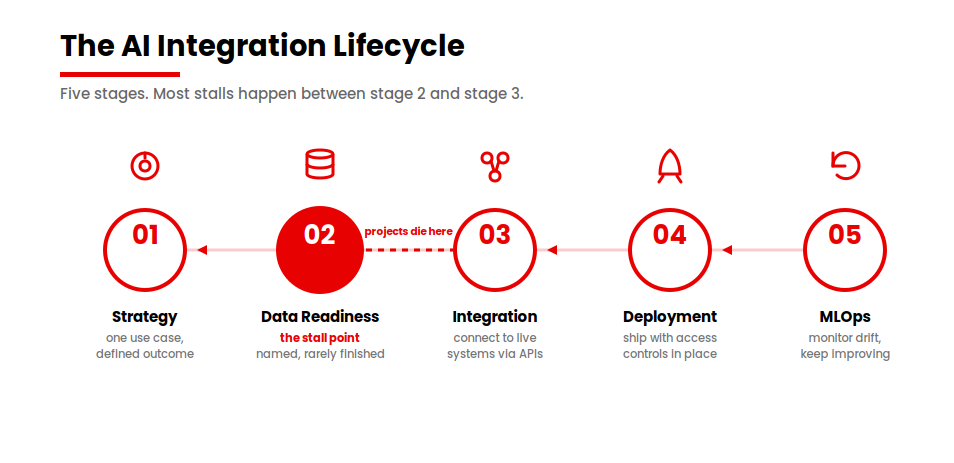
I think about delivery in five stages, and I find it useful to name them because most stalls happen at a specific one.
Strategy
Pick one high-value use case and define the outcome before anyone writes code. The startups MIT found succeeding did exactly this: they picked one pain point and executed well. (Fortune)
Data readiness
Get the data accessible, consistent, and governed. This is the stage everyone names and almost nobody finishes. I’ll give you a way to check it below.
Integration
Connect the model to live systems through stable APIs and a data layer that handles authentication, rate limits, and partial failures gracefully.
Deployment
Ship to production with security and access controls in place, so the AI only ever sees what a given user is allowed to see.
MLOps
Monitor for model drift, the slow decay in accuracy as the world changes while your model keeps answering as if it hadn’t, and keep improving the system over time.
When a project dies, it usually dies between stage two and stage three. The data was never made ready, so the integration had nothing solid to stand on.
Build Vs Buy: API-Based, Custom, Or Hybrid?
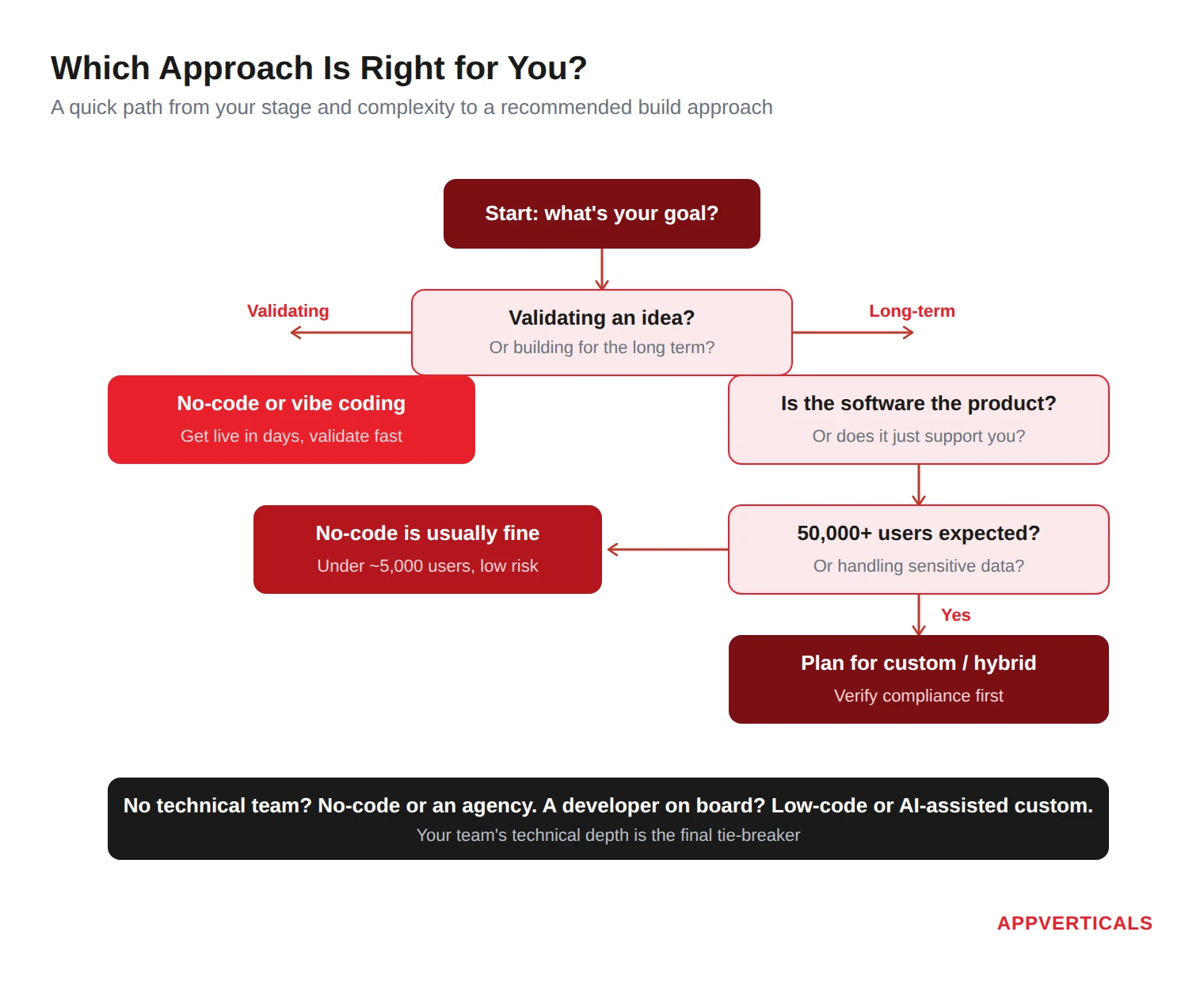
This is the decision I get asked about most, and the honest answer is that it depends on five things. Let me give you the framework I actually use, then the table.
I weigh use-case specificity (is this a common task or unique to you), data maturity (is your data a genuine advantage or a liability), latency and privacy needs (does the data have to stay on your own servers), in-house AI skills (do you have people who can maintain this), and budget and time horizon (how fast do you need value).
For most use cases, integrating a hosted, API-based model from OpenAI or Anthropic is faster, cheaper, and good enough. You’re renting a capability that would cost a fortune to reproduce. Custom AI development or building a model makes sense in a narrower set of cases: your use case is highly specific, your data is a real moat, or privacy and latency rules force you to host on-premises.
The path I recommend most often is the hybrid one. You buy the model and build the layer that touches your data: your own retrieval system, your orchestration, and your guardrails. You get speed and flexibility without handing your differentiation to a black box.
Factor
Lean API-based
Lean Custom
Lean Hybrid
Use-case specificity
Common task
Highly specific
Specific, standard reasoning
Data maturity
Data can leave your walls
Data is a core moat
Data is an advantage to keep
Latency / privacy
Standard
Strict, on-prem required
Some controls, mostly cloud
In-house AI skills
Minimal
Deep team available
Lean team plus a partner
Budget / time horizon
Fast, lower cost
Long, higher cost
Moderate, balanced
Vendor-lock-in tolerance
Higher
Lowest
Managed via abstraction layer
One practical note. If lock-in worries you, you can build an abstraction layer, a thin piece of software that lets you swap the underlying model later without rewriting everything around it. It costs a little more up front and saves you a painful migration when pricing or capability shifts, which in this market it will.
There’s a useful counterweight to keep in mind here. Not every team agrees the 95% figure means “hire a vendor.” Some practitioners read the same MIT data and argue that individual adoption is already producing real value and that the firm-level failure is structural and fixable in-house if a founder owns it.
Is Your Data Actually Ready? A Five-Point Check
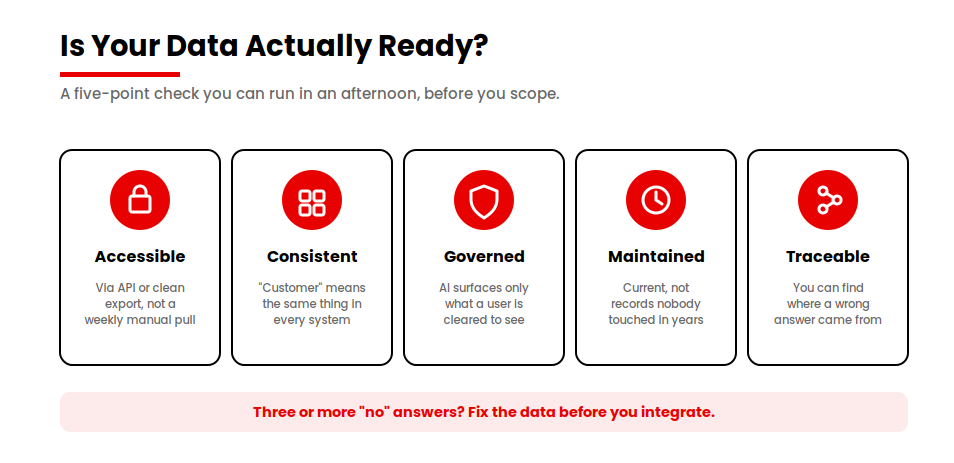
Before I scope any integration, I run a fast read on the data. You can do this yourself in an afternoon. Ask five questions.
Five checks before you scope. Three or more “no” means fix data first.
Is the data accessible through an API or a clean export, without someone manually pulling a file every week? Does it have a consistent schema, so “customer” means the same thing in every system instead of three different things? Is it governed and permissioned, so the AI only ever surfaces what a given user is cleared to see?
Two more. Is it maintained and current, or are you about to feed a model records nobody has touched in years? And can you trace its lineage, so that when an answer looks wrong you can find where the value came from?
If three or more of those are a “no,” you’re not ready to integrate yet. Scope a short data-readiness phase first. I know that’s not what anyone wants to hear when they’re excited to ship, but skipping it is the single most reliable way to join the 95%.
This isn’t a fringe opinion. Andrea Hill, writing in Forbes, framed integration as the dividing line between concept and impact and warned that AI “can’t just sit on your stack like a novelty add-on.” When AI sits off to the side, disconnected from the systems that run the business, it introduces fragmented data and conflicting signals rather than removing them.
Common Integration Architectures: API, RAG, and Agentic Patterns
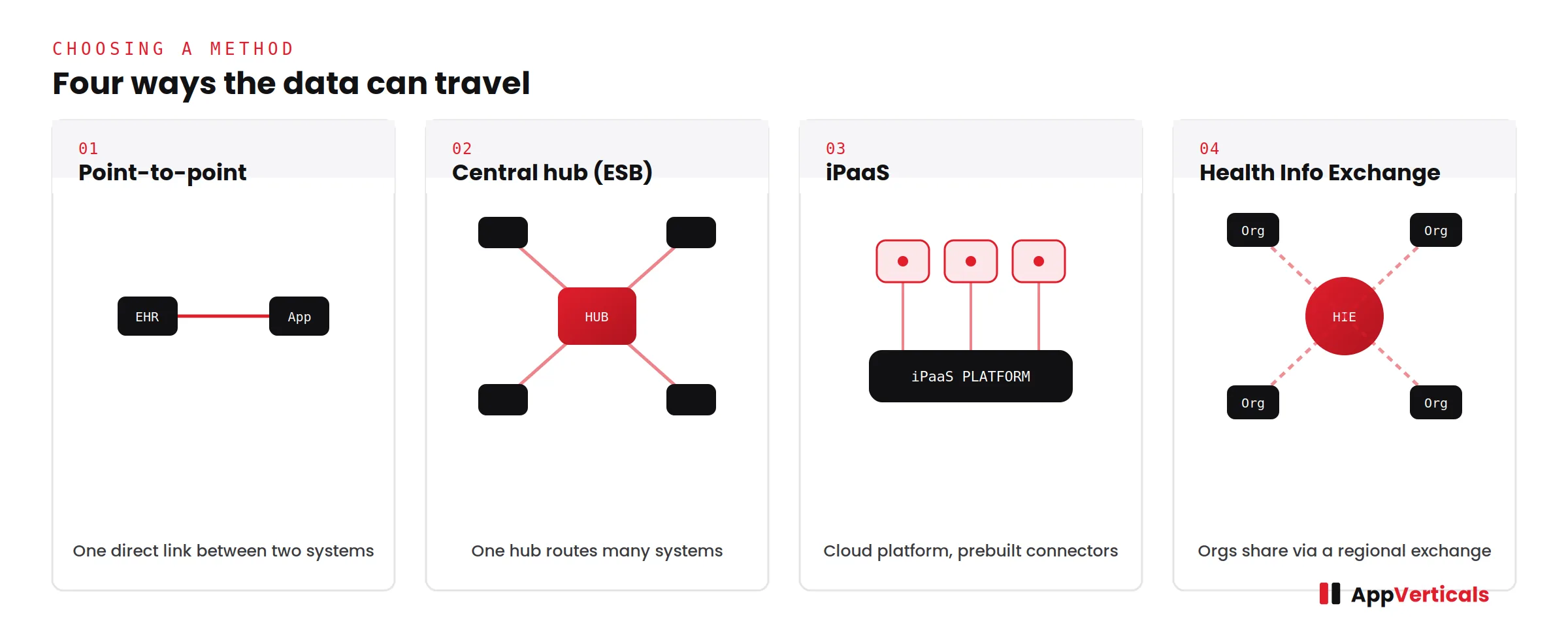
Three patterns cover most of what I build, and understanding them helps you talk to any partner clearly.
The simplest is a direct API integration: your application calls a hosted model, gets an answer, and shows it to the user. Good for a single feature, like summarizing a support ticket.
The most common for real business use is RAG, retrieval-augmented generation. In plain terms, you give the model a way to look things up in your own content before it answers, so its responses are grounded in your data instead of generic knowledge. RAG is what stops a model from confidently inventing answers about your business. It needs a vector database and a retrieval step, which is real engineering, and it’s where a lot of the integration work concentrates.
The most advanced is the agentic pattern, where AI agents plan and carry out multi-step tasks across systems, reading from one, deciding, and writing to another, within boundaries you set. Agents are powerful and they raise the integration bar sharply, because an agent that can act needs reliable, secure connections to every system it touches.
This architecture is becoming a core part of agentic AI software development, where AI agents move beyond generating responses and actively participate in software workflows by planning tasks, executing actions, and coordinating across systems.
If you’re weighing agents specifically, I’ve written more about where they fit and where they don’t in our piece onagentic AI for businesses. The short version: agents earn their complexity when a task needs reasoning over messy, changing context, and they’re overkill when a deterministic workflow would do.
Connecting AI to Your Stack: CRM, ERP, Data Warehouse, and Legacy Systems
This is the part that turns a clever prototype into something the business uses every day, and it’s where the surprises live.
Connecting to a modern CRM like Salesforce, HubSpot, or Dynamics 365 is usually well-trodden. There are APIs, and the data model is documented, and connecting to a data warehouse like Snowflake is similar.
The friction shows up with older systems. Legacy applications often lack clean access points, so part of the work is what I’d call careful archaeology: figuring out how to read and write to a system that was never designed to be read from or written to.
The harder problem is rarely a single connection. It’s that the same fact lives in five places and means something slightly different in each. Reconciling that, deciding which system is the source of truth for which field, is the unglamorous work that determines whether the AI gives consistent answers. When legacy systems are the bottleneck, the right move is sometimes to address them directly, which is whylegacy modernization and integration go hand in hand.
For deeper, two-way connections across multiple systems, this becomes asystem integration project in its own right, with the AI as one consumer of a properly connected data layer rather than a bolt-on.
A Real AI Integration, Start to Finish
Let me make this concrete with one of our projects, Hyvara, a sales intelligence product, because the pattern in it is the whole argument of this article.
The team behind it came to us with a sales operation buried in repetitive admin. Reps were hand-writing statements of work and technical briefs, and qualifying leads by digging through scattered notes. The context they needed to do any of this well was spread across their CRM and a pile of past deal records that no single tool brought together. Their teams were misaligned and deals were slipping.
What they wanted sounded like a model problem: “give us an AI that writes our sales documents and qualifies leads.” What they actually needed was an integration problem. A generic model could draft a plausible SOW, but a plausible SOW grounded in nothing is worse than useless to a sales rep. The value was entirely in connecting the model to their deals, their CRM, and their qualification framework.
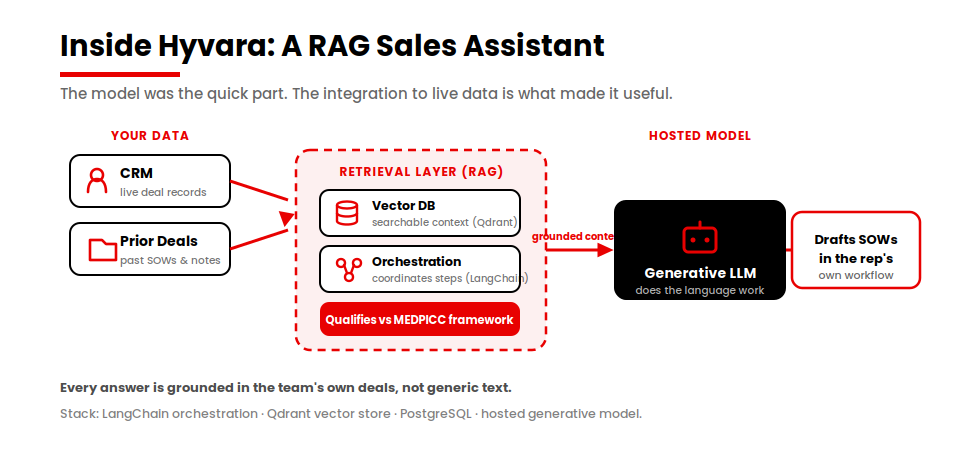
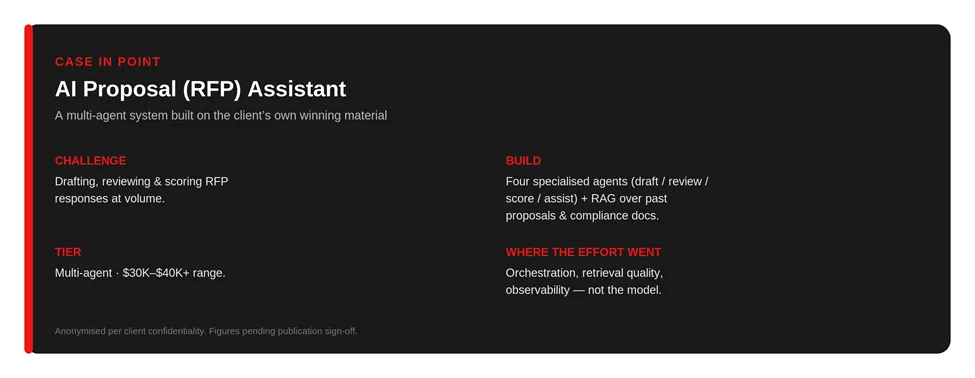
So we built Hyvara as a retrieval-augmented assistant. The model sits behind a RAG layer that pulls live, relevant context from the internal CRM and prior deals, qualifies opportunities against the MEDPICC sales framework, and drafts assets inside the rep’s existing workflow. Under the hood that meant an orchestration framework (LangChain) coordinating the steps, a vector database (Qdrant) holding the searchable context, a structured database (PostgreSQL) for the rest, and a hosted generative model doing the language work.
The lesson I’d pull out of it is the one I keep repeating. The model was the quick part. The work that decided whether the thing was useful was the integration: connecting it to live data and a vector store so every answer was grounded in the team’s own information instead of generic text.
You can pick the model in an afternoon. You earn the production system over the following weeks.
AI Integration Services Cost In 2026
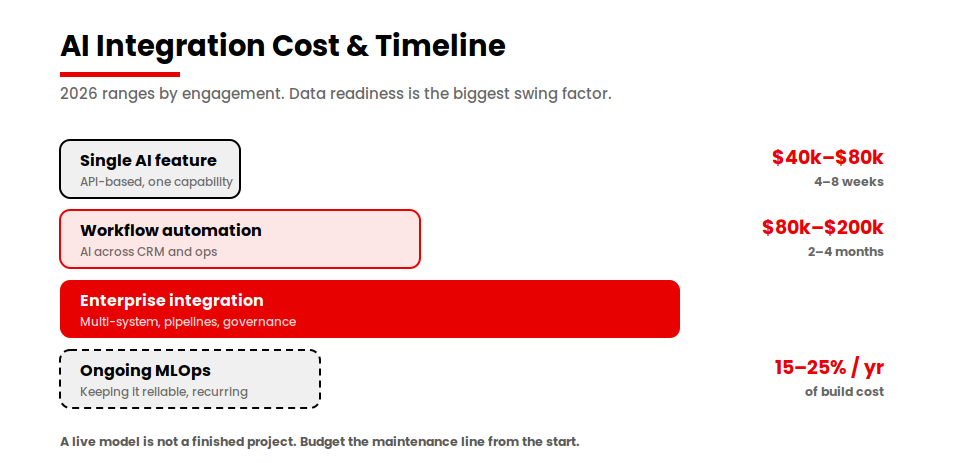
Both AI app development costs and integration costs can vary with scope, but here are the ranges I’d give a founder asking for a realistic budget. The biggest swing factor, in either direction, is how ready your data is.
Engagement
Timeline
Cost range (2026)
Best for
Single AI feature (API-based)
4–8 weeks
$40k–$80k
Adding one capability to a product
Workflow / process automation
2–4 months
$80k–$200k
Connecting AI across CRM and ops
Enterprise AI integration
4–9 months
$200k–$2M+
Multi-system, pipelines, governance
Ongoing MLOps / maintenance
Recurring
15–25% of build/yr
Keeping models reliable after launch
A word on that last row, because people forget it. A live model is not a finished project. It needs monitoring, retraining, and upkeep, and budgeting roughly 15–25% of the build cost per year for that keeps you out of trouble. If you want a rough self-serve number before you talk to anyone, you can estimate your project and then sanity-check it against these bands.
How Long It Takes and How to Measure ROI
Timelines track the table above, but the honest distribution is wider than most pilots assume. When data is genuinely ready, a focused integration can reach production in roughly 10 to 14 weeks. When it isn’t, the same scope can stretch to six months or more, and a meaningful share of proofs-of-concept get scrapped before they ever ship. The difference is almost entirely the data, not the model.
For ROI, I’d hold a project to leading and lagging signals. Leading: how many workflows you’ve actually redesigned around the AI, and real usage by the people meant to use it. Lagging: time saved, cycle time cut, error rates down, and eventually a line you can point to in the P&L.
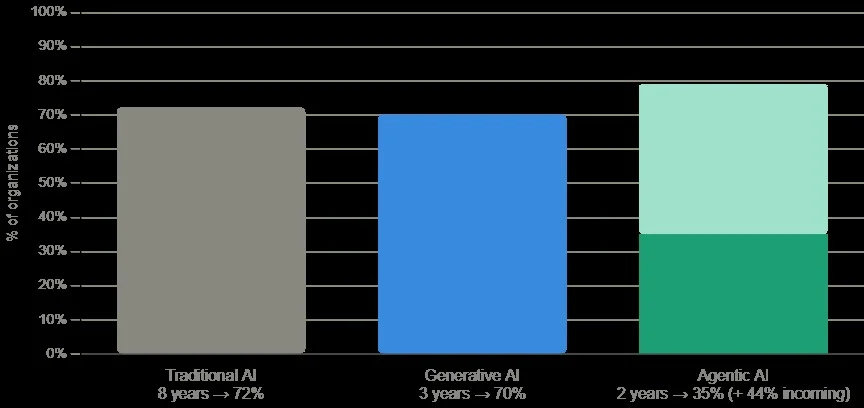
McKinsey’s 2025 research is a useful reality check here. 88% of organizations now use AI, but only a small single-digit share report material enterprise-level financial impact. The factor that most separates them is having redesigned their workflows rather than bolting AI on.
If you can’t name the workflow you’re redesigning and the number you expect to move, that’s a sign to go back to the strategy stage before spending on integration.
How to Choose an AI Integration Partner
When you’re evaluating anyone, including us, here are the eight questions I’d ask. They’re designed to separate teams that ship to production from teams that ship demos.
Production references, not demos. Ask to speak to a client whose system is live and running today, not one that looked good in a pilot.
Integration depth with your specific stack. Have they connected to your CRM, ERP, or warehouse before, and can they describe the hard parts?
Data-engineering capability. Integration is mostly data work. A team that only talks about models is missing the part that fails.
MLOps and monitoring. Ask how they’ll know when the model drifts and what they’ll do about it.
Clear ownership in production. Who is accountable for the model’s behavior once it’s live, and what’s the escalation path when it’s wrong?
Security and compliance posture. How do they handle access controls, data residency, and audit trails?
Pricing model. Fixed scope or time-and-materials, and what triggers a change order?
Post-launch support. What does the maintenance relationship look like after go-live?
A team that answers these crisply has done this before. A team that gets vague around data engineering, ownership, and monitoring is showing you where your project will stall.
Conclusion
The real choice isn’t which model to use. It comes down to three honest answers: is your data ready, should you build or buy for this specific use case, and does the partner across the table ship to production or just to a demo. Get those right before you scope, and AI integration stops being a stalled experiment and starts showing up in the numbers that matter.
If you’re past the pilot and ready to integrate for real, the best next step is a conversation about your actual use case, your actual data, and what it would honestly take.
Ready to move your AI from pilot to production?
Bring your use case to a team that connects AI to live systems and see how we wire AI into the CRM, ERP, and data warehouse you already run on.
HIPAA compliant app development means building a healthcare application so that every point where protected health information (PHI) is created, stored, transmitted, or accessed is covered by the safeguards the HIPAA Security Rule requires, encryption (AES-256 at rest, TLS 1.2 or higher in transit), unique user authentication with multi-factor login, role-based access control, and tamper-evident audit logging, each backed by a signed Business Associate Agreement (BAA) with every vendor that touches PHI.
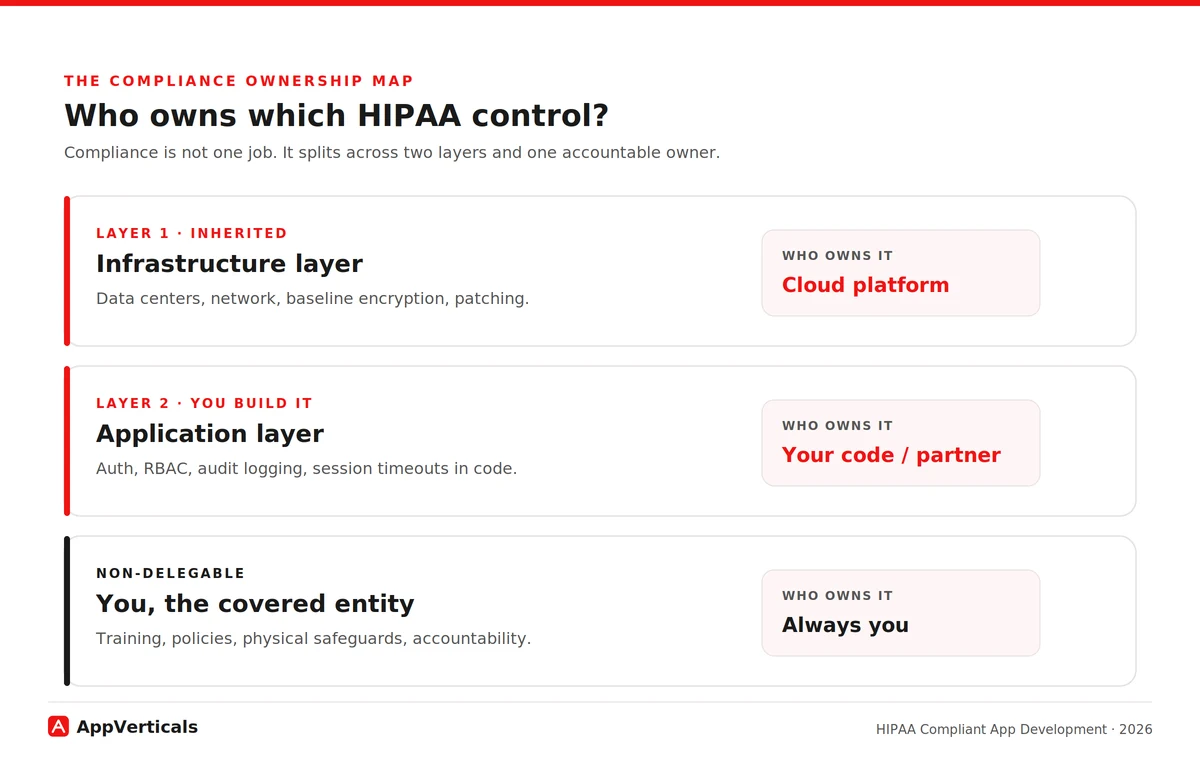
What that definition hides is the part that actually decides your build: those controls aren’t one job, they’re owned by different parties. Some are inherited from your hosting platform (the infrastructure layer), some you have to write into your own code (the application layer), and some never leave your hands at all as the covered entity.
The right way to scope a HIPAA build comes down to mapping that ownership correctly, then sizing how much of it applies to you, which depends on whether your app actually stores PHI or just passes it through, and how deep your integrations with clinical systems run.
So if you’re trying to put a healthcare app into production; a patient portal, a telemedicine tool, an MVP that touches real patient data, without it failing a security review or turning into an expensive rebuild, and you need to know which controls you own, what it’ll cost, and where these builds tend to break, this guide is for you.
Key Takeaways
HIPAA compliance isn’t one job, it splits across three owners: your cloud platform (infrastructure), your code (application layer), and you (workforce training, policies, accountability). Map who owns each control before your first sprint.
There’s no such thing as “HIPAA certified” software. You demonstrate compliance through a documented risk analysis, implemented controls, and audits like SOC 2 Type II or HITRUST.
The biggest scope question is transient vs. persistent: if your app stores PHI, nearly every Security Rule control applies; if it only passes PHI through, far fewer do. This single answer drives your cost and timeline.
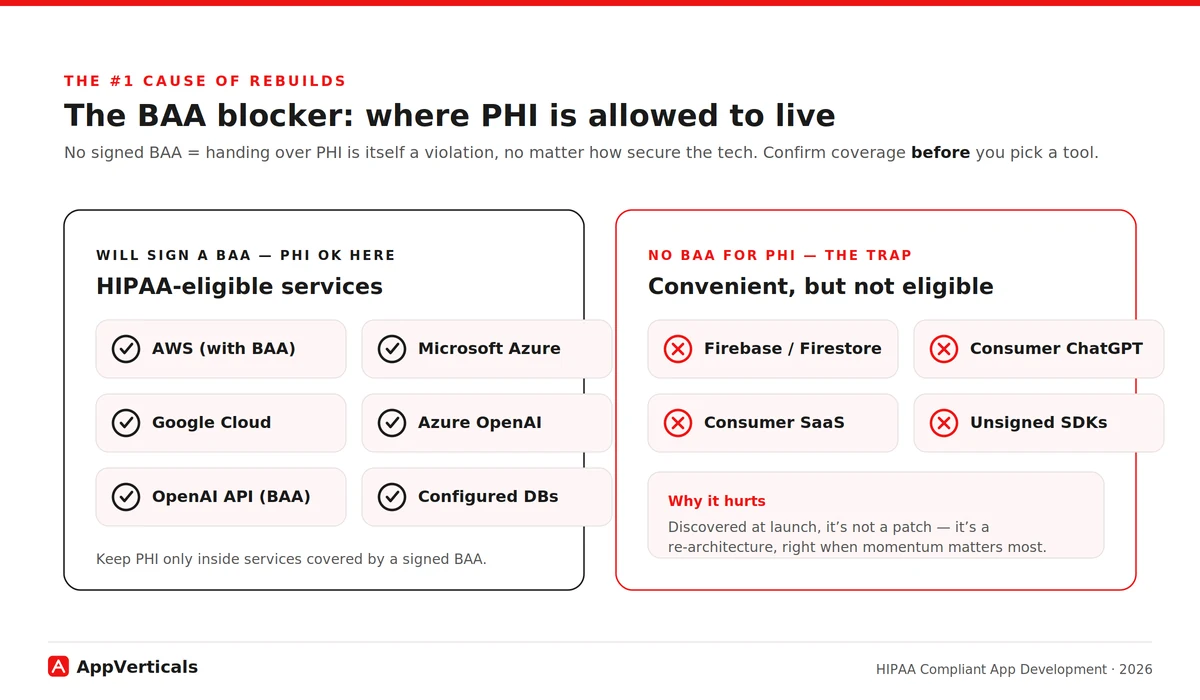
No BAA, no PHI. Handing patient data to any vendor without a signed Business Associate Agreement is a violation on its own, which is why convenient tools like Firebase/Firestore trigger expensive rebuilds.
Build to the stricter standard now. Treat encryption (AES-256, TLS 1.2+) and MFA as mandatory regardless of the pending Security Rule update, retrofitting later costs 3–5× more.
Budget realistically: compliant builds run $50k (MVP) to $300k+ (EHR-integrated platforms), add 15–25% for compliance work, and carry low-five-figure annual upkeep that never hits zero.
Who Is Responsible for HIPAA Compliance?
Start with the framework I wish every founder had before their first architecture meeting, because it reframes the entire problem from “am I compliant?”, an unanswerable, anxiety-inducing question into “which layer owns this control, and have we closed it?”, which you can actually answer.
Compliance for an app splits across two layers and one accountable owner.
The infrastructure layer is what your cloud platform handles and covers under its BAA: the physical data centers, the underlying network, baseline encryption capabilities, hardware patching. Run on a HIPAA-eligible cloud (AWS, Microsoft Azure, or Google Cloud) under a signed BAA and you inherit these. You don’t build them, you configure and use them correctly.
The application layer is what your own code owns: how users authenticate, who can see which records, whether every PHI access is logged, how sessions time out, how data moves between screens. The cloud gives you the ability to encrypt and to control access; your application has to actually use it. This is the layer where compliance is won or lost, and the layer your hosting provider’s BAA explicitly does not cover for you.
And the owner who can never delegate the whole thing away: you, the covered entity or business associate. Workforce training, administrative policies, physical safeguards in your own offices, and ultimate accountability for the PHI stay with you no matter how good your cloud or your developer is.
This is also where two pieces of “what HIPAA means” actually matter to a buyer.
First: there is no such thing as a HIPAA certification for software.
HHS and its Office for Civil Rights (OCR), the enforcer, don’t certify or “approve” any app or company. A vendor waving a “HIPAA certified” badge is misreading the rules.
What exists instead is demonstrated compliance: a documented risk analysis, the controls you’ve actually implemented across these layers, and third-party audits like SOC 2 Type II or HITRUST that enterprise buyers now expect.
Second: the difference between HIPAA-eligible (a vendor will sign a BAA and support compliant use) and HIPAA-compliant (you configured those eligible parts correctly and built the right controls around them).
Eligible is raw material; compliant is what you do with it. Both ideas only make sense once you see compliance as ownership of controls, which is why they live here, not in a definitions chapter.
Here’s how the controls typically fall. The exact lines shift per build, which is precisely why a competent partner draws this map with you at the start rather than leaving it vague:
Control
Infrastructure layer (platform/BAA)
Application layer (your code / partner)
You, as covered entity
Encryption at rest
Provides encrypted storage & key management
Enables it correctly for all PHI stores
Sets the policy requiring it
Encryption in transit
Provides TLS-capable endpoints
Enforces TLS 1.2+ on every PHI connection
—
Network isolation
Provides VPC / private networking
Configures isolation around PHI services
—
Patch management (infra)
Patches hardware & managed services
Patches app dependencies & libraries
—
Unique user authentication
Provides identity tooling
Implements unique logins + MFA
Enforces account policy
Automatic logoff / timeout
—
Builds session timeout into the app
Sets the timeout policy
Role-based access (RBAC)
Provides IAM primitives
Implements least-privilege roles in app
Defines who gets which role
PHI audit logging
Provides logging infrastructure
Logs every PHI access event in-app
Reviews the logs
Integrity controls
Provides storage integrity
Validates data isn’t improperly altered
—
Emergency access
—
Builds break-glass procedures
Authorizes who may use it
Workforce training
—
—
Trains all staff who touch PHI
Physical safeguards
Secures the data center
—
Secures your own premises/devices
Keep that table in your head for the rest of this guide. Every section below is really about one of its columns, and the single most common reason a build fails review is that nobody decided who owned a row until it was too late.
Scoping a HIPAA-compliant build
Discuss your ideas and requirements with our experts to get a detailed scope ready.
Do All Healthcare Apps Need To Be HIPAA Compliant?
Before you budget a single control from that table, size the problem, because the same table can describe a four-month MVP or a two-year platform depending on one question most teams never ask.
HIPAA applies when your app handles PHI for a covered entity (a provider, health plan, or clearinghouse) or as their business associate. A direct-to-consumer fitness or general-wellness app a person uses on their own, with no provider connection and no clinical record, generally falls outside it, that data can be sensitive and other privacy laws may apply, but it isn’t PHI under HIPAA.
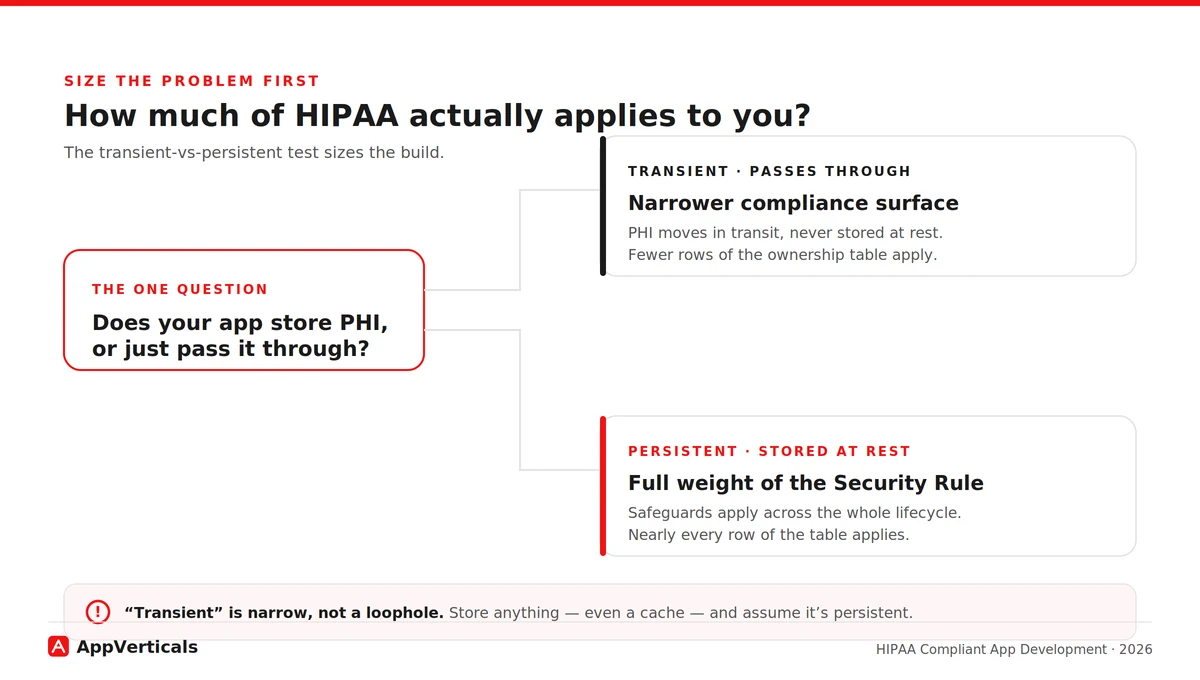
The lens that actually sizes your build is the transient versus persistent test, and it’s one almost no build-intent guide explains. Does your app merely pass PHI through, briefly, in transit, without storing it, or does it hold PHI at rest in your systems?
Persistent storage pulls the full weight of the Security Rule across the whole data lifecycle, lighting up nearly every row of the ownership table. A genuinely transient path may light up far fewer. This one answer determines how much of HIPAA lands on you, and therefore how much it costs.
One caution: “transient” is a narrow technical category, not a loophole. If you store anything, even a cache you control, assume it’s persistent until a compliance professional says otherwise.
Is Firebase HIPAA Compliant? The BAA Blocker That Forces Rebuilds
If I had to name the single issue that derails more early healthcare builds than any other, it’s this one. Start with the mechanics, because they’re the reason the trap is so costly.
A Business Associate Agreement is the legal instrument that lets a vendor handle PHI on your behalf. Without a signed BAA, handing PHI to a vendor is itself a HIPAA violation, regardless of how secure that vendor’s technology is. The BAA is the line; the technology is secondary to whether the line exists. You need one with every vendor that touches PHI, across every layer of that ownership table.
The trap: some of the most popular, developer-friendly tools your team will instinctively reach for will not sign a BAA for the service you want to use. The recurring example is Google’s Firebase, and Firestore in particular, fast to prototype on, not covered by a BAA for storing PHI. Teams build an MVP on it, reach launch, and only then discover patient data sitting in a service that was never eligible to hold it. That’s not a patch; it’s a re-architecture, and it lands right when momentum matters most.
The fix is simple once you know to look: keep PHI only in HIPAA-eligible services. The major clouds, AWS, Azure, Google Cloud, will sign a BAA and offer eligible services to build on. The discipline is to confirm BAA coverage before you pick a tool, and to make sure PHI never lands in a convenient service outside that coverage.
Tie it back to the scope test: a tool that only ever sees PHI in transit carries different exposure than your primary datastore, but the safe default is, if it touches PHI at all, it needs a BAA.
What Technical Safeguards Does The HIPAA Security Rule Require?
Now we can put real context behind the application-layer column of the table, because that’s what the Security Rule’s technical safeguards are, once you translate them out of regulatory language. These are the controls your code owns, not your cloud:
Access control: unique user IDs and a break-glass path for emergencies that doesn’t weaken normal security. No shared logins, ever.
Authentication: proving users are who they claim to be, which in 2026 means multi-factor authentication as the baseline, not a nice-to-have.
Encryption: AES-256 at rest and TLS 1.2+ in transit, everywhere PHI lives or moves.
Audit controls: recording who accessed which PHI and when, in logs that can’t be quietly altered.
Automatic logoff: sessions that time out so an unattended device isn’t an open door.
Integrity controls: ensuring PHI isn’t improperly altered or destroyed.
Where the regulation is heading matters for how you build today (part of a broader shift we cover in ourhealthcare software development trends guide). In January 2025, OCR published a proposed Security Rule overhaul, its first major update since 2013 that would make controls like encryption and MFA explicitly mandatory (removing the old “addressable” flexibility) and add requirements such as a written asset inventory and network map.
As of mid-2026 it remains proposed, not final: OCR is still working through thousands of comments, and the timing and final shape are uncertain. The current rule stays in effect meanwhile.
My strategic read: build to the stricter version regardless. Nearly every control in that proposal already reflects what reasonable security looks like in 2026, and OCR’s enforcement attention has already shifted toward these areas. Encryption and MFA belong in your architecture no matter what the final rule says or when it lands, building to the higher bar now is far cheaper than retrofitting later.
How Much Does HIPAA Compliant App Development Cost In 2026?
The cost of building a HIPAA compliant app comes down to scope, the two things we’ve already covered: how much of the ownership table you have to build (persistent vs transient), and how deep your integrations with clinical systems run. Compliance work itself typically adds 15–25% on top of a comparable non-regulated build, plus annual upkeep most first-time founders forget.
Here’s a quick breakdown:
App type
Typical timeline
Cost range (2026)
Main cost drivers
MVP (single feature, real PHI)
3–4 months
$50k–$90k
Compliance baked in from sprint one
Telemedicine app
6–9 months
$70k–$250k
Real-time video encryption, scheduling
Patient portal + EHR companion
8–12 months
$80k–$300k
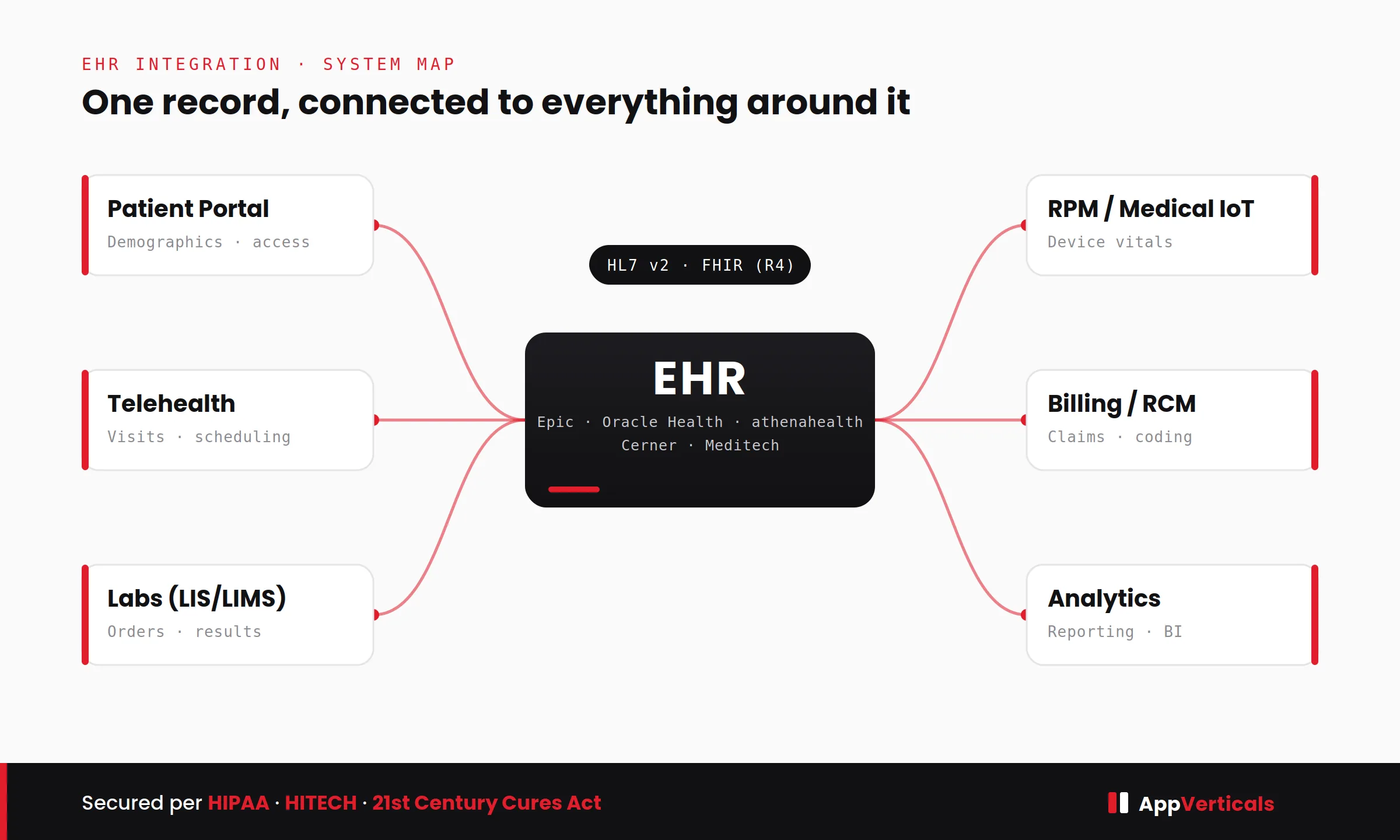
HL7/FHIR integration, RBAC, audit trails
Enterprise multi-site platform
12–24 months
$250k–$600k+
Multi-tenant isolation, ongoing validation
Read these ranges through the ownership lens.
The biggest single lever is EHR/EMR integration depth, connecting to clinical records via HL7/FHIR is where the hardest interoperability and security work lives, so it stretches both timeline and budget.
The second lever is when compliance entered the design. Retrofitting it onto an app that wasn’t built for it typically costs three to five times what building it in from day one would have, because the safeguards are architectural, shaping your data model, auth flow, and infrastructure from the first decision.
That’s the same reason the timelines run longer than equivalent consumer apps: you can’t sprinkle encryption and access control on at the end. And the recurring line nobody budgets: annual upkeep, audits, penetration testing, monitoring, commonly runs in the low five figures and never hits zero.
And the cost that dwarfs all of these if you get it wrong: the penalty. As of the January 2026 inflation adjustment,HIPAA civil monetary penalties run from $145 to $2,190,294 per violation, tiered by culpability, with that ceiling reserved for willful neglect left uncorrected. Those are per-violation figures, and a single breach often counts as many. Budgeting compliance is cheaply measured against that.
To pressure-test a number for your own scope,estimate your build before you talk to anyone, and ourfull healthcare app cost breakdown goes deeper to assist you with that.
CPCG: A Real HIPAA-Compliant App We Build
To see the ownership map in practice, let’s dig through an actual app we build.
Collaborative Patient Care Group (CPCG), a Washington, DC–based healthcare operations firm, came to us with a connectivity problem that was quietly a compliance problem. Their offshore on-screen customer representatives (OCSRs) needed to operate unattended kiosks sitting inside medical supply stores and healthcare facilities, scanning patient documents and running local applications on those machines remotely, without anyone physically present to grant access.
To do it, they had stitched together off-the-shelf remote-access tools; Microsoft Teams, AnyDesk, Splashtop. It worked, loosely, but it was exactly the fragmented arrangement that creates operational and security gaps: no unified control over who could reach a kiosk, when, or what they did once connected. On systems touching patient documents, that’s the kind of setup a reviewer flags immediately.
The rebuild came down to three decisions, each mapping straight onto a layer of the ownership table. On the infrastructure layer, the platform ran on a HIPAA-eligible cloud (AWS), so those controls sat under a proper BAA: inherited rather than reinvented.
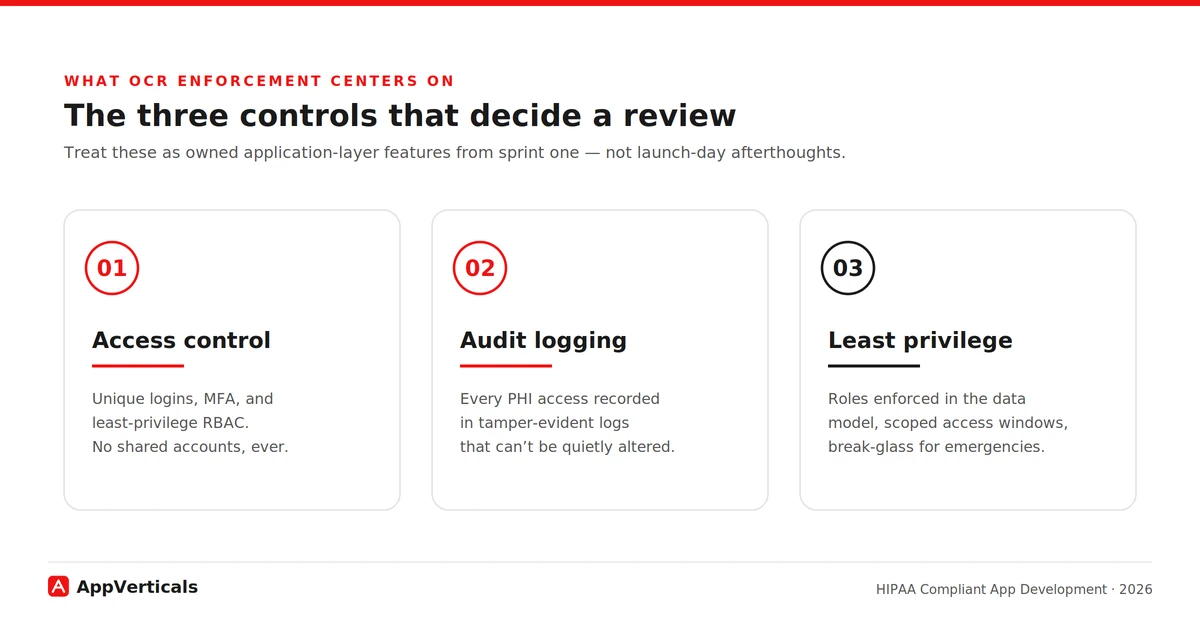
On the application layer, access control replaced open-ended remote access with schedule-bound access: an OCSR could log in and operate a kiosk only during their assigned shift hours, over role-based access spanning OCSR, store-manager, organization-admin, and CPCG super-admin tiers. Least privilege wasn’t a slogan; it was enforced in the data model.
Also on the application layer, audit logging captured sessions, and a dedicated audit module let super admins silently join an active session for quality assurance without notifying the representative or the kiosk, the kind of tamper-evident oversight the Security Rule expects.
The all-in-one platform replaced the fragmented toolset with controlled login windows, complete audit trails, and tiered role-based access, the exact triad (access control, audit logging, least privilege) that OCR enforcement now centers on.
The lesson maps back to the table: the moment audit logging and access windows are treated as owned application-layer features rather than afterthoughts, compliance stops being a launch-day scramble and becomes how the product works.
Compliant AI and LLM Features: Can You Use ChatGPT or AI APIs With Patient Data?
Almost every healthcare product I advise now wants an AI feature, summarizing records, drafting patient messages, triaging. It’s doable, and it’s really just the BAA rule applied to one more vendor in your ownership map.
You can only send PHI to an AI service that will sign a BAA for that use. As of 2026 the major providers offer eligible paths: OpenAI signs a BAA for its API platform (covering zero-retention-eligible endpoints), and Microsoft’s Azure OpenAI Service and the major clouds’ AI offerings are available under their BAAs.
The trap mirrors Firebase: consumer tiers aren’t covered. A clinician pasting notes into a standard consumer ChatGPT subscription is a violation no matter how careful they are, no BAA sits behind the consumer product. API and enterprise tiers are different products with different contractual protection.
Three rules for any AI feature: confirm the BAA covers the specific service and endpoints; log PHI access through the AI path like any other; and keep a human in the loop for anything near a clinical decision, for patient safety and to avoid FDA medical-device exposure. A signed BAA covers the vendor’s obligations; it doesn’t make your workflow compliant on its own. That part stays in your column.
How Do You Choose a HIPAA-Compliant App Development Partner
This is the decision that makes every other one easier. The real challenge is: everyone claims HIPAA experience. The fastest way to tell real from rehearsed is to ask them to do, on the spot, the thing this whole guide is built on: draw the ownership map for your build. These are the questions to ask before you sign:
Can you draw the two-layer ownership map for our build: who owns which control? (If they can’t, stop here.)
Can you show me a HIPAA build you’ve shipped: walk me through a real one, not a claim?
Will you sign a BAA with us, and help manage BAAs with our other vendors?
Do you hold SOC 2 Type II or HITRUST, or can you help us get there?
What’s your HL7/FHIR track record if we need EHR integration?
Will you deliver a documented risk analysis as a project artifact?
What’s your policy on PHI on devices and in local caches?
What does your post-launch compliance support actually include?
A partner who answers the first one crisply has actually done this. One who gets vague about layer ownership or waves off the risk-analysis deliverable is telling you something. Listen to it.
Conclusion
If your app touches PHI, it has to be HIPAA compliant, that part isn’t up for debate. What you do get to decide is whether you walk into the build knowing which controls your platform inherits, which your code must carry, and which stay with you, or whether you find out the hard way.
Settle that map before the first sprint and compliance becomes an architecture decision you make calmly, not a launch-day emergency you scramble through. So if you’re scoping a build now, map your PHI first. Then bring your questions to a team that’s shipped compliant healthcare products before.
Build It Compliant From Sprint One
Bring us your scope and we’ll map which controls your platform inherits, which your code carries, and what it’ll cost; before the first sprint.
RAG and fine-tuning are two ways to customize a large language model and the difference is simple: RAG gives the model new knowledge, while fine-tuning changes its behavior. Retrieval-augmented generation (RAG) connects a model like GPT-4 or Claude to an external knowledge base or vector store like Pinecone and retrieves relevant facts at query time. Fine-tuning instead retrains the model’s weights on your examples so it adopts a specific tone, format or task.
Start with RAG when knowledge changes often, fine-tune when you need consistent behavior and combine both when you need accurate facts in a controlled style.
“The most expensive sequencing mistake I see is reaching for fine-tuning when the actual problem is a knowledge gap. RAG would have solved it faster, cheaper, and with better accuracy and shown you exactly what was left for fine-tuning to fix.”
Key Takeaways
RAG gives the model new knowledge while fine-tuning changes how it behaves.
RAG gives the model new knowledge while fine-tuning changes how it behaves.
Start with RAG by default as it is faster, cheaper and more accurate than fine-tuning for most production use cases.
Fine-tune only when the gap is behavioral, such as tone, format or a specialized task prompting cannot fix.
RAG reduces hallucinations better because it grounds answers in retrieved sources that the model can cite.
Combining RAG and fine-tuning is now the standard pattern, with RAG owning the facts and fine-tuning owning the delivery.
Fine-tuning front-loads a higher cost while RAG converts a lower upfront investment into a steady per-query expense.
Most production failures trace back to ungoverned data, stale weights or a missing evaluation baseline, not the model itself.
What is RAG and How Does it Work?
RAG is an architecture that lets a language model answer using information it was never trained on, by fetching that information at the moment of the query. Instead of relying only on what the model memorized during its original training, a RAG system searches an external knowledge source, pulls back the most relevant passages and hands them to the model as context alongside the user’s question. It is the approach I reach for first on most projects and the reasons become clear once you see how the pipeline runs.
How a RAG pipeline works step by step
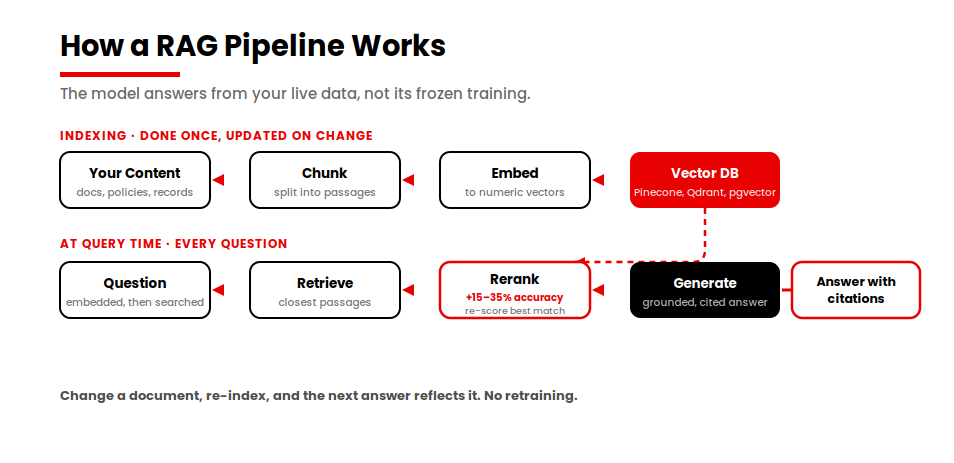
The mechanics are more straightforward than the acronym suggests. First, your source content, which might be support articles, internal policies, product documentation or database records, is broken into smaller passages through a process called chunking. Each chunk is then converted into a numerical representation called an embedding and stored in a vector database such as Pinecone, Weaviate, Qdrant or pgvector for teams already running PostgreSQL.
When a user asks a question, the system embeds that question, searches the vector database for the passages whose embeddings are closest in meaning and injects the top matches into the prompt. On nearly every system I build now, I add one more step before that injection, called reranking, where a second and more precise model re-scores the handful of candidate passages and pushes the genuinely best match to the top rather than trusting the raw similarity order.
In my experience this is one of the highest-impact accuracy levers available, with current benchmarks pointing to improvements in the range of 15 to 35 percent over embedding-based retrieval alone, which is why I treat it as part of the build rather than an optional extra. The model then generates an answer that is grounded in those retrieved and reranked passages rather than in its frozen training data.
Why teams reach for RAG: The practical consequence and the reason I lean on RAG so often, is that the system always answers from your live data. When a policy changes, you update the underlying document or re-index the knowledge base and the next answer reflects the change immediately, with no retraining required. Because the model is working from retrieved source material, it can also cite where each fact came from, which I have found to be a meaningful advantage in any setting where answers have to be auditable. This is why RAG has become my default architecture for support assistants, internal knowledge tools and any application built on top of documentation that changes faster than a training cycle could ever keep up with.
What is Fine-Tuning and How Does it Work?
Fine-tuning is the process of continuing a model’s training on a curated set of your own examples so that its underlying weights shift toward the behavior you want. Where RAG leaves the model untouched and feeds it information at query time, fine-tuning permanently alters the model itself. The result is a model that has internalized a particular tone, format or task and that produces it consistently without needing to be reminded in every prompt. I turn to it when off-the-shelf behavior is not good enough and prompting alone cannot close the gap.
How fine-tuning works in practice
In practice, a fine-tuning project starts with assembling a dataset of high-quality input and output pairs that demonstrate exactly how you want the model to respond. That dataset has to be clean, representative and large enough to move the model’s behavior without overfitting it to a narrow set of phrasings. The examples are then used in a training run that adjusts the model’s parameters, after which I evaluate the new version against held-out data to confirm it learned the intended behavior rather than memorizing the training set. I rarely retrain every weight in the model. Like most teams today, I use parameter-efficient methods such as LoRA, which update a small set of additional parameters and dramatically reduce the compute and cost involved while preserving most of the benefit.
What fine-tuning gives you and what it does not
What you get from fine-tuning is consistency. A fine-tuned model can reliably produce structured output in a fixed format, adopt a brand voice across thousands of interactions or handle a specialized classification task that the base model fumbles. What you do not get is fresh knowledge. The model’s understanding is frozen at the moment of training, so when your underlying facts change, the only way to update the model is to curate new examples and run the training process again. That single property, knowledge frozen at training time, is the reason I find fine-tuning and RAG so often end up solving genuinely different problems.
RAG vs Fine-Tuning: The Key Differences at a Glance
The cleanest way I know to see the distinction is to put the two approaches side by side across the dimensions that actually drive an architecture decision. The table below summarizes what each method changes, what it is best suited to and where each one starts to break down.
Dimension
RAG
Fine-Tuning
What it changes
What the model knows
How the model behaves
Best for
Fresh and changing facts, Q&A over documents
Consistent tone, format or a specialized task
Data freshness
Live, updated by changing the knowledge base
Frozen at training, requires retraining to update
Upfront cost and effort
Lower, typically days to weeks
Higher, requires curated data, compute and ML skills
Ongoing maintenance
Vector database plus retrieval costs per query
Periodic retraining as data drifts
Hallucination control
Stronger answers are grounded in citable sources
Weaker, no factual grounding, so confident answers can still be wrong
Latency
Adds a retrieval step to every query
Fast, no retrieval at inference time
Data and expertise
Clean knowledge base plus a chunking strategy
Labeled examples plus genuine ML expertise
When to avoid
Behavior or formatting problems
Fast-changing or auditable knowledge
The single most useful line in that table is the first one. RAG changes what the model knows and fine-tuning changes how the model behaves. Almost every other difference flows from that distinction. Because RAG injects information at query time, it stays current and it can cite sources, which is why it controls hallucinations better.
Because fine-tuning bakes behavior into the weights, it is fast at inference and consistent in style but it cannot give the model a fact it was not trained on. When someone asks me which approach is better in the abstract, I tell them the question itself has already taken a wrong turn, because the two are answering different questions.
RAG vs Fine-Tuning vs Prompt Engineering: Where Each Fits
Before I commit a team to either RAG or fine-tuning, I place both alongside the cheapest customization technique of all, which is prompt engineering. These three approaches sit on a spectrum of effort and permanence and choosing well usually means starting at the lightest end and only moving up when the lighter option genuinely falls short.
Where prompt engineering fits
Prompt engineering is the practice of shaping the model’s output purely through the instructions and examples you put in the prompt. It changes nothing about the model and adds no infrastructure, which makes it the fastest and least expensive option by a wide margin. For many tasks, a well-constructed prompt with a few worked examples is enough to get the behavior you want and I have watched teams reach for heavier machinery before testing whether careful prompting would have solved the problem.
The limitation is that a prompt has a finite context window and no memory, so it cannot inject a large and changing body of knowledge and it cannot reliably enforce a behavior across every edge case the way a trained model can.
Why these three Layers aren’t Rivals
RAG sits one level up. It solves the knowledge problem that prompting cannot because it can search across a knowledge base far larger than any prompt could hold and surface only the passages that matter for a given question. Fine-tuning sits at the most permanent end of the spectrum because it changes the model itself and is therefore the right tool when you need a behavior or a skill to be reliable and built in rather than requested each time.
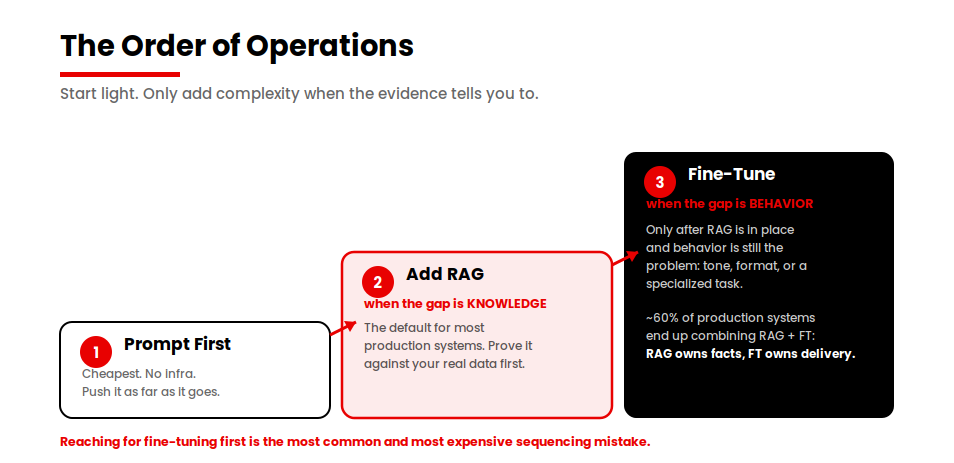
The sequence I follow on most engagements is to push prompt engineering as far as it will go, add RAG when the model needs knowledge it does not have and fine-tune only when consistency of behavior is still the gap after the first two are in place. These techniques are layers, not rivals and the strongest production systems I have shipped frequently use all three at once.
Cost and Effort: Is Fine-Tuning More Expensive than RAG?
Most published comparisons wave a hand at this question and conclude that fine-tuning costs more, without ever putting numbers on the table. That is the gap I want to close here, because the real cost of each approach is the single factor that most often decides which one a team can actually ship. In my experience fine-tuning usually carries a higher and lumpier cost, while RAG carries a lower upfront cost that converts into a steady operational one.
The table below frames the comparison the way it tends to play out on real delivery, using engineer-weeks and ongoing maintenance rather than vague adjectives.
Factor
RAG
Fine-Tuning
Typical build effort
Roughly 2 to 6 engineer-weeks for a production-grade pipeline
Roughly 6 to 12+ engineer-weeks, including data curation and iteration
Largest upfront cost driver
Data ingestion, chunking strategy and retrieval quality tuning
Curating and labeling a clean training dataset, plus computing for training runs
Specialized skill required
Data engineering and retrieval evaluation
Genuine ML expertise for training, evaluation and overfitting control
Ongoing cost shape
Recurring vector database hosting plus embedding and retrieval costs per query
Periodic retraining runs as the underlying data drifts
How cost scales
Grows with query volume and knowledge-base size
Grows in steps with each retraining cycle
How the cost pattern actually plays out
The pattern underneath those numbers is what matters. Fine-tuning front-loads its cost because the expensive parts, which are curating the dataset and running and validating the training, all happen before you see any benefit and that entire cost recurs every time your requirements or your data change enough to warrant a fresh run. RAG inverts this.
The build is lighter and faster to stand up but it introduces a permanent operating cost in the form of vector database hosting and a per-query retrieval charge that grows directly with usage. Over a long horizon, I find RAG tends to be cheaper for knowledge that changes frequently because you never pay to retrain, whereas fine-tuning can pay off for a stable, high-volume task where the behavior is fixed and the per-query inference is fast and retrieval-free.
If you want to model these trade-offs against the broader build budget, our guide tosoftware development cost estimation is a useful companion when scoping either path.
Accuracy and Hallucinations: Which is More Reliable?
For factual accuracy, I trust RAG as the more reliable approach and the reason is structural rather than incidental. The distinction matters most in exactly the applications people build first, which are the ones where a wrong answer carries a real cost.
Why does RAG control hallucinations better?
When a model answers from retrieved source documents, it is grounding its response in material it can point to, which both reduces the chance of fabrication and makes any fabrication that does occur far easier to catch. A RAG system can return citations alongside its answer, so a reviewer or an end user can verify the claim against the source instead of trusting the model’s memory.
For any application where the answer has to be accurate and current, I consider that grounding the strongest defense against hallucination available short of a human in the loop.
Where fine-tuning falls short on accuracy
Fine-tuning does not offer the same protection and it is important to be precise about why. Fine-tuning improves how consistently a model behaves but it does not give the model new facts, so a fine-tuned model can still produce a confidently wrong answer when it is asked about something outside its training data.
In fact, I have seen fine-tuning make a model more fluent and assured in its phrasing, which has the unwelcome effect of making its incorrect answers sound more authoritative. The behavior improves while the factual grounding does not and that combination is exactly the failure mode that gets missed in testing and discovered in production.
How combining both produces the most reliable system
This does not mean fine-tuning has no role in reliability. A fine-tuned model can be more consistent at refusing to answer when it is uncertain or at adhering to a format that surfaces its reasoning, both of which support trustworthy output.
The cleanest reliability story I know, though, comes from combining the two: use RAG to supply accurate and current facts and use fine-tuning to enforce the disciplined, well-formatted way those facts are delivered. When accuracy is the priority and the knowledge is changing, I treat RAG as the safer default and fine-tuning as the refinement layer rather than the foundation.
When to Use RAG, Fine-Tuning or Both: The Decision Framework
Most guides end the comparison here and leave you to weigh the trade-offs yourself. I think that is a cop-out, because after enough real projects, a clear default emerges. So rather than restating the trade-offs one more time, here is the position I actually take with clients, expressed as a framework you can apply to your own use case.
Not sure which approach fits your use case?
Most teams waste weeks on fine-tuning before confirming the problem is even behavioral. Talk to our AI team and we’ll tell you in one conversation which path makes sense for your build and which one to skip.
Start with RAG by default:
For the large majority of production use cases, RAG is the right first move because it is faster to build, cheaper to validate, easier to keep current and stronger on accuracy and auditability. If your knowledge changes often, if your answers have to stay accurate or if you need to cite sources, RAG is not just an option, it is the starting point. The cost of being wrong here is low, since a RAG prototype can be standing up and answering against your real data in days rather than weeks.
Fine-tune when the gap is behavior, not knowledge:
I move to fine-tuning when the problem I am left with is how the model behaves rather than what it knows. The clearest signals are a need for a consistent tone or brand voice across every interaction, a strict output format that prompting cannot reliably enforce or a specialized task that the base model handles poorly, no matter how good the prompt is.
If you find yourself fighting the same behavioral problem across thousands of responses, that is the point where the permanence of fine-tuning earns its higher cost.
Combine both when you need accurate facts delivered in a controlled style:
This is no longer a niche or advanced-only choice. It is now the standard production pattern, with roughly 60 percent of production deployments using both RAG and fine-tuning together, according to 2026 industry analysis.
The division of labor is clean. RAG owns the facts and fine-tuning owns the delivery. The textbook case I point to is a support assistant that pulls the correct, current policy and then delivers it in a precise, on-brand and compliance-safe format. Most teams reach this setup by proving RAG first and layering fine-tuning on top, which is the order I recommend in the next section.
The one rule that matters most: The single most important rule in this framework is the order of operations. Start with RAG, prove it against your real data and only fine-tune when behavior is still the gap once accurate retrieval is in place. Reaching for fine-tuning first is the most common and most expensive sequencing mistake I see, because teams spend weeks curating data and running training before they have even confirmed that their knowledge problem, which RAG would have solved faster and cheaper, was the real issue all along.
If you want this framework applied to a specific use case rather than in the abstract, that is exactly the kind of scoping my team works through in ourAI development services before any build begins.
Production Reality: Three Failure Patterns and How to Prevent Them
The comparison so far describes how these approaches behave when they work. The more valuable question for anyone about to commit budget is how they fail, because production is where most of these projects run into trouble. Gartner has reported that30% of generative AI proofs-of-concept are abandoned before they ever reach production, with data quality, cost and unclear return on investment cited as the recurring causes.
That number describes generative AI as a whole rather than RAG specifically and it should not be read as a RAG failure rate, but it sets the right expectation. The distance between a promising demo and a system that holds up in production is wide and in my experience it is rarely the model that closes it.
The RAG-specific picture is better documented than most teams realize. Barnett et al. (2024), in their failure taxonomy of retrieval-augmented generation systems, classify the concrete ways these pipelines break once real users and real data are involved. The three patterns below are the ones I see most often in delivery work, drawn from that research and from my own client engagements. I name each one, because naming a failure is the first step to designing it out.
Pattern 1: Retrieval against ungoverned data
What causes it:
A RAG system is only as trustworthy as the knowledge base it retrieves from and most knowledge bases were never built to be retrieved from. When the underlying content contains stale documents, near-duplicate versions of the same policy or mislabeled files, the retriever does its job perfectly and still hands the model the wrong source. Barnett et al. identify this retrieval-against-ungoverned-data problem as the most common RAG failure mode in production and it almost never shows up in a demo because demos run against a small and carefully curated set of clean documents.
What it looks like in production:
The model answers fluently and confidently and the answer is wrong, because it faithfully summarizes a superseded document or blends two conflicting versions of the same policy. To the user, it looks like the model lied. In reality, the retrieval layer surfaced bad source material and the model had no way to know.
How my team prevents it:
We run a data-readiness audit before a single retrieval query is written, because the order of operations matters here. In our delivery work, I have seen this pattern surface in 60% of client handoffs where RAG was selected before anyone checked whether the knowledge base was actually governed. The fix is unglamorous and decisive: deduplicate and version the source content, assign clear ownership for each document set and add relevance filtering and source-recency rules to the retrieval layer so that stale or low-confidence passages never reach the context window in the first place.
Pattern 2: Fine-tune weight overconfidence
What causes it:
Fine-tuning bakes knowledge into the model’s weights at a single moment in time and those weights cannot update themselves afterward. When a team fine-tunes on domain data that was accurate at training time but has since moved on, the model keeps answering with the same confidence it always had, except the answers are now wrong. I find this most damaging in fast-moving domains such as pricing, policy and product specifications, where the facts change faster than anyone schedules a retraining run.
What it looks like in production:
A fine-tuned support or sales model quotes a price, a policy or a specification that was correct last quarter and is wrong today and it does so with complete assurance. Because the behavior of the model has not changed and only the world has, the problem is invisible to anyone testing the model’s tone or format. It surfaces instead as a customer acting on outdated information.
How my team prevents it:
We treat anything that changes faster than the retraining cadence as a knowledge problem rather than a behavior problem, which means it belongs in RAG and not in the weights. When a use case genuinely needs both, we fine-tune only the stable behavior and let RAG supply the volatile facts, so that a price change or a policy update becomes a knowledge-base edit rather than a training run. We also set an explicit retraining trigger tied to how quickly the domain data drifts, so the model is never quietly out of date.
Pattern 3: The missing evaluation baseline
What causes it:
The most expensive failure pattern is also the quietest. Teams stand up a RAG or fine-tuned system, run a handful of demo queries, see good answers and declare it working, all without ever building a fixed test set of real questions with known-good answers. With no baseline, there is no way to measure whether the system is getting better or worse over time and drift becomes invisible.
What it looks like in production:
Everything seems fine at launch and then quality erodes slowly as the knowledge base grows, the data drifts or query patterns shift. Nobody notices because nobody is measuring, until a user complaint or a visible mistake forces the kind of investigation that should have been running automatically all along.
How my team prevents it:
We build the evaluation set before the system ships rather than after, scoring accuracy, relevance and hallucination rate against known-good answers. For RAG we measure retrieval quality as its own separate metric, because you cannot fairly judge an answer until you know whether the right document was even returned. For fine-tuning, we test against held-out data to catch overfitting. Most importantly, the evaluation runs continuously in production rather than once at launch, so that drift and wrong answers are caught by the monitoring rather than by the customer.
If I had to name the single most common and most expensive mistake I see, it is reaching for fine-tuning when the actual problem is a knowledge problem that RAG would have solved in a fraction of the time. Teams spend weeks curating training data and running experiments and they end up with a model that sounds polished but still cannot answer accurately, because the facts were never the model’s to memorize in the first place. Starting with retrieval would have gotten them to a working system faster and it would have shown them exactly what, if anything, was left for fine-tuning to fix.
Final Thoughts
The choice between RAG and fine-tuning is not really a competition, it is a question of what you need the model to do. If you need accurate and current knowledge, start with RAG. If you need consistent behavior or a specialized skill, fine-tune. And for most production systems, I expect you will combine them, with RAG supplying the facts and fine-tuning controlling how those facts are delivered. Once you know your use case and you understand your data, the right approach is usually clear and for a wider view of where AI is paying off in real products, see our roundup ofAI in app development statistics.
The teams I see get this right are rarely the ones with the most sophisticated stack. They are the ones who started with the lighter, cheaper, more accurate option, proved it against their real data and only added complexity when the evidence told them to.
AI agent integration is the process of connecting an AI agent to the data, tools, and workflows inside your existing applications, so it can read your real data and take real actions instead of only answering questions. You do not need to rebuild your product to do it. In practice you pick one of three patterns: wrapping your existing REST APIs with function calling, exposing capabilities through the Model Context Protocol (MCP), or coordinating several agents with an Agent-to-Agent (A2A) layer. The right choice comes down to how many tools you have, how often they change, and how tightly you need to control security and access.
So if you’re trying to give an AI agent access to your CRM, your internal docs, or your production database without rewriting the whole stack, and you need to know which architecture to pick, what it’ll cost, and where it tends to break, this guide is for you.
I’ll walk through each integration pattern, the real cost of building one, and the mistakes that quietly push teams into a rebuild. If you’re earlier than that and still weighing whether agents fit your business at all, our guide onagentic AI for businesses is the better place to start.
The most expensive assumption a CTO can make is believing the AI model is the product. In reality, integration, governance, and operational reliability are where most of the engineering effort goes.
Key Takeaways
Integration is the product, not the model. The agent is just a reasoning engine until you wire it into your real data and tools — and that wiring is where the work lives.
Pick the simplest pattern that fits. Function calling for a few stable tools, MCP for many or fast-changing ones, A2A only for true multi-agent work. Most teams over-build.
No rebuild required. Wrap legacy systems behind a clean integration layer. If a rebuild seems necessary, it’s usually a bad pattern choice.
Cost scales with integrations, not AI. From $3K–$5K for one tool to $40K+ for multi-agent builds — and the real expense is ongoing maintenance.
Security, observability, and human-in-the-loop are day-one concerns. Narrow identity, log everything, approve sensitive writes.
Failures cluster around governance, not the model. Clean knowledge sources, tight schemas, and post-launch tuning are what prevent rebuilds.
What AI Agent Integration Actually Means (and Why It Matters)
An AI agent on its own is a reasoning engine. It can plan, decide, and generate, but it has no hands. Integration is what gives it hands: a controlled way to look something up in your CRM, search your internal documents, or write a result back into the tool your team already uses.
I describe it to non-technical founders this way. A chatbot answers questions about your business. An integrated agent does work inside your business. The distance between those two things is almost entirely integration. If a conversational bot is closer to what you actually need right now, our guide toAI chatbot development services breaks down cost and features for that path specifically.
This matters because the value people imagine when they say “we want an AI agent” lives on the action side, not the answer side. An agent that can summarize a support ticket is mildly useful. An agent that can read the ticket, pull the customer’s order history, check stock, and draft the resolution back into your helpdesk is doing a job. Every one of those verbs is an integration.
So the work in front of you is rarely about the model you choose. It’s about wiring the model safely into systems that already have users, data, and uptime expectations.
The 3 Core Integration Patterns: API / Function Calling vs MCP vs A2A
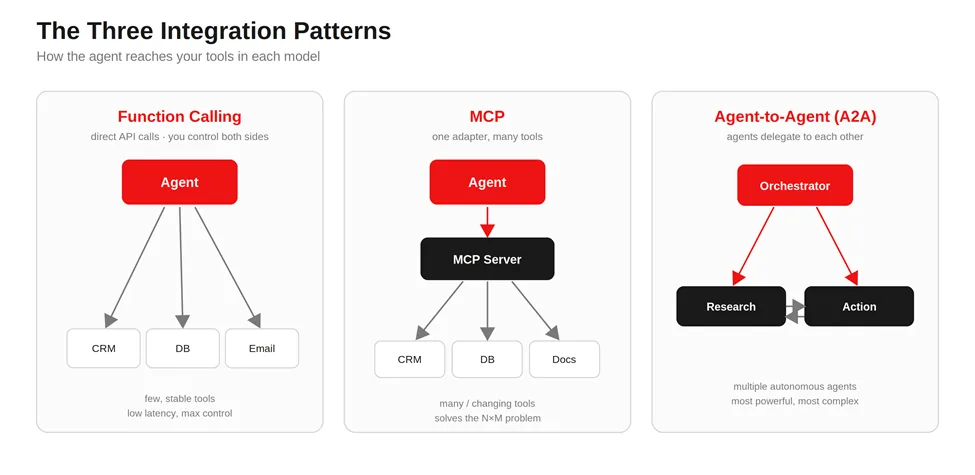
There are three patterns I reach for, and most projects land on one of them or a blend of the first two. Here’s how I explain each before we pick.
REST API plus function calling
Function calling means you describe your existing API endpoints to the model as “tools” it’s allowed to use, and the model decides when to call them. You keep full control of both sides. This is the simplest, lowest-latency option, and for a small, stable set of tools it’s often all you need.
Model Context Protocol (MCP)
MCP is an open standard that lets an agent discover and call tools through one consistent interface, instead of you hand-wiring every connection. Think of it as a universal adapter: you build one MCP server that exposes your capabilities, and any MCP-aware agent can use them. It earns its keep when you have many tools or they change often.
Agent-to-Agent (A2A)
A2A is for when you have multiple autonomous agents that need to delegate to each other, say, a research agent handing off to a booking agent. It’s the most powerful and the most complex, and it’s overkill for a single-agent task. I rarely recommend starting here.
The table below is the version I sketch on a call when someone asks which one they need.
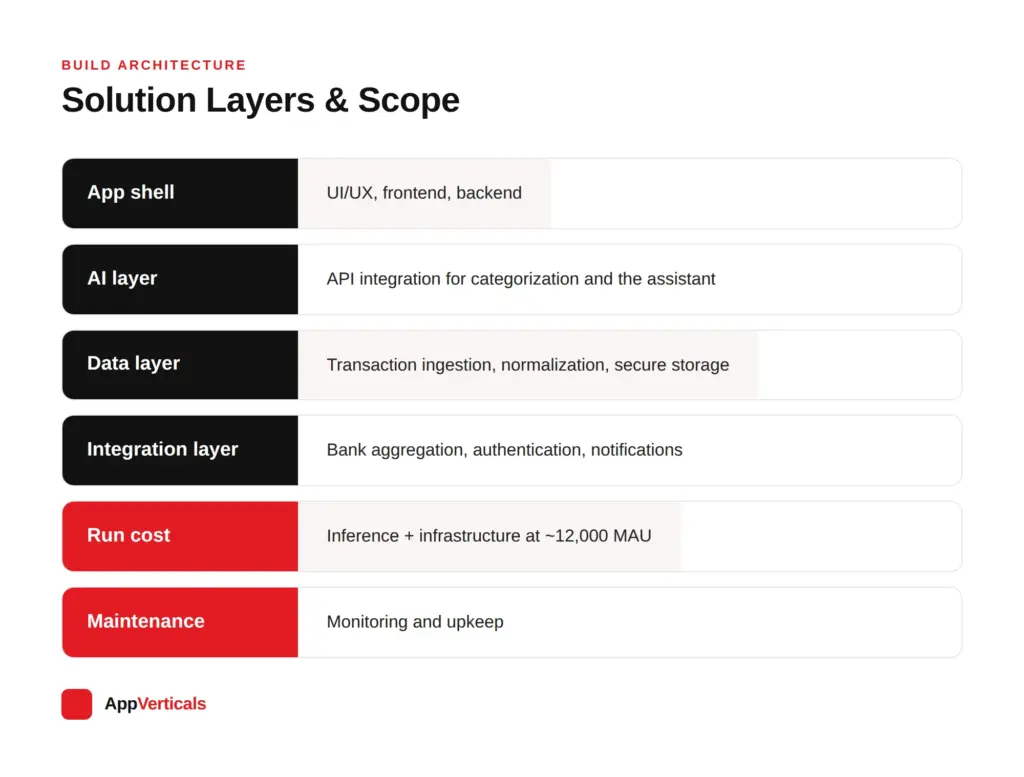
Cost Stack layer
What it covers
Estimated cost
App shell
UI/UX, frontend, backend
$45,000
AI layer
API integration for categorization and the assistant
The N×M problem is worth naming, because it’s the reason MCP exists. If you connect M agents to N tools by hand, you can end up maintaining M×N separate integrations. MCP collapses that: each tool exposes one server, each agent speaks one protocol, and the maintenance burden stops multiplying.
A note on stability, since this is the most common objection I hear: “aren’t these still moving targets?”
As of mid-2026, they aren’t experiments anymore. Both MCP and A2A now sit under the Linux Foundation’s Agentic AI Foundation (AAIF), launched in December 2025 and co-founded by OpenAI, Anthropic, Google, Microsoft, AWS, and Block. That matters for two reasons.
First, neutral governance: neither Anthropic nor Google solely controls the specs anymore, which is exactly what enterprises wait for before they commit. Second, it confirms the layering, A2A defines how agents communicate across organizational boundaries, while MCP defines how agents connect to internal tools and data sources, and together they form one foundational layer for interoperable multi-agent systems.
So when I say MCP and A2A are complementary rather than competing, that’s not just my read; it’s the architecture the people governing both protocols are building toward.
AI Agent Integration Architecture: How the Pieces Fit Together
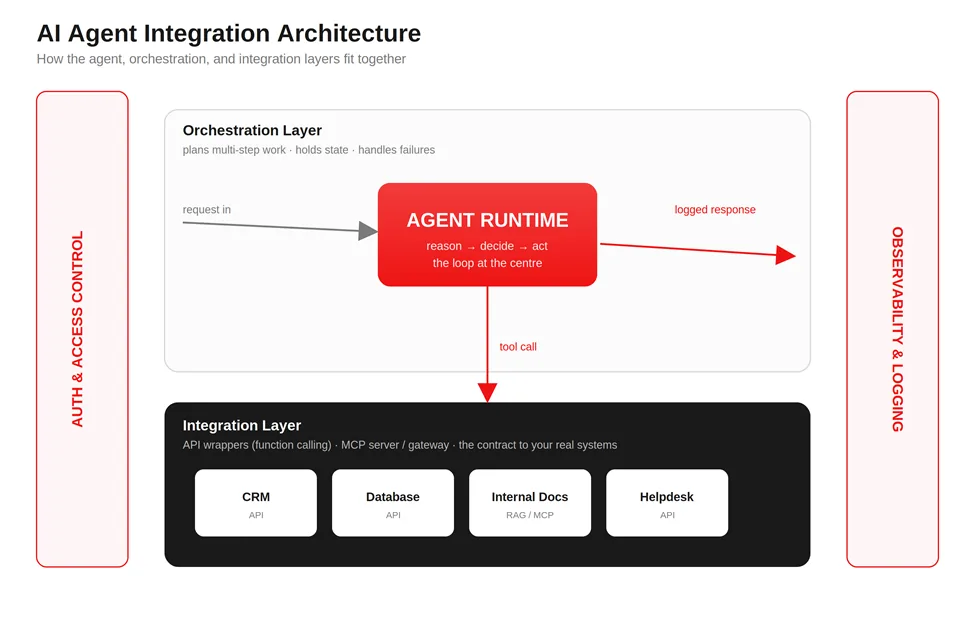
When I draw an agent integration on a whiteboard, the same layers show up almost every time, regardless of which pattern we chose.
At the center sits the agent runtime, the reasoning loop that takes a goal, decides on a step, and either responds or calls a tool. Around it sits an orchestration layer, which manages multi-step plans, keeps track of state between calls, and handles what happens when a step fails.
Below that is the integration layer, where your tools live. With function calling, these are direct API wrappers. With MCP, this is your MCP server (or a gateway in front of several). Either way, this layer is the contract between the agent’s intentions and your real systems.
Then there are two cross-cutting concerns that ride alongside everything: authentication and authorization (who the agent is allowed to be, and what it’s allowed to touch) and observability (a record of every decision and action the agent took). I treat both as load-bearing from day one, not as features to add later.
This feedback loop is also where the system gets better over time. As Terence Kok Wai Chuen, Chief AI and Innovation Officer, describes it, every agent action generates telemetry that can be routed back to refine the knowledge base, a continuous “reflect, plan, refine” cycle he calls the flywheel effect. Your observability layer isn’t just there to debug failures; it’s the raw material for improving the agent’s decision precision.
If you’re building the surrounding product around this, our work oncustom software development covers how that orchestration and integration layer gets engineered into a real stack.
Connecting Agents to Existing & Legacy Systems (Cloud and On-Prem)
Most of the prospects I talk to do not have a clean, modern, fully-documented API stack. They have a product that works, a few services that are a decade old, and at least one system nobody wants to touch. That’s normal, and an agent can still work with it.
For legacy or on-premise systems, the move I recommend is to wrap the old system behind a clean integration layer rather than letting the agent reach into fragile internals directly. You build a thin API bridge or middleware, a piece of software that sits between the agent and the legacy system and keeps them talking, and the agent only ever sees the tidy interface.
When the system is on-premises and the agent runs in the cloud, you connect them through a secure network tunnel or a private gateway, so internal systems are never exposed to the open internet. Compliance requirements usually shape this part more than the technology does.
The practical upside of wrapping is that you can modernize behind the bridge later without the agent noticing. The agent depends on the clean interface, not on the messy thing behind it. When you need to make two stubborn systems cooperate, that’s the same discipline as any othersystem integration project.
The difficult parts are rarely the AI. In practice the hard problems cluster around authentication and identity management, network restrictions, data quality, model permissions, and compliance. The model itself is often the easiest component to stand up.
How Much Does AI Agent Integration Cost?
It’s an important question if you’re planning around AI integration, so I’ll be direct about how the costs actually break down. The total depends on three things: how many systems you’re connecting, how strict your auth and compliance requirements are, and how much custom orchestration and observability you need on top.
If you want the wider market picture on adoption and returns first, our roundup ofAI automation statistics sets the context.
The cleanest way to think about it is in tiers, because the pattern you pick is the single biggest cost driver. These ranges assume you already have a working application and are adding AI to it, not building a new platform from scratch.
Integration tier
Typical scope
Indicative cost range
Typical timeline
Simple API wrapper
One tool, function calling, you control the API
$3K – $5K
1–2 weeks
MCP gateway
Several tools behind one MCP server
$5K – $10K
4–6 weeks
Multi-agent system
Multiple agents delegating across domains
$20K – $40K+
8–16 weeks
Legacy / on-prem bridge
Wrapping old or on-prem systems
$15K – $50K+ (Highly variable by infrastructure)
8–20+ weeks
What pushes a build from the low end to the high end is rarely the model. It’s everything around it: how many systems you integrate, what your compliance and security requirements look like, how much custom orchestration you need, whether you’re adding human approval steps, what observability and monitoring you require, and how good the knowledge sources are that the agent draws on. On most enterprise projects, the integrations and governance eat up more effort than the AI model itself.
The part that surprises people is that the build cost is rarely the expensive part over time. The ongoing cost is. Every hand-wired integration is something you maintain, monitor, and fix when the system on the other end changes. That maintenance line is exactly what MCP is designed to flatten, which is why the tier you choose has a long tail.
Want a number to start with first?
Get a cost estimate with our integration cost calculator.
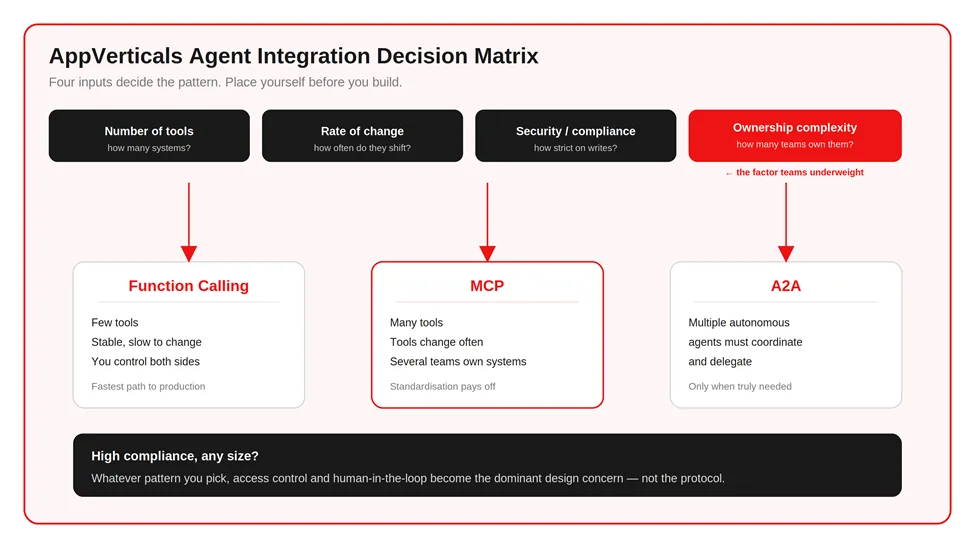
Choosing Your Pattern: The AppVerticals Agent Integration Decision Matrix
Every integration project we take on starts with the same argument in the room: which pattern do we build on? After running that decision enough times, I noticed we were always weighing the same handful of factors, and usually landing in the same place once we named them. So I wrote it down as a matrix, the one I now pull up on discovery calls, so a client can place themselves on it before a single line of code gets scoped.
It comes down to four questions: How many tools does the agent need to touch? How often does that toolset change? How strict are your security and compliance requirements on write actions? And who owns those systems, one team, or several?
That fourth factor is the one teams underweight. When different departments own different systems, the integration management gets harder fast, and that alone often justifies adopting MCP earlier than tool count would suggest.
Few tools, stable, you control them → REST API plus function calling: For many first-generation AI assistants, REST is the fastest path to production.
Many tools, or they change often, or several teams own them → MCP: The standardization pays for the extra infrastructure once you cross roughly a handful of tools or cross a few teams.
High compliance or sensitive writes, any size → whichever pattern you pick, the access-control and human-in-the-loop layer becomes the dominant design concern, not the protocol.
Multiple autonomous agents that must coordinate → A2A, and only then.
The honest version of this advice: most teams over-build. They reach for multi-agent architectures when a single agent with three well-chosen tools would have shipped in a fraction of the time. Start at the simplest pattern that covers the job and only move up when a real constraint forces you to.
A Six-Step Path to Integrating Your First Agent
When a client greenlights a build, this is the sequence I run. It works for one agent or ten.
Inventory your systems and data. List every tool the agent might touch and what data lives where. You can’t secure or connect what you haven’t mapped.
Pick the integration point and pattern. Use the decision matrix above. Choose where the agent plugs in and which of the three patterns fits.
Define the tools and schemas. Specify each action the agent is allowed to take, with clear inputs and outputs. Tight schemas prevent a lot of bad behavior before it starts.
Add auth and human-in-the-loop on writes. Anything that changes data gets authentication and, where it matters, a human approval step. Reads can be looser; writers earn scrutiny.
Add observability and fallbacks. Log every decision and action. Decide what happens when a connected system is slow or down, so a failure degrades gracefully instead of cascading.
Pilot on one workflow, then expand. Ship the agent against a single real workflow, watch it in production, and widen scope once it’s earning trust.
7 Integration Anti-Patterns That Force a Rebuild (What NOT to Do)
These are the mistakes I spend the most energy on heading off. Each one is something I’ve watched force a rebuild, and each has a one-line fix.
Prompt-only architecture. Teams try to solve everything through prompts instead of designing a proper workflow around the agent.
Fix: treat prompts as one component of the system, not the entire architecture.
No human review path. AI responses get treated as final decisions, so a single bad output becomes a real-world action.
Fix: introduce approval workflows and human oversight for important actions.
Poor knowledge sources. The agent draws on outdated, incomplete, or inconsistent information and confidently passes it on.
Fix: establish a clean knowledge management process before deployment.
Tool sprawl. Agents connect directly to a growing pile of systems with no central management, and maintenance multiplies.
Fix: use standardised integration layers such as MCP or service orchestration.
Missing observability. Nobody can see why the agent made a decision or where it failed.
Fix: implement logging, tracing, analytics, and monitoring from day one.
Hardcoded integrations. Every new tool requires an engineering change, so the roadmap slows to a crawl.
Fix: build extensible integration layers and reusable connectors.
Launch-and-forget mentality. Teams treat deployment as the finish line.
Fix: keep evaluating real conversations and tune the system after launch.
Chuen puts the strongest version of the knowledge-sources point this way: the efficacy, safety, and reliability of an agent are strictly bounded by the data underneath it, and deploying agents over fragmented, undocumented data estates yields fragile systems with high error rates. His architectural prescription is to bring the AI to the data rather than hauling data out to external processing, clean lineage and access controls are a prerequisite, not a phase-two cleanup.
A pattern across these seven: the failures cluster around governance and operations, not the model. That’s the same reason the objections I hear most on sales calls are security and compliance, fear of hallucinations, reliability of autonomous actions, integration complexity, and long-term maintenance cost. All five are integration concerns, and all five are answerable with the discipline above.
Security, Observability & Human-in-the-Loop
I keep these three together because in practice you can’t pull them apart. Each one assumes the other two exist, and a gap in any of them tends to surface as a problem in the others. Together they’re what make an integrated agent something your team is willing to run without holding its breath.
Security comes down to scope and identity. The agent should authenticate as a constrained identity that holds only the permissions the job requires, using standard token-based auth, with write access kept narrower than read access. The most common security finding I see is simply an over-privileged agent, one that can reach far more than its task ever calls for. That over-provisioning is also what makes the newer, MCP-specific risks dangerous.
Tool poisoning, where a malicious or compromised MCP server hides instructions inside the tool descriptions the model reads but a person never sees, has become one of the higher-leverage attacks on agent systems in 2026, and benchmark testing has found most agents susceptible to it. The infrastructure side is just as real: a critical MCP flaw disclosed in May 2026 (CVE-2026-33032, scored CVSS 9.8) was confirmed exploited in the wild, caused by MCP endpoints that didn’t inherit the host application’s authentication.
The defenses are the same disciplines applied with more rigour, never expose an MCP server publicly, authenticate every call, vet and pin the servers you connect to, and limit tool execution to an explicit allowlist. The reason least privilege matters more than any single control is the blast radius: a compromised server reaches every system the agent can, so the narrower the agent’s identity, the smaller the damage.
There’s a second failure mode that shows up once agents spread across an organization. Chuen in his article Industrialization of Agentic AI, flags “shadow work”, ungoverned agents spun up independently by different business units, as a primary enterprise risk, and the answer is centralized observability that can detect and audit every autonomous system touching critical infrastructure. It’s the same point as the decision-matrix factor teams underweight: once several teams own the systems an agent reaches, governance stops being optional.
Observability is being able to answer, after the fact, “what did the agent do, and why?” That means logging the reasoning steps and every tool call all the way down, not just the final output. Something will eventually go wrong, and when it does these logs are the whole difference between a five-minute fix and a guessing game. They’re also where you’ll first notice a poisoned tool or an unexpected call, which is why observability isn’t separate from security so much as the thing that makes security legible.
Human-in-the-loop is the approval checkpoint on actions that carry real consequence. It doesn’t need to be heavy. A single confirmation before the agent issues a refund or sends an external message is often all it takes to turn a system that makes people nervous into one they’re comfortable running, and it’s the last line of defense when the first two have missed something.
Build In-House vs Partner: What to Weigh
If you have an engineering team that already lives in your stack, a first agent integration is buildable in-house, and I’d encourage it for a contained, low-risk workflow. The learning compounds, and it’s often the cheapest way to build internal conviction about wheregenerative AI in business actually pays off for you.
It’s worth being honest about the trade-off underneath all of this. Chuen frames the strategic prize plainly: agentic AI decouples revenue growth from linear headcount expansion. But he’s equally direct that it demands high upfront capital for infrastructure and stringent data governance before you see any operational efficiency. That ordering matters, the governance work comes first, not after.
The calculus changes when the integration touches sensitive data, spans legacy systems, or has to be production-grade from day one. The patterns above are simple to describe and unforgiving to get wrong, and thecost of a bad early architecture choice is usually a rebuild six months later.
That’s the moment to weigh bringing in a team that has integrated agents into live systems before, whether as a full build or a short architecture review before your own engineers commit. If the agent is going to sit inside a larger product, ourSaaS development work covers how that fits into a maintainable platform rather than a one-off script.
For teams weighing the build side of that decision, our custom AI development work covers how we scope and staff a build like this
What This Looks Like in Practice: An AI Proposal Assistant
The clearest example I can share is an AI-powered proposal assistant we built around RFP responses, the long, compliance-heavy documents companies submit to win contracts. The client wasn’t short on writing talent. They were drowning in the coordination: drafting, reviewing, scoring, and keeping every response aligned with the requirements buried in each RFP.
We didn’t solve that with one agent. We used several specialized ones; a drafting agent, a review agent, a scoring agent, and a user-assistance agent, each owning a piece of the workflow. On its own that’s just division of labor. The part that made it useful was the data layer underneath.
We added Retrieval-Augmented Generation, or RAG; a setup where the agent retrieves relevant text from a trusted document store and grounds its answer in that, instead of relying on the model’s memory. The store held their past proposal documents, historical submissions, and the compliance requirements that responses get judged against. So the agents weren’t inventing answers; they were assembling them from the client’s own winning material.
That project sits squarely in the multi-agent tier, the $30K–$40K-plus range, and the cost lived where it always does, in the orchestration between agents, the retrieval quality, and making the whole thing observable and safe to run. The model was the least of it.
The agents were interchangeable parts. The integration; clean knowledge sources, retrieval, coordination, oversight, is what turned four language models into a system that does a real job.
Conclusion
The integration layer is what makes or breaks adding an AI agent to an app you already run. Pick the right pattern and the agent slots in cleanly; pick the wrong one and you inherit constant, expensive maintenance.
The decision in front of you now is which of the three patterns fits your toolset, your security posture, and your budget, and where the line sits between building in-house and bringing in a team that has done this on live systems before.
If you want that pattern and cost validated against your actual stack before you spend engineering time, a short scoping conversation is the fastest way to get there.
Planning to add an agent to your product?
See how our AI development team designs and integrates production-ready agents, architecture, build, and ongoing support.
The build cost is the number clients budget for. The inference cost is the number that surprises them six months later when the product has users and every active session is quietly adding to an API bill nobody modeled.
AI app development cost ranges from about $15 a month for a no-code prototype to more than $300,000 for a custom, enterprise-grade app built on proprietary models. Most business apps with AI features, such as a GPT or Claude-powered assistant, recommendations or document analysis, cost between $40,000 and $150,000 to build, plus inference and maintenance that scale with usage. The biggest drivers are your development approach, data readiness, integration depth and how much traffic the AI must serve. The cost that surprises teams most is not the build but the per-call API cost that grows with every active user.
I’ve scoped and built AI features across enough products to know where the real budget surprises come from. This article walks through every cost layer, from the upfront build to the monthly run bill that follows it.
For a wider market context on adoption rates and where budgets are heading, ourAI in app development statistics guide pairs well with the cost ranges in this article.
How Much Does AI App Development Cost? (ranges by app type)
AI app development cost depends almost entirely on which of four build paths you choose because each path carries a different mix of engineering effort, AI sophistication and ongoing run cost. A no-code prototype that wires a drag-and-drop builder to an off-the-shelf API can be live for the price of a monthly subscription, while a custom enterprise platform with fine-tuned, proprietary models can run past $300,000 before it ever serves a single user at scale. Understanding where your idea sits on that spectrum is the fastest way to turn a vague budget into a number you can actually plan around.
The table below maps the four most common AI app types to what each one typically includes, the build cost you should expect, a realistic timeline and the ongoing monthly cost that follows launch. Because the largest variable for most teams is the post-launch run cost rather than the build, the final column matters as much as the headline price.
App type
What’s included
Typical build cost
Timeline
Ongoing monthly cost
No-code prototype
Drag-and-drop app plus an API key
$15 to $500 per month
1 to 3 weeks
$15 to $500
AI API-integrated app
App shell plus one AI feature on an API
$25K – $50K
4 to 6 weeks
API usage plus hosting
Mid-complexity AI app
Custom features plus integrations
$50K – $100K
3 to 4 months
API plus infra plus upkeep
Custom or enterprise AI app
Proprietary or fine-tuned models
$150K – $300K+
4 to 6+ months
Infra plus retraining (15 to 25 percent per year)
Choosing the right app type for your stage
A no-code prototype is the right starting point when you need to validate an idea quickly rather than ship a production product, since it lets you put an AI feature in front of real users in days without committing engineering budget. The AI API-integrated app is where most funded startups and mid-market teams begin because it pairs a properly built app shell with a single high-value AI feature running on a managed API, which keeps the upfront cost contained while still delivering a polished experience.
Mid-complexity and enterprise builds become justified once your usage volume, compliance requirements or differentiation strategy demand deeper integration, custom model behavior or infrastructure you control end to end.
What else does AI app development cost beyond the AI layer?
It is worth noting that the AI layer is only one part of the bill because every figure above still has to cover the underlying app: the interface, the frontend, the backend, authentication and the work of shipping to the app stores. App-store overhead in particular is easy to overlook, since it includes developer-account fees, the review process, store-specific compliance work and the design polish required to pass approval, all of which exist before a single AI feature is switched on.
This is precisely the gap that most generic AI cost guides leave open because they price the model or the solution rather than a complete, shippable app with intelligence built into it.
If you are comparing this against a conventional build, our breakdown ofapp development cost covers that base layer in detail, including how AI integration and inference change the math.
What Drives the Cost of AI App Development?
The cost of AI app development is driven primarily by your development approach, the readiness of your data, the depth of your integrations and the volume of usage the AI must serve after launch. These four factors explain most of the difference between a $40,000 build and a $300,000 one and they interact with each other, which is why two apps that look similar on paper can carry very different price tags. Understanding each factor individually makes it far easier to see which levers you can pull to bring a number down without gutting the product.
Development approach and data readiness
Development approach is the single largest determinant because the choice between a no-code platform, an AI API and a custom model sets the floor for everything else. A managed API removes the cost of training and hosting a model, whereas a custom or fine-tuned model adds machine learning engineering, data pipelines and MLOps work that can easily double a budget. Data readiness is the factor teams underestimate most often during scoping, since clean, labeled and well-structured data is a prerequisite for any custom model and the work of collecting, cleaning and labeling that data frequently costs more than the modeling itself.
Integration depth, compliance and usage volume
Integration depth is the next major driver because an AI feature that has to read from and write to your existing systems, respect your permissions model and stay in sync with live data, the kind of work agent integration demands, is a meaningfully larger engineering effort than a standalone assistant. Compliance requirements in regulated sectors such as healthcare and finance add security architecture, audit trails and review cycles that lengthen timelines and raise costs. Finally, team location and seniority shape the rate you pay per hour and the volume of usage your AI must handle determines your ongoing inference bill, which is the factor that most often turns a comfortable build budget into an uncomfortable annual run cost.
Market research from firms such as Grand View Research and McKinsey continues to show enterprise AI spend rising year over year, which means usage-driven costs are likely to grow rather than shrink as adoption deepens.
AI App Development Cost by Feature (chatbot, recommendations, computer vision, predictive analytics, voice)
AI app development cost varies widely by feature and the cheapest features to add are the ones that can run on a pre-trained, general-purpose API rather than a model you have to train yourself. A conversational assistant, a recommendation engine or a document-analysis feature can usually be built on top of an existing large language model, which keeps the engineering effort focused on integration and user experience rather than model development.
Features that depend on specialized perception or domain-specific accuracy, such as custom computer vision or high-stakes predictive analytics, sit at the expensive end because they often require custom training, labeled datasets and ongoing tuning.
The most affordable AI features to add
A chatbot or AI assistant is generally the most economical AI feature to add because mature APIs from providers like OpenAI, Anthropic and Google handle the heavy lifting and you pay mainly for integration and prompt engineering. Recommendation systems are similarly approachable when they rely on managed services or off-the-shelf models, though cost rises once you need real-time personalization tuned to proprietary behavioral data.
Voice features, including transcription and voice interfaces, have become relatively affordable thanks to strong speech APIs, although latency and accuracy requirements can push the work upward.
The features that push budgets the highest
Computer vision and predictive analytics are where budgets climb fastest. A computer vision feature that recognizes generic objects can lean on existing models but a feature that must detect something specific to your domain, such as a particular defect on a production line or a clinical marker in a medical image, typically demands a custom-trained model and a carefully labeled dataset.
Predictive analytics carries a comparable pattern, since a model that forecasts outcomes from its own historical data needs that data to be clean, sufficient and representative before it can be trusted.
An AI investment app is a useful illustration of how these costs combine because a robo-advisory or portfolio-insight feature pairs a relatively affordable language-model assistant with a far more demanding predictive layer that has to be accurate, explainable and compliant, which is why this category usually lands in the mid-complexity to enterprise band rather than the API-integrated one.
The practical takeaway is that you can sequence features by cost, shipping the API-friendly ones first and reserving custom-trained features for the moment their business value clearly justifies the investment.
AI APIs vs. Custom Models: The Cost Trade-off (with break-even)
For most teams, the right starting decision is to build API-first and move to a custom model only once usage economics justify it because an AI API is dramatically cheaper to launch, even though it carries a per-call cost that grows with scale.
A managed API lets you ship in weeks instead of months and removes the upfront expense of training and hosting a model, which is exactly what an early-stage product needs when the priority is validating demand. A custom or fine-tuned model reverses that trade-off, demanding a larger upfront investment in exchange for lower marginal cost and greater control once your volume is high enough to amortize it.
The table below lays out the trade-off across the factors that actually move a decision, so you can see why the API path wins for most launches and where the custom path begins to make sense.
Factor
AI API integration
Custom model
Upfront build cost
Low, mostly integration work
High, includes training and MLOps
Time to launch
Weeks
Months
Per-use / inference cost
Per-call fee that scales with usage
Lower marginal cost, fixed infra to run
Data needed
Little to no to start
Large, clean, labeled dataset required
Control and customization
Limited to prompts and configuration
Full control over behavior and weights
Best for
Launching, validating, most apps
High volume, differentiation, strict data control
When does a custom AI model become cheaper than an API?
The break-even point is the moment your monthly API bill, growing with every active user, approaches the combined cost of building and running a custom model. Below that threshold, the API is both cheaper and faster, which is why it suits the overwhelming majority of products at launch. Above it, a fine-tuned or self-hosted model can lower your marginal cost per request enough to pay back its higher upfront cost over time and it gives you tighter control over latency, behavior and data residency.
The disciplined approach is to launch on an API, instrument your usage carefully and revisit the custom-model question only once your real traffic data shows the break-even is within reach, rather than committing to expensive model development on a forecast that may never materialize.
The Hidden and Ongoing Costs of AI Apps (inference, maintenance, retraining)
The hidden costs of AI apps are almost entirely post-launch and the largest of them is inference, the per-call API or compute cost that scales directly with the number of active users your AI has to serve. Teams routinely budget carefully for the build and then treat the running cost as an afterthought, which is the most common and most expensive mistake in AI app planning. These ongoing costs, which include inference, model monitoring and retraining, data pipeline upkeep and cloud infrastructure, frequently add 15 to 25 percent of the build cost every year and can exceed the original build over the lifetime of a successful app.
How to model your inference cost
Inference is worth modeling rather than guessing because its behavior is predictable once you know three numbers: how many AI calls an active user triggers, how many tokens each call consumes and the price per token of the model you are using. As an illustration, assume an average AI interaction uses roughly 1,500 input tokens and 500 output tokens, priced at Claude Sonnet 4.6 rates of $3 per million input tokens and $15 per million output tokens. That works out to about 1.2 cents per AI interaction. If a typical active user triggers three such interactions a day, each user costs roughly $1.08 a month in inference alone and that single figure is what scales as you grow.
Monthly active users
Approx. interactions per month
Estimated monthly inference cost
1,000
~90,000
~$1,080
10,000
~900,000
~$10,800
100,000
~9,000,000
~$108,000
Note: Figures use Claude Sonnet 4.6 rates at time of writing ($3 input / $15 output per million tokens), with three interactions per active user per day as an illustrative assumption. Substitute your own numbers for actual planning.
Why can the run cost exceed the build cost?
The scaling table makes the core risk visible. At 10,000 monthly active users, the annual inference bill of roughly $130,000 already rivals the cost of a mid-complexity build, and for an app that cost $80,000 to $120,000 to develop, it exceeds the original build outright within the first year.
Inference is also only one line in the ongoing total. Models need monitoring to catch quality drift, custom models need periodic retraining as your data and the world change, and the data pipelines that feed everything need maintenance.
The encouraging part is that several provider-level levers can cut the inference figure substantially:
Prompt caching: Reuses repeated context such as system prompts and reference documents, with current providers offering up to 90 percent savings on cached input.
Batch processing: Applies a 50 percent discount to requests that do not need a real-time response.
Prompt trimming: Lowers the cost of every call by reducing the number of tokens you send in the first place.
Model routing: Sends simple requests to smaller, cheaper models and reserves the most capable model for the moments that truly need it.
Usage limits: Cap per-user consumption so that a small number of heavy users cannot drive a runaway bill.
These mechanisms work best when they are designed in deliberately rather than discovered after the first large invoice arrives. The wider lesson for budgeting is to treat run cost as a planning input from the very first scoping conversation, because the assumptions you make about calls per user and tokens per call decide whether your app stays profitable as it grows. Modeling those choices before you build is far cheaper than re-architecting around them after launch, which is why the inference model belongs in your estimate alongside the build figures rather than in a separate conversation months later.
On AI app projects, the place clients most often under-budget is inference. Teams approve the build cost without modeling what the AI will cost to run once real users arrive and at scale, that running cost can quietly double the true cost of the product over a year.
How Long Does It Take to Build an AI App?
An AI app typically takes 2 to 6 months to build, with the timeline driven far more by data preparation and integration than by the choice of model itself.
A simple API-integrated app or a focused MVP can ship in 6 to 10 weeks because the AI capability is largely handled by a managed service and the engineering effort concentrates on the app shell, the integration and the user experience. A custom AI app with proprietary models, deep integrations into existing systems and compliance obligations generally takes 4 to 6 months or more, since each of those elements adds its own design, build and review cycle.
What drives the timeline most
The single biggest reason AI timelines slip is data. When a feature depends on a custom model, the work of sourcing, cleaning, labeling and validating training data routinely takes longer than building the model and that work cannot be compressed without sacrificing accuracy.
Integration is the second major timeline driver because connecting an AI feature to live systems, permissions and real-time data is meaningfully more involved than running it in isolation. The practical implication is that you can buy speed by starting API-first and keeping the first release narrow, then expanding once the product has proven itself with real users.
How to Estimate your AI App Development Cost (the AI App Cost Stack + worked example)
The most reliable way to estimate your AI app development cost is to break the build into the layers that actually generate cost and price each one separately, rather than reaching for a single industry range. We call this framework the AI App Cost Stack and it gives you a repeatable method you can apply to any AI app idea before you brief a developer. For the broader principles behind sizing a build like this, our guide tosoftware development cost estimation covers the estimation fundamentals that the stack below applies specifically to AI products.
The six layers of the AI App Cost Stack
The AI App Cost Stack has six layers and pricing each one in turn produces both a build cost and a monthly run cost:
Worked example: AI-powered budgeting app
An AI-powered personal budgeting app connecting to users’ bank accounts, automatically categorizing transactions, and using a GPT or Claude-powered assistant to answer questions and surface spending insights.
Cost Stack layer
What it covers
Estimated cost
App shell
UI/UX, frontend, backend
$45,000
AI layer
API integration for categorization and the assistant
The build totals roughly $90,000, squarely in the mid-complexity band. The monthly run cost of ~$6,000 adds up to roughly $72,000 a year once the app is live. That run cost is the number a single industry range would have hidden entirely.
To apply the framework to your own idea, estimate each layer from what you already know about your core AI feature, your integrations and your expected usage and treat the run cost as a first-class line item rather than a rounding error.
How to Reduce AI App Development Cost without Cutting Value
Build an MVP first
The most effective way to reduce AI app development cost without sacrificing value is to build an MVP first, shipping one high-value AI feature on a pre-trained API, validating it with real users and only then expanding. This approach protects you from the most expensive failure mode in AI development, which is spending six figures on features that turn out to be unwanted and it generates the real usage data you need to make every subsequent investment decision with evidence rather than guesswork. An MVP also spreads cost across phases, which keeps early budgets manageable and lets revenue or proven traction fund the next stage of the build.
Beyond the MVP, the strongest cost lever is the API-first principle described earlier because starting on a managed API removes the upfront expense of model development and lets you defer the custom-model question until your traffic data proves it is worth answering.
Phasing the roadmap reinforces both choices, since releasing capabilities in deliberate stages lets you retire ideas that do not earn their place before they consume engineering budget. On the run-cost side, designing in caching, prompt optimization, model right-sizing and usage limits from the start keeps your inference bill from scaling faster than your value does.
What you should not cut to save money
It is equally important to recognize what should not be cut because trimming the wrong things raises the total cost of ownership rather than lowering it. Skimping on data quality, security or the underlying app architecture tends to create rework and remediation costs that exceed whatever was saved, particularly in regulated industries.
The disciplined path is to spend deliberately on the foundation and the first proven feature, defer everything speculative and let real usage rather than ambition drive the pace of investment. When you are ready to scope that path properly, ourAI development services team can help you sequence the build so that cost follows validated value.
Conclusion
The real question is not what AI app development costs in general but what your specific app will cost to build and to run once people actually start using it. Once you know your core AI feature, your integrations and your expected usage, you have enough to turn a vague range into a number you can plan around and the AI App Cost Stack gives you a repeatable way to get there.
If you prefer, estimate your build yourself with the AppVerticalsapp cost calculator to see where your project lands.
Ready to scope your AI app properly?
Talk to our team about your build ranging from a focused MVP to a full production deployment!
EHR integration is how you get an electronic health record system, Epic, Oracle Health (Cerner), athenahealth, Meditech, and the rest, to talk to the other tools around it, so patient data moves on its own instead of someone re-typing it from one screen into another. That’s the whole game: labs, patient portals, telehealth, and billing, monitoring devices, all reading from and writing to the same record without a human in the middle copying numbers.
I’ve sat in a lot of these conversations from the customer-success side, and by the time someone reaches me they’ve usually stopped asking what integration is. They want the things nobody tells you up front: what it will actually cost, how long it will really take, which technical choices matter, and how to pick a team that won’t quietly burn the budget. So that’s what I want to walk you through here, the way I’d explain it to a client across the table.
“The teams that stay on budget aren’t the ones who found the cheapest developer. They’re the ones who got honest about what they actually needed before anyone wrote a line of code.”
Why This Matters More Than It Looks Like It Should
Here’s the thing I wish more teams felt before they felt it the hard way: manual data entry between healthcare systems is slow, and worse, it’s risky. Every time a person re-keys a result or a demographic, there’s a chance of a transposed digit, and every disconnected system is a place where something important can sit unseen. In a clinical setting, that’s not an inconvenience, it’s a safety and compliance problem.
When integration is done right, all of that quiet friction disappears. Results land in the chart automatically, schedules stay in sync, and clinicians spend their time on patients instead of clicking between tabs. And for anyone building a health-tech product, I’d go further: integration is often the difference between a tool people adopt and one they abandon.
I’ve watched it happen. A product that doesn’t connect to the system clinicians already live in all day is a product they’ll quietly stop opening. It doesn’t matter how good the idea is. Treat integration as a feature to bolt on later and you’ve already lost; it’s the thing that decides whether anyone actually uses what you built.
HL7 or FHIR? The Choice That Quietly Shapes Everything
Almost every integration I’ve been part of comes down to two standards, and you don’t need to be an engineer to understand the trade-off.
HL7 v2 is the older one. It’s been moving clinical data for decades, it’s everywhere, and it’s proven, it’s not going anywhere. FHIR is the modern approach, built on the same kind of web technology that powers most apps you use every day. It’s what regulators now lean toward and what most new builds start with, because it’s cleaner to connect and cheaper to maintain over time.
When someone says “the API,” they almost always mean FHIR, most major EHRs offer one now. The catch I always flag for clients is that FHIR coverage is uneven. A vendor might hand you patient details and lab results through FHIR but still make you use the older HL7 method for something like certain scheduling data. That’s why, in practice, the answer is rarely one or the other.
The momentum is clearly with FHIR, though, and it’s part of a wider shift I keep seeing across the industry, if you want the broader view, we’ve written separately about thelatest healthcare software development trends, and interoperability sits right at the center of them.
A Simple Way to Decide: HL7 V2 Or FHIR?
Lean FHIR when: you’re building something new, you need to meet patient-access compliance rules, you want lower upkeep down the road, or you’re connecting modern cloud apps.
Lean HL7 v2 when: you’re plugging into older interfaces that already exist, or the specific data you need isn’t available through FHIR yet.
What usually actually happens: a mix of both; FHIR for the modern pieces, HL7 v2 for everything else, routed through a piece of middleware (Mirth Connect) that keeps the two talking. Most real projects I see are hybrids, and that’s completely normal.
Choosing a standard decides how the data is formatted. The next choice is how it travels, and the right answer depends almost entirely on how many systems you’re connecting now and how many you’ll add later.
Approach
What it is, in plain terms
Best for
The catch
Point-to-point
A direct line between two systems
One connection that won’t grow
Gets messy and expensive once you add more systems
Central hub (ESB)
One hub routes messages between many systems
Hospitals with lots of internal connections
More work to set up and maintain
iPaaS
A cloud platform with ready-made connectors
Teams who want a faster, managed setup
Less custom control; ongoing platform fee
Through an exchange (HIE)
Connecting via a regional health data exchange
Sharing data across organizations
Depends on what that exchange supports
My rule of thumb for clients is simple: If you’re connecting two systems and that’s the end of it, a direct connection is fine. But the moment you can see a third, fourth, and fifth connection coming, a hub-based setup pays for itself, in all the maintenance headaches you won’t have a year from now.
What EHR Integration Actually Costs In 2026
This is the question almost everyone arrives with, so let me give you real numbers instead of “it depends.” The ranges below are the bands we genuinely work within for compliant delivery, and they hold up well against current market pricing.
What you’re building
Typical cost
What to know
Pull data in from one EHR, a couple of data types (FHIR)
$15K – $30K
The cheapest way in; the wait for sandbox approval sets the timeline
Two-way connection with one major EHR (Epic / Cerner)
Each system needs its own testing and IT coordination
Ongoing upkeep (per connection, per year)
$3K – $15K
Monitoring, fixing issues, keeping up with vendor changes
When I explain why one project costs three times another, it always comes back to four things: which direction the data flows (pulling data in is far cheaper than full two-way sync), which standard you use, how many types of data you’re moving (demographics is one thing; orders, results, scheduling, and medications each add work), and which EHR you’re connecting to, more on that next.
And here’s the part I push hardest on with clients, because it’s where budgets quietly leak: the expensive surprises are almost never the code. They’re the things outside our control, waiting on a vendor’s sandbox approval, sitting in a certification queue, or stuck behind a hospital’s own IT backlog.
Muhammad Arif, Technical Project Manager at AppVerticals, put a number on it for me recently: external approvals can add anywhere from 4-12 weeks, sometimes more, depending on the vendor and the integration model.
He’s watched the technical build finish quickly only for the timeline to stretch because of vendor onboarding, security reviews, and testing sign-offs the development team never controlled. So if a partner quotes you a number without warning you about any of that, the number isn’t real yet.
And if integration is one piece of a larger build, it’s worth looking at the full picture ofhealthcare app development costs so the integration budget sits in context rather than in isolation.
The Vendor You Connect To Changes the Math
The single biggest thing teams underestimate is which EHR is on the other end. It’s tempting to think of “the EHR” as one generic thing, but the vendor sets a huge share of your cost and timeline before we write any code.
EHR System
Relative Effort
Typical Cost (Single-Vendor Integration)
Why
athenahealth
Lowest
$15K – $45K
Built cloud-first and API-friendly; least friction to connect
Epic
Highest
$50K – $100K+
Requires certification and approval process before integration
Oracle Health (Cerner)
Mid–High
$45K – $90K
Powerful system, but compliance and approval cycles extend timelines
Meditech / Allscripts
Depends on the site
$40K – $85K
Variability across deployments; features differ by hospital setup
So my honest advice: if Epic is in your plans, budget for the certification process, not just the build. And if you have any flexibility on which system to connect first, the easiest one is usually whichever offers a mature FHIR API and a real developer program.
Arif’s shorthand for the fastest path: well-documented APIs, an available sandbox, standard FHIR support, a clear onboarding process, and technical support that actually answers. athenahealth tends to tick those boxes, which is why it’s often the quickest route to something you can demo.
How Long Does EHR Integration Take?
Timelines follow scope closely, and just like cost, most of the variation comes from waiting on other people rather than from the engineering itself.
What you’re building
Typical timeline
What sets the pace
Pulling data in from one EHR
4 – 6 weeks
Waiting on sandbox approval
Two-way connection with Epic / Cerner
10 – 14 weeks
The certification process
Multiple EHRs in production
16 – 24 weeks
Testing each system + each hospital’s IT queue
Notice the pattern. Pulling data in from one system is usually a four-to-six-week job. A two-way Epic or Cerner connection runs ten to fourteen. Connecting several EHRs at once is a sixteen-to-twenty-four-week effort. But the long poles holding up almost every one of these are approvals, certification, and someone else’s IT queue, not the time it takes us to write the code.
What Does the EHR Integration Process Actually Look Like?
Whenever a client asks how we’ll run the project, I describe six stages. None of this is mysterious, it’s just disciplined.
Discovery: We gather requirements, look at your current systems, and settle the technical choices: which standard, which method, which data. Getting this right is what keeps everything later from ballooning.
Planning: We lock the plan, timeline, budget, and what “done” means. And critically, we register for the EHR’s sandbox immediately, since that approval is often the longest wait, starting it early is the cheapest time you’ll ever save.
Design: We define how systems will communicate and, just as importantly, how we’ll keep the data secure and compliant. This is where HIPAA gets built in from the start rather than bolted on at the end.
Build: We create the connections or set up the middleware that links your EHR to the other system. For hybrid projects, this is usually where the FHIR and HL7 pieces get wired together.
Testing and launch: We test for performance, security, and real-world use, fix what breaks, then go live and train your team. With clinical data, there’s no “we’ll test it in production.”
Support: We keep an eye on it, resolve issues, and stay ahead of the vendor’s own updates. An integration nobody maintains slowly falls apart.
The Most Expensive Integration Mistake I See Clients Make
Most of the pain in these projects is predictable, which is the good news, predictable means avoidable.
The same few things trip people up: underestimating how long vendor approvals take, reaching for the older, more brittle approach when the modern one would have meant less upkeep, and, the big one, building a full two-way connection when simply pulling data in would have done the job.
That last one is the mistake I spend the most energy heading off. Teams ask for two-way sync because it sounds complete and thorough. But honestly, half the time they only ever needed to pull data in. That one assumption can double or triple the budget and add months of certification they never needed.
Arif framed it better than I usually do. The common version he sees is a client wanting full bi-directional integration with multiple EHRs from day one, when their actual business need could be met with a simpler phased rollout. As he put it:
In many cases, clients can achieve 80% of the business value by integrating only the critical workflows first and expanding later based on actual user adoption.
So the first thing I do with every client is help them separate what they truly need right now from what merely sounds impressive. Start with the workflows that move the needle, prove adoption, and then expand.
The fix isn’t glamorous, but it works every time: write down exactly which data you need and which direction it has to move, check each one against a real workflow, and get your sandbox access started on day one.
A Custom ERP Built by AppVerticals
At the end of the day, all of this is really about one thing, keeping patient data secure, compliant, and connected while it moves through a real care workflow. The projects I’m proudest of are the ones where we got that right from the ground up.
One I point to often isVision ZE. They run a Home and Community Services (HCS) agency, and they came to us to modernize operations that still leaned heavily on paper documentation and manual workflows. If you know the HCS world, you know the weight of it: every consumer comes with a stack of state-mandated forms, ICAP, IDRC, assessments, care plans, compliance documents, and each one has to be completed by a specific role, whether that’s a therapist, a client service coordinator, or a nurse, then routed through its own approval and signature rules.
Doing that on paper is slow and risky. Forms get lost, compliance gets tracked by hand, and nobody has a clear view of what’s been signed and what’s still outstanding. So we built them a centralized digital platform that replaced the paper, automated those workflows, enforced role-based permissions, handled electronic signatures, tracked the status of every document, and kept a full audit trail — all aligned to agency and state requirements.
The reason I bring up an agency-forms project here is that the hard part is identical.
Arif makes this point well: no matter the size of the project, our team starts from the same questions, what patient data are we collecting, storing, or transmitting; do we actually need all of it or can we minimize it; who gets access and under what circumstances; is it encrypted in transit and at rest; and what audit logs prove who touched what. Get those right and the system earns trust, whether you’re wiring up an Epic connection or replacing a filing cabinet.
Build It Yourself, Buy It, or Bring In A Partner
There are really three ways to get an integration done, plus a fourth option I think people should hear more often.
Building it in-house makes sense if you already have engineers who know healthcare interoperability and you’ll be maintaining lots of these over time.
Buying, using a vendor’s ready-made connectors or a platform with templates, is fastest when your needs line up neatly with what’s available off the shelf.
Bringing in a partner is the right call when you want production-grade, compliant work without standing up a permanent integration team, especially anything involving Epic, where having shipped against that exact system before saves real money.
And the fourth option I’ll always name honestly: sometimes you don’t need a custom integration at all. For a small practice, a full custom build can mean weeks of IT tickets and coordination they don’t have the appetite for.
Lighter tools, vendor connectors, ready-made templates, or newer products that push data straight into browser-based records, may get you where you need to go faster and cheaper. Match the effort to your scope, and only pay for custom work when the simpler options genuinely fall short.
If you’re weighing this across a bigger product roadmap, ourhealthcare software development services cover more than a single connection. And if a CRM is one of the systems you’re planning to wire into the EHR, which it often is, once billing and patient outreach enter the picture, ourhealthcare CRM software guide is a good place to think that part through.
How to Choose Your EHR Integration Partner?
By the time you’re comparing partners, the technical questions matter less than the track-record ones. Here’s the short list I’d use myself:
Have they actually shipped against your EHR? Especially with Epic, ask for it directly, because that experience doesn’t transfer from a generic résumé.
Do they bring up security on their own? A serious partner talks about agreements, encryption, access controls, and audit trails before you have to ask.
Will they talk you out of work you don’t need? The right team should be willing to tell you two-way sync is overkill for your case.
Do they quote the waiting, not just the building? Approvals, certification, and IT queues should all be in the estimate.
Can they show real, compliant healthcare work? That mindset matters far more than headcount.
Conclusion
The real decision in front of you was always how to integrate, not whether: which standard, which method, whether to build or partner, and at a cost and timeline you can stand behind. A simple connection can be live in six weeks for the price of a mid-size feature. A multi-system, Epic-certified setup is a six-figure, multi-quarter commitment. The teams that stay on budget are the ones that scope honestly up front and bring in people who’ve already done it against that exact system.
If you’re weighing your options, that’s the whole range we cover, from a single connection to a multi-system rollout and we’re happy to help you figure out what actually fits your scope.
Scope your EHR integration with people who've shipped it before
From a single FHIR connection to a full multi-system rollout, see exactly how we approach interoperability, standards, methods, compliance, and all.
AI chatbot development services cover the design, build, integration, training and ongoing optimization of conversational systems that understand natural language and act inside your business apps and channels. A focused customer-support bot built on an LLM API like GPT or Claude typically costs $8,000 to $40,000 and ships in 6 to 10 weeks, while a custom, multi-channel system can run well past $100,000.
This applies when it’s integrated with your CRM, deployed across your website, WhatsApp and Messenger, and grounded in your own data with RAG. In my experience, what separates a chatbot that pays for itself from one that frustrates customers is rarely the model. It comes down to conversation design, accurate knowledge grounding, a clear human-escalation path and post-launch monitoring.
In this guide we break down what AI chatbot development services include, what they cost (including whether a useful bot is possible under $10,000), how I model ROI, and what to expect at each stage of a build. Throughout, I’ll draw on RFP Success, an AI-powered proposal assistant my team built, because it’s the clearest example I have of where the real return actually comes from.
What Do AI Chatbot Development Services Include?
AI chatbot development services describe the full lifecycle of work required to turn a business use case into a production conversational system, rather than a single deliverable handed over at the end of a project. At the most basic level, the work begins with discovery and scoping, where we map the use case, the channels the bot needs to serve, the systems it must connect to and the knowledge it has to draw on.
From there, the engagement moves through conversation design, model selection, knowledge grounding, integration, testing, deployment and a period of post-launch tuning that, in my experience, often matters more to the final outcome than any earlier stage.
I always start with the business objective rather than the model itself. When we planned RFP Success, the first questions were never about which LLM to use, they were about what a winning proposal looks like, how much time teams were losing, and which historical documents the system should learn from.
Successful AI solutions are designed around business workflows, not around a specific model or technology trend.
The Four Layers of a Working Chatbot
For a US mid-market buyer, it helps to think of these services in terms of the layers that make a chatbot actually useful inside a business,
The conversation layer governs how the bot interprets intent, holds context across a multi-turn exchange and responds in a tone that fits your brand.
The knowledge layer determines what the bot knows and how reliably it retrieves the right answer, which is where retrieval-augmented generation or RAG and structured access to your help documentation, product data and policies come into play.
The integration layer connects the bot to your CRM, your helpdesk, your order systems and your channels, so that it can pull customer history, log tickets and take action rather than simply produce text.
The governance layer covers accuracy controls, security, compliance and the monitoring that keeps the system honest once real customers are using it.
When we evaluate any LLM integration, we work through a consistent checklist: business outcomes and success metrics, knowledge sources such as documents and historical records, accuracy requirements, human review requirements, integration needs, security and compliance considerations, and the expected scale and usage patterns. For RFP Success specifically, the assistant leverages historical proposals, RFP documents and compliance requirements to generate recommendations while keeping users in control of final submissions.
Why do the layers have to work together?
I treat these layers as one connected system because a weakness in any single layer undermines the whole. A bot with an excellent model and poor knowledge grounding will answer confidently and incorrectly, and a bot with strong integration but no escalation path will trap frustrated customers in a loop. The value of a professional engagement lies in making deliberate decisions across every layer and in building the operational scaffolding that turns a promising demo into a system you can rely on in front of customers.
Types of AI Chatbots You Can Build
The right type of chatbot depends almost entirely on what you are trying to accomplish, and the gap between the simplest and the most capable options is wide enough that choosing the wrong category early can cost you both time and budget. Most business chatbots fall into a handful of recognizable patterns and understanding them helps you scope your own project before you ever speak to a vendor.
Support, sales and internal helpdesk bots
Customer-support bots are the most common starting point and they are designed to deflect repetitive inquiries by answering questions grounded in your help center, policies and product documentation. When these bots are built well, they handle a meaningful share of incoming volume without human involvement and hand off cleanly when a question falls outside their confidence.
Sales and lead-qualification bots sit on marketing pages and in messaging channels, where they engage prospects, answer pre-purchase questions, capture intent and route qualified leads into your pipeline. Internal helpdesk bots serve your own employees rather than your customers, fielding IT, HR and operations questions against internal knowledge bases and reducing the load on overstretched support teams.
RFP Success is essentially an internal assistant of this kind , it helps proposal teams draft, evaluate, score and improve their RFP responses against their own historical material.
Transactional and multi-channel systems
Beyond these, transactional bots move past conversation into action, integrating with backend systems to check order status, process returns, schedule appointments or update account details. Multi-channel and agentic systems represent the most ambitious end of the spectrum, where a single conversational core serves your website, WhatsApp and Messenger at once, draws on your CRM and operational data through RAG and increasingly takes multi-step actions on a customer’s behalf rather than answering one question at a time.
For a deeper look at how this autonomous direction is reshaping software, our guide toagentic AI for businesses explains where conversational systems are heading and what it takes to deploy them responsibly.
Which type should you start with: The practical takeaway is that these types form a ladder rather than a menu of equals. A focused support bot is a sensible and affordable first rung, and most businesses are better served by building one use case well than by attempting an enterprise-grade, omnichannel system before they have validated demand and learned how their customers actually interact with a bot.
How Much Do AI Chatbot Development Services Cost?
The cost of hiring an AI chatbot development service varies depending on what you’re building. A no-code FAQ bot can be stood up for the price of a monthly subscription, while a custom, compliance-grade, multi-channel system integrated with your core operations can exceed $300,000. The figure that matters for your project is the one tied to your specific use case, your channels and the depth of integration you actually need, rather than the broad market range.
The table below breaks down the four possible cost tiers you can choose from:
Chatbot type
What’s included
Typical build cost
Timeline
Ongoing monthly
Under $10K?
No-code / builder bot
FAQ flows, 1 channel
$50 to $500 / mo
1 to 2 weeks
$50 to $500
Yes
LLM API support bot
1 channel, light RAG
$8K to $40K
6 to 10 weeks
API + hosting
At low end
RAG multi-channel bot
CRM + web / WhatsApp
$40K to $120K
10 to 16 weeks
API + infra
No
RAG enterprise
Enterprise RAG, compliance
$100K to $250K
16 to 24 weeks
Infra + upkeep
No
Agentic enterprise
Autonomous, multi-step agents
$250K to $500K+
24+ weeks
Infra + agent ops
No
Can you build a useful bot under $10,000?
The LLM API support bot at its low end is where the under-$10,000 question gets answered. Yes, a useful bot can be built for under $10,000 and it remains one of the highest-return projects a mid-market company can commission, but the budget defines the scope rather than the quality.
At that level, you are building a single-channel support or FAQ bot on a pre-trained model such as GPT, Claude or Gemini, grounded in your existing help documentation with light RAG and tuned to escalate cleanly when it is unsure. What you give up at that price is deep CRM integration, deployment across multiple channels, custom analytics and the extensive accuracy work that a larger budget pays for.
For many teams, that is exactly the right place to start because it validates the use case and produces real savings before you invest in the more expensive tiers.
What drives cost as you scale up
As you move up the table, the cost is driven less by the model and more by integration and assurance. Connecting a bot to your CRM and helpdesk, deploying it across web and messaging channels, grounding it reliably in proprietary data and meeting security and compliance requirements all add engineering effort, and that effort is where the budget goes.
This is where software development cost estimation becomes more meaningful than AI cost estimation. In practice, the real investment is shaped by system complexity: how many tools the bot connects to, how deeply it integrates into business workflows, how strictly data must be controlled, and how much validation is required before it can safely operate in production.
One pattern I see constantly: organizations overestimate AI operating costs and underestimate implementation and change-management efforts. For business-assistant applications, AI usage costs are typically only one component of the total investment; development, integrations, testing, security and user adoption often represent larger portions of the project budget.
Generating and evaluating a proposal in RFP Success with modern LLMs may cost anywhere from a few cents to a few dollars depending on proposal size, model selection and workflow complexity. The figures above are working benchmarks rather than fixed prices, so treat them as a planning range and expect a credible vendor to narrow them once they understand your channels, data and integration needs.
How Long Does It Take to Build and Deploy an AI Chatbot?
Timeline tracks closely with the cost tiers because the same factors that drive budget also drive the calendar. A no-code FAQ bot can be configured and launched in one to two weeks, since the heavy engineering has already been done by the platform and your team is mostly designing flows and loading content. An LLM API support bot typically takes 6 to 10 weeks from kickoff to a production launch, with the bulk of that time spent on conversation design, knowledge grounding, escalation logic and the testing required to make the bot trustworthy in front of customers.
Timelines for more complex builds
More ambitious systems take proportionally longer. A RAG-based multi-channel bot integrated with your CRM and deployed across web and messaging generally runs 10 to 16 weeks because each integration and each additional channel introduces its own design, testing and security work. For enterprise-grade assistants like RFP Success, we usually plan for implementation timelines of 8 to 16 weeks depending on requirements and integrations, and a custom build with agentic capabilities and strict compliance requirements commonly extends beyond that, with the later stages dominated by rigorous testing and governance.
Why the launch date is not the finish line
It is worth setting expectations clearly on one point: the launch date is not the finish line. The weeks immediately after deployment are when a chatbot improves most, as real conversations reveal gaps in the knowledge base, surface intents the team did not anticipate and show where the escalation thresholds need adjusting. A realistic timeline therefore includes a tuning period after go-live, and the teams that see the strongest results are the ones that plan for that optimization phase rather than treating launch as the end of the engagement.
No-Code Builder vs. Hiring a Development Company: Which is Right for You?
Use a no-code builder when you need a simple FAQ or marketing bot live quickly and cheaply. Hire a development company once the bot has to connect to your CRM, serve multiple channels, handle sensitive data, or meet compliance standards. Most businesses start on a no-code platform and outgrow it. The problem doesn’t lie with the tools; the chatbot simply becomes part of core operations, and a configuration-only platform runs out of room.
The table below compares the two approaches across the factors that actually decide the outcome.
Factor
No-code builder
Custom development
Upfront cost
Low, often a monthly subscription
Higher one-time build investment
Time to launch
Days to two weeks
Six weeks and up
Integration depth
Limited to supported connectors
Deep, API-level integration with your stack
Data control & security
Constrained by the platform
Full control over data handling and compliance
Accuracy & customization
Template-bound, limited tuning
Custom grounding, thresholds and tuning
Best for
Simple FAQ and marketing bots
CRM-connected, multi-channel, regulated use cases
How to decide where your use case sits
Reading that comparison, the decision usually resolves itself once you are honest about where your use case sits. If the bot only needs to answer a fixed set of common questions on a single channel, a no-code builder will get you live fast and at minimal cost, and paying for custom AI development would be over-engineering.
If the bot needs to pull customer history from your CRM, log and update tickets, respond consistently across your website and messaging channels or operate under data-protection requirements, a no-code platform will eventually force compromises that undermine the very value you are trying to capture. The most expensive mistake in this category is starting with a builder, investing months of content and process work, and then having to rebuild on custom infrastructure once the bot becomes business-critical.
Integrating Your Chatbot: CRM, Support Tools and Channels
Integration is where most of the engineering effort sits and it is also where most of the business value is created, which is why it deserves close attention during scoping. A chatbot that simply answers questions in a chat window is useful, but a chatbot that recognizes a returning customer, pulls their order history from your CRM, logs a ticket in your helpdesk and continues the same conversation whether the customer started on your website or in WhatsApp is operating at an entirely different level.
Reaching that level depends on connecting the conversational core to your existing systems through APIs, so that the bot can both read from and write to the tools your team already relies on.
Connecting to your systems and channels
On the systems side, the most common integrations are with your CRM, your helpdesk or ticketing platform and your order or account systems. These connections let the bot personalize responses using real customer data, create and update records rather than leaving work for an agent to redo, and trigger downstream actions such as processing a return or scheduling a callback.
On the channel side, a well-designed system serves your website, WhatsApp and Messenger from a single core, which means you maintain one knowledge base and one set of escalation rules rather than building and reconciling separate bots for each surface. That single-core approach is the difference between a coherent customer experience and a fragmented one.
Where no-code integration hits its limits
It is fair to note that no-code builders offer some integrations out of the box and for simple scenarios, those connectors are enough. The limits appear with complex workflows, conditional logic that spans multiple systems and the data-security controls that regulated industries require, all of which tend to exceed what a configuration-only platform can support. When integration depth becomes the deciding factor, custom development is usually the path that holds up over time because it gives you full control over how data moves between the bot and your stack.
Accuracy, Security and What Happens When the Bot is Wrong
This is the question buyers worry about most, so it is worth being direct. A well-built chatbot grounded in your data with RAG answers accurately the large majority of the time, but no chatbot is perfect. The mature way to think about accuracy is not whether the bot will ever be wrong but whether your system is designed to catch, contain and recover from the errors that inevitably occur. The single most common reason an AI assistant underperforms after launch, in my experience, is a lack of human oversight and ongoing monitoring.
The three safeguards that contain errors
Three safeguards do most of that work.
Confidence thresholds let the bot recognize when it is unsure and decline to guess, which prevents the most damaging failure mode of a system that answers incorrectly with full confidence.
A clear human-escalation path ensures that when the bot reaches the edge of what it knows, the customer is handed to a person smoothly, rather than left stuck in a loop, and that handoff carries the conversation context so the customer does not have to start over.
Post-launch monitoring closes the loop by flagging low-confidence and incorrect answers for human review, feeding those cases back into the knowledge base and the tuning process so the system improves over time rather than repeating the same mistakes.
I build these in as core requirements, not nice-to-haves: human review and approval workflows, confidence-based recommendations, continuous monitoring, post-launch tuning using real user interactions, and transparent AI suggestions rather than automatic decisions. In RFP Success, the AI acts as an advisor rather than a decision-maker. Users can review recommendations, request alternative evaluations, and modify proposals before final submission , they remain in control of every final decision and can modify, reject or request alternative AI recommendations at any stage.
The single most common reason an AI chatbot underperforms after launch is that it ships without a real escalation path or any monitoring in place, so it answers confidently when it should defer and no one notices the errors until customers complain. We prevent it by treating confidence thresholds, human handoff and post-launch review as core requirements rather than nice-to-haves, and by tuning the bot on real conversations in the weeks after go-live. The most successful AI deployments are not fully autonomous, they combine AI efficiency with human expertise and oversight.
Security and data control
On security, a custom build gives you control over how sensitive data is handled, stored and transmitted, which matters a great deal when the bot touches customer records or operates in a regulated sector. That control extends to data-residency choices, access controls, audit logging and the compliance frameworks your industry requires, and it is one of the clearest reasons that businesses with sensitive data move from no-code platforms to custom development. Occasional wrong answers are normal, and a well-built system handles them. The configuration that does real damage is a bot running with no escalation and no monitoring: its mistakes go unseen, and customer trust erodes before anyone notices.
Modeling AI Chatbot ROI
AI chatbots are profitable when they deflect enough support volume to more than cover their run cost, and the way to know is to model it before you commit. The core calculation is straightforward and it gives you a defensible number you can take to your own finance team. But I want to be clear about where the return actually comes from, because organizations often focus on the wrong line.
Organizations often focus on model costs, but the largest source of ROI usually comes from reducing manual effort and accelerating business processes.
The deflection model for support bots
For a support use case, the model works like this. Take the number of support tickets the bot deflects each month, multiply that by your fully loaded cost per ticket, and subtract the chatbot’s monthly run cost. The result is your monthly saving, and dividing the build cost by that monthly saving gives you a payback period in months.
To make that concrete, consider an illustrative support bot. Suppose your team handles 10,000 support contacts a month at a fully loaded cost of $5 per ticket and the bot reliably deflects 35 percent of them, which is 3,500 tickets. At $5 each, that is $17,500 in monthly support costs the bot absorbs. If the bot’s monthly run cost, including API usage and hosting, is $2,500, your net monthly savings are $15,000. Against a build cost of $30,000, the project pays for itself in roughly two months, after which the savings compound. Many support bots reach payback within 6 to 12 months, and the high-volume support and sales use cases tend to recover their cost fastest because deflection scales directly with traffic.
The same logic applied to a business assistant: RFP Success
The deflection formula is for support volume, but the same ROI logic applies to any assistant that removes manual effort, and this is exactly what we saw with RFP Success.
Before using the platform, proposal teams typically spent around 12 hours preparing a complete proposal. With AI-assisted drafting, proposal scoring, gap analysis, compliance checks and an integrated AI assistant, that effort dropped to roughly 4 hours, a time saving of about 67 percent per proposal. The platform also compressed internal review cycles: teams that previously needed around three review rounds reported reducing proposal reviews to a single cycle before submission. For organizations preparing proposals regularly, those efficiency gains translate directly into lower labor costs, faster turnaround times and higher proposal throughput, while the AI processing cost per completed proposal stays in the range of cents to a few dollars.
Why volume decides profitability
Profitability depends heavily on volume, and that has a clear strategic implication. A bot deployed against a high-traffic support queue or an active sales channel will clear its payback threshold quickly, while a bot serving a low-volume use case may take longer to justify, even when it is built well. The discipline of modeling deflection , or, for an assistant, hours saved, cost per unit and run cost before you commit is what separates a confident investment from a hopeful one.
For broader benchmarks on how AI is moving these numbers across the industry, our roundup ofAI in app development statistics provides additional context you can use to sanity-check your own assumptions.
What to Expect From an AI Chatbot Development Engagement
A well-run engagement follows a recognizable arc, and knowing that arc in advance helps you judge whether a vendor’s proposal is complete or whether it quietly omits the stages that matter. The work divides cleanly into building, training and optimizing, and each stage carries its own deliverables and its own decisions for you to be involved in.
The build and training stages
The build stage starts with discovery and scoping, where we define the use case, the channels, the systems to integrate with and the success metrics the project will be measured against. From there, it moves into conversation design, model selection and the engineering work of connecting the bot to your data and your stack.
The training stage is where the bot learns your business, as we ground it in your help documentation, product data and policies, set up retrieval so it pulls the right context and tune its tone and escalation behavior. This stage is where the difference between a generic bot and one that genuinely represents your business is made, and it rewards the time invested in curating clean, accurate source material.
The optimization stage
The optimization stage begins at launch and never fully ends, because a chatbot is a living system rather than a finished artifact. In the weeks after go-live, we review real conversations, identify questions the bot mishandled, expand the knowledge base to close those gaps and adjust confidence thresholds based on how the bot performs in the wild.
The strongest results come from clients who treat this phase as part of the engagement rather than an afterthought, because the bot that launches is rarely the bot that delivers its best numbers. When you evaluate proposals, look closely at how each vendor handles training and post-launch optimization, since those are the stages where capable partners distinguish themselves and where shortcuts do the most damage.
How to Choose an AI Chatbot Development Company
Choosing the right partner comes down to whether a company can do the unglamorous work well, rather than whether it can produce an impressive demo. A polished demo proves very little because the gap between a demo and a production system lies precisely in the areas that demos hide — knowledge grounding on messy real data, integration with your specific stack, escalation under genuine uncertainty and monitoring that keeps the system reliable over months of use. The questions worth asking a prospective vendor therefore focus on those areas.
Questions to ask a prospective vendor
How do you ground the bot in our proprietary data?Ask how they handle retrieval, embeddings, and knowledge update, and what happens when the bot is unsure. This reveals whether accuracy is treated as an engineering discipline or an afterthought.
How does the system handle uncertainty and wrong answers? Look for clear fallback logic, confidence thresholds, and escalation to humans (not vague “it improves over time” answers).
How do you integrate with our existing tools? Specifically ask about CRMs, helpdesks, and internal systems you already use (e.g., Salesforce, HubSpot, Zendesk). The depth of integration is a key differentiator.
What security and compliance standards do you follow?Request specifics: SOC 2, GDPR, HIPAA (if relevant), data encryption, and how sensitive data is stored and accessed.
What does post-launch optimization look like? Ask how they monitor performance, improve responses, retrain or refine the system, and what ongoing support is included after go-live.
Can you provide a realistic cost, timeline, and ROI estimate? Not a generic range, something tied to your actual use case. Strong vendors will scope conservatively and explain assumptions clearly.
What a strong AI partner looks like
They answer these questions with specifics, not buzzwords
They clearly explain what to build and what not to build
They are transparent about limitations, edge cases, and trade-offs
They treat scoping as seriously as development
A good partner doesn’t just sell capability, they define what success realistically looks like for your use case before a single line of code is written.
Conclusion
The decision in front of you is not whether an AI chatbot is worth building but which version fits your use case, your channels and your budget, and whether it will pay for itself once it is live. If you know your primary use case and the systems it needs to connect to, you have enough to get a realistic cost, timeline and ROI estimate. My consistent advice is to design around the workflow rather than the model, keep a human in the loop, and judge the return by the manual effort you remove, that is where the value has always come from in the projects I’ve built.
Ready to scope your build?
If you know your use case and the systems it needs to connect to, the next step is a realistic cost, timeline and ROI estimate tied to your project. Let’s talk through what to build and what to skip.
In 2020, fewer than 25% of new applications were built with low-code or no-code tools. By 2026, Gartner expects that figure to reach 75%, a 3x shift in six years. Whatever you decide for your own product, building this way has already moved from the exception to the default. The rest of this guide is about whether it should be your default.
You have an app idea. You’ve been quoted $80,000 to build it. Then someone at a dinner mentions Bubble, or Webflow, or “just vibe-code it,” and says you can do the whole thing for a couple hundred dollars a month. Now you don’t know who to believe, the quote feels steep, the shortcut feels too good to be true, and you can’t tell which is right.
That confusion is the single most common starting point we see. So this guide does two things at once. First, it lays out what the market data actually says about low-code and no-code. Second, and more importantly, it translates each number into a decision you can actually make: Is this right for my business, at this stage, with my budget?
Key Takeaways
Market size: Thelow-code development platform market stood at ~$37.4 billion in 2025, and is projected to hit $264.4 billion by 2032 at a 32.2% CAGR, though estimates vary widely by analyst, this is one of the higher-growth projections.
Adoption:Gartner projects 70% of new applications would use low-code/no-code by the end of 2025 (up from <25% in 2020), rising to 75% by 2026.
Speed: Low-code can cut development time by up to 90%;GitHub reports developers completing tasks 55% faster with AI assistance in its own study.
The honest catch: 40–48% of AI-generated code has been found to contain security vulnerabilities, and arigorous trial found experienced developers were 19% slower with early-2025 AI tools.
Main risks founders cite: scalability, vendor lock-in, customization ceilings, and security, explored honestly below.
The State of the Market (Why This Matters Now)
Let’s start with the number everyone quotes. Theglobal low-code development platform market was valued at roughly $37.4 billion in 2025 and is projected to reach $264.4 billion by 2032, growing at a 32.2% compound annual rate.
The bigger story isn’t the dollar figure, it’s the adoption curve.Gartner has repeatedly forecast that 70% of new applications built by organizations would use low-code or no-code technology by 2025, up from less than 25% in 2020, and that this rises to roughly 75% by 2026. That’s one of the fastest enterprise-technology adoption curves on record.
Two more shifts matter for you specifically. Gartner also projects that citizen developers will outnumber professional developers by roughly 4 to 1 at large enterprises, and that about half of all new low-code customers now come from business buyers outside the IT department.
What this means for you: these aren’t fringe tools anymore. Thelow-code/no-code development has become the default starting point for a large share of new software, which means the operators in your industry are very likely already using them. The question is no longer “is this legitimate?” It’s “where does it fit, and where does it break?”
What Exactly Is the Difference? (No-Code vs. Low-Code vs. Vibe Coding)
These three terms get lumped together constantly, and the differences genuinely matter, in 2026 there are now three approaches in play, not two.
Approach
What it is
Who it’s for
Examples
No-Code
Zero programming. Pure visual, drag-and-drop.
Non-technical founders, solopreneurs, ops teams
Bubble, Webflow, Adalo, Glide, Airtable
Low-Code
Visual-first, but you can drop in custom code.
Small dev teams, technical operators
Retool, OutSystems, Mendix, WeWeb, Microsoft Power Platform
Vibe Coding
You describe what you want in plain English; AI writes the actual code.
Anyone — but genuinely risky without technical oversight
Cursor, Lovable, Bolt, Replit
That third row is the 2025–2026 wildcard. The term “vibe coding” was coined byAndrej Karpathy, former Tesla AI director and OpenAI founding engineer, in a February 2025 post on X, describing a way of building where you “fully give in to the vibes, and forget that the code even exists.” It caught on so fast thatCollins Dictionary named it Word of the Year for 2025.
The honest one-line summary, which we’ll spend the rest of this article backing up with data: no-code is the fastest to start but hits walls earliest; low-code scales further but needs someone technical; vibe coding is incredibly fast and produces real, portable code, but carries security and maintainability risks that are very well documented by now.
The Real Cost Comparison
This is where founders most need a straight answer. Treat these as planning ranges, not quotes, real costs depend on complexity, region, and how much you change your mind mid-build.
Build type
Simple app
Medium complexity
Complex / enterprise
Custom development (US/UK)
$40K–$80K
$80K–$200K
$200K–$1M+
Custom development (offshore)
$10K–$30K
$30K–$80K
$80K–$300K
No-code platform (DIY)
$500–$3K/yr
$3K–$12K/yr
$12K–$50K/yr
No-code agency build
$4K–$15K
$15K–$50K
$50K–$150K
Low-code (enterprise tier)
$20K–$75K
$75K–$250K
$250K–$1M+
At the validation stage, the cost case for no-code is hard to argue with, and the reason isn’t just the build price, it’s what you don’t spend. Tara Reed built her art-recommendation startup Kollecto on Bubble with no code at all, and reported keeping operational costs under$600/month for the first six months while validating the idea, eventually generating around $30K in early revenue and getting into 500 Startups, all before writing a line of code. Marlow’s founder, Mary, reported launching her coaching platform on Bubble for roughly$79/month plus about $200/month in supporting tools like Zapier and Mailchimp.
The hidden-cost truth worth underlining: platform subscriptions compound: An app that costs $29/month at launch can cost $500+/month at scale once you hit workload-based pricing (Bubble) or per-seat pricing traps. The discipline that separates founders who win with no-code from those who get burned: model your three-year cost at 10x your current usage, not your month-one bill.
What this means for you: for MVP validation and early traction, the math favors no-code decisively. The math changes at scale where custom software development usually pays off, and the entire point of reading a guide like this is to know that in advance so the change doesn’t ambush you.
Speed, Productivity & ROI: And the Honest Counterpoint
The speed numbers are real and they’re the strongest argument for these tools:
Low-code/no-code can reduce development time by up to90%.
In GitHub’s own study of ~4,800 developers, those using Copilot completed tasks55% faster.
A Forrester Total Economic Impact study commissioned by Microsoft modeled a206% ROI over three years for a composite organization using Power Apps (a later, broader Power Platform TEI modeled224%).
There’s an important counterpoint, though, because faster feels and faster is not always the same thing. In a rigorous randomized controlled trial by METR, 16 experienced open-source developers worked through 246 real tasks. They predicted AI tools would make them 24% faster. They believed afterward they’d been about 20% faster. In reality, they were19% slower when allowed to use early-2025 AI tools, METR has since said it’s re-running the study on newer tools.
Two honest readings of that, taken together: the productivity gains are most reliable for simple, repetitive, well-scoped work (the exact sweet spot these tools were built for), and the “speed” of AI-assisted building can be partly perceptual, real on greenfield prototypes, much shakier on mature, complex systems.
What this means for you: if you have limited runway, three months to a launchable MVP versus nine is the difference between finding product-market fit and running out of cash. That’s a genuine reason to start fast. Just don’t assume the same speed multiplier holds once your product is real, complex, and carrying users.
Adoption by Industry: Is Your Sector Already Using It?
Adoption is uneven, and knowing where your sector sits tells you how much validation, and how many ready-made integrations and templates, already exist around you. The reliable signal here isn’t a precise “X% of your industry uses it” number (those float around a lot and rarely trace to a real source); it’s which sectors the analyst firms and the actual spending data consistently put at the front of the line. On that, the sources agree.
Grand View Research found that banking, financial services, and insurance (BFSI) was the single largest slice of the low-code market with over 27% of revenue in 2022, driven by client onboarding, back-office automation, and self-service tools.
MarketsandMarkets independently reaches the same conclusion: BFSI is the heaviest user and is projected to grow at the fastest rate, because these firms generate enormous volumes of data and constantly ship new products.
Here’s how the sectors line up, with what each is actually using these tools for:
Sector
What the evidence shows
Financial services (BFSI)
The largest market segment, 27% of low-code revenue in 2022, and forecast to grow fastest. Used for client onboarding, loan origination, KYC, and customer portals.
Healthcare
Consistently ranked a top adopter; one health system reported building 80 clinical use cases in 12 months on low-code. Common uses include scheduling, reporting dashboards, and patient-intake forms within HIPAA constraints.
Retail / e-commerce
A core vertical across analyst segmentation; used for storefronts, inventory, point-of-sale, and marketing automation.
Manufacturing
A consistently named adopter, using low-code for process automation, quality-control apps, and IoT/operations dashboards.
Government / public sector
Slower adoption due to procurement and security rules, but growing: U.S. federal low-code/no-code spend reached ~$236M in FY2023 and has roughly doubled in four years. The Department of Defense alone accounted for ~$76M.
Education
Smaller today but one of the fastest-growing segments by CAGR (24%+). Emerging as a key vertical for low-code adoption in administration, learning tools, and student management systems.
The Honest Risks with Low-Code/No-Code Development (What Nobody Tells You)
None of what follows is an argument against no-code, it’s the set of things to plan around so you use it deliberately instead of blindly.
Risk
Who it affects most
How to de-risk
Scalability
Consumer apps expecting fast user growth
Load-test early at 10x your current usage; know your ceiling before users find it.
Vendor lock-in
Long-term products on a single platform
Favor platforms that export clean code; write down an exit plan before committing.
Pricing
Apps with per-user or workload-based fees at scale
Model the 3-year cost at 10x users, not the month-one bill.
Customization ceiling
Products where the software is the advantage
If your edge is in the software, plan to move core logic to custom code eventually.
Security
Anything handling payments, health, or personal data
Verify SOC 2 / HIPAA / GDPR before building; have an engineer review before launch.
Risk 1: Scalability
No-code apps can slow noticeably at scale, and the manual processes propping up an MVP are often what break first. Kollecto is the textbook case: Tara Reedwrote that the model “began to fall apart” at around 1,500 monthly active users, not because Bubble itself collapsed, but because the human-in-the-loop steps behind it couldn’t scale.
Load-test early; find your ceiling before your users do.
Risk 2: Vendor lock-in
Rebuilding a maturing no-code app on custom infrastructure is a real, budgeted project, not a quick weekend fix. Platforms that export clean code (Webflow and others) reduce this risk; platforms that don’t, increase it.
Before you commit, model the worst case: what’s your exit plan if this platform doubles its price or shuts down in three years?
Risk 3: The pricing trap
Per-user pricing is fine for an internal tool and potentially catastrophic for a consumer app at scale; workload-based pricing can balloon unpredictably. Model costs at 10x your current users before choosing a platform.
Risk 4: Customization ceilings
If your competitive advantage is the software, a novel algorithm, a real-time system, deep custom logic, you will likely outgrow no-code eventually. If the software merely supports your business (a booking tool for a service company, an internal dashboard), no-code is usually enough indefinitely.
Risk 5: Security (the 2026 headline risk)
This is where vibe coding has produced well-documented failures:
In aMay 2025 study, 170 of 1,645 sampled Lovable-built apps (about 1 in 10) were leaking user data through the same class of misconfiguration, missing database row-level security, later assigned.
AnOctober 2025 scan by Escape.tech of ~5,600 vibe-coded apps found over 2,000 high-impact vulnerabilities, 400+ exposed secrets (API keys, tokens), and 175 instances of exposed personal data.
Across studies, roughly 40–48% of AI-generated code has been found to contain security flaws.
No-code and low-code platforms also vary enormously in formal compliance (SOC 2, HIPAA, GDPR). Therefore, it is important to verify the platform’s compliance posture before you build a single screen that touches sensitive data.
WHAT THE EXPERTS SAY: Tim Buckley, RFID executive with 15+ years in the field, on whether compliance kills low-code: he reported “no issues with DoD and government protocols so far” with their no-code/low-code stack, citing single sign-on, multi-factor authentication, and audit logging, with controls built so that formal certification is “an audit rather than a re-architecture.”
The takeaway for founders: compliance is achievable on these platforms, if you choose and configure them deliberately. The failures above were almost all misconfiguration, not platform impossibility.
Real-World Proof: What Has Actually Been Built
Serious businesses build this way every day. A few concrete, sourced examples:
Kollecto by Tara Reed: non-technical founder, built the MVP and the art-matching logic on Bubble; ~$30K early revenue, into 500 Startups, all no-code, and then hit a scaling wall around 1,500 MAU.
Teal by David Fano: the “digital career companion” raised $5 million (investors including Flybridge) while building on a no-code stack with Bubble, specifically so the whole team, not just engineers, could iterate on the product.
Marlow by Mary Fox: built on Bubble for ~$79/month, pivoted from direct-to-consumer to organizational coaching based on user feedback after roughly 10 iteration cycles, proving the “narrow scope, quick launch, real users, then iterate” playbook.
Y Combinator, Winter 2025: YC CEO Garry Tan revealed that for about 25% of the batch, ~95% of the code was AI-generated. Crucial nuance YC stressed: these were highly technical founders who chose AI, not non-technical people outsourcing to a black box, and ~80% of the batch were building AI products.
What this means for you: the question stopped being whether serious businesses build this way. It’s whether it fits your business model, timeline, and complexity, and what yourmigration plan is when it works.
What We’ve Learned Building These Systems Firsthand
Here’s what actually plays out when founders and business owners bring these tools to us, patterns you can apply before you spend anything.
The best first project is almost never your big idea, it’s the boring, repetitive task eating your team’s time. Our team has built several internal systems using low-code and no-code tools, and the lesson lines up exactly with the market data: these tools pay off most when they automate repetitive work, not when they try to be your flagship product. A few of the things we’ve automated this way:
An internal help assistant that answers staff questions instantly by pulling from our own documentation, so people stop interrupting each other for the same answers, and we can see which documents are missing or unclear.
A financial summary tool that gathers spending and expense data on a schedule and emails leadership a plain-English read on profit, burn rate, and where the money is going, work that used to mean someone manually assembling a spreadsheet.
An intake-and-sorting system that automatically captures incoming records and files them into the right place, so nothing gets lost and no one has to sort entries by hand.
Notice what these have in common: none is a product we sell. They’re internal chores, answering repeat questions, compiling reports, sorting records that used to swallow hours. If you’re a founder or business owner, this is the highest-confidence place to start: point these tools at a repetitive task you already understand, where a mistake is cheap and easy to spot. That’s the use case the adoption data rewards, and it’s where you’ll feel the value fastest.
The “80% done” trap, the most expensive misunderstanding we see. This one is worth slowing down on, because it costs founders real money and time. A pattern we run into often: someone arrives with an app they built (or had built) using a no-code tool or AI “vibe coding,” convinced it’s about 80% finished and just needs us to “wrap it up.”
When our team looks under the hood, the work is disorganized and hard to follow, and the genuinely time-consuming part is the review needed before anyone can safely build on top of it. Founders are understandably frustrated: the app looks finished, so it’s fair to ask why it isn’t.
Here’s the honest version, and the thing to internalize before you start: an app that demos beautifully can still be a long way from done, and that gap is mostly invisible until an experienced developer inspects it. It’s the same reason the security failures we discussed earlier kept slipping through: everything works in the obvious path, and the problems only show up when someone goes looking.
If you build a prototype this way (a smart move for testing an idea), budget time and money for a proper review before you treat it as the foundation of a real business. Plan for that step and it’s a minor line item; discover it after launch and it’s a crisis.
From the field: even serious, regulated industries are using these tools, selectively. We also spoke with Tim Buckley, an executive with 15+ years in RFID (the tracking technology behind things like cold-chain and pharmaceutical logistics), about where these tools fit in demanding, hardware-heavy enterprise work. A few things he told us that should reassure, and guide, a cautious founder:
Customers rarely ask for low-code by name. As he put it, “it is typically something we present as a viable solution to save costs”, and more clients are warming to it as awareness grows.
On where the line sits, he was specific: “no-code applications will adequately handle 70–80% of the RFID use cases across all verticals,” with only the most demanding, high-volume, complex projects needing fully custom development.
His team deliberately runs a hybrid setup, their own proven tools handling the specialized parts, combined with no-code platforms for the rest, because, in his words, “an important part is knowing how the system works.”
And on compliance, which scares off a lot of founders in regulated spaces, he reported “no issues with DoD and government protocols so far,” with the right security controls (single sign-on, multi-factor authentication, audit logging) and certification treated as a checkbox rather than a rebuild.
That 70–80% figure, coming from someone deploying this in security-sensitive government and pharma settings, is the most useful rule of thumb: these tools comfortably handle the majority of what most businesses need, and the remaining slice, the genuinely hard or sensitive part, is where bringing in a developer pays for itself.
The 2026 Wildcard: Vibe Coding and What It Actually Changes
Vibe coding is recent enough that a lot of advice predates it entirely. Here’s the current picture for any founder trying to make sense of the term:
AI coding adoption is near-universal among developers: 84% use or plan to use AI tools (Stack Overflow 2025), and 51% use them daily.
GitHub reports its Copilot assistant now generates ~46% of the code written by developers using it, andGartner projects AI will generate ~60% of all code by the end of the period.
The honest take for founders: Vibe coding gives you no-code-like speed but outputs actual code, so you avoid platform lock-in. That’s its real advantage over no-code. But the security risk is not theoretical (see the Lovable, Moltbook, and Escape.tech data above), and the METR trial shows AI doesn’t reliably speed up experienced developers on complex, mature work.
The emerging smart path is hybrid: no-code or vibe coding for the front-end MVP, then custom development for the backend and security-critical components when it matters. This is essentially what YC’s “highly technical founders using AI” are doing, and what Tim Buckley described doing with RFID.
Bottom line: vibe coding isn’t replacing no-code or custom development, it’s a third option sitting alongside them, strongest in technical hands and dangerous in unprepared ones.
The Decision Framework: Which Approach Is Right for You?
Five questions. Answer them honestly and you’ll know which category to explore.
Are you validating an idea, or building a long-term product?
Validating → no-code or vibe coding; get live in days.
Long-term → think hard about scale before committing to any one platform.
Is your competitive advantage in the software, or supported by it?
Supported by it (a booking app for your service business) → no-code is usually fine, possibly forever.
The software is the product (a novel algorithm, real-time engine) → you’ll likely need custom code eventually.
How many users do you expect in Year 2?
Under ~5,000 → no-code handles most use cases.
~5,000–50,000 → low-code or hybrid; test performance early.
50,000+ → plan a migration path; no-code may become a ceiling.
Do you handle sensitive data (payments, health, legal, financial)?
Yes → verify SOC 2 / HIPAA / GDPR compliance before building anything.
No → standard platform security is usually sufficient.
Do you have technical resources on your team?
None → no-code or a no-code agency (avoid low-code; it needs maintenance).
Some → low-code or vibe coding with oversight.
A developer on the team → low-code or AI-assisted custom development (the 2026 optimal).
This framework tells you which category fits.
Choosing the right platform, or knowing when to bring in engineers to review a vibe-coded build before it reaches users, is the next decision.
Conclusion
The market trajectory is not ambiguous: low-code, no-code, and now AI-assisted “vibe” development are all growing fast and are already the default starting point for a large share of new software. But the right tool depends entirely on your stage, your complexity, and your goals.
The smartest founders in 2026 aren’t arguing “no-code vs. custom.” They’re asking two sharper questions: What’s the fastest, cheapest way to validate this idea? And what’s my migration plan when it works? Get those two right, plan for the ceilings before you hit them, and the statistics in this article stop being background noise and start working as a map.
Most businesses think agentic AI is a smarter chatbot. One that can send emails, pull reports, maybe schedule a meeting. That framing is what’s causing most deployments to underdeliver, or collapse entirely. Agentic AI is a class of autonomous AI systems that can perceive a business environment, reason toward a goal, and take multi-step action, across tools, systems, and workflows, without a human managing each step.
It doesn’t wait for instructions. It doesn’t stop at generating a response. It works through an entire process on its own, identifying what needs to happen, calling the right tools, making decisions along the way, and adapting when conditions change. That’s a fundamentally different category of system, not a chatbot upgrade.
By 2026,40% of enterprise applications are projected to include task-specific AI agents, reports Gartner. Companies deploying agentic AI expect an average ROI of171%, roughly three times the return of traditional automation. And yetfewer than 10% of organizations have deployed it at scale, while Gartner forecasts that 40% of agentic AI projects will be canceled by 2027.
That gap isn’t a technology problem. It starts with how businesses frame what they’re building. This guide serves that exact gap, aimed at helping you understand what agentic AI is, what it can do and whether your business is ready for it or not.
What Is Agentic AI? (And How Is It Different From a Chatbot or RPA?)
The easiest way to understand agentic AI is to understand what it replaced, and why those previous tools kept hitting a ceiling.
Chatbots respond. Robotic process automation (RPA) repeats. Agentic AI reasons.
An AI chatbot is essentially a very sophisticated question-answering machine. It takes an input, processes it through a language model (LLM), and produces an output. That’s the end of its job. If you want it to do the next thing, you have to ask again.
RPA goes a step further, it can execute a sequence of steps, but only the exact steps it was programmed to follow. Change the form layout, rename a field, or add an exception to the process, and the bot breaks. IT teams who’ve managed RPA at scale know this maintenance burden intimately.
Agentic AI, a product of latest advances in AI development, handles ambiguity. It can interpret a goal, choose the right sequence of actions, use external tools (APIs, databases, and search), adjust its approach mid-process, and recover from partial failures. Think of it as the difference between handing someone a script and hiring someone who understands the objective.
Here’s how the three compare side by side:
Aspect
Traditional Automation / RPA
Chatbot (Generative AI)
Agentic AI
Input type
Structured data, fixed triggers
Natural language prompt
Goal, instruction, or event
Output type
Predefined action or report
Text response
Completed multi-step workflow
Decision-making
Rule-based, no deviation
Per-prompt, no memory
Goal-oriented, adaptive across steps
Human role
Sets up rules upfront
Prompts each interaction
Sets goal; reviews outcomes with approval gates for higher-stakes decisions
Best for
Repetitive, stable, rule-bound tasks
Single-turn Q&A, content generation
Cross-system processes requiring judgment
There are a few terms that come up constantly in agentic AI conversations and are worth knowing as someone who’s interested to invest in the technology:
Multi-agent systems: Multiple AI agents working in coordination, each handling a specialized part of a larger workflow. One agent gathers data, another analyzes it, another triggers an action.
Human-in-the-loop: A design pattern where certain decisions or thresholds require human approval before the agent proceeds. Not a limitation, it’s how most responsible deployments are structured.
Tool use: The agent’s ability to call external services, send an email, query a database, and update a CRM record, as part of completing a task.
A jointMIT Sloan Management Review and BCG survey from spring 2025 found that 35% of organizations had already adopted agentic AI, with another 44% planning near-term deployment.
Data: MIT Sloan Management Review & BCG
Every previous wave of enterprise technology followed the same pattern: slow start, gradual adoption, eventual plateau. Agentic AI isn’t following that pattern. Traditional AI took eight years to reach 72% adoption. Generative AI hit 70% in three. Agentic AI is already at 35%, in under two years, with another 44% of organizations planning deployment soon. The technology is spreading faster than most companies have built a strategy to manage it.
What Agentic AI Actually Does Inside a Business
When a client says they want agentic AI, the first question we ask is: “What business outcome are you trying to achieve?” Not which use case looks impressive in a demo? Not which workflow has the most automation potential on paper but what is the actual business problem that you are trying to solve with AI, says Faique Ali, Lead AI Engineer at AppVerticals.
The answer almost always changes the conversation. Most teams arrive with a solution already in mind, usually because they’ve seen a competitor announce something, read a case study, or sat through a vendor demo. The starting point is the technology, not the problem it’s meant to solve.
As Faique puts it: “Clients often come asking for a complex AI solution when a much simpler workflow automation can solve most of the problem.”
“We want agentic AI” usually turns out to mean faster support resolution, cleaner lead handoffs, or less manual data entry. So the real first question isn’t which agent to build, it’s whether you need an agent at all.
That said, when the use case does warrant one, the pattern is consistent: agents deliver most where a person is currently acting as glue between systems. This is also why agentic AI projects often overlap with custom software development. The agent itself is only one piece of the solution; it still needs to connect with CRMs, ERPs, databases, communication platforms, and internal workflows. In practice, the biggest gains usually come from designing software and integrations around the agent, not from the model alone.
Think about what happens when a new enterprise customer signs a contract. Someone from sales closes the deal. Then someone manually updates the CRM. Then someone emails finance to set up billing. Then someone pings the onboarding team. Then someone creates a project in the PM tool. That chain of handoffs, each one a person translating information from one system into another, is exactly what an agent is built for.
The scale of the problem is well-documented. Asana’sAnatomy of Work report found that employees spend roughly 60% of their working hours on “work about work”, status updates, switching between tools, tracking down information, and coordinating handoffs, leaving only 40% for the skilled work they were actually hired to do. That ratio hasn’t improved as companies have added more tools; in most cases, it’s gotten worse. TheAI automation ROI data makes a compelling case for why this is exactly the problem agentic AI is built to close.
Before deploying any agent, it’s worth running your candidate use cases through what we call the Four Traits of a High-Fit Use Case, discussed below.
The Four Traits of a High-Fit Agentic AI Use Case
A use case is genuinely agent-ready when it has all four of the following:
✓ A repetitive process with clear rules: not every edge case, but a definable core that runs on policy
✓ Cross-system dependencies: the task requires pulling from or pushing to more than one tool
✓ A measurable outcome: you can track whether the agent succeeded (resolution rate, time saved, error rate)
✓ A human currently acting as connective tissue: someone whose job is largely to move information between systems
If a use case doesn’t have all four, it’s either too simple for an agent (use basic automation) or too ambiguous to deploy reliably (reduce scope first).
In practice, the highest-impact applications tend to cluster around a handful of business functions:
IT Service Management
An employee submits a ticket. The agent reads it, checks the knowledge base, queries the user’s permissions, cross-references past similar issues, and either resolves it automatically or routes it to the right tier with full context already assembled. No human triaging a queue at 2am.
Employee Onboarding
When a new hire’s start date is confirmed, an agent triggers the full onboarding sequence, provisioning accounts, scheduling orientation, sending policy documents, notifying the payroll team, creating their tools access. What used to take a week of back-and-forth coordination runs in hours.
Finance and Contract Processing
Invoice arrives. Agent reads it, matches it against the PO, flags discrepancies, routes for approval if thresholds are met, and updates the ledger. Or doesn’t flag anything and just processes it, because it matched perfectly.
Lead Qualification
Inbound leads get scored against firmographic criteria, enriched with data from third-party sources, cross-referenced against CRM history, and routed to the right sales rep, with a briefing already assembled, before anyone manually picks up the thread. It’s one of the cleaner examples of whatSaaS platform development built around agentic workflows actually looks like in practice.
Gartner projects that by 2028, 33% of enterprise software applications will include agentic AI, enabling 15% of autonomous day-to-day business decisions. That’s not a fringe use case, that’s core operations.
Where Businesses Are Seeing the Most ROI from Agentic AI
The ROI numbers get attention. But it’s worth looking at where those returns are actually coming from, because the pattern is more instructive than the headline stats.
Companies deploying agentic AI systems are expecting an average ROI of 171%, and for US enterprises specifically, that number climbs to 192%, roughly three times the return of traditional automation. IBM’s EMEA survey 2025 found that 92% of business leaders expect measurable ROI from agentic AI within two years.
The companies generating the biggest returns aren’t using agents everywhere. They identified narrow, high-volume workflows where the cost of human coordination was measurable and the process was documentable. A few production examples from public reporting:
JPMorgan has over400 AI use cases running in production daily, not as experiments, but as operational infrastructure. Their legal and compliance teams have seen some of the sharpest efficiency gains.
Salesforce’s legal teams using purpose-built AIreport a 14% reduction in outside counsel spend, roughly $252K annually for median-sized legal departments.
These aren’t outliers. They’re early movers who figured out the same thing: the ROI comes from specificity, not from deploying broadly.
Rylko Roman, who leads enterprise engineering at a SaaS-scale organization, captured thediagnostic mindset well after a year of production deployments: “We learned to ask a simple question of every agent: What decision do you accelerate? If the answer is ‘answering a chat,’ we’re not ready. If the answer is ‘assemble evidence across logs, tickets, and dashboards so an on-call can act in seconds,’ that’s a candidate.”
That question, what decision does this agent accelerate? is a more useful filter than any vendor checklist.
The ROI potential is real, but so is the distance between a promising pilot and a production system that actually delivers it. Understanding what separates the two is where most teams underinvest.
Why Most Agentic AI Projects Stall Before They Scale
The gap between ambition and execution is well-documented. According toDeloitte’s 2025 Emerging Technology Trends study, while 30% of organizations are exploring agentic AI and 38% are piloting it, only 14% have solutions ready to deploy, and just 11% are actively running them in production.
MuleSoft’s 2025 Connectivity Benchmark Report, drawn from 1,050 enterprise IT leaders, found that 93% have implemented or plan to implement AI agents within two years. AndGartner predicts that over 40% of agentic AI projects will be canceled by end of 2027, citing escalating costs, unclear business value, and inadequate risk controls.
That’s a significant delta between intent and execution. The projects that stall aren’t failing because the technology doesn’t work. They’re failing for reasons that show up early, and that experienced teams learn to spot quickly.
The Five Most Common Reasons Agentic AI Pilots Fail
Poor data infrastructure
Agents don’t create data quality problems; they expose and amplify existing ones. If your customer records are fragmented, your agent will make fragmented decisions, at scale, faster than any human would. Before an agent goes live, the data it depends on needs to be clean, accessible, and owned.
Deloitte found that nearly half of organizations cite searchability and reusability of data as their top barriers to AI automation, this isn’t a minor friction point, and it’s a deployment wall.
Use case too broad to measure
“Improve customer service” is a goal. “Reduce first-contact resolution time by 30% for Tier 1 IT tickets” is a use case. The difference determines whether you can evaluate the agent, improve it, or justify continuing.
Pilots that start with vague mandates rarely make it to production.
No governance design
Who decides what the agent is allowed to do on its own? What requires a human sign-off? What happens when it makes a mistake? These aren’t edge cases, they’re deployment decisions.
Organizations that skip governance design in favor of shipping faster spend the back half of the project rebuilding trust with the teams the agent is supposed to help.
Integration complexity underestimated
There is no truly off-the-shelf agent that plugs into your existing stack and just works. Every organization’s combination of ERP, CRM, ITSM, and communication tools is different. Custom integration work is real, it takes time, and it’s often underplanned in initial budgets.
MuleSoft’s 2025 research found that only 29% of applications within enterprises are typically connected, meaning most agents are flying partially blind from day one.
No one owns the failure
As Faique Ali puts it: “Teams build impressive demos, but no one is comfortable letting it run in production, because there are no clear boundaries for what the AI can and cannot do.”
If responsibility for the agent’s decisions, approvals, and error handling isn’t assigned before launch, the system stays stuck in prototype mode. Agentic AI only works when someone is accountable for what it does.
The data infrastructure point is where we see the most expensive surprises. Teams pick a use case, start development, and three weeks in discover that the data the agent depends on lives in five different places, has no consistent schema, and hasn’t been maintained properly in years. That’s not a blocker you can engineer around on a tight timeline, it’s a project reset. The conversations about data readiness need to happen before the first sprint, not during it.
Faique frames the prerequisite bluntly: “Agentic AI doesn’t fix unclear processes, it amplifies them.” The businesses that succeed aren’t necessarily the ones with the most advanced AI stack. They’re the ones that already understand their own operations well enough to automate them safely.
Gib Bassett, writing on Medium about the context gap in enterprise AI deployments, puts it plainly: “Here’s what every working agentic AI system has in common, and what every failed one is missing: a human who can validate the agent’s outputs, challenge its assumptions when they drift, and correct course when the world changes faster than the model.”
The working knowledge behind how analysts actually use data, the caveats, dependencies, stakeholder expectations, is often invisible to the leaders most eager to automate it. That’s why the diagnostic conversation matters more than the build conversation, at least in the first thirty days.
Not ready to build yet? Start with readiness. Most agentic AI projects don’t fail on technology, they fail on organizational preparation. This guide on How to Prepare Your Organization for AI Adoption walks through the data, governance, and workforce groundwork that has to be in place first.
Is Your Business Ready for Agentic AI? The AppVerticals Stage-by-Stage Framework
The question isn’t whether agentic AI works. It does, with the right conditions. The more useful question is: what does “ready” actually look like for a company at your stage?
This framework came out of something we kept running into with clients. A 25-person startup and a 5,000-person enterprise are not making the same decision. They have different data maturity, different integration complexity, different governance requirements, and very different risk tolerance for a failed pilot. And yet most of the advice circulating about agentic AI readiness treats them identically.
So we did what we typically do before we formalize any guidance: we went back to the work. We reviewed our own deployment history across client engagements, ran structured conversations with stakeholders at multiple organizational stages, and stress-tested our assumptions against the failure patterns we were seeing in the market.
What came out of that process wasn’t a single checklist. It was a recognition that readiness is stage-dependent, and that the questions a startup needs to answer before deploying an agent are fundamentally different from the ones an enterprise needs to answer.
The framework below reflects that. It’s what we use internally when a client asks us where to start, and it’s what we walk prospective clients through before any scoping conversation begins.
Decision Area
Startup (<50 people)
Growth-stage (50–300 people)
Enterprise (300+ people)
Where to start
Single high-volume, low-risk workflow with a clear outcome: lead qualification, support triage, contract first-pass. Keep scope to one system integration.
Map where humans are acting as connective tissue between existing tools. Build a single cross-system agent in one department before expanding.
Identify the workflow with the highest coordination cost and the clearest governance path. Run a time-boxed pilot with defined success metrics before committing to broader rollout.
What to watch for
Data hygiene records are often informal at this stage. An agent running on inconsistent data produces inconsistent outputs.
Integration debt—growing companies accumulate tools fast. Understand your current stack before adding an orchestration layer on top.
Change management—agents change how people work. Enterprise adoption fails as often from internal resistance as from technical issues.
What to avoid
Deploying an agent as a substitute for a missing process. If the human workflow isn’t defined, the agent can’t automate it.
Trying to build everything in-house. The custom development requirement is real; the time cost without experience is higher than most teams anticipate.
Choosing use cases based on hype. The best agentic AI projects at enterprise scale solve a problem someone has been complaining about for three years, not one that surfaced in a strategy presentation.
The pattern we see most consistently across all three stages: the organizations that get real value from agentic AI in year one are the ones that resist the urge to go wide. They pick one workflow, instrument it properly, demonstrate a measurable outcome, and expand from there. The ones that struggle usually tried to solve too much at once, and ended up with a pilot that couldn’t prove anything to anyone.
That’s not a technology problem. It’s a scoping problem. And it’s one that shows up regardless of company size, budget, or how sophisticated the underlying model is.
Helping teams get that scoping decision right, before the build starts, is where we spend most of our time with new clients. [Talk to our team →]
Final Thoughts
The businesses getting real value from agentic AI aren’t necessarily the ones with the largest budgets or most advanced tech stacks. They’re the ones that identified a specific workflow problem, somewhere a human was acting as the glue between systems, and deployed an agent to handle it end to end.
Lead AI Engineer at AppVerticals, Faique Ali puts it straight: “The most successful AI agents are not the ones doing everything. They’re the ones doing specific jobs exceptionally well.”
The technology works. The ROI data is real. The risk is also real, particularly for organizations that skip governance and data preparation in favor of getting something live fast.
The smartest first move is usually the narrowest one. A single workflow, fully instrumented, with a clear success metric and a governance plan in place before launch. That pilot becomes the proof of concept that earns the next one. And the one after that.
If you’re not sure where that starting point is for your specific operation, that’s exactly the kind of conversation worth having before you commit to a build.
Is Agentic AI the Right Next Move for Your Business?
We help companies identify, scope, and build AI agents that reach production, not just demos.
A healthcare CRM is a purpose-built patient relationship management system designed to handle HIPAA-regulated data, integrate with EHR platforms, and automate the clinical and administrative workflows that generic CRM tools were never designed for. Pick the wrong one and you inherit either a compliance liability or a system that can’t talk to your EHR. The choice comes down to three variables: your integration requirements, your data ownership needs, and whether your patient workflows are standard enough for an off-the-shelf product or complex enough to justify a custom build.
Most healthcare organizations already know they need one. What they don’t know is what building one actually involves, and that gap is where projects go wrong. Timelines blow out because EHR sandbox access takes longer than anyone planned. Budgets collapsed because HIPAA architecture was scoped as an afterthought. And vendors get selected without anyone asking the one question that determines legal liability from day one.
Deborah Vick is the CEO of Vicktorious Academy and a chronic illness patient advocate who has navigated complex healthcare systems across nearly 40 years of personal experience with multiple chronic illnesses, both visible and invisible. Her perspective on where communication breaks down is direct:
Every patient I work with tells me the same thing: every time they see a new provider, they are starting from zero. Their history, their conditions, their preferences, none of it travels with them. That is not just frustrating. It is a risk.
That’s the problem a well-built healthcare CRM solves. This guide covers what it takes to build one properly.
TL;DR
A healthcare CRM manages the relationship layer; communication history, follow-ups, referral tracking, while your EHR handles the clinical record. They’re complementary, not interchangeable.
Generic CRMs (Salesforce, HubSpot) aren’t built for PHI. Retrofitting HIPAA compliance onto one almost always costs more than building right from the start.
Before you sign any dev partner: ask if they’ll sign a Business Associate Agreement (BAA). If there’s hesitation, walk away, it’s a legal requirement, not a formality.
Realistic build costs: MVP $40K–$80K · Mid-market $80K–$150K · Enterprise $150K–$300K+. The single biggest variable is EHR integration.
EHR credentialing (Epic, Cerner) takes 6–12+ weeks before a line of integration code can be written. Any timeline that doesn’t account for this will slip.
HIPAA compliance is a foundation, not a feature. Scoping it as a late-stage checklist is the #1 source of cost overruns.
Budget 15–20% of your build cost annually for maintenance, security patches, and EHR API updates.
Off-the-shelf SaaS works if you have fewer than 20 users and standard workflows. Custom makes sense when you need deep EHR interoperability, full data ownership, or a platform that scales with your org.
What Is Healthcare CRM Software, And How Is It Different from a Regular CRM?
The simplest way to explain it: an EHR tracks what happened clinically. A healthcare CRM tracks what happens relationally.
Your EHR stores diagnoses, prescriptions, lab results, and encounter notes. It’s a clinical record, built to support treatment decisions and regulatory documentation. A healthcare CRM manages a different layer entirely: who contacted the patient and when, whether they showed up to their follow-up, which referral source sent them, and how they’re engaging with their care plan between visits.
The two systems are complementary. They’re meant to talk to each other. But they’re not interchangeable, and confusing them is exactly how healthcare organizations end up building the wrong thing.
A regular CRM, Salesforce, HubSpot, Zoho, handles leads, deals, and contacts. That architecture simply doesn’t map to healthcare. There’s no concept of Protected Health Information (PHI) in a standard CRM schema. There’s no HIPAA audit log. Role-based access doesn’t account for clinical roles. And the moment a developer working on your CRM touches real patient data in a test environment, you’ve created HIPAA exposure that a standard software vendor agreement doesn’t cover.
A purpose-built healthcare CRM solves for all of this from the ground up, with a data model that treats patient identity, consent, and communication history as first-class objects, and with a compliance architecture that’s built in, not bolted on.
The distinction matters practically. Organizations that start with a generic CRM and try to ‘add HIPAA compliance‘ later almost always discover the same thing: the architectural debt is too deep to fix incrementally. It’s cheaper, and faster, to build right from the start, which is exactly what purpose-builthealthcare software development is designed to do.
Engagement rates, communication effectiveness, referral attribution
Regulatory requirement
HIPAA, ONC certification
HIPAA compliance (BAA required with vendor)
Why Healthcare Organizations Are Prioritizing Custom CRM Right Now
The short answer is that off-the-shelf tools have hit a ceiling, and patients have started noticing.
Patient volumes are climbing. Chronic disease management requires more touchpoints than any manual workflow can sustain. Telehealth’s permanence has multiplied the number of communication channels healthcare organizations are expected to manage simultaneously.
But the deeper pressure is something Deborah Vick articulates from the patient side with precision. She has spent decades managing multiple chronic conditions across fragmented provider networks, and she describes the structural communication failure that no amount of portal technology has fully solved:
One of the biggest challenges is the lack of interoperability between healthcare systems. I currently receive care from specialists across multiple healthcare organizations. While some information is shared, critical clinical notes, provider observations, and treatment rationale are often missing. This means patients must repeatedly tell their stories, explain complex medical histories, and bridge communication gaps between providers. During hospitalizations or urgent medical situations, these gaps can delay care and create unnecessary confusion. — Deborah Vick, CEO, Vicktorious Academy
Referral leakage is a growing problem for hospital networks: patients referred to a specialist and never followed up represent both a care gap and lost revenue. Automated referral tracking, a core CRM function, can recover significant volume that simply disappears in organizations still running on spreadsheets and manual follow-up calls.
The practices and health systems investing in CRM infrastructure are recognizing something straightforward: the relationship layer of healthcare has always existed. What’s changed is that patients now have enough options to punish organizations that manage it poorly.
Vick also illustrates what effective healthcare communication actually looks like in practice, and what makes it possible sharing her perosnal experience:
“Today I had a severe myasthenia gravis episode. I was able to reach my concierge medicine office via their phone and answering service. The on-call doctor called me back, looked at my medical chart, and I could give him information about what was in my chart because I was also showing symptoms of a UTI. Through our conversation, he was able to look up past conversations with the doctors to see where we were at and what I needed. He ordered me antibiotics without me having to go to the hospital. Being able to communicate with an on-call doctor was essential.”
That kind of interaction, a provider who can pull communication history, review the chart, and make a real-time clinical decision without an in-person visit, is exactly what a well-integrated healthcare CRM infrastructure makes possible at scale.
The practices and health systems investing in CRM infrastructure are recognizing something straightforward: the relationship layer of healthcare has always existed. What’s changed is that patients now have enough options to punish organizations that manage it poorly. The broader forces driving this shift, value-based care, AI-assisted workflows, interoperability mandates, are covered in depth in our healthcare software development trends roundup, if you want the fuller picture of where healthcare technology investment is heading in 2026.
Core Features of a Healthcare CRM System
Not every healthcare CRM needs every capability on this list. The right feature set depends on your org type, patient volume, and integration landscape. But these are the modules that appear in most production-grade systems.
Patient Data Management
It is the foundation. A healthcare CRM needs a unified patient record that pulls from multiple sources, your EHR, scheduling system, and billing platform, and presents a coherent view without duplicating data. This requires careful data modeling to handle patient identity matching, consent tracking, and PHI tagging so the system knows which fields require encrypted storage and access controls.
Vick identifies a specific dimension of patient data that most system designers miss: the gap between clinical documentation and lived reality.
“I have encountered situations where providers made assumptions based on how I appeared during a brief appointment rather than the reality of how my conditions affect my daily life. Reading those notes helps me understand what they are seeing and gives me an opportunity to clarify information when necessary.”
Building in structured mechanisms for patients to flag discrepancies in their records, and for those flags to reach the right person, is a design decision, not an afterthought.
Appointment Scheduling and Automation
Automated reminders via SMS, email, and voice. Rescheduling workflows. No-show follow-up sequences. This module alone can materially move metrics, studies consistently show automated reminders reduce no-show rates by 20–40%, which at scale represents significant recovered revenue.
EHR/EMR Integration
It is the most technically complex module, and also the one most frequently underscoped. Your CRM needs to read patient demographics, encounter history, and active care plans from your EHR, and write communication records back. The data standard is HL7 FHIR R4 for modern integrations, with legacy HL7 v2 often required in parallel for older systems.
Multichannel Patient Communication
A unified inbox for SMS, email, and telephony. The architectural requirement is a single system of record for communication history, not separate tools that don’t talk to each other. This matters for continuity of care and for HIPAA audit compliance.
Vick is direct about where this breaks down in practice:
“The most frustrating communication challenge I face today is the increasing loss of direct communication with physicians. In the past, many concerns could be addressed through secure messaging. Increasingly, messages are routed through staff members or intermediaries who often respond with instructions to schedule another appointment. Questions that could once be resolved through a brief exchange now require additional appointments that consume time, energy, financial resources, and limited appointment availability.”
This is a workflow design problem as much as a technology one. A healthcare CRM that routes messages through configurable triage logic, instead of dumping everything into a generic inbox, directly addresses what Vick describes.
Care Coordination and Referral Tracking
For hospital networks and multi-specialty practices, referral management is often the highest-ROI module. This includes tracking outbound referrals, inbound referral conversion rates, and care team coordination workflows for patients with complex or chronic conditions.
Analytics and Reporting
This feature helps measuring patient engagement metrics, communication effectiveness, appointment adherence rates, and referral source attribution. For C-suite buyers, this is often the module that closes the build decision: the ability to see, in one dashboard, what the relationship layer of the organization looks like, and where it’s leaking.
Role-Based Access Control (RBAC) and Audit Logging
It’s not an optional feature but a necessity. Every user in the system has a defined role. Every role has defined permissions. Every access event, read, write, update, delete, gets logged with a timestamp and user ID. This isn’t just compliance architecture; it’s also how you limit blast radius when credentials are compromised.
HIPAA, GDPR & the BAA Question No One Is Asking Their Dev Partner
If you need a quick overview of what matters, here’s a brief HIPAA compliance checklist you can always refer to before signing any vendor:
#
Compliance Requirement
What to Verify
PHI encryption at rest
AES-256 encryption applied to all stored patient data
PHI encryption in transit
TLS 1.2 minimum enforced across all data transfers
RBAC configured by clinical role
Access permissions mapped to specific roles — not generic user levels
Audit log covering all PHI access events
Every read, write, update, and delete timestamped with user ID
BAA signed before data access
BAA executed before any developer touches real or production-like patient data
Breach notification procedure documented
Written process in place — who gets notified, in what timeframe, by whom
Data destruction policy at project end
Vendor commits in writing to how PHI is destroyed or returned when engagement closes
Testing environment uses de-identified data only
No real patient records used in dev or QA environments under any circumstances
Penetration testing completed pre-launch
Third-party pen test conducted and findings remediated before go-live
HIPAA compliance in a healthcare CRM comes down to three things: how you store data, who can access it, and what happens when something goes wrong.
The Storage Requirements Are Well Understood: Encryption at rest (AES-256 is standard), encryption in transit (TLS 1.2 minimum), PHI isolation from non-PHI data, and regular backups with documented retention policies. These are technical requirements your development partner should be implementing as defaults, not as add-ons.
Role-based access is the second layer. Not everyone in a healthcare organization should see everything. A referral coordinator doesn’t need clinical encounter notes. A billing staff member doesn’t need communication history. RBAC ensures that access is scoped to role, that privilege escalation is controlled, and that every access event is logged. The audit log isn’t just a compliance artifact, it’s your forensic record in the event of a breach.
The breach notification requirement is the third layer, and it’s the one that surfaces the question almost nobody asks during vendor selection.
There’s one more area that is often overlooked but carries major significance, it’s the BAA question.
The BAA Question
“Clients come in without a BAA sorted quite often, especially smaller organizations. The impact is immediate: it delays vendor approvals, production access, data migration, and security reviews. A missing BAA alone can push a project back two to eight weeks before a single line of code is written.” —Muhammad Arif, Technical Project Manager, AppVerticals
Under HIPAA, any vendor who stores, processes, or transmits Protected Health Information on your behalf is classified as a Business Associate. That includes your development partner, specifically, any developer who touches real or production-like patient data during build and testing. This legal classification requires a signed Business Associate Agreement before the engagement begins.
A BAA defines the vendor’s obligations around PHI handling: how they store it, who can access it within their organization, what they’ll do if there’s a breach, and how they’ll destroy or return the data at project end.
The problem: many healthcare organizations go through the full vendor selection process, reviewing portfolios, comparing pricing, checking technical capabilities, without ever asking whether the development partner will sign a BAA. And many development vendors who work in healthcare either aren’t clear on the requirement or haven’t standardized the process.
The question you can ask your vendors directly: ‘Before we engage, can you provide and sign a Business Associate Agreement?’ A qualified partner answers yes immediately and provides a template or accepts yours. Any hesitation, confusion about what a BAA is, or suggestion that it’s ‘probably not necessary’ for development work is a signal to keep looking.
For organizations operating in the EU or handling data from EU-based patients, GDPR adds a parallel layer, a Data Processing Agreement (DPA) is the GDPR equivalent of a BAA. If your patient base includes European residents, you need both.
Healthcare CRM Development Cost in 2026
The range you’ll see everywhere, $40,000 to $300,000-plus, is accurate. It’s also almost useless without context, because the spread is entirely explained by three variables: which EHR integrations you need, what your compliance scope looks like, and how many custom workflows the system needs to support.
If you’re also evaluating costs for other healthcare digital products alongside your CRM, our breakdown of healthcare app development cost covers how these variables shift depending on the product type you’re building.
Everything in MVP + single EHR integration, referral tracking, reporting dashboard, care coordination
Everything in Mid-Market + multiple EHR integrations, full clinical workflow automation, advanced analytics, enterprise RBAC, multi-site architecture
What drives cost up
Adding even one EHR integration moves you to the next tier
HL7 v2 support alongside FHIR requires two separate integration architectures
Each major EHR vendor implements FHIR R4 differently, so every integration requires vendor-specific logic
Ongoing cost (Year 2+)
$6,000–$12,000/year
$12,000–$20,000/year
$20,000–$35,000/year
Budget 15–20% of initial build cost annually for security patches, feature iteration, and EHR API updates.
‘One feature request that consistently expands scope beyond initial estimates is the “single patient view”, an aggregated dashboard pulling data across multiple systems. It sounds straightforward. In practice it requires multiple integrations, data mapping, identity matching across systems, synchronization logic, and error handling. Scoping it properly at the start is the difference between a $10,000 line item and a project that quietly doubles. — Muhammad Arif, Technical Project Manager, AppVerticals
Custom Build vs. Salesforce Health Cloud vs. Off-the-Shelf SaaS: Which Is Right for You?
The cost ranges above assume you’ve already decided to build custom. That’s not always the right call, and committing to the wrong option for the right-sounding reasons is its own category of expensive mistake.
Three viable paths exist. Here’s the quick version, then the reasoning behind it.
Category
Off-the-Shelf SaaS
Salesforce Health Cloud
Custom Build
Time to launch
2–8 weeks
3–6 months
4–14 months
EHR integration depth
Pre-built connectors only
Standard + custom (expensive)
Full, vendor-specific
Customization ceiling
Low
Medium
None
Data ownership
Vendor-controlled
Vendor-controlled
Full ownership
3-year cost (mid-market)
$60K–$120K
$130K–$220K+
$100K–$170K
Best fit
Standard workflows, smaller teams
Salesforce-native orgs
Unique workflows, deep EHR needs
Off-the-shelf SaaS
It works if your patient engagement workflows are standard, your team is under 30 users, and you don’t need EHR integration beyond pre-built connectors. These platforms are HIPAA-compliant out of the box, deploy in weeks, and for straightforward use cases, appointment reminders, basic outreach, simple referral tracking, they do the job without a full build. The ceiling arrives when your workflows stop fitting the template. At that point you’re engineering workarounds inside a system not built for them, and that cost compounds quickly.
Salesforce Health Cloud
It is genuinely useful for a specific type of organization: larger health systems already in the Salesforce ecosystem, with complex commercial and clinical workflows running in parallel, and internal admin capacity to configure and maintain it. For everyone else, it tends to be oversold. Licensing runs $300–$600 per user per month. Implementation partners rarely quote below $50,000 for setup alone. For a mid-market clinic group with specific EHR requirements, the three-year total frequently exceeds a purpose-built custom system , without the integration depth that made it worth considering.
Custom Development
It is the right call when your EHR integration requirements go beyond pre-built connectors, your workflows are specific enough that you’d spend significant money bending a platform to fit them, or you need full ownership of your patient data outside a vendor’s data model.
The three-year number matters more than the upfront cost. A $60,000 custom MVP maintained at $15,000 per year lands in roughly the same range as mid-tier Health Cloud licensing for a 20-user team, before implementation and admin overhead. That math shifts by user count, but the gap is consistently smaller than it looks at the point of decision.
If you’re still not sure which path fits, four questions tend to clarify it:
Do you need bidirectional data sync with your EHR, not just read access?
Will patients interact directly with the system in ways you need to control and brand?
Do you have workflows that don’t map to a standard outreach or scheduling model?
Is your patient data an asset you need to own across vendor relationships?
Two or more yes answers almost always point to custom, whether organizations start there or arrive after a costly detour through the other two.
These are the patterns we’ve seen across every healthcare CRM engagement we’ve scoped. If you want to pressure-test your current plan against them before you commit, → that’s exactly the conversation we start with.
The AppVerticals CRM Scoping Matrix
“Most clients come in assuming the technology is the hard part. What actually drives the number is workflow complexity, integration requirements, and compliance scope, not the software itself. A $90,000 quote and a $200,000 quote can both be right for the same org type, depending on those three variables.” — Muhammad Arif, Technical Project Manager, AppVerticals
Before you can pressure-test a vendor quote, you need a framework to sanity-check the number they give you. There are four inputs that determine your realistic cost band:
Input 1: Org type. Telehealth startup, clinic group, multi-specialty practice, hospital network, or digital health product. The org type determines the complexity of workflows, the number of user roles, and the likely EHR environment.
Input 2: EHR integrations required. Zero (manual inputs only), one (the most common), or multiple. Each major EHR integration adds $15,000–$35,000 to scope, depending on the vendor and whether real-time sync is required.
Input 3: Compliance scope. HIPAA only, HIPAA + GDPR, or additional state-level regulations (California CMIA, New York SHIELD Act). Multi-jurisdiction compliance adds audit complexity and affects data architecture decisions made early in the build.
“The difference between a $40K project and a $300K project is rarely user count or software licenses. It’s almost always complex; multiple locations, multiple systems, custom patient journeys, enterprise security requirements. When someone gets a quote that’s outside this matrix without a clear explanation, that’s the conversation to have with your vendor before you sign anything.” — Muhammad Arif, Technical Project Manager, AppVerticals
Org Type
EHR Integrations
Compliance Scope
Feature Tier
Realistic Cost Band
Telehealth startup
0–1
HIPAA
MVP
$45,000–$75,000
Small clinic group
1
HIPAA
Mid-market
$80,000–$120,000
Multi-specialty practice
1–2
HIPAA
Mid-market
$110,000–$160,000
Hospital network (regional)
2–4
HIPAA + state
Enterprise
$180,000–$300,000+
Digital health product (B2B2C)
1
HIPAA + GDPR
Mid-market to enterprise
$120,000–$220,000
If a vendor quotes you outside this range without explaining why, ask them to walk through the same four inputs. The right partner can justify every line of their estimate. Muhammad has significantly emphasized on how the type of organization matters most when it comes to calculations in his conversation. He specifically mentioned:
“Multi-location clinics almost always underestimate their own complexity. They think of themselves as one organization, but each location has typically evolved different workflows over time. The gap between a solo practice and a hospital system isn’t just user count. Its integration depth and governance complexity, and multi-location clinics tend to sit much closer to the hospital end of that spectrum than they expect.”
The EHR Integration Reality: What Your Dev Partner Should Tell You before You Sign Anything
EHR integration is the line item that blows healthcare CRM timelines most consistently. Not because it’s technically impossible, but because the time required to get production API access, before a single line of integration code is written, is longer than most project plans account for.
EHR Vendor
Timeline
Week 1–3
Week 4–6
Week 7–10
Week 11–14+
Epic
6–12+ weeks
MyApp registration
Security review
Technical validation
Health system IT governance → production access
Oracle Cerner
6–10 weeks
Cerner Code application
Documentation review
Technical review
Approval & credentialing → production access
Athenahealth
3–6 weeks
REST API application
Technical review
Approval
Production access granted
⚠ Credentialing runs parallel to design and architecture work, but integration development cannot begin until production access is granted. Any project timeline that treats credentialing as a background assumption rather than a tracked workstream will slip.
The questions to ask before you sign:
Have you worked with this specific EHR vendor before? In what context?
How are you accounting for credentialing time in the project timeline?
Do you support HL7 v2 alongside FHIR, or FHIR only?
What happens if EHR vendor approval takes longer than scoped? Is the timeline padded or do we absorb the delay?
A development partner who’s done this before will answer these questions without hesitation. One who’s treating EHR integration as a standard API connection will either sidestep or underestimate them. If your product scope extends beyond CRM, a patient-facing app, a care coordination tool, or a broader digital health platform, our healthcare app development team has handled EHR integration across all major vendors.
Why Healthcare CRM Projects Go Over Budget: The 3 Mistakes We See Repeatedly
“One lesson I’ve learned from healthcare CRM projects is that the technology is usually the easier part. The real effort goes into understanding clinical workflows, regulatory requirements, and how different healthcare roles interact throughout the patient journey. Investing time in workflow discovery early in the project significantly reduces rework later, but most clients skip it, and that’s where the budget problems start.” — Muhammad Arif, Technical Project Manager, AppVerticals
Let’s take a detailed look at the areas Muhammad finds as repetitive client mistakes that cause healthcare CRM projects to go over budget:
Mistake 1: Treating EHR Integration as a Checkbox, Not a Timeline
The most common budget-blower. A client scopes a 5-month CRM build, allocates 6 weeks for ‘EHR integration,’ and then discovers that Epic credentialing alone takes 10 weeks, before development has started. The project slips. The development team sits partially idle waiting for access. The client pays for the delay.
Muhammad particularly mentioned:
“Clients consistently expect EHR integration to take two to four weeks. The reality is six to sixteen weeks, depending on EHR vendor responsiveness, API maturity, and security review requirements. The integration itself is often not the bottleneck, access and approvals are. I’ve seen sandbox access alone delay a project by three months due to vendor approval queues and incomplete API documentation.”
The fix is straightforward: scope the credentialing process as its own workstream at the start of the engagement, run it in parallel with architecture and design work, and build the project timeline assuming the worst-case credentialing window, not the best case.
Mistake 2: Scoping HIPAA Compliance as a Feature, Not a Foundation
HIPAA compliance isn’t a module you add before launch. It’s an architectural decision that shapes everything from the database schema to the deployment infrastructure to the access control model. Muhammad highlights:
“Clients often assume their CRM vendor automatically covers HIPAA requirements. It rarely does. The things I most consistently have to flag are audit logging, access controls, data retention policies, and PHI storage locations, none of which were scoped upfront. When compliance gets treated as a late-stage checklist, it doesn’t take two weeks to fix. It takes six, after most of the budget is already spent.”
The right approach: define the HIPAA architecture before a single line of application code is written. Choose a cloud provider with a HIPAA BAA (AWS, Azure, and GCP all offer them). Structure the data model around PHI boundaries from day one. Implement RBAC and audit logging as foundational components, not add-ons.
Mistake 3: Building for Your Current Org, Not Your Next One
Healthcare organizations change. Practices acquire, merge, and expand. A CRM scoped for 15 users at a single-location clinic looks very different from one that needs to serve 80 users across four locations two years later.
The architecture decisions that govern multi-tenancy, user permission models, and database scaling are made early and are expensive to change later. An MVP doesn’t need to be enterprise-ready on day one, but it does need to be built on a foundation that doesn’t actively prevent scaling. This is a conversation to have before the architecture document is finalized, not after you’ve outgrown a system that wasn’t designed to grow.
How to Choose a Healthcare CRM Development Partner: 5 Questions That Separate the Right Partner from the Rest
Portfolio and price are obvious evaluation criteria but there’s a lot more to consider when choosing your healthcare CRM development partner. These five questions surface what portfolio and price can’t.
‘Have you worked with our specific EHR before, and can you show us the integration?’
Not ‘do you have EHR integration experience’, that’s too easy to claim. Specifically: have you integrated with this EHR, what was the scope, and can you walk us through how you handled the credentialing process and the integration architecture?
‘Will you sign a Business Associate Agreement before accessing any patient data?’
As covered earlier: this is legally required, not optional. Ask it directly. The response tells you immediately whether the partner understands HIPAA at an operational level or just a theoretical one. If there’s hesitation or confusion, walk away.
‘How do you handle compliance architecture, is it built from the start, or scoped as a separate phase?’
The right answer is ‘built from the start.’ Compliance-as-an-afterthought is the single biggest source of healthcare software cost overruns.
‘Can you walk us through a project that went over budget or timeline, and what caused it?’
This question doesn’t have a right answer, it has a revealing answer. A partner who can tell you specifically what went wrong, what they learned, and how they’ve changed their process is a partner who has actually shipped healthcare software under real conditions.
‘What does your post-launch support model look like?’
Healthcare software doesn’t stop needing attention after launch. EHR vendors update their APIs. HIPAA enforcement priorities shift. Your workflows evolve. You want a defined maintenance agreement, a clear SLA for critical bug fixes, and an explicit plan for handling EHR API updates.
Red flags to watch for:
Cost estimates delivered without walking through your specific EHR environment and compliance scope
No healthcare-specific portfolio, or a portfolio that blurs healthcare with general software
Vague answers about the BAA
A timeline that doesn’t explicitly account for EHR credentialing
No dedicated QA process for PHI handling
The Build Decision Carries Consequences That Last Years
A healthcare CRM is not a commodity product. The compliance requirements, the EHR integration complexity, and the variation between org types mean the build decision, what to build, how to scope it, and who you build it with, carries consequences that last years.
Deborah Vick puts the human stakes plainly:
“The best healthcare communication creates partnership. Patients are not simply recipients of care; they are active participants living with their conditions every day. The healthcare organizations that communicate most effectively are the ones that recognize the value of both clinical expertise and lived experience, bringing them together to improve care for everyone involved.”
The organizations that get it right treat the development engagement like a clinical system: with documented requirements, a partner who understands the regulatory environment, and clear accountability for every component that touches patient data. The ones that get it wrong typically discover the gap during testing, after the budget is spent.
If you’re scoping a healthcare CRM build, the conversation you need to have is about scope, not just price. That’s where we start.
Ready to build it right?
See how we approach healthcare software development.
AppVerticals has developed 2000+ apps and digital products. Our experts are ready to help you build something amazing.
Still Thinking It Over?
Submit your details, and our team will reach out to explore how we can bring your idea to life.
A Technology Partner You Can Rely On
1000+ brands trust AppVerticals to create high-performing digital solutions.
Catherine
Founder, Real Estate Agency
They delivered a top-tier solution that’s fast, user-friendly, and packed with features tailored to the real estate industry. The team was professional, detail-oriented, and easy to work with from start to finish.
Bruce Wilson
CEO, Logistics SaaS Startup
The app came together exactly how we hoped. If you're looking for a team that knows what they’re doing and respects your time, they’re a solid choice.
Amit Chopra
Head of Marketing, Al Rostamani Group
Successfully delivered the project on time and within budget. They remained flexible and cooperative with backend content organization, and their support, company culture, and client-centric approach truly stood out.
Trusted by Global Industry Leaders
Your Next Big Idea Needs the Right Team
Share a few details and get a clear timeline, cost estimate, and technical roadmap, tailored to your idea.