










 ChatGPT
 Perplexity
 Claude
 Google AI
AI chatbot development services cover the design, build, integration, training and ongoing optimization of conversational systems that understand natural language and act inside your business apps and channels. A focused customer-support bot built on an LLM API like GPT or Claude typically costs $8,000 to $40,000 and ships in 6 to 10 weeks, while a custom, multi-channel system can run well past $100,000.
This applies when it’s integrated with your CRM, deployed across your website, WhatsApp and Messenger, and grounded in your own data with RAG. In my experience, what separates a chatbot that pays for itself from one that frustrates customers is rarely the model. It comes down to conversation design, accurate knowledge grounding, a clear human-escalation path and post-launch monitoring.
In this guide we break down what AI chatbot development services include, what they cost (including whether a useful bot is possible under $10,000), how I model ROI, and what to expect at each stage of a build. Throughout, I’ll draw on RFP Success, an AI-powered proposal assistant my team built, because it’s the clearest example I have of where the real return actually comes from.
What Do AI Chatbot Development Services Include?
AI chatbot development services describe the full lifecycle of work required to turn a business use case into a production conversational system, rather than a single deliverable handed over at the end of a project. At the most basic level, the work begins with discovery and scoping, where we map the use case, the channels the bot needs to serve, the systems it must connect to and the knowledge it has to draw on.
From there, the engagement moves through conversation design, model selection, knowledge grounding, integration, testing, deployment and a period of post-launch tuning that, in my experience, often matters more to the final outcome than any earlier stage.
I always start with the business objective rather than the model itself. When we planned RFP Success, the first questions were never about which LLM to use, they were about what a winning proposal looks like, how much time teams were losing, and which historical documents the system should learn from.
The Four Layers of a Working Chatbot
For a US mid-market buyer, it helps to think of these services in terms of the layers that make a chatbot actually useful inside a business,
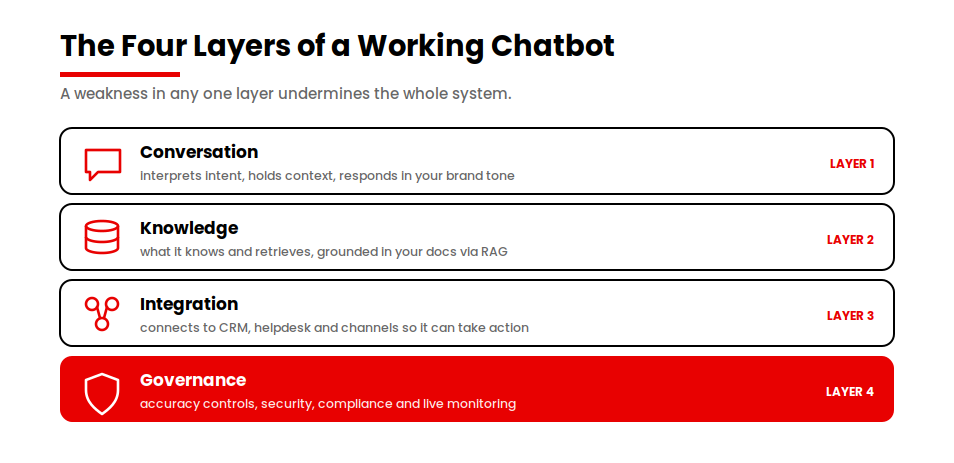
- The conversation layer governs how the bot interprets intent, holds context across a multi-turn exchange and responds in a tone that fits your brand.
- The knowledge layer determines what the bot knows and how reliably it retrieves the right answer, which is where retrieval-augmented generation or RAG and structured access to your help documentation, product data and policies come into play.
- The integration layer connects the bot to your CRM, your helpdesk, your order systems and your channels, so that it can pull customer history, log tickets and take action rather than simply produce text.
- The governance layer covers accuracy controls, security, compliance and the monitoring that keeps the system honest once real customers are using it.
When we evaluate any LLM integration, we work through a consistent checklist: business outcomes and success metrics, knowledge sources such as documents and historical records, accuracy requirements, human review requirements, integration needs, security and compliance considerations, and the expected scale and usage patterns. For RFP Success specifically, the assistant leverages historical proposals, RFP documents and compliance requirements to generate recommendations while keeping users in control of final submissions.
Why do the layers have to work together?
I treat these layers as one connected system because a weakness in any single layer undermines the whole. A bot with an excellent model and poor knowledge grounding will answer confidently and incorrectly, and a bot with strong integration but no escalation path will trap frustrated customers in a loop. The value of a professional engagement lies in making deliberate decisions across every layer and in building the operational scaffolding that turns a promising demo into a system you can rely on in front of customers.
Types of AI Chatbots You Can Build
The right type of chatbot depends almost entirely on what you are trying to accomplish, and the gap between the simplest and the most capable options is wide enough that choosing the wrong category early can cost you both time and budget. Most business chatbots fall into a handful of recognizable patterns and understanding them helps you scope your own project before you ever speak to a vendor.
Support, sales and internal helpdesk bots
Customer-support bots are the most common starting point and they are designed to deflect repetitive inquiries by answering questions grounded in your help center, policies and product documentation. When these bots are built well, they handle a meaningful share of incoming volume without human involvement and hand off cleanly when a question falls outside their confidence.
Sales and lead-qualification bots sit on marketing pages and in messaging channels, where they engage prospects, answer pre-purchase questions, capture intent and route qualified leads into your pipeline. Internal helpdesk bots serve your own employees rather than your customers, fielding IT, HR and operations questions against internal knowledge bases and reducing the load on overstretched support teams.
RFP Success is essentially an internal assistant of this kind , it helps proposal teams draft, evaluate, score and improve their RFP responses against their own historical material.
Transactional and multi-channel systems
Beyond these, transactional bots move past conversation into action, integrating with backend systems to check order status, process returns, schedule appointments or update account details. Multi-channel and agentic systems represent the most ambitious end of the spectrum, where a single conversational core serves your website, WhatsApp and Messenger at once, draws on your CRM and operational data through RAG and increasingly takes multi-step actions on a customer’s behalf rather than answering one question at a time.
For a deeper look at how this autonomous direction is reshaping software, our guide to agentic AI for businesses explains where conversational systems are heading and what it takes to deploy them responsibly.
How Much Do AI Chatbot Development Services Cost?
The cost of hiring an AI chatbot development service varies depending on what you’re building. A no-code FAQ bot can be stood up for the price of a monthly subscription, while a custom, compliance-grade, multi-channel system integrated with your core operations can exceed $300,000. The figure that matters for your project is the one tied to your specific use case, your channels and the depth of integration you actually need, rather than the broad market range.
The table below breaks down the four possible cost tiers you can choose from:
| Chatbot type | What’s included | Typical build cost | Timeline | Ongoing monthly | Under $10K? |
|---|---|---|---|---|---|
| No-code / builder bot | FAQ flows, 1 channel | $50 to $500 / mo | 1 to 2 weeks | $50 to $500 | Yes |
| LLM API support bot | 1 channel, light RAG | $8K to $40K | 6 to 10 weeks | API + hosting | At low end |
| RAG multi-channel bot | CRM + web / WhatsApp | $40K to $120K | 10 to 16 weeks | API + infra | No |
| RAG enterprise | Enterprise RAG, compliance | $100K to $250K | 16 to 24 weeks | Infra + upkeep | No |
| Agentic enterprise | Autonomous, multi-step agents | $250K to $500K+ | 24+ weeks | Infra + agent ops | No |
Can you build a useful bot under $10,000?
The LLM API support bot at its low end is where the under-$10,000 question gets answered. Yes, a useful bot can be built for under $10,000 and it remains one of the highest-return projects a mid-market company can commission, but the budget defines the scope rather than the quality.
At that level, you are building a single-channel support or FAQ bot on a pre-trained model such as GPT, Claude or Gemini, grounded in your existing help documentation with light RAG and tuned to escalate cleanly when it is unsure. What you give up at that price is deep CRM integration, deployment across multiple channels, custom analytics and the extensive accuracy work that a larger budget pays for.
For many teams, that is exactly the right place to start because it validates the use case and produces real savings before you invest in the more expensive tiers.
What drives cost as you scale up
As you move up the table, the cost is driven less by the model and more by integration and assurance. Connecting a bot to your CRM and helpdesk, deploying it across web and messaging channels, grounding it reliably in proprietary data and meeting security and compliance requirements all add engineering effort, and that effort is where the budget goes.
This is where software development cost estimation becomes more meaningful than AI cost estimation. In practice, the real investment is shaped by system complexity: how many tools the bot connects to, how deeply it integrates into business workflows, how strictly data must be controlled, and how much validation is required before it can safely operate in production.
Generating and evaluating a proposal in RFP Success with modern LLMs may cost anywhere from a few cents to a few dollars depending on proposal size, model selection and workflow complexity. The figures above are working benchmarks rather than fixed prices, so treat them as a planning range and expect a credible vendor to narrow them once they understand your channels, data and integration needs.
How Long Does It Take to Build and Deploy an AI Chatbot?
Timeline tracks closely with the cost tiers because the same factors that drive budget also drive the calendar. A no-code FAQ bot can be configured and launched in one to two weeks, since the heavy engineering has already been done by the platform and your team is mostly designing flows and loading content. An LLM API support bot typically takes 6 to 10 weeks from kickoff to a production launch, with the bulk of that time spent on conversation design, knowledge grounding, escalation logic and the testing required to make the bot trustworthy in front of customers.
Timelines for more complex builds
More ambitious systems take proportionally longer. A RAG-based multi-channel bot integrated with your CRM and deployed across web and messaging generally runs 10 to 16 weeks because each integration and each additional channel introduces its own design, testing and security work. For enterprise-grade assistants like RFP Success, we usually plan for implementation timelines of 8 to 16 weeks depending on requirements and integrations, and a custom build with agentic capabilities and strict compliance requirements commonly extends beyond that, with the later stages dominated by rigorous testing and governance.
Why the launch date is not the finish line
It is worth setting expectations clearly on one point: the launch date is not the finish line. The weeks immediately after deployment are when a chatbot improves most, as real conversations reveal gaps in the knowledge base, surface intents the team did not anticipate and show where the escalation thresholds need adjusting. A realistic timeline therefore includes a tuning period after go-live, and the teams that see the strongest results are the ones that plan for that optimization phase rather than treating launch as the end of the engagement.
No-Code Builder vs. Hiring a Development Company: Which is Right for You?
Use a no-code builder when you need a simple FAQ or marketing bot live quickly and cheaply. Hire a development company once the bot has to connect to your CRM, serve multiple channels, handle sensitive data, or meet compliance standards. Most businesses start on a no-code platform and outgrow it. The problem doesn’t lie with the tools; the chatbot simply becomes part of core operations, and a configuration-only platform runs out of room.
The table below compares the two approaches across the factors that actually decide the outcome.
| Factor | No-code builder | Custom development |
|---|---|---|
| Upfront cost | Low, often a monthly subscription | Higher one-time build investment |
| Time to launch | Days to two weeks | Six weeks and up |
| Integration depth | Limited to supported connectors | Deep, API-level integration with your stack |
| Data control & security | Constrained by the platform | Full control over data handling and compliance |
| Accuracy & customization | Template-bound, limited tuning | Custom grounding, thresholds and tuning |
| Best for | Simple FAQ and marketing bots | CRM-connected, multi-channel, regulated use cases |
How to decide where your use case sits
Reading that comparison, the decision usually resolves itself once you are honest about where your use case sits. If the bot only needs to answer a fixed set of common questions on a single channel, a no-code builder will get you live fast and at minimal cost, and paying for custom AI development would be over-engineering.
If the bot needs to pull customer history from your CRM, log and update tickets, respond consistently across your website and messaging channels or operate under data-protection requirements, a no-code platform will eventually force compromises that undermine the very value you are trying to capture. The most expensive mistake in this category is starting with a builder, investing months of content and process work, and then having to rebuild on custom infrastructure once the bot becomes business-critical.
Integrating Your Chatbot: CRM, Support Tools and Channels
Integration is where most of the engineering effort sits and it is also where most of the business value is created, which is why it deserves close attention during scoping. A chatbot that simply answers questions in a chat window is useful, but a chatbot that recognizes a returning customer, pulls their order history from your CRM, logs a ticket in your helpdesk and continues the same conversation whether the customer started on your website or in WhatsApp is operating at an entirely different level.
Reaching that level depends on connecting the conversational core to your existing systems through APIs, so that the bot can both read from and write to the tools your team already relies on.
Connecting to your systems and channels
On the systems side, the most common integrations are with your CRM, your helpdesk or ticketing platform and your order or account systems. These connections let the bot personalize responses using real customer data, create and update records rather than leaving work for an agent to redo, and trigger downstream actions such as processing a return or scheduling a callback.
On the channel side, a well-designed system serves your website, WhatsApp and Messenger from a single core, which means you maintain one knowledge base and one set of escalation rules rather than building and reconciling separate bots for each surface. That single-core approach is the difference between a coherent customer experience and a fragmented one.
Where no-code integration hits its limits
It is fair to note that no-code builders offer some integrations out of the box and for simple scenarios, those connectors are enough. The limits appear with complex workflows, conditional logic that spans multiple systems and the data-security controls that regulated industries require, all of which tend to exceed what a configuration-only platform can support. When integration depth becomes the deciding factor, custom development is usually the path that holds up over time because it gives you full control over how data moves between the bot and your stack.
Accuracy, Security and What Happens When the Bot is Wrong
This is the question buyers worry about most, so it is worth being direct. A well-built chatbot grounded in your data with RAG answers accurately the large majority of the time, but no chatbot is perfect. The mature way to think about accuracy is not whether the bot will ever be wrong but whether your system is designed to catch, contain and recover from the errors that inevitably occur. The single most common reason an AI assistant underperforms after launch, in my experience, is a lack of human oversight and ongoing monitoring.
The three safeguards that contain errors
Three safeguards do most of that work.
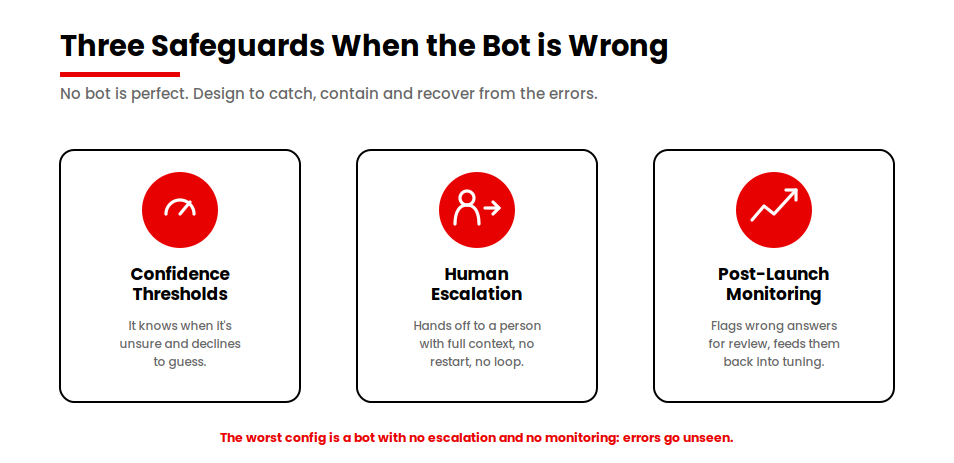
- Confidence thresholds let the bot recognize when it is unsure and decline to guess, which prevents the most damaging failure mode of a system that answers incorrectly with full confidence.
- A clear human-escalation path ensures that when the bot reaches the edge of what it knows, the customer is handed to a person smoothly, rather than left stuck in a loop, and that handoff carries the conversation context so the customer does not have to start over.
- Post-launch monitoring closes the loop by flagging low-confidence and incorrect answers for human review, feeding those cases back into the knowledge base and the tuning process so the system improves over time rather than repeating the same mistakes.
I build these in as core requirements, not nice-to-haves: human review and approval workflows, confidence-based recommendations, continuous monitoring, post-launch tuning using real user interactions, and transparent AI suggestions rather than automatic decisions. In RFP Success, the AI acts as an advisor rather than a decision-maker. Users can review recommendations, request alternative evaluations, and modify proposals before final submission , they remain in control of every final decision and can modify, reject or request alternative AI recommendations at any stage.
Security and data control
On security, a custom build gives you control over how sensitive data is handled, stored and transmitted, which matters a great deal when the bot touches customer records or operates in a regulated sector. That control extends to data-residency choices, access controls, audit logging and the compliance frameworks your industry requires, and it is one of the clearest reasons that businesses with sensitive data move from no-code platforms to custom development. Occasional wrong answers are normal, and a well-built system handles them. The configuration that does real damage is a bot running with no escalation and no monitoring: its mistakes go unseen, and customer trust erodes before anyone notices.
Modeling AI Chatbot ROI
AI chatbots are profitable when they deflect enough support volume to more than cover their run cost, and the way to know is to model it before you commit. The core calculation is straightforward and it gives you a defensible number you can take to your own finance team. But I want to be clear about where the return actually comes from, because organizations often focus on the wrong line.
The deflection model for support bots
For a support use case, the model works like this. Take the number of support tickets the bot deflects each month, multiply that by your fully loaded cost per ticket, and subtract the chatbot’s monthly run cost. The result is your monthly saving, and dividing the build cost by that monthly saving gives you a payback period in months.
To make that concrete, consider an illustrative support bot. Suppose your team handles 10,000 support contacts a month at a fully loaded cost of $5 per ticket and the bot reliably deflects 35 percent of them, which is 3,500 tickets. At $5 each, that is $17,500 in monthly support costs the bot absorbs. If the bot’s monthly run cost, including API usage and hosting, is $2,500, your net monthly savings are $15,000. Against a build cost of $30,000, the project pays for itself in roughly two months, after which the savings compound. Many support bots reach payback within 6 to 12 months, and the high-volume support and sales use cases tend to recover their cost fastest because deflection scales directly with traffic.
The same logic applied to a business assistant: RFP Success
The deflection formula is for support volume, but the same ROI logic applies to any assistant that removes manual effort, and this is exactly what we saw with RFP Success.
Before using the platform, proposal teams typically spent around 12 hours preparing a complete proposal. With AI-assisted drafting, proposal scoring, gap analysis, compliance checks and an integrated AI assistant, that effort dropped to roughly 4 hours, a time saving of about 67 percent per proposal. The platform also compressed internal review cycles: teams that previously needed around three review rounds reported reducing proposal reviews to a single cycle before submission. For organizations preparing proposals regularly, those efficiency gains translate directly into lower labor costs, faster turnaround times and higher proposal throughput, while the AI processing cost per completed proposal stays in the range of cents to a few dollars.
Why volume decides profitability
Profitability depends heavily on volume, and that has a clear strategic implication. A bot deployed against a high-traffic support queue or an active sales channel will clear its payback threshold quickly, while a bot serving a low-volume use case may take longer to justify, even when it is built well. The discipline of modeling deflection , or, for an assistant, hours saved, cost per unit and run cost before you commit is what separates a confident investment from a hopeful one.
For broader benchmarks on how AI is moving these numbers across the industry, our roundup of AI in app development statistics provides additional context you can use to sanity-check your own assumptions.
What to Expect From an AI Chatbot Development Engagement
A well-run engagement follows a recognizable arc, and knowing that arc in advance helps you judge whether a vendor’s proposal is complete or whether it quietly omits the stages that matter. The work divides cleanly into building, training and optimizing, and each stage carries its own deliverables and its own decisions for you to be involved in.
The build and training stages
The build stage starts with discovery and scoping, where we define the use case, the channels, the systems to integrate with and the success metrics the project will be measured against. From there, it moves into conversation design, model selection and the engineering work of connecting the bot to your data and your stack.
The training stage is where the bot learns your business, as we ground it in your help documentation, product data and policies, set up retrieval so it pulls the right context and tune its tone and escalation behavior. This stage is where the difference between a generic bot and one that genuinely represents your business is made, and it rewards the time invested in curating clean, accurate source material.
The optimization stage
The optimization stage begins at launch and never fully ends, because a chatbot is a living system rather than a finished artifact. In the weeks after go-live, we review real conversations, identify questions the bot mishandled, expand the knowledge base to close those gaps and adjust confidence thresholds based on how the bot performs in the wild.
The strongest results come from clients who treat this phase as part of the engagement rather than an afterthought, because the bot that launches is rarely the bot that delivers its best numbers. When you evaluate proposals, look closely at how each vendor handles training and post-launch optimization, since those are the stages where capable partners distinguish themselves and where shortcuts do the most damage.
How to Choose an AI Chatbot Development Company
Choosing the right partner comes down to whether a company can do the unglamorous work well, rather than whether it can produce an impressive demo. A polished demo proves very little because the gap between a demo and a production system lies precisely in the areas that demos hide — knowledge grounding on messy real data, integration with your specific stack, escalation under genuine uncertainty and monitoring that keeps the system reliable over months of use. The questions worth asking a prospective vendor therefore focus on those areas.
Questions to ask a prospective vendor
- How do you ground the bot in our proprietary data?Ask how they handle retrieval, embeddings, and knowledge update, and what happens when the bot is unsure. This reveals whether accuracy is treated as an engineering discipline or an afterthought.
- How does the system handle uncertainty and wrong answers? Look for clear fallback logic, confidence thresholds, and escalation to humans (not vague “it improves over time” answers).
- How do you integrate with our existing tools? Specifically ask about CRMs, helpdesks, and internal systems you already use (e.g., Salesforce, HubSpot, Zendesk). The depth of integration is a key differentiator.
- What security and compliance standards do you follow?Request specifics: SOC 2, GDPR, HIPAA (if relevant), data encryption, and how sensitive data is stored and accessed.
- What does post-launch optimization look like? Ask how they monitor performance, improve responses, retrain or refine the system, and what ongoing support is included after go-live.
- Can you provide a realistic cost, timeline, and ROI estimate? Not a generic range, something tied to your actual use case. Strong vendors will scope conservatively and explain assumptions clearly.
What a strong AI partner looks like
- They answer these questions with specifics, not buzzwords
- They clearly explain what to build and what not to build
- They are transparent about limitations, edge cases, and trade-offs
- They treat scoping as seriously as development
Conclusion
The decision in front of you is not whether an AI chatbot is worth building but which version fits your use case, your channels and your budget, and whether it will pay for itself once it is live. If you know your primary use case and the systems it needs to connect to, you have enough to get a realistic cost, timeline and ROI estimate. My consistent advice is to design around the workflow rather than the model, keep a human in the loop, and judge the return by the manual effort you remove, that is where the value has always come from in the projects I’ve built.
Ready to scope your build?
If you know your use case and the systems it needs to connect to, the next step is a realistic cost, timeline and ROI estimate tied to your project. Let’s talk through what to build and what to skip.
Want a starting point first? Estimate your project with the app cost calculator to see where it lands.