Logistics Software ROI: What to Realistically Expect (With Calculations)

Custom logistics software can deliver 100–200%+ ROI within 2–3 years through fuel savings, labor automation, and improved delivery performance. Companies that implement route optimization, automated order fulfillment, and real-time inventory tracking consistently cut costs and boost customer retention.

For example, UPS said its ORION route-optimization platform reduced average daily driving by six to eight miles per route and was expected to save 100 million miles and 10 million gallons of fuel annually when fully deployed in the U.S. Costa Logistics also reported a 10% reduction in cost per case, a 14% increase in pick rate, and a 14% reduction in direct labor hours after upgrading its WMS and analytics stack. 

In this guide, we show you how to calculate your logistics software ROI, which metrics to track, and how to structure your investment for maximum returns.

What Is ROI in Logistics Software Development?

Return on Investment (ROI) is a financial metric used to assess the profitability of any investment relative to its cost. For logistics software, it answers a simple but critical question: how much value does the software generate compared to what you spent on it?

ROI for logistics software is about determining whether the benefits, cost savings, operational efficiency, revenue growth — outweigh the total costs of development, implementation, and ongoing maintenance. It measures the impact of the software on both short-term performance and long-term profitability.

Why Is ROI Important for Logistics Software?
Why ROI matters for logistics software investment decisionsWhy ROI matters for logistics software investment decisions

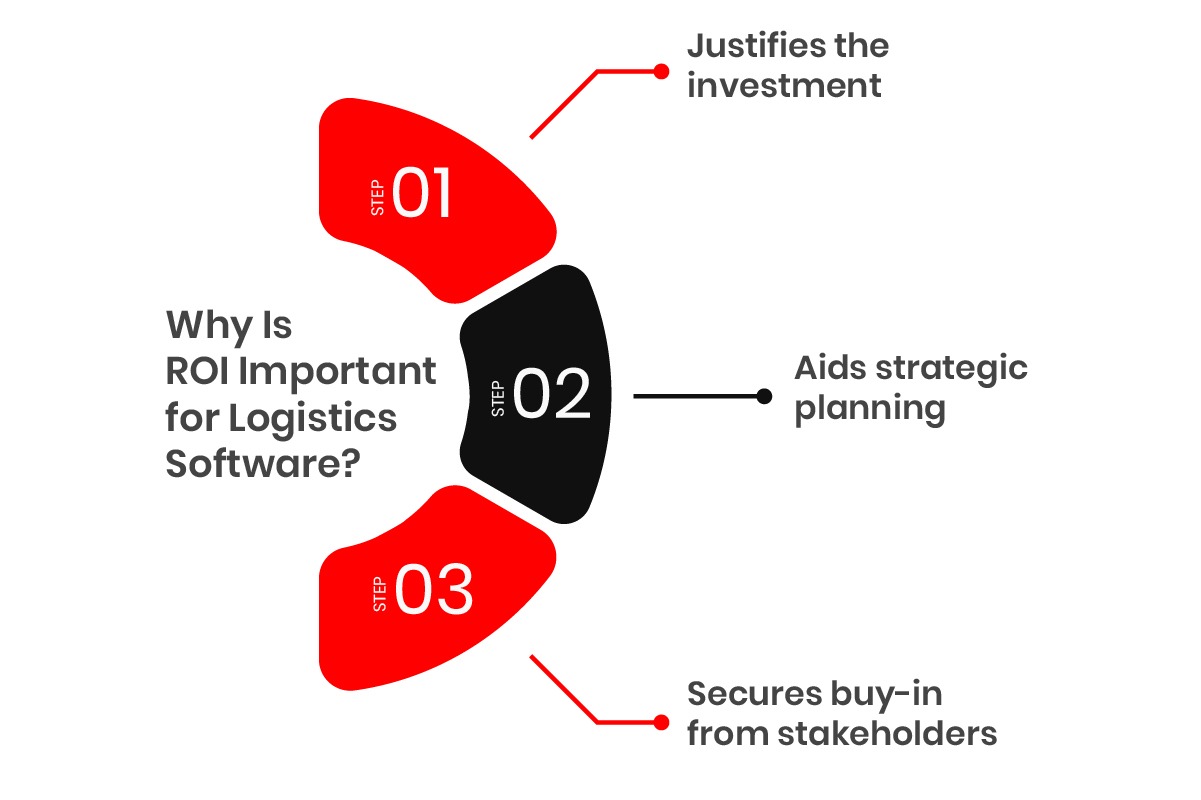
  • Justifies the Investment: Whether you’re a logistics manager, CFO, or CEO, a clear ROI calculation validates the decision to invest in custom logistics software and demonstrates that the technology will pay for itself over time.
  • Aids Strategic Planning: ROI isn’t just a number — it’s a roadmap. Understanding how it impacts your business helps you allocate resources, prioritize investments, and make decisions that support long-term goals.
  • Secures Buy-In from Stakeholders: ROI is the language every stakeholder understands. A clear calculation gives them confidence that the project will produce measurable improvements.

Breaking Down the Key Components of ROI in Logistics Software

When calculating ROI, you’re not just looking at upfront costs. Several factors contribute to the total picture:

  • Development Costs: Software design, engineering, testing, and project management. A custom platform integrating a warehouse management system (WMS), freight management system, and real-time analytics will require significant upfront investment, typically $80K–$500K+ depending on scope.
  • Integration Costs: Connecting with existing ERP, WMS, and TMS systems adds roughly 15–25% to base development costs, depending on complexity.
  • Operational Efficiency Gains: This is the real payoff. Automating manual tasks, optimizing routes, and improving inventory management generate immediate cost savings, route optimization alone can reduce fuel spend by up to 15%.
  • Ongoing Maintenance & Support: Budget approximately 10–15% of initial development costs per year for updates, security patches, and scalability enhancements.
  • Revenue Growth: Improved efficiency, faster deliveries, and higher customer satisfaction directly impact revenue. Companies with improved order fulfillment and real-time tracking report 15–20% higher customer retention rates.

For a full cost breakdown, see our guide on logistics software development cost.

Why ROI Should Be Your Key Metric

  • Guides Future Investments: Strong ROI gives you the confidence to reinvest savings into further innovation.
  • Enhances Operational Transparency: Clear ROI metrics reveal exactly where money is going and where it’s returning, helping you identify areas for improvement.
  • Aligns with Business Goals: ROI directly links technology investments with core objectives — cost reduction, revenue growth, or customer satisfaction.

Why Custom Logistics Software Is the Key to Maximizing ROI

Off-the-shelf logistics software may appear cost-effective initially, but it consistently underperforms when it comes to adapting to your specific business needs. Custom logistics software is built around your workflows, making it more efficient, scalable, and capable of driving stronger returns. Here’s Why: 
Why Custom Logistics Software Is the Key to Maximizing ROI

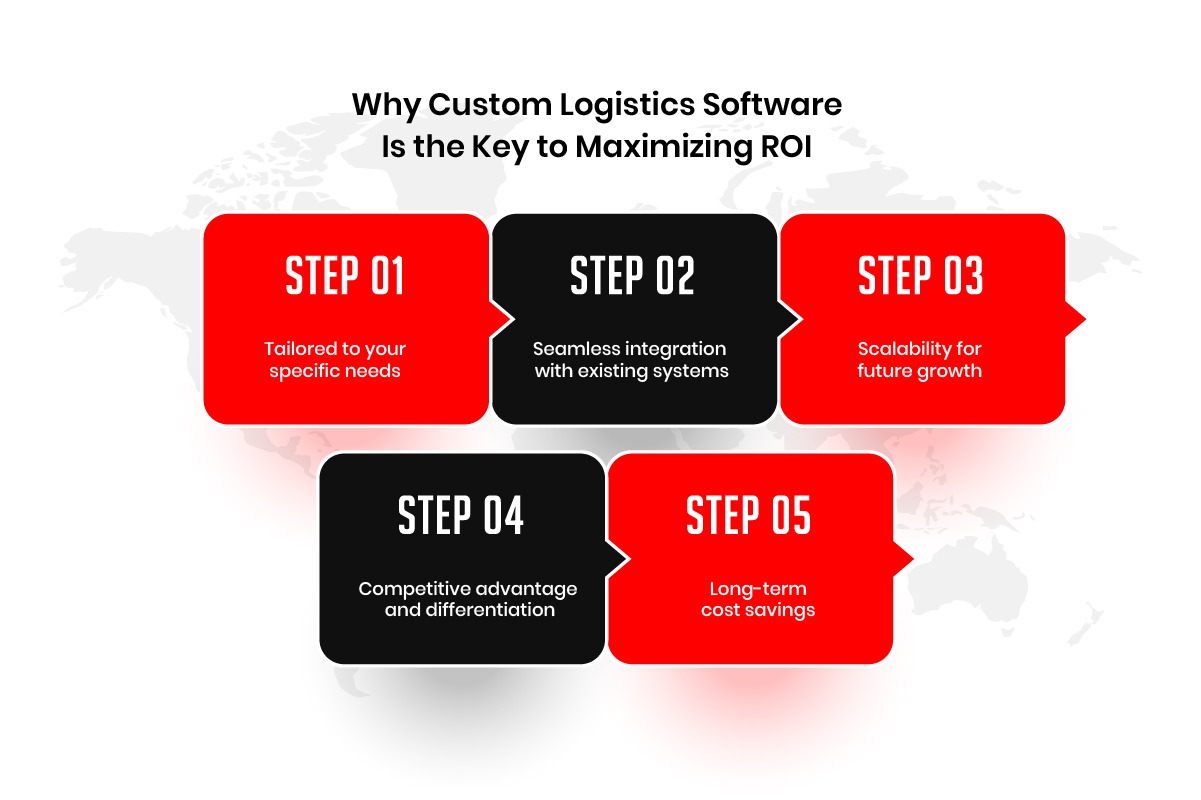
Tailored to Your Specific Needs

Custom software is built specifically for your operations, so you’re not paying for features you’ll never use or missing capabilities you need. If your business relies on multi-modal transportation, for example, custom software can manage the complexities of air, road, and sea logistics far more efficiently than a generic solution.

ROI impact: You get exactly the tools needed to improve efficiency, cut unnecessary costs, and optimize workflows — nothing more, nothing less.

Seamless Integration with Existing Systems

Custom software integrates directly with your existing ERP, WMS, TMS, and other platforms, providing a unified view of your logistics operations. This minimizes disruptions, reduces implementation time, and ensures real-time data flows between systems.

ROI impact: Smooth integration reduces productivity loss during transition and ensures your teams can make faster, data-driven decisions from day one.

Scalability for Future Growth

As your business expands into new regions or adds delivery routes, custom software scales with you — no need for a complete system overhaul. New features and increased volumes are handled through incremental upgrades.

ROI impact: Scalability protects your investment over the long term. You won’t need to re-invest in entirely new systems as your operations grow.

Competitive Advantage

Custom software enables capabilities that competitors using off-the-shelf tools simply can’t replicate — optimized delivery windows, real-time shipment tracking, proactive customer notifications, and more.

ROI impact: A stronger competitive position drives higher customer acquisition, better retention, and in some cases, premium pricing power.

Long-Term Cost Savings

Automation of order fulfillment, route optimization, and inventory management reduces human error, improves resource utilization, and eliminates overstock — all of which compound into significant cost savings over a 2–5 year horizon.

ROI impact: While upfront costs are higher, total cost of ownership over 3–5 years is typically lower than off-the-shelf alternatives when you factor in licensing fees, workaround costs, and productivity losses.

Key Metrics to Track for ROI in Logistics Software

To calculate and validate the ROI of logistics software, you need to track the right KPIs. Here are the categories and the specific numbers that matter.

Operational Cost Savings

  • Fuel Savings: Route optimization reduces fuel consumption by up to 15%, directly impacting your bottom line.
  • Labor Savings: Automation cuts manual task time by 25–40%. Inventory checks, data entry, dispatch coordination, these can all be automated.
  • Inventory Holding Costs: Real-time tracking and smarter replenishment logic can reduce storage costs by 20–30%.
  • Error Reduction: Fewer processing errors mean fewer costly returns, re-deliveries, and customer credits.

Efficiency & Productivity Gains

  • Faster Order Fulfillment: Streamlined workflows reduce order processing cycles, allowing more orders to be processed with the same resources.
  • Increased Throughput: Higher shipment volumes without proportional increases in headcount or equipment.
  • Reduced Administrative Overhead: Automation handles up to 40% of routine administrative work, freeing staff for higher-value tasks.
  • Improved Asset Utilization: Better vehicle scheduling and warehouse space management reduces idle time and wasted capacity.

Revenue & Customer Satisfaction

  • On-Time Delivery Rates: Improved tracking and dispatch coordination drives higher on-time performance, which directly correlates with repeat business.
  • Customer Retention: Even a 5% improvement in retention can increase profits by 25–95% over time, a well-documented effect in service businesses.
  • New Revenue Streams: Enhanced capabilities unlock premium offerings such as same-day delivery, real-time tracking, or guaranteed delivery windows.

Data-Driven Insights

  • Real-Time Tracking: Enables rapid identification and resolution of delays before they escalate into customer-facing failures.
  • Predictive Analytics: Demand forecasting improves inventory positioning and reduces both stockouts and overstock situations.
  • Continuous Optimization: Ongoing data analysis surfaces inefficiencies in routes, staffing, and resource allocation, turning improvement into a repeatable process rather than a one-time event.

How to Track These Metrics Effectively

  • Use Built-In Dashboards: Most logistics platforms provide real-time analytics dashboards, use them actively, not just for reporting.
  • Establish Baselines Before Launch: Document your pre-implementation KPIs so you can measure improvement accurately post-launch.
  • Review Quarterly: ROI from logistics software compounds over time, regular reviews ensure you’re capturing improvements and identifying new optimization opportunities.

Step-by-Step Guide to Calculating Custom Logistics Software ROI

To calculate the ROI of your custom logistics software, follow these key steps:
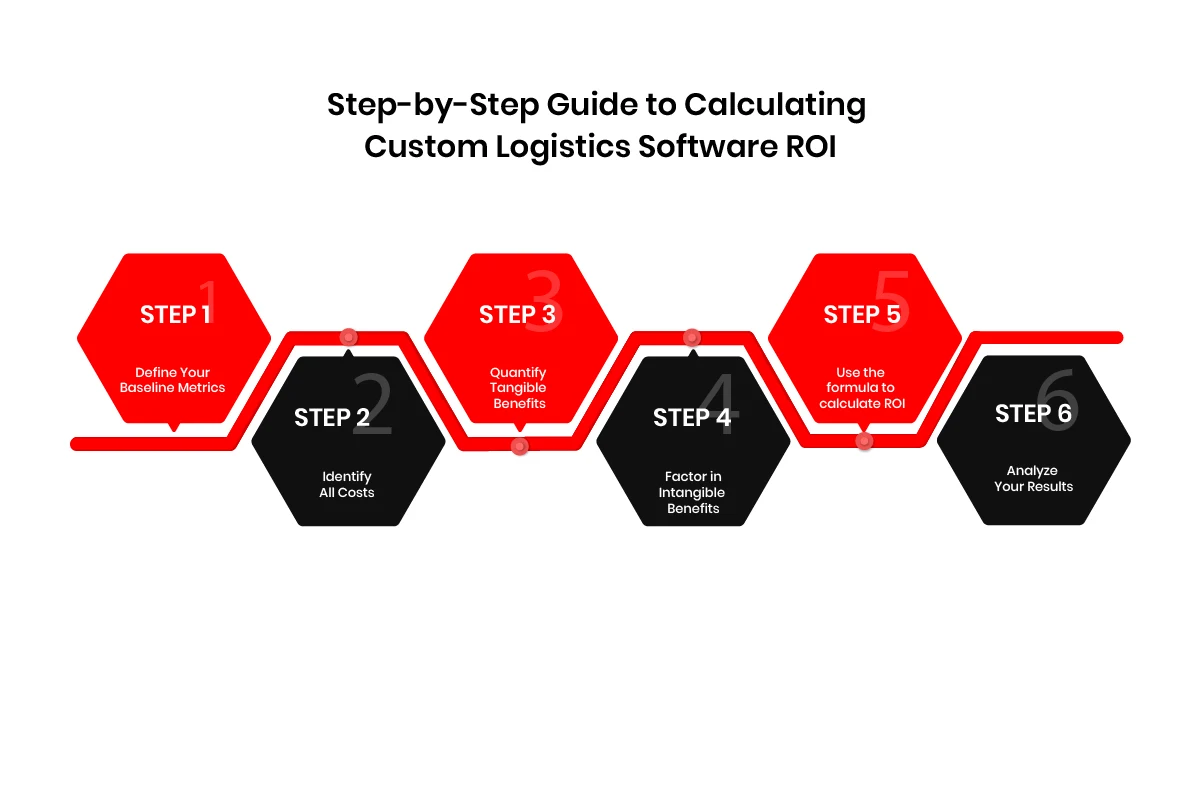
calculating custom logistics software ROI

Step 1: Define Your Baseline Metrics

Start by gathering data on current operational costs (fuel, labor, inventory, etc.) and key performance indicators (KPIs) like order fulfillment time and customer satisfaction. This gives you a clear “before” picture.

Step 2: Identify All Costs

Calculate the total investment, including:

  • Development costs: Developers, designers, and project management.
  • Implementation costs: Integration with existing systems.
  • Training and support costs: Onboarding and ongoing technical support.
  • Maintenance costs: Updates and security.

Step 3: Quantify Tangible Benefits

Measure the direct benefits like:

  • Cost savings: Fuel, labor, inventory holding.
  • Revenue growth: Customer retention, faster deliveries, and new services.

Step 4: Factor in Intangible Benefits

Consider qualitative benefits like:

  • Customer satisfaction: Leads to loyalty and repeat business.
  • Employee productivity: Streamlined processes improve staff efficiency.

Step 5: Apply the ROI Formula

ROI Formula

ROI = ((Total Benefits − Total Costs) ÷ Total Costs) × 100

Example Calculation:
Category Amount ($)
Annual fuel savings 80,000
Annual labor savings 120,000
Inventory holding cost reduction 60,000
Revenue gain from improved retention 80,000
Total Annual Benefits 340,000
Development + integration cost 200,000
Year 1 maintenance 25,000
Total Year 1 Costs 225,000
ROI (Year 1) 51%
3-Year ROI (with annual maintenance) ~170–200%

Step 6: Analyze Your Results

Evaluate your ROI by looking at:

  • Payback period: How long until you recoup your costs?
  • Net Present Value (NPV): For a more accurate long-term view.

By following these steps, you can confidently calculate the ROI of your logistics software and track its ongoing impact on your operations.

Custom vs. Off-the-Shelf Logistics Software: ROI Comparison

A common question when justifying the investment in custom software is how it stacks up against buying an off-the-shelf solution. The table below provides a realistic comparison over a 3-year period for a mid-sized logistics operation.

Factor Off-the-Shelf Software Custom Logistics Software
Upfront Cost $20,000–$80,000 (licensing + setup) $80,000–$500,000+ (development)
Annual Ongoing Cost $15,000–$60,000 (subscriptions, per-user fees) $8,000–$50,000 (maintenance, 10–15% of dev cost)
3-Year Total Cost $65,000–$260,000 $104,000–$650,000
Integration Fit Partial — requires workarounds Seamless — built for your systems
Scalability Limited by vendor roadmap Fully scalable with your growth
Workflow Match You adapt to the software Software adapts to you
Typical 3-Year ROI 40–90% 100–200%+
Payback Period 6–18 months 18–36 months
Long-Term Value (5yr+) Decreases as limitations compound Increases as the system scales with the business
Off-the-shelf solutions offer a faster initial payback but plateau in value, often forcing a costly replacement or customization project within 3–5 years. Custom software requires a larger upfront commitment but compounds in value as it scales with your operations.

Understanding Payback Period and Net Present Value (NPV)

ROI tells you the magnitude of your return. Payback period and NPV tell you when and whether that return is worth pursuing given the time value of money.

Payback Period

The payback period is how long it takes for cumulative benefits to equal your total investment. It is the most intuitive way to assess financial risk.

Payback Period = Total Investment ÷ Annual Net Benefit
Example:
Total investment (development + integration): $200,000
Annual benefits (savings + revenue gains): $340,000
Annual maintenance: $25,000
Annual net benefit: $315,000
Payback Period = $200,000 ÷ $315,000 ≈ 7.6 months

For smaller operations with lower benefit volumes, a payback period of 18–30 months is typical and still represents a strong investment.

Net Present Value (NPV)

NPV accounts for the fact that money earned in the future is worth less than money today (due to inflation and opportunity cost). A positive NPV means your investment creates real value; a negative NPV means the costs outweigh the discounted future benefits.

NPV = Σ (Annual Benefit ÷ (1 + Discount Rate)^Year) − Initial Investment

Example (using a 10% discount rate over 3 years):

Year Benefit ($) Discount Factor Discounted Benefit ($)
Initial Investment $200,000 -$200,000
Year 1 $340,000 1.10 $309,090
Year 2 $340,000 1.21 $280,991
Year 3 $340,000 1.33 $255,639
Sum of Discounted Benefits $845,720
NPV $645,720 — strongly positive


For more conservative scenarios with a higher discount rate (15–20%) or lower benefit volumes, NPV analysis helps you stress-test the investment before committing.

Rule of thumb: If your payback period is under 24 months and your 3-year NPV is positive, the investment is financially sound for most logistics operations.

How to Maximize ROI from Your Custom Logistics Software

1. Continuously Optimize Software Use

Monitor KPIs on a regular cadence and use data insights to make iterative improvements to workflows. Small, consistent optimizations across routes, staffing, and inventory management compound into significant gains over time.

Why it matters: Continuous optimization keeps the software aligned with evolving business needs and prevents performance from plateauing after initial deployment.

2. Ensure Full User Adoption

Train your team thoroughly on all features — not just the ones immediately visible — and create feedback channels so users can report friction points. Underutilized features are wasted investment.

Why it matters: Studies consistently show that user adoption rate is one of the strongest predictors of software ROI. A 70% adoption rate does not generate 70% of the potential ROI, it often generates far less, because the highest-value features tend to be the most complex ones.

3. Design for Scalability from Day One

Work with your development partner to architect the system with future growth in mind. Plan for modular feature expansion, higher data volumes, and new geographic markets.

Why it matters: A system that can scale avoids costly re-development projects as your business grows, protecting the original investment well into the future.

4. Choose the Right Development Partner

Work with developers who have direct logistics domain experience, not just general software engineers. A partner who understands TMS, WMS, and freight operations will make better architectural decisions and anticipate integration challenges before they become expensive problems.

Why it matters: The development partner you choose will have an outsized impact on the long-term value of the software, not just whether it works on launch day, but whether it continues to deliver value for years afterward.

5. Use Phased Rollouts for Faster Early Returns

Implement in phases, starting with the highest-impact areas (route optimization, automated dispatch, or inventory tracking). Use real-world performance data from each phase to refine the next.

Why it matters: Phased rollouts allow you to start generating ROI while the full system is still being built, and they reduce the risk of a large-scale failure by letting you catch and fix issues early.

Final Thoughts

Investing in custom logistics software development offers significant potential for operational improvements, cost savings, and revenue growth. By accurately calculating ROI, tracking the right metrics, and continuously optimizing your system, you can unlock its full value and build a strong foundation for long-term success.

Maximizing ROI is an ongoing process, not a one-time event. It requires thoughtful planning from the architecture stage, full user adoption, scalable system design, and a development partner with genuine logistics domain expertise. When those elements come together, logistics software doesn’t just pay for itself. It becomes a sustainable competitive advantage.

At AppVerticals, we specialize in custom logistics software development tailored to the specific needs of your operation. Our team can help you build a solution that optimizes your logistics workflows, maximizes ROI, and scales with your business, from initial scoping through long-term support.

Future-Proof Your Logistics Operations

With scalable, tailored logistics software, your business can grow efficiently. Let’s discuss your custom software needs today.

App Development Cost in 2026: Average Prices and a Full Cost Breakdown

App development cost in 2026 runs from roughly $25,000 for a single-platform MVP to $400,000 and beyond for a compliance-heavy enterprise build. Most funded products land between $60,000 and $180,000. Those are averages across very different scopes, which is why two quotes for the same brief can look nothing alike.

I spend most of my week on estimation calls, and by the time someone reaches me they have usually stopped asking what an app costs. They have two quotes on the desk, four times apart, and they want to know which one is honest. Both usually are. They are pricing different products.

What moves your total is scope depth, platform strategy across native Swift and Kotlin versus React Native or Flutter, backend architecture on AWS, Azure or Firebase, integration count across services like Stripe and Twilio, regulatory exposure under HIPAA, PCI-DSS or GDPR, and the billing model buried in your contract.

This guide breaks the number into line items you can defend to a CFO, prices the years after launch, and answers the thing you are really asking: how long until it pays you back.

The hourly rate is the smallest variable in your budget. What decides your final invoice is how precisely the scope was written down before anyone started building.

Key Takeaways:

  • Most apps cost $60,000 to $180,000, with MVPs from $25,000 and regulated builds past $400,000.
  • Cost is hours × rate, so ask every vendor for the hour count behind their number.
  • The billing model moves your total more than the hourly rate does.
  • Maintenance runs 15–25% of the build cost, every year, forever.
  • Decide how the app pays back before you commission it.
  • Two integrations or fewer, no compliance exposure? An app builder will do.

Average App Development Cost in 2026: A Full Breakdown

Here is the band I use as a starting point on every scoping call. Treat it as the frame you place your project inside, then adjust with everything in the sections below.

Complexity Tier What It Includes Average Cost Timeline
MVP / Simple Single platform, 5–8 screens, basic authentication, minimal backend, and no third-party complexity $25,000 – $60,000 3 – 5 months
Mid-Complexity Cross-platform development, user accounts, payments, push notifications, admin panel, and 3–5 integrations $60,000 – $180,000 5 – 9 months
Complex Real-time features, multiple user roles, custom algorithms, analytics dashboards, and high-scale requirements $180,000 – $400,000 9 – 15 months
Enterprise / Regulated Multi-platform ecosystem, HIPAA or PCI-DSS requirements, audit logging, SSO, and legacy system integrations $400,000+ 12 – 24 months

The tier you belong in is set by integration depth and compliance exposure, rarely by screen count. I have scoped a 12-screen app at $210,000 and a 40-screen app at $70,000. The 12-screen one talked to three hospital systems and that is exactly what majorly altered the range.

App category shifts the same numbers again, because certain categories carry structural cost that has nothing to do with how the app looks. Understanding different mobile app use cases can help businesses define the right scope, features, and complexity level before estimating development costs.

App Type Primary Cost Driver Typical Range Timeline
On-demand marketplace Three products in one: customer app, provider app, and admin console; plus live matching and dispatch logic $150,000 – $400,000+ 9 – 15 months
E-commerce Catalog performance at scale, payment and refund flows, and inventory synchronization with existing ERP systems $70,000 – $250,000 5 – 10 months
Messaging / Social Real-time delivery guarantees, media storage, CDN costs, moderation tooling, and encryption requirements $120,000 – $300,000+ 8 – 14 months

The on-demand row can sometimes confuse you as a founder. The truth is; when someone tells me they want “an app like Uber,” they are describing three applications and a dispatch engine. The pricing conversation gets much easier once we say that out loud.

Not sure which tier your project sits in?

Answer a few questions about your scope and get a range built around your project instead of an average.

Calculate Your App Cost

Why App Development Cost Estimates Vary

Something I get asked constantly: why does every published figure contradict every other one? It is a fair question, and the answer tells you a great deal about how to read any estimate you are handed.

Look at what the main public sources actually say.

Source Published Figure What It Measures Why It Reads Differently
Business of Apps Simple: $5,000–$50,000
Medium: $50,000–$120,000
Complex: $120,000–$300,000
Aggregated benchmarks pulled from multiple vendor datasets Includes very small freelance and template-based builds at the bottom, which significantly lowers the starting range.
GoodFirms Simple app: 382–910 hours
Advanced app: 915–2,110 hours
Survey data expressed in development hours rather than dollar estimates Does not assume an hourly rate, so the final cost changes significantly depending on the market and team you hire.
Clutch Agency rates of roughly $25–$149 per hour Self-reported hourly rate ranges from listed agencies Shows rate bands only. It does not indicate how many hours your specific app scope requires.
Agency-published guides Commonly $40,000 to $400,000+ Delivery pricing from firms building mid-market and enterprise applications Usually excludes the freelance pricing floor, so the lower end starts much higher.

None of these are wrong. What makes them deviate is how they measure things.

Hours are the one measure you can apply your own rate to. Take the midpoint of the GoodFirms simple-app range, around 650 hours, and apply a $40 blended rate and you get $26,000. Apply a $120 US rate to the same scope and you get $78,000. Same product, same hours, triple the price.

That single calculation explains most of the confusion in the market. Cost equals hours multiplied by rate, and every published range is quietly making an assumption about one of those two variables.

Here is the position I work from. Hours are a property of your scope and are largely fixed once requirements are settled. Rate is a property of who you hire. Any estimate that gives you a dollar range without telling you the hour count behind it has hidden the only number you can actually negotiate.

So when a vendor sends you a total, ask for the hours. If they cannot produce them, they have not scoped the work.

8 Cost Factors That Drive the Numbers for Mobile App Development

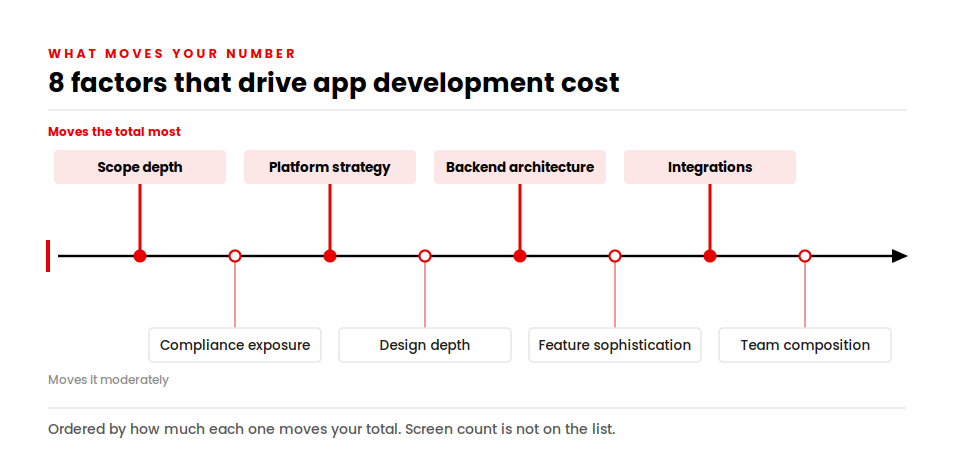
These are the eight variables I adjust on every estimate, ordered roughly by how much they move the total.

Eight app development cost factors on a timeline, ranked from scope depth to team composition

Scope depth, not screen count

A screen showing static content costs a fraction of a screen that reconciles live data from two external systems. When clients send me a wireframe count, I send back a question about what sits behind each one.

Platform strategy

Building separate native apps in Swift for iOS and Kotlin for Android means two codebases, two test cycles, and double the ongoing maintenance surface. A cross-platform build in React Native or Flutter uses one shared codebase and can typically save 30–40% compared with dual native development.

We built Spruce in React Native for exactly that reason, and the client retained 85–95% of native performance while avoiding the cost and complexity of maintaining a second codebase. However, cross-platform is not always the right choice when an app requires deep hardware access, heavy custom animations, or highly platform-specific interactions. Understanding the trade-offs between native and cross-platform development helps teams choose the right approach based on product requirements, budget, and scalability goals.

Backend and cloud architecture

The backend is where your app stores data, enforces rules and talks to everything else. A simple backend with basic authentication and a database runs $10,000–$25,000. One handling real-time processing at scale runs $60,000–$200,000+.

Backend shortcuts are the most expensive mistake I see. Scaling problems never appear at a thousand users. They appear at fifty thousand, when rebuilding costs more than building correctly would have.

Third-party integrations

Every external service you connect to add build time, testing time and an ongoing bill. Payments through Stripe, messaging through Twilio, authentication through Auth0 and analytics through Mixpanel each carry setup cost plus a per-use fee that scales with your traffic.

Industry and compliance exposure

Regulated sectors add a cost layer that generic estimates often leave out. Security architecture and encryption can add $15,000–$40,000, while implementing HIPAA, PCI-DSS, or GDPR controls may add another $10,000–$50,000 plus recurring audit costs.

We built Visionze as a HIPAA-compliant mental health platform, and the compliance requirements represented a clear budget consideration rather than something absorbed quietly during development. A development partner who does not raise compliance during the initial scoping phase may not fully understand the product’s technical and regulatory requirements.

These factors make healthcare app development costs significantly different from standard app projects, especially when security, data privacy, and regulatory workflows are involved.

Design depth

Design decides retention, so it is rarely the place to economize. Here is how design cost actually distributes on a mid-complexity build.

Design Stage Deliverable Cost Range
UX Architecture User flows, information architecture, wireframes $4,000 – $15,000
UI Design System Component library, visual screens, states $8,000 – $35,000
Animation and Micro-interactions Transitions, loading states, feedback patterns $3,000 – $25,000
Brand and Iconography App icon, in-app brand system, store assets $5,000 – $20,000

Feature sophistication

Basic features (profiles, login, content listings) add $10,000–$20,000. Moderate ones (in-app messaging, payments, analytics dashboards) add $20,000–$30,000. Advanced capabilities such as AI recommendations, AR, wearable integrations, or real-time sync add $30,000–$50,000 and upward per capability. Apps that connect with smartwatches, fitness trackers, or medical devices also require additional work around sensor data, Bluetooth communication, and device compatibility. A deeper look at wearable app development helps teams understand these additional cost factors.

Team composition

You are paying for a team, not a developer. A realistic mid-complexity build needs engineers, a designer, a QA specialist, a project manager and some architecture oversight. When a quote looks unusually low, the missing roles are usually the reason.

App Development Cost Breakdown by Stage: Where the Money Actually Goes

When a CFO asks me to justify a number, this is the table I bring. Costs accumulate in phases, each with its own risk profile, and underfunding any single phase reliably produces rework later.

Stage % of Budget Cost Range (Mid-Complexity Build) Duration
Discovery and Requirements 10 – 15% $7,000 – $25,000 2 – 4 weeks
UX and UI Design 20 – 25% $15,000 – $60,000 4 – 8 weeks
Backend Development 20 – 30% $25,000 – $60,000 8 – 14 weeks
Frontend / App Development 25 – 35% $50,000 – $120,000 10 – 16 weeks
QA and Testing 15 – 20% $15,000 – $45,000 Runs alongside build
Launch and Store Deployment 5 – 10% $5,000 – $15,000 2 – 4 weeks
Year-One Maintenance 15 – 25% of build cost $18,000 – $45,000 Ongoing

Two lines in that table are the ones people try to cut, and both are false economies.

Discovery gets cut because it produces documents rather than software. I have watched teams save 30–40% of their downstream budget by validating assumptions during discovery instead of discovering them mid-build, when every correction touches code that already exists.

QA gets cut because it looks like insurance. Skipping it moves the cost rather than removing it, into churn, one-star reviews and emergency patches that cost far more than the testing would have.

App Developer Hourly Rates by Country: What It Costs to Hire in 2026

Geography sets your rate, and rate is one of the two variables in the cost equation. Here is what the market looks like in 2026.

Region Junior Mid-level Senior
United States / Canada $65 – $90/hr $100 – $130/hr $130 – $150+/hr
United Kingdom $60 – $80/hr $85 – $110/hr $100 – $120/hr
Western Europe $50 – $70/hr $70 – $90/hr $80 – $100/hr
Gulf / UAE and Saudi Arabia $45 – $70/hr $65 – $95/hr $85 – $120/hr
Eastern Europe $25 – $40/hr $35 – $55/hr $45 – $70/hr
Latin America $20 – $35/hr $30 – $50/hr $40 – $60/hr
South and Southeast Asia $15 – $25/hr $20 – $40/hr $35 – $55/hr

The gap between a senior US engineer and a senior Eastern European engineer is roughly two to three times per hour. Whether that gap is worth paying depends on your product, not on a general preference for one region.

Cheap hours and low cost are different things. The metric that matters is cost per unit of shipped, working output. A $20/hour engineer who needs three rounds of rework per sprint costs more than a $50/hour engineer who ships correctly the first time.

Rate is only half the picture. How you engage a team changes your total as much as where they sit.

Engagement Model Rate Range Best For Risk Profile True Cost Context
Freelancer $50 – $300/hr Bounded prototypes, single features, short specialist work High — single point of failure, IP exposure, no continuity Cheapest upfront option, but carries higher rework and handover risk
Agency $75 – $250/hr Full production builds with a real deadline Medium — accountability structures exist, but overhead is real Higher upfront investment, but more predictable delivery and support
Dedicated Offshore Team $30 – $80/hr Ongoing product development and scaling Low to medium — if properly vetted and managed Strongest long-term cost per output, but requires internal technical oversight
In-house $150,000 – $200,000/year fully loaded Core product roles at Series A and beyond Low — full alignment and retention Highest total cost, but creates the strongest institutional knowledge

One condition on the dedicated-team row. That model works when you have an internal technical lead or CTO who can evaluate output quality. A dedicated team with no internal technical counterpart becomes a risk rather than a solution.

If you are budgeting per hour rather than per project, the mid-level band in your chosen region multiplied by the GoodFirms hour count for your complexity tier will land you close enough to start a real conversation.

The Quote Anatomy: What You Are Actually Paying For

This is the section I wish every buyer read before their first vendor call, because the billing model in your contract moves your final total more than the hourly rate inside it.

There are three structures in common use.

Time and material. You pay for hours logged. It suits evolving scope and iterative product work, and it drifts badly without milestone discipline and a named person enforcing scope.

Fixed price. You agree a scope and a number. The risk transfers to the vendor, so any competent vendor pads the quote to absorb unknowns, and every subsequent change becomes a priced change order. It works when requirements are genuinely complete before work starts, which for complex products is rare.

Retainer or dedicated engagement. You buy capacity at a monthly rate, typically $3,000–$8,000 per developer depending on seniority and region. It gives predictability and deep product familiarity without employment overhead.

Billing Model Budget Predictability Scope Flexibility Where the Risk Sits
Time and Material Medium High With you
Fixed Price High Low With the vendor, priced into the quote
Retainer / Dedicated High Medium Shared

 The Quote Anatomy Checklist

When two quotes differ wildly, the cause is almost always something absent from the cheaper one. Ask every vendor to price these nine lines separately, in this order, and compare line by line rather than comparing totals.

A related habit worth building: challenge any line item whose label could mean three different things. “User management” can mean a login screen, or it can mean roles, permissions, invitations, audit trails and account recovery. Two vendors reading the same phrase differently is one of the most common reasons quotes diverge, and the gap only surfaces once the build is underway.

  1. Discovery and requirements. If it is missing, you are paying for it later as rework.
  2. UX and UI design. Confirm whether a design system is included or only screens.
  3. Backend and API development. Ask what happens at 10x your expected load.
  4. Frontend build, per platform. Confirm exactly which platforms the number covers.
  5. Third-party integrations, itemised. Each integration named, with its recurring cost stated.
  6. QA and testing. Manual, automated, performance and security should appear as separate lines.
  7. DevOps and deployment. CI/CD pipeline setup, environments, store submission.
  8. Project management. If nobody is being paid to run the project, you are running it.
  9. Post-launch support window. How many weeks of fixes are included before maintenance billing starts.

A vendor who cannot produce those nine lines has given you a guess with a decimal point.

What change actually costs

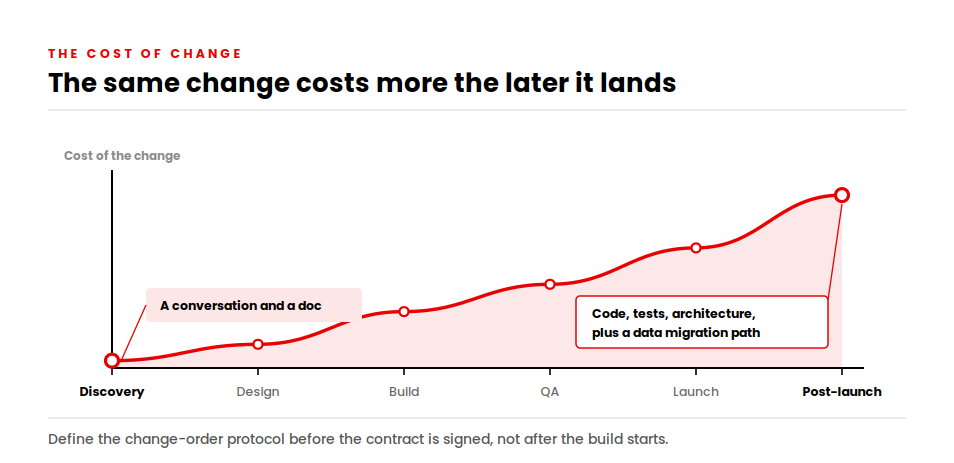
Scope will move. The cost of moving it depends entirely on when.

A change during discovery costs a conversation and a document revision. The same change during design costs rework of flows and screens. After the build has started, it touches code, tests and sometimes architecture. Post-launch, it touches all of that plus a migration path for existing users and data.

Curve showing the cost of a scope change rising from discovery through to post-launch

So define the change-order protocol in writing before the contract is signed: how a request gets priced, who approves it, and how it gets documented. Projects without that protocol turn every feature conversation into a negotiation.

The App Maintenance Cost and Ongoing Expenses After Launch

Your build budget buys you version one. Owning the product is a separate, recurring line that surprises more first-time founders than anything else on this page.

Ongoing Cost Typical Annual Figure
Maintenance (bug fixes, OS compatibility, security patches) 15% – 25% of original build cost
Cloud hosting and infrastructure $2,400 – $60,000
CDN and media delivery $6,000 – $36,000
Third-party service and API fees $5,000 – $50,000+
Apple Developer Program $99/year
Google Play Console $25 one-time fee
Security audits and penetration testing $5,000 – $20,000 per engagement

Take the maintenance line seriously, because it compounds. A $120,000 app carries $18,000 to $30,000 of annual maintenance, which makes your real year-one figure closer to $145,000. Every year after that, the same 15–25% applies to a codebase that keeps growing.

Two platform-level costs deserve naming. Apple and Google both release major OS versions annually, and each one requires compatibility work whether or not you shipped a single new feature. Cloud costs scale with usage, so success itself raises your bill.

Then there is user acquisition, which is usually the largest post-launch line and the one least often budgeted. Cost per install currently runs about $1.50–$4.00 on Android and $1.50–$3.50 on iOS, with North America at the higher end.

I say a version of this on most calls: do not spend $150,000 building something and leave nothing to launch it with. A product nobody can find performs identically to a product that was never built.

Is Owning an App Profitable? A Break-Even Model for Your Build

Cost is only half a decision. The other half is return, and it gets far less attention than it deserves. We’ve written separately about the benefits of mobile apps for businesses; this section is about putting numbers on them

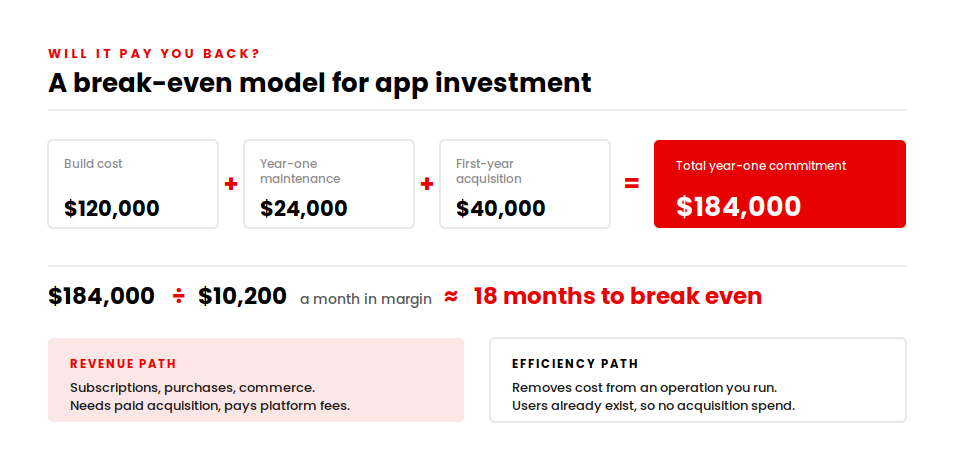
Here is the model I walk executives through. It is deliberately simple, because a simple model people actually complete beats a sophisticated one they abandon.

Break-even model: $120K build plus $24K maintenance plus $40K acquisition equals 18 months payback

Total year-one cost = build cost + year-one maintenance + user acquisition spend

Monthly contribution = (monthly active users × revenue or cost saving per user) − monthly running cost

Months to break even = total year-one cost ÷ monthly contribution

Run a mid-complexity build through it. A $120,000 app carries about $24,000 of year-one maintenance. Add $40,000 of first-year acquisition and your total year-one commitment is $184,000. To break even inside eighteen months, the app needs to generate roughly $10,200 a month in attributable margin.

That number is either obviously achievable or obviously not, and either answer is useful. What you want to avoid is not knowing.

The two paths to payback

Apps recover their cost in one of two ways, and the distinction changes your entire budget.

Revenue apps earn directly through subscriptions, in-app purchases or commerce. They need paid acquisition, and platform fees apply. Apple and Google take 15% on the first $1M of annual earnings and 30% above it. Your monetization model also changes your build cost: subscriptions require billing, entitlement and proration logic; freemium requires analytics and lifecycle messaging infrastructure.

Efficiency apps pay back by removing cost or friction from an operation you already run. They rarely need paid acquisition because the users already exist, which makes their payback maths considerably kinder.

Our work with the Nokia Al-Saudia Training Centre is a clear example of the second path. Their training delivery and certification management ran across fragmented systems with heavy manual handling. After we rebuilt the platform, they onboarded more than 10,000 learners and cut manual enrollment processing time by 35%.

That 35% is the payback. No acquisition spend, no platform fee, just administrative hours removed from a process that runs continuously.

When the return is engagement rather than revenue

Some products are judged on reach. ParentPass, built for The Miles Foundation, connects families to community resources, parenting content and local events, with a focus on underserved populations.

We built it in React Native on a .NET backend across Azure and Google Cloud, with a recommendation engine personalizing content by family need, location and child age. Since launch it has reached over 17,000 users, including 12,439 registered members, with more than 7,000 local events listed.

For a mission-driven product, those adoption numbers are the return. The budgeting lesson holds either way: decide what your payback metric is before you commission the build, because it changes which features are worth funding.

Custom App Development vs App Builders: When Not to Pay for Custom

I will argue against my own service here, because the alternative is real and sometimes correct.

App builders and no-code platforms have improved considerably. For a genuinely simple product, one of them will get you live for a few thousand dollars in a few weeks, and paying an agency for that work is a waste of your money.

The honest question is where the line sits. These are the four gates I use.

Gate 1 — Integration depth. Connecting to one or two mainstream services through a standard connector is comfortable builder territory. Once you need three or more systems, custom API work, or anything talking to a legacy internal platform, builders stop being viable.

Gate 2 — Compliance exposure. If you handle protected health information under HIPAA, card data under PCI-DSS, or need auditable access logs, you need control over your data layer and infrastructure. Most builder platforms cannot give you that.

Gate 3 — Expected concurrency. Builders handle modest traffic well. Real-time features at scale, live location, or high concurrent write volume will hit a platform ceiling you cannot engineer around.

Gate 4 — Is the app the business? If the app is a channel supporting a business that already works, a builder may serve you for years. If the app is the product, you need to own the codebase, the roadmap and the performance characteristics.

Two or more gates say yes, custom development is the right call. Zero or one, start with a builder and revisit in twelve months.

For a concrete sense of where the line falls, one of our builds scans a pool’s surroundings in augmented reality, stitches multiple images into a single view, and uses AI and geometric algorithms to plot coping materials onto a three-dimensional space before the customer orders. That runs on native iOS and Android with a .NET backend and Python microservices. No builder platform reaches that.

Meanwhile a straightforward booking or catalog app with one payment integration and a few hundred monthly users genuinely does not need us. Telling people that costs us the occasional project and saves them from a bad one.

How to Reduce Your App Development Cost without Damaging the Product

Cost optimization is a scoping problem. Cheaper engineers rarely fix expensive decisions.

Fund one measurable outcome first. Your first release should prove exactly one thing: revenue, retention, and operational saving or risk reduction. Teams that hold that line typically cut initial spend by 40–60% without compromising what they build later.

Our approach to MVP development is built around that constraint.

Phase the build deliberately. Discovery, then MVP, then version two. Each phase gives you real usage data before you commit the next tranche of budget, which beats any estimate.

Use cross-platform where it fits. Single-codebase builds save 30–40% against dual native when UI parity is acceptable and hardware access is light. They fit poorly for hardware-intensive apps and heavy custom animation.

Reuse generic components, build the differentiators. Standard elements such as authentication, contact screens and navigation patterns can be reused. Build the features that make your product distinct from scratch, because those are the ones customers choose you for.

Bring QA in from day one. Involving QA at requirements stage rather than after the build catches specification problems while they are still cheap to fix.

Split ownership from execution. Most mature teams keep product ownership, architecture decisions and compliance leadership close to the business, then place delivery capacity wherever the economics are strongest. That structure gives you cost control without losing product direction.

How AppVerticals Estimates Your App Development Cost

We start with hours, not a headline number.

Our estimation process runs discovery first, converts requirements into modules, sizes each module in hours, then applies a blended rate for the team structure the project actually needs. You see the module-level hour count, which means you can challenge the scope rather than negotiating a total that has no visible components.

That approach also handles the situation we see more often than we would like: a project that has already gone wrong somewhere else. Lulo Freight, a Texas-based freight logistics platform, came to us after a previous development partner could not complete the work to the agreed scope.

We analysed what existed, identified the gaps against their objectives, and finished the platform: real-time shipment tracking, instant transparent quoting for shippers, a load board matching carriers to freight by fleet capacity, and payment and driver management on the carrier side. It runs on Laravel and React Native with MySQL, Firebase and AWS.

Rescue work is the most expensive way to build software. Everything gets paid for twice, and the second team inherits decisions it would not have made. The scoping discipline that prevents it costs a fraction of what it saves.

Conclusion

The number you have been quoted is not the decision in front of you. What matters is whether the scope behind that number is the smallest thing that proves your business case, and whether the contract behind it protects you when the scope moves. It will move.

A $60,000 build that ships the wrong product costs more than a $160,000 build that ships the right one. And a low hourly rate attached to a vague statement of work is the most expensive line item in software.

So price the scope rather than the app. Ask every vendor for the same nine line items in the same order and see which estimate survives the comparison. The one that can show you its hours is the one worth talking to.

Price your app build line by line

Scoping, architecture, design, build and post-launch support for iOS, Android and cross-platform products, with module-level hour estimates you can challenge.


Explore our mobile app development services →

Top App Development Companies in Dallas & Their Best Developers (2026): Rankings, Pricing & Expert Comparison

Building a successful mobile app is not only about having a great concept or idea, instead, choosing the right partner is equally important.

When it comes to Dallas, it’s becoming a center for growing startups and entrepreneurs, providing them with unlimited growth opportunities. One of the many factors behind this rapid innovation happening in Dallas is the presence of top-notch app development companies. in 2026, businesses are choosing Dallas not only because of the affordability but for an uninterrupted access to the top engineering talent, technological innovation and agencies that succeed at delivering successful apps quicker than any other market. Whether you’re building a basic MVP, a cross-platform application or a full-fledged enterprise product, the city guarantees some of the finely skilled development teams across the country.

Confused how to choose the best partner? This guide lists down the top 10 app development companies in Dallas, highlighting their best developers, comparing prices, and breaking down the services they offer. Each company has been evaluated on the basis of industry expertise, tech stack, transparency, and real project outcomes; providing you with a clear picture of who can be your best app development partner in 2026.

Key Takeaways

  • Dallas is a fast-growing hub for mobile app development, offering competitive pricing and access to top talent.
  • Top app development companies in Dallas, like AppVerticals, provide a wide range of services including AI apps, SaaS, and cross-platform development.
  • Pricing in Dallas is more affordable compared to Silicon Valley and NYC, with hourly rates ranging from $50 to $200 depending on complexity.
  • Key industries benefiting from Dallas developers include healthcare, FinTech, logistics, and retail.
  • The app development process in Dallas includes discovery, design, development, and post-launch support, ensuring a comprehensive solution.
  • Dallas app developers offer advantages over offshore teams, such as better communication, faster project timelines, and a deep understanding of U.S. market needs.

Why Dallas Is One of the Fastest-Growing Hubs for Mobile App Development

There are several reasons why Dallas is becoming a growing hub for mobile app development, a few top among them includes:

A Booming Tech Ecosystem Backed by Fortune 500 Companies

Dallas is home to many Fortune 500 companies such as Texas Instruments, ExxonMobil, and AT&T, building the foundation of a dynamic business ecosystem. these giants help enhancing the local tech environment, turning Dallas into an integral part of the digital transformation across globe. This tech-driven environment gives boost to the app development companies helping business transform with cutting-edge mobile solutions.

Access to Top Engineering Talent & Multicultural Consumer Markets

There are multiple prestigious universities such as, Southern Methodist University and University of Texas, passing out hundreds of skilled engineers every year. Meaning, there’s easy access to the top talent. The app development companies in Dallas have the best developers hired, building robust solutions for businesses aiming to digitize.

Cost-Effective Development Compared to California & NYC

Major tech cities in the USA such as San Francisco and California are popular for their higher development costs. However, Dallas offer cost-effective solutions without compromising the quality by any means. The low cost of business and living in the city makes it an appealing choice for startups to invest in mobile app development, without having to exceed their budgets.

Rise of AI-Driven Product Innovation in Dallas Startups

Most startups in Dallas are adopting AI and machine learning technologies, helping businesses create robust mobile solutions. The increasing number of AI-powered applications, specifically, in the fields of finance, healthcare, and logistics, highlight the great potential of this city towards leading the future of mobile app development.

Why Businesses Prefer Dallas Agencies vs Offshore Teams

While offshore teams can seem like an attractive option for cost savings, many businesses prefer working with Dallas-based agencies. The advantages of proximity, real-time collaboration, and a deep understanding of the U.S. market make Dallas app development firms more appealing. Companies can expect higher-quality work, faster communication, and smoother project management when working with local teams.

Top Mobile App Development Companies in Dallas (Ranked for 2026)

Take a look at top 10 app development companies in Dallas in 2026, ranked on the basis of expertise, project delivery and prestige and make an informed investment choice:

1. AppVerticals: Best Overall Mobile App Development Company in Dallas

AppVerticals stands out for their quick adoption of latest technologies such as, AI and machine learning, etc. Offering a wide range of mobile app development services, the company helps startups, enterprises and everything in between that aims to build to digitize using modern technologies and outsmart their competitors. let’s explore why ApVerticals can be your #! app development partner in 2026:

Team Size & Technical Expertise

The team comprises of 100+ professionally certified and trained app developers with experience across android, ios, and cross-platform solutions. The engineers in team are well-versed with the latest technologies such as React Native, Flutter, and even the AI-driven development.

Core Services (iOS, Android, Flutter, AI Apps, SaaS, Enterprise Apps)

From basic conceptualization to final deployment and post launch, we provide full-cycle app development support to each client:

  • iOS & Android App Development: Custom apps designed for the most popular mobile platforms.
  • Flutter Development: Cross-platform apps built for both iOS and Android, providing cost-effective solutions.
  • AI & Machine Learning Apps: AI-integrated apps tailored for industries like healthcare, finance, and logistics.
  • SaaS & Software & Solutions: Scalable apps for large enterprises that need robust, secure, and flexible solutions.

Pricing & Engagement Models

AppVerticals offer diverse pricing models including fixed-price projects, dedicated teams and hourly rates. The pricing is mostly competitive, however, it typically lies between $50 to $150, depending on the basis of engagement models, and project’s level of complexity.

Notable Projects & Case Studies

  • Coca-Cola: Built a mobile app for Coca-Cola to manage rewards, local promos, and repeat customer engagement — all in one place.
  • Spruce: launched a service app for residents to book cleaning, laundry, and more — no calls or front desk needed.
  • CPTnS: Reimagined pool construction through AR and AI, giving users real-time customization and visualization at their fingertips.

Industries Served 

As a leading app development company in Dallas, AppVerticals has build solutions for diverse industries, including:

  • Healthcare: apps built to optimize patient management, telemedicine, and health monitoring.  
  • FinTech: Custom apps for banking, investment, and secure financial transactions.
  • Real Estate: Solutions for property management, real estate listings, and virtual tours.
  • On-Demand Services: Apps for ride-sharing, food delivery, and other on-demand services.
  • SaaS: Scalable software-as-a-service applications for businesses across various sectors.

Why We Ranked Them #1 

AppVerticals has earned the top spot due to its outstanding track record in delivering high-quality apps, its commitment to customer satisfaction, and its ability to scale solutions to meet clients’ needs. The company has received numerous accolades, including recognition as a leading app development firm in Dallas by Clutch and GoodFirms.

Contact Details & Website

Website: www.appverticals.com

Phone: (123) 456-7890

Email: contact@appverticals.com

2. TechnBrains

TechnBrains is a cutting-edge app development company that excels in delivering highly scalable and user-centric mobile solutions. Known for its expertise in a variety of industries including healthcare, fintech, and e-commerce, TechnBrains offers robust app development services that meet the ever-evolving digital landscape. Whether you’re looking to create a high-performance app or leverage emerging technologies, TechnBrains ensures every project is optimized for success.

Core Services:

  • iOS & Android App Development

  • Cross-Platform Development (React Native, Flutter)

  • Custom App Solutions (E-commerce, Healthcare, FinTech)

  • AI & Machine Learning Integration

  • Enterprise Solutions

Notable Projects:
TechnBrains has successfully delivered dynamic and scalable apps across industries such as healthcare and finance, enabling businesses to streamline operations and enhance user engagement.

Why Choose Them:
TechnBrains stands out for its comprehensive approach to digital transformation, combining technical prowess with industry-specific insights. The team ensures that apps are both high-performance and future-ready.

Pricing:
Custom pricing based on project scope and requirements.


3. IndiaAppDeveloper

IndiaAppDeveloper is a specialized app development company delivering robust, scalable, and user-centric digital solutions for modern businesses. The company focuses on building high-performance applications using cross-platform technologies, helping startups and enterprises launch faster and grow smarter in the digital ecosystem.

Core Services:

  • Cross-platform app development

  • Ride-sharing app development

  • Dating app development

  • Taxi booking apps

  • Logistics and delivery management applications

  • Custom mobile app solutions

Notable Projects: IndiaAppDeveloper has successfully delivered feature-rich applications across industries such as transportation, logistics, on-demand services, and social networking, enabling businesses to streamline operations and enhance user engagement.

Why Choose Them:
IndiaAppDeveloper stands out for its deep domain expertise in on-demand and marketplace apps. By combining scalable architecture, modern UI/UX, and reliable backend systems, the team ensures secure, efficient, and future-ready applications tailored to real business needs.

Pricing:
Contact for custom pricing based on project scope and requirements.

4. Jumppace

Jumppace is one of the most prestigious app development companies in Dallas, focused upon developing apps that can help businesses transform. They are known for helping startups and entrepreneurs build strong mobile presence in their respective markets. 

Core Services: Mobile app development, digital marketing, UI/UX design, branding, and mobile web development.

Notable Projects: They have worked with companies in sectors like retail, education, and healthcare, delivering apps that are user-centric and innovative.

Why Choose Them: Jumppace emphasizes creating apps that not only function well but also enhance brand identity through well-thought-out design and development strategies.

Pricing: $75–$125 per hour

Contact: jumppace.com

5. Agile Infoways

Agile Infoways is a Dallas-based app development company with a global presence. They pride themselves on their agile methodology and quick turnaround times for complex mobile app projects.

Core Services: iOS & Android development, cross-platform development (React Native, Flutter), UI/UX design, and enterprise solutions.

Notable Projects: Agile Infoways has helped businesses across various industries, including real estate, logistics, and finance, by creating secure, scalable, and high-performance apps.

Why Choose Them: With a strong commitment to agile practices and customer satisfaction, Agile Infoways excels in providing tailored, cost-effective mobile solutions.

Pricing: $50–$100 per hour

Contact: agileinfoways.com

6. 10Clouds

A leading provider of web and mobile app development services, 10Clouds specializes in building innovative, scalable solutions. They focus on delivering high-quality apps and cloud-based solutions.

Core Services: Mobile app development (iOS, Android), web development, and custom software solutions.

Notable Projects: 10Clouds has worked with clients in industries like finance, healthcare, and media, developing high-performance applications.

Why Choose Them: Known for their focus on innovation and agility, 10Clouds provides end-to-end mobile app development, from strategy to design and deployment.

Pricing: $125–$175 per hour

Contact: 10clouds.com

7. Pepper Square

Pepper Square is a digital design and development agency that creates beautiful, high-functioning mobile apps. Their experienced team focuses on designing apps that drive business growth.

Core Services: Mobile app design and development, branding, UX/UI design, and digital strategy.

Notable Projects: They’ve worked with top-tier brands in retail, healthcare, and entertainment, creating custom mobile apps that are both user-friendly and impactful.

Why Choose Them: Pepper Square is known for delivering a blend of creativity and technical excellence, ensuring that every app they build not only looks good but also functions seamlessly.

Pricing: $100–$150 per hour

Contact: peppersquare.com

8. Axencia

Axencia focuses on high-quality, customer-centric mobile app development. Their team offers a full range of services, including strategy, design, and development.

Core Services: iOS & Android app development, cross-platform development, custom software, and digital transformation consulting.

Notable Projects: Axencia has delivered high-quality mobile solutions to industries like healthcare, education, and retail, providing clients with intuitive and reliable apps.

Why Choose Them: They bring a mix of strategy and innovation to the table, helping businesses scale their mobile presence with user-friendly and secure applications.

Pricing: $100–$160 per hour

Contact: axencia.com

9. FuturByte

FuturByte is a leading app development agency that combines cutting-edge technology with design thinking. They have a strong portfolio of successful projects across various sectors.

Core Services: Mobile app development (iOS/Android), digital marketing, and cloud solutions.

Notable Projects: Their work includes apps for retail, finance, and entertainment, offering solutions that enhance customer engagement and streamline business operations.

Why Choose Them: FuturByte focuses on delivering apps that meet both user expectations and business objectives, with an emphasis on quality and scalability.

Pricing: $50–$120 per hour

Contact: futurbyte.com

10. Articon

Articon is a design-focused mobile app development agency with a reputation for building aesthetically-driven, functional mobile solutions. Their team integrates design thinking with technical expertise.

Core Services: Custom mobile apps, web apps, UI/UX design, and cloud solutions.

Notable Projects: They have worked with clients in entertainment, healthcare, and logistics, building apps that provide seamless user experiences and business efficiencies.

Why Choose Them: Articon excels in blending cutting-edge technology with beautiful design, ensuring that the apps they create are both visually appealing and highly functional.

Pricing: $80–$150 per hour

Contact: articon.com

Find Your Perfect App Development Partner

Talk to our experts to get professional advice. 


Comparison Table — Best Dallas App Development Companies at a Glance

Here’s a quick glance at the best app development companies in Dallas and what ranks them on the top: 

Company Name Team Size Hourly Rate Project Minimum Industries Served Best For Rating & Awards
AppVerticals 100+ $50–$150 $5,000 Healthcare, FinTech, Real Estate, SaaS Startups, Enterprises Clutch 5.0, GoodFirms
Squareball Studios 10–50 $100–$150 $10,000 Entertainment, Healthcare, Retail UX/UI Design, Creative 4.8/5, Top 50 Design Agencies
The BHW Group 10–50 $150–$200 $25,000 Healthcare, Real Estate, E-commerce High-End Custom Apps 5/5 on Clutch, Featured on DesignRush
Jumppace 10–25 $75–$125 $5,000 Retail, Education, Healthcare Brand-Centric Apps 4.7/5 on GoodFirms
Agile Infoways 50–100 $50–$100 $8,000 Real Estate, Logistics, Finance Agile Methodology 4.9/5 on Clutch, Upwork Top Rated
10Clouds 100+ $125–$175 $15,000 FinTech, Media, Healthcare Scalable Solutions 5/5 on Clutch, Recognized for Innovation
Pepper Square 20–50 $100–$150 $7,500 Retail, Healthcare, Entertainment Design Focused Apps 4.8/5 on Clutch, Award-Winning Design Team
Axencia 10–50 $100–$160 $10,000 Healthcare, Retail, Education Strategic Consulting 4.6/5 on GoodFirms
FuturByte 20–40 $50–$120 $5,000 Retail, FinTech, Education Scalable Tech 4.7/5 on Clutch, Growing App Development Firm
Articon 10–30 $80–$150 $6,000 Entertainment, Healthcare, Logistics Beautiful Design 4.8/5 on GoodFirms

 How Much Does It Cost to Develop a Mobile App in Dallas?

The cost of app development in Dallas varies, on the basis of multiple factors. From the complexity of features required to the framework platform, and UI/UX design, everything plays a role in determining the real cost. 

Pricing Ranges by Complexity

  • Basic Apps (MVP):$10,000 to $50,000. 
  • Mid-Complexity Apps: $50,000 to $100,000. 
  • High-Complexity Apps: $100,000 to $500,000 or more.

Average Hourly Rates in Dallas vs National Average

  • Dallas Average Hourly Rate: Typically between $75 and $150 per hour, which is relatively affordable compared to other major tech cities.
  • National Average Hourly Rate: Rates in major tech hubs like San Francisco or NYC can range from $100 to $250 per hour, making Dallas a more cost-effective option for businesses.

App Types & Cost Breakdown

Here’s a quick overview of how much different types of mobile apps can cost:

App Type Estimated Development Cost
Simple Apps $10,000–$30,000
E-commerce Apps $50,000–$100,000
Social Media Apps $60,000–$150,000
On-Demand Apps $75,000–$200,000
Enterprise Apps $100,000–$500,000+

Each app type has its own cost factors based on the functionality, design, and integrations required. If you want to know the detailed breakdown, check out our guide on the cost of hiring an app developer

Hidden Costs Most Companies Won’t Tell You

While the initial development cost is clear, there are often hidden expenses:

  • App Maintenance: Ongoing updates and bug fixes cost 15–20% of the initial development cost annually.
  • Marketing & Launch: Expect to spend $5,000–$50,000 on digital marketing, ASO, and PR.
  • Backend Infrastructure: Cloud services and data storage can cost $1,000–$10,000 per month, depending on the app’s scale.

How to Reduce Costs without Reducing Quality

There are several ways to keep costs under control while still delivering a high-quality app:

  • Start with an MVP
  • Use Cross-Platform Development
  • Choose Agile Development

Get a Custom Pricing Quote for Your Project

Get a personalized pricing estimate based on your app’s features and complexity. 


Which Factors Matter the Most When Choosing a Dallas Mobile App Development Company

  • Tech Stack & Engineering Depth: Expertise in modern technologies like React Native, Flutter, AI for scalability and performance.
  • Transparency in Pricing & Timeline: Clear pricing and project timelines with no hidden costs.
  • UI/UX and Product Strategy Capability: Strong UI/UX design and a solid product strategy to ensure user-friendly and business-aligned apps.
  • Agile Methodology & Communication Style: Flexible, iterative development with regular updates and clear communication.
  • Post-Launch Support & Long-Term Partnership Capability: Ongoing support for maintenance and app evolution.
  • Tools and Platforms They Use: Industry-standard tools for efficient development and collaboration.

What Are the Dallas Mobile App Development Services You Can Outsource?

  • Full-Cycle App Development: From concept to deployment, get end-to-end mobile app solutions.
  • MVP Development for Startups: Build and launch a basic version of your app to test market viability.
  • UI/UX and Product Design: Focus on creating engaging and user-friendly interfaces for a better user experience.
  • AI/ML-Powered Applications: Integrate artificial intelligence and machine learning for smarter, personalized apps.
  • SaaS Platform Development: Develop scalable software-as-a-service platforms with secure multi-user access.
  • App Modernization & Maintenance: Update and maintain legacy apps to keep them competitive and functional.

Learn More About Our App Development Process

Understand how we work, from initial strategy to post-launch support, ensuring your app is a success at every stage.

What Makes Dallas App Developers Unique?

  • Proximity to Major Business Hubs: Easy access to national and international markets.
  • Strong Enterprise Expertise: Specialized in building scalable apps for large businesses.
  • Deep Understanding of Multicultural/US Markets: Insight into diverse consumer needs and preferences.
  • Better Communication than Offshore Teams: In-person collaboration and better time zone alignment for consistent updates.

Questions to Ask Before Hiring an App Development Company

Here’s the list of questions you must ask before hiring an app development company, it can hep you make an informed decision. 

  • Do you create prototypes before development?
  • What’s included in your discovery phase?
  • How do you ensure code quality and performance?
  • Will I own the full source code?
  • What tools will we use for progress tracking?
  • How often do you communicate during development?
  • What tech stack do you recommend and why?
  • Do you assist with app store publishing?
  • How do you handle revisions & change requests?
  • Do you offer post-launch maintenance packages?
  • Can you share failed projects and lessons learned?
  • Do you have experience in my industry?
  • What security standards do you follow?
  • How scalable will the app be?
  • Can we start with an MVP instead of full build?

The App Development Process Explained (Step-by-Step)

Step 1. Discovery & Strategy: Define project goals, research target audience, and outline app requirements.

Step 2. Wireframes & UX Prototyping: Create wireframes and prototypes to visualize user flows and design elements.

Step 3. UI Design & Branding: Design the final UI and establish branding elements (colors, fonts, logo).

Step 4. Development (Frontend + Backend): Develop the app’s frontend (user interface) and backend (server-side logic).

Step 5. QA Testing & Bug Fixing: Test for bugs, performance issues, and user experience flaws before release.

Step 6. Launch, Publish, and Deployment: Deploy the app to app stores or distribute it through other channels.

Step 7. Support, Maintenance & Scaling: Post-launch support, bug fixes, updates, and scaling as your user base grows.

Most Innovative App Trends Coming from Dallas Developers

AI-Integrated Mobile Apps: Incorporating artificial intelligence for personalized experiences and automation.

Cross-Platform Development Evolution: Using frameworks like Flutter and React Native for faster, cost-effective app creation.

Cloud-Native & Microservices Apps: Leveraging cloud infrastructure and micro services for scalability and flexibility.

Predictive Analytics & Personalization: Using data-driven insights to offer personalized content and enhance user engagement.

Enterprise Mobility Modernization: Modernizing enterprise apps to enable remote work, improve collaboration, and boost productivity.

How to Get Started With the Right App Development Partner

  • Free Consultation: Start with a no-cost consultation to discuss your idea, goals, and get initial feedback.
  • Project Scoping: Define the project’s scope, features, and technical requirements to ensure alignment with your business objectives.
  • Budget Planning: Establish a clear budget based on project needs, including development, marketing, and maintenance costs.
  • Roadmap Creation: Develop a detailed project timeline, setting milestones for each stage of development.

Conclusion 

Dallas stands out as a key hub for mobile app development, offering a dynamic tech ecosystem and a wealth of skilled developers. Whether you’re a startup testing your idea or an enterprise scaling your digital presence, the city provides the expertise and resources needed to bring your app vision to life.

By partnering with the right development team, you ensure your project is in capable hands, with access to cutting-edge technologies, efficient processes, and competitive pricing. With these advantages, Dallas remains a top destination for businesses ready to innovate and grow through mobile app development.

Start Your App Development Journey Today

Talk to our experts to explore your options and take the first step towards success.

What are the Top Solutions for Integrating Computing Systems in Manufacturing and Automation Sectors?

Curious what are the top solutions for integrating flexible computing systems in manufacturing and automation sectors? The quick answer is –adopting technologies that can make production lines scalable, adaptive, and efficient. Flexible computing allows seamless automation, quick decision-making in real-time and predictive operations; each of them crucial for modern manufacturing.

If you want a thorough understanding of technologies that are transforming this sector, look at our detailed guide on IT solutions for manufacturing industry.

Why Is Flexible Computing Important in Manufacturing and Automation?

Flexible computing systems allow manufacturers to quickly respond to any fluctuating demands in production. Contrary to the rigid IT infrastructures, these systems are scalable, modular, and particularly designed to handle complex automation workflows.

The key benefits of flexible computing systems in manufacturing and automation includes:

  • Allows keeping a track and control over production processes in real-time.
  • Helps reducing downtime and errors in production.
  • Simplifies integration with AI models, IoT devices, and cloud platforms.
  • Offer scalability for the initiatives of automation and digital transformation.

Which Technologies Enable Flexible Computing in Manufacturing?

Here’s the list of technologies that allow flexible computing in manufacturing:

Edge Computing

This allows processing data locally on the factory floor. It helps with:

  • Cutting-down dependence on centralized servers.
  • Adjusting to production parameters in real-time.
  • Sending instant alerts each time a machine malfunctions.

IoT Integration in Manufacturing

IoT connects machines, devices and sensors to help with:

  • Real-time traction of equipment performances.
  • Predictive maintenance to reduce costly downtime.
  • Data-driven workflow optimization for smarter operations.

Cloud and Hybrid Computing Systems

Cloud and hybrid solutions offer scalable computing resources that can help with:

  • Handling large volumes of manufacturing data.
  • Remote monitoring and management of operations.
  • Simplifying flexible scaling alongside the increase in production requirements.

AI and Machine Learning Algorithms

AI and ML helps with predicting, optimizing and automation manufacturing processes. That further assists in:

  • Forecasting inventory and production requirements.
  • Identifying inefficiencies in real-time.
  • Automating high-precision or repetitive tasks for an increased efficiency.

Transform Your Manufacturing with Flexible Computing Technologies

Unlock real-time efficiency, reduce downtime, and scale effortlessly with the right tech.


How Can Manufacturers Implement Flexible Computing Systems Effectively?

Integrating flexible computing systems into manufacturing and automation processes might seem complicated, but following a structured, step-by-step approach can certainly guarantee a seamless adoption with measurable outcomes. Here’s how manufacturers can implement these effectively:

Step 1: Assess Existing Infrastructure and Determine Key Areas

Before you invest into new technology, it is essential to evaluate your existing infrastructure.

  • Look at and determine which production processes or lines can make the most out of flexible computing such as, precision-critical or high-volume operations, etc.
  • Map out machine connectivity, data flow, and automation gaps to determine which edge computing or IoT cloud can be the ideal fit.

Step 2. Start with Hybrid Computing Systems

Hybrid systems are basically a blend of cloud computing with on-premises operations, they allow scalability and flexibility without impacting the existing operations.

  • Deploy hybrid systems into pilot areas in the beginning to track performance and mitigate any uprising challenges.
  • Leverage these systems to centralize data collection, processing and analytics – allowing teams to make data-backed decisions in real-time.

Step 3. Collaborate with Experienced IT Solutions Providers

Partnering with software and IT service provider familiar with manufacturing automation is critical:

  • Look for a leading mobile app development company like AppVerticals who understands industry-specific workflows, automation requirements and compliance standards really well.
  • We can build custom solutions, integrated with IoT and AI with a guarantee of seamless system interoperability.

Step 4. Train Staff for Digital Adoption

No matter how smart of a system you implement, it will fail unless your employees cannot use them effectively.

  • Conduct thorough training sessions around the new tools and processes to provide operators, managers, and engineers with the required information and practical exposure.
  • Implement and encourage a culture of continuous learning and experimentation so that the staff can make effective use of the flexible computing systems.

Step 5. Gradually Incorporate IoT and AI Systems

Once your core, foundational system is in place, you can continue to integrate AI-driven tools and IoT sensors over time to enhance the automation.

  • Connect your equipment and machines with smart sensors that enable real-time monitoring.
  • Implement predictive maintenance and workflow optimization leveraging AI algorithms.
  • Keep a continuous track of your system’s performance and adjust your strategies accordingly to enhance scalability and efficiency.

Simplify Flexible Computing Integration with Expert Guidance

Our step-by-step process ensures smooth implementation and measurable results. Let’s make your transformation seamless.


How Do Flexible Computing Solutions Benefit Manufacturing and Automation?

Flexible computing has a direct impact on the costs and operational efficiency of manufacturing and automation.

  • It allows quicker decision-making without any delays in production.
  • It helps preventing any unannounced downtimes via predictive maintenance.
  • It helps with future expansion and significant changes in infrastructure through scalability.
  • It maximizes accuracy and productivity via automation integration.

Conclusion

To summarize, flexible computing systems are crucial for modern manufacturing and automation sectors. Top solutions include, IoT integration, edge computing, cloud systems, and AI-driven automation.

Implementing these solutions ensure smarter, faster, and more scalable operations; helping businesses stay competitive in 2025.

Take the Next Step towards Smarter Manufacturing

Ready to revolutionize your operations with flexible computing? Let’s implement the right solutions for your business.


Top IT Solutions for the Manufacturing Industry: Increase Efficiency and Reduce Costs

The manufacturing industry is at a crossroad. Manufacturers are under constant pressure of cutting-down costs and improving supply chain resiliency without compromising the quality of products. Adapting technology is no longer optional; it’s become critical, without that – operational inefficiencies and downtime become costly liabilities. 

Manufacturers experience an average 800 hours of downtime every year, breaking down into 15 non-productive hours/week. A research study found these unplanned downtime can add up to $50 billion per annum in lost productivity. 

So, if you’re a startup or an entrepreneur confused whether to invest into an IT solution; it’s the best time you do. From AI-driven automation to cloud-based software, the rightly built technologies can effectively cut-down your downtime, optimize workflows, and drive noticeable cost savings. 

Read our detailed guide about AI in transportation to determine AI-powered solutions are helping redefine transportation and logistics for almost every industry including manufacturing. 

In this guide, we’ll help you explore the top IT solutions for the manufacturing industry and describe how you can implement them to stay on top of competition. 

Take the Next Step towards Smarter Manufacturing

Unlock the potential of IT solutions to streamline your operations and stay ahead of the competition. 


Key Takeaways

  • Manufacturers are under constant pressure to cut costs and improve efficiency. IT solutions are essential for staying competitive by reducing downtime, enhancing workflows, and optimizing operations.
  • Manufacturers face an average of 800 hours of downtime per year, costing up to $50 billion annually in lost productivity. IT solutions can mitigate these losses through automation, predictive maintenance, and real-time monitoring.
  • From AI-driven automation to cloud-based ERP and MES systems, these technologies streamline production processes, improve inventory management, reduce errors, and enhance supply chain visibility.
  • Key trends include smart manufacturing (AI, IoT), cloud computing for scalability and flexibility, and predictive analytics for better decision-making and maintenance scheduling.
  • IT solutions can lead to significant cost savings by reducing labor and material waste, improving energy efficiency, and automating manual tasks, all of which improve profitability.
  • Emerging technologies like 5G, AI, and blockchain are set to transform the manufacturing landscape, offering faster, more reliable communication and enhanced supply chain transparency.

What Are IT Solutions for Manufacturing? 

IT solutions for the manufacturing industry comprises multiple technologies – all designed to reduce costs, maximize efficiency, and improve the overall process of production. These solutions put together software, hardware, and services that can help manufacturers keep track of their operations in real-time, automate processes, and make data-driven decisions. 

From manufacturing software like AI-powered solutions and cloud-based tools to the ERP systems, these technologies work together to address the common challenges of manufacturing industry, including:

  • Inventory management issues 
  • Production inefficiencies
  • Quality control problems
  • Supply chain disruptions

Why IT Solutions Are Critical for Manufacturers in 2025

With the majority of manufacturing companies going digital, the need for rightly built IT solutions is more urgent than ever. An average 61% manufacturers claim that they’re planning to invest in technology this year in order to enhance operational efficiency and increase production agility, reports Deloitte

Key trends that are driving this increasing demand includes:

  • Smart Manufacturing: integration of sensors, AI, and IoT allow real-time monitoring and predictive analytics; cutting-down downtime and enhancing operational efficiency. 
  • Cloud Computing: cloud-based manufacturing software offers scalability, flexibility, and quick access to data; allowing better collaboration and faster decision-making. 
  • Automation and AI: process automation not only maximizes the speed, it also helps with increasing consistency and reducing human-error. AI plays a critical role in optimizing processes like quality control and predictive maintenance. 
  • Data-Driven Decision-Making: real-time data allows manufacturers to optimize production lines, identify bottlenecks, and predict demand with an enhanced accuracy. 

With manufacturers facing a constant pressure of reducing costs, improving product quality and enhancing productivity, IT solutions have become a strategic necessity to stay in competition. 

Challenges Manufacturers Face Without IT Solutions 

Manufacturers face many hurdles impacting their growth without the adequate implementation of adequate technology, a few prominent among them includes:

  • Inefficient Manual Processes: legacy systems depended on manual, paper-based workflows often slow-down production, waste critical time of the workers and increase the potential of errors. 
  • High Operational Costs: lack of automation results in excessive waste, increased labor costs and suboptimal resource allocation. 
  • Limited Visibility: without any access to the real-time data, manufacturers often struggle to determine inefficiencies, manage inventory and predict production needs. 
  • Downtime and Equipment Failure: unpredictable downtime and poor maintenance scheduling can impact production negatively, leading towards costly delays. 

Unlock the Power of IT Solutions for Manufacturing

Take the first step toward transforming your manufacturing processes with advanced IT solutions designed to reduce downtime and enhance productivity.


Key IT Solutions Transforming the Manufacturing Industry 

Let’s take a look at some of the top IT solutions that are helping redefine the manufacturing industry for good: 

Manufacturing Software Solutions

These are designed to help manufacturers manage their operations efficiently. From inventory management to production scheduling and supply chain coordination, these systems cover everything that matters. MES (Manufacturing Execution Systems) and ERP (Enterprise Resource Planning) are the top most critical tools in this category. 

  • ERP Systems for Manufacturing: ERP software is usually integrated with all the core business functions including, inventory, finance, production, and supply chain management, under one cohesive platform. By automating the flow of data and offering real-time insights; manufacturers can enhance forecasting, reduce errors, and ensure smoother operations. 

For example: cloud-based ERP solutions for manufacturing are becoming popular for they can offer scalability, remote access and cost-efficiency, allowing manufacturers to enhance productivity and streamline workflows. 

  • MES for Real-Time Production Monitoring: MES software offers real-time traction of production activities, allowing manufacturers to monitor product quality, equipment performance, and output. This system is crucial for determining any bottlenecks and making sure the production targets are met in a timely manner. 

For Example: an MES system that integrates with IoT sensors can send automatic alerts to the managers every time the machine needs maintenance; reducing downtime and maximizing efficiency. 

Cloud-Based Manufacturing Solutions

The cloud is changing how the manufacturing industry operates: by offering scalable, cost-effective, and flexible solutions. Cloud-based manufacturing software allows manufacturers to access, store and analyze data remotely. This leads to improved data security, better collaboration, and reduced IT infrastructure costs. 

Benefits of Cloud-Based Manufacturing ERP

  • It allows you to access data from anywhere, at any time; using a secure online platform. 
  • It can be easily scaled as your business grows, without any need for expensive infrastructure requirements. 
  • It helps keep all the communication across different locations and departments streamlined, making sure everyone gets access to the latest information. 

Cloud-based ERP allows manufacturing startups to work with utmost flexibility while also having control over procurement, inventory, and customer relations. It’s highly beneficial for businesses that operate from multiple locations or have remote teams. 

AI and Automation in Manufacturing 

AI and automation are becoming the game changers in the manufacturing industry. These solutions help manufacturers maximize efficiency, cut-down costs and enhance product quality by utilizing data and machine learning at best. 

  • AI for Predictive Maintenance: the best use of AI in manufacturing is predictive maintenance. By identifying and analyzing data from machinery sensors, AI systems can easily predict when the equipment might fail and schedule maintenance before that happens. This helps reduce unexpected downtimes, enhance equipment life, and cut-down the cost of repairing. For example, AI-driven predictive maintenance systems can cut-down down time by 30-50% in industries like automotive manufacturing, reports McKinsey. 
  • Robotic Process Automation: Robotic Process Automation (RPA) helps with automating repetitive tasks, such as: quality checks or assembly line operations. With robots performing these repetitive tasks, human workers get enough time to focus on value-adding activities like strategizing to improve overall product quality, etc. 
  • Smart Manufacturing: smart factories integrate AI, IoT, and automation to create a networked, self-optimizing system. These factories are capable of making decisions in real-time on the basis of sensors, machines, and even the data from supply chains – ensuring higher efficiency and seamless production. For example, AI systems can automatically adjust production schedules on the basis of raw material availability, machine availability and real-time demand data in a smart factory, optimizing the process and reducing waste. 

Learn about the best mobile app frameworks for cross-platform development in our thorough post to decide which of them suits your manufacturing solution idea the best. 

Managed IT Services for Manufacturing Companies 

For growing manufacturers and startups, managed IT services can provide technical support required to stay competitive without having to deal with the hassle of managing IT in-house. Managed IT services are often the most cost-effective solution for businesses that require access to cybersecurity, expert technology support, and network management. 

How Managed IT Services Work?

A managed IT service provider (MSP) usually takes care of everything, ranging from the routine system updates and maintenance to advanced services like data backup and cloud infrastructure. For example: an MSP can oversee your IT systems, determine vulnerabilities, and offer timely maintenance, making sure the systems run efficiently without any undue disruptions. 

Benefits of Manufacturing Businesses

  • With 24/7 surveillance and prompt resolution of the issues identified, MSPs majorly decline the risk of system failure and production delays. 
  • Expert Support: manufacturers can get access to the top-level IT expertise and latest technologies without the need for hiring any fulltime IT team in-house. 
  • Cost Savings: manufacturers can save a major cost in terms of training, salaries, and overhead expenses by outsourcing IT management. It can help free up capital so you can invest in something more profitable. 

Partnering with a managed IT service is a great option for small to medium sized manufacturers, aiming to enhance their IT infrastructure while also keeping the costs under control. AppVerticals is a top-tier mobile app development company offering managed IT services that can help transform your manufacturing operations like never before. 

Benefits of IT Solutions for the Manufacturing Industry 

Boosting Productivity and Efficiency

Productivity and efficiency are the core of successful manufacturing. IT solutions significantly improve the process by reducing manual tasks, automating processes, and providing real-time visibility into the production workflows. 

  • Improved process visibility: most manufacturing processes involve multiple suppliers, teams, and departments. IT solutions built for manufacturing industries help keeping track of production activities in real-time, allowing manufacturers to oversee every aspect of workflow from beginning to end. This incredible transparency supports quick decision-making and enables solving issues before they can actually disrupt the process of production. 

For Example: a cloud-based ERP system offers manufacturers with a centralized dashboard that showcases everything from equipment performance to inventory levels and everything, helping prevent any delays in production and ensure seamless operations. 

  • Reduction of Manual Tasks: most manufacturing tasks such as, order processing, inventory management and quality checks are still being carried out manually, which is both time-consuming and prone to errors. Automating these processes with IT solutions can significantly reduce the manual labor, cut-down human errors, speed-up workflows and let resources focus on high-value tasks such as: product research and strategy. 

For example: automated inventory systems use RFID technology and barcodes to keep track of the stocks in real-time, cut-down the need for manual counting and help manufacturers prevent overstocking and stockouts. 

  • Predictive Analytics for Optimization: IT solutions integrated with predictive analytics make use of historical data to predict future trends, allowing manufacturers to optimize resource allocation and production schedules. Predictive maintenance, for example, allows manufacturers to plan and schedule maintenance activities on the basis of data; avoiding any unannounced downtime and maximizing operational efficiency. 

Cost Reduction and Profitability

IT solutions directly contribute to the bottom line by reducing operational costs and optimizing manufacturing processes. From improved resource management to energy savings, manufacturers can cut-down excessive costs that are possibly impacting their profitability. 

  • Energy Consumption Management: manufacturing plants are often energy-intensive and the rising cost of energy can affect your profitability. Smart IT solutions can help keep track of the energy consumption in real-time, determine inefficiencies, and recommend adjustments to better optimize the use of power. 

For Example: an IoT-based energy management system can easily identify areas where energy is being wasted like machines running when not needed, etc. They can also suggest adjustments that can help reduce costs by almost 10-15% every year.  

  • Labor Cost Savings: automation plays a significant role in reducing labor costs by replacing manual processes with software solutions and machines. IT systems like robotic process automation (RPA) and automated assembly lines can get the repetitive tasks done within no time and with less errors than humans. 

For example: RPA tools can handle inventory tracking, allowing employees to focus on tasks that require advanced skill levels, such as customer service or product development. 

  • Material Waste Reduction: efficient management of raw materials is crucial for cost controlling and waste reduction. IT solutions such as: inventory control software, help manufacturers keep track of material usage in real-time, ensuring an optimal production planning and reducing waste. 

For example: lean manufacturing techniques, backed by IT systems, can help reduce excess inventory, optimize production schedules, and minimize scrap, resulting in higher profitability and cost savings. 

  • Enhanced Supply Chains: Supply chain is usually the most cost-heavy and complex aspect of manufacturing. IT solutions for manufacturing industries help enhance communication with suppliers, tracking chains in real-time, preventing any disruptions, and ensuring timely deliveries. By implementing automated supply chain management software, manufacturers can better identify needs and cut-down costs associated with excess inventory and stockouts. 

For example: cloud-based supply chain platforms allow manufacturers to adjust production schedules automatically on the basis of demand fluctuations and inventory levels, ensuring an efficient and cost-effective supply chain. 

Enhanced Data and Reporting Capabilities

Data is often the most critical asset a manufacturer can leverage. IT solutions help capture the data in real-time, making it easier and quicker to analyze operations, monitor performance, and make data-driven decisions that can maximize efficiency. 

  • Real-Time Data for Informed Decision-Making: With real-time data at hands, manufacturers can make decisions quickly on the basis of latest information. The ability to monitor inventory levels, production lines, and equipment status in real-time really help manufacturers in addressing problems before they escalate. 

For example: cloud-based manufacturing software integrates inventory data, production data, and supplier data into a centralized dashboard, offering managers with critical insights they need for making decisions without delay. 

  • Improved Reporting and Forecasting: IT solutions help manufacturers track key performance indicators (KPIs) across production cycles, making it easier to generate reports and forecasts. With better reporting capabilities, businesses can forecast demand, adjust production schedules, and make strategic business decisions based on real-time insights. 

For example: Business intelligence (BI) tools integrated into manufacturing systems offer detailed reporting on inventory, machine uptime, and supply chain performance, empowering manufacturers to predict future needs and adjust strategies accordingly.

  • Cloud-Based Manufacturing Software Benefits: Cloud-based platforms enhance reporting capabilities by offering flexible, scalable, and real-time access to data. This enables manufacturers to generate custom reports, track KPIs across different departments, and identify areas for improvement. 

For example: A manufacturer using a cloud-based ERP system can generate monthly performance reports, track production progress, and monitor quality control metrics without needing to rely on fragmented legacy systems.

Improved Product Quality and Customer Satisfaction

Quality is a critical differentiator in manufacturing, and IT solutions play a central role in ensuring consistent product quality and enhancing customer satisfaction.

  • Automated Quality Control Systems: With automated inspection systems, manufacturers can ensure that products meet quality standards without the need for manual inspections. These systems use sensors and cameras to identify defects or inconsistencies in products as they move through the production line, reducing human error and improving consistency. 

For example: AI-powered visual inspection systems can detect minute defects in products during the production process, helping to maintain high quality while reducing waste.

  • Predictive Quality Management: IT solutions enable predictive quality management by collecting and analyzing data from multiple stages of production. This approach allows manufacturers to predict quality issues before they occur and make adjustments in real time, leading to fewer defects and higher customer satisfaction. 

For example: Machine learning algorithms can analyze data from sensors to predict potential quality issues, triggering automated corrections to the production process before a defect reaches the customer.

  • Smart Manufacturing Tools for Quality Control: Smart manufacturing technologies, including IoT sensors and AI, ensure that each stage of production adheres to the desired quality standards. Real-time monitoring of production lines ensures that products are consistently meeting specifications and that defects are identified and addressed before they reach customers. 

For example: A smart factory can automatically adjust machine parameters based on data gathered from production, ensuring product quality is maintained at every step.

Optimize Your Manufacturing Operations with the Right IT Solutions

Ready to explore how these IT solutions can transform your manufacturing business? Our experts are here to help you integrate the perfect system tailored to your needs.

CTA Button Text: Get Started with a Free Consultation

How to Choose the Right IT Solutions for Your Manufacturing Business 

If you’re seeking the right IT solutions, start with identifying your pain points. Determine whether you’re struggling with delays in production, quality control, or inventory issues. Understanding what areas of your process need improvement can help choose the right technology. Before you move on to pick the best technology, try understanding the areas that needs improvement as follows: 

  • Define Clear Goals: focus on areas that you aim to achieve; whether it’s increasing efficiency, reducing downtime or improving the product quality. 
  • Scalability: Make sure you pick an IT solution that can grow and scale alongside your business. For example, a cloud-based ERP system offers scalability without any need for costly infrastructure changes. 

Read about mobile app development strategy in our detailed guide and get to know the best practices for defining your business goals. 

Key Factors to Consider When Selecting IT Solutions

  • Integration: choose IT solutions that can well integrate with your existing systems to avoid inefficiencies or data silos. For example: a cloud-based ERP system that can seamlessly connect with MES and SCM software and help with improving decision-making and streamlining workflows. 
  • Ease of Use: choosing user-friendly systems is critical for a seamless adoption. Systems such as modern ERP solutions are often designed to minimize the learning curve and be intuitive. 
  • Vendor Support: choose a vendor that has specialized experience in manufacturing and can offer reliable support to ensure a long-term access and smoother implementation. 
  • Customization: always seek solutions that can be easily customized and tailored to your specific business needs. A modular cloud ERP system allows you to pick features that truly aligns with your business needs. 

IT Consulting and Managed Services 

Consulting: IT consultants can help identify your exact needs and suggest solutions that align with your goals, ensuring the perfect fit. For example: manufacturing consultants can help you with drafting a digital strategy that can optimize operations using AI, automation, and cloud tools. 

Managed IT Services: a managed IT service can provide you with ongoing support, including 24/7 monitoring of your system, data backup and cybersecurity, reducing the burden on in-house teams. 

Making the Final Decision

Now that you understand key factors as well as how a managed IT service can be of your help, consider the following aspects before making a final decision: 

  • Test before Committing: meaning you should always ask for a trial or demo to make sure the solution truly aligns with your needs and can be easily integrated with the existing systems. 
  • Cost vs. ROI: make sure you determine the ROI by weighing your initial cost of investment with the long-term benefits like improved productivity, reduced down-time, and noticeable cost savings. 
  • Team Input: keep your existing team in the loop to make sure the technology you’re choosing will easily streamline their workflows. 

Considering the above-mentioned factors, you can certainly make a great choice and pick an IT solution that can maximize efficiency, cut-down costs and position your business for massive growth. 

Real-World Applications of IT Solutions in Manufacturing 

Let’s take a look at some of the real-world applications of IT solutions in manufacturing: 

Automated Inventory Management

Inventory management is often a critical function for manufacturers and even the slightest of inefficiencies here can lead to excess stocks or shortages. IT solutions as of automated inventory systems can help simplify the process by offering real-time tracking and automated stock updates. 

How It Works: automated systems use barcode scanning and RFID technology to keep track of inventory movements in real-time. This can help eliminate the need for manual stocktaking and reduce human errors at the same time. 

Benefits: 

  • Cut-down storage costs
  • Reduce overstocking and stockout issues 
  • Increase order fulfillment rates 

For Example: a manufacturer using cloud-based inventory software can reorder materials each time the stock level reaches the standard threshold automatically, making sure there’s a continuous production flow without any need for manual intervention. 

Predictive Maintenance for Reduced Downtime

Unannounced or unplanned downtimes are a significant source of lost revenue in the manufacturing industry. IT solutions such as predictive maintenance can help prevent any failures in the equipment. They can identify any inefficiency by analyzing data from equipment sensors and predict every time a machinery needs service or repair. 

How It Works: machine learning algorithms and IT sensors can closely analyze the performance of each equipment in real time and predict potential failures or disruptions, allowing to schedule maintenance and repairs before a breakdown actually occurs. 

Benefits:

  • Cut-down unplanned downtime
  • Maximize equipment lifespan
  • Enhance production efficiency

Example: predictive maintenance has reduced the overall downtime by almost 30%, saving millions for the automotive industry – reports McKinsey. 

Cloud-Based ERP for Streamlined Operations

Cloud-based enterprise resource planning (ERP) systems integrate multiple manufacturing operations including inventory, finance, production, and consumer engagement – all into one, centralized platform. 

How It Works: cloud-based ERPs can be easily accessed from anywhere, allowing data synchronization across teams in real-time. This helps improve the decision-making process and ensure all the stakeholders are on the same page. 

Benefits: 

  • offer scalability for growing businesses 
  • enhance collaboration across teams
  • provide real-time insights into operations 

For example: a budding electronics manufacturer can use a cloud-based ERP to keep track of everything from the basic sourcing of components to final assembly, ensuring the production runs smooth and inventory levels remain optimized at all times. 

AI and Automation in Quality Control 

Ensuring product quality is a top priority for manufacturers. IT solutions such as automated quality checks and AI-driven inspection systems can majorly improve defect detection and decline human error. 

How It Works: AI systems leverage computer vision and machine learning to inspect products as they move in the production line and pinpoint defects, making sure only the best quality products reach the market. 

Benefits: 

  • enhance customer satisfaction
  • reduce rework and defects
  • Guarantees consistency across production batches. 

For example: smart manufacturing systems backed with AI can automatically reject products that are defective from the assembly line, majorly reducing the rate of product returns and improving brand reputation. 

Real-Time Data Analytics for Better Decision-Making

Modern manufacturers are heavily relying on real-time data analytics to optimize their operations and make quicker, informed decisions. IT solutions such as IoT-enabled devices or business intelligence (BI) tools offer data-driven, actionable insights into energy usage, production performance and more. 

How It Works: BI tools can collect and analyze data from multiple sources such as, inventory systems, production lines, and supply chains – offering manufacturers with real-time dashboards that clearly highlight areas that need improvement. 

Benefits: 

  • Identifying bottlenecks and inefficiencies
  • Enhanced forecasting and resource allocation 
  • Quicker decision-making 

For Example: a manufacturer that uses real-time analytics can easily adjust production schedules on the basis of live data, preventing any bottlenecks and ensuring the resources are efficiently utilized. 

The Future of IT Solutions in the Manufacturing Industry

1. The Rise of Smart Manufacturing

Smart manufacturing is the next frontier in the industry, driven by the integration of Internet of Things (IoT), AI, and cloud computing. These technologies are enabling self-optimizing systems that make decisions in real time, improving efficiency and reducing human intervention.

What It Means for Manufacturers:
Smart factories use connected devices to monitor machinery, track inventory, and even adjust production schedules based on real-time data. This creates a more flexible and responsive manufacturing environment.

Future Benefits:

  • Increased automation and reduced operational costs
  • Real-time production adjustments for better efficiency
  • More accurate demand forecasting

Example: A smart factory could automatically adjust its production line based on live supply chain data, ensuring that resources are allocated efficiently, reducing waste, and boosting productivity.

2. Artificial Intelligence and Machine Learning in Manufacturing

AI and machine learning (ML) are increasingly being used to optimize production processes, from predictive maintenance to supply chain management and quality control.

What It Means for Manufacturers:
AI-driven solutions can predict equipment failures, optimize production schedules, and detect quality issues on the fly. Machine learning can identify patterns and make decisions based on historical data, continuously improving operations over time.

Future Benefits:

  • Predictive maintenance that prevents downtime before it happens
  • Advanced analytics for smarter production scheduling
  • Improved product quality through automated inspections and adjustments

Example: AI and ML can be used in manufacturing analytics platforms to predict when parts will need maintenance, thus preventing costly breakdowns and improving uptime by up to 25% (Source: IBM).

3. Blockchain in Manufacturing Supply Chains

Blockchain technology, often associated with cryptocurrencies, is gaining traction in the manufacturing industry for improving supply chain transparency, traceability, and security.

What It Means for Manufacturers:
By using distributed ledger technology, blockchain can create an immutable record of every transaction in the supply chain. This ensures end-to-end traceability of raw materials, components, and finished products.

Future Benefits:

  • Enhanced transparency and security in transactions
  • Improved supply chain management with tamper-proof data
  • Reduced counterfeiting and fraud

Example: A pharmaceutical manufacturer could use blockchain to track the entire supply chain of a drug, ensuring that every component is legitimate, reducing the risk of counterfeit products entering the market.

4. 5G Connectivity for Real-Time, High-Speed Data

The advent of 5G technology will revolutionize how manufacturers connect their equipment and devices, enabling instantaneous data exchange across production lines and systems.

What It Means for Manufacturers:
5G will enable faster, more reliable communication between machines, sensors, and IT systems, driving real-time decision-making and enabling fully autonomous factories. The higher bandwidth and reduced latency of 5G will support the growing demands of IoT and other data-intensive applications.

Future Benefits:

  • Faster communication and data transfer across devices
  • Enhanced real-time monitoring and decision-making
  • The ability to support more connected devices within manufacturing operations

Example: With 5G-powered IoT devices, manufacturers could deploy a network of smart sensors throughout their factory that instantly send performance data to a centralized system for analysis, enabling quicker decision-making and reducing machine downtime.

5. Sustainable Manufacturing and Green IT Solutions

The push for sustainability is reshaping manufacturing operations, with businesses increasingly turning to green IT solutions to reduce energy consumption and minimize their carbon footprint.

What It Means for Manufacturers:
Sustainable manufacturing practices integrate energy-efficient technologies and processes, such as cloud computing and energy management software, to reduce waste and lower emissions.

Future Benefits:

  • Reduced energy consumption and operational costs
  • Compliance with environmental regulations
  • Enhanced brand image and corporate responsibility

Example: Cloud-based ERP systems can optimize resource allocation, reduce waste, and provide detailed reporting on energy usage, helping manufacturers meet sustainability goals and reduce their environmental impact.

Conclusion

As the manufacturing industry continues to evolve, embracing the right IT solutions is no longer optional, it’s a strategic necessity. From boosting productivity and reducing costs to improving quality and customer satisfaction, the right technologies can significantly transform how manufacturers operate, making them more agile, efficient, and competitive.

For manufacturers aiming to thrive in an increasingly digital world, IT solutions are the key to unlocking new levels of efficiency, cost-effectiveness, and innovation. The benefits are clear, but the journey doesn’t end with implementation. It’s about continuous improvement, embracing new technologies, and adapting to the ever-changing manufacturing landscape.

At AppVerticals, we specialize in providing customized IT solutions tailored to the unique challenges of the manufacturing sector. If you’re ready to take the next step and explore how technology can transform your operations, contact us today. Our team of experts is here to help you implement cutting-edge solutions that drive long-term success and keep your business ahead of the curve.

Transform Your Manufacturing Business Today

Contact us now to begin your journey with custom IT solutions that will elevate your manufacturing processes.