


















 ChatGPT
 Perplexity
 Claude
 Google AI
Mobile app development is the process of designing, building, testing and shipping software for smartphones and tablets, across native iOS and Android, cross-platform frameworks like React Native and Flutter, and progressive web apps. Most guides walk you through the stages. The stages matter, and they are below, but they are not what decides whether the thing you build works.
Four decisions do: which platform you build for, whether you build native or cross-platform, how much scope goes into the first release, and who builds it. Everything else follows from those.
I am Ali Hassan and I run product strategy and client success at AppVerticals, which means I scope these builds before they start and I see which of those four decisions people get wrong. This guide covers each one, points you at the detailed breakdown for whichever you are stuck on, and shows you what the four decisions looked like on a platform we shipped for Coca-Cola Dubai.
Key Takeaways
- Four decisions determine your outcome: platform, build model, scope and partner. Make them in that order, and make the scope decision before the budget is fixed.
- Cross-platform suits most first builds. Go native when performance, device hardware or a long single-platform roadmap dominates.
- A simple app runs one to three months, a medium build four to seven, and a platform eight or more. Slippage almost always traces to a decision nobody made on time.
- Prototype before you write production code. Coca-Cola Dubai’s platform went through 150 prototype iterations and launched with zero critical bugs.
- This page is an orientation. Each section links to the detailed breakdown for that decision.
What Is Mobile App Development?
Mobile app development is the end-to-end process of building software that runs on smartphones and tablets, covering strategy, design, engineering, testing, store submission and everything that happens after launch. It spans native builds written for a single platform, cross-platform builds sharing one codebase across iOS and Android, and progressive web apps delivered through a browser.
The mechanics are well documented. Google publishes a full getting-started path for Android, Apple does the same for iOS, and the eight stages below are broadly consistent across the industry. What varies between a project that ships and one that stalls is rarely the process. It is the four decisions underneath it.
The Four Mobile App Development Decisions That Set Your Outcome
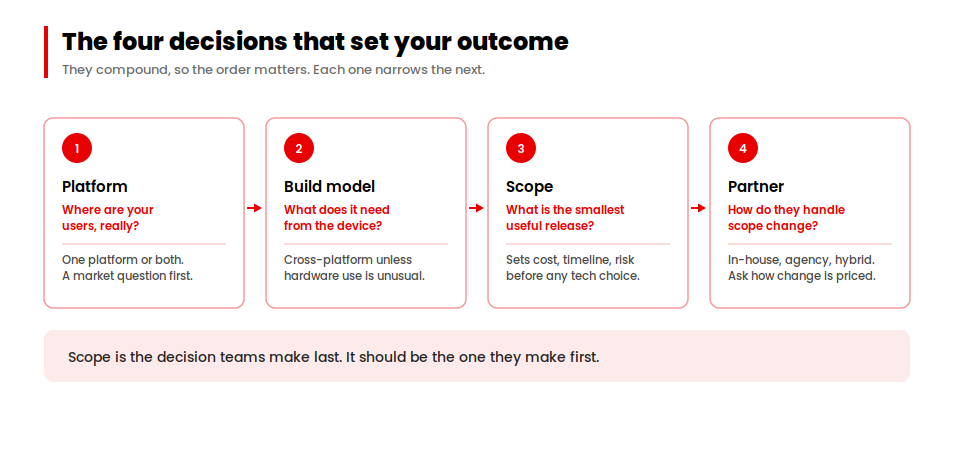
Every build I scope comes down to these four. They compound, which is why the order matters: each one narrows the sensible options for the next.
1. Which platform
iOS, Android, or both. This is a market question rather than a technical one. Look at where your users actually are, what they spend, and which platform your competitors have neglected. Building both at once doubles your surface area before you have learned anything, so most teams are better served launching on one and expanding once the product is proven.
2. Native or cross-platform
Native gives you the deepest access to device hardware and the tightest performance. Cross-platform gives you one codebase across both platforms and roughly half the maintenance burden over time. The honest test is whether your app does anything unusual with the camera, sensors, background processing or on-device machine learning. If it does not, cross-platform development is usually the better economics. Section three has the comparison.
3. How much scope
This is the decision teams make last and should make first. Scope drives cost, timeline and risk more than any technology choice, and a first release that tries to be complete is the most reliable way to spend a year learning nothing. Define the smallest version that lets real users do the core job, ship it, and let usage tell you what to build next. That approach is what MVP development exists to structure. If you are building inside a large organization with existing systems to integrate, the constraints are different and enterprise mobile app development covers them.
4. Who builds it
In-house, an agency, or a hybrid. The question that separates good partners from bad ones is not portfolio quality, it is how they handle the moment when your requirements change mid-build. Ask how scope changes get priced, who owns the code, and what happens after handover. Our full checklist for this is in how to choose a mobile app development company.
Native, Cross-Platform or PWA?
Three ways to build, with a genuine trade-off between them. Most teams overthink this and pick based on what their engineers already know, which a defensible reason is as long as it is a stated one.
| App Type | Best For | Trade-off | Relative Cost |
|---|---|---|---|
| Native | Heavy hardware use, demanding performance, one primary platform | Separate codebases mean separate builds, separate teams and separate maintenance | Highest |
| Cross-platform | Most business apps that need iOS and Android from one codebase | A thin layer between you and the platform, occasionally noticeable in animation-heavy interfaces | Moderate |
| Progressive web app | Reach without an install, tight budgets, content-led products | No app store presence and limited access to device features | Lowest |
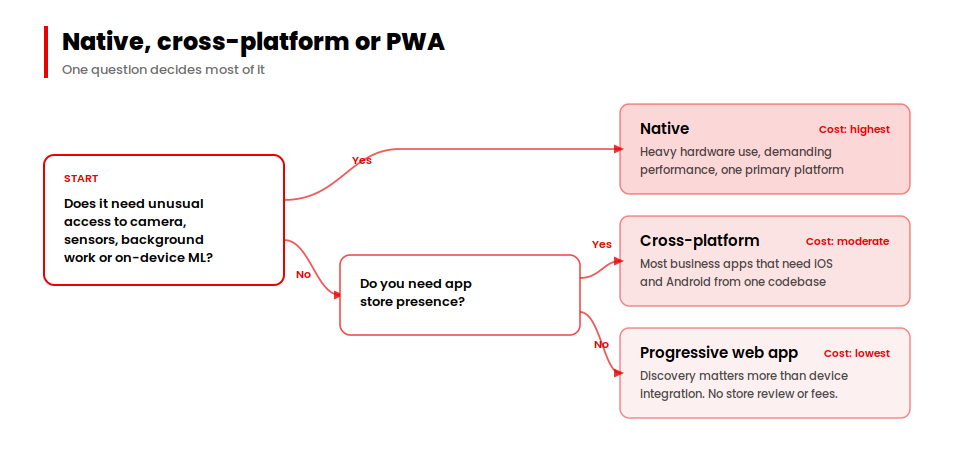
Progressive web apps deserve more consideration than they usually get. They skip store review entirely, they are indexed by search engines, and for a product where discovery matters more than device integration they can outperform a native build at a fraction of the cost.
The Eight Stages of Mobile App Development, End to End
Here is the whole sequence in one view. Each stage produces a decision, not just a deliverable, which is the part most process diagrams leave out. For the stage-by-stage detail, including what each one should hand to the next, see our breakdown of the eight phases of the mobile app development process.
| Stage | What Happens | The Decision You Make | Typical Duration |
|---|---|---|---|
| 1. Strategy | Define the problem, the audience and the business goal | Whether this is worth building at all | 1–2 weeks |
| 2. Market research | Competitor analysis, positioning, platform demand | Which platform you launch on | 1–2 weeks |
| 3. Analysis and planning | Requirements, roadmap, stack selection, estimation | What ships in release one | 2–3 weeks |
| 4. UI/UX design | Wireframes, prototypes, interface design, accessibility | How the core journey actually works | 3–6 weeks |
| 5. Development | Front end, back end, APIs, integrations | Where to trade speed against durability | 8–20 weeks |
| 6. Testing | Functional, performance, security and user testing | What counts as ready to ship | Continuous, plus 2–4 weeks |
| 7. Deployment | Store submission, release planning, store optimization | Phased rollout or full launch | 1–3 weeks |
| 8. Post-launch | Monitoring, fixes, iteration, localization | What the data says to build next | Ongoing |
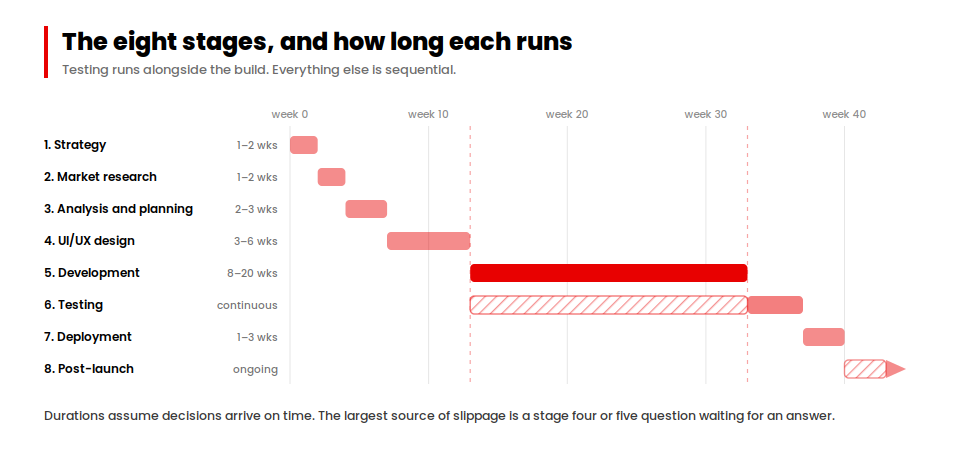
Durations assume decisions arrive on time. In my experience the single largest source of slippage is not engineering complexity, it is a stage four or five question waiting three weeks for an answer from the client side.
What It Costs and How Long It Takes
Cost tracks complexity more closely than anything else. Platform count, integration count and design depth move the number most.
| Complexity | Cost Band | Timeline |
|---|---|---|
| Simple | $5,000 – $50,000 | 1–3 months |
| Medium | $50,000 – $120,000 | 4–7 months |
| Complex or AI-powered | $120,000 – $500,000+ | 8+ months |
Those bands cover the build. They do not cover app store fees, third-party services, or the annual maintenance that typically runs at a meaningful share of the original build cost. For the full picture, including where budgets usually overrun, see our detailed breakdown of mobile app development cost. If you want a number quickly, the app cost calculator gives an estimate from a short set of inputs.
Platform-specific figures differ enough to be worth checking separately: we maintain current breakdowns for Android app development cost and iPhone app development cost.
One thing worth being direct about. A quote produced without a defined feature list, a wireframe-level user flow and a clear integration list is a guess. Investing in a short discovery engagement before asking for fixed prices is the cheapest risk reduction available on a project of any size.
Durations assume decisions arrive on time. In my experience, the single largest source of slippage is not engineering complexity; it is a stage-four or stage-five question waiting three weeks for an answer from the client side. Working with an experienced mobile app development company in the USA helps keep product, design and engineering decisions moving through each stage. Once the scope, platform and essential features are defined, an app development cost calculator can provide an initial estimate for budget and timeline planning.
Inside Mobile App Development: Coca-Cola Dubai’s Trade Platform
Coca-Cola’s UAE trade channel runs through thousands of restaurants, hotels, retailers and hospitality venues. Until recently, every one of them ordered by phone call, sales rep visit and paper. We built the platform that replaced it. The full case study has the detail; here is how the four decisions played out.
| Peak Users at Launch | Platform Uptime | Faster User Journeys | Median Page Load |
|---|---|---|---|
| 2M+ | 99.98% | 45% | 1.2s |
Platform: both, from day one
This was one of the rare cases where launching on a single platform made no sense. The trade buyer network spans every kind of business in the UAE, using every kind of device, under varying connectivity. Partial coverage would have meant partial adoption.
Build model: cross-platform on React Native
One codebase across iOS and Android, chosen specifically because Coca-Cola would need to maintain and extend the platform long after the initial build. Two native codebases would have doubled the cost of every subsequent update cycle for no benefit the trade buyers would have noticed.
Scope: five decision moments, 92 screens
We organised the whole build around what a trade buyer actually needs to do: discover, order, track, manage and get help. Every one of the 92 screens answered to one of those five. Nothing was built because a B2B commerce platform is expected to have it. That discipline is also what kept a build of that size to nine months.
The features that came out of it were the ones the ordering relationship demanded: one-tap reordering from favourites, barcode scanning for in-store stock checks, self-service invoice and credit management, and an AI assistant called Arwa wired into core navigation with visibility into the buyer’s own account context rather than bolted on as a help widget.
Partner: a 10-person team and 150 prototypes
Before any production code, the full 92-screen design went through more than 150 prototype iterations, testing journey logic, information architecture and performance behaviour under the load the network would generate at peak. That is the reason the platform launched with zero critical bugs. It was not luck, and it was not a compressed design phase.
Accessibility was built in from design rather than retrofitted, because in a market with that much variation in digital literacy, AA compliance is a coverage decision rather than a compliance exercise.
“They worked closely with our team to build a platform that brings ordering, invoicing, account management, and customer support into a single digital experience for our trade network.”
Digital Transformation Lead, Coca-Cola
Planning a build and want the four decisions pressure-tested first?
We scope platform, build model, release scope and delivery model before anyone writes code, so the budget you approve is the one the project runs to.
→ Explore our mobile app development servicesChoosing Your Mobile App Development Technology
Stack choices follow from the four decisions rather than driving them. Once platform and build model are settled, most of this narrows quickly.
| Layer | Common Options | Choose It When |
|---|---|---|
| Frontend | React Native, Flutter, Swift, Kotlin | React Native suits teams already in JavaScript. Flutter suits design-heavy interfaces. Swift and Kotlin when you have committed to native on one platform. |
| Backend | Node.js, Django, Ruby on Rails | Node.js for real-time features. Django for data-heavy or security-sensitive products. Rails when speed to a working build matters most. |
| Infrastructure | AWS, Google Cloud, Azure | Follow your existing enterprise agreements and your team’s operational experience before comparing feature lists. |
| Database | PostgreSQL, MySQL, MongoDB, Firebase | Relational when your data has real relationships and transactional integrity matters. Document stores for high-volume, loosely structured data. |
Two constraints apply regardless of stack. Follow Apple’s Human Interface Guidelines and Material Design so your app behaves the way each platform’s users expect, and design against WCAG from the start. Retrofitting accessibility after a build is consistently more expensive than designing for it.
Getting Into the App Stores
Submission is where otherwise well-run projects lose weeks, almost always to avoidable errors rather than to anything about the product.
| Apple App Store | Google Play |
|---|---|
| Account cost: $99 per year | Account cost: $25 one-time |
| Review time: 1–7 days | Review time: 1–3 days |
| Submission tool: App Store Connect | Submission tool: Play Console |
| Strictest on: Completeness, privacy disclosure, duplicate or thin functionality | Strictest on: Policy compliance, data safety declarations, target API level |
Roughly 15% of submissions get rejected. Spam and duplicate-functionality issues account for around 28% of rejections and incompleteness for another 22%, with privacy problems a persistent third. Reading Apple’s App Store Review Guidelines before you build, rather than before you submit, removes most of that risk. The equivalent requirements for Android are set out in the Play Console documentation, and you will need an Apple Developer Program membership to submit at all.
Progressive web apps skip this entirely. They are hosted on your own infrastructure over HTTPS with a web app manifest and a service worker, and users add them from the browser. No review, no fees, no rejection risk, at the cost of store visibility.
Where to Go Next
This page is an orientation. Whichever of the four decisions you are actually stuck on, the detail is below.
Working out budget
- Mobile app development cost — the full breakdown by feature, platform and phase
- App cost calculator — a quick estimate from a short set of inputs
- Android app development cost and iPhone app development cost
Working out process
- The eight phases of mobile app development — what each stage produces
- Enterprise mobile app development — integration, security and governance constraints
Choosing a build model
Choosing a partner
- How to choose a mobile app development company — the questions worth asking
Building for an industry
- Healthcare · Fintech · Ecommerce · Logistics
Market context
Conclusion
The stages are well understood and every competent team follows roughly the same ones. What separates the builds that ship from the builds that drift is whether the four decisions got made deliberately, in order, and early enough to shape the budget rather than be constrained by it.
Pick your platform on evidence about your users. Pick your build model on what the app actually does with the device. Pick your scope before anyone quotes you a number. Then pick a partner who will tell you when one of the first three is wrong.
Want a number before you commit to a conversation?
The calculator takes a few inputs and gives you a working estimate to plan against.
→ Try the app development cost calculator















