














 ChatGPT
 Perplexity
 Claude
 Google AI
AI integration services are the engineering and consulting work that embeds AI (large language models, retrieval pipelines, AI agents, computer vision, or generative AI) into the systems a business already runs on: its CRM, ERP, data warehouse, and day-to-day workflows. AI development builds the model. Integration makes it work, securely and at scale, inside real operations.
I spend most of my week on the second half of that sentence. By the time a founder or a VP of Engineering reaches me, they’ve usually stopped asking what AI is. They’ve run a pilot, watched it impress everyone in a demo, and then watched it quietly die on the way to production.
If you’ve also been there and want to know the why, what it will cost to do it properly, whether to build or buy, and how to spot a team that ships to production instead of to a slide deck, this guide covers exactly that.
Key Takeaways
- The model isn’t the hard part, integration is. MIT found 95% of AI pilots deliver zero P&L impact, and it’s rarely the model’s fault. It’s messy data and no one owning the connection.
- Demos lie; production tells the truth. Clean demo data hides the mess. With only 29% of enterprise apps integrated, most models land blind.
- Check your data before you scope. Five tests: accessible, consistent, governed, maintained, traceable. Three “no” answers means fix data first.
- Hybrid usually wins build-vs-buy. Buy the model, build the layer that touches your data. Go custom only for niche use cases, real data moats, or strict privacy.
- Budget the whole lifecycle. $40k–$2M+ depending on scope, plus 15–25% of build cost per year to keep it running.
- Pick a partner who ships to production, not demos. Ask for live references, integration depth, and clear ownership. Buyers succeed ~3x more than internal-only builds.
Why 95% of AI Pilots Never Reach Production
Let me start with the number that should shape your whole approach. In 2025, MIT’s NANDA initiative studied enterprise AI across 300 deployments, 150 leader interviews, and a survey of 350 employees. It found that 95% of enterprise AI pilots delivered no measurable impact on the P&L. Not small returns. Zero.
When I read that the first time, the part that stood out wasn’t the failure rate. It was the cause. The MIT team was direct: the issue wasn’t the quality of the models. It was the learning gap: tools that couldn’t retain context, adapt to a workflow, or connect to the systems where work actually happens.
I’ve sat in enough scope calls to recognize the pattern. A pilot runs on a clean, curated slice of data in a sandbox, operated by one motivated team. Production runs on years of inconsistent, half-governed data spread across systems nobody built to talk to each other. The model that looked brilliant on the demo data starts giving confident, wrong answers the moment it meets the real thing.
There’s a second number that explains the stall mechanically. MuleSoft’s 2025 Connectivity Benchmark found that the average enterprise runs 897 applications and only 29% of them are integrated. An AI agent is only as useful as the data it can reach. Drop a capable model into an estate where two-thirds of the systems can’t pass it clean, current data, and you’ve built something that’s smart in theory and blind in practice.
So when a pilot stalls, I don’t start by swapping models. I start by asking where the data lives, who owns the connection, and whether anyone defined what “working in production” was supposed to mean before the build began.
Stuck between a working pilot and a production system?
That gap is exactly what our generative AI development services are built to close.
What AI Integration Services Actually Include
When people hear “integration,” they often picture a single API call. The real scope is wider, and knowing it helps you scope budget and avoid surprises.
A typical engagement covers a few distinct layers. There’s the model layer, choosing and configuring the LLM or model that fits the job. There’s the data layer, which gets your information into a shape the model can use, which often means building pipelines (the plumbing that moves and cleans data between systems) and a vector database (a store that lets the model search your content by meaning, not just keywords).
Then there’s the connection layer: middleware and APIs that let the AI read from and write to your CRM, ERP, and warehouse. Middleware is just software that sits between two systems and keeps them talking. This connection layer becomes even more important for multi agent AI systems, where multiple agents may need controlled access to different systems while coordinating tasks through reliable APIs and shared data sources.
Finally there’s the operations layer: deployment, monitoring, and the ongoing work of keeping a live model reliable, which the field calls MLOps.
Most of the cost and most of the risk sits in the data and connection layers. The model is increasingly a commodity you rent. Your data, and how cleanly it flows, is the part nobody else has.
The AI Integration Lifecycle
I think about delivery in five stages, and I find it useful to name them because most stalls happen at a specific one.
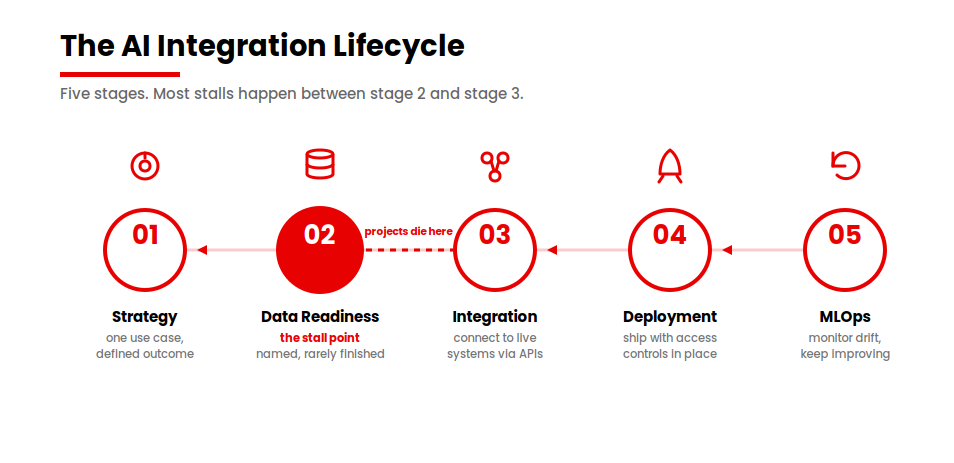
Strategy
Pick one high-value use case and define the outcome before anyone writes code. The startups MIT found succeeding did exactly this: they picked one pain point and executed well. (Fortune)
Data readiness
Get the data accessible, consistent, and governed. This is the stage everyone names and almost nobody finishes. I’ll give you a way to check it below.
Integration
Connect the model to live systems through stable APIs and a data layer that handles authentication, rate limits, and partial failures gracefully.
Deployment
Ship to production with security and access controls in place, so the AI only ever sees what a given user is allowed to see.
MLOps
Monitor for model drift, the slow decay in accuracy as the world changes while your model keeps answering as if it hadn’t, and keep improving the system over time.
When a project dies, it usually dies between stage two and stage three. The data was never made ready, so the integration had nothing solid to stand on.
Build Vs Buy: API-Based, Custom, Or Hybrid?
This is the decision I get asked about most, and the honest answer is that it depends on five things. Let me give you the framework I actually use, then the table.
For most use cases, integrating a hosted, API-based model from OpenAI or Anthropic is faster, cheaper, and good enough. You’re renting a capability that would cost a fortune to reproduce. Custom AI development or building a model makes sense in a narrower set of cases: your use case is highly specific, your data is a real moat, or privacy and latency rules force you to host on-premises.
The path I recommend most often is the hybrid one. You buy the model and build the layer that touches your data: your own retrieval system, your orchestration, and your guardrails. You get speed and flexibility without handing your differentiation to a black box.
| Factor | Lean API-based | Lean Custom | Lean Hybrid |
|---|---|---|---|
| Use-case specificity | Common task | Highly specific | Specific, standard reasoning |
| Data maturity | Data can leave your walls | Data is a core moat | Data is an advantage to keep |
| Latency / privacy | Standard | Strict, on-prem required | Some controls, mostly cloud |
| In-house AI skills | Minimal | Deep team available | Lean team plus a partner |
| Budget / time horizon | Fast, lower cost | Long, higher cost | Moderate, balanced |
| Vendor-lock-in tolerance | Higher | Lowest | Managed via abstraction layer |
One practical note. If lock-in worries you, you can build an abstraction layer, a thin piece of software that lets you swap the underlying model later without rewriting everything around it. It costs a little more up front and saves you a painful migration when pricing or capability shifts, which in this market it will.
There’s a useful counterweight to keep in mind here. Not every team agrees the 95% figure means “hire a vendor.” Some practitioners read the same MIT data and argue that individual adoption is already producing real value and that the firm-level failure is structural and fixable in-house if a founder owns it.
Is Your Data Actually Ready? A Five-Point Check
Before I scope any integration, I run a fast read on the data. You can do this yourself in an afternoon. Ask five questions.
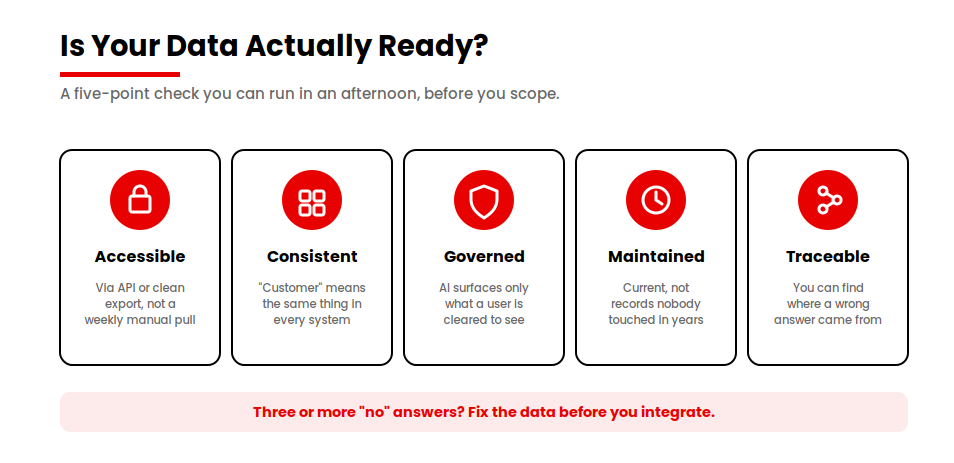
Five checks before you scope. Three or more “no” means fix data first.
Is the data accessible through an API or a clean export, without someone manually pulling a file every week? Does it have a consistent schema, so “customer” means the same thing in every system instead of three different things? Is it governed and permissioned, so the AI only ever surfaces what a given user is cleared to see?
Two more. Is it maintained and current, or are you about to feed a model records nobody has touched in years? And can you trace its lineage, so that when an answer looks wrong you can find where the value came from?
If three or more of those are a “no,” you’re not ready to integrate yet. Scope a short data-readiness phase first. I know that’s not what anyone wants to hear when they’re excited to ship, but skipping it is the single most reliable way to join the 95%.
Common Integration Architectures: API, RAG, and Agentic Patterns
Three patterns cover most of what I build, and understanding them helps you talk to any partner clearly.
The simplest is a direct API integration: your application calls a hosted model, gets an answer, and shows it to the user. Good for a single feature, like summarizing a support ticket.
The most common for real business use is RAG, retrieval-augmented generation. In plain terms, you give the model a way to look things up in your own content before it answers, so its responses are grounded in your data instead of generic knowledge. RAG is what stops a model from confidently inventing answers about your business. It needs a vector database and a retrieval step, which is real engineering, and it’s where a lot of the integration work concentrates.
The most advanced is the agentic pattern, where AI agents plan and carry out multi-step tasks across systems, reading from one, deciding, and writing to another, within boundaries you set. Agents are powerful and they raise the integration bar sharply, because an agent that can act needs reliable, secure connections to every system it touches.
This architecture is becoming a core part of agentic AI software development, where AI agents move beyond generating responses and actively participate in software workflows by planning tasks, executing actions, and coordinating across systems.
If you’re weighing agents specifically, I’ve written more about where they fit and where they don’t in our piece on agentic AI for businesses. The short version: agents earn their complexity when a task needs reasoning over messy, changing context, and they’re overkill when a deterministic workflow would do.
Connecting AI to Your Stack: CRM, ERP, Data Warehouse, and Legacy Systems
This is the part that turns a clever prototype into something the business uses every day, and it’s where the surprises live.
Connecting to a modern CRM like Salesforce, HubSpot, or Dynamics 365 is usually well-trodden. There are APIs, and the data model is documented, and connecting to a data warehouse like Snowflake is similar.
The friction shows up with older systems. Legacy applications often lack clean access points, so part of the work is what I’d call careful archaeology: figuring out how to read and write to a system that was never designed to be read from or written to.
The harder problem is rarely a single connection. It’s that the same fact lives in five places and means something slightly different in each. Reconciling that, deciding which system is the source of truth for which field, is the unglamorous work that determines whether the AI gives consistent answers. When legacy systems are the bottleneck, the right move is sometimes to address them directly, which is why legacy modernization and integration go hand in hand.
For deeper, two-way connections across multiple systems, this becomes a system integration project in its own right, with the AI as one consumer of a properly connected data layer rather than a bolt-on.
A Real AI Integration, Start to Finish
Let me make this concrete with one of our projects, Hyvara, a sales intelligence product, because the pattern in it is the whole argument of this article.
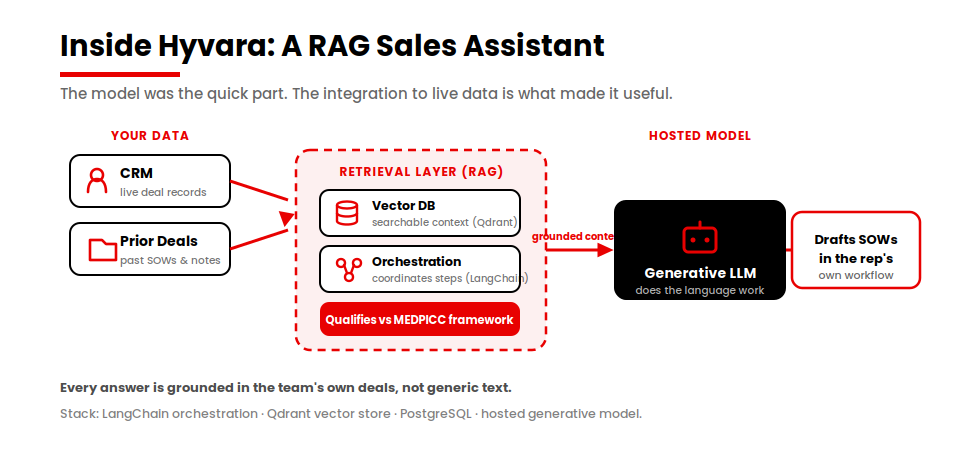
What they wanted sounded like a model problem: “give us an AI that writes our sales documents and qualifies leads.” What they actually needed was an integration problem. A generic model could draft a plausible SOW, but a plausible SOW grounded in nothing is worse than useless to a sales rep. The value was entirely in connecting the model to their deals, their CRM, and their qualification framework.
The lesson I’d pull out of it is the one I keep repeating. The model was the quick part. The work that decided whether the thing was useful was the integration: connecting it to live data and a vector store so every answer was grounded in the team’s own information instead of generic text.
You can pick the model in an afternoon. You earn the production system over the following weeks.
AI Integration Services Cost In 2026
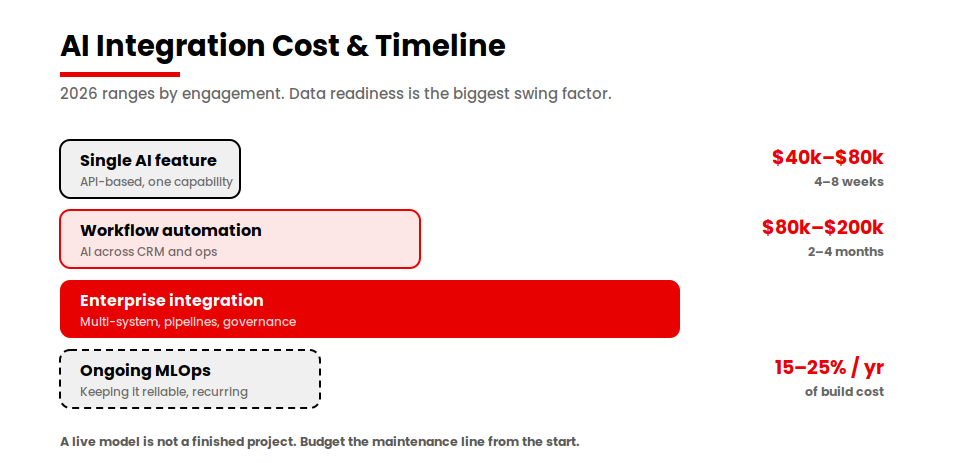
Both AI app development costs and integration costs can vary with scope, but here are the ranges I’d give a founder asking for a realistic budget. The biggest swing factor, in either direction, is how ready your data is.
| Engagement | Timeline | Cost range (2026) | Best for |
|---|---|---|---|
| Single AI feature (API-based) | 4–8 weeks | $40k–$80k | Adding one capability to a product |
| Workflow / process automation | 2–4 months | $80k–$200k | Connecting AI across CRM and ops |
| Enterprise AI integration | 4–9 months | $200k–$2M+ | Multi-system, pipelines, governance |
| Ongoing MLOps / maintenance | Recurring | 15–25% of build/yr | Keeping models reliable after launch |
How Long It Takes and How to Measure ROI
Timelines track the table above, but the honest distribution is wider than most pilots assume. When data is genuinely ready, a focused integration can reach production in roughly 10 to 14 weeks. When it isn’t, the same scope can stretch to six months or more, and a meaningful share of proofs-of-concept get scrapped before they ever ship. The difference is almost entirely the data, not the model.
For ROI, I’d hold a project to leading and lagging signals. Leading: how many workflows you’ve actually redesigned around the AI, and real usage by the people meant to use it. Lagging: time saved, cycle time cut, error rates down, and eventually a line you can point to in the P&L.
McKinsey’s 2025 research is a useful reality check here. 88% of organizations now use AI, but only a small single-digit share report material enterprise-level financial impact. The factor that most separates them is having redesigned their workflows rather than bolting AI on.
How to Choose an AI Integration Partner
When you’re evaluating anyone, including us, here are the eight questions I’d ask. They’re designed to separate teams that ship to production from teams that ship demos.
- Production references, not demos. Ask to speak to a client whose system is live and running today, not one that looked good in a pilot.
- Integration depth with your specific stack. Have they connected to your CRM, ERP, or warehouse before, and can they describe the hard parts?
- Data-engineering capability. Integration is mostly data work. A team that only talks about models is missing the part that fails.
- MLOps and monitoring. Ask how they’ll know when the model drifts and what they’ll do about it.
- Clear ownership in production. Who is accountable for the model’s behavior once it’s live, and what’s the escalation path when it’s wrong?
- Security and compliance posture. How do they handle access controls, data residency, and audit trails?
- Pricing model. Fixed scope or time-and-materials, and what triggers a change order?
- Post-launch support. What does the maintenance relationship look like after go-live?
A team that answers these crisply has done this before. A team that gets vague around data engineering, ownership, and monitoring is showing you where your project will stall.
Conclusion
The real choice isn’t which model to use. It comes down to three honest answers: is your data ready, should you build or buy for this specific use case, and does the partner across the table ship to production or just to a demo. Get those right before you scope, and AI integration stops being a stalled experiment and starts showing up in the numbers that matter.
If you’re past the pilot and ready to integrate for real, the best next step is a conversation about your actual use case, your actual data, and what it would honestly take.
Ready to move your AI from pilot to production?
Bring your use case to a team that connects AI to live systems and see how we wire AI into the CRM, ERP, and data warehouse you already run on.
Explore our system integration services
Also read: Agentic AI for Businesses: Where AI Agents Actually Fit if you’re weighing agents as part of your integration.