ChatGPT
 Perplexity
 Claude
 Google AI
AI app development means building an app with artificial intelligence, using tools like Replit, Bubble, Base44, or Figma AI. Non-technical founders pick one of two paths. A no-code builder for a fast prototype. Or custom code on OpenAI or Anthropic APIs for something built to last. I am Ali, Product Strategist and Client Success Lead at AppVerticals, and I have scoped more than fifty digital products.
More than 1.1 million public code projects now plug into an AI model. That number is up 178 percent in a year, per GitHub’s 2025 Octoverse report. By the end, you’ll know which build path fits your idea, what it will likely cost, and where to expect challenges.
| The real risk in AI app development is picking the wrong build path before you understand your own idea. |
Key Takeaways
- AI app development typically follows one of three approaches: a no-code prototype, an AI-enhanced MVP, or a fully custom AI product, depending on your goals and budget.
- No-code platforms let you test ideas quickly and affordably, but you rely on the platform because you do not own the underlying source code.
- Most funded AI apps with a single AI-powered feature cost between $25,000 and $100,000, making careful planning essential before development begins.
- The biggest obstacles are rarely the AI itself—they are integrating real user data, implementing payments, and passing app store review requirements.
- Build your first version using APIs like OpenAI or Anthropic, define your app’s scope realistically, and ensure someone with technical expertise guides key development decisions.
What Is AI App Development, Really?
AI app development means building an app that uses artificial intelligence, either as the core feature or as an add-on. Non-technical founders mean one of two things by this. A no-code AI app builder such as Bubble or Replit. Or custom code built on an OpenAI API or Anthropic API.
AI in app development is not one single technique. It ranges from a simple prompt wired into a chat interface to a fine-tuned model trained on your own data. For most first apps, the simple end is enough. It often comes down to prompt engineering more than anything else. Some founders call this vibe coding: describing the app in plain language and letting the tool generate it.
- AI as a feature: an AI capability, like a chatbot, sits inside a larger app.
- AI as the product: the AI itself is the value, and the rest of the app exists to deliver it.
That distinction decides how you scope, staff, and price the build, covered in the framework below.
No-Code AI App Builders vs. a Real Development Team
((Alt Text: Split comparison graphic for ai app development: No-Code Prototype card in red on the left versus Development Team card in black on the right, each listing three traits.)
The decision comes down to what your app has to survive. A no-code tool gets you a working prototype in days. A development team gets you something that can handle real users and real data.
I have scoped products for founders on both sides of this choice. The mistake is rarely picking the wrong tool. The mistake is not knowing which stage you are actually at.
Comparing ai app development services before you have scoped your own idea wastes the first conversation. You do not need to hire an ai app development company on day one.This is overkill for a first prototype. A vetted development partner can tell you fast whether your idea is a two-week no-code prototype or a real build. Our guide on how to vet an MVP development partner walks through what to ask before you commit budget.
A no-code builder is the right call when you are validating demand and have not spent real money yet. A development team is the right call once you need real data, payments, or app store review.
For example; if a founder wants a booking app with an AI scheduling assistant. A no-code build tests the idea in about a week. A development team builds the version that can actually take payments and hold real appointment data.
The AI App Build-Path Framework
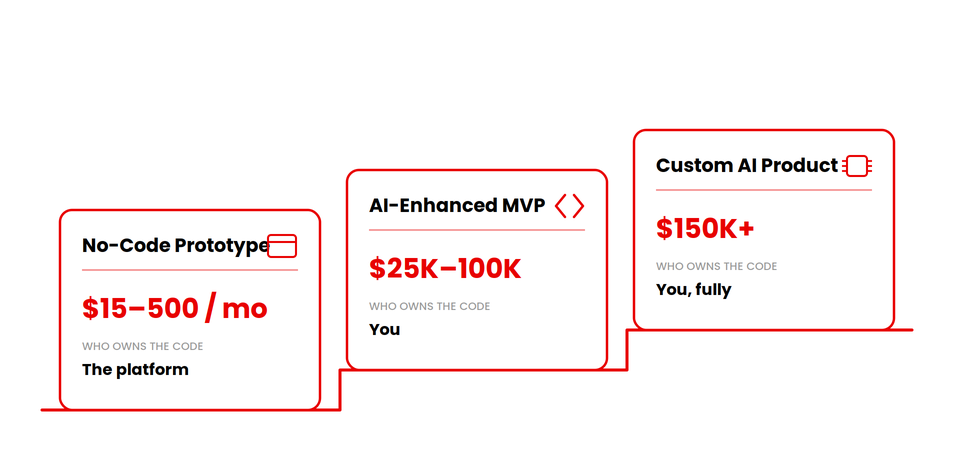
I use three tiers to scope every AI app idea that comes across my desk. The middle tier is your minimum viable product with one AI feature done right. Naming the tier early saves a founder from guessing at budget.
| Build Path | Best For | Who Owns the Code | Typical Cost | Typical Timeline | Where It Breaks Down |
|---|---|---|---|---|---|
| No-Code Prototype | Validating an idea fast, before spending real money | The builder platform. You rent access, you do not own the code. | $15 to $500 per month | 1 to 3 weeks | Real user data, payments, app store review, scaling past a few hundred users |
| AI-Enhanced MVP | A real first version with one or two AI features, built to launch | You. Built by a development team on your own architecture. | $25,000 to $100,000 | 4 weeks to 4 months | Needs a development partner from day one, higher upfront cost than no-code |
| Custom AI Product | AI is the core value of the product, not a feature bolted on | You, fully, including the model layer and data pipeline. | $150,000 and up | 4 to 6+ months | Requires ongoing model, data, and infrastructure investment |
Cost and timeline ranges are reconciled against our published cost guide, so the two do not contradict each other.
Each tier buys something different beyond the price tag.
- No-Code Prototype: speed. You find out whether anyone wants this before you spend real money on a build.
- AI-Enhanced MVP: a real product. Built to handle actual users and real data, beyond a simple walkthrough.
- Custom AI Product: control. You own every layer, which matters once the AI becomes your core value.
Before You Build: A Quick Scoping Checklist
(Alt Text: Five stacked checklist row cards for scoping an ai app development idea, alternating white and light-pink fill, each with a bold icon-circle on the left and short label on the right, final row in solid black for the budget step.)
Product scoping means writing down the idea before you touch a tool, no-code or custom. This step is the one founders skip most, and skipping it is expensive later.
- Write your idea as one sentence: what it does, and for whom.
- List the one AI feature that matters most.
- Decide if AI is the core product, or a feature inside a bigger one.
- Set a realistic budget range before touching any tool.
- Decide if you are validating an idea, or building to launch.
Answer these five honestly, and the rest of this guide gets much easier to apply.
Step-by-Step: How to Build an AI-Powered App
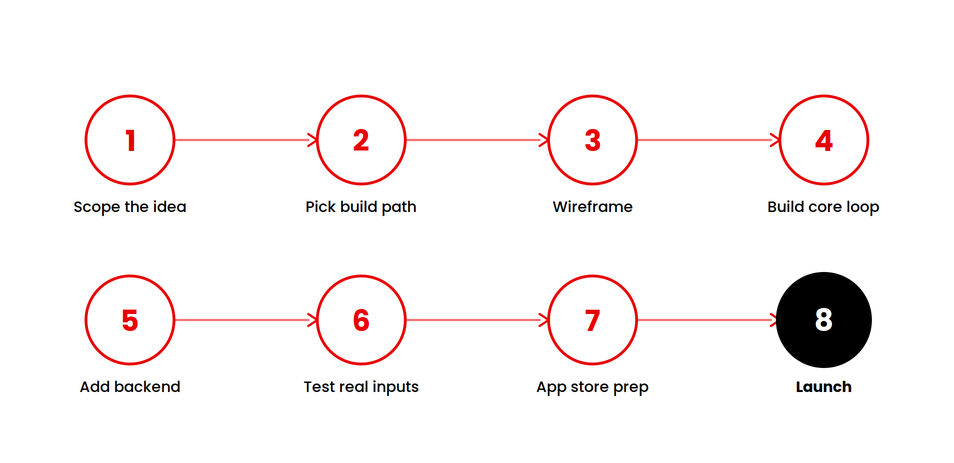
Most ai mobile app development follows this same sequence, whether the app lives on iOS, Android, or the web.
- Scope the idea. Use the checklist above. Write down the one AI feature that has to work and the one metric that tells you it worked.
- Pick your build path. Match your answers against the Build-Path Framework above.
- Wireframe before you build. UI/UX design still matters even inside a no-code build. A rough wireframe forces decisions that are cheap on paper and expensive in code.
- Build the core loop first. Whether you use a no-code builder or a development partner, build the single AI feature before anything decorative.
- Add backend infrastructure, cloud hosting, and user authentication. A demo does not need real accounts. A shipped app does.
- Test with messy, real inputs instead of clean examples. Real user data breaks demos that look perfect in a walkthrough.
- Prepare for app store review. Apple and Google both check what your AI feature discloses and what data it touches.
- Launch to a small group first. Expand once the AI feature holds up outside your own testing.
Some founders want the whole build handled, AI feature included. They start with our generative AI development services instead of piecing it together themselves.
Best AI Tools for Web App Development, by Build Path
The best AI tools for web app development split cleanly by what stage you are at. Do not shop for tools before you know your tier.
| Category | Example Tools | Best For | Limitation for Non-Technical Founders |
|---|---|---|---|
| No-Code AI App Builders | Bubble Replit Base44 |
Fast prototypes, testing an idea | Limited code ownership, a real scaling ceiling |
| AI Feature APIs | OpenAI Anthropic Google Gemini |
Adding AI features to a custom-built app | Requires a developer to integrate properly |
| Design and Prototyping | Figma AI | Turning an idea into a clickable prototype fast | Does not build the actual backend or database |
| Development Partners | AppVerticals and similar teams | Production-ready MVPs and custom AI products | Higher upfront cost than DIY, but ships something that scales |
A no-code ai chatbot app development services provider can get a support bot live in a week. A custom recommendation engine trained on your own data cannot and should not try to. Match the tool to the tier you are building for.
What AI App Development Actually Costs
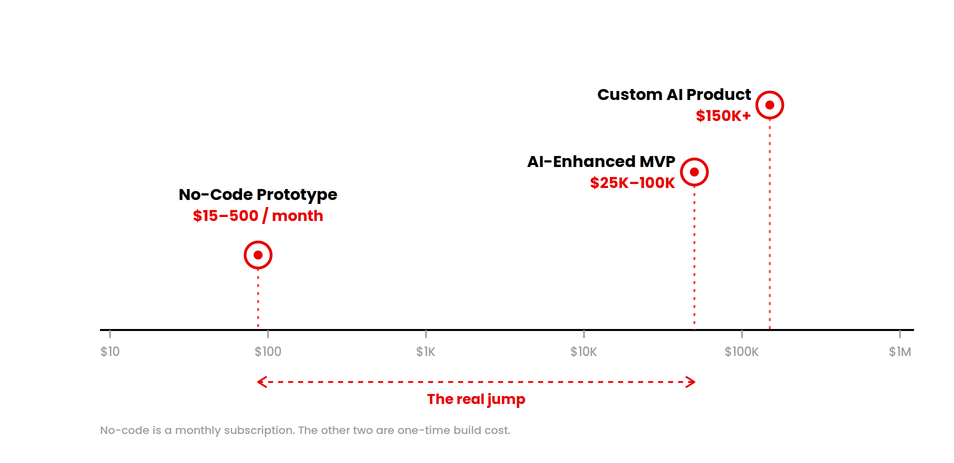
AI in app development costs $15 a month for a no-code prototype and over $300,000 for a custom enterprise build. Most funded apps with one AI feature cost $25,000 to $100,000. Three things drive that range: build path, how much of your own data the AI needs, and day-one user volume.
For the full breakdown by build type, feature, and ongoing inference cost, see our complete AI app development cost guide.
Where Most First AI Apps Quietly Stall
The stall point is rarely the model. In my own scoping calls, it is almost always one of three things:
- Real user data the prototype was never tested against.
- Payment handling the no-code tool was not built to secure.
- App store review, which checks how an AI feature discloses itself and what data it touches.
A no-code prototype that impresses in a demo can still fail app store review on its first submission. This happens against the Apple App Store Review Guidelines or the Google Play Developer Program Policies. Founders rarely budget time for a second review round. It happens often enough that you should plan for it up front.
Data ownership and data privacy are the quieter version of this problem. Most no-code platforms hold your app’s data and code on their infrastructure. If you outgrow the platform, migrating that data and rebuilding the app becomes its own project.
Do You Need a Technical Co-Founder?
A technical co-founder is not required to start. A generative AI app development company can fill that gap instead, especially once the build needs a custom model. Technical judgement somewhere in the process is required. That judgement can come from a co-founder, an advisor, or a development partner.
A no-code tool can get you a working prototype alone. Once you need real users, real data, or app store review, that usually changes. Most founders bring in a technical co-founder or a development partner at that point.
Here is an honest test. If your prototype breaks, can you tell whether the problem is your prompt, your data, or the platform?
If the answer is no, that gap is worth closing before you spend more on the build. An advisor for a few hours a month is often enough at the prototype stage. A development partner makes more sense once real users are involved.
What to Do Next
Three things before you contact anyone about building your app:
- Write your one-sentence idea and your one must-have AI feature.
- Place your idea on the Build-Path Framework above, honestly.
- Set a real budget range using the cost table.
A no-code prototype is often enough to test product-market fit before you spend real money on a build. Founders who do these three things first get a faster, more accurate scoping conversation. There is something concrete to react to, instead of a blank idea.
Ready to Scope Your AI App the Right Way?
Get a clear build path and cost range built around your specific idea.
→ Talk to Our AI Development TeamKeep Reading
If you’re a founder mapping out your own build, these articles are worth reading next.