
















 ChatGPT
 Perplexity
 Claude
 Google AI
AI in mobile apps means using machine learning, generative AI and natural language processing to power features like chatbots, personalized recommendations, image recognition, voice input and fraud detection, either on-device or in the cloud. Roughly 72% of enterprises now use AI in at least one business function, so the hard part is no longer adoption. It is deciding which AI actually deserves a place in your product, and most of it does not. A recommendation engine or a well-grounded support chatbot can lift retention and revenue. A bolted-on “AI assistant” that no one opens just adds cost, latency and privacy risk.
Even as adoption becomes near-universal, RAND finds that more than 80% of AI projects fail to deliver real business value, so in 2026 the gap between growth and wasted budget comes down to which features you actually choose to build.
This guide walks through how AI is genuinely used in mobile apps, scores the most common features as build, situational or skip and shows what each costs, so you spend your budget on the AI that moves your numbers, not the AI that looks good in a press release.
Key Takeaways
- AI adoption in apps is no longer the hard part. Roughly 72% of enterprises already use AI, so the competitive edge now comes from choosing the right features.
- Personalized recommendations and a well-grounded support chatbot are the two AI features almost every app should build first because both move retention and revenue directly.
- A generic “AI assistant” bolt-on is the most common feature I tell clients to skip, since it adds cost and latency without solving a defined user problem.
- Roughly 70% of AI products fail to deliver value and the failure almost always traces back to a feature that was added for the demo rather than for the user.
- On-device AI wins on speed, privacy and offline support, while cloud AI wins on heavy models and most strong apps use a hybrid of the two.
- A single AI feature built on a pre-trained API typically costs between $8,000 and $40,000, while a custom multi-feature AI app can exceed $150,000.
- The right way to start is with the one AI feature that solves your biggest user problem, prove it out, then expand from there.
How is AI Used in Mobile Apps? (the real use cases)
Strip away the marketing and AI in mobile apps comes down to a handful of jobs it does genuinely well. The first is personalization. The app learns from what a user taps, watches, buys, or skips, and reshapes the experience around them. This is what sits behind your feed, your “recommended for you” row, and the order in which search results appear.
The second is conversation. A support chatbot reads a user’s question, pulls the relevant answer from your knowledge base, and resolves the issue without a human in the loop. When it is built properly, grounded in your actual content rather than left to guess, it deflects a large share of support tickets and keeps users from rage-quitting at a dead end.
The third is perception. Computer vision lets an app understand images and the camera feed. That covers document scanning, receipt capture, product lookup, skin or plant identification, and the augmented reality try-on features common in retail and beauty apps.
The fourth is prediction and protection. Models forecast what a user is likely to do next and flag activity that looks wrong. Fraud detection in a fintech app, anomaly alerts in a banking app, and predictive restocking in commerce all live here.
Underneath all of this, AI quietly powers search ranking, dynamic content, voice input, translation, and security monitoring. The pattern worth remembering is that the best uses solve a specific, nameable problem. The weak ones exist because “we should have AI in here somewhere.” That single distinction predicts almost everything about whether a feature will pay off, and it is the lens I will use for the rest of this guide. This shift from experimentation to practical AI adoption is reflected across the mobile app ecosystem. Businesses are increasingly using AI for personalization, automation, security, and user engagement, as shown by broader AI in app development statistics.
The 4 Types of AI in Mobile Apps (and which phone apps use them)
When clients ask which AI they need, I find it clearer to talk in terms of the four underlying types rather than the buzzwords. Each one maps to a different class of problem.
Machine learning is the workhorse
It powers recommendations, predictions, ranking, and personalization by learning patterns from data. Netflix and Spotify use it to decide what to surface next. Amazon uses it to rank products. Almost any app with a personalized feed is running ML behind the scenes.
Natural language processing handles text and speech
This is the engine behind chatbots, voice assistants, smart replies, and translation. Duolingo uses it for language practice, banking apps use it for conversational support, and Google Translate is essentially NLP in your pocket.
Computer vision lets an app interpret images and video
Google Lens identifies objects, banking apps read checks through the camera, retail apps power virtual try-on, and health apps analyze skin conditions or food photos.
Generative AI is the newest type
It creates content rather than just classifying it, drafting text, summarizing long threads, generating images, and powering the assistant features that have exploded since 2023. ChatGPT’s app is the obvious example, but generative AI now shows up inside email apps, note-takers, and design tools.
Most production apps combine two or three of these. An e-commerce app might use ML for recommendations, NLP for its support chatbot, and computer vision for visual product search. The type you need follows from the problem you are solving. Which one sounds most advanced is beside the point. I have seen teams reach for generative AI when a simple ML classifier would have done the job for a tenth of the cost, and the reverse far less often.
Which AI Features are Worth Building, The Worth-It Scorecard
Here is the part competitors leave out. Everyone lists the features. Almost no one tells you which ones actually deserve a place in your build. So I scored the most common mobile AI features against the four things that matter when you are the one paying for them: how much user value they create, how much they move retention, what they cost to build, and what they cost to maintain once they are live. The last column is the verdict, and the verdicts do not hedge.
These calls come from delivery experience, not theory. They reflect what has paid off in the apps my team has shipped.
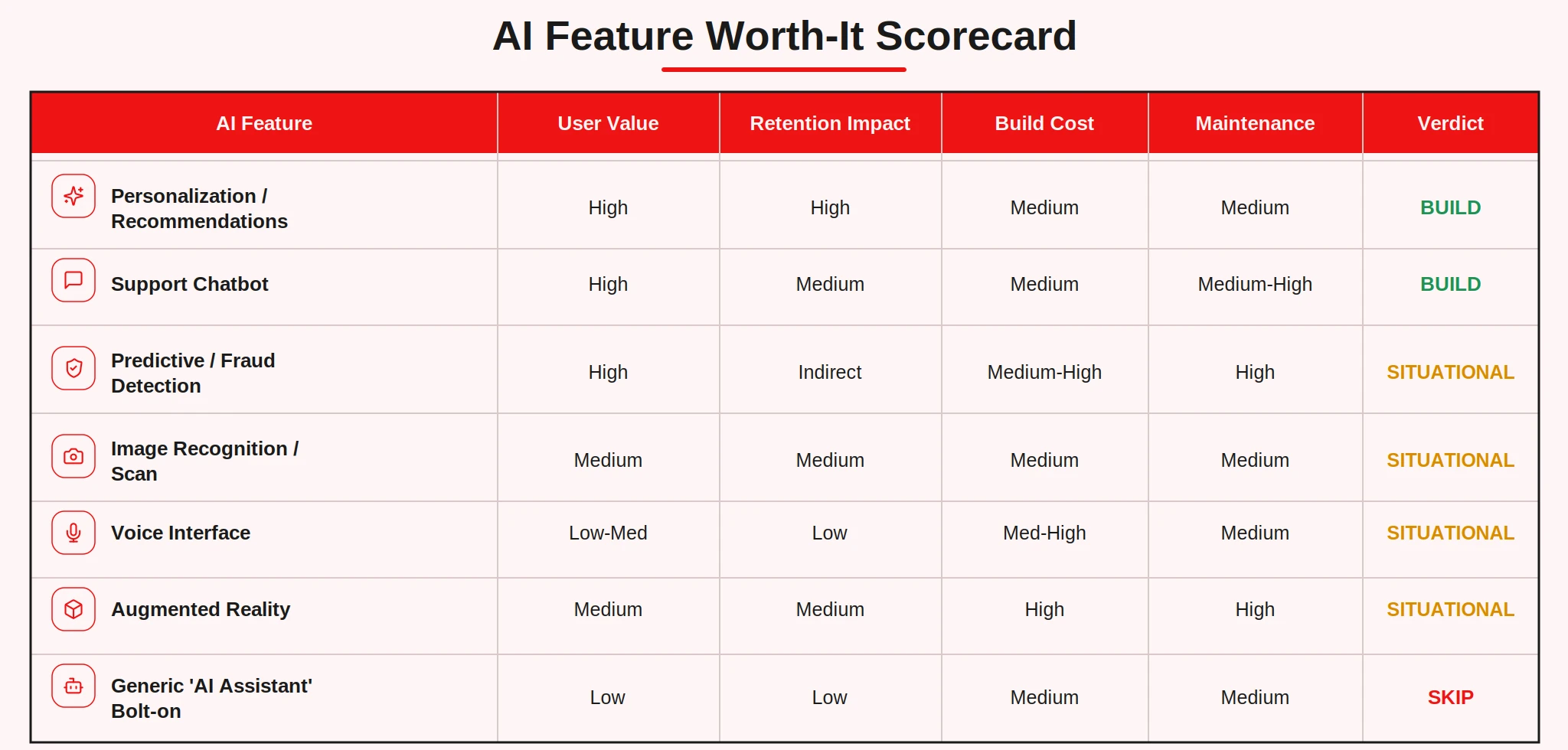
I asked myself the question clients always ask me, and put the answer on the record next to the scorecard.
A few notes on the calls.
1. Recommendations and personalization earn a clear Build
This is the single most reliable AI investment in mobile. It compounds over time, it directly shapes the metrics you care about, and the cost is moderate because the patterns are well understood. If you only build one AI feature, build this one.
2. A RAG-grounded support chatbot is also a Build, with one condition
The “RAG-grounded” part is not optional. Retrieval-augmented generation means the bot answers from your own documents and data rather than improvising. That is the difference between a chatbot that deflects tickets and one that confidently invents wrong answers and erodes trust. If you are going to build a chatbot, this is how to do it, and it is worth reading up on proper AI chatbot development before you scope it.
3. Fraud and anomaly detection is Situational because context decides everything
For a fintech or payments app, it is close to mandatory and pays for itself the first time it stops a real loss. For a recipe app, it is irrelevant. The retention impact is indirect, you keep users by keeping them safe, and the maintenance load is high because the patterns you are chasing keep changing, so the verdict depends entirely on your domain.
4. Image recognition, voice and AR are Situational for the same reason
A scan feature is excellent in a banking, retail, or health app and pointless in most others. Voice interfaces sound impressive in demos but see low real-world usage outside of accessibility, hands-free, and specific in-car or kitchen contexts. AR is genuinely valuable for retail, furniture, and beauty, where a virtual try-on or place-in-room view removes real purchase friction, but its build and maintenance costs are high thanks to 3D assets and device fragmentation. Build any of these when your use case demands it. Building them because they look modern is how budgets get quietly drained.
The generic “AI assistant” bolt-on gets a Skip, and I will defend that one below, because it is the feature clients ask for most and regret most.
Curious what these verdicts cost in practice?
Before you commit to any Build, it helps to see the numbers. Our feature-by-feature breakdown of AI app development cost prices each of these features so you can put a budget against your own shortlist.
AI Features that are Usually Hype (and what to do instead)
The most common request I get is some version of “can we add an AI assistant.” Almost every time, when I ask what specific problem it solves, the answer is a pause. That pause is the whole problem.
A generic assistant bolted onto an app that did not need one does three things, all bad. It adds engineering and inference cost. It adds latency, because every interaction now waits on a model. And it adds privacy surface, because you are routing user data to an AI system for no clear return. Meanwhile, users open it once out of curiosity and never again. The button sits there as a monument to a roadmap decision, not a user need.
This is where the adoption numbers get sobering. Enterprises have embraced AI, but embracing it and profiting from it turn out to be very different things. Gartner found that only 28% of AI use cases fully meet their ROI expectations, which lines up with the 80% failure rate we opened with. Buying or shipping AI is easy, and almost everyone has done it.
Getting a return is hard, and most have not. A large share of those failures are features that landed on the roadmap because AI was on a strategy slide, with no one able to name the metric they were supposed to move. Gartner traces much of the collapse to weak data foundations rather than the models themselves, forecasting that 60% of AI projects will be abandoned through 2026 for exactly that reason. The full picture of adoption climbing while value lags is laid out in our AI in app development statistics, and closing that gap is exactly what this scorecard is built to do.
So what do you do instead of a generic assistant? You take the underlying capability and aim it at a real job. Instead of “an AI assistant,” build the one thing your users actually struggle with. If they cannot find products, build AI-powered search and recommendations. If they get stuck and contact support, build a grounded chatbot. If they abandon a long form, build smart autofill or summarization for that exact flow. The capability is fine. The generic, unfocused packaging is what fails.
The test I apply to every proposed feature is one sentence: what specific problem does this solve, and how will we measure that it worked? If a feature cannot answer that cleanly, it does not go in the build. That single filter has saved clients more money than any optimization I have ever shipped.
On-Device vs Cloud AI: Cost, Speed and Privacy
Once you have chosen a feature, the next decision is where the AI actually runs. This choice quietly drives your cost, your speed, and your privacy posture, and it is worth making per feature rather than once for the whole app.
| Factor | On-device | Cloud |
|---|---|---|
| Latency | Instant, no round trip | Depends on network and model |
| Cost | One-time, no per-call fee | Ongoing inference cost per call |
| Privacy | Data stays on the phone | Data leaves the device |
| Offline support | Works without a connection | Requires connectivity |
| Model size | Limited by device hardware | Effectively unlimited |
On-device AI runs the model directly on the phone using frameworks like Apple Core ML and Google ML Kit. It is the right choice when you need instant response, offline support, or maximum privacy. Face unlock, keyboard prediction, basic image processing, and simple classification all belong here. There is no per-call fee and no network dependency, but you are constrained by what the hardware can hold.
Cloud AI runs the model on a server you call through an API. It is the right choice for heavy models, especially large language models, that no phone can run well. The tradeoff is an ongoing inference cost that scales with usage and a dependency on connectivity and latency. Every request also sends user data off the device, which matters for sensitive domains.
In practice, most strong apps use a hybrid. A small on-device model handles the fast, private, high-frequency tasks, and a cloud model handles the heavy lifting when it is genuinely needed. A photo app might run basic enhancement on-device and only call the cloud for a complex generative edit. The split should be decided by latency tolerance, data sensitivity, and cost per call, in that order.
How to Integrate AI into a Mobile App (APIs, models and effort)
The good news is that you almost never start by training a model from scratch. The fastest, cheapest path is to call a pre-trained model through an API. For generative and language tasks that means providers like OpenAI, Anthropic, and Google. For on-device tasks it means Apple Core ML and Google ML Kit. You wire the API into your app, handle the input and output, and you have a working feature in a fraction of the time a custom model would take.
The integration work itself usually breaks into a few stages. First you define the exact job and the data the model needs. Then you select the model, API for speed and breadth, on-device for privacy and offline, custom only when the off-the-shelf options genuinely fall short. Then comes the real engineering: connecting the model to your app, designing the prompts or inputs, handling errors and edge cases, managing latency, and building the fallback for when the model is unavailable or wrong. That last part, the graceful failure path, is where amateur integrations fall apart and production-grade ones earn their keep.
Custom AI development or model training enters the picture only when your problem is specific enough that no general model handles it well. I train custom models when a client’s domain data, accuracy requirements, or privacy constraints make the API route insufficient. It costs more and takes longer, so it should be a deliberate choice, not a default. For most teams shipping their first AI feature, a well-integrated API beats a mediocre custom model every time.
If you are scoping a build, it helps to think of the AI layer as one part of broader mobile app development rather than a bolt-on. The model is rarely the hard part. The integration, the data plumbing, and the failure handling are where the effort actually goes. That is why the underlying mobile app architecture matters as much as the AI model itself — your API layer, data flow, security approach, and backend infrastructure determine whether an AI feature can perform reliably at scale. For a wider view of the tooling and approach, our AI development work covers the patterns we reuse across projects.
What AI Features Cost to Build
Cost is where a lot of AI roadmaps meet reality, so let me give you real ranges rather than vague reassurances.
A single AI feature built on a pre-trained API typically lands between $8,000 and $40,000. That covers a recommendation engine, a grounded chatbot, or a scan feature wired into an existing app. The range is wide because it depends on integration depth, how much custom data work is involved, and how polished the experience needs to be.
A custom, multi-feature AI app, the kind where AI is the core of the product and several models work together, can exceed $150,000. Custom model training, complex data pipelines, and tight accuracy requirements all push you up the curve.
The biggest cost drivers are consistent. The first is whether you use an API or train a custom model, which can change the budget by an order of magnitude. The second is integration depth, since AI woven through many flows costs far more than a single contained feature. The third is ongoing inference cost, which is easy to forget at scoping time and scales directly with your usage. A cloud model that is cheap with a thousand users can become a meaningful line item with a million.
The cheapest sensible path is the one I recommend to almost every client. Start with one high-value feature on an API, ship it, measure it, and expand only once it proves out. You contain your risk, you learn what your users actually respond to, and you avoid spending six figures on AI before you know which AI matters. To put real numbers against your own shortlist, our breakdown of AI app development cost goes feature by feature.
AI in Mobile Apps: Trends for 2026 and Beyond
A few shifts are worth planning for rather than reacting to.
On-device AI is getting dramatically more capable. As phone chips add dedicated neural hardware, models that used to require the cloud now run locally. That trend pushes more features toward instant, private, offline operation, and it lowers the inference bill for tasks that move on-device. If a feature is borderline cloud today, it may be comfortably on-device within a release cycle or two.
Generative AI is maturing from novelty into utility. The winning implementations in 2026 are narrow and grounded, summarizing your content, drafting inside your specific workflow, answering from your data, rather than open-ended assistants that try to do everything. The hype is fading and the useful, scoped applications are what remain.
Agentic features are starting to appear in apps, where the AI does not just answer but completes multi-step tasks on the user’s behalf. This is early and should be approached carefully, but it is the direction of travel for the most ambitious products.
And the bar for personalization keeps rising. Users now expect apps to adapt to them, so the recommendation and personalization layer that was a differentiator a few years ago is becoming table stakes. The takeaway for 2026 is the same as the takeaway for the rest of this guide. The technology keeps getting cheaper and more capable, which makes choosing well more important, not less.
The Honest Takeaway
After shipping these features across a lot of products, my conclusion is simple. AI belongs in your mobile app where it solves a real user problem, a recommendation engine, a grounded support chatbot, fraud detection, where it matters. Drop it in as a checkbox feature and all you have added is cost and latency for no return. Adoption is no longer the hard part. Choosing well is.
Once you know which one or two AI features are worth building for your app, the next step is to pick them correctly and price them, and that is the exact call my team makes with clients every week.
See what your AI features would cost → Read: AI App Development Cost