























 ChatGPT
 Perplexity
 Claude
 Google AI
Legacy system migration succeeds when companies align technical change with commercial priorities such as uptime, data trust, and operational continuity. The strongest outcomes come from choosing the right migration model, controlling execution risk, and ensuring the business performs better after transition than it did before.
Outdated infrastructure with higher operational risk and slower transformation outcomes. A successful legacy system migration strategy treats modernization as a business continuity initiative, using phased execution, validated data migration, and rollback planning.
This is where experienced legacy software modernization services teams can reduce disruption while accelerating execution. The leadership challenge is clear: how do you modernize core systems without disrupting customers, revenue, or daily operations?
Let’s discuss.
What Is Legacy System Migration and Why Does It Fail in Production?
Legacy system migration is the process of moving core business applications, databases, and workflows from outdated technology to modern platforms without interrupting operations.
That sounds straightforward. But, it is one of the highest-risk initiatives many companies take on. It is measured by whether the business still performs after it moves.
That distinction matters.
McKinsey & Company has reported that around 70% of large-scale transformation programs fail to meet their stated goals, often due to execution gaps rather than strategy alone. IBM has also consistently highlighted that aging infrastructure increases operational risk, maintenance burden, and slows innovation.
This means delaying legacy system migration can be costly, but rushing it can be worse.
Where Legacy System Migration Usually Breaks
Most failures happen after launch, when real users, real data, and real workflows hit the new environment.
1. Integrations Fail Before the Application Does
A migrated platform may look perfect in testing, yet fail once connected to payment systems, CRMs, ERPs, inventory tools, or third-party APIs. Many legacy systems depend on years of custom connections that are poorly documented.
Example: Several retail modernization programs discussed by major cloud providers have shown that order systems can migrate successfully while downstream inventory sync delays create fulfillment issues.
2. Data Moves, but Trust Does Not
One of the biggest risks in data migration from legacy systems is assuming copied records equal usable records. They do not.
A customer table may transfer correctly while billing history, permissions, linked subscriptions, or reporting logic breaks. Finance notices it first. Customers notice next.
According to enterprise migration frameworks from Amazon Web Services and Microsoft, strong migrations validate business logic, relationships, and workflows, not just row counts.
3. Hidden Dependencies Surface Late
Legacy systems often run on invisible scripts, manual processes, shared databases, and “one person knows how it works” logic.
Example: A manufacturer upgrades its ERP interface, only to discover an overnight legacy script still controls supplier pricing updates. The new platform launches Friday. Procurement breaks Monday.
Migration Success vs Production Success
| What Vendors Celebrate | What Executives Should Measure |
|---|---|
| System went live | Revenue workflows stayed stable |
| Data transferred | Data remained accurate |
| Cutover completed | Customers felt no disruption |
| Timeline met | Teams became faster, not slower |
| New platform launched | ROI actually improved |
What Smart Companies Do Differently
A successful legacy software migration strategy usually includes:
- Dependency mapping before budgets are approved
- Parallel environments for testing under real load
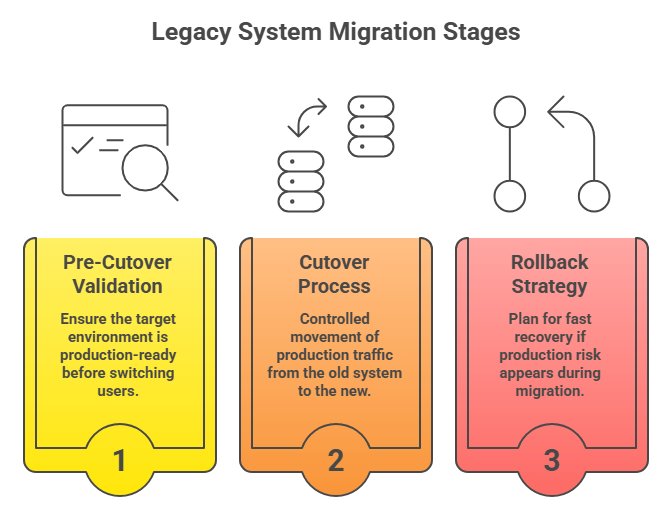
- Staged cutovers instead of big-bang launches
- Rollback plans with clear decision thresholds
- 30-day post-launch monitoring, not weekend celebration
Still Running Revenue-Critical Operations on Legacy Systems?
Every month you delay can mean higher maintenance spend, slower releases, and growing failure risk. We’ll show you what to move, what to keep, and how to modernize without disruption.
How Does Data Migration from Legacy Systems Work Without Data Loss?
Most data loss does not happen because files disappear. It happens when records are duplicated, relationships break, fields map incorrectly, or late transactions never reach the new system. The safest migrations treat data as a live business asset, not a static export.
That priority is growing fast. Statista has estimated global data creation will exceed 180 zettabytes by 2025, highlighting how enterprise data volumes continue to expand.
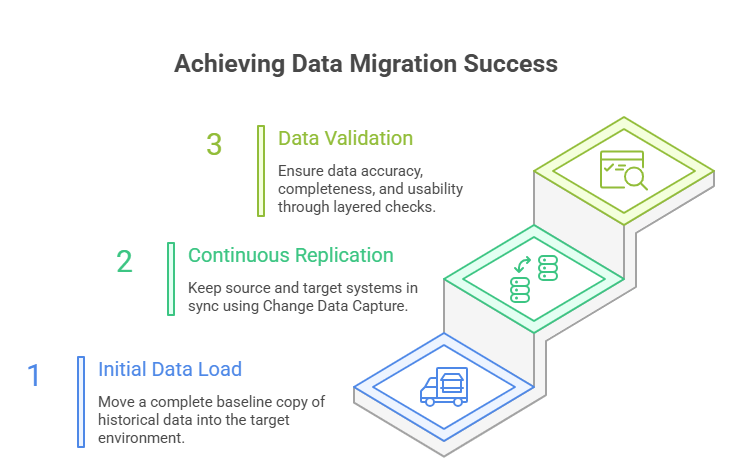
1. Initial Data Load: Build a Clean Foundation First
The first step in data migration for legacy systems is moving a complete baseline copy of historical data into the target environment.
This usually includes:
- customer records.
- financial transactions.
- product catalogs.
- contracts and documents.
- audit history.
- operational reference tables.
But copying data alone is not enough. Strong migrations begin with schema mapping, where each source field is matched to the correct destination field, type, format, and business rule.
For example:
- Cust_Name in a legacy CRM may need to split into First Name and Last Name
- old status values like A / I may need mapping to Active / Inactive
- date formats may need normalization across systems
A healthcare provider migrating patient systems may move millions of records successfully, yet still fail if allergies, consent flags, or historical encounters are mapped incorrectly.
2. Continuous Data Replication (CDC): Keep Source and Target in Sync
Most businesses cannot pause operations for days while data moves. That is why modern data migration from legacy systems often uses Change Data Capture (CDC).
CDC continuously captures inserts, updates, and deletes from the source system, then applies them to the new environment in near real time.
This helps in two ways:
- keeps target data current while teams test
- reduces final downtime during cutover
Google Cloud, Amazon Web Services, and Microsoft all support replication-led migration models because they reduce switchover risk for active production workloads.
Real example: Many retailers modernizing commerce platforms replicate orders and inventory changes continuously before switching traffic, rather than freezing sales activity for a weekend migration window.
3. Data Validation Techniques: Trust Must Be Proven
A successful migration is not confirmed when data arrives. It is confirmed when the data is accurate, complete, and usable.
Strong teams validate in layers.
a. Row Count Validation
Compare source and target totals across tables.
Example: 1,250,000 customer records in source should equal 1,250,000 in target.
Useful first check, but never enough on its own.
b. Checksum Validation
Use hashes or checksums to confirm data values match between environments. This helps detect silent corruption, truncation, or transformation errors that row counts miss.
c. Schema Validation
Confirm:
- correct data types
- required fields populated
- foreign keys preserved
- relationships intact
- business rules still valid
Example: An invoice table may migrate fully, but if customer IDs no longer match account records, collections and reporting can fail immediately.
Amazon Web Services migration guidance emphasizes validation beyond basic transfer counts because operational data quality matters more than file movement.
Business Example of Why Validation Matters
After Southwest Airlines’s 2022 operational disruption, industry analysis heavily focused on aging internal systems and modernization delays. It reinforced a core lesson for leadership teams: when critical workflows depend on legacy platforms, resilience testing and staged modernization matter as much as the technology itself.
This is why experienced migration teams validate:
- customer transactions
- scheduling / workflow continuity
- permissions
- reporting
- failover readiness
Data Migration Decision Table
| Scenario | Best Approach | Why |
|---|---|---|
| Small inactive dataset | Export / Import | Fastest simple move |
| Large active production system | CDC Replication | Minimizes downtime |
| Complex regulated data | Staged Load + Validation | Higher control and auditability |
| Poor legacy data quality | Cleanse Before Migration | Prevents bad data transfer |
| Revenue-critical workflows | Parallel Run + Reconciliation | Reduces operational risk |
What Breaks When Migrating Legacy Systems (And How to Prevent It)?
Migrating legacy systems usually breaks at the data layer, dependency layer, or testing layer long before the new platform itself fails. The most common causes are missing primary keys, schema mismatches, undocumented integrations, storage shortfalls, and weak production testing.
A successful legacy system migration identifies these risks before cutover, not after users discover them. That risk is real across industries. Project Management Institute has consistently reported that poor requirements discovery and weak risk planning remain leading causes of project underperformance.
In migration programs, those same gaps often appear as technical surprises, missed dependencies, and launch delays.
1. Missing Primary Keys Disrupt Data Migration
Many older systems were built before modern replication and synchronization methods became standard. Some tables rely on duplicates, composite identifiers, or no enforced primary key at all.
That becomes a serious issue during data migration from legacy systems because replication tools often need reliable unique identifiers to track updates and deletes accurately.
What can break:
- duplicate customer records
- missed updates
- failed synchronization jobs
- rollback complexity
Example: Microsoft migration guidance for database modernization notes that key structure and schema readiness directly affect online migration reliability.
How to prevent it:
- audit tables without primary keys
- create temporary surrogate keys where needed
- clean duplicates before migration starts
2. Schema Mismatches Create Silent Failures
Legacy environments often contain inconsistent data types, outdated formats, and years of custom field logic. When source and target schemas do not align, data may move successfully but behave incorrectly.
Examples:
- text fields truncated in the new system
- currency formats misread
- date logic shifted across regions
- customer status codes mapped incorrectly
A platform can go live on schedule while reporting, billing, or analytics quietly fail in the background.
Amazon Web Services and Google Cloud both emphasize schema mapping and validation because data movement alone does not guarantee operational accuracy.
How to prevent it:
- field-by-field schema mapping
- sample transaction testing
- reconciliation of reports before cutover
3. Hidden Dependencies Surface Late
This is one of the most expensive migration failures.
Legacy systems often depend on:
- scheduled scripts
- shared databases
- manual spreadsheets
- internal APIs
- vendor feeds
- one employee who “knows how it works”
Example: Southwest Airlines’s 2022 operational crisis renewed broad scrutiny of aging internal systems and interconnected operational dependencies. It became a reminder that fragile legacy processes can become enterprise-level disruptions when stress hits.
How to prevent it:
- dependency interviews across departments
- traffic monitoring of connected systems
- batch job inventory
- business process mapping, not just server mapping
The undocumented process is often riskier than the documented application.
4. Storage Limitations Delay Cutover
Many teams budget for compute and tooling but underestimate storage growth during migration.
You may need capacity for:
- full source copy
- replicated changes
- snapshots and backups
- temporary staging data
- rollback retention
Microsoft database migration best practices commonly recommend extra storage headroom during transitions because migrations often consume more space than steady-state operations.
How to prevent it:
- forecast 3x storage scenarios
- reserve rollback snapshot capacity
- monitor growth during sync windows
5. Poor Testing Creates False Confidence
The most dangerous phrase in migration programs is: it worked in staging.
Many staging environments do not replicate:
- real transaction volume
- user concurrency
- third-party integrations
- dirty historical data
- month-end reporting pressure
Example: TSB Bank’s widely reported platform migration disruption showed how go-live issues can emerge.
How to prevent it:
- load testing with realistic volumes
- end-to-end workflow testing
- finance and operations signoff
- pilot releases before full cutover
What to Assess Before Migration Checklist
| Area | What to Verify Before Approval |
|---|---|
| Data Integrity | Primary keys, duplicates, orphaned records |
| Schema Readiness | Field mapping, data types, transformations |
| Dependencies | APIs, scripts, reports, vendor feeds |
| Capacity | Storage, backup, rollback space |
| Testing | Real load, workflows, user journeys |
| Governance | Owners, rollback authority, escalation paths |
Online vs Offline Legacy System Migration: Which One Should You Choose?
Choose online legacy system migration when the business cannot tolerate meaningful downtime and systems must remain available while data moves. Choose offline legacy system migration when data consistency, simpler execution, or lower migration complexity matters more than temporary service interruption.
The right choice depends on revenue sensitivity, transaction volume, regulatory exposure, and operational tolerance for risk.
This decision has become more important as always-on operations grow. Statista has reported that global eCommerce sales continue to rise year over year, meaning more businesses now rely on continuous digital transactions rather than fixed operating hours.
For many companies, even short outages now carry greater commercial impact than they did a decade ago.
What Is Online Legacy System Migration?
Online migration moves data and workloads while the source system remains active. Users continue operating during most of the migration window, while replication tools keep the new environment synchronized until final cutover.
This often uses:
- Change Data Capture (CDC).
- live replication.
- phased traffic switching.
- blue-green or canary deployments.
Best When:
- customer portals run 24/7.
- payment systems cannot pause.
- global users operate across time zones.
- downtime would damage revenue or trust.
Example: Netflix
Netflix’s move from on-prem systems to Amazon Web Services is widely cited because workloads were shifted progressively rather than through one full shutdown event. That phased model reduced business disruption and gave teams room to validate systems in production.
What Is Offline Legacy System Migration?
Offline migration temporarily pauses production activity while systems or data are moved. The source system is taken offline, migrated, validated, and then relaunched on the target environment.
This often uses:
- export/import transfers
- scheduled maintenance windows
- full weekend cutovers
- controlled restart after validation
Best When:
- systems have low transaction volume
- overnight or weekend downtime is acceptable
- data consistency is mission-critical
- architecture is too complex for live sync
Example:
Many banks and insurers historically used scheduled maintenance windows for core upgrades because transactional accuracy mattered more than uninterrupted availability. While customers may face temporary service limits, controlled downtime can reduce reconciliation risk.
Downtime vs Consistency: The Real Trade-Off
This is the core decision.
| Priority | Better Choice | Why |
|---|---|---|
| Maximum uptime | Online Migration | Business continues operating during transition |
| Simplest execution | Offline Migration | Fewer moving parts and sync dependencies |
| Real-time transactions | Online Migration | Reduces lost revenue risk |
| Sensitive reconciliations | Offline Migration | Cleaner final data state |
| Global customer base | Online Migration | No practical downtime window |
| Legacy complexity too high | Offline Migration | Lower operational variables |
When Online Migration Works Best
Online legacy system migration is strongest when businesses need continuity and can invest in stronger execution controls.
Use it when:
- revenue depends on 24/7 availability
- customers expect uninterrupted access
- operations span multiple regions
- strong DevOps / monitoring maturity exists
- systems support CDC or replication tools
Examples include:
- SaaS platforms
- marketplaces
- travel booking systems
- telecom portals
- subscription products
Online migration reduces downtime risk, but requires more planning discipline.
When Offline Migration Is Safer
Offline migration often makes sense when availability is less critical than data certainty or cost control.
Use it when:
- users can tolerate maintenance windows
- systems are internal only
- transaction volume is moderate
- live replication is too costly or risky
- old architecture is unstable
Examples include:
- internal HR systems
- legacy reporting databases
- archival systems
- back-office tools
Hidden Risks Leaders Often Miss
Online Migration Risks
- replication lag
- dual-system complexity
- higher tooling cost
- unnoticed sync failures
Offline Migration Risks
- cutover overruns
- extended outages
- customer frustration
- compressed rollback windows
The wrong method is often the one chosen for convenience rather than business reality.
Why AppVerticals Is a Strong Fit for Legacy System Migration
AppVerticals is well positioned for this because the team approaches migration through business continuity, integration stability, and phased execution rather than risky big-bang rebuilds. As a trusted custom software development company, the focus stays on solving operational challenges, not simply replacing technology.
A clear example is the VisionZE healthcare portal project. VisionZE faced a common legacy challenge where patient records, scheduling, billing, and compliance tasks were spread across disconnected systems. AppVerticals unified four fragmented business functions into one centralized platform, reduced duplicate data entry points, improved internal coordination across teams, and strengthened data accuracy across daily workflows.
That type of work reflects the same discipline required in legacy system migration: protecting sensitive data, preserving uptime, and improving system performance without disrupting users.