


















 ChatGPT
 Perplexity
 Claude
 Google AI
Mobile app architecture is the structural plan that defines how an app’s presentation, business logic, and data layers connect. It decides whether an app can scale to real users without a rebuild. It covers platform choice, such as native, React Native, or Flutter. It also covers the backend pattern, either a monolith or microservices. It includes the design pattern that organizes the code, such as MVC, MVVM, or Clean Architecture.
In this guide, you will learn the three core layers, how to pick a platform and pattern, what each stage costs, and the one mistake that forces a rebuild.
| The architecture decision you skip on day one is the one that costs the most on day two hundred. |
Key Takeaways
- Build on a Strong Foundation:
Every well-designed mobile app architecture is built around three core layers—presentation, business logic, and data—to improve scalability, maintainability, and performance. - Prioritize Platform and Backend Choices:
Selecting the right platform and backend architecture has a greater impact on long-term success than simply choosing a familiar design pattern. - Match Architecture to Your Growth Stage:
A simple layered monolith works best for pre-seed startups, while growing products benefit from modular architectures designed to support future expansion. - Avoid Costly Technical Debt:
Poor architectural decisions can create expensive technical debt, with Gartner reporting that such concerns affect roughly 40% of infrastructure systems on average. - Plan Before You Build:
Use a pre-development architecture checklist, choose patterns based on project requirements rather than familiarity, and make decisions that align with your budget and long-term goals.
What Is Mobile App Architecture?
Mobile app architecture is the structure of a mobile app: how its screens, logic, and data connect. It defines what gets built where and why.
The architecture of a mobile app works the same way a blueprint works for a building. It shows the load-bearing pieces before anyone touches the walls.
A mobile app without a defined architecture still works at first. It gets harder to change with every feature added. Architecture sits underneath the code as the decision layer that shapes everything built on top of it.
Why Does Mobile App Architecture Matter?
Architecture decisions matter because they set a ceiling on what your app can become. A layered monolith built for 500 users cannot serve 500,000 users without real rework.
AppVerticals has shipped more than 2,000 products. Its portfolio has closed over $500 million in follow-on funding and reached more than 12 million active users. Those results trace back to architecture decisions made at the start of each engagement.
I have seen the same pattern across more than 30 scoping engagements.The architecture founders choose during scoping decides what growth costs later. . Teams that name their architecture decisions early spend less later. Teams that skip the conversation pay for it during their first real growth spike.
The Three Layers Every Mobile App Needs
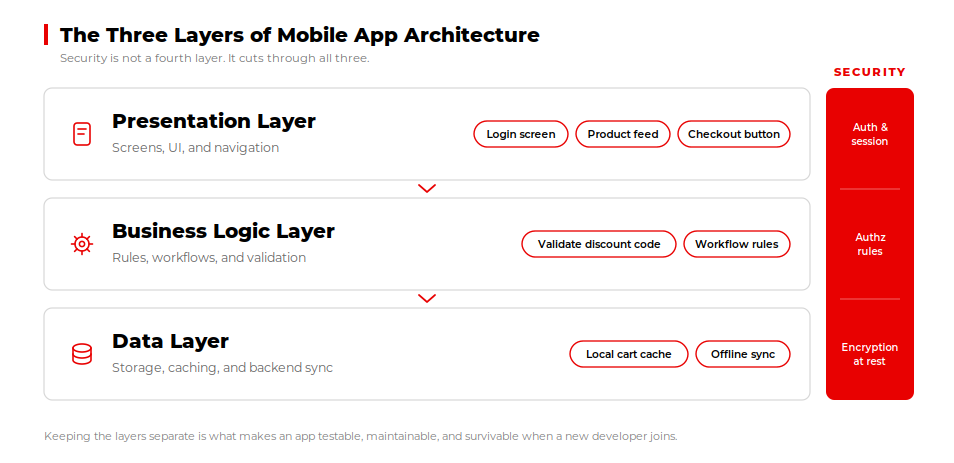
Most mobile apps split into three layers. This structure shows up in nearly every mobile app architecture diagram, from Android’s official guide to independent engineering blogs.
The presentation layer handles what the user sees and taps. The business logic layer manages the app’s rules, workflows, and validation. The data layer manages storage, caching, and syncing with a backend.
| Layer | What It Handles | Example in a Real App |
|---|---|---|
| Presentation Layer | Screens, UI components, navigation, and everything the user sees and interacts with. | The login screen, product feed, and checkout button. |
| Business Logic Layer | The app’s rules, workflows, validation, and calculations that determine how features behave. | Checking whether a discount code is valid before checkout. |
| Data Layer | Storage, retrieval, caching, and syncing data with a backend or database. | Saving a cart locally, then syncing it once the app reconnects online. |
Keeping these layers separate is what makes an app testable and maintainable. It is also what makes a codebase survivable when a new developer joins.
Security Across Every Layer
Security cuts across all three layers together. Authentication and session handling live in the presentation layer. Authorization rules belong in the business logic layer. Data-at-rest encryption and access control belong in the data layer. Mobile banking app architecture makes this explicit, since compliance frameworks require encryption and audit trails at every layer. Skipping this at day one gets expensive once real user data is involved.
Native, Cross-Platform, or Hybrid: Choosing Your Architecture Type
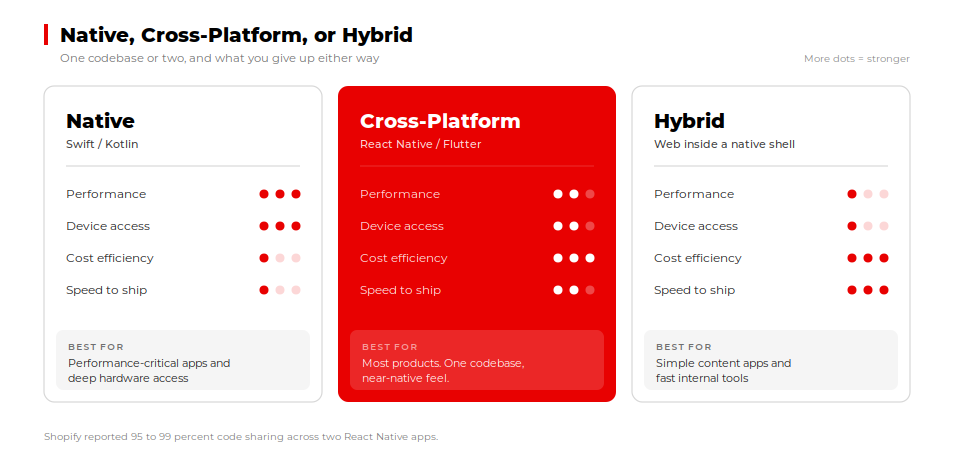
Native apps are built separately for iOS and Android, using Swift or Kotlin. They give the best performance and the deepest access to device hardware, at a higher build cost.
Cross-platform frameworks, mainly React Native and Flutter, share one codebase across both platforms. Flutter’s own architecture guide recommends an MVVM pattern split across a UI layer and a data layer. That structure closely mirrors what Android recommends.
Shopify’s engineering team documented 95 percent code sharing on its Arrive app. It documented 99 percent code sharing on its Compass app after adopting React Native. That is a measured outcome from a company running React Native at real scale.
Hybrid apps wrap web technology inside a native shell. They are the fastest but weakest option for complex apps.
For a full breakdown of when each option fits, read our guide on native vs cross-platform app development. If your stack is already narrowed down, our comparison of the top mobile app development frameworks goes deeper.
Common Architecture Patterns: MVC, MVVM, MVP, and Clean Architecture
MVC, MVVM, MVP, and Clean Architecture are the four patterns that organise code inside a mobile app, ordered from simplest to most structured.
Once you have a platform, you need a pattern to organize the code inside it. Android’s official architecture guide recommends a layered structure close to MVVM.
MVC (Model-View-Controller) is the simplest pattern and fits small apps with minimal logic. MVVM (Model-View-ViewModel) adds a layer that separates UI state from business logic. It is the pattern most current guidance favors for Android and Flutter apps alike.
MVP (Model-View-Presenter) and VIPER solve similar problems with more structure and more boilerplate. They tend to fit larger teams working on one codebase, where strict boundaries prevent conflicts. Clean architecture goes further, isolating business logic from any framework so it can be tested independently.
| Pattern | Best For | Team Size | Tradeoff |
|---|---|---|---|
| MVC | Small apps with simple, minimal logic | 1 to 2 developers | Gets messy fast as features grow |
| MVVM | Testable UI state, most Android and Flutter apps | 2 to 6 developers | More setup than MVC, worth it past MVP |
| MVP / VIPER | Larger codebases needing strict boundaries between people | 6+ developers | More boilerplate, slower to prototype with |
| Clean Architecture | Apps that must outlive a specific framework or platform | Any size, most often larger teams | Highest upfront structure, hardest to justify early |
Pick the simplest pattern that matches your team size and app complexity today. You can always add structure later. It is far harder to remove structures you never needed.
Backend Architecture: Monolith vs. Microservices
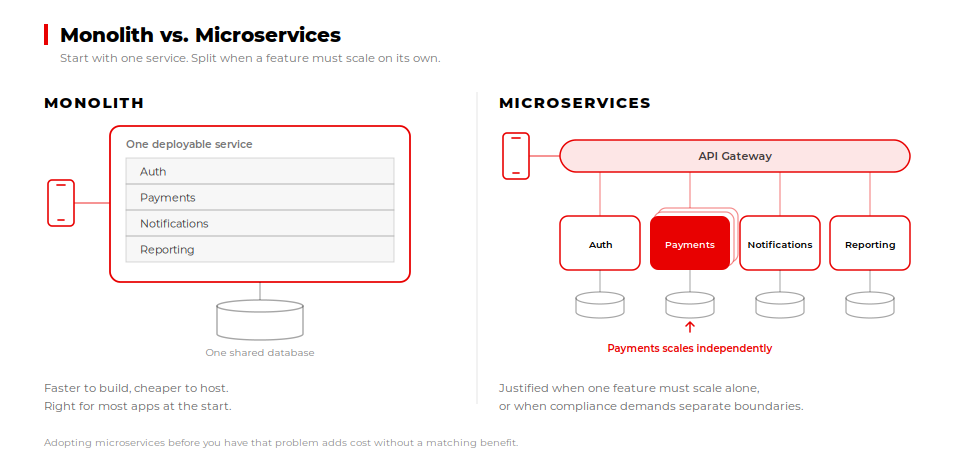
Start with a monolith. Move to microservices only when a specific feature needs to scale independently of the rest of the app.
Mobile app backend architecture is the other half of the decision. It gets skipped almost as often as the frontend pattern. A monolith keeps all backend logic in a single deployable service. It is faster to build, cheaper to host, and easier for a small team to maintain. Most apps should start here.
Microservices split backend logic into independently deployable services. They add real value once you have distinct teams or uneven traffic across features. Mobile banking app architecture is a common case where microservices arrive early. Compliance and fraud checks often need to scale independently from the rest of the app.
Where Mobile Banking App Architecture Differs
Regulators expect clear boundaries between account services, payments, and fraud detection, each auditable on its own. Audit logging is an architectural constraint from the start. Every write to balances or transaction state needs a durable, queryable log for compliance review. Fraud detection often needs to scale independently, since transaction spikes do not follow normal app traffic patterns. Banking is one of the few cases where microservices make sense from day one.
Adopting microservices before you have that problem adds cost without a matching benefit.
A Day-One Decision Framework for a Scalable App
A scalable app starts with four architecture questions before development begins.
First, what is your team size, and who owns architecture decisions after launch? Second, what is your realistic user count in twelve months? Third, does any part of the product have a real case for microservices on day one? Fourth, which platforms actually matter to your users right now?
Answering these honestly does most of the work. Still validating the product itself? Our guide on deciding what to validate before you build covers that earlier decision.
AppVerticals has applied this framework on enterprise-scale platforms, including the modernization of a property services marketplace serving 685,000 customers. Rebuilding the platform around five defined user roles unified operations for more than 7,500 property management companies.
Factors That Constrain Your Architecture Choice
Four technical factors decide which architecture actually fits. Connectivity and offline behavior come first. An app that must work without a signal needs offline-first sync built into the data layer from day one. UI and navigation complexity comes next. A simple content app needs less structure than one with deep, branching navigation. Real-time requirements matter too. Chat, live tracking, or trading features need an architecture built for constant data flow. Device fragmentation is the fourth factor, mainly on Android, where screen sizes and OS versions vary widely. Offline-first is where most 2026 competitors are building their differentiation. It deserves a real decision early, before code gets written. Weigh these four factors before you lock in a pattern or a platform.
What Architecture Actually Costs, By Stage
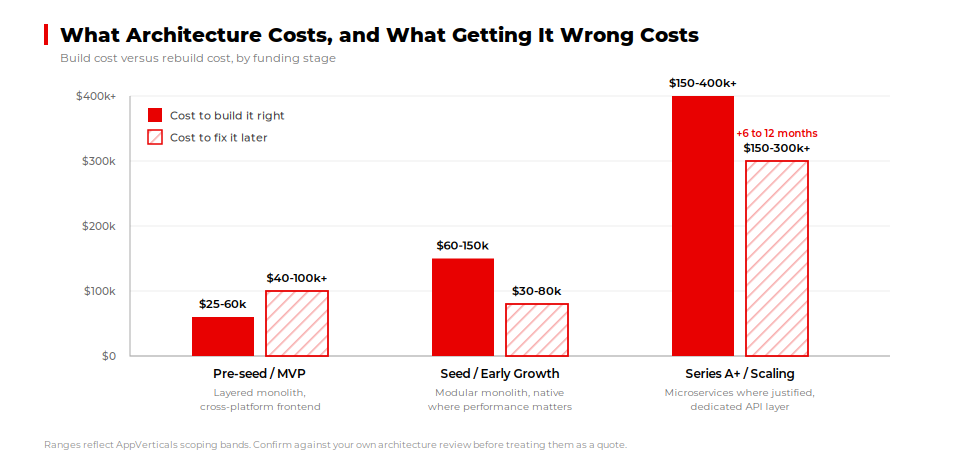
Mobile app architecture costs between $25,000 and $400,000+, depending on your stage and technical requirements. Architecture cost scales with stage, team size, and how much of the system needs to survive rapid growth.
| Stage | Recommended Architecture | Typical Cost Range | What Getting It Wrong Costs |
|---|---|---|---|
| Pre-seed / MVP | Simple layered monolith, cross-platform frontend | $25,000 to $60,000 | $40,000 to $100,000+ to rebuild unseparated layers |
| Seed / Early Growth | Modular monolith, native where performance matters | $60,000 to $150,000 | $30,000 to $80,000 to retrofit a data layer |
| Series A+ / Scaling | Microservices where justified, dedicated API layer | $150,000 to $400,000+ | 6 to 12 months and $150,000 to $300,000+ to rebuild |
These ranges reflect the same delivery bands AppVerticals uses when scoping real client builds. They are cross-checked against the cost breakdowns in our POC vs Prototype vs MVP guide. Confirm current figures with your own architecture review before treating them as a quote.
See What Your Build Could Cost
Get a personalized estimate based on your architecture choices
→ Get an EstimateThe Mistake That Forces an Expensive Rebuild
The most common mistake I see at the scoping stage is choosing a pattern for familiarity or speed over fit, and it has nothing to do with code quality.
A team picks the stack they already know, without checking whether it fits where the product is headed. The mismatch stays invisible until the app needs to scale. By then, the fix costs far more than the original decision would have.
Gartner’s own research on infrastructure technical debt backs this up at the industry level. Skipping the architecture conversation does not remove the decision. It just delays the bill.
A Quick Checklist Before You Start Building
A pre-development architecture checklist helps catch expensive design mistakes before development begins. Run through this list before your team writes the first line of code. It covers the architecture decisions that get skipped most often.
| Decision | Confirm Before Development Starts |
|---|---|
| Platform choice | Native, cross-platform, or hybrid, chosen for real complexity, not team familiarity |
| Backend pattern | Monolith or microservices, matched to current team size and near-term scaling need |
| Data layer plan | How data is stored, cached, and synced offline, decided before the first screen |
| Third-party dependencies | Which APIs and SDKs the app depends on, and what happens if one changes |
| Ownership of decisions | Who signs off on architecture changes after launch, not only at kickoff |
If you cannot answer every item with confidence, complete an architecture review before signing a development contract. An experienced mobile app development company can translate your product requirements, integrations, security needs and growth targets into an architecture plan your development team can implement.
Final Words
If you cannot answer every item with confidence, complete an architecture review before signing a development contract. A custom mobile app development company can help you evaluate platform choices, integrations, security requirements, and expected usage, then document an architecture plan your team can build and maintain.
Get Your Architecture Plan Reviewed
Bring the stack, the backend pattern, and the user target. We tell you what breaks first.
→ See how we build mobile appsKeep reading: Native vs Cross-Platform App Development, Top Mobile App Development Frameworks, and The Mobile App Development Guide for 2026.
















