













 ChatGPT
 Perplexity
 Claude
 Google AI
AI agent integration is the process of connecting an AI agent to the data, tools, and workflows inside your existing applications, so it can read your real data and take real actions instead of only answering questions. You do not need to rebuild your product to do it. In practice you pick one of three patterns: wrapping your existing REST APIs with function calling, exposing capabilities through the Model Context Protocol (MCP), or coordinating several agents with an Agent-to-Agent (A2A) layer. The right choice comes down to how many tools you have, how often they change, and how tightly you need to control security and access.
So if you’re trying to give an AI agent access to your CRM, your internal docs, or your production database without rewriting the whole stack, and you need to know which architecture to pick, what it’ll cost, and where it tends to break, this guide is for you.
I’ll walk through each integration pattern, the real cost of building one, and the mistakes that quietly push teams into a rebuild. If you’re earlier than that and still weighing whether agents fit your business at all, our guide on agentic AI for businesses is the better place to start.
Key Takeaways
- Integration is the product, not the model. The agent is just a reasoning engine until you wire it into your real data and tools — and that wiring is where the work lives.
- Pick the simplest pattern that fits. Function calling for a few stable tools, MCP for many or fast-changing ones, A2A only for true multi-agent work. Most teams over-build.
- No rebuild required. Wrap legacy systems behind a clean integration layer. If a rebuild seems necessary, it’s usually a bad pattern choice.
- Cost scales with integrations, not AI. From $3K–$5K for one tool to $40K+ for multi-agent builds — and the real expense is ongoing maintenance.
- Security, observability, and human-in-the-loop are day-one concerns. Narrow identity, log everything, approve sensitive writes.
- Failures cluster around governance, not the model. Clean knowledge sources, tight schemas, and post-launch tuning are what prevent rebuilds.
What AI Agent Integration Actually Means (and Why It Matters)
An AI agent on its own is a reasoning engine. It can plan, decide, and generate, but it has no hands. Integration is what gives it hands: a controlled way to look something up in your CRM, search your internal documents, or write a result back into the tool your team already uses.
I describe it to non-technical founders this way. A chatbot answers questions about your business. An integrated agent does work inside your business. The distance between those two things is almost entirely integration. If a conversational bot is closer to what you actually need right now, our guide to AI chatbot development services breaks down cost and features for that path specifically.
This matters because the value people imagine when they say “we want an AI agent” lives on the action side, not the answer side. An agent that can summarize a support ticket is mildly useful. An agent that can read the ticket, pull the customer’s order history, check stock, and draft the resolution back into your helpdesk is doing a job. Every one of those verbs is an integration.
So the work in front of you is rarely about the model you choose. It’s about wiring the model safely into systems that already have users, data, and uptime expectations.
The 3 Core Integration Patterns: API / Function Calling vs MCP vs A2A
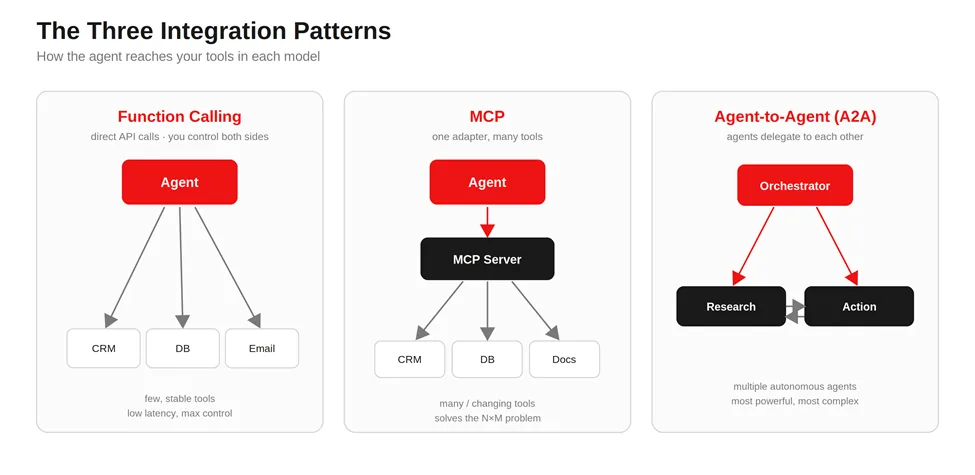
There are three patterns I reach for, and most projects land on one of them or a blend of the first two. Here’s how I explain each before we pick.
REST API plus function calling
Function calling means you describe your existing API endpoints to the model as “tools” it’s allowed to use, and the model decides when to call them. You keep full control of both sides. This is the simplest, lowest-latency option, and for a small, stable set of tools it’s often all you need.
Model Context Protocol (MCP)
MCP is an open standard that lets an agent discover and call tools through one consistent interface, instead of you hand-wiring every connection. Think of it as a universal adapter: you build one MCP server that exposes your capabilities, and any MCP-aware agent can use them. It earns its keep when you have many tools or they change often.
Agent-to-Agent (A2A)
A2A is for when you have multiple autonomous agents that need to delegate to each other, say, a research agent handing off to a booking agent. It’s the most powerful and the most complex, and it’s overkill for a single-agent task. I rarely recommend starting here.
The table below is the version I sketch on a call when someone asks which one they need.
| Cost Stack layer | What it covers | Estimated cost |
|---|---|---|
| App shell | UI/UX, frontend, backend | $45,000 |
| AI layer | API integration for categorization and the assistant | $18,000 |
| Data layer | Transaction ingestion, normalization, secure storage | $15,000 |
| Integration layer | Bank aggregation, authentication, notifications | $12,000 |
| Run cost | Inference + infrastructure at ~12,000 MAU | ~$6,000/month |
| Maintenance | Monitoring and upkeep | ~18% of build per year |
The N×M problem is worth naming, because it’s the reason MCP exists. If you connect M agents to N tools by hand, you can end up maintaining M×N separate integrations. MCP collapses that: each tool exposes one server, each agent speaks one protocol, and the maintenance burden stops multiplying.
A note on stability, since this is the most common objection I hear: “aren’t these still moving targets?”
As of mid-2026, they aren’t experiments anymore. Both MCP and A2A now sit under the Linux Foundation’s Agentic AI Foundation (AAIF), launched in December 2025 and co-founded by OpenAI, Anthropic, Google, Microsoft, AWS, and Block. That matters for two reasons.
First, neutral governance: neither Anthropic nor Google solely controls the specs anymore, which is exactly what enterprises wait for before they commit. Second, it confirms the layering, A2A defines how agents communicate across organizational boundaries, while MCP defines how agents connect to internal tools and data sources, and together they form one foundational layer for interoperable multi-agent systems.
So when I say MCP and A2A are complementary rather than competing, that’s not just my read; it’s the architecture the people governing both protocols are building toward.
AI Agent Integration Architecture: How the Pieces Fit Together
When I draw an agent integration on a whiteboard, the same layers show up almost every time, regardless of which pattern we chose.
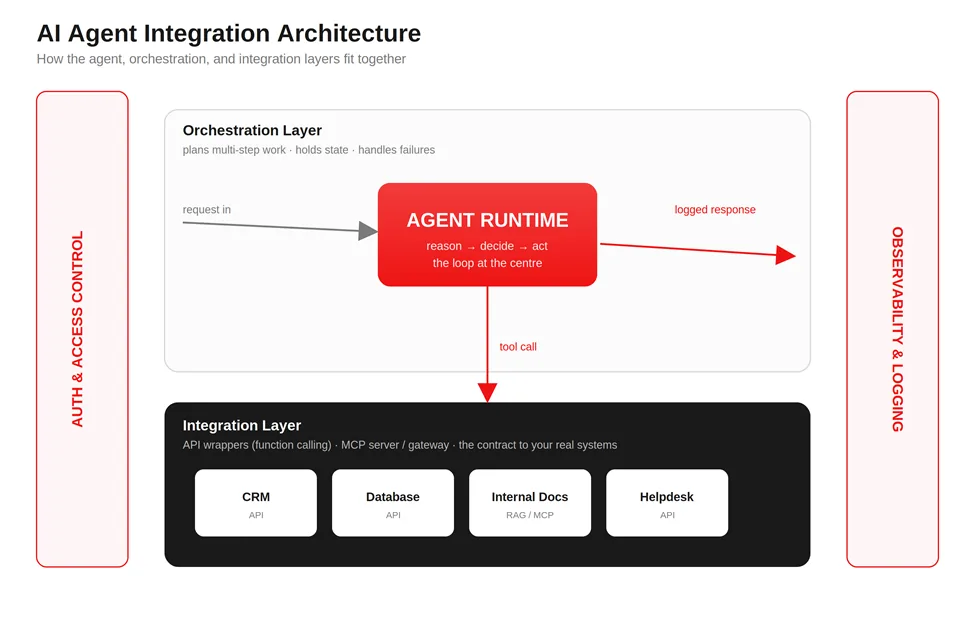
At the center sits the agent runtime, the reasoning loop that takes a goal, decides on a step, and either responds or calls a tool. Around it sits an orchestration layer, which manages multi-step plans, keeps track of state between calls, and handles what happens when a step fails.
Below that is the integration layer, where your tools live. With function calling, these are direct API wrappers. With MCP, this is your MCP server (or a gateway in front of several). Either way, this layer is the contract between the agent’s intentions and your real systems.
Then there are two cross-cutting concerns that ride alongside everything: authentication and authorization (who the agent is allowed to be, and what it’s allowed to touch) and observability (a record of every decision and action the agent took). I treat both as load-bearing from day one, not as features to add later.
If you’re building the surrounding product around this, our work on custom software development covers how that orchestration and integration layer gets engineered into a real stack.
Connecting Agents to Existing & Legacy Systems (Cloud and On-Prem)
Most of the prospects I talk to do not have a clean, modern, fully-documented API stack. They have a product that works, a few services that are a decade old, and at least one system nobody wants to touch. That’s normal, and an agent can still work with it.
For legacy or on-premise systems, the move I recommend is to wrap the old system behind a clean integration layer rather than letting the agent reach into fragile internals directly. You build a thin API bridge or middleware, a piece of software that sits between the agent and the legacy system and keeps them talking, and the agent only ever sees the tidy interface.
When the system is on-premises and the agent runs in the cloud, you connect them through a secure network tunnel or a private gateway, so internal systems are never exposed to the open internet. Compliance requirements usually shape this part more than the technology does.
The practical upside of wrapping is that you can modernize behind the bridge later without the agent noticing. The agent depends on the clean interface, not on the messy thing behind it. When you need to make two stubborn systems cooperate, that’s the same discipline as any other system integration project.
How Much Does AI Agent Integration Cost?
It’s an important question if you’re planning around AI integration, so I’ll be direct about how the costs actually break down. The total depends on three things: how many systems you’re connecting, how strict your auth and compliance requirements are, and how much custom orchestration and observability you need on top.
If you want the wider market picture on adoption and returns first, our roundup of AI automation statistics sets the context.
The cleanest way to think about it is in tiers, because the pattern you pick is the single biggest cost driver. These ranges assume you already have a working application and are adding AI to it, not building a new platform from scratch.
| Integration tier | Typical scope | Indicative cost range | Typical timeline |
|---|---|---|---|
| Simple API wrapper | One tool, function calling, you control the API | $3K – $5K | 1–2 weeks |
| MCP gateway | Several tools behind one MCP server | $5K – $10K | 4–6 weeks |
| Multi-agent system | Multiple agents delegating across domains | $20K – $40K+ | 8–16 weeks |
| Legacy / on-prem bridge | Wrapping old or on-prem systems | $15K – $50K+ (Highly variable by infrastructure) | 8–20+ weeks |
What pushes a build from the low end to the high end is rarely the model. It’s everything around it: how many systems you integrate, what your compliance and security requirements look like, how much custom orchestration you need, whether you’re adding human approval steps, what observability and monitoring you require, and how good the knowledge sources are that the agent draws on. On most enterprise projects, the integrations and governance eat up more effort than the AI model itself.
Want a number to start with first?
Get a cost estimate with our integration cost calculator.
Calculate Your Integration CostChoosing Your Pattern: The AppVerticals Agent Integration Decision Matrix
Every integration project we take on starts with the same argument in the room: which pattern do we build on? After running that decision enough times, I noticed we were always weighing the same handful of factors, and usually landing in the same place once we named them. So I wrote it down as a matrix, the one I now pull up on discovery calls, so a client can place themselves on it before a single line of code gets scoped.
It comes down to four questions: How many tools does the agent need to touch? How often does that toolset change? How strict are your security and compliance requirements on write actions? And who owns those systems, one team, or several?
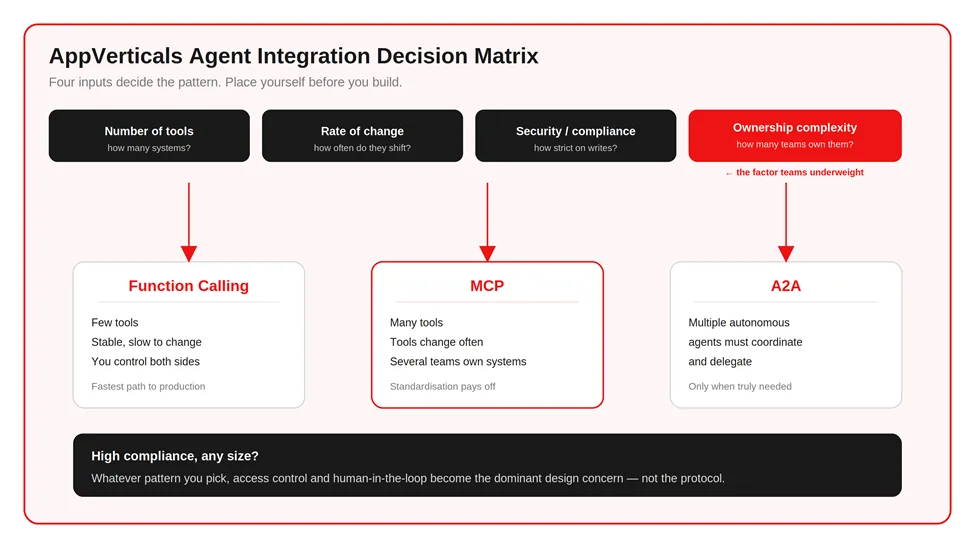
That fourth factor is the one teams underweight. When different departments own different systems, the integration management gets harder fast, and that alone often justifies adopting MCP earlier than tool count would suggest.
- Few tools, stable, you control them → REST API plus function calling: For many first-generation AI assistants, REST is the fastest path to production.
- Many tools, or they change often, or several teams own them → MCP: The standardization pays for the extra infrastructure once you cross roughly a handful of tools or cross a few teams.
- High compliance or sensitive writes, any size → whichever pattern you pick, the access-control and human-in-the-loop layer becomes the dominant design concern, not the protocol.
- Multiple autonomous agents that must coordinate → A2A, and only then.
A Six-Step Path to Integrating Your First Agent
When a client greenlights a build, this is the sequence I run. It works for one agent or ten.
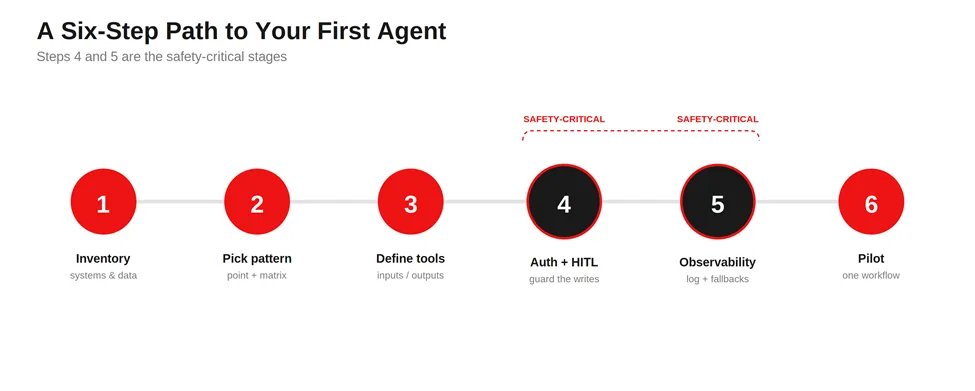
- Inventory your systems and data. List every tool the agent might touch and what data lives where. You can’t secure or connect what you haven’t mapped.
- Pick the integration point and pattern. Use the decision matrix above. Choose where the agent plugs in and which of the three patterns fits.
- Define the tools and schemas. Specify each action the agent is allowed to take, with clear inputs and outputs. Tight schemas prevent a lot of bad behavior before it starts.
- Add auth and human-in-the-loop on writes. Anything that changes data gets authentication and, where it matters, a human approval step. Reads can be looser; writers earn scrutiny.
- Add observability and fallbacks. Log every decision and action. Decide what happens when a connected system is slow or down, so a failure degrades gracefully instead of cascading.
- Pilot on one workflow, then expand. Ship the agent against a single real workflow, watch it in production, and widen scope once it’s earning trust.
7 Integration Anti-Patterns That Force a Rebuild (What NOT to Do)
These are the mistakes I spend the most energy on heading off. Each one is something I’ve watched force a rebuild, and each has a one-line fix.
- Prompt-only architecture. Teams try to solve everything through prompts instead of designing a proper workflow around the agent.
- No human review path. AI responses get treated as final decisions, so a single bad output becomes a real-world action.
- Poor knowledge sources. The agent draws on outdated, incomplete, or inconsistent information and confidently passes it on.
- Tool sprawl. Agents connect directly to a growing pile of systems with no central management, and maintenance multiplies.
- Missing observability. Nobody can see why the agent made a decision or where it failed.
- Hardcoded integrations. Every new tool requires an engineering change, so the roadmap slows to a crawl.
- Launch-and-forget mentality. Teams treat deployment as the finish line.
A pattern across these seven: the failures cluster around governance and operations, not the model. That’s the same reason the objections I hear most on sales calls are security and compliance, fear of hallucinations, reliability of autonomous actions, integration complexity, and long-term maintenance cost. All five are integration concerns, and all five are answerable with the discipline above.
Security, Observability & Human-in-the-Loop
I keep these three together because in practice you can’t pull them apart. Each one assumes the other two exist, and a gap in any of them tends to surface as a problem in the others. Together they’re what make an integrated agent something your team is willing to run without holding its breath.
Security comes down to scope and identity. The agent should authenticate as a constrained identity that holds only the permissions the job requires, using standard token-based auth, with write access kept narrower than read access. The most common security finding I see is simply an over-privileged agent, one that can reach far more than its task ever calls for. That over-provisioning is also what makes the newer, MCP-specific risks dangerous.
Tool poisoning, where a malicious or compromised MCP server hides instructions inside the tool descriptions the model reads but a person never sees, has become one of the higher-leverage attacks on agent systems in 2026, and benchmark testing has found most agents susceptible to it. The infrastructure side is just as real: a critical MCP flaw disclosed in May 2026 (CVE-2026-33032, scored CVSS 9.8) was confirmed exploited in the wild, caused by MCP endpoints that didn’t inherit the host application’s authentication.
The defenses are the same disciplines applied with more rigour, never expose an MCP server publicly, authenticate every call, vet and pin the servers you connect to, and limit tool execution to an explicit allowlist. The reason least privilege matters more than any single control is the blast radius: a compromised server reaches every system the agent can, so the narrower the agent’s identity, the smaller the damage.
Observability is being able to answer, after the fact, “what did the agent do, and why?” That means logging the reasoning steps and every tool call all the way down, not just the final output. Something will eventually go wrong, and when it does these logs are the whole difference between a five-minute fix and a guessing game. They’re also where you’ll first notice a poisoned tool or an unexpected call, which is why observability isn’t separate from security so much as the thing that makes security legible.
Human-in-the-loop is the approval checkpoint on actions that carry real consequence. It doesn’t need to be heavy. A single confirmation before the agent issues a refund or sends an external message is often all it takes to turn a system that makes people nervous into one they’re comfortable running, and it’s the last line of defense when the first two have missed something.
Build In-House vs Partner: What to Weigh
If you have an engineering team that already lives in your stack, a first agent integration is buildable in-house, and I’d encourage it for a contained, low-risk workflow. The learning compounds, and it’s often the cheapest way to build internal conviction about where generative AI in business actually pays off for you.
The calculus changes when the integration touches sensitive data, spans legacy systems, or has to be production-grade from day one. The patterns above are simple to describe and unforgiving to get wrong, and the cost of a bad early architecture choice is usually a rebuild six months later.
That’s the moment to weigh bringing in a team that has integrated agents into live systems before, whether as a full build or a short architecture review before your own engineers commit. If the agent is going to sit inside a larger product, our SaaS development work covers how that fits into a maintainable platform rather than a one-off script.
For teams weighing the build side of that decision, our custom AI development work covers how we scope and staff a build like this
What This Looks Like in Practice: An AI Proposal Assistant
The clearest example I can share is an AI-powered proposal assistant we built around RFP responses, the long, compliance-heavy documents companies submit to win contracts. The client wasn’t short on writing talent. They were drowning in the coordination: drafting, reviewing, scoring, and keeping every response aligned with the requirements buried in each RFP.
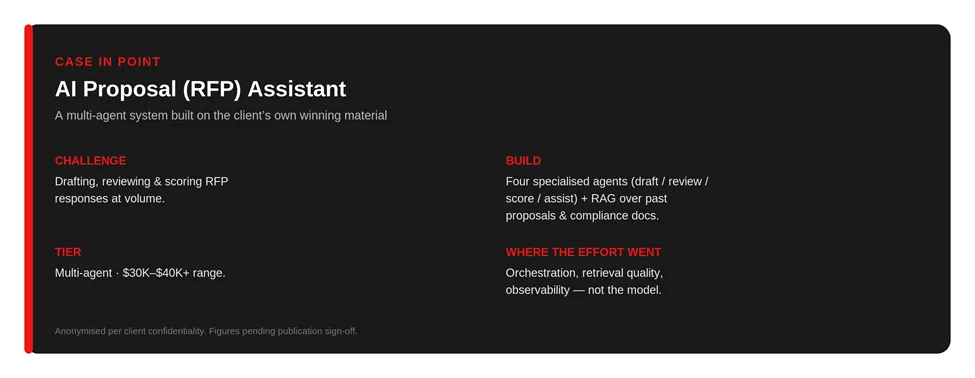
We didn’t solve that with one agent. We used several specialized ones; a drafting agent, a review agent, a scoring agent, and a user-assistance agent, each owning a piece of the workflow. On its own that’s just division of labor. The part that made it useful was the data layer underneath.
We added Retrieval-Augmented Generation, or RAG; a setup where the agent retrieves relevant text from a trusted document store and grounds its answer in that, instead of relying on the model’s memory. The store held their past proposal documents, historical submissions, and the compliance requirements that responses get judged against. So the agents weren’t inventing answers; they were assembling them from the client’s own winning material.
That project sits squarely in the multi-agent tier, the $30K–$40K-plus range, and the cost lived where it always does, in the orchestration between agents, the retrieval quality, and making the whole thing observable and safe to run. The model was the least of it.
The agents were interchangeable parts. The integration; clean knowledge sources, retrieval, coordination, oversight, is what turned four language models into a system that does a real job.
Conclusion
The integration layer is what makes or breaks adding an AI agent to an app you already run. Pick the right pattern and the agent slots in cleanly; pick the wrong one and you inherit constant, expensive maintenance.
The decision in front of you now is which of the three patterns fits your toolset, your security posture, and your budget, and where the line sits between building in-house and bringing in a team that has done this on live systems before.
If you want that pattern and cost validated against your actual stack before you spend engineering time, a short scoping conversation is the fastest way to get there.
Planning to add an agent to your product?
See how our AI development team designs and integrates production-ready agents, architecture, build, and ongoing support.
Explore our AI development services