


















 ChatGPT
 Perplexity
 Claude
 Google AI
There are four types of mobile apps: native, web, hybrid, and progressive web apps (PWAs). The technology matters less than the business problem the app needs to solve, and the right choice depends on the users, their buying habits, and the available budget.
Clients often come to me asking for a native app because it sounds like the premium choice, before we have talked about whether the business actually needs one. This guide is the framework I walk them through: what each type is, what each one costs, and how to match the type to how you actually operate.
Global app revenue is projected to reach $739.61 billion in 2026, an 11.2 percent rise, according to Statista. That growth is why the fit question deserves real thought before any budget gets committed.
Key Takeaways
- Four app types exist: native, web, hybrid, and progressive web apps.
- Business model should drive the choice, ahead of any technology preference.
- Cross-platform builds cost 30 to 40 percent less than dual native.
- We redesigned Spruce’s platform in React Native, and it now serves more than 685,000 customers.
- Native apps still win for heavy hardware use and app-store visibility.
- Web apps and PWAs skip app-store review and update instantly.
- Internal tools rarely need a full custom build.
- Use the Business-Model Selection Framework before you scope a build.
The Four Types of Mobile Apps, Explained Simply
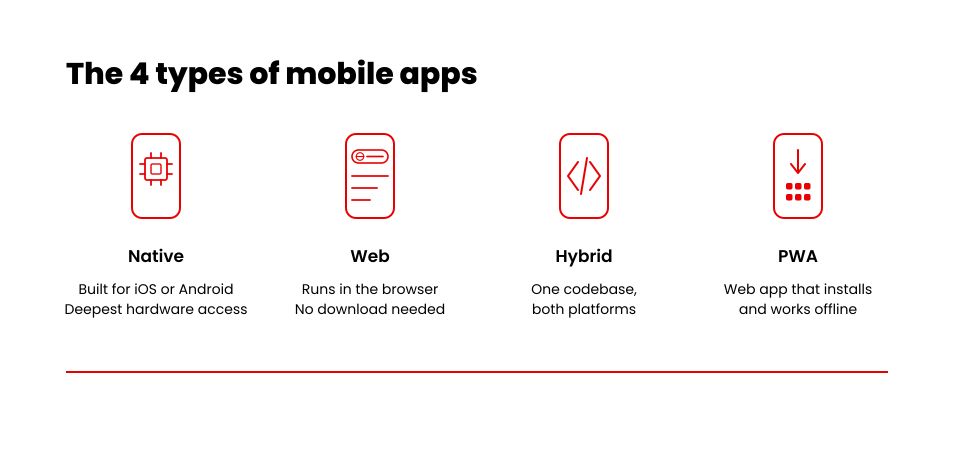
Four types of mobile apps exist: native, web, hybrid, and progressive web apps. Each one trades cost, speed, and reach in a different way, and the type you pick sets the ceiling on all three before a single screen gets designed. The table below gives you the plain-language version of each.
| App Type | What It Is | Where It Shines |
|---|---|---|
| Native | Built specifically for iOS or Android and runs directly on the device | Fastest load times and the deepest access to the camera, GPS, and sensors |
| Web | Runs inside a mobile browser, so users do not need to download it | Immediate reach and instant updates at the lowest cost |
| Hybrid | One codebase shared across iOS and Android through React Native or Flutter | A balance between native performance and cross-platform development cost |
| Progressive web app (PWA) | A web app with offline access, home-screen installation, and push notifications | App-like engagement without an app store listing |
Native, Web, Hybrid, or PWA: Strengths and Trade-offs
| Dimension | Native | Web | Hybrid | PWA |
|---|---|---|---|---|
| Performance | Fastest | Browser-limited | Near-native | Browser-limited |
| Hardware access | Deepest: camera, GPS, sensors | Limited | Broad, via frameworks | Limited: basic camera, no Bluetooth |
| Offline use | Full | Minimal | Full | Partial |
| Distribution | App Store and Google Play | Any browser, no download | App Store and Google Play | Home screen, no store review |
| Codebases to maintain | Two (iOS and Android) | One | One | One |
Each app type trades performance for cost in a different way. The right one depends on what your app needs to do, and for whom.
Native apps
Native apps run directly on iOS or Android. They give the fastest performance and the deepest access to a phone’s hardware, including the camera, GPS, and sensors. That strength comes at a price.
Building for both iOS and Android means two codebases, two test cycles, and double the long-term maintenance. Native suits apps where speed and hardware access decide customer trust. Banking apps and heavy AR use are good examples.
Web apps
Web apps run inside a mobile browser. Nobody has to download anything, so reach is immediate and update cycles are instant. The trade-off is limited offline access and no presence in the App Store or Google Play. Web apps suit internal tools and occasional-use products where app-store discovery does not matter.
Hybrid apps
Hybrid apps use React Native or Flutter to share one codebase across iOS and Android. Developers write the logic once and ship it on both platforms, which cuts build time and cost. Hybrid apps trade a small amount of native performance for a large reduction in build and maintenance cost. Our own build data backs this up, and the Spruce project below shows exactly how much.
Progressive web apps (PWAs)
A PWA adds offline access, home-screen installation, and push notifications to a web app. Users never visit an app store. Updates roll out the moment you publish them. A PWA fits businesses that want app-like engagement without app-store review delays or dual-codebase maintenance.
For a deeper technical comparison, see our full breakdown of native versus cross-platform development. Native, web, hybrid, and PWA each solve different problems for different budgets, which is exactly what the framework below maps out.
The Business-Model Selection Framework: Match Your App Type to How You Actually Operate
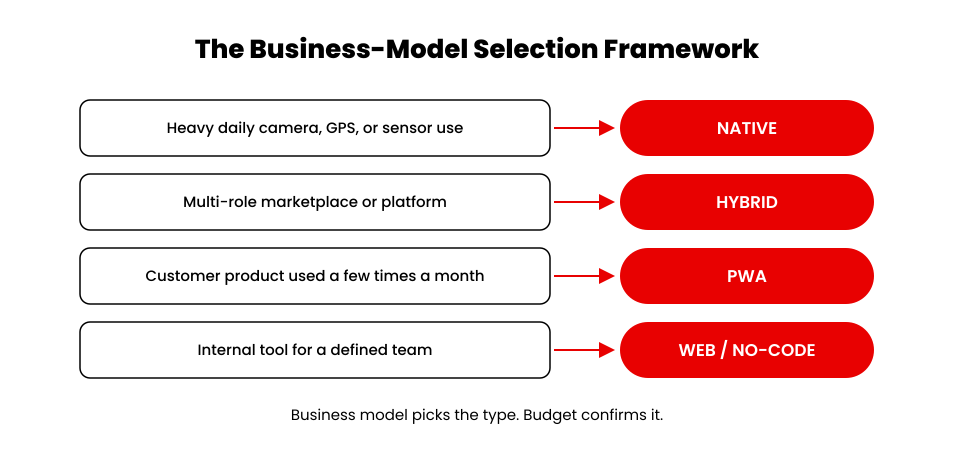
Business model decides app type more reliably than technical preference does. A consumer app, an internal tool, and a two-sided marketplace each pull toward a different answer, and that holds true regardless of which technology a founder personally likes. Revenue expectations are another factor that should influence this decision. A business focused on subscriptions, in-app purchases, commerce, or customer engagement may choose a different app strategy than a company building an internal productivity tool. Comparing mobile app vs web app revenue statistics can help teams understand how platform choice affects monetization opportunities.
| How You Operate | App Type That Usually Fits | Why |
|---|---|---|
| Consumer product with heavy daily use of the camera, GPS, or sensors (banking, AR) | Native | Speed and hardware access decide customer trust, and app-store visibility supports discovery |
| Two-sided marketplace or multi-role platform serving several user types | Hybrid (React Native or Flutter) | One codebase covers every role on iOS and Android and stays cheap to extend as roles grow |
| Customer product reached a few times a month; content or service business | PWA | App-like engagement, home-screen install, and instant updates without app-store review delays |
| Internal tool for a defined team | Web app, or a no-code platform below the custom threshold | Immediate reach in any browser, with no download and no store presence needed |
Use this table as a starting point. A short scoping conversation still confirms the fit against your actual budget and timeline.
Not Sure Which Type Fits Your Business?
The framework above gets you close. A short scoping conversation gets you certain.
→ Talk Through Your App TypeHow Spruce put the hybrid row into practice
Spruce is a proof point for the hybrid row above. The company runs a property services platform connecting residents, property managers, and service professionals across the United States.
Spruce came to us with a platform stretched past what its original architecture could support. Service professionals had no mobile app and coordinated jobs by phone and message. Property managers could see that bookings existed but could not see enough to manage their portfolios.
We redesigned the platform and shipped a mobile app for service professionals in React Native, on both iOS and Android from a single codebase. Cross-platform builds like this cost 30 to 40 percent less than building separate native apps, and React Native typically keeps 85 to 95 percent of native performance. Both are general benchmarks rather than measurements from this specific build.
The platform now supports more than 685,000 customers across 6,477 properties and 7,581 property management companies. That scale is exactly why the business-model lens mattered here. A multi-sided platform with several distinct user roles needed one codebase it could extend quickly, more than it needed the fastest possible frame rate on a single screen.
What Each Type of App Actually Costs to Build
App type sets the starting range for what a build costs. Complexity and integrations move the number further, but the type you choose decides the floor.
| App Type | Typical Range | What Drives It |
|---|---|---|
| Native, single platform, simple scope | $25,000 – $60,000 | One codebase, one operating system, minimal backend |
| Native, iOS and Android built separately | $85,000 – $300,000 | Two codebases, two test cycles, double the maintenance |
| Hybrid or cross-platform (React Native, Flutter) | $60,000 – $180,000 | One shared codebase, cross-platform frameworks, standard integrations |
| Web app or PWA, simple scope | $25,000 – $60,000 | Browser-based, single codebase, no app-store review cycle |
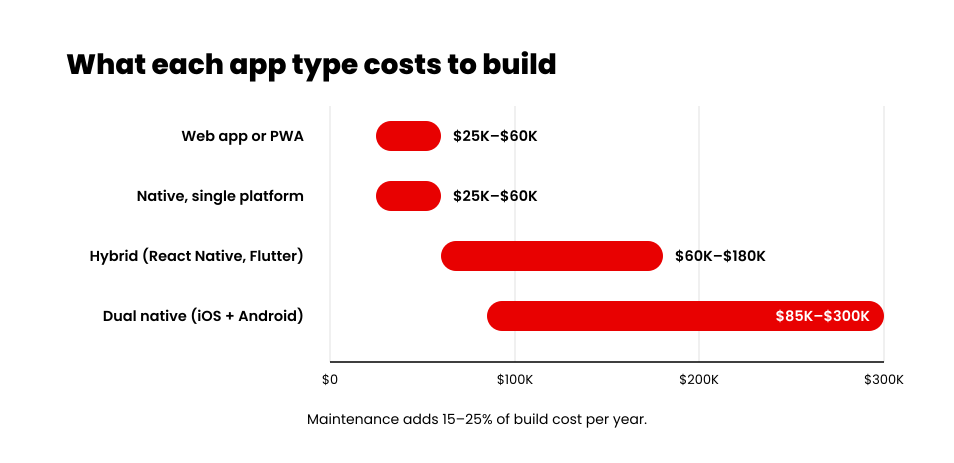
Figures reflect our own project data in our 2026 app development cost breakdown. The dual-native range follows the same relationship quoted throughout this guide: a hybrid build runs 30 to 40 percent less than the equivalent pair of native apps. Actual cost still depends on integration count, compliance needs, and design depth.
Maintenance adds another 15 to 25 percent of the build cost every year, regardless of type. Budget for that before you commit to a number.
Do You Even Need a Custom App? When to Buy Instead of Build
Not every business needs a custom-built app. A short checklist below tells you whether you do.
App builders and no-code platforms have improved considerably. For a single internal workflow with a handful of users, one of them will get you running in weeks at a cost of a few thousand dollars. Paying for a custom build at that scale wastes your budget.
The calculation changes once you cross a real threshold:
- Three or more system integrations
- Compliance requirements such as HIPAA (the US health-data privacy law) or PCI-DSS (the payment card security standard)
- Real-time features at meaningful scale
When a client asks for a custom build to manage one internal process, the first question I ask is how many people will actually use it and what the team needs to get the job done. The platform that sounds impressive and the framework trending this year both come after that.
If your app requires custom integrations, stronger security or a roadmap beyond one internal workflow, involve a team that can evaluate the product before recommending a platform. An experienced mobile app development company in the USA can compare native, hybrid, web and progressive web app options against your users, budget and long-term requirements then turn the right choice into a practical development plan.
Mobile Apps by Function: A Quick Reference
Type and business model set the technical foundation. Function groups apps by what they do instead of by platform, and it is worth a quick pass before you finalize scope.
| Function | What It Covers | Type It Usually Pairs With |
|---|---|---|
| Booking and on-demand services | Scheduling, dispatch, and job coordination | Hybrid, for multi-role coverage |
| Messaging and communication | Chat, notifications, and status updates | Native or hybrid, for reliable push |
| Payments and fintech | Checkout, wallets, and billing | Native, for hardware-level security |
| E-commerce and retail | Catalogs, carts, and loyalty | Hybrid or PWA, for reach plus engagement |
| Content and media | Articles, video, and streaming | PWA or web, for instant updates |
| Internal operations | Approvals, reporting, and team workflows | Web app, or no-code below the threshold |
A single app can span more than one function. A resident-facing app might blend booking, messaging, and payments in one build. These functional categories often overlap inside a single scope, which is exactly the kind of conversation the framework above is built to guide.
Conclusion
You now have a framework that starts with how your business actually operates. Match your app type to how customers or employees use the product, then confirm the cost range against your budget before you scope a build.
The app type that fits a business is the one that matches that real usage and what the business can spend on building and keeping it running. Feature count comes after both. Once the type and the range line up, the next step is turning the category into an actual build plan.
Keep reading: How Much Does It Cost to Make an App in 2026 for the full line-item breakdown behind the ranges above.
















