


















 ChatGPT
 Perplexity
 Claude
 Google AI
App development runs through seven phases in a fixed order: discovery, design, architecture, development, testing, launch, and post-launch support. A mid-complexity build on a single platform takes four to seven months to move through all seven.
I spend most of my week between a delivery team and a client who wants to know why week fourteen looks a lot like week eleven did. That conversation has taught me more about schedules than any project plan has.
The pattern is consistent. Schedules slip in the phases where decisions get made, and they slip quietly. By the time a delay is visible in the build, it has usually been sitting in the plan for a month.
This guide gives you a duration range for each of the seven phases, the deliverable that proves a phase actually closed, and the specific reason each one runs long.
Key Takeaways
- Follow the Seven Development Phases:
A complete mobile app project typically moves through discovery, design, architecture, development, testing, launch, and post-launch support in sequence. - Plan for a Four-to-Seven-Month Timeline:
A mid-complexity, single-platform app commonly takes around four to seven months when all seven phases are properly accounted for. - Development Takes the Largest Share:
Development generally consumes about half of the overall schedule, while technical architecture is often the shortest phase and one of the most frequently overlooked in project plans. - Never Compress Testing Too Aggressively:
Testing is commonly shortened to meet deadlines, but reducing QA time can create expensive quality issues and increase the cost of fixing problems later. - Account for Launch and Review Time:
App store approval can add unavoidable time to the schedule, so teams should include a launch buffer rather than planning for an immediate go-live after submission. - Use Phase Exit Tests:
Track progress by confirming that each development phase has produced its required deliverable before moving to the next stage, helping prevent gaps and costly rework.
What Are the 7 Phases of App Development?
The seven phases of app development are discovery and requirements, UX and UI design, technical architecture, development, quality assurance and testing, launch and app store review, and post-launch support. Each phase produces a specific artifact that the next phase depends on.
Skipping the artifact moves the work later, where it costs more. I have watched teams leave a written integration map out of the plan and pay for it in month four, when an assumption about a third-party system turns out to be wrong.
The order holds firmer than a project plan sometimes implies. Design closes after scope settles, and testing closes after a build exists. What varies between projects is how much the mobile app development stages overlap.
For what happens inside each phase, our mobile app development guide covers the work itself. This guide covers how long that work takes.
How Long Each App Development Phase Takes
A mid-complexity single-platform build runs four to seven months from kickoff to store approval. The table below breaks that total into phases.
| Phase | Typical Duration | Share of Schedule | What It Must Deliver |
|---|---|---|---|
| Discovery and requirements | 2 to 4 weeks | 8 to 12 percent | Signed scope document |
| UX and UI design | 3 to 5 weeks | 12 to 18 percent | Clickable prototype, all scoped screens |
| Technical architecture | 1 to 3 weeks | 5 to 8 percent | Stack decision and integration map |
| Development | 10 to 18 weeks | 45 to 55 percent | Working build against approved designs |
| Quality assurance and testing | 3 to 6 weeks | 12 to 18 percent | Defect log with severities cleared |
| Launch and app store review | 1 to 2 weeks | 4 to 6 percent | Approved build live on the store |
| Post-launch support | Ongoing | Not applicable | Monitoring, patches, iteration |
Read this table phase by phase. Architecture and design overlap on most projects, and testing runs alongside development, which is why the individual ranges sum higher than the four to seven month calendar total.
Phase by Phase: What Each One Delivers and What Delays It
Each of the seven mobile app development phases below carries a duration range, the artifact that closes it, and the reason it runs long.
Phase 1: Discovery and Requirements, 2 to 4 Weeks
Discovery produces the scope document everything else gets built against. The work is stakeholder interviews, feature prioritization, technical feasibility checks, and a written definition of what version one includes.
This is the phase sponsors most often want to cut, and the one I push back on hardest. Every week removed here comes back as two to four weeks of rework during development.
The ambiguity survives the deletion. It surfaces later, after code has been written against a guess.
Phase 2: UX and UI Design, 3 to 5 Weeks
Design produces a clickable prototype covering every screen in the approved scope. It covers user flows, wireframes, visual design, and a design system the developers build against.
Design runs longer than teams expect because it is where the scope document meets reality. A screen that reads as one line in a requirements list turns out to need four states.
Phase 3: Technical Architecture, 1 to 3 Weeks
Architecture produces the stack decision, the data model, and a map of every third-party integration the app depends on. On most projects it overlaps with design.
This is the shortest phase of the seven and the one most likely to be invisible on a project plan. It is also where an unexamined integration turns into a six-week problem later.
Phase 4: Development, 10 to 18 Weeks
Development produces working front-end and back-end code against the approved designs. It absorbs roughly half the total schedule on a typical build.
This is the phase everyone watches and the phase least likely to be the actual problem. When a project runs late, the cause is usually an upstream decision nobody made.
My teams run this phase against a fixed scope with a change-request process attached, so a new requirement arrives with its timeline impact already priced into it.
Phase 5: Quality Assurance and Testing, 3 to 6 Weeks
Testing produces a defect log with severity ratings and a record of what was fixed. It covers functional testing, performance testing, security testing, and user acceptance testing, which means putting the build in front of real users and letting them try to break it.
Teams that run testing alongside development find issues while they are still small and isolated. Teams that batch testing at the end inherit a pile of interconnected defects with no clean fix sequence.
Phase 6: Launch and App Store Review, 1 to 2 Weeks
Launch produces an approved build live on the store. The work is store listing preparation, metadata, screenshots, compliance checks, and submission.
Apple states that 90 percent of submissions are reviewed in less than 24 hours. Treat that as a service average. A build can sit in the Waiting for Review queue before a reviewer opens it, and that queue time is invisible on your submission date.
Google publishes a wider window. Play Console Help states that processing can take a few hours or up to seven days, and longer in exceptional cases, and Google recommends planning a buffer of at least a week. That one line moves more launch dates than any coding delay I have seen.
Rejection restarts the clock, which is why this phase carries a one to two week window. Apple reports that over 40 percent of unresolved review issues relate to guideline 2.1, App Completeness, covering crashes, placeholder content, and incomplete information. All of those are catchable before you submit.
Phase 7: Post-Launch Support, Ongoing
Post-launch support produces a monitored, patched, and iterating product. It has no end date, which is the reason it belongs on the plan.
Budget the first eight weeks after launch as active work. Real users find issues no test plan anticipated, and the fix window closes fast before store reviews harden.
The common failure here is treating launch as the finish line and releasing the team the week the app goes live.
How I Group the Phases, and Why the Count Varies
I use seven phases because each one produces an artifact you can point at, which makes it a defensible payment gate. Other groupings serve other purposes, and the count moves depending on where the lines get drawn.
| Grouping | What It Merges | Where It Works |
|---|---|---|
| Four steps | Define, design, develop, deploy. Requirements fold into define, testing folds into develop. | Explaining the shape of a project to a board in one slide. |
| Five steps | Testing separates from development. Architecture still folds into design. | Internal planning where the stack is already settled. |
| Seven phases | Discovery, architecture, testing, and post-launch each stand alone. | Contracts and payment milestones. Each phase has a distinct artifact. |
| Ten steps | Design splits into wireframing, prototyping, and visual design. Feasibility separates out. | Sprint planning inside a delivery team. |
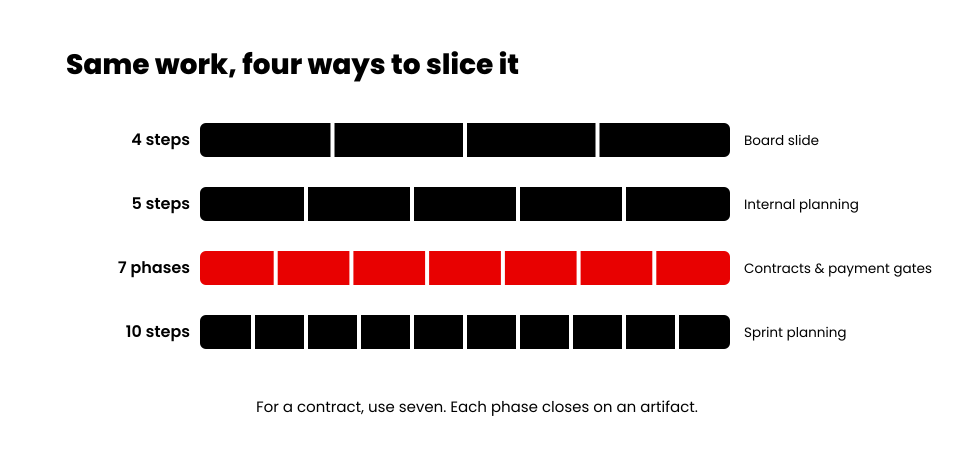
Ten-step versions are usually labelled mobile app development lifecycle stages, which is part of why the number appears to move around. The work stays constant across all four groupings. Only the line placement changes.
For a contract, I would use the seven-phase model every time. Four steps are too coarse to hold anyone to, and ten create gates for steps that overlap in practice.
Where App Timelines Slip, and by How Much
Timelines slip in four places, and three of them happen before any code is written. The table shows the pattern I see most often.
| Phase | Typical Slip | What Causes It | Earliest Warning Sign |
|---|---|---|---|
| Discovery | 1 to 2 weeks | No single decision-maker named | Scope document in review for more than five days |
| Design | 2 to 4 weeks | Late reviewer reopens approved screens | An executive joins a design call for the first time in week four |
| Architecture | 2 to 6 weeks | Integration discovered to be unusable | A third-party API described as “we will confirm later” |
| Development | 3 to 8 weeks | Scope added after design sign-off | Change requests arriving without timeline impact attached |
| Testing | 2 to 4 weeks | Defects found late because testing was batched | First defect log appears after week two of development |
| Launch | 1 to 2 weeks | Store rejection on completeness | Submission built with placeholder content |
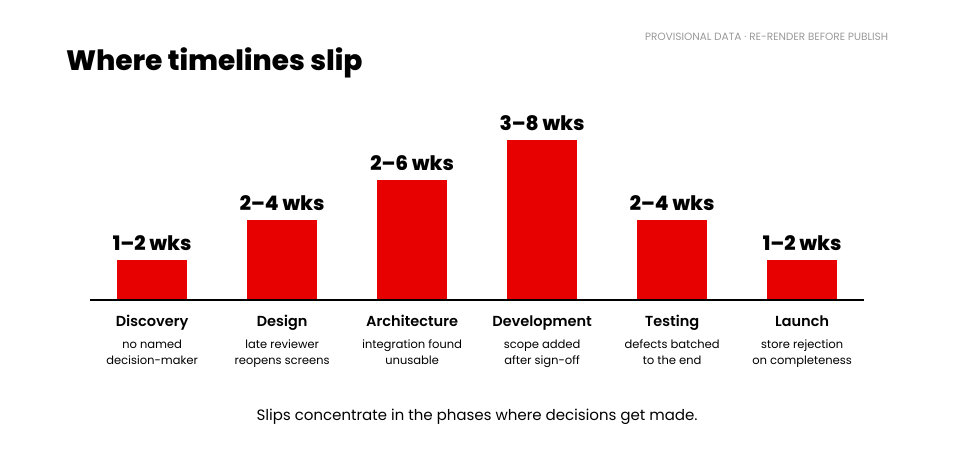
The pattern is consistent. Slips concentrate in the phases where decisions get made. A project running late in development is usually paying for a decision that was avoided in week three.
Which Phases Compress and Which Have a Floor
Some phases genuinely shorten under pressure. Others have a floor, and pushing against it relocates the cost somewhere less visible.
Phases that compress:
- Development. Adding engineers works once the architecture is settled and the scope is fixed. It fails mid-design.
- Design. Reducing the number of scoped screens shortens this phase honestly. Reducing review rounds only defers the feedback.
- Discovery. Compresses when a decision-maker is available daily, and only then.
Phases with a floor:
- App store review. Speed here is not purchasable. Google recommends a week of buffer regardless of budget.
- User acceptance testing. Real users need calendar time to use the product before they can report on it.
- Security and compliance review. Regulated builds add fixed weeks that cannot be parallelized.
The honest way to shorten a timeline is to cut scope. Building a smaller version one and shipping it earlier is the mechanism that actually works. That is the premise behind MVP development, which means launching the smallest version of the product that still delivers the core value, and it is the one compression method that leaves no debt behind.
The Phase Exit Test: How to Audit Progress Without Reading Code
Check for artifacts. A phase reported as 90 percent complete tells you nothing. A phase that has produced its artifact is finished, and the number in the status report is a separate question.
Run this test at every gate in your mobile app development project timeline:
- Discovery is finished when a scope document exists and the sponsor has signed it.
- Design is finished when a clickable prototype exists covering every screen in that scope document.
- Architecture is finished when a written integration map exists naming every external system and its access method.
- Development is finished when a build runs on your own phone and matches the prototype.
- Testing is finished when a defect log exists with every critical and high-severity item closed.
- Launch is finished when the app is live and downloadable by someone outside the project team.
- Post-launch runs on a review cadence and has no exit gate at all.
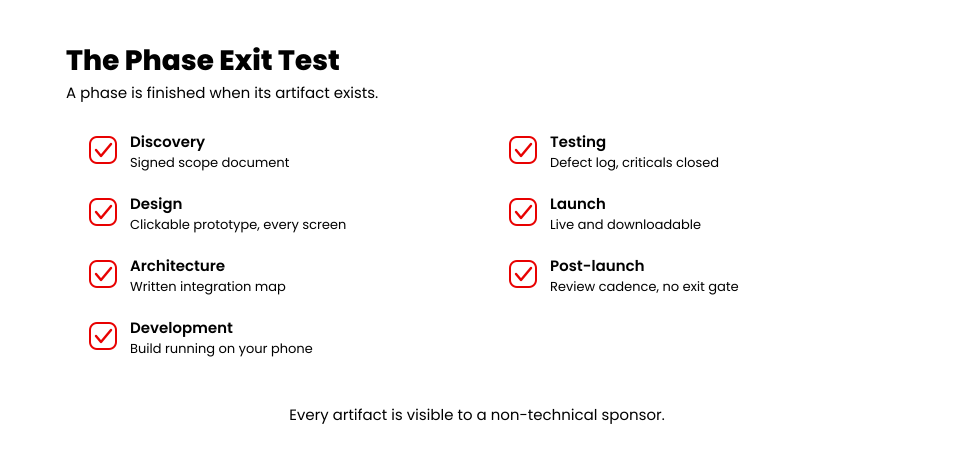
Every artifact on that list is something a non-technical sponsor can see. You do not need to read code to run this test.
The earliest reliable signal that a build is slipping is a status update that describes activity where a deliverable should be. When a report says the team is working through design feedback in week five and no updated prototype exists, the phase has not moved. That gap shows up two to three weeks before the date does.
See what cutting scope actually saves you
Adjust the feature set, platforms, and complexity, and get a cost range back for the version you would ship first.
→ Run the app development cost calculatorWhat Seven Phases Looked Like on the Spruce Rebuild
Spruce is a US property services platform. Residents, property managers, and short-term rental operators book cleaning and chore work through it, and vetted professionals deliver the jobs.
When the Spruce team came to us, they already had a working system. A resident mobile app, web portals for admins, service providers, and property managers, all of it running on a fragmented legacy architecture that made every feature update harder than the last.
The brief sounded like a redesign. Discovery turned it into something else.
Four things surfaced in that phase that were not in the original request. Service Pros had no mobile app at all, so jobs were being coordinated through people rather than software. The property manager portal was missing the property-level data managers needed to make decisions.
There was no capacity management, so the platform was overbooking providers. And pricing did not adjust for market, floor plan, or square footage, which left billing inconsistent across regions.
Each of those is a subsystem. On a project plan, “custom pricing configurator” occupies one line. In the build it became a module with its own rules, its own admin interface, and its own effect on every booking in the system.
Architecture ran long on this project, and it earned the time. We were connecting Braze, Braintree, Slack, Front chat, and Mixpanel into one platform across five distinct user roles, on AWS with React, React Native, Node, Postgres, and Firebase underneath.
Mapping those integrations before development started is the reason development never stopped halfway through to renegotiate them. Thirteen modules shipped in the end, from authentication and role-based access through to capacity management, pricing configuration, and properties prospecting.
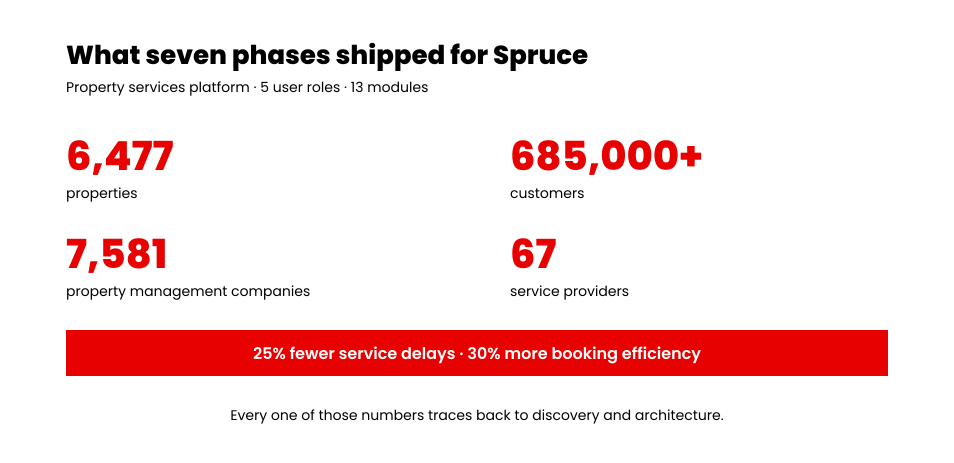
The platform now runs more than 6,477 properties and 685,000 customers, supported by 67 service providers and 7,581 property management companies. Published figures put it at a 25 percent reduction in service delays and a 30 percent increase in booking efficiency.
Here is the part that matters for your own plan. None of those four discoveries were visible in the original brief. They surfaced in discovery and architecture, the two shortest phases on the chart, and they set the length of everything that came after.
How Phase Durations Shift by Complexity and Platform
Complexity and platform choice change the length of the development phase far more than they change the others. Discovery, design, and launch stay broadly stable across project sizes, so the overall app development timeline moves mostly on build effort.
A simple app runs one to three months in total. A mid-complexity build runs four to seven months. A complex or compliance-heavy build runs eight months or more. For what each tier includes and costs, see our guide to app development cost in 2026, or run the numbers yourself with the app cost calculator.
Platform choice affects the development phase specifically. Two separate native builds add roughly 30 to 50 percent over a single platform, because discovery, design, architecture, and testing are largely shared. A cross-platform development approach shares one codebase and lands closer to a single-platform schedule, with platform-specific testing still required for both.
An iPhone app development schedule and an Android one run to similar lengths on their own. The difference shows up in review and device testing. Teams planning a mobile app development timeline for both platforms should budget the extra weeks in testing.
Regulated builds in healthcare, finance, or children’s categories add four to eight weeks that cannot be parallelized. Compliance documentation, audit logging, and external review run on their own schedule.
Final Thoughts
A phase plan with dates on it is a forecast. What makes it trustworthy is whether each phase produced the thing that proves it finished.
Take the duration ranges above into your next status call. Ask for the artifact behind each completed phase.
A partner running a disciplined process hands it over without hesitating. That is the whole test.
We take iOS, Android, and cross-platform builds through all seven phases with a fixed scope, a named deliverable at every gate, and a change-request process attached. Explore our mobile app development services
Want the number before the plan? Run your build through the app development cost calculator and get a range in a few minutes.
















