


















 ChatGPT
 Perplexity
 Claude
 Google AI
Wearable app development means building software for devices worn on the body: smartwatches, fitness bands, smart rings, and AR glasses. These apps power fitness tracking, remote patient monitoring, field operations, payments, and hands-free workflows, and they run on platforms like watchOS and Wear OS.
Most clients who bring me a wearable project arrive with a feature list and a hardware preference. I set both aside at first, because two earlier decisions, platform and data sensitivity, set the budget before any feature gets scoped. This guide follows that order: platforms, features, cost, enterprise use cases, compliance, and the technical constraints that shape all of them.
Grand View Research values the wearable technology market at $92.9 billion in 2025 and projects it to reach $229.9 billion by 2033. The demand side of this decision is settled. The engineering side is where budgets go wrong.
Key Takeaways
- Wearable app development covers smartwatches, fitness bands, smart rings, and AR glasses, built either standalone on the device or as a companion app synced to a phone.
- Budgets run from $25,000–$40,000 for a single-platform consumer app to $75,000–$300,000+ once regulated health data enters the build. Platform count and data sensitivity set the tier; features move you within it.
- Native code fits continuous sensor polling, all-day battery budgets, and regulated data. Cross-platform frameworks fit session-based apps that sync on demand.
- HIPAA compliance is an architecture decision designed in from the first sprint, and some health wearables also fall under the FDA’s Software as a Medical Device (SaMD) review.
- Battery life constrains every other engineering decision on a wearable. The core tradeoff is sensor polling frequency against power budget.
- Enterprise use concentrates in three jobs: remote patient monitoring, field-service dispatch, and warehouse safety alerts.
How a Wearable App Differs From a Mobile App
A wearable app runs directly on a small, battery-constrained device and gets used in glances rather than sessions. That single difference cascades into screen design, processing, and architecture.
| Dimension | Wearable App | Mobile App |
|---|---|---|
| Screen size | Small, glanceable | Full screen, extended reading |
| Processing power | Limited, often paired to a phone | Full smartphone processor |
| Interaction model | Glance, tap, voice, gesture | Extended touch sessions |
| Architecture | Standalone or companion synced to a phone | Runs independently |
A standalone wearable app runs without a phone nearby, managing its own connectivity and storage. A companion app depends on a paired phone for processing and long-term storage. I confirm which model fits a client’s use case before I recommend a platform, because the answer changes both the architecture and the budget tier. Screen size runs the other way too. When a workflow needs more room than a phone gives, I point clients toward tablet app development instead.
Our wearable and IoT development team builds both models across every major wearable platform.
Types of Wearable Devices and the Platforms Behind Them
Four device categories cover almost every wearable project I scope: smartwatches, fitness bands, smart rings, and AR or smart glasses. Each one locks you into a different platform, language, and constraint set, which is why the device decision comes before the feature list.
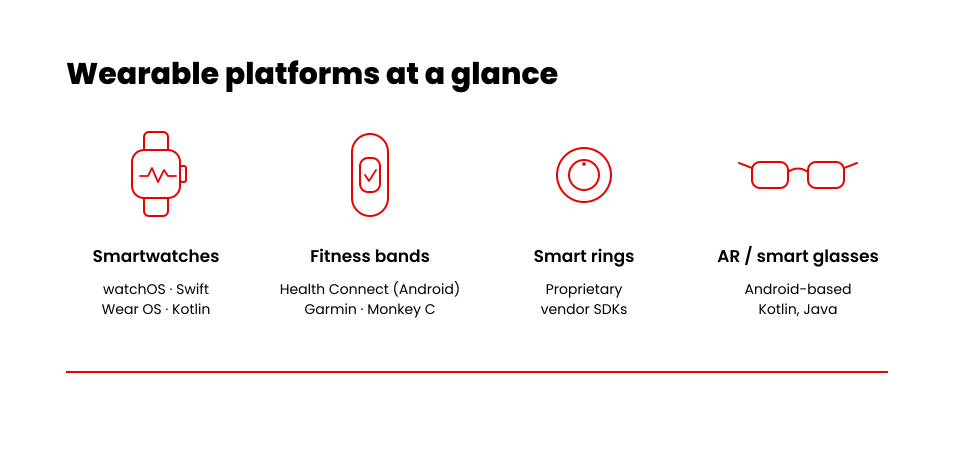
Apple Watch runs watchOS, built with Swift, with health data flowing through Apple HealthKit. Most Android-based watches run Wear OS, built with Kotlin, while Samsung’s older Gear line ran on Tizen. If your users wear watches, this is a two-platform world for all practical purposes.
Fitness bands are mid-transition. Fitbit’s JavaScript-based device runtime is a legacy path now, and Google is consolidating Android health data into Health Connect, its unified on-device health API, while cloud integrations built on the old Fitbit Web API move to the new Google Health API before legacy endpoints shut down in September 2026. I point every new fitness-band client toward Health Connect rather than legacy Fitbit APIs. Garmin sits apart: its Connect IQ SDK uses Monkey C, a language Garmin built specifically for its own devices.
Smart rings still rely on proprietary vendor SDKs, since no open standard covers the category yet. AR and smart glasses mostly run Android-based platforms, built with Kotlin or Java. Rings, glasses, and bands each carry different limits on battery, memory, and connectivity, and those limits shape the feature set more than any roadmap does.
Core Features Every Wearable App Needs
Every wearable app I ship carries four features, regardless of platform. Miss one and the app gets abandoned within weeks.
- Real-time sync. The app must move sensor data to a phone or the cloud as it happens. Most wearables sync over Bluetooth Low Energy, a protocol built for small, battery-powered devices.
- Gesture or voice control. Small screens need hands-free input, so I build tap, swipe, and voice paths into every interface.
- Offline mode. A wearable loses connectivity often, and core functions have to keep working without a live connection.
- Security. Encryption and authentication protect the health and location data every sensor collects.
How Much Does Wearable App Development Cost in 2026?
Wearable app development cost depends more on platform count and data sensitivity than on any single feature. Those two variables set the tier, and the feature list moves you around within it. Here are the average ranges I quote clients, based on the projects our team has scoped.
| Build Scope | Platform | Average Range | What Drives the Variance |
|---|---|---|---|
| Standalone consumer app | Single platform | $25,000–$40,000 | Sensor count and offline mode requirements |
| Companion app synced to a phone | Dual platform, watchOS and Wear OS | $40,000–$75,000 | Bi-directional sync architecture and notification handling |
| Regulated health-data app | HIPAA-aligned architecture | $75,000–$300,000+ | Continuous telemetry, audit logging, and FDA SaMD review scope |
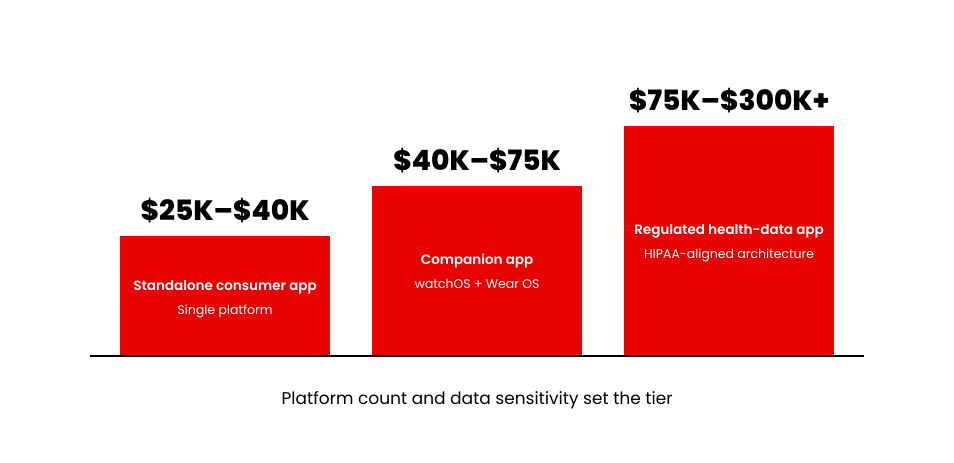
These are averages from our own project scoping, and they are a starting point rather than a substitute for a scoped quote on your specific build. A project can also move up a tier quickly once regulated health data enters the picture, because continuous telemetry, audit logging, and compliance review add scope that has nothing to do with the visible feature list.
Want a breakdown tailored to your exact features and platform scope?
Use our interactive estimation tool to calculate a project baseline in minutes.
Get a fast estimate for your own scope →Enterprise and Healthcare Wearable Use Cases
Enterprise and healthcare teams use wearable apps for three specific jobs: clinical remote monitoring, field-service dispatch, and warehouse safety alerts. Each one earns its budget by removing a phone from someone’s hands at the moment those hands are busy.
Healthcare wearable app development usually starts with remote patient monitoring, or RPM. A wearable sensor tracks vitals between clinic visits and flags anything abnormal to a care team, which keeps patients out of the office for routine checks. Our healthcare app development expertise extends the same remote-monitoring pattern into full care platforms such as Visionze.
Field-service teams use smartwatch apps for route guidance and hands-free checklists. A technician glances at a wrist instead of pulling out a phone mid-task, which keeps both hands on the actual repair or install.
Warehouse and logistics teams use wearables for safety alerts and hands-free scanning. A vibration or an on-screen alert warns a worker before a hazard becomes an incident, and hands stay free for the scanner or the pallet.
Native vs Cross-Platform: The Three Questions That Decide It
Three questions decide whether a wearable app should be native or cross-platform, and a personal preference for one toolkit should never be the deciding factor. I ask them in the same order on every scoping call.
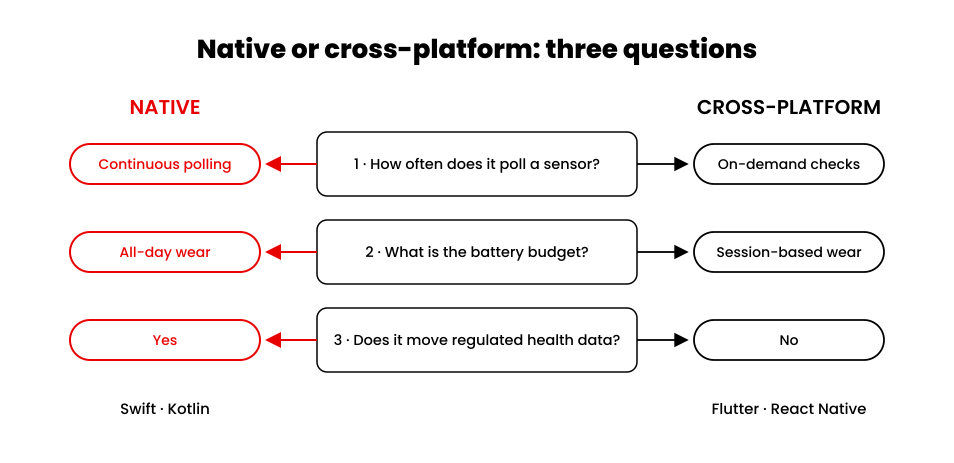
Question one: how often does the app poll a sensor? Continuous polling favors native code, since it sits closer to the hardware. On-demand or periodic checks run fine on a cross-platform framework such as Flutter or React Native.
Question two: what is the battery budget? All-day wear pushes toward native, because native code manages power more precisely. A session-based app, worn for a workout or a shift, has more room for a cross-platform build.
Question three: does the app move regulated health data off the device? Regulated data pushes toward native, since audit logging and encryption need tighter hardware control. An app with no regulated data can lean cross-platform without that constraint.
Regulatory and Compliance Considerations for Health-Data Wearables
HIPAA compliance for a wearable app is an architecture decision, planned into the system design before the first sprint. The HIPAA Security Rule requires encryption, access controls, and audit logging for any system handling protected health information, and a wearable app that reads heart rate, SpO2 (blood oxygen), or glucose data falls under it.
Some health-tracking wearables also qualify as Software as a Medical Device, or SaMD, under FDA guidance, which adds a regulatory review path on top of HIPAA. I check SaMD classification during the earliest scoping conversation with a client, because finding out later reprices the whole build.
Real vetting matters more than a stated commitment to best practices. Ask any wearable development partner four questions before you sign a contract:
- Which platform have they shipped on: watchOS, Wear OS, or a proprietary device SDK?
- Can they show FDA submission or HIPAA audit experience on a real project?
- Do they have a live, shipped wearable product, beyond a service listing?
- What encryption and access-control approach do they use for data at rest and in transit?
The Wearable App Development Process, Step by Step
Six steps take a wearable app from concept to launch, in the order I run them with every client.
- Discovery. We confirm the use case, the target device, and whether the data is regulated.
- Platform selection. We apply the three questions above to choose native or cross-platform.
- UX for small screens. We design for a glance, with one primary action and minimal text per screen.
- Build. Engineers integrate the sensors, connectivity, and the four core features covered earlier.
- Test across devices. Every build gets tested on real hardware, in addition to a simulator.
- Launch and maintain. Wearable operating systems update often, so maintenance stays part of the plan.
Common Challenges and How to Plan Around Them
Battery life limits every other decision on a wearable build, more than screen size or device compatibility. Continuous sensor polling drains a battery fast, so I trade data frequency against power budget deliberately, using the same battery question from the platform framework. An app that checks a sensor once a minute lasts far longer than one that streams constantly.
Screen-size constraints shape every design decision on a wearable interface. I limit each screen to one primary action and minimal text, and anything that needs a paragraph of explanation belongs on the paired phone app instead.
Multi-device compatibility adds real engineering time, because a companion app has to work across phone models, watch models, and operating system versions at once. I build the compatibility test matrix during discovery, before any code gets written.
What a Connected-Hardware Project Taught Us About Wearable Constraints
The clearest lesson our team has on these constraints came from hardware that sits on a shelf instead of a wrist. A UAE scent-marketing brand sells premium cold-air diffusion machines to hotels, spas, malls, and boutiques. The machines were excellent hardware operating as isolated units: no reliable phone communication, no smart scheduling, no way to manage several devices across a property.
Their team needed the same thing every wearable team needs: a stable, real-time link between a small device and a phone. Our engineers extended the companion app that connects to the diffusers over Bluetooth and Wi-Fi, adding smart timing schedules by day of the week, working-and-pausing intervals configured in seconds to control scent intensity, and a dashboard that groups devices by location.
Those interval controls are the exact duty-cycle tradeoff this guide keeps returning to: how often a device acts versus how much power and attention it burns. A diffuser meters fragrance, and a wearable meters sensor reads. Solving connectivity, scheduling, and multi-device management for one constrained device class builds the same engineering muscle the other one demands, which is why I treat every wearable scope as a connected device app development problem first.
Conclusion
Wearable app development prices out as three separate decisions: platform, data sensitivity, and scope. Get those three right before you set a budget and the cost range stops being a guess. If your build touches health data, start with the compliance question, because it moves the tier more than any feature can. For a build plan scoped to your platform and data needs, our wearable and IoT team can run the same framework from this guide against your specific project.
Scope Your Wearable Build
Our wearable and IoT engineering team designs, builds, and ships regulated, enterprise-grade wearable software.
Talk to our wearable and IoT team→Keep reading: Mobile App Development Cost for how the same platform and compliance factors play out across mobile builds.

![AI_in_App_Development_Statistics[1]](https://www.appverticals.com/wp-content/uploads/2025/12/AI_in_App_Development_Statistics1.png)















