ChatGPT
 Perplexity
 Claude
 Google AI
How long does it take to develop an app? Most business apps take 3 to 9 months from kickoff to store approval. A simple single-function app ships in 2 to 4 months. A medium app with accounts, payments, and an admin panel takes 4 to 7 months. Enterprise and regulated builds run 9 to 18 months or longer.
Those ranges are the easy part. The harder question is what each month costs you. Build time consumes runway, delays revenue, and pushes your next board update. Compliance work under HIPAA or PCI DSS adds weeks that no feature list shows. App Store and Google Play review add days more at the very end. Scope changes after design sign-off are the single largest cause of slip.
This guide sets out timelines by app type and phase. It also covers what each month of build time costs, and why launch dates move.
Why this matters now: Google Play advises developers to build in a buffer of at least one week between submission and go-live. Reviews run from a few hours to seven days.
|
Every month you add to a build is a month you subtract from your runway.
|
Key Takeaways
|
How Long Does It Take to Develop an App? The Short Answer
How long does it take to build an app depends on four scope tiers. Most business apps land in the 3 to 9 month band. The table below is the fastest way to place your own project.
| App Type | Typical Timeline | What It Includes | Example |
|---|---|---|---|
| Simple | 2 to 4 months | One core function, no backend, no accounts | Calculator, event schedule viewer |
| Medium | 4 to 7 months | User accounts, payments, admin panel, APIs | Booking app, fitness tracker, storefront |
| Complex | 7 to 12 months | Real-time features, multi-role access, deep integrations | Marketplace, logistics platform, social network |
| Regulated | 9 to 18 months | HIPAA, PCI DSS or SOC 2 scope, audit trails, formal sign-off | Telehealth platform, banking app |
I use this table in every scoping call. Find the row that matches what you need at launch. Ignore the row that matches what you want in year two.
Add a discovery phase before the build starts. Skipping it moves the work later, when every change touches code that already exists.
App Development Timeline by Complexity: Simple, Medium and Complex
Complexity drives the app development timeline more than any other factor. Engineering hours scale faster than feature counts do. Here is what each tier costs in effort.
| Complexity Tier | Timeline | Engineering Hours | What Pushes a Project Into This Tier |
|---|---|---|---|
| Simple | 2 to 4 months | 300 to 800 | Under 10 screens, no server, no login |
| Medium | 4 to 7 months | 800 to 1,500 | Authentication, payment gateway, third-party APIs |
| Complex | 7 to 12 months | 1,500 to 5,000+ | Live data, multiple user roles, scaled backend |
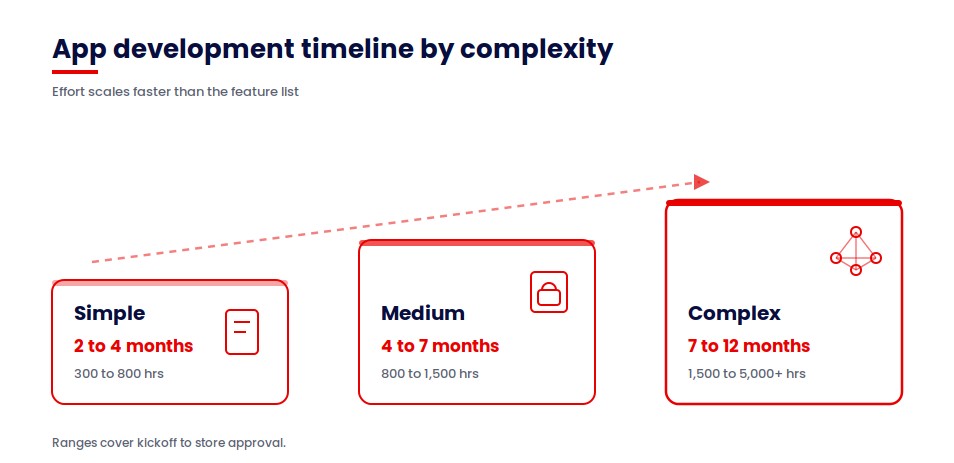
The mobile app development timeline follows these same three bands on iOS and Android. Platform choice shifts the effort, and the tier still sets the calendar.
Where most business apps actually land
Most of the projects I scope land in the medium tier. Founders arrive expecting the simple tier. The gap opens the moment a login screen enters the scope. One user account brings authentication, storage, recovery, and privacy handling with it. Our mobile app development team sizes projects against that reality rather than the feature list.
Why published estimates disagree
Public estimates for a simple app run from 2 months to 9 months. That spread is real, and it has one explanation. Each estimate measures a different scope. Some count only the build phase. Others count discovery, design, review, and launch prep. Some describe a prototype. Others describe a production release with monitoring in place.
Ask any estimate two questions before you trust it. Does the clock start at kickoff or at the first line of code? Does it stop at code complete or at store approval? Those two answers explain most of the variance you will find.
How Long Each Stage Takes
A full timeline for app development breaks into seven stages. Development is the longest by a wide margin. The rest are shorter than founders expect.
The durations below are for a medium-tier build on one platform. Scale them against your own tier using the table above.
| Stage | Duration | Share of Schedule | What Decides the Length |
|---|---|---|---|
| Discovery and requirements | 2 to 4 weeks | 8 to 12 percent | Stakeholder availability and decision speed |
| UI and UX design | 3 to 5 weeks | 12 to 18 percent | Number of screens and review cycles |
| Technical architecture | 1 to 3 weeks | 5 to 8 percent | Integration count and environment provisioning |
| Development | 10 to 18 weeks | 45 to 55 percent | Integration count and backend complexity |
| QA and testing | 3 to 6 weeks | 12 to 18 percent | Device matrix and regression scope |
| Launch and store review | 1 to 2 weeks | 4 to 6 percent | Store queues and submission completeness |
| Post-launch support | Ongoing | Not applicable | Release cadence and defect volume |
Read the stages individually. Architecture overlaps design on most projects, and QA runs alongside development, so the individual ranges sum higher than the calendar total they sit inside.
Development absorbs 45 to 55 percent of the calendar. Total app development time runs 3 to 9 months across these seven stages, depending on tier. For the wider process behind them, read our guide to the mobile app development process. A dedicated breakdown of app development phases covers each stage in depth.
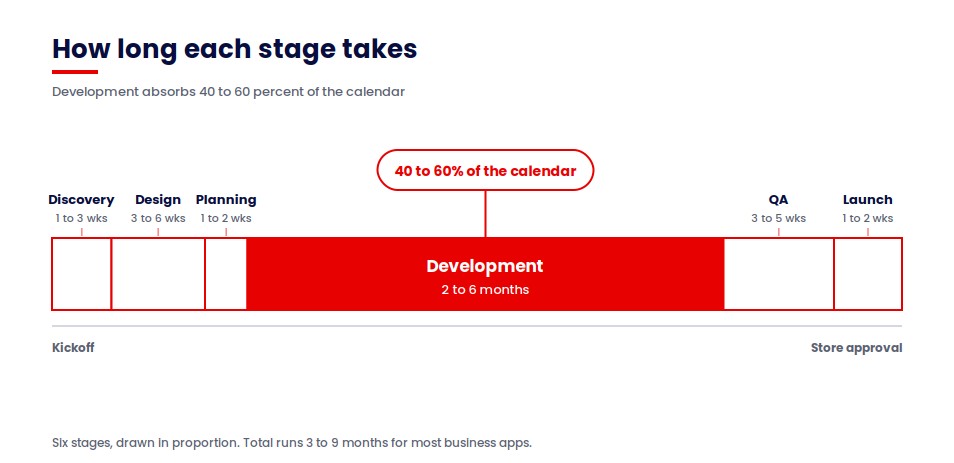
Development absorbs 40 to 60 percent of the calendar. Total app development time runs 3 to 9 months across these six stages. For the wider process behind them, read our guide to the mobile app development process. A dedicated breakdown of app development phases covers each stage in depth.
How Long Does It Take to Build an MVP?
An MVP takes 3 to 5 months for the core build. Add 3 to 7 weeks for testing and release prep. How long does it take to build an app prototype? A single-function version with no backend takes 3 to 4 weeks.
The window you hit depends on what you agree to cut. I put these trade-offs in writing before kickoff, because how long to build an app is decided at scoping rather than in the sprint.
- To hit 3 months: one platform, one user role, no admin panel, no payments.
- To hit 4 months: add payments or one third-party integration and keep the rest fixed.
- To hit 5 months: add an admin panel and a second user role.
- Beyond 5 months you are building a V1, and the scope conversation changes.
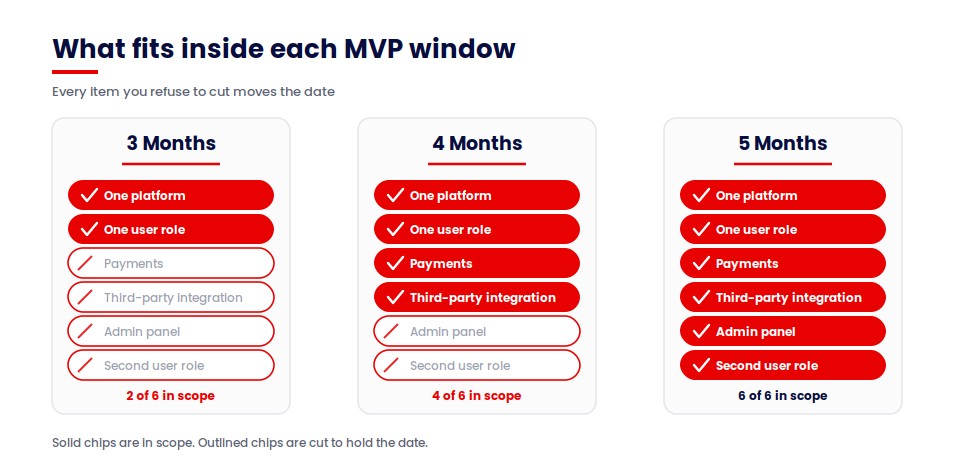
Every item you refuse to cut moves the date. Our MVP development engagements start by naming the one problem the first release solves.
iOS, Android or Cross-Platform: Does the Platform Change the Timeline?
Platform choice moves the schedule less than scope does. The answer to how long does it take to build an ios app sits close to the Android answer. A simple build takes 1 to 3 months on either platform.
| Approach | Added Effort | Review Window | Suited To |
|---|---|---|---|
| Native iOS only | Baseline | 90 percent under 24 hours | Premium audiences, deep device features |
| Native Android only | Baseline plus fragmentation testing | A few hours to 7 days | Broad reach, wide device range |
| Both natively | Close to double the build effort | Both queues apply | Performance-critical products |
| Cross-platform | 20 to 40 percent less than two native builds | Both queues apply | Standard interfaces, faster market entry |
Apple states that 90 percent of submissions are reviewed in less than 24 hours. Google Play reviews run from a few hours to seven days, and Google advises a one-week buffer. Android adds calendar time in testing rather than in review. Screen sizes and OS versions multiply the device matrix.
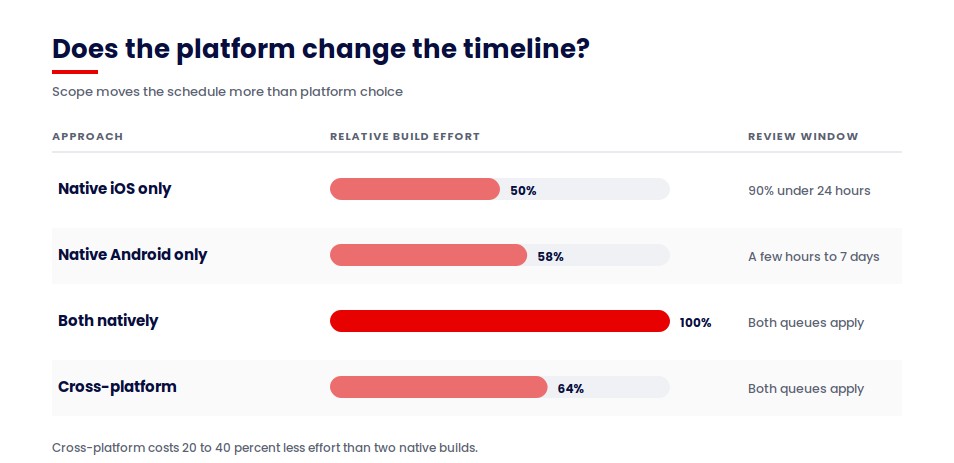
How long does it take to develop an Android app? Android runs the same for 1 to 3 months at the simple tier. The extra time appears in device testing rather than in code.
For the iOS-specific decisions behind these numbers, see our iOS app development guide.
Timelines by Industry: Healthcare, Fintech, Logistics and Retail
How long does it take to develop a mobile app in a regulated sector? Longer than the same feature set in retail. Compliance and integration depth add months before a single screen changes. Here is what we see across our own delivery work.
| Sector | Typical Range | What Adds the Time |
|---|---|---|
| Retail and ecommerce | 3 to 6 months | Payment integration, catalog scale, PCI DSS scope |
| Logistics | 5 to 9 months | Live tracking, offline handling, carrier integrations |
| Fintech | 7 to 12 months | KYC flows, PCI DSS scope, audit trails, penetration testing |
| Healthcare | 6 to 12 months | HIPAA scope, access controls, clinical workflow sign-off |
How long does it take to create an app for healthcare specifically? Six to twelve months, because access controls and clinical sign-off sit on the critical path.
What Each Month of Build Time Actually Costs You
A month of build time costs you a month of team burn. That figure is the number your board will ask about. The bands below pair our published cost ranges with the timelines above.
How long does it take to make an app set your burn window. A longer schedule spends the same team rate across more months.
| Tier | Timeline | Build Cost Band | Implied Monthly Burn | Runway Consumed |
|---|---|---|---|---|
| Simple | 2 to 4 months | From $20,000 | $5,000 to $10,000 | Under one quarter |
| Medium | 4 to 7 months | $40,000 to $120,000 | $10,000 to $17,000 | One to two quarters |
| Complex | 7 to 12 months | $120,000 to $200,000 | $17,000 to $20,000 | Two to four quarters |
| Regulated | 9 to 18 months | $200,000 and above | $20,000 and above | Three to six quarters |
Cost bands come from our published mobile app development cost analysis. Monthly burn is derived by dividing each band across its timeline. Treat it as a planning figure rather than a quote.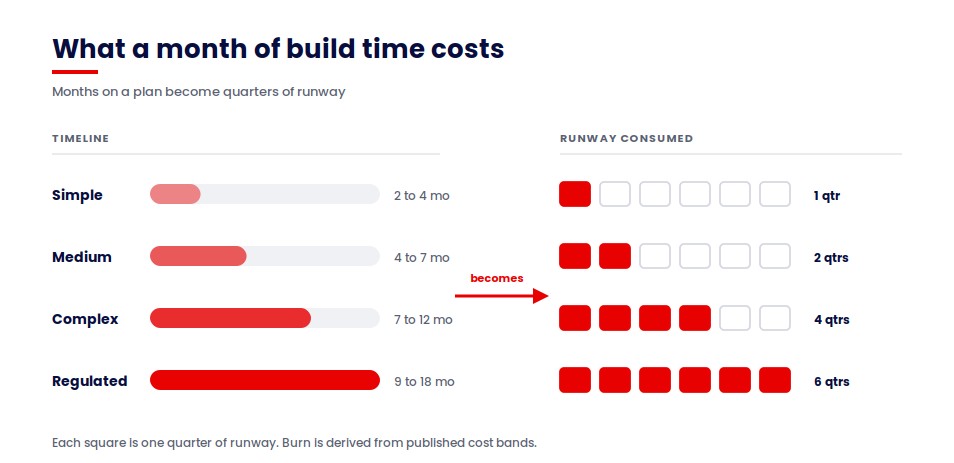
Variance inside each band comes from three things. Integration count drives it first. Compliance scope drives it second. Approval latency on your side drives it third.
Not sure which tier your project sits in?
Answer a few questions about your scope and get a timeline and cost range built around your project.
→ Calculate Your App CostWhy Compliance Scope Sets the Calendar: The CPCG Build
Collaborative Patient Care Group runs offshore support staff for US healthcare providers. Their representatives connect into unattended kiosks sitting in medical supply stores, scanning patient documents and operating software on machines with nobody standing in front of them.
When they came to us, that was running on a patchwork of general-purpose remote access tools. It worked, in the sense that connections happened. It also meant patient documents were moving through software nobody had scoped for healthcare access control.
The brief I received described a remote access product. What set the schedule was everything sitting underneath that.
We built four separate applications. A desktop app for the kiosks, a desktop app for the representatives, a web portal for client-side organization admins, and a super admin portal for CPCG themselves. Four applications means four sets of designs, four test cycles, and four release paths.
Then four role levels on top of that: representative, store manager, organization admin, and super admin. Every screen in the system had to answer what each of those four people could see and do. Role count multiplies design and QA work in a way feature count does not.
The requirement that surprised the client sat in the audit module. Super admins can silently join a live session for quality assurance, without notifying the representative or the kiosk. That is one line in a requirements document. In the build it touched session architecture, permissions, logging, and the entire QA plan, because you cannot ship a silent-observation feature without proving it behaves correctly in every access state.
Access control worked the same way. Representatives can only log in and out during predefined schedule hours, which turns a login screen into a scheduling system with enforcement behind it.
None of that appears on a feature list as extra time. All of it is a calendar. The platform runs on AWS with React, Electron, Node, React Native, and Postgres underneath, and it is now fully adopted across CPCG’s active stores and kiosks as the central platform for every representative interaction.
The lesson I take into scoping calls: in a regulated build, count the roles and the audit requirements before you count the screens. Those two numbers predict the schedule better than the feature list does.
Spruce shows the same principle without the compliance overhead. We rebuilt their US property-services platform across five distinct user roles, with a pricing engine and a capacity module underneath. Role count set that schedule too, and it landed in a shorter band because no audit regime sat on top of it.
On certifications, one clarification worth having before you scope a regulated build. AppVerticals is ISO 27001 certified, and our delivery practices are HIPAA-compliant, PCI DSS-secure, and SOC 2-aligned. That shortens preparation work. It does not remove the review cycles, so budget those as calendar time from day one.
Has AI Actually Made App Development Faster?
AI compresses the build stage and leaves the rest of the schedule intact. How long does it take to build an app with AI? Measure it at stage level. Project-level claims hide where the time actually sits.
Development is 45 to 55 percent of the calendar. A meaningful gain there still leaves half the schedule untouched. Claims of a 50 to 70 percent whole-project reduction come from vendors selling build tools. Their own product is the variable being measured.
What compresses
- Boilerplate code and scaffolding.
- First-draft test cases and synthetic data.
- Documentation and release notes.
What does not compress
- Discovery, because it runs at the speed of stakeholder availability.
- Integration works against systems you do not control.
- Compliance review and security sign-off.
- Store review queues, which run on external timetables.
- Code review, because a human still verifies every change.
The Slip Ledger: Why App Timelines Move, and Who Controls Each Cause
Timelines move for reasons that split cleanly into two columns. I built the Slip Ledger to make that split visible before a contract is signed. Read your own column first.
| What the Client Controls | What the Vendor Controls |
|---|---|
| Scope changes after design sign-off | Estimation quality at proposal stage |
| Approval latency on designs and releases | Integration planning and discovery depth |
| Access to internal systems, data and test accounts | Staffing continuity across the build |
| Undecided or competing stakeholders | QA sequencing rather than QA at the end |
| Late compliance or legal requirements | Environment and release automation readiness |
The largest item in the client column is scope change after design sign-off. The largest item in the vendor column is estimation quality at the proposal stage. Both are visible before kickoff, and both are negotiable.
Budget overruns follow the same pattern as schedule overruns. The Standish Group CHAOS Report has tracked this across decades of software projects.
What to do before you sign
- Name the single decision-maker for design approvals.
- Agree a change-control process with a stated timeline impact.
- Provide system access and test accounts before sprint one.
- Ask your vendor which assumptions carry the most schedule risk.
Conclusion
Your timeline is a budget decision before it is an engineering one. Pick the app type that matches what you actually need at launch. Then check that the range fits your runway and your roadmap. If the two do not line up, cut scope before you cut quality. A tighter MVP shipped in four months beats a full build abandoned at month ten. When you are ready to put numbers against the schedule, read our guide to mobile app development cost.
Put a budget against the schedule
Every month on this page carries a cost. See what each phase actually spends, line by line.
→ Read the app development cost breakdownKeep reading: the mobile app development process, for the full build process these timelines sit inside.