ChatGPT
 Perplexity
 Claude
 Google AI
A full design engagement, covering research, wireframes, UI screens, prototyping, and testing, can run anywhere from about $3,000 for a simple app with a small screen count to $50,000 or more for a complex product built across multiple platforms with deep user research and several rounds of testing.
That range is wide because it blends work from freelance marketplaces, boutique studios, and full service app development companies, and each provider prices the same set of activities differently. App design cost is also a separate line item from app development cost.
Design covers the research and visual work that defines how the app looks and behaves. Development is the engineering work that turns that design into a working product. The sections below break down what actually shapes the price, what designers charge, and how to build a realistic budget for your own project.
Key Takeaways:
- App design cost in 2026 typically ranges from $3,000 to $50,000+, depending on complexity, platforms, research, and testing requirements.
- App design is a separate cost from development and covers UX research, wireframes, UI screens, prototypes, and design specifications.
- Simple MVP designs may cost around $3,000–$10,000, medium-complexity apps $10,000–$25,000, and complex products $25,000–$50,000+.
- Key factors affecting app design cost include screen count, user flows, app complexity, platform coverage, custom interactions, design systems, and revisions.
- A complete app design process includes UX research, information architecture, wireframing, UI design, prototyping, usability testing, and developer handoff.
- Most small-to-medium app design projects take around 2–4 weeks, while complex products may require 6–8+ weeks.
How Much Does It Cost to Design an App in 2026?
Published estimates for app design vary widely because providers cover different levels of work. Fiverr lists app design services from about $35 to $9,000, ranging from individual screen designs to more complete UI packages. At the higher end, providers that include design within a broader product development engagement quote substantially more. Appinventiv estimates $3,000 to $30,000, SolveIt starts at around $5,000 and can exceed $20,000 for larger projects, while Jotform places the range at $3,000 to $50,000 or more.
For most projects, a practical planning range is $3,000 to $50,000+. Simple MVPs with limited screens and straightforward user flows generally fall toward the lower end, while complex apps with multiple platforms, user roles, custom interfaces, design systems, and usability testing require a larger budget.
These figures cover app design, not the cost of building the app itself. Design typically includes UX research, information architecture, user flows, wireframes, UI design, prototyping, and design specifications. Development is a separate phase that turns those designs into a functioning product.
The wide pricing range is therefore less about a single market rate and more about what the project includes, how complex it is, and who you hire. The sections below break down the main factors that influence app design cost, what designers charge, how long the process takes, and how to estimate a realistic budget for your project. For broader context on the mobile app market, see our breakdown of global mobile app development market statistics.
| App Complexity | Typical Design Cost | Typical Scope |
|---|---|---|
| Simple MVP | 3,000–10,000 | 5–15 screens, basic flows, one platform |
| Medium complexity | 10,000–25,000 | 15–40 screens, custom UI, prototype, testing |
| Complex | 25,000–50,000+ | Multiple platforms, roles, advanced UX, research, testing |
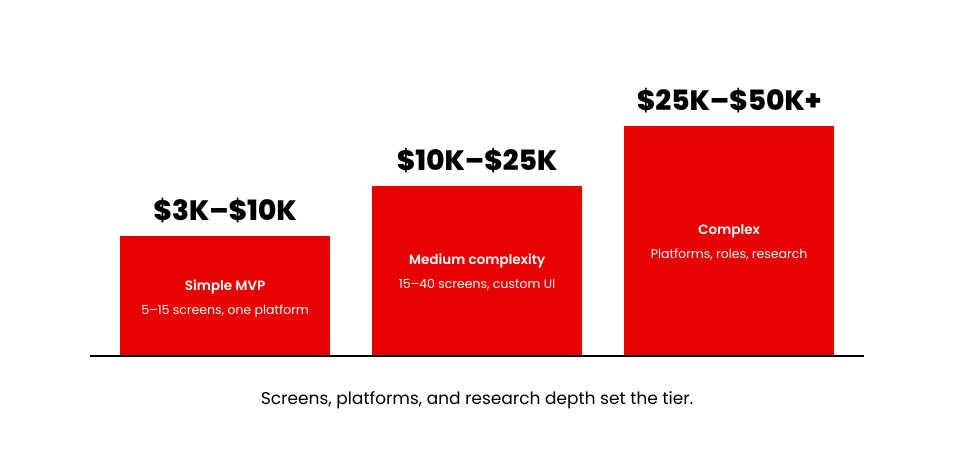
The biggest cost drivers are the number and complexity of screens, the number of platforms being designed, custom interactions and animations, research and usability testing, accessibility requirements, and whether the project needs a reusable design system. A simple app with a handful of straightforward screens requires far less design work than a marketplace, fintech platform, healthcare application, or multi-role enterprise product with dozens of interconnected flows.
For budgeting purposes, 5,000–25,000 is a reasonable starting range for many small to mid-sized app design projects, while more complex products can move well beyond $50,000. The right budget depends less on the label of the app and more on the actual scope of the design work required.
Design Only Quotes vs. Bundled Design and Development Quotes
Part of the confusion around published cost ranges comes from mixing two different kinds of quotes. A design only quote covers research, wireframes, UI screens, and a prototype, and nothing else. A bundled quote from an app development company folds design into a larger price that also covers engineering, quality assurance, project management, and often a maintenance period after launch.
Both are legitimate ways to buy app design. A design only engagement gives you finished files that any development team can pick up. A bundled engagement keeps design and development under one roof, which can reduce miscommunication between the team that designed the screens and the team that builds them, though it usually costs more upfront because it covers more work. Knowing which type of quote you are looking at before comparing numbers prevents a lot of unnecessary sticker shock.
Turn Your App Idea Into a Defined Design Scope
Not sure how many screens, user flows, platforms, or prototype iterations your product needs? Share your requirements with our team to receive a practical recommendation covering design deliverables, development considerations, timeline, and budget range.
Talk through your design scope
How Much Does Each App Design Stage Cost?
App design costs are spread across several stages, and each stage contributes differently to the final budget. Current 2026 estimates from Jotform put individual design stages in the following ranges:
| Design Stage | Typical Cost Range | What It Covers |
|---|---|---|
| UX research and discovery | 500–8,000 | User research, competitor analysis, requirements, and product discovery |
| Wireframing and UX mapping | 1,000–10,000 | User flows, information architecture, and low-fidelity screen layouts |
| UI design and visual styling | 2,000–25,000+ | High-fidelity screens, typography, colours, components, and visual states |
| Prototyping and usability testing | 1,000–15,000 | Interactive prototypes, user testing, findings, and design iterations |
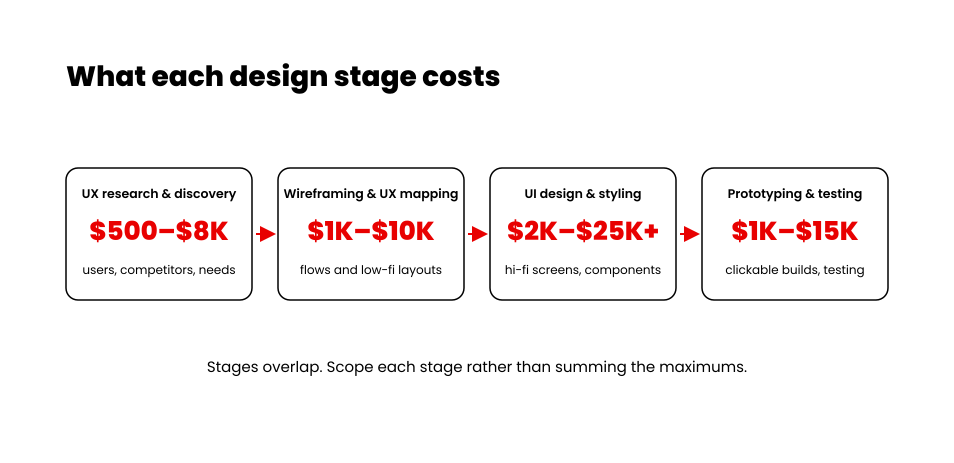
The stages can overlap, and not every project needs the same level of research or testing. A simple MVP may require lightweight discovery and a small prototype, while a complex product may need extensive research, dozens of screens, multiple prototype iterations, and structured usability testing.
The important point is that adding every stage at its maximum range does not automatically produce the right budget. Your actual app design cost depends on the scope of each stage, the number of screens and user flows, the platforms involved, and the team you hire.
What Does App Design Include?
A complete app design process defines how users move through the product, how information is presented, and how each interaction should work before development begins. Depending on the project’s scope, app design can include the following:
- UX research: Designers study the target users, their needs, pain points, and the tasks they need to complete. This may involve user interviews, competitor analysis, surveys, or reviewing existing product data.
- Information architecture: The content and features are organized into a structure that makes the app easy to navigate. Designers determine how screens, menus, categories, and other elements connect.
- User flows: User flows map the steps required to complete important actions, such as creating an account, searching for a product, making a payment, or booking a service. Mapping these flows early can reveal usability problems before development starts.
- Wireframes: Wireframes provide simplified layouts for individual screens. They focus on content placement, navigation, and functionality rather than colors, imagery, or detailed visual styling.
- UI design: Designers create the visual interface, including typography, colors, buttons, icons, forms, cards, spacing, and other interface elements. The goal is to create a consistent visual language across the application.
- Interactive prototype: A prototype connects the designed screens so stakeholders can experience key interactions before the app is built. Prototypes can also be used during usability testing to identify confusing or inefficient user flows.
- Design system: Larger applications may require a reusable design system containing components, styles, spacing rules, typography, and interaction patterns. This helps maintain consistency as the product grows.
- Usability and accessibility considerations: Designers evaluate whether users can understand and operate the interface efficiently. Depending on the project, this can include usability testing, responsive layouts, readable typography, sufficient contrast, and accessible interaction patterns.
- Developer handoff: The final design package gives developers the specifications and assets needed to implement the interface. It can include screen designs, component states, measurements, design tokens, prototypes, and exportable assets.
Not every app requires the same level of design work. A small MVP may need basic user flows, wireframes, UI screens, and a prototype, while a large enterprise application may require extensive research, testing, accessibility work, and a complete design system. This difference in scope is one of the main reasons app design costs vary so widely from one project to another.
What Drives App Design Cost?
App design costs vary because the amount of design work required varies from project to project. A five screen MVP with a simple user flow requires far less effort than a fintech platform with multiple user roles, complex transactions, and dozens of interconnected screens. The main factors that influence app design cost include:
Number of Screens and User Flows
More screens generally mean more design work. However, the number of screens alone does not determine the price. A small app with complicated workflows can require more design effort than a larger app with straightforward navigation. Designers may need to create different states for each screen, including empty states, loading screens, error messages, confirmation screens, and permission prompts.
App Complexity
The features and interactions inside the app have a major impact on design effort. Basic features such as profiles, search, and simple forms are relatively straightforward. Features such as real time tracking, payments, scheduling, dashboards, chat, or multi step transactions require more detailed UX planning and interaction design. A multi role logistics platform, similar in structure to what we covered in our breakdown of building an app like Uber Freight, needs separate flows and screens for shippers, carriers, and administrators, and each of those flows needs its own research, design, and testing pass.
UX Research and Usability Testing
Research adds time and cost but can reduce the risk of building an interface based on assumptions. Depending on the project, designers may conduct user interviews, competitor research, usability tests, or prototype testing before finalizing the interface. A project that requires extensive research and multiple testing rounds will typically cost more than one that moves directly from requirements to UI design.
Platforms and Device Types
Designing for both iOS and Android can increase the scope because each platform has its own interface conventions and components. Platform coverage adds hours even when the visual style stays consistent. According to Clutch’s 2026 pricing data, app development companies charge roughly the same hourly rate regardless of operating system, but building for both iOS and Android usually means reviewing and adapting the design against each platform’s own interface guidelines. If you are also deciding how to build the app itself, your development framework choice, such as Flutter versus React Native, can affect how your design system needs to be structured for reuse across platforms.
Custom UI and Interactions
Using standard interface patterns can reduce design effort. Custom illustrations, animations, gestures, transitions, dashboards, and highly interactive components require additional planning and design work. For example, a basic checkout screen is relatively simple to design. A custom checkout experience with multiple payment methods, validation states, transaction status updates, and error handling requires considerably more UX and UI work.
Design System Requirements
A small MVP may only need a basic collection of reusable components. Larger products often need a complete design system covering typography, colors, buttons, forms, navigation, cards, spacing, component states, and interaction patterns. Building this system takes additional time upfront, but it can make future design and development more consistent and efficient.
Accessibility Requirements
Designing for accessibility can add requirements around color contrast, typography, touch targets, navigation, labels, and interaction states. The extent of this work depends on the product, target audience, platform, and applicable accessibility requirements.
Designer Location and Team Structure
Designer rates vary by location, experience, specialization, and engagement model. A freelance designer may charge differently from a specialized design agency or an in-house product team. The pricing model also matters. Designers may charge hourly, by project, or through a broader product design engagement. Comparing prices is therefore only useful when the included deliverables and scope are comparable.
Revisions and Scope Changes
The number of revision rounds can affect the final cost. Changes made after the user flows and interface have been approved can require additional work, particularly when they affect multiple screens or interconnected workflows. Defining the scope, deliverables, and revision process before design begins helps keep the project budget predictable.
How Much Do App Designers Charge?
App designer rates vary based on experience, location, project scope, and whether you hire a freelancer or an agency. In 2026, current marketplace and agency pricing data shows a wide range:
| Hiring Option | Typical Rate |
|---|---|
| Entry level freelance UI/UX designer | $7–$25/hour |
| Mid level freelance designer | $30–$75/hour |
| Senior or specialist designer | $80–$125/hour |
| UX/UI design agency | $25–$49/hour is the most common range on Clutch |
| UX/UI project on Clutch | Typically $10,000–$49,999 |
Fiverr’s 2026 marketplace data puts professional UI/UX designer rates at 20–125 per hour, while its broader experience breakdown ranges from $7/hour for entry level designers to $125/hour for senior specialists. Fiverr also reports that mobile app UI design projects commonly cost 400–1,200 on its marketplace.
Agency pricing is higher for many full product design engagements because the scope can include UX research, strategy, wireframing, prototyping, usability testing, UI design, design systems, and developer handoff. Clutch reports that UX/UI projects listed on its platform typically cost 10,000–49,999, with most UX agencies charging 25–49 per hour.
Location also makes a significant difference. Clutch’s 2026 data lists typical UX/UI agency rates of 100–149/hour in the United States and Canada, compared with 25–49/hour in India, the Philippines, Ukraine, and Mexico.
The key point is that an hourly rate alone does not tell you what an app design project will cost. A designer charging $40 per hour but taking 150 hours could cost more than a designer charging $75 per hour who completes the same defined scope in 70 hours. When comparing quotes, look at the deliverables, number of screens, UX research, prototypes, revisions, design system, testing, and developer handoff included in the price.
How Long Does It Take to Design an App?
A typical app design project takes 2 to 4 weeks for the design phase. This generally covers defining user requirements, creating wireframes and mockups, refining the UI, and producing prototypes and development-ready design assets. Simple apps may take less time, while complex products can require several weeks or more.
A practical timeline looks like this:
| Design Scope | Typical Timeframe |
|---|---|
| Simple MVP | 1–2 weeks |
| Medium complexity app | 2–4 weeks |
| Complex app | 4–8+ weeks |
These ranges are estimates, Fiverr’s 2026 marketplace data, for example, estimates 2–4 weeks for a medium-complexity mobile app with around 10–15 screens, while complex UX projects can take 6–12 weeks when they include research, prototyping, usability testing, and detailed documentation.
Several factors can extend the timeline:
- Number of screens: More screens and user flows require more wireframes, UI states, and revisions.
- App complexity: Payments, real-time features, dashboards, multi-role workflows, and custom interactions require additional UX planning.
- Research and testing: User interviews, usability testing, and multiple prototype iterations add time but can uncover usability problems before development.
- Platforms: Designing for both iOS and Android can require additional platform-specific considerations.
- Revisions: Frequent changes to approved user flows or screens can push the project beyond the original schedule.
- Design systems: Building a reusable component library and detailed design documentation takes additional time, particularly for larger products.
It is also important to distinguish design time from total app development time. Clutch estimates the complete mobile app development process at roughly 20–40 weeks, with design accounting for about 2–4 weeks of that timeline.
For budgeting purposes, a 2–4 week design timeline is a reasonable starting point for many small and medium app projects, provided the requirements are clearly defined and feedback is delivered promptly. Larger applications with extensive UX research, multiple platforms, complex workflows, or usability testing should be planned on a longer schedule.
How to Estimate Your App Design Cost
The AppVerticals Design Scope Framework gives you five variables to define before requesting an app design quote. Instead of starting with an arbitrary dollar figure, work through each variable to understand how much design work your project actually requires.
| Cost Variable | Questions to Answer | How It Affects Your Budget |
|---|---|---|
| 1. Complexity | How many features, workflows, and user roles does the app have? | More complex workflows require more UX planning, states, and testing. |
| 2. Platform coverage | Are you designing for iOS, Android, or both? | Additional platforms require platform-specific review and adaptation. |
| 3. Research depth | Do you need interviews, competitor research, surveys, or usability testing? | More research increases upfront design time but can reduce costly redesigns later. |
| 4. Prototype fidelity | Do you need a basic clickable prototype or a highly interactive prototype for testing? | Higher-fidelity prototypes require more interaction design and iteration. |
| 5. Revision scope | How many formal revision rounds are included? | More revisions increase the amount of design time and can push the project beyond its original scope. |
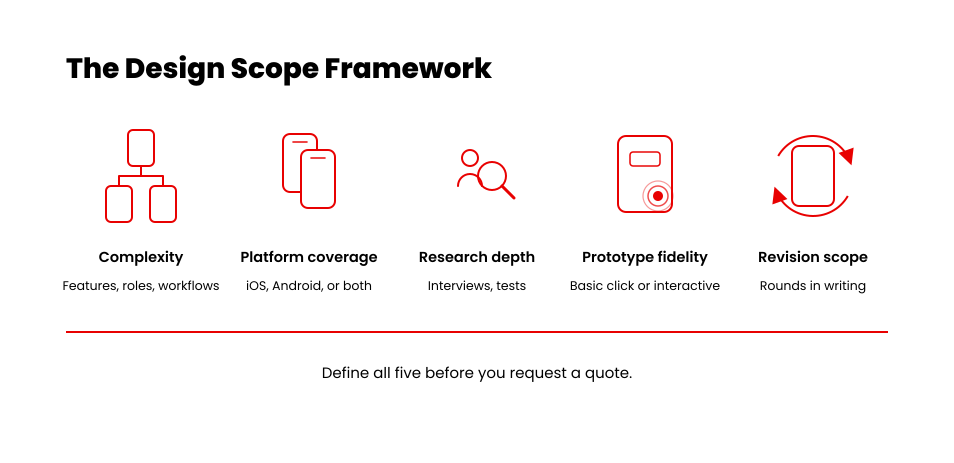
Start by defining the app’s features, screens, user roles, and core workflows. Then determine which platforms you need, how much research is necessary, how detailed the prototype should be, and how many revision rounds you expect.
For example, a moderate-complexity app with one platform, around 30 custom screens, a documented user flow, an interactive prototype, and one round of usability testing requires considerably more design work than a five-screen MVP with straightforward navigation.
Want a number before you talk to anyone?
Run your feature list through the app development cost calculator to see where design sits inside your total build budget.
Calculate your app costHow to Reduce App Design Costs Without Sacrificing Quality
Reducing app design costs does not mean removing essential UX work or choosing the cheapest designer. The better approach is to control scope, validate decisions early, and reuse design components so your budget goes toward the parts of the product that matter most.
Start With a Focused MVP
Do not design every feature you may eventually want. Identify the core user journey and design the screens required to test and support it first. Fewer user flows mean fewer screens, states, prototypes, and revisions. This approach also makes it easier to validate assumptions before investing in a complete product. Nielsen Norman Group recommends using small usability tests rather than treating testing as a large, expensive research project.
Prioritize UX Before Visual Polish
A polished interface cannot compensate for a confusing user flow. Spend your early design budget on information architecture, user flows, wireframes, and prototype testing before investing heavily in visual details. Low fidelity prototypes can help teams test ideas before committing to high fidelity screens and production development. Recent research on MVP prototyping also supports low fidelity prototyping as a way to validate ideas with limited resources.
Use a Reusable Design System
Create reusable components for buttons, forms, navigation, cards, typography, colors, and other common interface elements. Once these components are defined, designers can build additional screens faster and maintain visual consistency. This is particularly valuable for larger apps because changes to a shared component can be reflected across multiple screens instead of requiring each screen to be redesigned independently.
Test Before Development
Fixing a usability problem in a prototype is generally less expensive than discovering it after developers have implemented the interface. Test the most important user flows before approving the final UI. You do not necessarily need a large research program. Nielsen Norman Group’s research recommends testing with five users for many usability studies and repeating small tests as needed.
Avoid Unnecessary Customization
Not every interface element needs to be designed from scratch. Standard platform patterns and established component libraries can reduce design effort when they fit the product. Custom interactions, illustrations, animations, and complex components should be reserved for areas where they provide meaningful value. The goal is not to make every screen unique, but to make the important parts work well.
Define the Scope Before Design Starts
Unclear requirements are a common source of additional design work. Before hiring a designer or agency, define the expected screens, user roles, platforms, core features, deliverables, revision rounds, and handoff requirements. A clear scope makes quotes easier to compare and reduces the risk of paying for repeated work caused by late changes.
Keep Designers and Developers Aligned
Involve development early enough to identify technical constraints before the UI is finalized. A design that looks simple but requires complex custom implementation can increase development costs later. A shared component library, clear specifications, and early developer feedback can reduce unnecessary redesigns and handoff problems.
The cheapest app design is not necessarily the one with the lowest initial quote. A better target is the lowest cost that still gives you enough research, UX validation, and design quality to make informed development decisions. Cutting useful validation may reduce the design invoice while increasing the cost of revisions later.
Final Thoughts
App design cost in 2026 can range from around $3,000 to $50,000 or more, but the right budget depends on what your app actually needs. Screen count, complexity, platforms, research, testing, custom interactions, and design system requirements can all change the final estimate.
The best way to control that cost is to define your core user flows, prioritize the MVP, validate the UX early, and agree on deliverables and revision rounds before design begins. A lower quote is not necessarily better if it leaves out the research, testing, or design work needed to build a usable product.
See What a Full App Design Engagement Actually Covers
Research, user flows, wireframes, UI screens, interactive prototypes, design systems, and developer-ready handoff, scoped to your screen count and platforms
Also Read: Mobile App development Cost in 2026 to better understand the breakdown.