


 ChatGPT
 Perplexity
 Claude
 Google AI
Mobile app use cases for business are split into two groups: apps built for customers and apps built for the people who run operations. The second group is where the real payback sits. Field service dispatch, clinical workflow, warehouse management, logistics tracking, and approval routing all move faster once they leave paper and fixed terminals behind.
Take a field technician: pulling up repair documentation on a device instead of driving back to the office means more finished jobs in a day. A warehouse team scanning inventory instead of typing it in by hand catches fewer count errors. Clinical staff updating a record from the floor saves a few minutes each time, and those minutes add up fast across hundreds of patient encounters a week.
Mobile device users worldwide reached 7.49 billion in 2025, yet most operational processes still run on paper or fixed desktops. This guide walks through the enterprise operational use cases for mobile apps: what each one solves, which system it has to integrate with, and what breaks when that integration gets skipped.
Key Takeaways
- Enterprise operational mobile app use cases: field service, clinical workflow, warehouse, logistics, and approvals deliver the clearest, fastest payback.
- Consumer-facing apps and enterprise mobile applications are different engineering problems. The enterprise version requires deep backend integration: ERP, EHR, WMS, TMS, or CRM.
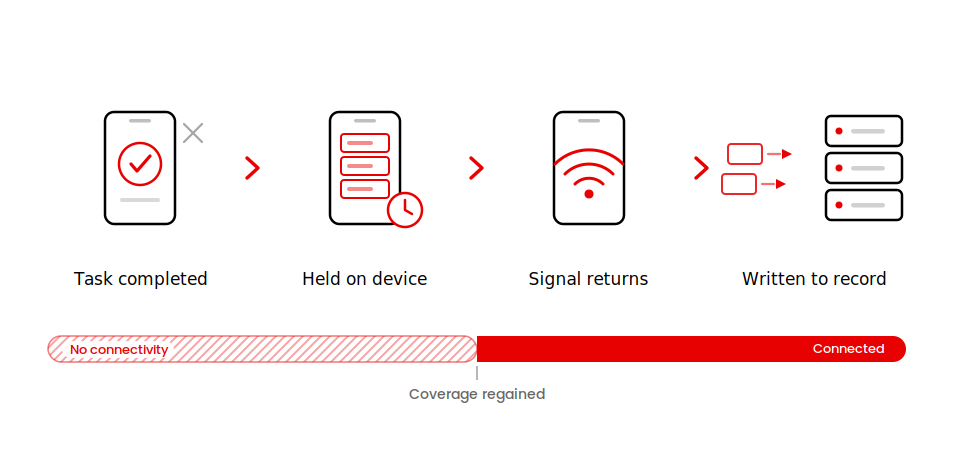
- Field service and warehouse use cases require offline-first design. An app that needs a live connection will fail exactly when the worker needs it most.
- Integration work almost always costs more and takes longer than the app itself. Budget for it separately.
- The AppVerticals Operational Mobile Use Case Matrix maps each use case to its primary system integration, offline requirement, and compliance flag.
- Average enterprise mobile application projects cost $90,780 (Clutch benchmark). Field service and warehouse builds sit toward the higher end, driven by integration complexity.
What Is a Mobile App Use Case? (And Why Enterprise Operational Cases Are Different)
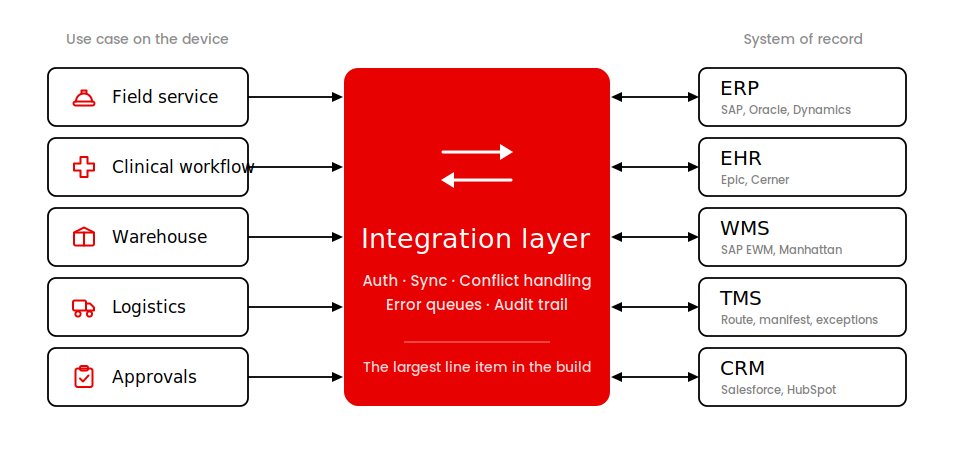
A mobile app use case is a specific job a worker does on a device, in a location away from a desk, that the device handles faster and more accurately than the alternative. The enterprise mobile application version of that definition adds one constraint: the result must flow back to the system of record, or the use case has not solved anything.
Consumer apps and enterprise mobile apps are different products built for different problems. A consumer retail app is designed around repeat engagement, smooth onboarding, and ease of download. An enterprise app is designed around task completion speed, backend integration with ERP, EHR, WMS, or CRM, and reliability under operational conditions: poor signal, gloves, and a 30-second task window. For the full engineering picture, see enterprise mobile app development.
Consumer mobile app examples like retail checkout, wellness tracking, and e-learning are well-documented. The operational workforce-facing use cases covered here are where the build decisions get expensive and consequential.
Field Service and Work Order Management
Field service mobile app use cases eliminate return-to-office trips when work order data lives on a device. A technician who pulls up a repair guide, updates a work order, captures a customer signature, and closes the job without returning to a depot finishes more jobs per day. The operational gain is measurable in jobs per technician per week.
The field service mobile app use case covers work order dispatch, route optimization, equipment inspection checklists, and proof of delivery. Each of these requires the app to write back to the scheduling system and ERP in real time. A technician who captures a completed inspection offline and syncs it at the end of the day is one workflow. A technician who cannot complete the inspection because the app needs a live connection is a different, more expensive outcome.
Integration requirement
Field service apps connect to ERP systems (SAP, Oracle, or Microsoft Dynamics) and scheduling software. The ERP integration is the highest-cost element of the build. Work order status, parts inventory, job completion, and billing all pass through it. An app that does not integrate with ERP does not reduce the back-office data entry burden: it doubles it.
Offline requirement
Technicians regularly lose signal in basements, industrial facilities, plant floors, and rural sites. The app must capture data locally and sync when connectivity returns. Both field service and warehouse use cases share this requirement; skipping offline-first design in either setting guarantees failure at the critical operational moment.
Outcome signal
Forrester Total Economic Impact study on Microsoft Power Platform found that enterprises running field service workflow automation reported a 224 percent ROI and an $81.7 million net present value with payback in under six months. The field service portion is the clearest single driver of that outcome.
What this looked like on a build we ran
Spruce is a US home and property services platform. When they came to us they already had a resident mobile app and web portals for admins, property managers, and service providers. The people actually doing the jobs, their service pros, had nothing.
Every task update routed through someone sitting at a desk. There was no capacity management either, so the same pro could get double-booked and nobody found out until the morning of the job.
We rebuilt the platform and gave service pros their own mobile app with real-time task management, availability tracking, and on-site updates from the job itself. We added a capacity module so workload distribution stopped being a guess, and a pricing configurator that adjusts by market, floor plan, and square footage.
That platform now runs 6,477 properties and 685,000 customers across 67 service providers and 7,581 property management companies. React Native on the device, Node and Postgres behind it, all on AWS.
Spruce runs home services rather than industrial field work. The problem underneath is identical: a worker away from a desk who could not see or close a job without going through the office first.
Clinical Workflow and Patient Data Access
Clinical staff lose minutes on every patient encounter when the system of record is a fixed terminal across the room. A healthcare mobile app with EHR access at the point of care cuts that gap. The use case covers EHR and EMR access, medication administration verification, patient check-in, and Electronic Visit Verification (EVV) for home health workers.
This is a staff-facing use case, not a patient-facing one. The clinical workflow app sits in the hands of nurses, physicians, and care coordinators. For healthcare app development requirements specific to this vertical, see that page.
Integration requirement
Clinical workflow apps connect to EHR systems. The dominant platforms are Epic and Cerner. Both have documented developer integration programs. The integration layer handles patient record retrieval, medication orders, and scheduling. HIPAA compliance governs every data element in transit and at rest.
The integration work is where the schedule actually goes. On BondOrtho we connected practice management software, an insurance clearinghouse, and two banking platforms into one automated workflow with HIPAA-compliant handling across every hop.
None of that is visible to the person using the system, and all of it has to be correct before a clinician touches a screen.
Compliance requirement
HIPAA. Every data element the app touches: patient identifiers, medication records, visit logs; must meet HIPAA Security Rule standards. The compliance posture is built into the architecture, not added at the end.
Warehouse and Inventory Management
Casita builds lightweight fiberglass travel trailers in Texas, and when they came to us their inventory, production scheduling, and workflows all ran on paper ledgers.
Warehouse managers had no live view of stock, so the operation swung between stockouts and over-ordering. Finance reconciled by hand and reported late. Production scheduling was rigid enough that crews sat idle waiting on parts that were technically in the building.
We are building them a custom ERP covering inventory management, production line scheduling, and forecasting. A mobile app for business with barcode scanning cuts count time and reduces entry errors by replacing typed input with scanned confirmation.
The warehouse mobile app use case covers barcode scanning for stock counts, put-away confirmation, returns processing, and pick-list management. Each transaction writes to a WMS (Warehouse Management System) and, in many cases, to an ERP layer above it. The integration gives management real-time inventory visibility. Without it, the scan is a local event with no downstream effect.
Integration requirement
Warehouse apps connect to WMS platforms and ERP systems. Common WMS integrations include SAP Extended Warehouse Management, Oracle WMS, and Manhattan Associates. The app communicates scan events to the WMS, which updates stock levels, triggers replenishment, and feeds the ERP inventory record.
Offline requirement
Warehouse RF zones frequently have dead spots where dense metal racking interrupts the signal. An app that requires a live connection fails inside the building it was built to serve. Offline-first design captures the scan event locally and syncs when the device reaches coverage: nothing is lost.
Logistics Dispatch and Last-Mile Delivery
Logistics dispatch moved from radio and paper manifests to mobile apps for business because the data flows faster and the customer visibility that comes with it is now a commercial requirement. A driver with a mobile app updates delivery status in real time, captures proof of delivery, and receives route updates without a call to dispatch.
The logistics app development use case covers route optimization, proof of delivery capture, real-time shipment status updates, and customer notification triggers. The TMS (Transportation Management System) holds the route, the manifest, and the exception handling rules. The notification API sends status updates to the end customer.
Integration requirement
Logistics apps connect to TMS platforms and customer notification systems. The TMS integration carries the route, the delivery manifest, and exception flags. The notification layer sends delivery ETAs and confirmation messages to customers. Both integrations run in real time during active delivery runs, which makes reliability a core design constraint.
A freight platform we picked up mid-build
Lulo Freight is a Texas logistics technology company that matches shippers with carriers. We took the platform over after their previous development partner could not finish it to scope.
Shippers needed visibility they were not getting. Carriers needed a way to fill empty capacity instead of running dead miles between loads.
We delivered real-time shipment tracking with live status updates, instant transparent quoting, and a load board where carriers find freight matched to their fleet and availability. Driver and fleet management, payment processing, and document handling all sit inside the same system.
The document module matters most for this use case. Shipment paperwork and contracts live attached to the shipment record, so nothing important is sitting in a folder in someone’s cab.
Sales, Lead Capture, and Approval Workflows
Sales reps and field managers carry approval authority that was previously bottlenecked by a return to the office. A mobile app for business that surfaces the approval queue, the relevant data, and the action button removes that bottleneck without requiring anyone to sit at a desk.
The sales and approval use case covers CRM updates in the field, lead capture at events with direct CRM push, expense approvals, quote sign-offs, and multi-step approval routing. This is the lightest use case to build and the fastest to deploy. The integration surface is smaller: CRM and ERP for financial approvals.
Integration requirement
Sales and approval apps connect to CRM platforms (Salesforce, HubSpot, Microsoft Dynamics) and ERP systems for financial approvals. The CRM integration is the primary data layer.
Consumer-Facing Mobile App Use Cases: Retail, Healthcare, and E-Learning
Consumer-facing mobile app examples are well-covered in the public record. Retail apps, patient-facing healthcare apps, and e-learning platforms each have established documentation, market-size data, and vendor ecosystems.
Retail apps serve shoppers with product catalogs, mobile checkout, and loyalty programs. Patient-facing healthcare apps cover telemedicine, wellness tracking, and appointment scheduling. E-learning apps deliver courses, assessments, and certificates to individual learners. Each is a legitimate mobile app use case, and each is covered in depth in our broader enterprise mobile guide referenced above.
The operational workforce-facing use cases covered in the sections above are where the build decisions get expensive and consequential; consumer use cases are a starting point for understanding mobile architecture.
What Goes Wrong When Mobile Falls Short
Three failure modes appear consistently in enterprise mobile builds that did not deliver on their operational promise. They are not failures of the app itself; they are failures of the integration, the offline design, or the use case selection.
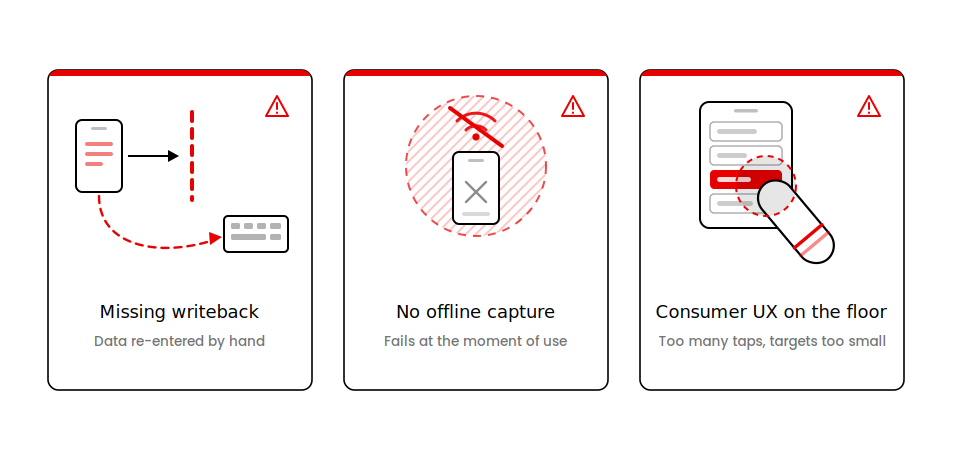
Failure mode 1: The app works but the data never reaches the system of record
The most common and the most expensive failure: an app that captures field data locally but does not write back to ERP or WMS creates a second data-entry job. Someone in the back office re-enters the same information into the system that already runs the business. The field efficiency gain is real; the back-office cost increase eats it.
TechTarget August 2026 analysis of enterprise mobile data capture describes this as a first-mile problem: mobile data capture fails when integration is treated as a lightweight extension of enterprise software rather than the engineering foundation the app sits on.
We built a B2B parts platform for an automotive distributor where the entire thing turned on a NetSuite sync. Live inventory, SKUs, and transaction data move between the storefront and the ERP continuously.
Pull that sync out and what you have left is a clean ordering interface sitting next to an ERP that does not know an order happened. Someone in the back office keys it in a second time, and the efficiency you paid for goes to them.
Failure mode 2: The app requires a live connection at the exact moment it is most needed
Field service mobile app deployments that require connectivity fail in basements and on plant floors. Warehouse apps that require connectivity fail in the RF dead zones created by dense metal racking. Both failures happen at the specific operational moment the app was built to serve; offline-first design is a precondition for these use cases, not a feature upgrade.
Failure mode 3: The use case is right but the UX is wrong for the worker
A warehouse operative picking stock cannot navigate a four-tap confirmation flow while wearing gloves, holding a scanner, and standing in a narrow aisle with a pallet truck approaching. Consumer UX patterns: swipe actions, multi-step onboarding screens, rich animation; add friction to operational workflows. Enterprise mobile UX is a different discipline: one tap, large targets, immediate confirmation, and no screen that requires a second look.
Integration Requirements by Use Case: The AppVerticals Operational Mobile Use Case Matrix
The table below maps each enterprise mobile application use case to its primary system integration, offline design requirement, and compliance flag. This is the engineering reality behind the use case selection decision.
| Use Case | Primary System Integration | Offline Required | Compliance Flag |
|---|---|---|---|
| Field Service and Work Order Management | ERP (SAP, Oracle, Dynamics) + scheduling software | Yes: signal loss at job sites is routine | None (standard data security) |
| Clinical Workflow and Patient Data Access | EHR (Epic, Cerner) + EVV systems | Conditional: depends on care setting | HIPAA required |
| Warehouse and Inventory Management | WMS (SAP EWM, Oracle WMS, Manhattan) + ERP | Yes: RF dead zones are common | None (standard data security) |
| Logistics Dispatch and Last-Mile Delivery | TMS + customer notification API | Partial: active route data buffers locally | None (standard data security) |
| Sales, Lead Capture, and Approval Workflows | CRM (Salesforce, HubSpot, Dynamics) + ERP | Optional: approvals need connectivity | None (standard data security) |
| Consumer-Facing (Retail, Healthcare, E-Learning) | Platform-dependent: varies by use case | Rare: consumer apps assume connectivity | HIPAA where patient data is involved |
Not Sure What Your Mobile App Will Cost?
Field service and warehouse builds run toward the higher end of the cost range. See real project figures before you scope your build.
Get the Mobile App Cost BreakdownConclusion
Most companies already run these processes in some form. Field service teams fill out work orders on paper. Warehouse staff count stock by hand. Clinical teams update records at a fixed terminal because that is where the system lives. None of that means a mobile app is automatically worth building. It is worth building when moving a specific use case to mobile, with proper backend integration removes enough friction to justify the cost. Start with whichever process burns the most of your team’s time today. Build that one first.
Ready to Scope Your Enterprise Mobile App?
Tell us your use case, integration requirements, and timeline and get a clear estimate before you commit to a build.
Start a DiscussionKeep reading: Enterprise Mobile App Development: Key Factors, Benefits and Costs for 2026 covers the full engineering and governance picture behind these use cases.