





















Generative AI in Business: Applications, Implementation Steps, and ROI Benchmarks

Generative AI in business enables organizations to automate repetitive work, generate content and code, and extract actionable insights from large datasets. Companies applying it to customer support report 40% faster ticket resolution, while marketing teams reduce content production time by 5x. In software engineering, AI-assisted coding improves development speed and reduces manual errors.

Despite the potential, 30% of generative AI pilots fail after proof of concept, often due to incomplete data, insufficient workflow integration, or unclear ROI (Gartner). Effective adoption requires selecting high-value workflows, preparing clean and accessible data, embedding AI into existing systems, and establishing governance and measurement frameworks.

This guide provides a step-by-step approach to generative AI in business, covering applications across functions, risk mitigation, implementation steps, and ROI benchmarks. 

It also includes insights of a generative AI development company, giving executives and product leaders a practical framework to evaluate and deploy AI where it delivers measurable results.

What is Generative AI in Business?

Generative AI in business refers to AI systems that create, summarize, classify, or analyze content, code, designs, or data to support workflows and decision-making. It is distinct from the predictive AI organizations have used for years. Predictive AI tells you what is likely to happen next. Generative AI produces something new: a draft contract, a working code function, a customer response, a 10-page research summary distilled from 500 documents.

McKinsey estimates the long-term opportunity at $2.6 trillion to $4.4 trillion in additional productivity value from corporate use cases. That figure is the incremental productive output that AI makes possible when embedded directly into workflows. 

Why Generative AI Matters for Businesses in 2026

Generative AI matters in 2026 because it has moved from experimentation into core workflow infrastructure, where businesses gain advantage by automating repeatable work, improving decision speed, and measuring ROI before scaling. 

More than 50% of organizations now use generative AI in at least one business function, but adoption alone is not the real story. The real gap is between companies testing AI tools and companies redesigning workflows around them. 

Accenture’s research found that organizations which have fully modernized AI-led processes achieve 2.5x higher revenue growth and 2.4x greater productivity compared to their peers. That gap is not closing. It is widening.

For business leaders, AI at scale is becoming part of business continuity, operating efficiency, and competitive planning. 

In 2026, the question is not whether to adopt generative AI. The question is which workflows to target first, how to prove value early, and how to avoid the implementation mistakes that turn promising pilots into sunk costs.

Generative AI Business Applications by Function

The most effective way to evaluate generative AI for your organization is by function, not by technology. 

DCD (Dad Crafted Decor): AppVerticals implemented a generative AI workflow using a custom-trained YOLO model to detect cabinets, drawers, and fittings in real time. Generative AI applied textures and finishes instantly, letting users visualize renovations accurately before making decisions. 

Early results included a 60 percent reduction in design iteration time and over 80 percent fewer costly mistakes, demonstrating the effectiveness of workflow-first AI implementation. 

Here is what other applications actually show.
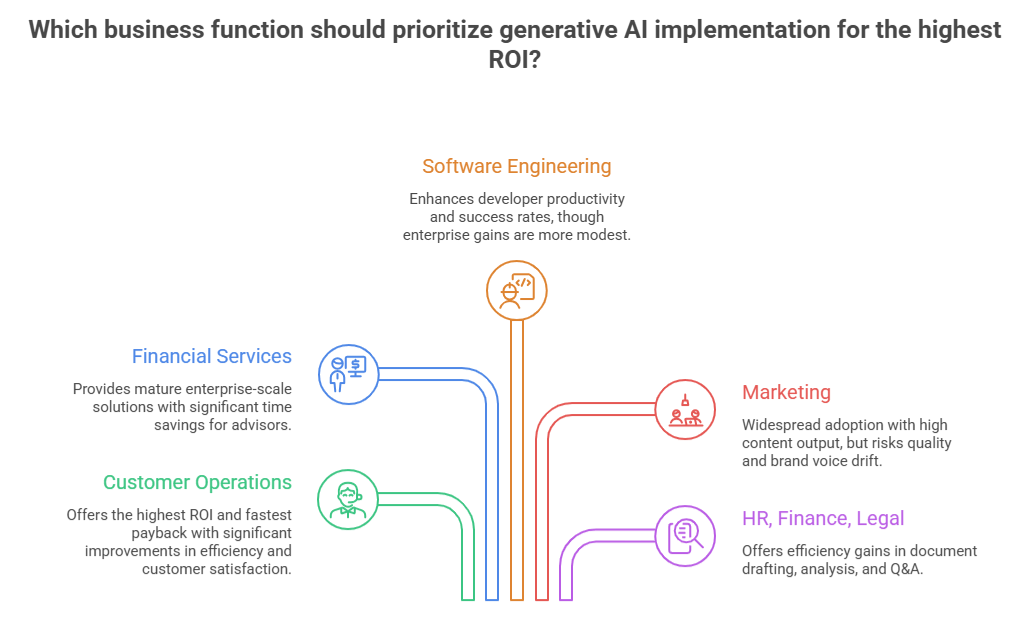
Generative AI Business Applications by Function

1. Customer Operations and Support

This is consistently the highest-ROI, fastest-payback function for generative AI. The Klarna case study is the most documented example at scale. 

In February 2024, Klarna deployed an OpenAI-powered customer service assistant that handled 2.3 million conversations in its first month. The assistant resolved issues in under two minutes compared to 11 minutes for human agents, drove a 25% drop in repeat inquiries, and contributed to a projected $40 million profit improvement.

Human-AI ratio matters more than full automation. Klarna’s most durable gains came from AI handling tier-1 volume while humans focused on judgment-intensive cases.

2. Financial Services and Wealth Management

Morgan Stanley’s deployment of AI at Morgan Stanley Debrief is the most mature enterprise-scale wealth management implementation on record. 

The system, built on OpenAI’s GPT-4 and launched in early 2024, indexed more than 350,000 proprietary research documents and made them queryable in seconds versus the 30-plus minutes advisors previously spent on manual research. 

By late 2025, the tool had achieved 98% adoption among the firm’s wealth management advisors, with nearly 50% of all Morgan Stanley employees using generative AI tools.

3. Software Engineering

GitHub’s most rigorous study, a controlled experiment with 95 professional developers, found that access to GitHub Copilot reduced average task completion time from 2 hours 41 minutes to 1 hour 11 minutes, a 55% improvement in coding speed. Success rates also improved from 70% to 78%.

At the enterprise scale, a field experiment at Microsoft with 1,663 developers showed 12.92% to 21.83% more pull requests completed per week. At Accenture, a separate experiment with 311 developers showed 7.51% to 8.69% productivity improvements. 

These numbers are smaller than the controlled lab results, which is expected. Enterprise codebases are more complex, and integration with existing tools takes time. 

But they are consistent and measurable.

4. Marketing and Content Operations

Marketing is the function where generative AI adoption is most widespread and where measurement is most inconsistent. According to Salesforce, more than 60% of marketing leaders have already used generative AI for content creation. 

The production efficiency gains are real: teams generating 5x more content output with the same headcount are not unusual. The risk, documented across multiple implementations, is quality and brand voice drift when AI-generated content bypasses editorial review.

5. HR, Finance, and Legal

HR teams use generative AI for job description drafting, resume screening, onboarding content, and employee policy Q&A. Finance teams have cut report drafting time by an average of 40 to 60% in production deployments. Legal teams use document review AI to cut contract analysis from hours to minutes. 

A European bank replaced its rule-based customer chatbot with a generative AI version and found it 20% more effective at answering queries, with further improvements expected to double that figure.

Highest-ROI Generative AI Use Cases for Business

The highest-ROI generative AI use cases share three traits: high task volume, measurable output, and clear workflow ownership. Financial services currently leads on ROI, followed by media, telecommunications, mobility, retail, energy, manufacturing, healthcare, and education. 

Use Case Real-World Evidence Avg ROI Range Time to Value
AI Customer Support Agent Klarna: $40M profit gain, 85% faster resolution, 2.3M chats/month (Feb 2024) 3x to 5x 3 to 6 months
Internal Knowledge Assistant Morgan Stanley Debrief: 98% advisor adoption, 350K+ docs indexed, seconds vs. 30 min 2x to 4x 6 to 12 months
Code Generation / Dev Assist GitHub Copilot: 55% faster task completion, 12-22% more PRs/week at Microsoft 3x to 6x 4 to 8 months
Marketing Content at Scale United Airlines: scaled from 15% to 50% flight coverage with same team 4x to 8x 2 to 4 months
Sales Enablement Verizon: 40% sales increase, 95% query resolution, 100K churns prevented 3x to 5x 3 to 6 months
Document Automation (Legal/HR/Finance) European bank: 20% lift over rule-based system; finance teams: 40-60% drafting time cut 2x to 5x 4 to 9 months

Story Tree – A Case Study of AppVerticals

Story Tree needed a way to make digital bedtime stories feel personal at scale. AppVerticals built an AI-powered storytelling platform that clones a parent’s voice to narrate each story, pairs it with generative content personalized to the child, and produces AI-generated thumbnails for every title. The result: 25% higher story consumption in the pilot and over 70% of test users reporting stronger engagement with the platform. 

Generative AI Implementation: A Step-by-Step Roadmap

Successful AI deployments take less than 8 months on average and organizations realize value within 13 months. That timeline is achievable. It is also frequently blown when organizations skip the foundational steps in favor of moving straight to model selection. 
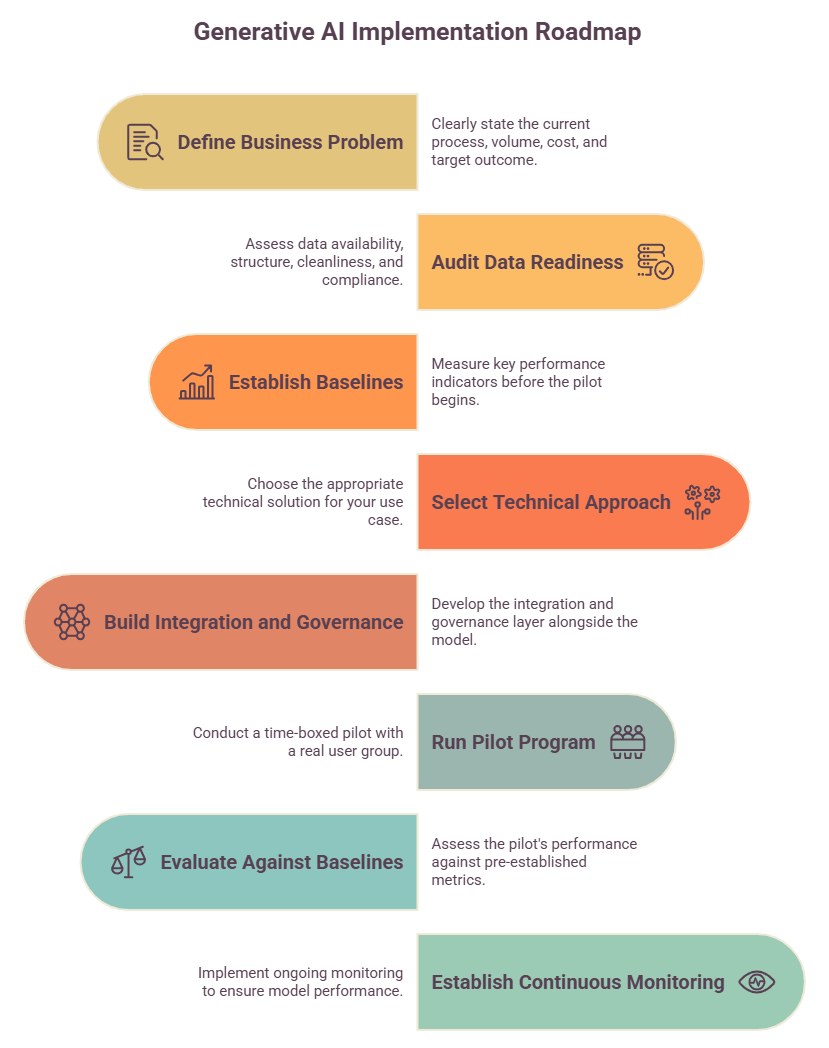
Generative AI in Business Implementation

Here is the sequence that consistently produces results.

1. Define the business problem before touching any technology. 

State the current process, the volume, the cost per unit, and the target outcome in measurable terms. ‘Customer support handles 10,000 tier-1 tickets per month at an average of 12 minutes each. 

Target: resolve 60% through AI in under 2 minutes with equivalent satisfaction scores.’ That is a solvable problem. ‘We want to explore AI’ is not.

I have seen AI projects fail because teams pick the tool first and only later figure out the workflow. The model produces outputs that are useless if the process is not mapped. If a process is not defined, you cannot automate it, and the AI will only make mistakes happen faster 

Faiq Ali, Lead AI Engineer at AppVerticals

2. Audit data readiness before selecting any tool. 

What data does this workflow require? Where does it live? Is it structured, clean, and accessible without violating privacy or compliance requirements? 

I tell clients that data readiness is not something you do before implementation. It is part of the implementation itself. Most broken AI systems I have reviewed failed because the model was acting on inputs that nobody cleaned. Garbage in still means garbage out, and at scale it becomes costly, said Faiq Ali. 

3. Establish baselines and success metrics before the pilot begins. 

Measure handle time, error rate, output volume, cost per task, and any other KPI you expect to move. Organizations that skip this step have no way to prove ROI, and without provable ROI, the program does not scale. 

McKinsey’s AI survey found that organizations reporting significant financial returns are twice as likely to have redesigned end-to-end data workflows before selecting modeling techniques.

4. Select the right technical approach for your use case. 

The five options, and when each applies, are covered in the Build/Buy/Customize section below.

5. Build the integration and governance layer alongside the model, not after it. 

The integration connects the AI to your existing systems. The governance layer establishes output logging, human review queues, and monitoring. 

Both must exist from day one in regulated or customer-facing deployments.

6. Run a time-boxed pilot with a real user group, not an internal demo. 

30 to 60 days, defined user cohort, measurement against your pre-established baselines. Klarna’s production launch followed roughly 6 months of internal testing, alpha deployment, and limited beta rollout before going live across 23 markets. That pipeline is typical of implementations that succeed.

7. Evaluate against baselines. 

If the pilot meets your ROI threshold, expand. If it does not, diagnose the gap before scaling. Most scaling failures trace directly to gaps that were visible in the pilot but ignored under pressure to move fast.

8. Establish continuous monitoring. AI models drift. 

A system that performed at 90% accuracy at launch can degrade as your data, products, or customer base changes. Build monitoring into your operational model from the start.

What Architecture Does a Business GenAI System Need?

Most business AI deployments are not a single model. They are a stack of components, and the architecture you choose determines what the system can do, how reliably it does it, and how much it costs to maintain. Understanding the stack helps you evaluate AI development services, avoid vendor lock-in, and plan governance correctly.

The Five-Layer GenAI Architecture Stack

The 5-layer generative AI architecture stack includes foundation model layer, retrieval layer, orchestration layer, integration layer, and governance. 
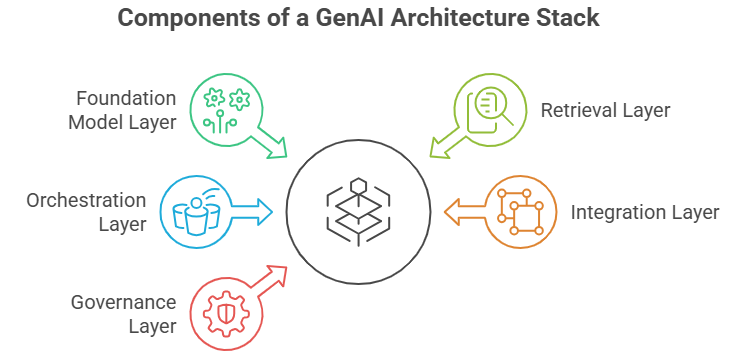
Five-Layer GenAI in Business Architecture Stack

1. Foundation model layer:

The LLM is accessed via API (GPT-4o, Claude 3.5, Gemini, Llama 3, Mistral) or deployed on-premise for sensitive data environments. In 2026, more than 50% of enterprises are running an average of 4.2 AI models in production.

2. Retrieval layer (RAG)

A vector database or search index that retrieves relevant internal documents before each query, grounding model outputs in your specific data context. This is the layer that makes a general-purpose LLM behave like an expert in your domain.

3. Orchestration layer

Middleware such as LangChain, LlamaIndex, or custom-built frameworks that manage prompts, tool calls, memory, and multi-step reasoning. This layer is where workflow logic lives.

4. Integration layer

APIs and connectors linking the AI to your CRM, ticketing system, ERP, database, or communication tools. Without this layer, AI outputs do not reach the systems and people who need them.

5. Governance layer

Output logging, access controls, human review queues, bias monitoring, and performance dashboards. Companies are twice as likely to uncover AI failures when governance is in place.

AI agents add an action layer on top of this stack. Instead of just generating text or answers, agents call APIs, query databases, trigger downstream workflows, and complete multi-step tasks with minimal human input between steps.

Generative AI Risks and Governance Checklist

Approx. 40% of enterprises deploying generative AI cited content integrity and governance as one of their top three operational risks. Governance is not a compliance checkbox. It is an engineering requirement that determines whether your AI system remains reliable at scale.

The Six Core Risk Categories of Gen AI in Business

These include:

1. Hallucinations and factual errors

Models generate confident, coherent outputs that are factually wrong. In low-stakes workflows this is a quality problem. In legal, medical, financial, or regulatory contexts it is a liability. Every high-stakes output needs a human review checkpoint.

2. Data leakage and privacy exposure

Sending sensitive internal data to external model APIs without proper data processing agreements creates compliance exposure. 

3. Model drift

AI systems degrade over time as your data, products, or customer base changes. A model that performed well at launch requires ongoing monitoring to catch drift before it affects output quality.

4. Prompt injection

Malicious inputs can manipulate AI agent behavior, particularly in systems where users control portions of the prompt context. This is a meaningful attack surface in customer-facing deployments.

5. Over-reliance and skill atrophy

Teams that stop applying critical judgment because the AI handles it create operational risk. Human oversight must be designed into the process, not bolted on after an incident.

6. Regulatory and IP risk 

AI-generated content may reproduce copyrighted material. Outputs in regulated industries may conflict with disclosure requirements or fiduciary standards. These risks must be evaluated by function, not treated as uniform.

Governance Checklist by Priority

Governance Control Priority Level Responsible Owner
Output logging and complete audit trail Critical Engineering
Human review checkpoint for high-stakes outputs Critical Operations / Legal
Data classification and role-based access controls Critical Security / Legal
PII and sensitive data handling policy Critical Legal / Compliance
Vendor data processing agreements Critical Procurement / Legal
Model performance monitoring dashboard High Engineering / Analytics
Bias detection and fairness audits High Quality / Compliance
User training on AI limitations and failure modes High HR / L&D
Incident response plan for AI failures High Operations
Periodic output quality spot-checks Medium Quality Assurance

Why Generative AI Projects Fail After Proof of Concept

The core root causes include data quality failure, no measurable business objective, workflow integration failure, cost overruns without tracking, governance gaps causing incidents, and scaling before the pilot proved. 

Data quality failure. 

The model is only as good as the data behind it. If the source data is incomplete, outdated, duplicated, or trapped across disconnected systems, the output becomes unreliable no matter how strong the model is. 

I often hear clients ask how much AI will cost. That is the wrong question. The real question is how much a poorly implemented AI system will cost them. The subscription fee is the smallest part of a bad rollout, said Faiq Ali. 

No measurable business objective. 

Projects started with ‘let’s explore AI’ rarely scale. Without a defined metric and baseline, there is no way to declare success or justify continued investment.

According to Fullstack, only 15% of US employees report that their workplaces have communicated a clear AI strategy. 

IBM’s Marina Danilevsky framed the strategy problem clearly: “People said, ‘Step one: we’re going to use LLMs. Step two: What should we use them for?’” The sequence reveals the mistake. When businesses choose the technology before defining the problem, AI programs struggle to prove value, scale beyond experimentation, or connect to measurable ROI.

Workflow integration failure. 

AI deployed on top of a broken or poorly documented process does not fix the process. It accelerates the dysfunction. Generative AI reveals workflow problems it cannot solve on its own. The pre-integration audit is not optional.

Change management underinvestment. 

Teams that do not trust AI outputs either do not use them or over-correct for errors in ways that eliminate the efficiency gain. High adoption rates require training, communication, visible leadership involvement, and workflow redesign that makes AI use natural rather than forced.

Cost overruns without ROI tracking. 

Organizations spend on model API costs, infrastructure, and integration without tracking savings or revenue impact. When CFOs ask what they got for the investment, there is no answer.

Governance gaps causing incidents. 

One data leakage event or AI-generated error in a regulated context can end a program. Governance cannot be retrofitted after deployment.

How to Measure ROI from Generative AI in Business

ROI from generative AI comes from four value buckets: labor time saved, process speed improved, error or rework reduced, and decisions made faster or better.

Measuring it requires a framework, not a gut feeling.

ROI Measurement Framework by Value Bucket

This is the measurement framework AppVerticals applies when establishing baselines with clients before an AI pilot begins. 

Value Bucket What to Measure How to Measure It
Labor efficiency Hours saved per task per week across the user group Time tracking pre/post; manager surveys
Process velocity Cycle time reduction: from request to output Ticket close time, content turnaround, report generation time
Output quality Error rate, rework frequency, customer satisfaction QA audits, revision tracking, NPS/CSAT
Decision speed Time from question to actionable insight Stakeholder surveys, report timestamps
Revenue impact Pipeline influenced, conversion lift, retention CRM attribution, cohort analysis, A/B testing
Cost avoidance Headcount not added relative to output growth Capacity planning models, annualized labor cost

One critical note: Adoption rate is not ROI. A tool that 80% of your team uses but that produces no measurable business outcome is not a success. Measure outputs and business metrics, not login rates.

TCO vs ROI Comparison

TCO Factor What to Include Why It Matters for ROI
Model usage cost API calls, token volume, inference, fine-tuning High usage can reduce ROI if costs are not tracked by workflow.
Infrastructure cost Cloud hosting, vector database, monitoring tools AI systems need supporting infrastructure beyond the model itself.
Integration cost CRM, ERP, helpdesk, database, or internal API connections ROI improves only when AI is connected to real workflows.
Governance cost Audit logs, access controls, human review, compliance checks Risk control is part of operating cost, not an optional layer.
Maintenance cost Prompt testing, model updates, monitoring, retraining AI performance changes over time and requires active upkeep.
Training cost User onboarding, workflow training, adoption support Teams need clear usage rules to turn AI output into business value.

Build, Buy, or Customize: Which Generative AI Approach Fits Your Business?

This is one of the most consequential decisions in a generative AI program. The wrong choice wastes money. The right choice depends on three factors: workflow complexity, data sensitivity, and internal technical capacity.

Approach Best Fit Examples Core Advantages Core Limitations
Prebuilt SaaS tools Standard, high-volume tasks with no proprietary data requirements ChatGPT Enterprise, Jasper, Copy.ai, Notion AI Fastest to deploy; lowest cost to start Limited customization; no internal data integration
API-based LLM Custom prompt workflows where you control the context OpenAI API, Anthropic API, Google Vertex AI Flexible; scalable; no vendor UI lock-in Requires dev capacity; prompt engineering expertise needed
RAG system Internal knowledge retrieval where answers must come from your data Custom doc search, contract analysis, HR policy Q&A Grounded in your specific context; reduces hallucinations significantly Data preparation is intensive and ongoing
Fine-tuned model Domain-specific output patterns that general models do not replicate Industry-specific language, proprietary writing style, specialized classification High accuracy on the target task Expensive to train; requires labeled data and MLOps expertise
AI agents Multi-step autonomous workflows that require tool use and decision-making Support ticket resolution, sales outreach, data pipeline orchestration Handles complexity that single-turn LLMs cannot Highest governance requirement; production failure modes are non-trivial

 Most organizations start with prebuilt or API tools and customize incrementally as adoption grows and requirements become clearer. Jumping to fine-tuning or custom AI agents on day one is almost always premature.

AI development services become relevant when your workflow complexity exceeds what prebuilt tools support, your data is too sensitive for third-party processing, or your process requires a custom integration architecture. 

A qualified AI development partner designs and builds the system to your specifications, integrates it with your existing stack, and hands off with documentation and monitoring in place.

How to Choose the First Generative AI Use Case

The ideal first use case scores high on volume, labor intensity, and measurability, and low on risk. Customer support ticket handling, marketing content drafts, and internal document search consistently meet this profile across industries.

Use Case Selection Scoring Matrix

AppVerticals uses this scoring model to evaluate which use case a client should build first. 

Selection Criterion High Priority Signal (Score: 3) Moderate Signal (Score: 2) Low Priority Signal (Score: 1)
Task volume 100+ occurrences per week 25 to 99 per week Fewer than 25 per week
Labor intensity per task 30+ minutes per occurrence 10 to 30 minutes Under 10 minutes
Output measurability Clear quantitative KPI within 60 days Measurable but longer lag Subjective or difficult to quantify
Data readiness Clean, accessible, structured, compliant Partial gaps, fixable in 30 days Scattered, inconsistent, or siloed
Risk level Low stakes; errors are reversible Moderate stakes with review step High stakes; irreversible or regulated
User receptiveness Team actively interested and involved in scoping Neutral; willing to try Active resistance or skepticism

Avoid starting with the most complex, most sensitive, or most politically charged workflow in your organization. Win with a simple problem, prove the model, build internal credibility, then tackle the harder problems.

Conclusion

Generative AI delivers business value when applied to well-defined workflows with clear baselines, clean data, and governance built in from the start. The organizations producing the highest returns are winning because they disciplined their implementation, measured obsessively, and scaled only what was proven.

The high failure rate across generative AI pilots shows how often organizations skip the foundational work. Data readiness, workflow integration, human-AI ratio calibration, and governance are not optional steps. They are the work. For more expertise, explore our case studies.

Evaluating which generative AI use cases to prioritize?

AppVerticals helps you consider whether to build a custom AI system or deploy a prebuilt solution for your business. 

Explore Generative AI development services

Android App Development Outsourcing: What Works, What Fails, and How to Get It Right  

Outsourcing Android app development means hiring an external team to build and maintain your Android app. It works when you need platform-specific expertise fast and can’t justify a full-time Android hire at US market rates ($100,000–$125,000/year). It fails when the vendor treats Android as generic mobile development, and you usually won’t find out until you’re deep into a rebuild.

The founder who got burned wasn’t careless. They checked portfolios, read reviews, and got on discovery calls. What they missed: the vendor routed the work through a Flutter generalist team, never asked which Android OS versions their users ran, and scoped against a feature list instead of a user flow. None of it was visible at signing.

This guide covers how to structure the decision, the engagement, and the relationship, so you end up with a working app, not a rebuild.

Key Takeaway

  • The native vs. cross-platform decision is yours to make: Understanding what your product actually needs, hardware integration, device fragmentation exposure, iOS parity, before you brief a vendor means you can evaluate their recommendation confidently rather than take it on faith.
  • A discovery sprint is the most underused risk-mitigation tool in outsourcing: A paid, time-boxed sprint ($2,000–$8,000) tells you more about a vendor’s real capabilities than any portfolio or sales call.
  • Fixed-price contracts feel safe but often aren’t. The vendor prices in uncertainty you haven’t specified yet, and when scope disputes arise, you’re the one who absorbs the cost.
  • Post-launch is where most outsourcing relationships quietly fail: Bug severity definitions, OS update compatibility commitments, and Play Store policy responsibilities should all be in your contract before you sign, not negotiated after something breaks.
  •  IP ownership means nothing without code accessibility: Your repo must be the working repo from day one. A signed assignment clause is worthless if the codebase is undocumented and the only person who understood it has stopped returning messages.
  •  The engagement model should match your stage: Fixed-price for defined MVPs, T&M with milestone gates for active development, dedicated team for 12+ month roadmaps, each protects you differently, and choosing the wrong one compounds every other risk.

When Outsourcing Android Development Actually Makes Sense (And When It Doesn’t)

Android commands roughly 70% of the global mobile OS market, running on approximately 3.9 billion active devices worldwide. In markets across Africa, Latin America, and South and Southeast Asia, that share exceeds 85%. If your users are anywhere outside the US and Western Europe, building an Android product isn’t one option among several, it’s the primary distribution channel.

The business case for outsourcing typically comes down to one of three realities.

The cost of in-house expertise doesn’t match your stage.

The 2025 Dice Tech Salary Report puts the average US software developer salary at $128,386, with mid-level engineers earning $100,000–$125,000. A senior Android engineer with current Jetpack Compose experience, Play Store deployment history, and real familiarity with device fragmentation sits at the high end of that band, before benefits, onboarding, or ramp time. For a startup or early-growth company whose product hasn’t yet proven market fit, that’s a difficult commitment to justify.

Your timeline is shorter than in-house hiring allows.

Finding, interviewing, and onboarding a senior Android developer takes three to five months on a good run. Outsourcing compresses that to weeks. When your roadmap has a hard external date, a partnership launch, a funding milestone, a platform dependency, that gap matters.

Your scope is defined enough to contract.

Outsourcing works best when the work can be scoped, delivered, and measured. If you’re still in discovery, genuinely uncertain what the product needs to do, outsourcing introduces alignment risk that an internal product conversation resolves faster and cheaper.

When It Doesn’t Make Sense

If Android development is the competitive core of your product, if the app is the product in a way that demands daily, tightly integrated engineering, outsourcing introduces handoff latency that compounds at each iteration.

Consumer social apps, real-time communication products, and anything requiring deep OS-level integration (Bluetooth LE, NFC, background processing constraints specific to manufacturer implementations) carry meaningfully higher outsourcing risk. The feedback loop between product and engineering needs to be short, and outsourcing stretches it.

However, before making a final decision, it’s worth understanding the full economics of outsourcing versus building internally. Whether you’re evaluating freelancers, a dedicated development team, or a mobile app development company with Android expertise, cost visibility is essential to making the right call.

The best place to start is with a detailed breakdown of Android app development costs. Understanding how pricing changes based on app complexity, team structure, geographic location, and long-term maintenance requirements will help you evaluate potential partners more effectively and avoid budget surprises later.

The Native vs. Cross-Platform Decision, And Why Your Vendor’s Answer Might Not Be Neutral

When you ask an outsourcing vendor whether to build natively in Kotlin or cross-platform with Flutter or React Native, you’ll get a confident answer. That answer reflects their team composition at least as much as it reflects your product requirements.

A vendor whose bench is primarily Flutter developers will make a compelling case for Flutter. A vendor with strong Kotlin engineers will explain why native is the right choice. Both will give you technically defensible reasoning. The problem is that you’re evaluating the reasoning without access to the context that shaped it.

Here’s a quick look at what factors you can look at when choosing between native and cross-platform:

Criteria Native Kotlin Flutter React Native
Hardware & platform integration (Bluetooth, NFC, camera, background processing, OEM-specific APIs) Strong fit Partial fit Poor fit
Device fragmentation exposure (Sub-$200 devices, Xiaomi / Transsion / OPPO OEM variants, Android 10–15 range) Strong fit Partial fit Poor fit
iOS parity required (Simultaneous Android + iOS launch from a shared codebase) Poor fit Strong fit Strong fit
UI complexity (Custom animations, platform-native feel, complex layout requirements) Strong fit Strong fit Partial fit
Long-term maintenance (Talent availability, Google Play compliance, OS update compatibility) Strong fit Partial fit Partial fit
Timeline pressure (Fastest path from brief to Play Store for an API-driven product) Partial fit Strong fit Strong fit
Post-launch flexibility (Ability to swap vendors, hire in-house, or extend the codebase cleanly) Strong fit Partial fit Partial fit

If you’re still not sure, this is worth understanding in detail,  because getting the technical approach wrong at the start of a project isn’t a minor error, it surfaces as a rebuild six to twelve months later.

Native Android (Kotlin) is the right call when:

  • Your app requires deep platform integration, Bluetooth LE, NFC, camera APIs, biometric authentication flows, or background sync behavior that varies by manufacturer.
  • You’re building for a wide and fragmented device pool: Sub-$200 devices, older OS versions, or regional OEM brands like Xiaomi, Transsion, or OPPO that implement Android differently from flagship Samsung or Google Pixel hardware.
  • Play Store compliance and Google’s target API level requirements are central to your go-to-market: Google’s developer documentation is explicit: apps must target the latest API level to submit updates, and older-style XML layouts and background processing patterns are increasingly flagged.
  • You need Jetpack Compose for complex, performant, and customized UI: Google’s Android Developers Blog describes the shift toward Compose as a platform-wide transition, not an optional upgrade, vendors still building entirely in the legacy XML/View system are working against the grain of where Android development is heading

Cross-platform (Flutter, React Native) makes sense when:

  •       You’re building simultaneously for Android and iOS and your UI is relatively standard, forms, dashboards, catalogues, data display.
  •       A shared codebase matters more than platform-specific optimization.
  •       Your app is primarily API-driven rather than hardware-reliant.
The test to run on any vendor:
Ask directly: “What does your team’s composition look like? How many Kotlin/native Android engineers do you have versus Flutter developers?” A vendor with genuine Android expertise will answer that question without hesitation and will be able to explain specifically how they’d handle any platform-specific requirements in your use case. A vendor optimised for their own team’s convenience will redirect toward cross-platform benefits. 
The cost of getting this wrong is not a line item, it’s a rebuild. A cross-platform app that crashes on 20–30% of your user base because of manufacturer-specific Android behavior isn’t a bug. It’s an architectural mismatch that doesn’t have a patch.
If you’re also working through the native vs. cross-platform decision in detail, our guide covers the full technical and commercial comparison, answering all your queries.

How to Vet an Android Outsourcing Partner without a Technical Background

The core challenge is that the people best placed to evaluate an Android development partner are Android developers. If you don’t have one, you’re working from indirect signals, and vendors know it.

Portfolio reviews, case study pages, and client testimonials are all necessary starting points. None of them are sufficient. A well-produced case study tells you that the vendor is good at producing case studies. It tells you significantly less about whether the senior Kotlin engineer from the pitch will be on your project, or whether they even have one.

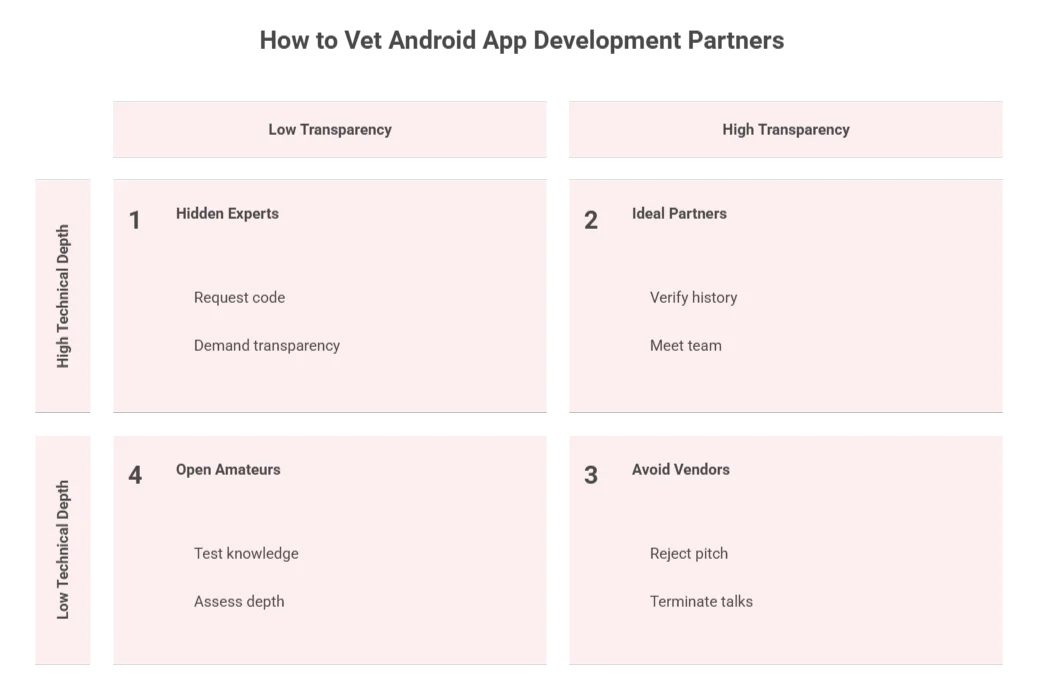
Here’s what actually differentiates strong vendors from strong pitches.

how to vet android app development partners

Ask about their Play Store release history specifically.

Not whether they build Android apps, ask how many apps they’ve shipped to the Play Store in the last 18 months, what the average ratings are, and whether any have faced compliance rejections for target API level requirements.

A vendor with genuine Android experience will have specific, non-defensive answers. A vendor whose Android work runs through a generic mobile team will pivot.

 Ask who does the work, not who’s in the room.

Ask directly: “If we move forward, who specifically would be on this project? Can I meet them before we sign?” Legitimate partners accommodate this readily.

A vendor who hedges on team composition before signing is almost certainly planning to staff the project differently from how they pitched it.

Request a code review of a live project.

You don’t need to evaluate the code technically. You’re evaluating whether they’ll share it. A vendor who won’t show you code from a previous project, even a public or deprecated one, is protecting something.

A vendor who provides a repository link and offers to walk you through the architecture in plain language is demonstrating both technical confidence and the communication quality your project will depend on.

 Test their Android knowledge with one question.

Ask: “How do you handle Android OS version fragmentation across a typical user base?”

There’s no single correct answer. But a vendor who can’t explain their approach, which OS versions they target, how they test across manufacturer variants, how they handle background processing constraints that differ between Android 11 and Android 14, doesn’t have the platform depth the question exposes.

The Discovery Sprint: The Risk-Mitigation Tool Most Clients Skip

The single most effective way to evaluate an outsourcing partner is to pay them to do a bounded piece of work before you commit to a full engagement.

A discovery sprint is a paid, time-boxed engagement, typically one to three weeks, costing between $2,000 and $8,000, where the vendor scopes your project in detail, asks clarifying questions, and produces a technical architecture proposal or detailed specification. It’s not a free consultation. It’s a paid work sample.

What you’re evaluating is the process, not the deliverable.

A bad discovery sprint costs $5,000. A bad full engagement costs $50,000. The pattern of discovery sprints saving clients from the wrong vendor is consistent enough that we recommend them for almost every engagement above $25,000.

The Three Mistakes Clients Make Before They Sign Anything

These patterns discussed below show up consistently when engagements go sideways, usually within the first 60 days. Zaid Trimizi, Senior Customer Success and Product Manager at AppVerticals, has sat across the table from enough clients to know exactly where the cracks form.

Scoping by feature list instead of user flow.

A founder comes in with a tidy spreadsheet. Login, onboarding, dashboard, notifications, settings, twelve features, each with a one-line description. The vendor quotes against it. Everyone shakes hands.

Six weeks later, nobody can agree on what “notifications” actually meant. Does it cover the state where a user has denied Android notification permissions entirely? Does it handle the edge case where a background sync fails on a Xiaomi device running a heavily modified Android skin? The spreadsheet didn’t say. The contract didn’t either. Now it’s a dispute.

“The feature list tells me what a client wants to exist. The user flow tells me what the app actually needs to do. Those are two different documents, and most clients only bring one of them to the first call.” — Zaid Trimizi, Senior Customer Success & Product Manager, AppVerticals

A feature list negotiation produces a contract. A user flow conversation produces a specification. Contracts get disputed. Specifications get built. Before you sign anything, ask the vendor to walk through your primary user journeys end-to-end, not feature by feature, but as a user would actually experience them. Where they ask incisive questions, note it. Where they ask none, pay attention.

Choosing fixed-price because it feels like the safer option.

The logic is understandable. A fixed number feels like a ceiling. It feels like the vendor is absorbing the risk. What’s actually happening is more complicated.

Zaid has watched this play out repeatedly as he mentions: a client signs a fixed-price contract for an Android app at $35,000, relieved to have a hard number. Eight weeks in, a scope dispute emerges over something that seemed obvious to the client but wasn’t written into the spec. The vendor stands their ground, correctly, contractually. The client either pays more or accepts less. Neither outcome was what they thought they were buying.

The reason is incentive misalignment. A fixed-price vendor is optimised to close the contract and deliver to the letter of the spec, not to build something that performs consistently across your user base’s actual devices. Edge cases, performance considerations on sub-$200 handsets, manufacturer-specific Android behavior, these live outside the spec. So they often don’t get built.

For most Android projects in the $20,000–$80,000 range, a time-and-materials engagement with clearly defined milestone gates is a more reliable structure. It gives you real visibility into where time is going, the ability to reprioritise as you learn, and a vendor whose incentive is to work efficiently rather than to minimize scope interpretation.

Treating the PM as the technical decision point.

This one is subtle, and Zaid considers it the most common mistake non-technical clients make once the project is underway.

A client without an engineering background naturally gravitates toward the PM, they’re responsive, they speak in plain language, and they’re explicitly there to be the bridge. So every question goes through them. Architecture concerns, scope changes, technology decisions, all filtered through a single coordination layer.

What the client receives isn’t the engineer’s answer. It’s the PM’s interpretation of it. By the time a technical concern has been raised by the client, processed by the PM, discussed internally, and reported back, something has usually been lost, or softened.

“I always tell clients: you don’t need to understand the code to talk to the engineer. You just need to be in the room when the important decisions get made. If you’re only ever talking to the PM, you’re not in that room.” — Zaid Trimizi, Senior Customer Success & Product Manager, AppVerticals

Insist on direct access to the lead engineer for architecture decisions, scope changes, and anything involving a shift in technical direction. Make it a condition before you sign, not a request you make three months in when something has already gone wrong.

50,000 Downloads, Zero Technical Background: What a Real Outsourcing Engagement Looks Like

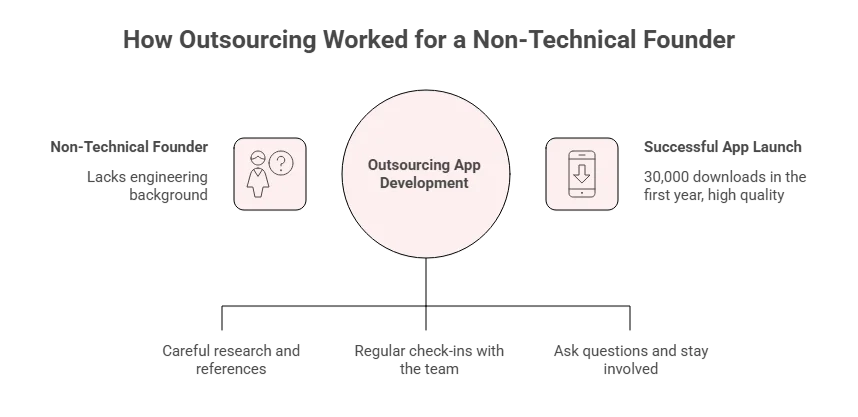
Isaac Knable had a clear product vision and no engineering background. A wrestling coach with over 20 years on the mat, founder of a wrestling academy, and inventor of the Footwork Trainer, he wanted to build Stance and Motion, a mobile app to help wrestlers at every level, from youth beginners to competitive athletes, develop footwork and movement mechanics from home, with no equipment required.

how outsourcing worked for a non-technical vendor

The idea had been sitting with him since 2018. Getting it built was a different matter entirely.

Speaking on AppTalk, Isaac described the vendor selection process with the kind of honesty that doesn’t usually make it into case studies. He’d considered freelancers, spoken to high school connections, and eventually narrowed the field to three candidates, a process he described as long, research-heavy, and deliberately careful. What tipped the decision toward AppVerticals wasn’t portfolio depth or price. It was the energy in the conversation, the confidence the team brought, and, critically, the references. Isaac reached out to people who had already built apps through AppVerticals and asked them directly what the experience was like.

“I got it down to about three people… I reached out to a couple people that had built apps and they pretty much told me straight what I was getting into. That sounded good to me. So I just kind of pulled the trigger.” — Isaac Knable, creator of Stance and Motion, on AppTalk

What follows is a useful illustration of how a non-technical founder should manage an outsourced build. Isaac’s own reflection on what he’d do differently was specific: he’d check in more. Not because anything went wrong, but because the instinct to trust the team and step back can quietly become a gap in communication that costs you later.

“If I was giving advice to somebody coming in, just keep communicating. I was maybe more willing to put trust in the team to do the job, but I should have been more willing to check in.” — Isaac Knable, AppTalk

When he did reach out, the response was there. Messages answered within the hour. The PM, Muhammad, described by Isaac was consistently available and reliable throughout the process.

The outcome: Stance and Motion launched on both Android and the Apple App Store, crossed 30,000 downloads in its first year, and, in Isaac’s own words, ended up “10 times better than what I originally had in my mind.” His high school coach’s voice is recorded into the app’s drill instructions, a detail that came together through a simple iPhone recording and editing by the AppVerticals team.

The app has been largely self-sustaining for months without active development pushes, running on organic reach while Isaac focuses on marketing through his own social channels.

The story isn’t remarkable because everything went smoothly. It’s useful because Isaac is precise about where the friction was, budget pressure, post-launch bug anxiety, the learning curve of understanding what “device issues” actually means, and honest that the communication discipline was something he had to learn through the process, not something he arrived with.

That’s the reality of most successful outsourced builds. The technical execution is only part of it. The client’s willingness to stay engaged, ask questions, and check in consistently is the variable that most directly determines how well the vendor can serve them.

Engagement Models: Which One Protects You at Each Stage

The Deloitte 2024 Global Outsourcing Survey found that 80% of executives plan to maintain or increase their third-party outsourcing investment. The same survey identified outcome-based and milestone-structured engagements as the fastest-growing delivery models, which reflects a market that has learned, broadly, that open-ended vendor relationships without defined measurement points tend to drift.

There are three standard engagement models for Android outsourcing. The right one depends on where you are in the product lifecycle.

Here’s a quick look at the engagement models you can choose from before we go into details:

Fixed Price Time & Materials Dedicated Team
Best for Defined MVP, single module Active development, evolving scope Long-term roadmap, scaling
Cost predictability High Medium (with milestone gates) Medium–High
Flexibility Low High High
Client control Low after signing High High
Typical range $15K–$80K $20K–$150K+ $8K–$25K/month
Primary risk Scope disputes Budget overrun without gates Team composition drift

Fixed Price

Best for bounded, stable-scope work: a defined MVP with a locked feature set, a specific module, a UI redesign with clear deliverables.

The appeal is cost predictability. The risk is that fixed-price projects require a specification detailed enough that there’s no interpretive room in “done.” Most clients don’t have that specification before they sign. Most vendors price against the specification they have, which is always incomplete.

Use fixed-price when the scope is genuinely stable and you’ve already run a discovery sprint that produced a detailed technical spec. Don’t use it as a substitute for scoping.

Time and Materials (T&M)

Best for active product development with requirements that will evolve. Payment is tied to time logged and milestones reached, not to a pre-defined deliverable.

The risk is budget overrun without controls. T&M without milestone gates is a blank cheque. T&M with clearly defined two-week milestones, where each gate requires a demo or deployment, is a fundamentally different and significantly safer arrangement. The milestone structure is the protection, not the model itself.

Dedicated Team

Best for ongoing development where the outsourced team functions as a de facto internal engineering function, typically when you have 12+ months of roadmap, consistent development volume, and the economics of a monthly retainer ($8,000–$25,000/month for a typical Android team) compare favorably against fully-loaded US hiring costs.

The specific risk with dedicated teams: composition drift. The senior engineers who open the engagement often see attrition handled unilaterally by the vendor, a mid-level developer replaces a senior one without it being flagged as a change. Require contractually that any team composition change is communicated and subject to your approval.

Thinking through Android outsourcing for your own product?

We help founders and product managers navigate these decisions before they become expensive mistakes. No pitch, just clarity.

What Post-Launch Support Should Actually Cover (And What Most Contracts Leave Out)

The engagement doesn’t end at launch. For most Android apps, launch is where the real operating environment begins, and it’s significantly more complex than the development environment.

An Android OS update changes background process permissions. Google updates its target API level requirements and flags apps that haven’t complied for Play Store removal. A manufacturer pushes a custom Android skin that breaks a background sync process on 15% of your user base. A third-party SDK used in the build reaches end-of-life. None of this is unusual. All of it is inevitable over a 12-to-24-month window.

A typical outsourcing contract’s post-launch section amounts to: “We’ll provide 30 days of bug fixes.” That clause is not a support agreement. It’s a cooling-off period.

A real post-launch support contract covers the following.

Bug severity definitions with explicit response time SLAs.

Critical bugs, app crashes on launch, payment flows broken, authentication failures, should have a response commitment within 4 hours and a resolution SLA of 24–48 hours. Major issues, features unavailable, data display errors, should be addressed within 24 hours.

Minor issues, UI inconsistencies, edge-case rendering, can roll into the next sprint cycle. Without these definitions, every post-launch conversation starts with an argument about severity.

Android OS update compatibility commitments.

Google releases a major Android version annually. Manufacturer overlays add further variance. Your contract should specify that the vendor is responsible for maintaining compatibility with new major OS versions for a defined period, typically 12 months post-launch, at a pre-agreed rate, whether covered by a retainer or billed at a defined hourly rate.

Google’s Play Store requirements mandate that all new app updates target the latest API level; a vendor not actively monitoring these requirements will leave you scrambling to comply on a deadline you didn’t know was coming.

Play Store policy change responsibility.

Google’s Play Store policies update frequently, privacy permission declarations, content policy requirements, billing API changes. When a compliance update is required, who owns the cost?

The general principle: if the change is driven by an external policy or platform shift (Google’s requirements, a third-party SDK, a deprecated API) rather than a defect in the original build, the cost structure should be pre-negotiated rather than disputed under pressure.

Retainer structure vs. per-ticket billing.

A monthly retainer covering a defined block of hours, typically 10–20 hours for a stable app, is more predictable than per-ticket billing, which turns every request into a scope negotiation. For apps with active user bases or dependent third-party integrations, the retainer model protects you from the scenario where a critical fix sits for three days while a vendor waits for commercial approval.

Knowledge transfer requirements.

If you ever want to move development in-house or switch vendors, your contract should define what a proper handoff requires: inline documentation, a maintained README that a new developer can actually follow, architecture decision records (ADRs) for non-obvious design choices, and a defined handoff sprint, typically two to four weeks, where the outgoing team walks the incoming team through the codebase.

Without this defined in writing, handoff quality depends entirely on goodwill. Goodwill is plentiful when the relationship is warm. It’s absent when it isn’t.

Protecting Your IP, Code Ownership, and What Happens When the Relationship Ends

You can find detailed explanation of why you need to check-box each of the above-mentioned areas below:

IP ownership is standard outsourcing advice. Getting it right in practice requires more specificity than most contracts provide.

The standard guidance, “make sure your contract includes IP assignment”, is necessary but not sufficient. An IP assignment clause covers who legally owns the code at signing. It doesn’t address what happens to the code’s usability when the relationship ends, which is the practical risk that actually affects clients.

You can own the IP and still have a codebase that’s practically inaccessible: undocumented, architecturally opaque, built on internal tools and library configurations that only the original vendor knows how to navigate. Ownership without accessibility isn’t protection. 

Your repository should be the working repository from day one.

Not a mirror, not a periodic export, the repository the vendor commits to should be under your account and your control from the first line of code. If the relationship ends for any reason, termination, vendor insolvency, a commercial dispute, you have a complete, current codebase immediately.

The pattern that causes real damage: vendors maintaining an internal “working” repo and pushing updates to the client’s repo periodically. The client is always behind, always dependent.

Documentation standards belong in the SOW, not in goodwill.

Specify minimum documentation requirements as a deliverable: inline comments for non-obvious logic, a maintained README, ADRs for architecture decisions. These take no significant extra time when built from the start.

They take substantial time and goodwill to retrofit, and retrofitting usually happens only when the relationship is already under strain.

Require a maintained third-party dependency inventory.

Every Android app has dependencies: Retrofit for networking, Glide for image loading, Dagger or Hilt for dependency injection, Firebase for analytics, payment SDKs. Your contract should require a dependency registry with licence types and update status.

This protects you from discovering post-handoff that a core library is GPL-licensed (with implications for proprietary code distribution), deprecated, or maintained by a single contributor who has gone quiet.

Define the handoff sprint contractually.

If you exit the relationship, the contract should specify a transition period, typically two to four weeks, where the outgoing team documents and walks a new team through the architecture. Some clients include a penalty clause for non-compliance. At minimum, the obligation should be explicit and tied to final payment.

For large engagements, consider code escrow. For projects above $200,000 or for mission-critical applications, a code escrow arrangement, where source code is held by a neutral third party and released under defined conditions such as vendor insolvency or material breach, provides protection that justifies the cost and administrative overhead.

Who Should Choose What: A Practical Decision Framework

Outsourcing decisions don’t have a single correct answer. They have conditions. Here’s how to frame the choice based on where you actually are.

Early-stage startup (pre-Series A, no internal Android team)

Outsourcing makes sense if your scope is defined well enough to be contracted.

  •       Run a discovery sprint before committing to a full build.
  •       Use a fixed-price or milestone-based T&M structure for your MVP.
  •       Keep the scope deliberately narrow, a working, performant core product is more valuable than a feature-complete but fragile one.
  •       Budget for post-launch support from the start; it’s far cheaper to structure it in the initial engagement than to renegotiate it after launch under pressure.

Growth-stage company (Series A–B, small internal team, scaling product)

A dedicated team often makes sense when Android development is ongoing and your roadmap extends 12+ months. The economics of a dedicated team at $8,000–$20,000/month compare favorably to the fully-loaded cost of a US mid-level Android hire.

Prioritise vendor consistency, team drift in dedicated models is the most common source of velocity decline over time. Make team composition change notification a contractual term.

Enterprise or established business building a new Android product line

Your primary risk isn’t cost, it’s integration complexity and compliance. Prioritise vendors with demonstrable experience in your industry’s compliance requirements (HIPAA for health, PCI-DSS for payments, GDPR for European users) and in Android’s enterprise management tooling (Android Enterprise, Managed Device Work Profiles).

Vetting should include a technical architecture review, not just a portfolio check or reference call.

If you’ve had a bad outsourcing experience before Conduct reference calls with at least two previous clients, not testimonials supplied by the vendor, but calls you arrange independently. Ask specifically about what went wrong and how the vendor handled it. Every engagement has friction. How a vendor responds to problems tells you more than how they perform when everything is smooth.

Conclusion

A well-outsourced Android app ships on time, performs consistently across the device fragmentation Android actually presents, and leaves you with a vendor relationship you can scale or exit cleanly. That outcome isn’t the default, it’s the result of the right engagement model, a contract that protects you after launch, and a partner who understands Android specifically rather than mobile generically.

The decisions that determine whether your engagement succeeds are almost all made before the first line of code is written: how you structure the discovery sprint, how thoroughly you scope the user flows, what your post-launch terms actually say, and whether the team who shows up for the work is the one who showed up for the pitch.

Get those things right, and the technical execution follows.

Unlock Your Telemedicine App’s Full Potential

We’ll tell you honestly whether outsourcing is the right move, which model fits your stage, and what a realistic scope looks like, before you’ve committed to anything. No pitch, no proposal until you want one.


Custom CMS Development: How to Plan, Build, and Avoid Costly Mistakes

Custom CMS development means building a content management system around your business’s exact content, workflow, security, and publishing needs. That matters when plugin-heavy systems start creating limits. According to Patchstack, 97% of WordPress vulnerabilities in 2025 came from plugins. 

A custom CMS is not always the right choice. For simple websites, CMS customization may be faster and more cost-effective. 

But if your business needs unique content structures, advanced permissions, custom workflows, third-party integrations, stronger SEO control, or a backend your team can actually use, working with the right custom CMS development company becomes worth considering.

This guide explains what to plan, what it costs, and what to avoid.

Custom CMS Development in 2026 (Quick Look)

  • Custom CMS development means building a CMS around your business’s content structure, workflows, permissions, integrations, and SEO needs.
  • It is best for businesses that have outgrown WordPress, Webflow, Shopify, or plugin-heavy CMS setups.
  • Use a custom CMS when you need custom content types, approval workflows, strict roles, CRM/ERP integrations, clean SEO controls, or multi-channel publishing.
  • Do not build custom if the website is simple. CMS customization is usually faster and cheaper.
  • A good custom CMS should start with workflow first, not technology. Define who creates, edits, approves, and publishes content before choosing the stack.
  • Custom CMS development cost can range from $15,000 to $300,000+, depending on scope, integrations, migration, security, and support.
  • Biggest risks include overbuilding version one, ignoring SEO, weak migration planning, poor admin usability, and no maintenance plan.
  • With Custom CMS, your team can actually publish faster, protect SEO, reduce developer dependency, and scale content safely.

How to Build A Custom CMS in 2026? Step-by-Step Process

A custom CMS should not start with code. It should start with the question your current CMS keeps creating:

Why does simple content work still need technical support?

Forrester predicted that web content management software is projected to reach $15.3 billion by 2028. CMS is no longer just a publishing tool. For growing businesses, it has become digital infrastructure.

1. Start With the Workflow, Not the Technology

Do not begin by asking whether the CMS should be built in Laravel, Node.js, .NET, React, or Next.js. That comes later.

Start by mapping how content actually moves through the business.

Ask:

  • Who creates content?
  • Who edits it?
  • Who approves it?
  • Who publishes it?
  • Where does the current CMS slow the team down?
  • Which users should only access specific fields or pages?

This matters because most CMS problems are not caused by a lack of features. They are caused by unclear workflows.

A marketing manager may need to update landing pages without touching layout code. A product team may need to manage feature pages. A compliance reviewer may only need approval access. 

A developer may need control over templates and APIs, not daily publishing tasks.

Expert view: if your CMS does not reflect the way your team works, your team will build workarounds outside the CMS. That is when approvals move to Slack, SEO checks happen in spreadsheets, and developers become responsible for basic content edits.

2. Define Content Types and Publishing Rules

A custom CMS should not treat every page as a blank document. That is fine for a small website, but it breaks down when content becomes structured, repeatable, and tied to business outcomes.

Instead, define content types clearly.

Content Type Fields the CMS Should Support
Blog post Author, category, slug, meta title, meta description, schema, featured image
Service page Hero copy, CTA blocks, FAQs, testimonials, internal links, schema
Case study Industry, challenge, solution, results, tech stack, project timeline
Location page City, service area, local schema, localized CTA, map data
Product page Features, pricing fields, media, FAQs, comparison blocks
Author profile Bio, role, expertise, social links, related content

This is where custom CMS solutions create real value. The system guides the team to publish consistent content instead of forcing every page to be rebuilt manually.

For SEO, this also protects structure. If every service page has fields for FAQs, schema, internal links, and metadata, optimization becomes part of the publishing process instead of an afterthought.

3. Design the Admin Experience

The backend is where most custom CMS projects either succeed or quietly fail.

A website can look polished on the front end, but if the admin panel is confusing, the business still has a CMS problem.

The admin experience should be built for the people who use it every week: marketers, editors, product managers, operations teams, and compliance reviewers.

A strong admin experience should include:

  • Clean dashboard
  • Simple content editor
  • Preview mode
  • Draft and publish controls
  • Approval workflows
  • Revision history
  • Role-based access
  • Media management
  • SEO fields placed where editors actually need them

Here is the practical test: can a marketer update a headline, CTA, image, meta title, or landing page section without opening a development ticket?

If not, the CMS is still too dependent on engineering.

That does not mean giving everyone full control. A good custom CMS gives non-technical teams enough flexibility to move fast, while protecting templates, layouts, permissions, and critical fields from accidental damage.

4. Build the Core CMS Modules

Once workflows, content types, and admin UX are clear, then the development team can build the core modules.

For most custom CMS website development projects, the first version should include:

  • User management
  • Content management
  • Media library
  • SEO controls
  • Navigation management
  • Forms
  • Search
  • Permissions
  • Reporting
  • Audit logs

Do not overbuild the first version. This is where budgets get wasted.

The first version of a custom content management system should answer one question:

Can the team create, edit, approve, optimize, publish, and manage content safely?

If yes, launch the core system first. Advanced personalization, AI-assisted tagging, content recommendations, and automation can come later after real users start working inside the CMS.

This phased approach keeps the project practical and reduces the risk of building features nobody uses.

5. Connect Business Systems

A custom CMS becomes more valuable when it connects with the systems your business already depends on.

Common integrations include:

  • CRM
  • ERP
  • Marketing automation
  • Analytics
  • Ecommerce systems
  • Payment gateways
  • DAM tools
  • Internal databases
  • Third-party APIs

This is where custom CMS development often makes more sense than basic CMS customization.

For example, a real estate platform may need property listings synced from an internal database. A healthcare website may need controlled approval workflows before content goes live. An ecommerce brand may need product content, campaign pages, inventory data, and customer segments connected across systems.

When these needs are handled through too many plugins, the CMS becomes harder to maintain. One plugin handles forms. Another controls SEO. Another manages redirects. Another connects analytics. Another handles schema. Over time, the backend becomes a dependency chain.

A custom CMS should simplify that environment by connecting systems through planned architecture, not patchwork fixes.

6. Test With Real Content Teams

Developers can test whether the CMS works. Content teams test whether the CMS is usable.

Before launch, give real users real tasks:

  • Publish a blog post
  • Update a service page
  • Change a CTA
  • Add SEO metadata
  • Upload images
  • Submit a page for approval
  • Restore an older version
  • Preview a page before publishing

Then watch where they slow down.

If users hesitate, the interface is unclear. If they keep asking developers for help, the workflow is wrong. If approvals still happen outside the CMS, the system has not replaced the old process. If SEO fields are skipped, they are probably hidden, confusing, or disconnected from the publishing flow.

This step is important because CMS adoption is not won in the architecture diagram. It is won in the daily publishing experience.

7. Launch, Train, and Maintain

A custom CMS launch is not finished when the website goes live.

The launch should include:

  • Content migration
  • QA testing
  • Redirect validation
  • SEO checks
  • Analytics setup
  • User training
  • Documentation
  • Backup setup
  • Security monitoring
  • Ongoing support

Training is not optional. If your team does not know how to publish, review, restore, optimize, and manage content inside the CMS, they will go back to old habits.

Maintenance also needs to be planned from the start. A custom CMS still needs security updates, performance monitoring, hosting support, bug fixes, and feature improvements as the business grows.

The best custom CMS is not the one with the longest feature list. It is the one your team can use confidently without turning every content update into a development task.

What Features Should a Custom CMS Include?

A custom CMS should include four layers: structured content management, SEO and marketing controls, workflow permissions, and enterprise safeguards. Build these first. Everything else is optional until your team proves they need it.

A good custom content management system should do the opposite: make daily publishing faster, keep technical risk under control, and stop content quality from depending on memory.

Essential CMS Features

The first layer is the publishing foundation:

Feature Build It This Way
Page management Let users create approved page types, not random layouts
Custom content types Give blogs, service pages, case studies, products, locations, and authors their own fields
Media library Support alt text, file versions, compression, focal points, and CDN-ready assets
User roles Control who can draft, edit, approve, publish, or delete
Drafts and revisions Let users save work, compare versions, and roll back safely
Preview mode Show the real page before it goes live
Scheduled publishing Support campaigns, regions, and time-zone-aware launches
Search Let teams find content by type, owner, status, date, or location

The feature I would prioritize hardest is custom content types.

Blank editors feel flexible at first. Then every page starts looking different. One service page has FAQs, another does not. One location page has local schema, another misses it. One case study has results, another reads like a blog.

That is bad content architecture.

For a custom CMS website, structure should be built into the system. A service page should already have fields for hero copy, CTAs, FAQs, related case studies, internal links, trust signals, and schema. The editor fills the fields. The CMS protects the layout.

SEO and Marketing Features

SEO should be built into the CMS, not handled after publishing.

Include:

  • Meta titles and descriptions
  • Editable URLs
  • Redirect management
  • Canonical controls
  • Schema fields
  • XML sitemap logic
  • Open Graph fields
  • Internal linking fields
  • Analytics and event tracking fields

Here is where implementation matters.

If a live URL changes, the CMS should warn the user and create a redirect. One careless URL edit can break rankings, backlinks, internal links, and paid campaign pages.

Do not make editors paste schema code. Build structured fields that generate schema from FAQs, authors, services, products, reviews, or local pages.

Do not hide SEO controls in a settings tab nobody opens. Put metadata, canonical options, Open Graph previews, and internal link suggestions inside the publishing workflow.

Sanity reports that Amplitude produced 18x more SEO content, improved site speed by 76%, and increased traffic by 19% after giving marketers more autonomy and reducing engineering dependency. 

The lesson is not “use Sanity.” The lesson is that CMS features should connect directly to publishing velocity, SEO output, and team ownership.

Workflow and Permission Features

Once more than one team uses the CMS, simple “admin” and “editor” roles are not enough.

Build:

  • Admin, editor, author, and reviewer roles
  • Approval stages
  • Content locking
  • Audit logs
  • Department-level access
  • Multi-site or multi-location permissions

This is where a custom CMS becomes safer than basic CMS customization.

Enterprise Features

Enterprise features are not “nice to have” when the CMS supports multiple teams, sensitive workflows, integrations, or high-traffic pages.

Build early for:

  • SSO
  • MFA
  • API access
  • Webhooks
  • Backups
  • Security logs
  • Compliance support
  • Scalable hosting
  • Multi-language support

SSO and MFA protect access. API access lets the CMS serve websites, apps, portals, ecommerce platforms, and internal tools. Webhooks can trigger cache clearing, search indexing, translation workflows, frontend rebuilds, or approval notifications.

Backups should be tested, not assumed. A backup that has never been restored is not a recovery plan.

Security logs also deserve real attention. IBM’s Data Breach Report puts the global average breach cost at $4.4 million, which is why CMS access, permissions, and audit trails should be treated as risk controls, not backend extras.

Build features that protect speed, structure, security, and scale. Cut anything that only makes the CMS look powerful but does not improve how the team actually works.

Also read: Best Enterprise CMS platforms 

Custom CMS Architecture: What Should Be Built?

A custom CMS architecture should not be planned around screens first. It should be planned around how content will be stored, reused, delivered, secured, and changed later.

This is where the build either becomes scalable or expensive to maintain.

The main decision is whether the CMS should be monolithic, headless, or hybrid.

Architecture Type Best For Risk
Monolithic CMS Simple websites where backend and frontend can stay together Harder to reuse content across apps, portals, or multiple frontends
Headless CMS Websites, apps, portals, and multi-channel content delivery Requires stronger frontend and API planning
Hybrid CMS Businesses that need editorial control plus flexible content delivery Can become complex if roles and APIs are not clearly defined

For most growing businesses, a hybrid or API-first custom CMS works best. It keeps the admin experience simple for content teams while giving developers clean APIs for websites, apps, ecommerce systems, or customer portals.

The second decision is content modeling. The CMS should not store content as static pages only. It should store reusable business objects: services, authors, case studies, products, locations, FAQs, media, and categories. That makes content easier to reuse across landing pages, blogs, apps, and regional websites.

The third decision is system boundaries. Business logic, permissions, validation, and integrations should live in the backend, not inside the admin screen. The frontend should display content. The CMS should structure and govern it. APIs should move it safely.

That separation matters because designs change, campaigns change, and integrations change. If everything is tightly coupled, every change becomes a rebuild.

How Much Does Custom CMS Development Cost?

Custom CMS development usually costs $15,000 to $300,000+, depending on whether you are building a simple internal CMS, a custom CMS website, or an enterprise-grade content platform with integrations, workflows, migration, security, and multi-channel delivery. Public CMS pricing guides place mid-range custom CMS projects around $10,000–$120,000 and enterprise builds around $120,000–$300,000+, so these ranges are realistic planning benchmarks, not fixed quotes.

Custom CMS Development Cost by Project Type

CMS Type Estimated Cost What You Usually Get
Basic custom CMS $15,000–$40,000 Admin panel, page/content management, media uploads, basic roles, SEO fields
Mid-level custom CMS website $40,000–$120,000 Custom content types, approval workflows, SEO controls, integrations, migration, reporting
Enterprise custom CMS solution $120,000–$300,000+ Advanced permissions, multi-site support, APIs, SSO/MFA, localization, DevOps, security controls
Complex CMS with advanced integrations $300,000+ Multi-brand or multi-region CMS, ecommerce/CRM/ERP/DAM integrations, custom workflows, high-scale infrastructure

I would not recommend building a custom CMS under the assumption that “we only need a backend.” That is how projects get underquoted. The backend is only one part. The expensive work is usually in the decisions: how content is modeled, how users are allowed to change it, how existing content is migrated, how integrations behave, and how the system stays stable after launch.

Custom CMS Development Cost by Region

Region Typical Hourly Range Best Fit
North America $80–$200/hr Enterprise strategy, regulated industries, complex architecture
Western Europe $70–$150/hr Strong engineering, compliance-heavy projects, enterprise builds
Eastern Europe $35–$70/hr Strong technical delivery with moderate cost
Latin America $30–$60/hr Nearshore teams, US time-zone overlap, agile delivery
South Asia / Southeast Asia $25–$50/hr Cost-efficient builds when project management is strong

What Affects the Custom CMS Development Cost?

The cost of custom CMS development rises when the CMS has to support more business logic, more users, more content relationships, or more systems. The biggest cost drivers are:

Cost Driver Why It Increases Budget
Number of content types Each content type needs fields, validation, templates, permissions, and testing
Design complexity Flexible page sections and custom layouts require more frontend and CMS logic
User roles More roles mean more permission rules and edge cases
Approval workflows Review, compliance, and publishing flows require careful backend logic
Integrations CRM, ERP, ecommerce, DAM, analytics, and APIs add planning and testing time
Migration scope Existing pages, metadata, media, redirects, and URLs must be preserved
Security requirements SSO, MFA, audit logs, encryption, and compliance controls increase effort
SEO requirements Schema, redirects, canonicals, sitemaps, and metadata need CMS-level planning
Hosting and DevOps Staging, deployment, backups, CDN, monitoring, and scaling add cost
Ongoing maintenance Bugs, updates, support, and new features need post-launch budget

Hidden Costs to Plan For

The most expensive CMS costs are often the ones nobody includes in the first estimate.

Plan for these early:

  • Content migration
  • SEO migration
  • Redirect mapping
  • QA testing
  • Documentation
  • User training
  • Hosting
  • Maintenance
  • Security updates
  • Future feature requests

The best way to control cost is not to choose the cheapest team. It is to define the first version properly. Build the content models, workflows, SEO controls, permissions, and integrations that matter now. 

Leave advanced automation, personalization, and AI-assisted features for later unless they solve a current business problem.

Custom CMS vs WordPress vs Headless CMS

If your website is simple, WordPress may be enough. If your content needs to publish across websites, apps, and portals, headless CMS may fit better. If your workflows, permissions, integrations, or business rules are too specific for a prebuilt platform, custom CMS development is the stronger choice.

Factor Custom CMS WordPress Headless CMS
Best for Complex workflows Standard websites Multi-channel content
Flexibility High Medium High
Launch speed Slower Faster Medium
Cost Higher upfront Lower upfront Medium to high
Security control High Plugin-dependent High
Editorial ease Built around your team Familiar interface Depends on setup
Integrations Fully custom Plugin/API-based API-first
Scalability High if built well Depends on setup High

Use WordPress for speed, headless CMS benefits in flexible content delivery, and custom CMS for operational control.

What are the Common Custom CMS Development Mistakes?

The most common custom CMS development mistakes are building the CMS for developers instead of content teams, overbuilding the first version, ignoring SEO during development, planning migration too late, and launching without a maintenance plan. 

1. Building for Developers Instead of Editors

This is the mistake I would watch first.

A CMS can be technically clean and still fail if marketers, editors, and product teams avoid using it. You see it in small details:

  • Field names only developers understand
  • Too many required fields
  • No clear preview mode
  • Confusing media controls
  • No simple way to edit CTAs, metadata, or page sections
  • Marketers still asking developers for routine updates

That is a bad sign. A custom CMS should reduce dependency on engineering, not create a prettier way to submit developer requests.

2. Overbuilding the First Version

A custom CMS does not need every possible feature in version one. That creates three problems:

  • Longer development timelines
  • Higher upfront cost
  • Poor adoption because the CMS feels heavy from day one

A good custom CMS starts focused. It can grow later.

3. Ignoring SEO During Development

SEO should not be added after the CMS is built. By then, the wrong URL logic, metadata structure, sitemap rules, and page templates may already be baked into the system.

The most common SEO mistakes include:

  • Broken URLs
  • Missing redirects
  • Weak metadata controls
  • No canonical settings
  • No schema support
  • Poor XML sitemap logic
  • Slow page templates
  • Image-heavy pages without optimization
  • No control over index/noindex settings

This is especially risky during custom CMS website development because the CMS controls how pages are created, structured, and published.

4. Poor Migration Planning

Migration is often underestimated because it sounds simple: move old content into the new CMS. Common migration problems include:

  • Lost metadata
  • Broken internal links
  • Missing media files
  • Duplicate pages
  • Changed URLs without redirects
  • Poorly formatted content
  • Missing schema
  • Broken author or category relationships

Do not treat migration as data entry. Treat it as SEO and content risk management.

5. No Maintenance Plan

A custom CMS is not finished when it goes live.

Without maintenance, the system slowly becomes harder to use and more expensive to fix. The common issues are:

  • Security risks
  • Outdated dependencies
  • Performance problems
  • Broken integrations
  • Growing feature backlog
  • Weak post-launch support
  • No clear owner for future improvements

This is where custom CMS solutions succeed or fail long-term. The launch proves the CMS works. Maintenance proves it can keep working as the business grows.

Custom CMS Development Checklist (2026)

Use this custom CMS development checklist before planning, building, or launching the system. 

Strategy Checklist

  • Business case is clear
  • CMS users are identified
  • Current CMS problems are documented
  • Content types are mapped
  • Approval workflows are defined
  • Integration needs are listed
  • Budget range is approved

This is the first filter. If the business cannot explain why it needs a custom CMS, the build will likely become expensive and unfocused. 

Architecture Checklist

  • Admin panel is planned
  • Content model is defined
  • Database structure is mapped
  • API layer is planned
  • Frontend delivery is confirmed
  • Security controls are included
  • Hosting strategy is selected

This is where the CMS becomes scalable or fragile. The content model should be clear before development starts. 

SEO Checklist

  • URL structure is preserved
  • Redirect map is prepared
  • Metadata fields are included
  • Canonical controls are added
  • Sitemap logic is planned
  • Schema fields are supported
  • Page speed is tested

This checklist protects organic visibility. A custom CMS website should not go live until URLs, redirects, metadata, schema, canonicals, and sitemap logic are tested. 

Launch Checklist

  • Content migration is tested
  • QA is complete
  • User roles are configured
  • Training documents are ready
  • Analytics is installed
  • Backups are enabled
  • Support plan is confirmed

The launch is not just a deployment. It is the moment your content team starts using the CMS under real pressure. 

Build a Custom CMS Your Team Can Actually Use

Planning a custom CMS website but not sure what features, workflows, or architecture you really need?

Get a Free CMS Consultation