ChatGPT
 Perplexity
 Claude
 Google AI
Tablet app development becomes a real question the moment a phone-first app stops working for the people using it. A field technician squints at a five-inch screen while checking a wiring diagram. A nurse tries to chart on a phone between patient rooms. A retail associate rings up a sale on a device built for texting.
Each of those scenes turns “should we build a tablet app” into a support ticket. By the time it reaches me, someone has usually already bought the tablets.
This guide covers when a dedicated tablet build is worth the spend, what it costs against extending an existing phone app, and what changes operationally once a fleet of shared tablets enters the picture. Android’s tablet ecosystem is more fragmented than Apple’s, and that shapes both design choices and testing effort.
The answer I give most often is narrower than clients expect. Build a tablet app when the workflow demands the screen.
Key Takeaways
- Wearable app development covers smartwatches, fitness bands, smart rings, and AR glasses, built either standalone on the device or as a companion app synced to a phone.
- Budgets run from $25,000–$40,000 for a single-platform consumer app to $75,000–$300,000+ once regulated health data enters the build. Platform count and data sensitivity set the tier; features move you within it.
- Native code fits continuous sensor polling, all-day battery budgets, and regulated data. Cross-platform frameworks fit session-based apps that sync on demand.
- HIPAA compliance is an architecture decision designed in from the first sprint, and some health wearables also fall under the FDA’s Software as a Medical Device (SaMD) review.
- Battery life constrains every other engineering decision on a wearable. The core tradeoff is sensor polling frequency against power budget.
- Enterprise use concentrates in three jobs: remote patient monitoring, field-service dispatch, and warehouse safety alerts.
What Counts as Tablet App Development (and How It Differs From a Phone Build)
Tablet app development means designing software specifically for a tablet’s larger screen and different interaction patterns. It is not a phone app stretched to fit. It covers layout, navigation, and features built around split-screen use, landscape orientation, and more on-screen content than a phone allows.
Apple and Google both publish official design rules for this. Apple’s guidelines cover designing for iPadOS directly. Android’s large-screen guidelines cover tablets, foldables, and Chromebooks together. Tablet application development also involves testing against a wider range of screen sizes than a phone app needs. A phone app resized to fit a tablet screen looks stretched. That gap is why businesses with tablet-heavy workflows commission a dedicated build instead of a resize.
When Your Business Actually Needs a Tablet App: Industry Use Cases
Your business needs a tablet app when a specific team’s workflow demands more screen space than a phone provides. Three roles show this pattern most often: field technicians, bedside clinicians, and retail staff running point-of-sale.
Field service
Field technicians reference wiring diagrams, schematics, and equipment manuals while working hands-on. A tablet shows more of that document at once. It also mounts more securely in a vehicle or on equipment than a phone does. Tablet app development services for field teams add offline access, since job sites rarely have reliable connectivity.
Clinical charting
Clinicians chart at the bedside, often on a shared device passed between shifts. A tablet gives enough screen space for a full electronic health record form. A phone screen forces constant scrolling through the same form. That scrolling adds time clinicians do not have.
Retail point of sale
Retail associates use tablets differently. Quick lookups and fast checkout favor portability over screen size. A small tablet with integrated payment hardware often beats both a phone and a full-size tablet for this specific task.
The Decision Matrix: Device, Use Case, and When to Build
Use this decision matrix before committing a budget to a tablet build. It maps a workflow signal to a device recommendation, with the reasoning behind each call.
| Workflow Signal | Device Recommendation | Why |
|---|---|---|
| Field technician referencing diagrams or manuals while working hands-on | Tablet | Larger screen for schematics; mounts more securely in a vehicle or on equipment than a phone. |
| Clinician charting at bedside | Tablet | Screen real estate for EHR-style forms; a shared-device model across a care team. |
| Retail associate doing quick lookups or ringing up a sale on the floor | Phone, or small tablet if payment hardware is integrated | Portability and one-handed use matter more than screen size for fast, repeated interactions. |
| Warehouse picker scanning individual items | Phone or wearable scanner | Speed and one-handed use outweigh the benefit of a larger screen for this task. |
Read the matrix by workflow. The same healthcare organization might need tablets for bedside charting and phones for a nurse doing rounds. Match the device to the task.
Where the task is a glance or an alert rather than a document, wearable app development is the form factor to look at instead.
Need Help with Planning Your App?
Once you know whether a tablet makes sense for your workflow, our complete mobile app development guide walks through planning, design, development, testing, deployment, and cost.
→ Read the Mobile App Development GuideDesign and UX Differences Tablets Require
Tablet design differs from phone design in five ways. Screen size, multi-window support, orientation, number of users, and target audience all shift.
Screen size changes how much content fits on one view. A field technician’s diagram viewer can show a full schematic on a tablet. A phone forces panning and zooming instead. Multi-window and split-screen support let a clinician reference a chart while entering notes in a second pane. Orientation matters more on a tablet. Field and retail apps often default to landscape.
Clinical charting apps often stay in portrait. A tablet is also more often a shared device than a phone is. A shift-based retail app needs a fast login and logout flow. That flow cannot carry over a single-user assumption from the phone build.
Android vs iOS Tablet Fragmentation: What to Plan For
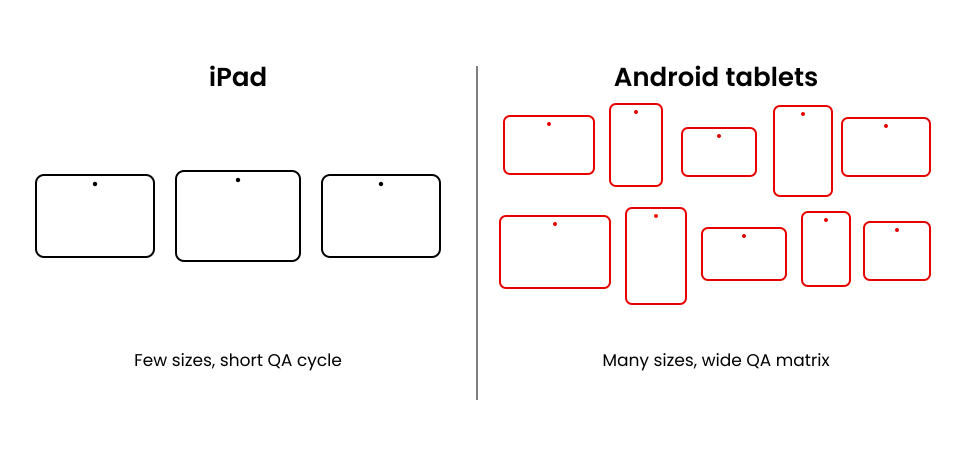
Android tablets carry more design and testing risk than iPads, mainly because Android hardware is far less standardized. Plan for that risk before you pick a platform.
iPad hardware ships in a small, predictable set of screen sizes, which makes iPad app development services easier to scope and test. Android tablets do not. Screen sizes, resolutions, and manufacturer skins vary widely across Android tablet app development projects. That variety multiplies the testing matrix. Custom iPad app development also benefits from that consistency, since fewer screen sizes means a shorter QA cycle. Android’s own SDK has historically lacked a dedicated tablet concept, unlike iOS. Google’s adaptive app quality guidelines now address this directly. Codebases built by an earlier Android tablet app development company may not follow them yet. I recommend budgeting extra QA time if your build targets Android tablets first. Windows Surface tablets are a smaller third option; most projects still concentrate on iPad and Android.
What It Costs to Build a Tablet App: Extend vs. Build From Scratch
A tablet build falls within the mobile app development range. That range runs from 40,000 to 400,000 dollars. It shares the same backend, compliance, and QA overhead as any custom app. The tablet-specific variable is the incremental cost of the larger screen.
| Scenario | Incremental Cost Band | Incremental Timeline | What Drives the Difference |
|---|---|---|---|
| Extend existing phone app to tablet (adaptive/responsive layout) | 15% to 30% of base build cost | 3 to 6 weeks | UI rework for larger screens, expanded device testing matrix. |
| Build tablet-first or tablet-only from scratch | 10% to 20% above equivalent phone-only scope | 6 to 10 weeks | Full design and development cycle scoped for the larger-format UI from day one. |
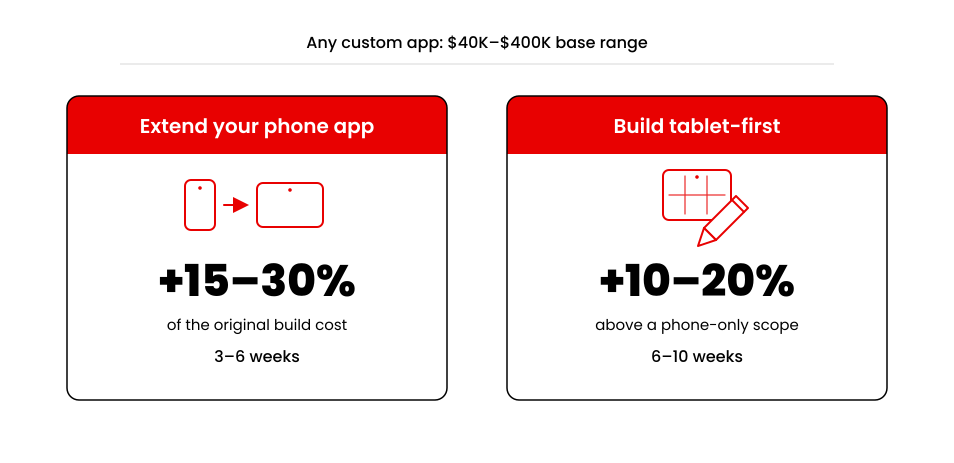
That incremental cost depends on one decision: extending an existing phone app or building a tablet-first from scratch. Extending an app reuses the backend, authentication, and business logic already built for the phone version. Building tablet-first means a new design system and a wider testing matrix from day one. Android app development cost and iPhone app development cost follow the same underlying pattern. Add the scope of a second screen size on top of that.
If you are evaluating an iPad-specific build, our iPad app development company in Dallas can help you scope the project and cost it out.
Managing a Fleet of Shared Tablets: Device Management, Kiosk Mode, and Offline Sync
A fleet of shared tablets needs device management. Plan for four things before rollout: enrollment, lockdown, session handling, and offline sync.
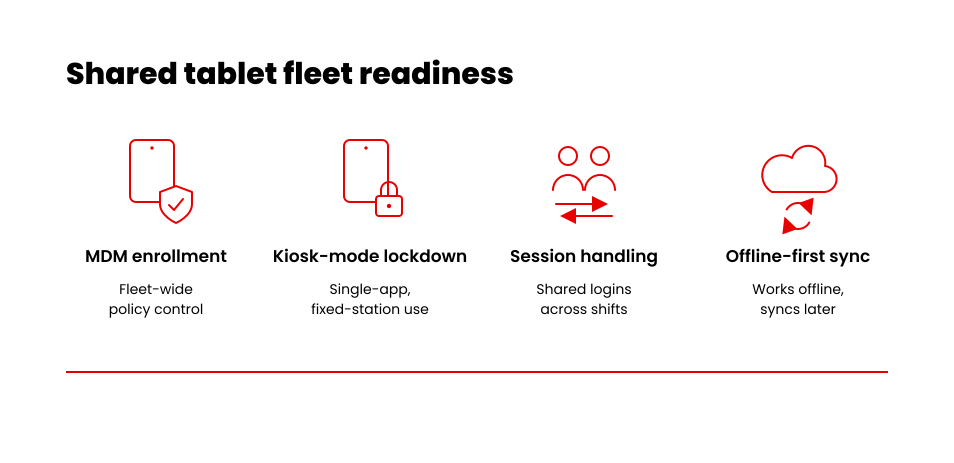
Each of these addresses a different failure mode a shared device introduces that a personal phone never does.
- MDM enrollment for fleet-wide policy control across every device.
- Kiosk-mode lockdown for single-app or fixed-station deployments.
- Shared-login and session handling for devices used across shifts.
- Offline-first sync design for field and clinical use with inconsistent connectivity.
For CPCG, we’ve built centralized access-control systems for shared devices, including scheduled access and centralized visibility across every location. That experience carries over directly to a shared tablet fleet: the access-control problem is the same, even when the hardware differs.
The Tablet App Development Process, Step by Step
Tablet app development services follow five stages: discovery, design, development, testing, and deployment. The tablet-specific work concentrates in design and testing.
- Discovery defines the workflow the tablet needs to support, using the decision matrix above as a starting filter.
- Design builds the tablet-specific layout, including split-screen and orientation handling.
- Development follows standard practices for the chosen platform, native or cross-platform.
- Testing expands to cover the tablet’s wider range of screen sizes, especially on Android.
- Deployment includes device enrollment if the tablets are company-owned and shared.
Converting an Existing Mobile App vs. Building for Tablet First
Converting an existing mobile app to tablet costs less than building tablet-first. It is not always the right call, though. Use the cost delta from the section above to decide.
Conversion works well when the tablet workflow is mostly the same task with more room. It works poorly when the tablet workflow is fundamentally different. A shared-device clinical form or a field diagram viewer are good examples. In that case, the incremental cost of a tablet-first build buys a better result. For the broader planning and architecture considerations behind this decision, see our enterprise mobile app development guide.
How to Choose a Tablet App Development Partner
I recommend choosing a tablet app development company based on shared-device and device-management experience rather than just tablet UI portfolio pieces. Ask specifically about MDM and kiosk-mode experience.
In our experience, a strong tablet app development partner shows fleet-enrollment experience alongside screen design. Ask for a project where they handled shared logins across shift changes. Ask how they tested across Android’s wider hardware range if the build targets Android. Those answers separate an experienced iPad app development agency from a team that has only resized a phone app.
Conclusion
Usefulness was never the real question here. Tablets are useful for plenty of teams. The question that actually matters is narrower than that. Does your specific workflow need one or not? That workflow could belong to a technician working in the field. It could belong to a nurse charting at the bedside. It could belong to an associate working the retail floor. Each of those workflows needs the screen and durability a tablet provides. Or it doesn’t, and a better phone experience solves it for less. Use the decision matrix above before you commit any budget. If you are still weighing whether your business is ready, our mobile app development guide is a useful next stop.
Build Your App Now!
See what a tablet-specific build take for your team.
Talk to Our Mobile App Development Team→Keep reading: App Development Cost in 2026, for the full cost breakdown behind these numbers.