Our Odoo implementation brings financial discipline, operational visibility, and process control across departments. From accounting automation to manufacturing workflows, we design ERP systems that reduce operational leakage and provide real-time decision clarity.
We use Sitecore to drive measurable revenue growth through intelligent personalization and behavior-driven content delivery. By aligning marketing automation, data orchestration, and omnichannel engagement, we help brands turn digital touchpoints into retention engines.
We architect AWS environments that stay stable under scale, traffic spikes, and compliance pressure. From secure cloud migrations to CI/CD automation and cost governance, we engineer cloud foundations that protect performance while enabling rapid product evolution.
We implement Dynamics 365 to align systems with actual business operations, bringing clarity, control, and accountability across CRM, ERP, and service functions. From sales to finance, configurations eliminate inefficiencies and enable confident, real-time decisions.
In 2026, Odoo ERP powers over 16 million users globally and 170,000+ active enterprises, making it a statistically validated growth engine reshaping the mid-market ERP landscape. For CEOs, CFOs, CTOs, and digital transformation leaders, the question is no longer whether Odoo ERP is viable, but how fast it’s growing, its market share, and its long-term stability.
After a number of Odoo consulting and implementation projects, I’ve learned that successful ERP adoption is not just about software; it’s about operational ROI, scalability, and measurable business growth.
I have compiled this report with the most relevant Odoo ERP market statistics, adoption trends, financial metrics, and industry data for 2026, helping decision-makers interpret the numbers behind the platform’s rise. Without any further ado, let’s dig in.
16+ million users globally and over 170,000 active enterprise customers make Odoo one of the fastest-growing ERP platforms worldwide.
120,000+ new customers annually, growing at ~20–25% CAGR, outperforming SME-focused ERP offerings from SAP, Oracle, and Microsoft Dynamics.
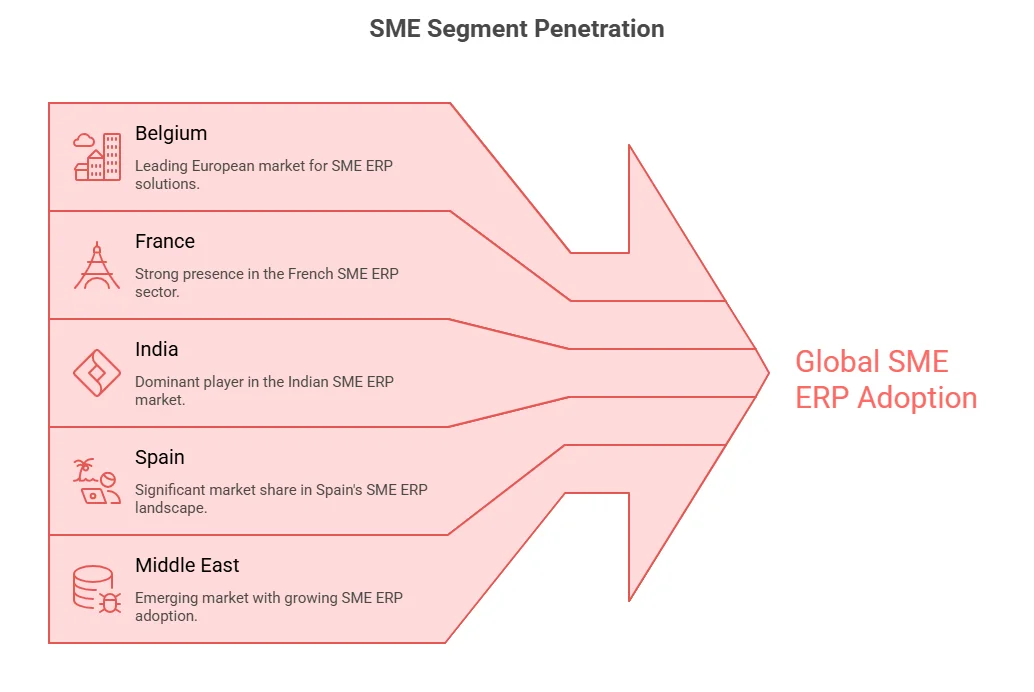
Odoo holds 5.77% global ERP market share, and 12–15% of SME ERP adoption, with the strongest presence in Belgium, France, India, Spain, UAE, and Saudi Arabia.
According to StartUpBusiness, Revenue is scaling rapidly like a SaaS platform: €650M in 2025, projected to be €800M+ in 2026, targeting €1B by 2027, with 42% annual recurring revenue (ARR).
Implementation speed is a major adoption driver: 2–4 months for 10–25 users, 6–12 months for 100+ users, compared to 12–24 months for SAP.
Cost advantage is substantial: As per Bresdel, Odoo Enterprise TCO for 50 users: $315K–387K, up to 65% lower than legacy vendors, thanks to flat per-user pricing and no per-module fees.
Adoption spans industries with measurable ROI: 25–35% production lead-time reduction in manufacturing, 15% inventory accuracy improvement in retail, 20–30% faster billing cycles in professional services, and 40–60% faster setup in hospitality & real estate.
Cloud & AI adoption is high: 60% of core apps are AI-enabled, 35% automated invoice OCR adoption, 20–30% reduction in stock-outs with predictive demand planning.
Odoo supports 10,000+ concurrent users, millions of daily transactions, and multi-company, multi-currency reporting, proving its scalability for mid-market enterprises.
Despite adoption success, ERP failure risk persists: 75% of projects miss objectives, 74% exceed budget, and 61% run over schedule, usually due to data migration, integration, or governance issues, not the platform itself.
For organizations seeking expert guidance on Odoo implementation, AppVerticals delivers proven strategies, customizations, and integrations that maximize ERP ROI.
How Many Users Does Odoo ERP Have Globally in 2026?
Odoo ERP has over 16 million users worldwide in 2026, with 120,000+ new customers added annually.
Odoo is positioning itself as the dominant modular ERP for mid-market businesses (10–500 employees).
How Much Revenue Is Odoo ERP Generating and How Fast Is It Growing?
Odoo generated about €650M in revenue in 2025, is projected to exceed €800M in 2026, and is targeting €1B by 2027, reflecting strong ARR growth and SaaS-like scaling.
Observation: Odoo is scaling like a SaaS company, not a traditional enterprise vendor.
How Is Odoo ERP Being Adopted Across Industries in 2026?
Odoo ERP shows broad adoption across sectors, driving lead‑time reductions in manufacturing, faster checkout and inventory gains in retail, optimized services billing, and quicker setup in hospitality and real estate.
For mid-market companies, Odoo ERP adoption is often justified within the first fiscal year.
How Has the Odoo ERP Partner Ecosystem Grown in 2026?
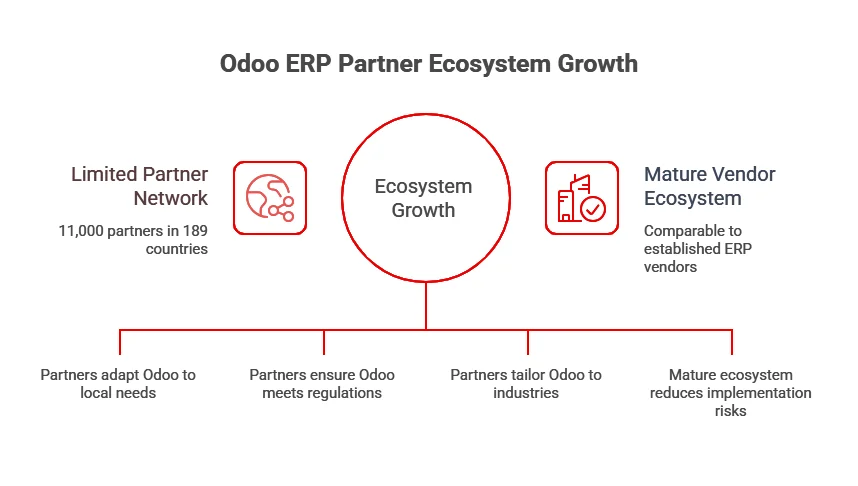
Odoo’s global partner network exceeds 11,000 certified partners in 189 countries, supporting localization, industry‑specific implementation, and broader ecosystem maturity.
Ecosystem growth supports:
Localization
Compliance adaptation
Industry-specific implementation
Lower deployment risk
Vendor ecosystem maturity is now comparable to established ERP vendors.
How is Odoo ERP Leveraging Cloud and AI in 2026?
Odoo ERP leverages cloud deployment and AI to automate processes, improve forecasting, and scale efficiently, making it a proactive platform for SMEs.
Expert Opinion: I see Odoo continuing to grow in the SME market, with more AI features and ecosystem expansion in the coming years. – Omar Farh, Odoo Developer
This indicates that Odoo ERP is no longer “just open-source,” it is AI-augmented and cloud-native.
Expert Opinion: The “composable ERP” trend – Businesses are moving away from monolithic systems toward modular platforms. Odoo’s app-based architecture fits perfectly with this shift, letting companies build their tech stack incrementally rather than committing to massive upfront investments. Economic pressures are accelerating the shift – With the current economic climate, CFOs are scrutinizing every software expense. Companies are actively looking to consolidate their tech stack, and Odoo can replace 5-10 different SaaS subscriptions at a fraction of the cost. The SMB market maturation – Mid-market companies that outgrew QuickBooks but aren’t ready for SAP now have viable options. Odoo has really matured in recent years – better UX, more robust features, stronger partner ecosystem. It’s no longer just for small shops. Developer community momentum – There’s a growing pool of Odoo developers and implementation partners globally, particularly in regions like India, Europe, and Latin America. This makes implementation more accessible and competitive pricing-wise. – Jihad Mahfouz, Full Stack Developer
Where Is Odoo ERP Experiencing the Most Geographic Growth in 2026?
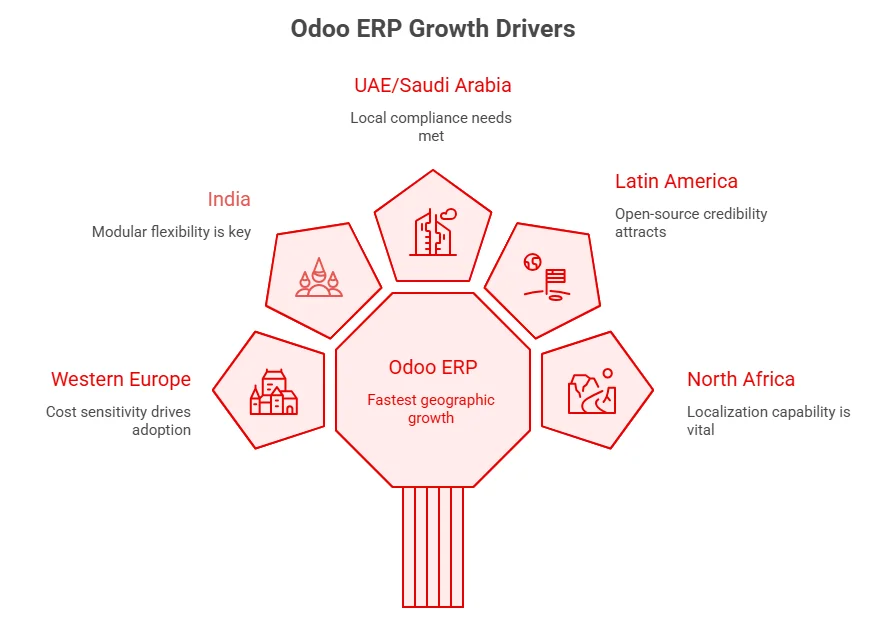
Odoo ERP is growing fastest in regions like Western Europe, India, the UAE & Saudi Arabia, Latin America, and North Africa, driven by cost sensitivity, modular flexibility, and local compliance needs.
Emerging markets show the fastest acceleration due to:
Cost sensitivity
Modular flexibility
Open-source credibility
Localization capability
How Does Odoo ERP Compare Competitively in the Market in 2026?
Odoo competes strongly on cost, speed, modularity, and flexibility versus legacy vendors like SAP, Oracle, and NetSuite, making it especially appealing for mid‑market and SME deployments
Category
Odoo
SAP
Oracle
NetSuite
User Experience
Highly intuitive and user-friendly
Complex and requires training
Moderately user-friendly
Fairly easy with some learning curve
Cost Structure
Budget-friendly and scalable
Premium-priced solution
High-cost enterprise pricing
Mid-to-upper pricing range
Flexibility & Customization
Extremely adaptable with extensive customization options
Limited flexibility
Moderate customization capabilities
Restricted customization compared to others
Ideal For
Organizations of all sizes, from startups to large enterprises
Large-scale corporations
Multinational firms with complex HR and operations needs
Growing mid-market companies seeking a cloud-based ERP
How Scalable Is Odoo ERP in 2026?
Performance metrics:
10,000+ concurrent users supported
Millions of daily transactions are possible
Multi-company, multi-currency environments
Consolidated reporting across global entities
Scalability is no longer a barrier for mid-market enterprises.
What Challenges and Market Constraints Does Odoo ERP Face?
Despite strong statistics, Odoo ERP has limitations:
Steeper learning curve vs accounting-only systems
Customization maintenance overhead
Not ideal for extremely regulated industries
Large enterprise (10,000+ users) complexity may require additional architecture
However, adoption trends show these constraints are not slowing mid-market growth.
Why Do Some Odoo ERP Implementations Fail?
Despite its rapid adoption, a significant number of Odoo ERP implementations run into serious issues that can undermine expected ROI and delay go-live dates.
Up to 75% of ERP projects fail to achieve original objectives, with only about 23% considered fully successful, while 74% exceed budget and over 61% take longer than planned. This high failure rate reflects integration, scope, and planning issues that plague many Odoo deployments.
One of the most common implementation failure causes remains poor data migration. Migrating data from legacy systems to Odoo often results in incomplete maps, corrupt records, and lost history when not properly audited and cleansed beforehand, increasing the likelihood of post-go-live disruptions.
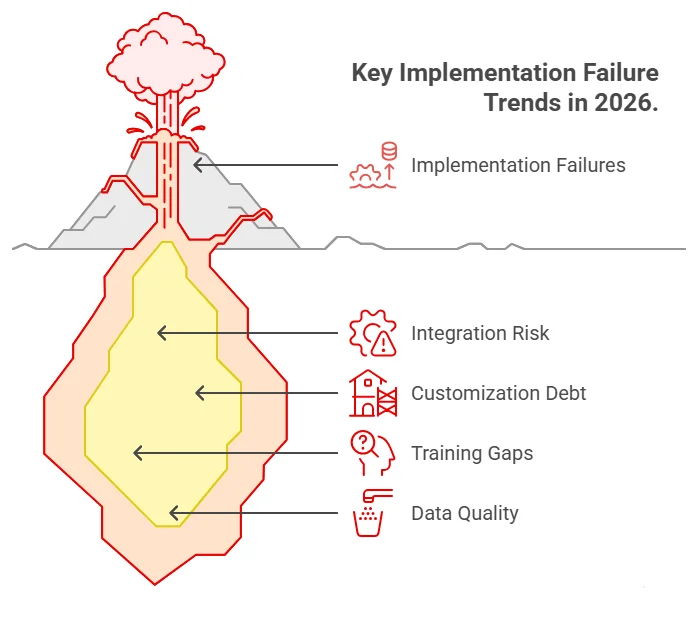
Key Implementation Failure Trends to Watch in 2026
Integration risk remains a top threat: as ERP ecosystems expand, projects require more real-time data syncs and API connections between Odoo and legacy or third-party systems, failures in which account for a large share of overruns in cost, time, and scope.
Customization debt is increasing: firms trying to replicate legacy processes instead of re-engineering workflows in Odoo risk prolonged upgrade cycles and escalating maintenance bills.
Training and adoption gaps continue to derail otherwise functional implementations, especially in self-implemented or under-managed projects.
Data quality and migration complexity remain core risk vectors, emphasizing the need for phased dry runs and extensive cleansing prior to go-live.
Failure Red Flags Every Buyer Should Monitor in 2026
To avoid becoming another statistic, stakeholders should watch for:
No detailed scope or KPI documentation before project kickoff
Frequent scope changes during build without change control
Low user participation in testing (lack of UAT)
No dedicated change management plan
Integration delays that push go-live phases outward
These are consistent risk patterns across multiple Odoo implementation mistake analyses, reinforcing that failure is rarely due to the ERP itself, but due to project governance failures.
Odoo Looks Simple—Until You Implement It
Don’t become part of the 75% ERP failure statistic. AppVerticals delivers risk-controlled Odoo implementations built for measurable ROI.
Trend 5: Shift from On-Premise to SaaS: Cloud-first deployments are now the majority.
Expert Opinion: Odoo has emerged as one of the fastest-growing ERP platforms in recent years, driven by its ability to deliver a comprehensive and flexible solution at a competitive cost. It positions itself effectively between complex, high-cost legacy systems and lightweight tools with limited functionality, making it particularly attractive for growing businesses. With continued expansion in cloud capabilities and automation features, Odoo appears well-positioned to strengthen its global market presence in the coming years.
– Amr Abuzeid, Sr. Odoo Functional Consultant
Final Analysis: What the Statistics Signal
The 2026 data confirms Odoo ERP has transformed from a niche open-source option to a high-growth, globally adopted, financially robust ERP platform. Key stats highlight:
User Base & Market Growth: 16+ million users, 170,000+ enterprise customers, 120,000+ new clients annually, and CAGR ~20–25%.
Revenue & Financial Strength: €650M in 2025, projected €800M+ in 2026, ARR at 42%, targeting €1B by 2027. Valuation exceeds $5B, signaling stability and reinvestment capacity.
Market Positioning: 5.77% global ERP market share, 12–15% SME segment adoption, competing against 250+ ERP vendors. Dominates modular, cloud-first, AI-embedded ERP adoption for mid-market enterprises.
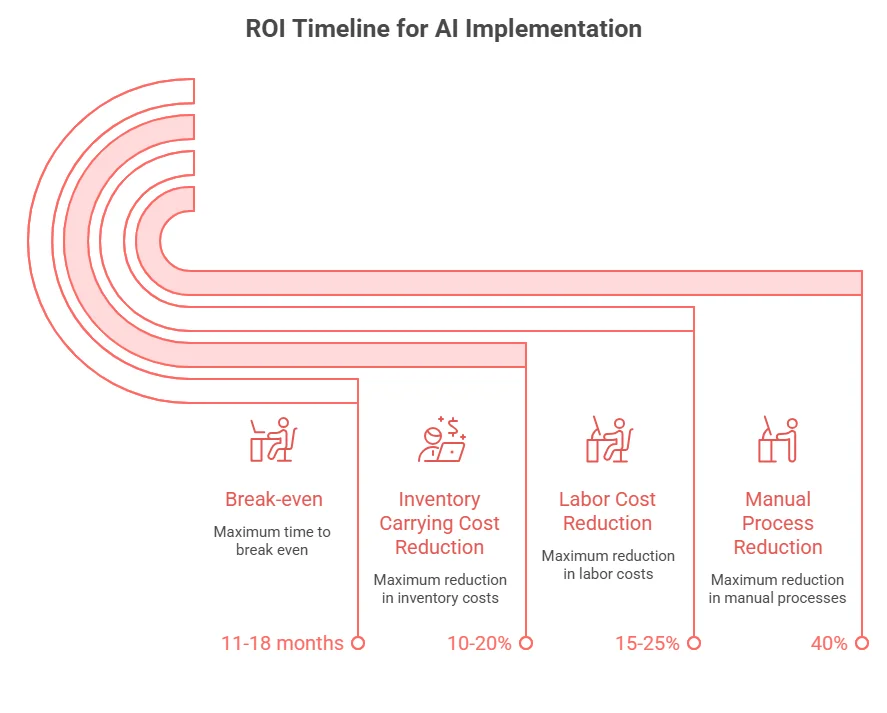
Operational ROI: Break-even within 11–18 months, 15–25% labor cost reduction, up to 40% manual process reduction, 10–20% lower inventory carrying costs.
Implementation Efficiency: Average deployment of 2–12 months depending on company size, 89% report <48 hours downtime, 92% rate migration “smooth” or “very smooth”.
Cost & TCO Advantage: Up to 65% lower 5-year TCO than SAP, Oracle, or Microsoft Dynamics. Flat per-user pricing, automated upgrades, and no forced bundles drive affordability.
Cloud & AI Adoption: 60% of apps are AI-enabled, automated invoice OCR adoption up 35%, predictive sales & demand planning reducing stock-outs 20–30%.
Global Expansion: Strongest growth in Western Europe, India, UAE, Saudi Arabia, Latin America, and North Africa, driven by modular flexibility, cost sensitivity, and local compliance.
Odoo ERP’s modularity, cost-effectiveness, speed, and AI/cloud features make it a top choice for SMEs and mid-market companies. Its growth signals vendor stability, a mature ecosystem, and proven ROI, making the real question how quickly it can boost operational efficiency.
More Related Guides:
AI in App Development Statistics 2026: Explores how AI integration in mobile and web apps is driving engagement, automation, and measurable ROI in 2026.
AI Chatbot Technology in 2026: Explores how AI chatbots are being adopted across mobile and web apps, driving automation, cost reduction, and measurable business ROI in 2026.
App Monetization Statistics 2026: Breaks down global app revenue benchmarks, monetization models, retention metrics, and AI-driven growth strategies shaping profitable apps in 2026.
SaaS Development & Adoption Statistics 2026: Highlights global SaaS market growth, adoption trends, revenue benchmarks, churn metrics, and AI-driven innovations shaping scalable software businesses in 2026.
E-commerce App Development Statistics 2026: Covers market size, mobile commerce growth, user behavior, AI adoption, development costs, and ROI insights shaping high-performing e-commerce apps in 2026.
Odoo is better for faster, lower-cost, and modular ERP adoption, while SAP is better for large enterprises requiring deep process standardization, global scale, and long-term operational control.
SAP continues to lead the enterprise ERP space, while Odoo has gained strong traction among SMEs and mid-market businesses due to its flexibility and lower implementation barriers. In practice, ERP decisions often hinge more on complexity tolerance and transformation capacity than on features alone.
In this guide, I’ll break down the key factors you need to know: cost, customization, scalability, and my advice on which direction to go.
Key Takeaways:
Cost Efficiency: Odoo offers transparent pricing, while SAP’s pricing is complex and custom.
Implementation Speed: Odoo deploys faster with phased rollouts; SAP requires longer implementation times.
Customization Flexibility: Odoo is highly customizable and API-accessible (with the Custom plan); SAP offers customization but with more complexity.
Scalability: Odoo scales for smaller operations; SAP is built for large-scale, global enterprises.
Support Options: Odoo has community-driven support with premium options; SAP provides enterprise-level support and proactive guidance.
Integration: Odoo offers API integrations (Custom plan); SAP provides a structured, enterprise-grade integration suite.
Best for Small Businesses: Odoo is perfect for small businesses needing flexibility and cost transparency; SAP suits large enterprises with complex needs.
Big Enterprise Benefits: SAP offers better scalability and support for large enterprises, while Odoo works well for specific business needs within large companies.
Odoo vs SAP: A Quick Overview
Odoo is an ERP suite designed for modular adoption, allowing businesses to implement one app at a time. With 15 million users, 6,000+ employees, and 16,000+ partners, it serves everyone from startups to large enterprises, offering a flexible, scalable ecosystem. If you’re considering Odoo for your business, working with an experienced Odoo development company can significantly streamline the process.
SAP (S/4HANA) is considered a top-tier ERP for large enterprises, particularly those with $750M+ in revenue. It’s recognized as a Tier I ERP by Panorama Consulting, making it ideal for complex organizations needing deep control and process governance.
So, the real question isn’t which is better? But which model suits your business? Odoo rewards speed, modular adoption, and flexible customization, while SAP excels at standardization, enterprise control, and rigorous process governance.
Let’s take a look at quick decision-matrix:
Criteria
Odoo
SAP
Best For
Small to medium enterprises, phased modular rollouts
Large enterprises, global scale, complex governance
Cost Transparency
Clear, predictable pricing with flexible plans
Complex pricing, often requires custom quotes
Speed of Implementation
Fast deployment, can start with core apps and expand
Longer timelines, often requires enterprise-level planning
Customization Flexibility
High flexibility with modular customization (Custom plan)
Strong customization but with higher complexity and cost
Integration Capabilities
API access on Custom plan, external integrations easy
Integration Suite for seamless, enterprise-grade integrations
Support
Community-driven support with paid options
Enterprise-level support, with optional premium guidance (Preferred Success)
Scalability
Excellent for operational scalability in specific business units
Built for enterprise-scale, global standardization, and complex environments
Governance & Control
Lower control but flexible for evolving business needs
Strong governance, compliance, and process standardization
What Is Odoo?
Odoo is a modular ERP suite covering core functions like finance, sales, inventory, HR, and more. It comes in two editions: Odoo Community (open-source) and Odoo Enterprise (licensed). Whether you’re looking to implement Odoo CRM or the entire suite, the Odoo implementation process is designed to scale with your business needs.
The key takeaway here is flexibility, Odoo allows businesses to start small (e.g., CRM + invoicing) and expand as needed, without the hassle of re-platforming. It also offers a broad range of apps, with contributions from both the core team and the community.
Tired of Overly Complex ERP Systems?
Switch to a simpler, adaptable platform built for real operational agility.
SAP, in this context, refers to SAP S/4HANA, a powerful ERP designed for large-scale finance, supply chain, and manufacturing operations. It’s considered a Tier I product, ideal for large enterprises requiring strict governance and process control. SAP’s focus is on enterprise-grade functionality and scalability.
The main difference? Odoo encourages iteration and customization, while SAP expects you to align with standard processes and manage change through formal programs. Neither approach is universally better, but depending on your organization’s appetite for governance and transformation, one may fit better than the other.
What are the Key Differences in Cost between Odoo and SAP?
When it comes to cost, ERP decisions get real. Generally, ERP spend breaks down into four areas: subscription/licensing, implementation, integration, and ongoing change (enhancements + support).
Odoo implementation cost is highly transparent. In the U.S., Odoo Standard costs $31.10/user/month (billed yearly) or $38.90 monthly, while Odoo Custom is $61.00/user/month (yearly) or $76.20 monthly.
The Custom plan is essential for multi-entity setups or integration-heavy projects, as it includes Odoo Studio, Multi Company, and External API access, key features for complex deployments. Notably, external API access is limited to the Custom plan, which is a crucial cost driver for those planning integrations with BI, data warehouses, or legacy systems.
On the SAP side, pricing varies based on scope, user types, packages, and agreements, making it harder to pin down. However, SAP’s Integration Suite follows a tenant subscription model for integration costs.
What many teams overlook is that ERP costs go beyond just software, implementation often drives up costs significantly. Panorama’s 2024 ERP data shows the median project cost is $450,000, with an average duration of 15.5 months, a reminder that execution and organizational change can exceed the first-year software subscription.
Let’s take a quick look at the cost breakdown:
Cost Component
Odoo: What Typically Drives It
SAP: What Typically Drives It
CFO/CTO Note
Subscription/Licenses
Standard vs. Custom; Custom needed for API/multi-company/studio
Packaged subscriptions + user models; varies by deal/package
Treat as “entry ticket,” not total cost.
Implementation
Partner scope, data migration, customization
Program scale, process standardization, change management
Benchmark against median $450K / 15.5 months
Integration
API availability (Custom plan)
iPaaS strategy, Integration Suite as common layer
Integration scope often silently expands budget
Support
Ecosystem-based support (varies by approach)
Enterprise Support + optional Preferred Success
Support models impact risk and internal headcount
Get a Custom Odoo Implementation Quote
Discover how Odoo’s flexible pricing can be tailored to your unique business needs. Our team will provide a personalized quote based on your specific requirements.
What are the Key Customization Features of Odoo vs SAP?
When explaining customization, I break it down like this: Odoo is easier to customize early on, while SAP is safer to govern at scale, if you follow the platform’s rules.
Odoo Customization Options (how we use it at AppVerticals):
Odoo Studio: Low/no-code customization for adding fields, changing views, automating workflows, available in the Custom plan.
Custom Modules/Code: For complex cases, like manufacturing or accounting, where Studio’s limits are reached.
External API Integration: Connects BI, mobile apps, portals, or legacy systems, only available on the Custom plan.
Edition Flexibility: The choice between Community vs. Enterprise impacts long-term maintenance strategy.
SAP Customization/Extensibility (how it’s typically managed):
SAP Integration Suite: Platform-style integration for connecting SAP and non-SAP systems.
Enterprise Support Structures: Governed change through structured support programs and service plans.
Preferred Success: Proactive release guidance and enhanced SLAs for cloud ERP journeys.
My Practical Advice: If speed and iteration matter most to your competitive advantage, Odoo’s customization capabilities are compelling. However, if global standardization, auditability, and strict controls are key, SAP’s ecosystem and governance model often provide the edge, though expect more program overhead.
Which ERP is better for Small Business?
For small businesses, Odoo often wins on time-to-value and cost transparency, as long as the scope remains realistic. Its published pricing makes budgeting clear, start with Standard pricing and upgrade to Custom when you need multi-company support, Studio, or API integration. This upgrade path is key because many small businesses don’t need deep integration upfront, but want the option as they grow.
A common problem for small businesses is assuming the ERP’s sticker price is the total project cost. According to Panorama, the median ERP project cost is $450,000, with an average duration of 15.5 months, numbers that can be out of reach for many SMBs if they aim for an enterprise-style rollout.
Here’s my recommendation for small businesses:
Choose an ERP that allows phased adoption without needing a perfect enterprise blueprint from day one.
Stick to core functions like finance, order-to-cash, and procure-to-pay before diving into customization.
If you know you’ll need integrations (e.g., warehouse automation, BI, custom apps), plan for Odoo Custom upfront, as API access is only available with this plan.
While SAP can be a good fit for small businesses in specific cases (e.g., regulated industries or strict governance), it’s rarely the default unless there’s already a broader SAP ecosystem decision at the group level.
What Are the Pros and Cons of Odoo vs SAP for Large Enterprises?
Large enterprises typically choose ERP systems to reduce operational variance, gain more control, and scale reliably, not just for features.
Why SAP is Often Chosen for Large Enterprises
SAP S/4HANA is a Tier I ERP, ideal for complex environments like multi-entity consolidation, global process governance, and compliance-heavy operations. Its support structure is tailored for large enterprises, with Enterprise Support included in every cloud subscription, ensuring robust assistance.
Where Odoo Can Fit in the Enterprise
Odoo, while often associated with smaller companies, is also used by large enterprises. It works well for specific business lines, subsidiaries, or when a phased, modular rollout is preferred over a single large-scale transformation. Odoo’s flexibility makes it suitable for enterprises looking for speed and cost transparency in certain areas.
Trade-offs for Your Board/C-Suite
Odoo offers faster deployment and greater cost transparency but requires careful discipline around customization and integration, especially as API access is restricted to the Custom plan.
SAP tends to have higher program overhead but excels in environments where governance, auditability, and standardized global execution are top priorities.
How Does Odoo vs SAP Compare in Terms of Scalability and Flexibility?
I break scalability into two categories: technical scalability (users, transactions, uptime) and organizational scalability (expanding to new countries, entities, and business units without chaos).
Odoo: Flexible, Modular Scalability
Odoo’s strength lies in its flexibility, with a one app at a time approach that suits businesses of all sizes, from startups to large enterprises. This modularity makes it easy to start small (e.g., CRM + invoicing) and scale up as the business grows (e.g., adding inventory, HR, manufacturing).
However, this flexibility comes with a cost: you need strong architectural discipline. As soon as you integrate custom apps, analytics, or external APIs, you’ll need the Custom plan, something many businesses overlook early on, leading to rework and frustration.
SAP: Scalable Execution with Enterprise Guardrails
SAP’s scalability comes from its ecosystem maturity and robust enterprise guardrails. The Integration Suite serves as a unified layer to connect SAP and third-party systems, making integration a permanent capability at enterprise scale.
As enterprises adopt more cloud-based solutions, scalability becomes easier, with SaaS enabling flexibility, modern capabilities, and seamless data integration. Panorama notes the growing preference for cloud as it supports enterprise scalability while offering flexible data access.
My Decision Rule
• If you need maximum flexibility and can enforce a clean customization strategy, Odoo offers excellent operational scalability.
• If you need strong governance and predictable controls across multiple regions and business units, SAP provides safer scalability, but it comes with higher investment in program management and process alignment.
Scale Your Business with Odoo
Learn how Odoo can grow with your business. Our experts will help you integrate a scalable ERP solution that adapts to your future needs.
Integration is where ERP ROI is either captured or lost.
Odoo Integrations (Practical Reality)
Odoo offers external connectivity via APIs (XML-RPC and similar), but it’s important to note that API access is only available on the Custom plan.
This means that for a CTO, integration strategy and licensing must go hand-in-hand, especially if you’re planning for BI pipelines, middleware, or custom app development. Without the Custom plan, integration capabilities are limited, which can be a critical cost consideration.
SAP Integrations (Platform Approach)
SAP takes a more structured, platform-driven approach with its Integration Suite, a unified platform designed to connect SAP and third-party applications, processes, and data.
SAP also provides clear pricing for the Integration Suite, allowing you to model integration as a defined line item, rather than burying it under “hidden consulting” costs. This ensures better transparency and budgeting for large-scale integrations.
What I Recommend You Budget for Either Way:
• Canonical Data Model & Ownership Rules: Ensure clear rules for finance master data, product, and customer data.
• Integration Monitoring & Error Handling: Don’t just ensure it connects, plan for proactive monitoring and error management.
• Release Strategy: Integrations can break when ERP customizations change or cloud releases update. Treat integration as a product, not a project.
What Support Options Are Available for Odoo vs SAP?
Support is about more than just tickets, it’s about how risk is managed when your business is live.
Odoo Support & Community Model
Odoo’s support includes email access (24/5 on weekdays in multiple languages) and free upgrades. The Odoo Community Association (OCA) plays a key role by promoting collaboration and creating lower-cost, high-quality solutions faster through community-driven development.
SAP Support Model
SAP offers Enterprise Support with every cloud subscription, providing structured support channels like a knowledge base, cases, expert chat, and community forums. For a more proactive approach, SAP Preferred Success includes targeted release guidance, enhanced SLAs, and access to customer success experts.
Executive-Level Translation:
• If you’re looking for a self-directed ecosystem with a strong community focus (and are comfortable managing partner quality), Odoo is a solid fit.
• If you require a formalized enterprise support structure with premium guidance layers, SAP is better suited for large organizations running mission-critical operations.
Conclusion
If I had to summarize Odoo vs SAP in one line: Odoo optimizes for modular speed and cost transparency; SAP optimizes for enterprise governance and standardized scale.
For investors, the key takeaway is to treat implementation + integration as major cost categories, not afterthoughts. Panorama’s benchmarks, $450,000 median project cost and 15.5 months median duration, offer a useful reality check against overly optimistic projections.
For CTOs, it’s crucial to note that Odoo’s External API access requires the Custom plan, which can significantly impact both your budget and integration strategy.
If you’d like to explore how Odoo ERP can fit your needs, AppVerticals specializes in Odoo ERP development and can help tailor a solution that scales with your business.
If you share your company’s size (revenue, users), number of legal entities, countries, and any plans for custom app development or deep BI integration, I can help you build a 3-year cost model and decision matrix specific to your situation, without assumptions.
Ready to Transform Your Business with Odoo?
Take the next step towards a more efficient, scalable, and cost-effective ERP solution with Odoo.
I’ve led enough ERP implementations to know that most organizations don’t fail on software. They fail on data, process, and change management and the industry data supports that reality. According to research from ERP analysts, 55 %–75 % of ERP projects fail to meet their objectives due to poor execution rather than technology limitations.
Odoo is no different.
Odoo’s modular design across accounting, inventory, CRM, manufacturing, and HR offers real flexibility, but without disciplined implementation, that flexibility becomes a liability. Success rarely depends on features. It depends on how the system is implemented.
This guide explains how Odoo implementations actually unfold in manufacturing, distribution, and service businesses, where projects break down, and what must be controlled before go-live, beyond the sales pitch.
TL;DR: Odoo Implementation Process
A successful Odoo ERP implementation is not a linear setup. It is a controlled business transformation that follows this core flow:
Set success metrics first (order-to-cash, inventory accuracy, cost control).
Map AS-IS and TO-BE processes before any configuration starts.
Deploy core modules first (Sales, Inventory, Accounting), then expand.
Migrate and validate data in multiple cycles to avoid corrupt go-lives.
Run UAT with real transactions and enforce a 90%+ pass rate.
Go live in phases, not all at once.
Stabilize and optimize for 60–90 days after launch.
Odoo projects fail when organizations skip discovery, rush data migration, or over-customize. They succeed when process discipline, clean data, and user adoption are treated as first-class deliverables.
Too Many Systems? Odoo Brings It All Together
Unify operations, automate workflows, and run your business from one ERP platform.
Odoo implementation is the structured process of deploying Odoo ERP to manage your business operations, transforming how data flows through finance, supply chain, sales, manufacturing, and HR functions.
It’s not software installation. It’s business process reengineering enabled by technology.
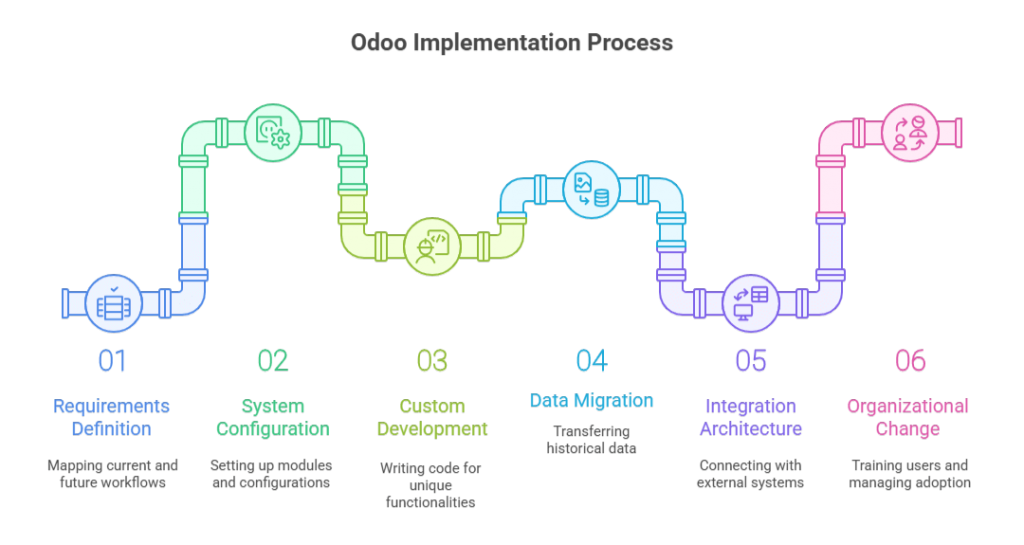
The implementation encompasses six technical workstreams:
Requirements definition: Mapping current-state workflows (AS-IS) and designing future-state processes (TO-BE) that leverage Odoo’s native capabilities
System configuration: Setting up Odoo’s 30+ modules, chart of accounts, inventory locations, user permissions, workflow automation, reporting structures, using point-and-click administration tools
Custom development: Writing Python code to extend Odoo functionality when standard features don’t address industry-specific requirements or unique business logic
Data migration: Extracting, cleansing, and loading historical data from legacy systems, customer records, product catalogs, open orders, financial transactions, inventory balances
Integration architecture: Connecting Odoo with payment gateways, EDI networks, shipping carriers, eCommerce platforms, and third-party applications via APIs or middleware
Organizational change: Training users, managing resistance, establishing support structures, and driving adoption across departments
Most organizations underestimate items 1, 4, and 6. They budget for technical configuration but neglect the organizational readiness work that determines whether users actually adopt the new system.
For enterprises requiring enterprise-grade consulting support, implementation becomes a strategic transformation initiative rather than an IT project. The distinction matters: IT projects focus on technology deployment, transformation initiatives focus on business outcomes.
If your organization lacks internal ERP expertise, consider an ERP implementation partnerthat provides both technical execution and strategic consulting. The best partners challenge your requirements and push back on unnecessary customization.
Note: Think of Odoo implementation as constructing a building. The software is your raw material, steel, concrete, and glass. Implementation is the architectural design, foundation work, and construction management that transforms materials into a functional structure. You can have premium materials and still produce an unusable building if the construction methodology fails.
Get Your Implementation Workstreams Mapped
Receive a scoped checklist for requirements, migration, integrations, and UAT based on your modules and user count.
Why ERP Implementation Methodology Matters More Than the Platform
I’ve watched CTOs select ERP systems based on feature matrices and Odoo pricing comparisons, then act surprised when implementations fail. The platform isn’t usually the problem; the execution methodology is.
According to Panorama Consulting’s 2023 ERP Report, 55% of organizations experienced budget overruns during ERP implementation, and 28% reported that their system failed to deliver expected business benefits within the first year. These failures stem from poor requirements definition, inadequate change management, and unrealistic timeline expectations, not software deficiencies.
The Real Cost of Poor Planning
When an Odoo implementation fails, it’s rarely a clean failure. What I see instead:
Shadow IT proliferation: Teams revert to Excel, Google Sheets, and departmental databases because the ERP doesn’t match their workflow
Data integrity collapse: Without proper validation rules, your accounting team spends hours reconciling transactions that should auto-match
User abandonment: Adoption rates below 60% within six months signal that the system was configured for theoretical workflows, not actual business operations
Scope creep litigation: I’ve reviewed contracts where implementation partners billed 3x the original estimate because requirements weren’t locked down during discovery
The antidote to these failures is structured implementation discipline. That’s what the rest of this guide covers.
Pre-Implementation Readiness: What to Lock Down Before You Start
Before any Odoo partner logs into your demo environment, you need internal clarity on three questions:
1. What business processes are you standardizing?
This isn’t about documenting what you do today. It’s about defining what you will do after go-live. If your sales team closes deals using five different quote approval paths, you must rationalize those into one or two standard workflows before configuration begins.
I recommend AS-IS/TO-BE process mapping for every department touching the ERP:
AS-IS mapping: Document current workflows, system touchpoints, data flows, and pain points (1-2 weeks)
The gap between AS-IS and TO-BE reveals where you need training, where you need customization, and where you need organizational change management.
2. Community or Enterprise, based on operational requirements, not budget
Odoo pricing structures create an illusion that Community edition is “free” and Enterprise is a premium upsell. That’s not how you should evaluate the decision.
Choose Community edition if:
You have internal Python/PostgreSQL development resources
You’re deploying fewer than 5 core modules
You don’t need multi-company consolidation or advanced studio customization
Your business operates during standard hours with tolerance for delayed support responses
Choose Enterprise edition if:
You require SLA-backed support with response time guarantees
You need Odoo Studio for no-code workflow customization
You’re running 24/7 operations where downtime has direct revenue impact
You need features like IoT box integration, advanced MRP, or automated marketing
Budget isn’t the constraint—operational risk tolerance is. I’ve seen companies select Community to save $15/user/month, then spend $100K on custom development to replicate features included in Enterprise.
3. Implementation partner selection criteria
Your implementation partner becomes your de facto ERP Program Manager for 4-6 months. Vet them like you’re hiring a VP of Operations.
Evaluation criteria I use:
Criterion
What to Validate
Red Flags
Industry Experience
Implementations in your sector with similar process complexity
Generic “we work with all industries” positioning
Odoo Certification Status
Gold or Silver Odoo partner with certified developers
No visible certification or partner listing on Odoo.com
Post-Go-Live Support Model
Dedicated support team, SLAs, and escalation paths
“We’ll train your team to self-support”
Methodology Transparency
Documented phases, deliverables, and sign-off gates
Vague “agile approach” without a work breakdown structure
Reference Checks
3+ client references from projects delivered in the past 12 months
Only testimonial quotes, no live client references
I also request code review access if they’ve built custom modules for previous clients. Code quality tells you whether you’re hiring engineers or scripters.
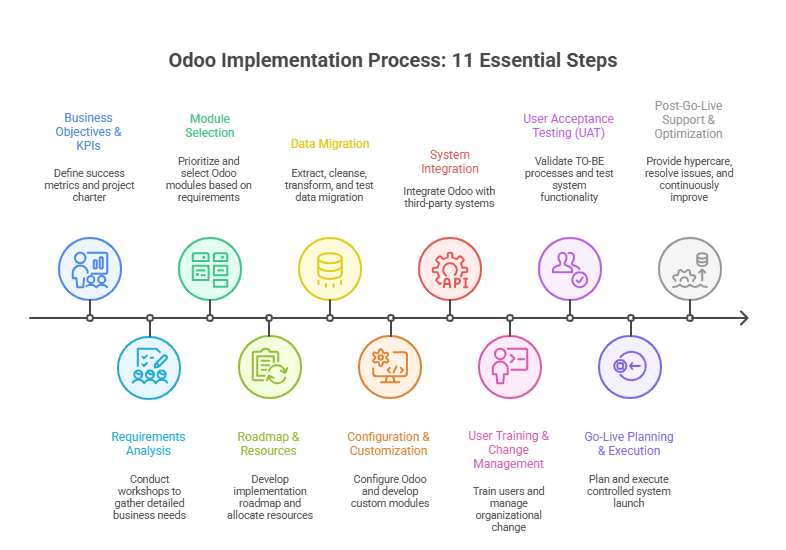
The Complete Odoo Implementation Process: 11 Essential Steps
Most Odoo partners present implementation as a linear sequence: requirements → configuration → training → go-live. That’s a simplified sales narrative.
Real implementations are iterative, with feedback loops between phases. Here’s how I structure Odoo ERP implementation projects:
Step 1: Define Clear Business Objectives and KPIs
Duration: 1 week Owner: Executive sponsor + ERP Program Manager
Every implementation starts with a question: What does success look like 12 months after go-live?
I document this in a project charter with measurable KPIs:
Operational efficiency: Order-to-cash cycle time reduction (target: 20-30%)
Data visibility: Real-time inventory accuracy (target: 95%+)
Cost reduction: Eliminated redundant software licenses (quantify current spend)
Process standardization: Reduced quote approval paths from 5 to 2
These KPIs become your implementation guardrails. When stakeholders request custom features, you evaluate them against these success metrics. If a request doesn’t advance a defined KPI, it’s scope creep.
Bill of materials (BOM) structure and routing definitions
Work order scheduling and capacity planning requirements
Quality control checkpoints and non-conformance handling
Subcontracting and outsourced operation workflows
Each workshop produces a requirements traceability matrix linking business requirements to Odoo configuration decisions. This document becomes your scope boundary and change control reference.
Step 3: Select Odoo Modules Based on Business Needs
Duration: 1 week Owner: Solution architect + IT lead
Odoo’s modular architecture means you don’t deploy everything at once. I prioritize modules based on dependency chains and business criticality.
Step 4: Implementation Roadmap and Resource Allocation
Duration: 1 week Owner: ERP Program Manager
I build implementation roadmaps using a work breakdown structure (WBS) with defined deliverables, owners, and dependencies.
Sample roadmap for a mid-size distribution company (4-6 month timeline):
Week
Phase
Key Deliverables
Go / No-Go Gate
1–4
Discovery & Requirements
Signed requirements document, TO-BE process maps
Executive sign-off on scope
5–8
Data Migration Preparation
Data extraction, cleansing rules, validation scripts
Data quality audit passed
9–14
Configuration & Development
Configured Odoo environment, custom module development
UAT environment ready
15–18
User Training & UAT
Training materials, UAT test cases executed
>90% test case pass rate
19–20
Go-Live Preparation
Cutover plan, rollback procedures, support rota
Go-live readiness checklist
21–22
Go-Live & Stabilization
Production launch, hypercare support
Day-7 system health check
23–26
Post-Go-Live Optimization
Issue resolution, process refinement
Month-1 KPI review
Resource allocation includes both internal FTEs and partner consultants. I typically see 20-30% FTE commitment from department heads during requirements and UAT phases. This isn’t a “set it and forget it” project.
Step 5: Data Migration Strategy and Execution
Duration: 4-6 weeks (parallel with configuration) Owner: Data migration lead + IT team
Data migration is your highest technical risk in any Odoo ERP implementation.
I follow a four-stage migration process:
Stage 1: Data extraction and profiling
Extract data from legacy systems (ERP, CRM, spreadsheets, Access databases)
Profile data quality: completeness, consistency, duplicates, referential integrity
Document data ownership and authoritative sources for each entity type
Stage 2: Data cleansing and transformation
Deduplicate customer and vendor records
Standardize product codes, UOMs, and categorization
Map legacy chart of accounts to the new Odoo GL structure
Transform data formats to match Odoo import templates
I allocate 30-40% of the total implementation effort to data migration. Underestimate this, and you’ll go live with corrupt data that destroys user trust in the new system.
Case Study: A $40M industrial equipment distributor I worked with discovered during migration that 35% of their product master data had incomplete cost records. They’d been running on institutional knowledge and Excel lookups for years. We spent an extra 3 weeks cleansing cost data before migration, but that investment prevented thousands of hours of post-go-live data corrections.
Avoid a “Dirty Data” Go-Live
Get a migration plan that includes validation cycles, reconciliation checks, and cutover controls.
Duration: 5-7 weeks Owner: Odoo implementation partner + internal IT
Configuration means setting up Odoo using native features. Customization means writing Python code to extend functionality.
The 80/20 rule applies: aim for 80% configuration, 20% customization. Every custom module you build creates technical debt—ongoing maintenance, upgrade complexity, and documentation burden.
Configuration priorities:
Company setup: Multi-company structure, fiscal year, base currency, tax configuration
User roles and permissions: Access control lists (ACLs) by role, department, data visibility rules
Reporting and dashboards: KPI views, management reports, operational metrics
When to customize (sparingly):
Industry-specific compliance requirements not covered by standard modules
Complex pricing algorithms that can’t be configured through standard price lists
Integration with proprietary systems (legacy WMS, custom-built tools)
Unique business logic that differentiates your competitive position
For customization work, I require full-stack product engineering teams that follow Odoo’s development guidelines and use version-controlled repositories. Custom code without proper documentation becomes a liability during upgrades.
Config vs. custom decision tree:
Need new functionality?
├─ Is it available in standard Odoo module?
│ └─ YES → Use standard module (configure, don't customize)
├─ Is it available in Odoo App Store?
│ └─ YES → Evaluate third-party app (test before committing)
├─ Can workflow process change accommodate standard features?
│ └─ YES → Revise business process (most cost-effective option)
├─ Is it a regulatory/compliance requirement?
│ └─ YES → Approve customization (document compliance mapping)
└─ Is it a competitive differentiator worth ongoing maintenance cost?
└─ YES → Approve customization (with TCO analysis)
└─ NO → Rejector defer to Phase 2
Step 7: Third-Party System Integration
Duration: 3-4 weeks (parallel with configuration) Owner: Integration architect + IT team
Most organizations don’t run pure Odoo, they integrate with payment gateways, EDI networks, shipping carriers, eCommerce platforms, and industry-specific applications.
Integration patterns I use:
Integration Type
Method
Use Case
Real-Time API
REST / JSON or XML-RPC
Payment processing, CRM synchronization, eCommerce order imports
Scheduled Batch
SFTP file exchange or API polling
EDI transactions, bank statement imports, data warehouse exports
Direct Database
PostgreSQL replication or database views
Business intelligence tools and reporting platforms
Middleware / iPaaS
Zapier, Make, Celigo
Low-code integrations for non-critical or auxiliary workflows
For companies with legacy system modernization needs, I sometimes run Odoo in parallel with the existing ERP for 30-60 days before full cutover. This dual-run period validates data sync accuracy and gives teams confidence before decommissioning legacy systems.
Step 8: User Training and Change Management
Duration: 3-4 weeks Owner: Change management lead + department heads
Training isn’t about showing people where buttons are. It’s about helping them understand why their daily work changes and how to execute new processes.
I structure training in three tiers:
Tier 1: Executive briefing (2 hours)
System overview and strategic benefits
Dashboard and reporting access
Escalation paths for issues
Tier 2: Power user training (2-3 days)
Deep functional training by module
Admin capabilities, workflow configuration, and troubleshooting
These users become internal support resources post-go-live
Tier 3: End user training (4-8 hours)
Role-specific workflows and daily tasks
Hands-on exercises using test data that mirrors real scenarios
Quick reference guides and video tutorials
Training should happen 2-3 weeks before go-live, close enough that knowledge is retained, far enough that there’s time for practice in the UAT environment.
Change management runs parallel to training. I send weekly email updates from the executive sponsor explaining project progress, upcoming changes, and why the new system matters. People resist change when they don’t understand the “why.”
Step 9: User Acceptance Testing (UAT)
Duration: 2-3 weeks Owner: Business process owners + QA lead
UAT validates that Odoo executes your defined TO-BE processes correctly. This isn’t software testing—it’s business process validation.
I create test scenarios based on real transaction patterns:
Sales order to invoice workflow:
Create a quote with volume discount pricing
Send a quote for customer approval
Convert quote to sales order
Reserve inventory and generate a delivery order
Confirm shipment and generate invoice
Process payment and reconcile in accounting
Each scenario includes expected results and acceptance criteria. For example: “Invoice should reflect volume discount, payment terms should match customer master data, accounting entries should post to correct GL accounts.”
UAT pass rate should exceed 90% before proceeding to go-live. Any critical or high-priority defects must be resolved—no exceptions. I’ve delayed go-live decisions three times in my career when UAT revealed data integrity or configuration issues. Every time that delay prevented a catastrophic production failure.
Step 10: Go-Live Planning and Execution
Duration: 1-2 weeks Owner: ERP Program Manager + IT operations
Go-live isn’t a single event, it’s a controlled deployment with defined phases, rollback triggers, and support coverage.
Go-live checklist (non-exhaustive):
Final data migration completed and validated
User accounts provisioned with correct permissions
Integration endpoints tested in the production environment
Backup and rollback procedures documented and tested
Hypercare support schedule published (24/7 coverage for first 48-72 hours)
Executive sponsor sign-off on go-live decision
I prefer phased go-lives when possible:
Option 1: By business unit: Launch Odoo in one warehouse/region, stabilize for 30 days, then expand
Option 2: By module: Launch sales + inventory first, add manufacturing 60 days later
Option 3: Parallel run: Operate legacy and Odoo systems simultaneously for 2-4 weeks
Full big-bang cutover is the highest risk and should only happen when business operations are simple enough to validate quickly (typically sub-50 users with limited module scope).
Case Study: A $120M food distributor I advised wanted to launch Odoo across 4 warehouses simultaneously. I recommended a phased go-live starting with their smallest site. Good decision, we discovered a critical issue with lot number traceability during the first week. We fixed it before rolling out to the other three sites, preventing a compliance failure that could have triggered FDA scrutiny.
Step 11: Post-Go-Live Support and Continuous Improvement
Duration: Ongoing (3-6 months intensive support) Owner: Internal support team + implementation partner
The first 30 days post-go-live are hypercare—intensive monitoring and rapid issue resolution.
Tier 3 (Implementation partner): System defects, integration failures, performance issues
During hypercare, I run daily standups (15 minutes) to review open issues, user feedback, and system performance metrics. These standup meetings replace formal status reports and enable rapid decision-making.
After stabilization (30-60 days), shift to continuous improvement:
Monthly KPI reviews: Compare actual performance against success metrics defined in Phase 1
Process optimization: Identify workflow bottlenecks and refine configurations
Training refreshers: Address knowledge gaps revealed during production use
Feature rollout: Enable additional Odoo modules as organization readiness improves
The implementation partner relationship doesn’t end at go-live. I typically maintain a retainer for the first 6-12 months to support optimization, minor enhancements, and periodic health checks.
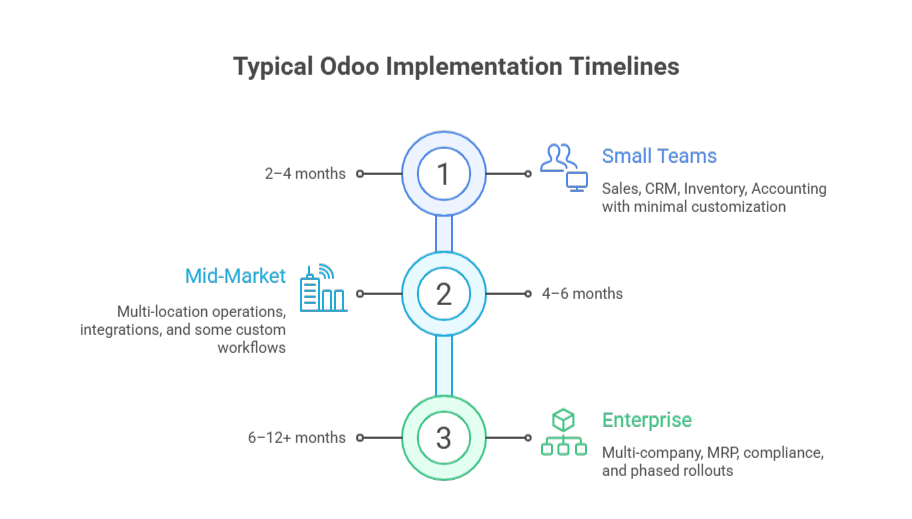
How long does an Odoo implementation take?
Odoo timelines depend on scope complexity, data quality, and organizational readiness, not company size.
Typical ranges
Small teams (10–50 users):2–4 months Sales, CRM, Inventory, Accounting, with minimal customization
Mid-market (50–250 users):4–6 months Multi-location operations, integrations, and some custom workflows
Enterprise (250+ users):6–12+ months Multi-company, MRP, compliance, and phased rollouts
Projects often extend to 12–18 months when data is fragmented, customization is high, or stakeholders are not fully dedicated.
See the full timeline by business size and complexity:Odoo Implementation Timeline →
Odoo Implementation Cost: Beyond License Fees
Odoo license pricing is straightforward (Community is free to self-host; Enterprise starts around $24.90/user/month), but licenses are usually ~20–30% of total year-one cost. The bigger drivers are implementation services, migration, integrations, and training.
Common Implementation Failures and How to Prevent Them
Most Odoo ERP failures are caused by execution mistakes, not by the platform itself.
Unclear requirements lead to systems that technically work but do not match real finance, inventory, or sales workflows. This is prevented by defining measurable acceptance criteria, TO-BE process maps, and stakeholder sign-off before configuration begins.
Poor data quality is the fastest way to destroy ERP credibility. Migrating years of inconsistent, duplicate, or incomplete records leads to broken reporting and accounting errors. Successful projects audit, clean, and validate data in multiple cycles before going live.
Low user adoption causes teams to abandon Odoo for spreadsheets and email. This happens when users are not involved early or trained on real workflows. High-adoption projects combine role-based training, executive sponsorship, and hands-on UAT.
Excessive customization creates technical debt, upgrade risk, and long-term instability. Strong Odoo implementations favor configuration over custom code, approve customization only when it delivers business or compliance value, and control scope through formal change management.
These controls turn Odoo from a risky software rollout into a stable, scalable ERP system.
Odoo Implementation Best Practices from Expert Partners
Based on 50+ implementations across manufacturing, distribution, professional services, and eCommerce, here are the practices that separate successful projects from troubled ones:
Practice 1: Lock scope before configuration starts
No configuration work until requirements document is signed by all department heads. Changes after configuration begins go through formal change control with impact assessment, re-baselining, and executive approval. This single practice prevents 60% of budget overruns.
Practice 2: Migrate data early and often
Don’t wait until go-live week for your first migration attempt. I run 3-4 migration rehearsals starting 8-10 weeks before go-live. Each cycle reveals data quality issues, giving you time to remediate rather than panic-fixing during cutover weekend.
Practice 3: Configure for 80% of transactions, train for the other 20%
Don’t over-engineer Odoo to handle every edge case and exception scenario. Configure for your high-volume, standard transactions. Train users on manual workarounds for the 20% of exceptions. This prevents configuration bloat and maintains system simplicity.
Practice 4: Deploy support infrastructure before go-live, not after
Establish your tiered support model, help desk ticketing system, and escalation procedures 2-3 weeks before go-live. Have support team shadow during UAT so they’re trained on common issues. The worst time to figure out support escalation is during a production incident on Monday morning.
Practice 5: Measure KPIs weekly for first 90 days
Track the success metrics you defined in Step 1, weekly, not monthly. If order processing time is increasing or inventory accuracy declining, you need to know immediately so you can intervene before users lose confidence. Weekly KPI reviews create accountability and enable rapid course correction.
Practice 6: Resist customization unless it’s a genuine differentiator
Every custom Python module you build creates technical debt, including ongoing maintenance, upgrade testing, and documentation burden. Challenge every customization request: “Can we achieve this through configuration and process change?” Reserve custom development for regulatory requirements or competitive advantages worth the 5-year TCO.
Practice 7: Maintain implementation partner relationship post-go-live
Don’t treat go-live as the end of partner engagement. I maintain support retainers for 6-12 months post-launch. This gives you access to experts who understand your configuration when optimization needs arise. Trying to bring in new consultants 6 months later costs more—they have to reverse-engineer your system.
Practice 8: Document configuration decisions and business rules
Create a “configuration guide” that explains why settings were chosen, what business rules they enforce, and what happens if they’re changed. When your ERP Program Manager leaves 18 months later, this documentation prevents institutional knowledge loss. Include: approval hierarchies, pricing logic, reorder calculations, and GL account mappings.
Organizations seeking guidance on these practices should partner with proven ERP implementation specialists who can provide both technical execution and strategic advisory throughout the project lifecycle.
Your Odoo Implementation Checklist
Use this as a readiness assessment before starting your project:
I’ve led successful Odoo implementations for $10M companies and failed ones for $500M enterprises. The difference wasn’t budget or technical complexity—it was execution discipline.
The organizations that succeed treat Odoo implementation as business process reengineering enabled by software, not as a software installation project. They invest in requirements rigor, data quality, change management, and user adoption. They challenge customization requests and embrace standard processes.
The organizations that fail treat it as an IT initiative, underestimate data migration complexity, skip change management, and customize recklessly.
If you’re evaluating Odoo or fixing a troubled implementation, focus less on feature comparisons and more on your organizational readiness. The best ERP system poorly implemented delivers worse outcomes than a mediocre system well implemented.
Before you start: define your success metrics, secure executive sponsorship, and commit to process discipline. Then find an implementation partner who will challenge your assumptions and hold you accountable to best practices, not just execute whatever you request.
Odoo can absolutely run your business. But only if you run the implementation correctly.
AppVerticals has developed 2000+ apps and digital products. Our experts are ready to help you build something amazing.
Still Thinking It Over?
Submit your details, and our team will reach out to explore how we can bring your idea to life.
A Technology Partner You Can Rely On
1000+ brands trust AppVerticals to create high-performing digital solutions.
Amit Chopra
Head of Marketing, Al Rostamani Group
Successfully delivered the project on time and within budget. They remained flexible and cooperative with backend content organization, and their support, company culture, and client-centric approach truly stood out.
Bruce Wilson
CEO, Logistics SaaS Startup
The app came together exactly how we hoped. If you're looking for a team that knows what they’re doing and respects your time, they’re a solid choice.
Catherine
Founder, Real Estate Agency
They delivered a top-tier solution that’s fast, user-friendly, and packed with features tailored to the real estate industry. The team was professional, detail-oriented, and easy to work with from start to finish.
Trusted by Global Industry Leaders
Your Next Big Idea Needs the Right Team
Share a few details and get a clear timeline, cost estimate, and technical roadmap, tailored to your idea.