


 ChatGPT
 Perplexity
 Claude
 Google AI
React Native app development costs $15,000 to $250,000, with most commercial builds landing between $40,000 and $100,000. Ask nine agencies and you will get nine numbers inside that range, which is not much help when you are trying to approve a budget.
What separates a $22,000 React Native app from a $180,000 one is rarely the framework. It is what the app has to talk to, how many kinds of user it serves, and one workflow decision most buyers make before anyone explains what it costs.
This piece prices four build we delivered as our React Native development services, names what drove each one, and covers the two React Native-specific decisions that move a budget more than feature count does.
Key Takeaways
- Most React Native builds cost $40,000 to $100,000: An Expo-based MVP can start near $15,000, while enterprise platforms can exceed $150,000.
- React Native reduces development costs: It can cost 30% to 40% less than separate native iOS and Android builds, with savings increasing as more user roles are added.
- Choose Expo or bare workflow carefully: Deciding before understanding your native requirements can become one of the most expensive avoidable mistakes in a React Native project.
- Native requirements can increase costs: Bluetooth, AR, background audio, and deep camera access may require native modules, adding roughly $15,000 to $40,000.
- React Native can scale to millions of users: Coca-Cola Dubai used a ten-person team over nine months and more than 150 prototypes to reach 2 million peak users.
What React Native App Development Costs in 2026
React Native app development costs $15,000 to $250,000 in 2026. An MVP built on Expo with standard components starts near $15,000. A customer-facing app with accounts, payments and offline support typically runs $40,000 to $100,000. Enterprise platforms with multiple user roles, deep integrations and compliance requirements begin around $120,000.
| Build Tier | Cost Range | Timeline | What You Get |
|---|---|---|---|
| Expo MVP | $15,000 – $40,000 | 6 – 12 weeks | Standard components, managed workflow, one core journey, minimal backend |
| Mid-Range App | $40,000 – $100,000 | 10 – 20 weeks | Custom design, payments, push notifications, offline support, 20–30 screens |
| Complex Build | $100,000 – $180,000 | 20 – 32 weeks | Multiple user roles, native modules, third-party integrations, and admin tooling |
| Enterprise Platform | $180,000+ | 8 – 12 months | Multi-surface product, high-concurrency backend, accessibility, and compliance work |
The entry point for React Native sits lower than most cross-platform frameworks, and Expo is the reason. A managed workflow removes the native build configuration that used to consume the first two weeks of every project. That is a real saving, and it comes with a condition covered further down.
For cost bands across all app types rather than React Native specifically, our app development cost guide sets the wider context.
React Native App Development Cost by App Type
| App Type | Cost Range | Main Cost Driver |
|---|---|---|
| Content or Booking App | $20,000 – $50,000 | Screen count and CMS integration |
| Ecommerce App | $45,000 – $105,000 | Catalogue, payments, order management |
| On-Demand or Marketplace | $55,000 – $130,000 | Two-sided flows, real-time tracking, dispatch logic |
| Logistics or Field Operations | $60,000 – $140,000 | Offline sync, GPS, role-based permissions |
| Multi-Role Operations Platform | $90,000 – $200,000 | Each distinct user role is close to a separate interface |
That last row is the one people miss. Every user role you add is another set of screens, permissions and states. React Native saves you building them twice, which means the saving grows as roles multiply. There is a real example of that below.
Expo or Bare Workflow: The Decision That Moves Your Budget Most
This is the React Native question that has no Flutter equivalent, and almost nobody prices it.
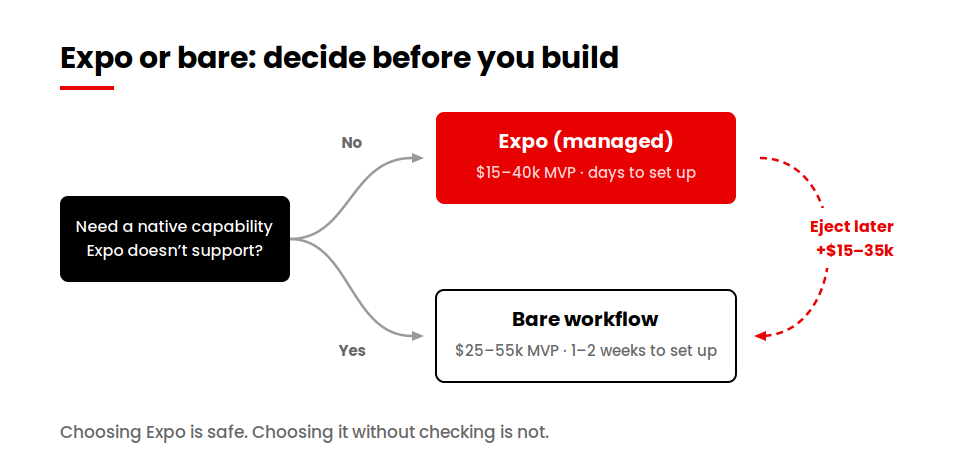
Expo is a managed layer on top of React Native. It handles the native build configuration, over-the-air updates, and a large library of pre-built native capabilities, so a team can ship without touching Xcode or Android Studio. The bare workflow gives you the raw React Native project with full native access and full responsibility for configuring it.
| Comparison | Expo (Managed) | Bare Workflow |
|---|---|---|
| Setup and Configuration | 1 – 2 weeks | — |
| Access to Native Code | Through config plugins | Direct, unrestricted |
| Over-the-Air Updates | Built in via EAS | Build it yourself |
| Typical MVP Cost | $15,000 – $40,000 | $25,000 – $55,000 |
| Adding an Unsupported Native SDK | Config plugin, or eject | Straightforward |
Expo is the right default for most projects. The trap is not choosing it. The trap is choosing it without knowing whether your app will eventually need something Expo does not support, and discovering that in month four.
What ejecting actually costs
Leaving the managed workflow mid-project means taking ownership of the native build configuration you had been avoiding, reconciling every config plugin against a raw native project, and rebuilding your release pipeline. On a project already underway, budget three to six weeks and expect the work to land on your most senior developer.
That is $15,000 to $35,000 of unplanned spend, and it lands at the worst point in a timeline, when scope is fixed and a launch date is already public.
Not sure whether you need bare React Native?
Answer a few questions about what your app has to talk to and get a workflow recommendation with the cost implication attached.
Check my workflow →What Drives React Native App Development Cost
Four things, in order of impact.
Feature scope. A login with email and password is a day. A login with four social providers, biometric fallback, cross-device session management and two-factor is two weeks. Both are called login on a feature list.
| Feature | Typical Cost |
|---|---|
| Authentication (Basic) | $2,000 – $3,500 |
| Social and Biometric Login | +$2,500 – $5,000 |
| Payments (Single Gateway) | $3,000 – $6,000 |
| Push Notifications | $2,000 – $3,500 |
| Real-Time Chat | $9,000 – $16,000 |
| Offline Mode with Sync | $8,000 – $20,000 |
| Live Video | $12,000 – $30,000 |
| Each Third-Party SDK | $1,500 – $6,000 |
Design depth. Standard components cost nothing extra. A branded design system runs $8,000 to $20,000. Fully custom interfaces with animation reach $35,000.
Backend. If you have working APIs, the React Native app is a front end. If you do not, you are buying a backend alongside it, and that is frequently 40 percent of the total.
User roles. Covered above, and demonstrated below.
For a framework you can use to compare two quotes line by line, our Flutter cost guide sets out the seven items a complete estimate itemises. The same test applies to React Native.
When React Native Forces You into Native Code
React Native renders real native components, which is why it feels closer to native than older hybrid approaches. It does not give you access to everything, and the gap is where budgets break.
You will need native module work when your app requires:
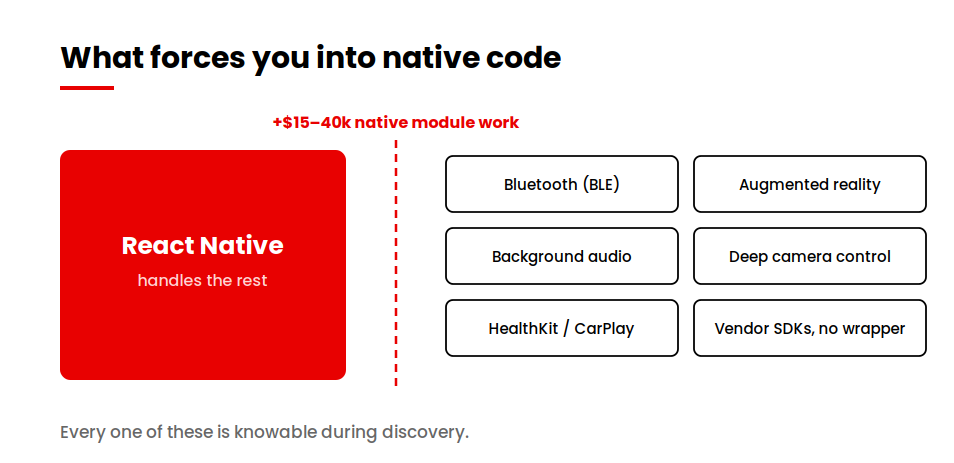
- Bluetooth Low Energy for hardware pairing, beacons or medical devices
- Augmented reality through ARKit or ARCore
- Background audio or location running reliably when the app is closed
- Deep camera control such as manual focus, RAW capture or frame-level processing
- Platform-exclusive frameworks including HealthKit, CarPlay, Android Auto and Wear OS
- A vendor SDK with no React Native wrapper, common in payments hardware, industrial equipment and older enterprise systems
When any of these is in scope, budget $15,000 to $40,000 on top of the feature estimate. The work is real native development in Swift and Kotlin, bridged into your JavaScript codebase, and it needs someone who can write both.
The useful part is that this list is knowable in advance. Every item is a product decision, not a technical surprise. Walk your feature list against it during discovery and the number stops being a risk and becomes a line item.
React Native Developer Rates and Team Structure
| Region | Mid-Level | Senior | Lead / Architect |
|---|---|---|---|
| US and Canada | $95 – $145/hr | $145 – $195/hr | $195 – $250/hr |
| Western Europe | $75 – $115/hr | $115 – $155/hr | $155 – $195/hr |
| Eastern Europe | $45 – $80/hr | $80 – $115/hr | $115 – $150/hr |
| South Asia and Southeast Asia | $28 – $50/hr | $50 – $80/hr | $80 – $115/hr |
React Native teams have one composition quirk worth knowing. Because the codebase is JavaScript, teams often assume web developers can staff it. They can write the code. What they usually cannot do is diagnose a native crash, tune a list that stutters on a mid-range Android device, or decide whether a problem belongs in JavaScript or in a native module. Budget for at least one person who has shipped React Native to both stores.
For scale, the Coca-Cola Dubai platform ran with a ten-person design and engineering team over nine months. That is roughly 90 person-months, and it is what an enterprise-tier React Native build actually looks like in staffing terms.
React Native vs Native App Development Cost
| Project Scope | React Native | Native (iOS + Android) | Saving |
|---|---|---|---|
| MVP | $28,000 | $46,000 | 39% |
| Mid-Range App | $70,000 | $115,000 | 39% |
| Complex Build | $140,000 | $220,000 | 36% |
| Enterprise Platform | $220,000 | $330,000 | 33% |
The saving narrows as complexity rises, because complex apps are more likely to need native modules, and native module work is priced the same either way.
Native wins outright when you need pixel-level platform-specific interface work, heavy use of platform APIs like ARKit or HealthKit, or single-platform delivery with no second platform planned.
If you are specifically weighing React Native against Swift for an iOS-first product, we cover that comparison in React Native vs Swift.
Four React Native Builds and What Drove the Cost of Each
Every other page on this topic prices hypothetical apps. Here are four real ones.
Coca-Cola Dubai: discovery was the line item
The stack was React Native on the front end with Node.js, PostgreSQL and AWS behind it. The platform was engineered over nine months by a ten-person design and engineering team and reached more than 2 million peak users at 99.98% uptime, with user journeys 45% faster than the previous experience, AA accessibility compliance and zero critical bugs at launch.
The number that explains the budget is not any of those. It is 150+ prototypes.
For a brand at that scale, the expensive part was not building the app. It was establishing what to build, validating it, and proving it would hold at peak load before a single production user arrived. Discovery and prototyping consumed a share of that nine months that would look extravagant on a startup project and was proportionate here, because the cost of shipping the wrong experience to 2 million people is larger than the cost of prototyping it 150 times first.
The transferable point: at enterprise scale, prototyping is not a design cost. It is risk reduction, and it is priced accordingly.
The full decision story is in why we chose React Native for Coca-Cola Dubai.
Get Spruce: five roles, one codebase
Get Spruce serves 685,000 customers across five distinct user roles, each with its own permissions and interface, plus a separate Service Pro app for operators. We measured 85 to 95 percent of native performance in production.
Five roles is where cross-platform economics change shape. A single-role consumer app saves roughly the 35 percent the comparison table predicts. Five roles means five sets of screens and states you would otherwise have built twice, so the saving compounds rather than staying flat.
The cross-platform discount is usually quoted as a fixed percentage. It is not fixed. It scales with the number of distinct interfaces your product needs.
Lulo Freight: inheriting someone else’s codebase
Lulo Freight came to us after a previous development partner failed to deliver to scope. We took over the codebase and completed the platform: a load board, real-time tracking, instant quoting, and a carrier-side interface handling capacity matching, payments and driver operations.
Rescue projects price differently from new builds, and nobody on this topic explains how. Before any feature work begins, someone has to read the existing code, establish what works, and find what has been implemented incorrectly rather than incompletely. That audit is typically two to four weeks on a mid-sized codebase, and it is the most valuable money you will spend on a rescue.
CPCG: React Native was one surface of three
CPCG replaced five separate tools in eight weeks with a system that ran across three surfaces at once. A React Native app, an Electron kiosk application, and a desktop application for operators, carrying live video, remote desktop control, recorded call logs and request alerts between them.
The React Native app was the cheapest of the three. Multi-surface products get quoted as though the mobile app is the project, and it rarely is. What costs money is keeping three clients in agreement about the same live session state.
What the four have in common
The React Native layer was the predictable part of all four estimates. What moved the numbers was 150 prototypes, five user roles, an inherited codebase and three simultaneous surfaces. When you compare two React Native quotes, the front-end hours are rarely where the difference lives.
The New Architecture: React Native’s Upgrade Cost
React Native has been migrating to what Meta calls the New Architecture, replacing the old JavaScript-to-native bridge with Fabric for rendering and TurboModules for native calls. It is faster and it is where the framework is going.
For a 2026 build it carries two budget implications.
If you are starting fresh, build on the New Architecture from day one. There is no migration to pay for later, and the ecosystem has largely caught up.
If you have an existing app, migration cost depends almost entirely on your dependency list rather than your own code. Libraries that have not been updated need replacing or forking. A well-maintained app with mainstream dependencies is a few weeks. An app carrying four years of accumulated packages, some abandoned, can be considerably more.
The practical guidance is to audit your dependency list before committing to a number. It is the only part of the migration anyone can estimate accurately in advance.
Hidden and Ongoing React Native App Costs
| Ongoing Cost | Typical Range |
|---|---|
| Maintenance and Updates | 15 – 20% of build cost per year |
| Apple Developer Program | $99/year |
| Google Play Developer Account | $25 one-time |
| Backend and Hosting | $50 – $5,000/month |
| Expo EAS (If Used) | $0 – $100+/month by usage |
| Third-Party Services | $100 – $2,000/month |
Budget 20 to 30 percent of build cost annually.
How to Reduce React Native App Development Cost Without Cutting Scope
Start on Expo if your capability list allows it. Days rather than weeks of setup, and you keep over-the-air updates without building them.
Ship one journey properly. An MVP that does one thing well cuts initial spend by 40 to 60 percent and tells you which of the remaining features anyone actually wants.
Use maintained community packages. React Native’s ecosystem covers navigation, state, payments and media well. Building those yourself buys nothing.
Check your native requirements during discovery. The single most expensive React Native mistake is discovering a native dependency in month four. One afternoon against the trigger list above prevents it.
What does not work: hiring web developers because the codebase is JavaScript, skipping the rescue audit on an inherited project, or compressing a timeline. Each costs more in rework than it saves.
If the answer is a smaller first release, MVP development is the place to start.
Conclusion
In all four builds above, the React Native layer behaved exactly as estimated. The variance came from prototyping, role count, an inherited codebase and surface count, and none of those is a framework question.
When you are holding two quotes, look past the development hours and find what each one assumed about those four things. That is where the difference lives, and it is a difference you can actually evaluate.