

 ChatGPT
 Perplexity
 Claude
 Google AI
Building a retail app in 2026 typically costs between $35,000 and $300,000 or more. The wide range comes down to what you actually build. A basic app with a product catalog, cart, and checkout sits near the low end. An app with loyalty programs, point of sale integration, real time inventory sync, and personalized recommendations sits much higher.
Before you request a quote, it helps to know what moves the number. This guide breaks down retail app costs by complexity, explains how individual features change your budget, and gives you a simple framework for estimating your own project cost before you talk to a development partner.
Mobile apps are now an important part of how consumers discover, engage with, and purchase from brands. Statista’s regional mobile app spending data shows that consumer spending on mobile apps varies considerably across regions, highlighting the importance of understanding your target market before investing in an app. For retailers, factors such as target geography, payment preferences, and platform usage can all influence the scope and cost of development.
So, what should you actually budget for a retail app in 2026? Let’s break down the typical cost ranges and what you get at each level.
How Much Does Retail App Development Cost in 2026?
Retail app development typically costs $35,000 to $300,000+, depending on the app’s feature set, integrations, number of platforms, and backend complexity. A basic shopping app may stay near the lower end, while apps connected to POS, ERP, inventory, loyalty, and advanced personalization systems can require a significantly larger investment.
Not every retailer needs every feature. Exploring different mobile app use cases can help you identify which functionality actually supports your customers and business model before adding unnecessary complexity to the first release.
| Tier | Price Range | Timeline | What It Includes |
|---|---|---|---|
| Basic | $35,000 to $60,000 | 3 to 4 months | Product catalog, search, cart, checkout, user accounts, order history, single payment gateway, push notifications |
| Mid Range | $60,000 to $150,000 | 4 to 7 months | Everything in Basic, plus loyalty programs, wishlists, product reviews, multiple payment methods, basic point of sale integration, personalized recommendations |
| Advanced | $150,000 to $300,000 or more | 7 to 12 months or more | Everything in Mid Range, plus full point of sale and ERP integration, inventory sync across locations, AI-driven personalization, augmented reality product preview, advanced analytics, multi-region support |
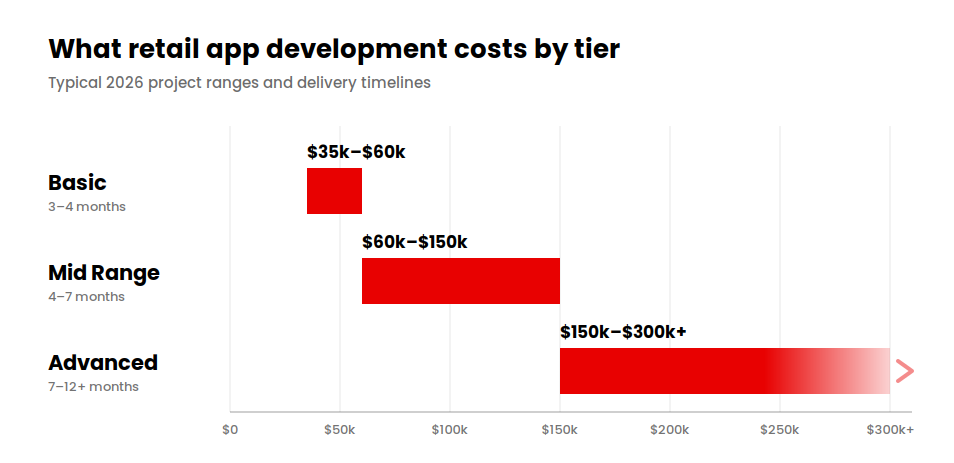
These ranges are useful for initial budgeting, but the feature scope ultimately determines the quote. For example, a retailer selling through one location may only need a product catalog, checkout, payments, and order management. A regional or national retailer may need real-time inventory synchronization, store-level fulfillment, loyalty management, and integrations with existing business systems.
Retail App Cost by Business Size
| Business Type | Typical Fit | Realistic Budget Range |
|---|---|---|
| Single location retailer | Basic tier | $35,000 to $60,000 |
| Regional chain, 5 to 25 locations | Mid Range tier | $60,000 to $150,000 |
| National or multi-region retailer | Advanced tier | $150,000 to $300,000 or more |
Development location can also affect the budget. Teams in the United States typically charge higher hourly rates than teams in South Asia or Eastern Europe. However, hourly rate alone is a poor way to compare development partners. An inexperienced team may charge less but require more revisions, take longer to complete the project, or overlook technical requirements that become expensive to fix later.
That is why an unusually low quote deserves closer scrutiny. Check whether it includes backend development, security testing, quality assurance, integrations, deployment, and post-launch support. Cutting these areas from the initial estimate can reduce the headline price while increasing the total cost of ownership later.
For most retailers, the better approach is to start with the features that directly support shopping and revenue, then expand based on customer behavior and business needs. A basic or mid-range app can establish the core experience before the retailer invests in more complex capabilities such as AI personalization, multi-store inventory synchronization, or augmented reality.
The right budget, then, is not necessarily the largest one. It is the budget that matches your current business model, technical requirements, and growth plans without paying for complexity you do not need yet. Looking at ecommerce app development statistics can also help retailers understand broader mobile shopping trends before deciding which capabilities deserve priority.
How Retail App Features Affect Development Cost
Retail apps share a common set of features, but each one carries its own cost range depending on complexity. Here is roughly what to expect for the features that show up in almost every retail app project, along with what tends to push each one toward the higher end of its range.
| Feature | Typical Cost Range | What Drives the Cost |
|---|---|---|
| Product catalog and search | $3,500–$9,000 | Number of products, variants, images, filters, search complexity, and predictive search |
| Cart and checkout | $6,000–$16,000 | Checkout flow, guest checkout, saved payment methods, currencies, discounts, and payment options |
| Payment integration | Varies by scope | Number of gateways, regional payment methods, BNPL, refunds, saved cards, and compliance requirements |
| Inventory management | Varies by complexity | Number of stores, warehouses, SKUs, inventory systems, and real-time synchronization requirements |
| Loyalty program | $4,000–$12,000+ | Points, membership tiers, rewards, referrals, promotions, and redemption rules |
| POS integration | Varies significantly | POS platform, transaction synchronization, returns, loyalty integration, and real-time data exchange |
| Third-party integrations | Varies by integration | Shipping, tax, CRM, ERP, marketing, analytics, and other external platforms |
| Backend development | Major project cost driver | Order management, user data, inventory logic, APIs, security, scalability, and infrastructure |
| AI-powered recommendations | Varies by implementation | Recommendation model, data requirements, personalization logic, and third-party AI services |
| AR product preview | Varies by complexity | 3D assets, device compatibility, product category, AR functionality, and testing requirements |
Which Features Have the Biggest Impact?
Catalog, cart, checkout, and basic payments are common requirements that can usually be planned relatively easily. The bigger cost increases tend to come from features that require the app to communicate with other systems or process complex business rules.
For example, multi-location inventory synchronization becomes significantly more complex when stock needs to remain accurate across dozens of stores and warehouses. The same applies to POS integration, where transactions, returns, loyalty points, and customer data may need to stay synchronized between physical and digital channels.
Advanced features can also change the technical requirements. AI recommendations require customer and product data to generate relevant suggestions, while AR product previews may require specialized development and device testing. These features can add considerable scope, so they should be evaluated against their expected business value rather than added simply because they are available.
Retail App Development Cost by Complexity
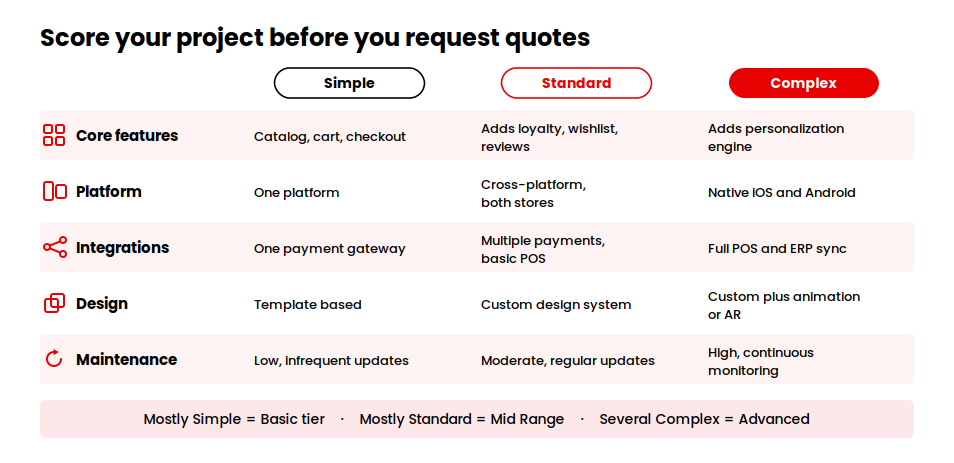
To make budgeting easier, we built a simple Retail App Cost Estimation Framework based on five variables: core features, platform requirements, integrations, design complexity, and post launch maintenance. Score your own project against each variable to see which tier it falls into before you request quotes.
| Variable | Simple | Standard | Complex |
|---|---|---|---|
| Core features | Catalog, cart, checkout | Adds loyalty, wishlist, reviews | Adds personalization, recommendations engine |
| Platform | One platform or basic cross-platform build | Cross-platform, polished for both stores | Native iOS and Android, or cross-platform with heavy custom code |
| Integrations | One payment gateway | Multiple payment methods, basic POS | Full POS and ERP sync, multiple third-party systems |
| Design | Template-based | Custom design system | Custom design plus animation or AR features |
| Maintenance need | Low, infrequent updates | Moderate, regular feature updates | High, continuous integration monitoring |
How to Use the Framework
If most of your requirements fall under Simple, your project will generally sit toward the lower end of the Basic tier. If several variables fall under Complex, expect the project to move toward the Advanced tier.
The useful part of this framework is that it shows what is driving the budget. Instead of simply accepting a higher quote, you can identify whether the increase comes from platform requirements, integrations, design, or another part of the scope.
For example, consider a regional clothing retailer with 15 stores. The company wants a product catalog, loyalty program, and real-time store inventory. Its core features and design would fall into the Standard category, while the POS and inventory integration could fall into the Complex category because the system needs to synchronize data across multiple locations.
That combination would likely place the project toward the upper end of the Mid-Range tier, potentially around $130,000, depending on the existing POS architecture and other technical requirements. If that exceeds the initial budget, the retailer could launch with inventory integration for a smaller number of locations and expand it later.
A smaller retailer would have a very different cost profile. A single-location home goods store that needs only a product catalog, cart, checkout, and basic loyalty program could keep most requirements in the Simple or Standard categories. With a straightforward cross-platform build and limited integrations, the project could fall toward the lower end of the Basic tier, potentially around $40,000–$50,000.
The point is not to produce an exact quote from a checklist. It is to identify the requirements responsible for the biggest cost increases before development begins. That gives you more control over the scope and makes it easier to decide which features belong in the first release and which can wait for later versions.
Put a number against your scope
Our calculator runs the same variables you just scored and returns a cost range with a projected timeline.
Calculate Your App Cost →What Are the Ongoing Costs of a Retail App?
The initial development budget is only part of the total investment. After launch, retailers need to account for maintenance, infrastructure, third-party services, security, and ongoing growth. These costs vary with traffic, transaction volume, integrations, and the complexity of the app.
| Ongoing Cost | What It Covers | Typical Consideration |
|---|---|---|
| Maintenance and updates | Bug fixes, security patches, OS compatibility, and technical improvements | A common benchmark is 15%–20% of the original development cost annually |
| Hosting and infrastructure | Cloud servers, databases, storage, backups, and scaling | Costs increase with users, traffic, data, and real-time operations |
| Third-party services | Payment processing, shipping APIs, tax tools, SMS, email, analytics, and other services | Usually usage-based, so costs grow with transactions and customers |
| Security and compliance | Security monitoring, vulnerability testing, data protection, and payment compliance | Requirements depend on how the app handles customer and payment data |
| Customer support tools | Help desk, live chat, ticketing, and customer communication | Becomes more important as order volume and customer inquiries increase |
| Marketing and app store optimization | User acquisition, app store visibility, promotions, and retention campaigns | Ongoing expense rather than a one-time development cost |
How much should you budget for maintenance?
A widely used benchmark is 15%–20% of the original development cost per year for maintenance and updates. For a $100,000 app, that translates to approximately $15,000–$20,000 annually.
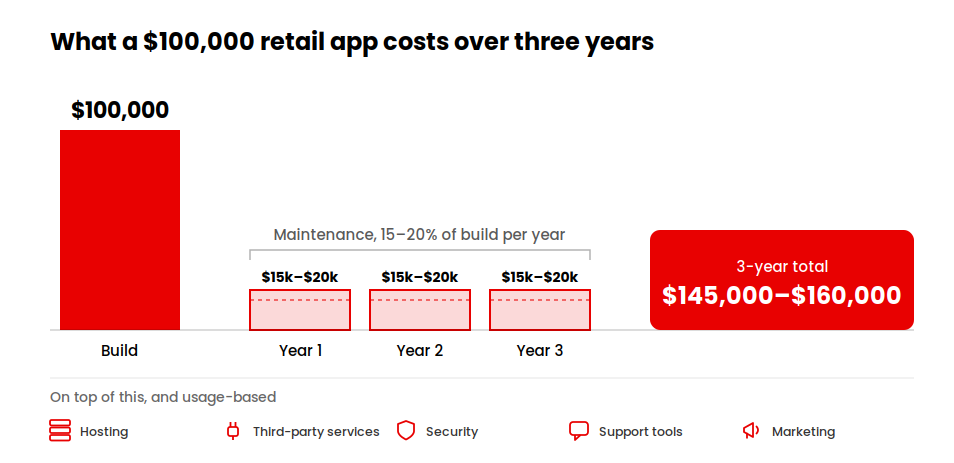
The actual figure can be higher when the app requires frequent feature updates, multiple integrations, or major changes to remain compatible with new operating system versions. Early post-launch support may also require additional attention as real users expose issues that were not identified during testing.
Infrastructure costs are similarly variable. A small retail app with limited traffic may require only a modest cloud budget, while a high-volume platform with real-time inventory synchronization, multiple locations, and seasonal traffic spikes can require substantially more infrastructure.
Third-party services add another variable cost. Payment processing, shipping APIs, tax calculation, SMS, email, analytics, and other external services often charge according to usage. As your customer and transaction volume grows, these expenses generally grow with it.
Security and compliance should also remain part of the ongoing budget.
Retail apps handle customer information and, depending on their payment architecture, may have additional security and compliance requirements. Regular monitoring, vulnerability testing, updates, and reviews help prevent security requirements from becoming an expensive afterthought.
Marketing and customer support sit outside the technical budget but still affect the app’s overall operating cost. User acquisition, app store optimization, support software, and customer communication become increasingly important as the app scales.
The simplest way to plan is to treat launch as the start of the app’s investment lifecycle, not the finish line. A realistic budget should cover both the initial build and the recurring costs required to keep the application secure, available, compatible, and useful as the retail business grows.
How to Estimate Your Retail App Development Budget
Use these steps to build a realistic budget before you approach a development partner for quotes. Working through them in order also gives you a clearer picture of which pricing tier your project actually falls into.
List your must have features separately from nice to have features: A clear must have list keeps early quotes accurate and stops scope creep from inflating the budget later. It also gives you a fallback plan if the first round of quotes comes in above what you expected, since you already know which features can move to a later phase.
Decide your platform strategy early: Know whether you need iOS, Android, or both, and whether native or cross platform development fits your timeline and budget. This decision affects almost every other cost in the project, so it is worth settling before requesting quotes rather than during the quoting process.
Map every required integration: List every system the app needs to connect to, payment gateways, point of sale, inventory, CRM, shipping, so integration cost is part of the estimate from the start rather than a surprise later. Include systems you plan to add in year two as well, since knowing about them upfront lets your development partner build an architecture that can accommodate them without a costly rework.
Choose the right development partner for your project size: A freelancer might fit a simple MVP with limited integrations. A larger retail build with point of sale and ERP integration usually needs a mobile app development company with experience handling complex integrations, scalability, security, and ongoing maintenance.
Request an itemized estimate, not a lump sum: An itemized breakdown shows exactly what you are paying for at each stage, design, core features, integrations, testing, and makes it easier to compare quotes across development partners on equal terms rather than guessing at what a single total number actually includes.
Ask what happens after launch: Before signing anything, confirm whether maintenance is included in the contract, what the hourly rate is for post launch changes, and how quickly the team responds to a critical issue like a checkout failure. These answers matter as much as the development price itself.
Build in a contingency for scope changes: Even a well planned project usually needs small adjustments once real users start interacting with the app. Setting aside 10 to 15 percent of the development budget for post launch refinements keeps early feedback from turning into a difficult budget conversation.
Conclusion
Retail app development cost varies significantly depending on functionality, integrations, platforms, and overall complexity. There is no single number that applies to every project. What matters is defining your must-have features and technical requirements before you request estimates, so you can compare quotes on equal terms rather than guessing at what each number actually includes.
The businesses that end up happiest with their retail app are rarely the ones who chased the lowest price. They are the ones who scoped the project honestly from the start, priced in the features that actually matter to their customers, and planned for what the app would need a year after launch, not just on the day it goes live.
If you are ready to move from budgeting to building, our team can help you scope a retail app that fits your business and your budget, and give you an itemized estimate you can actually compare against other quotes.
Move from budgeting to building
Tell us your must-have features, your integrations, and your target launch date, and we scope a retail app that fits all three.
Request an Itemized Estimate →