


















 ChatGPT
 Perplexity
 Claude
 Google AI
Kiosk software development means building the application that runs on a self-service terminal, plus the portals and services behind it. It is a different job from kiosk mode, which locks an existing device down to one app and is a setup task rather than a build.
That distinction decides your budget. Configuration costs a license. Development costs a project.
The line I watch for in every scoping call is whether the kiosk is attended or unattended. An unattended kiosk serves someone standing alone at a screen. An attended kiosk lets a remote person join the session and work through it with the customer, which turns one application into two clients, a presence layer and a permission model. Most teams do not realize they have asked for the second one until we map it.
This guide covers what goes into a custom kiosk build, which tools we use, where projects overrun, what failure costs you on unattended hardware, and how to price the work.
Key Takeaways
- Kiosk software is more than kiosk mode: It includes the app, backend, management portal, permissions, updates, and monitoring.
- Attended kiosks cost more to build: Remote agents add another client, live session management, permissions, and reconnect handling.
- Hardware drives complexity: Peripherals such as scanners, payment devices, and printers, cameras, and cash systems need their own integrations and failure handling.
- Remote management reduces operating costs: Automatic recovery, device monitoring, remote access, and updates can prevent costly on-site visits.
- Your scope determines the cost: User roles, peripherals, remote access, fleet size, existing hardware, and compliance requirements are the main cost drivers.
- Build only when you need to: Lockdown settings or off-the-shelf kiosk platforms may be enough for simple workflows; custom development makes sense when the workflow, hardware, or operating model is unique.
What Is Kiosk Software Development?
Custom kiosk software is an application built for a specific terminal, a specific workflow and a specific set of hardware. It usually ships as three or more pieces: the app on the kiosk, a portal for the people managing it, and the services that hold everything together.
Kiosk software development vs kiosk mode
Kiosk mode is a setting. On Windows it is Assigned Access, which runs one app full screen and relaunches it if it closes. Microsoft documents the single-app and multi-app kiosk options in full. Android and iOS have their own equivalents.
Kiosk mode answers one question: how do I stop someone using this device for anything else? It does not build your workflow, talk to your document scanner, or give a manager a screen to run the fleet from.
Teams often arrive believing they need kiosk software when they need a lockdown setting, and occasionally the reverse. Sorting that out in week one saves a lot of money.
When you need custom kiosk software
You need a build when the workflow does not exist as a product you can buy. Three signals I see repeatedly:
- Your process spans multiple organizations, sites, or device groups with different rules for each.
- You need peripherals working together in a sequence, not just present on the machine.
- A remote person has to see or operate the kiosk while a customer is standing at it.
If none of those apply, an off-the-shelf platform is usually the better spend, and I will say so on the call. Custom software development earns its cost when the workflow is the product.
Attended vs Unattended Kiosks: The Difference That Changes Your Build
This is the single biggest cost fork in kiosk work, and it is almost never in the initial brief.
What a self-service kiosk needs
Self-service kiosk software runs one job for one person standing at the screen. Interactive kiosk software of this kind covers ordering, check-in, wayfinding, ticketing and payments.
The build is one client application, a backend, and an admin view. Sessions are short and self-contained. If the screen resets, the next customer starts clean.
What an attended kiosk needs
An attended kiosk adds a second human who is somewhere else. They join the session, see what the customer sees, and often operate the machine directly.
That changes the architecture rather than adding a feature. You now need two client applications that stay in sync, a presence layer that knows who is available, session state that survives a dropped connection, and a permission model deciding who may join what and when.
| Dimension | Unattended Self-Service Kiosk | Attended Kiosk |
|---|---|---|
| Who is present | Customer alone | Customer plus a remote agent |
| Client applications | One | Two, kept in sync |
| Session length | Seconds to minutes | Minutes to hours |
| Session state | Disposable, resets between users | Must survive reconnects |
| Presence and availability | Not needed | Required |
| Permission model | Simple, often two roles | Four or more roles with scheduling |
| Remote control of peripherals | Local only | Agent may drive scanner or printer |
| Relative build effort | Baseline | Substantially higher |
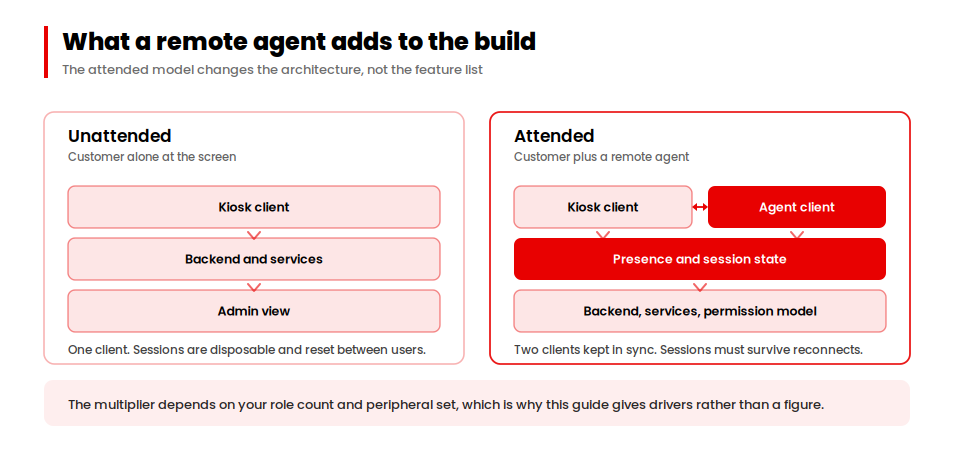
I have put “substantially higher” in that last row on purpose. The multiplier depends on your role count and peripheral set, and I would rather give you the drivers than a number I cannot stand behind.
What Goes Into Custom Kiosk Software: Six Components
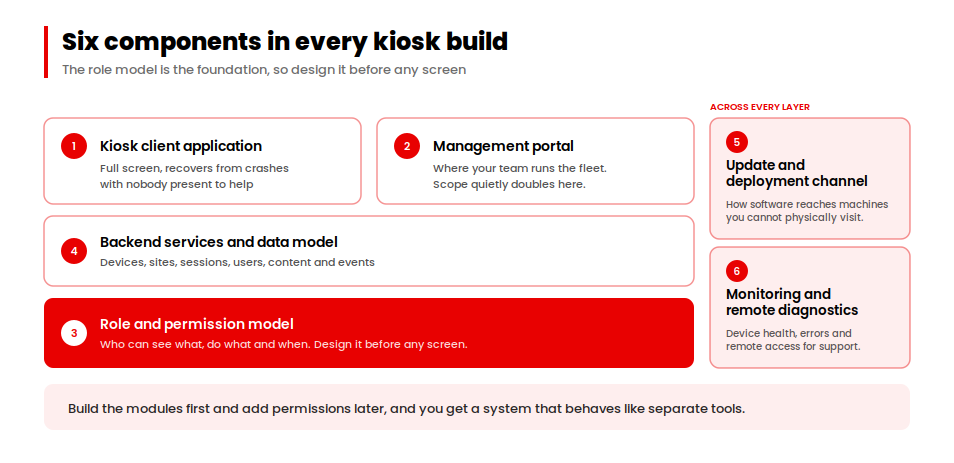
Every kiosk system software project we scope contains the same six pieces, whether it is a single terminal or a digital kiosk software development programme running across hundreds of sites. Knowing them makes your own estimate far more accurate before you brief anyone.
1. The kiosk client application
The app the customer touches. It runs full screen, recovers from crashes without a person present, and talks to whatever hardware is bolted to the machine.
Touch screen kiosk software also needs an input design that works for gloved hands, poor lighting and users who will never read instructions.
2. The management portal
A web application where your team sees every device, assigns content or schedules, and handles exceptions. This is usually where scope quietly doubles, because every role wants its own view.
3. The role and permission model
Who can see what, do what and when. On a single-site deployment this is small. Across multiple organisations with multiple sites each, it becomes the foundation everything else sits on.
Design it before any screen. Building modules first and adding permissions later produces a system that looks unified and behaves like separate tools.
4. Backend services and data model
Devices, sites, sessions, users, content and events. The data model has to represent your real operating structure, or every report you ask for later will be a workaround.
5. The update and deployment channel
How new software reaches machines you cannot physically visit. Getting this wrong turns every release into a travel expense.
6. Monitoring and remote diagnostics
Device health, uptime, error reporting and remote access for support. Covered properly in the failure section below.
Kiosk Software Development Tools and Technology Stack
The kiosk software development tools you pick shape both cost and how the thing behaves at 2am with nobody in the building.
Desktop frameworks for the kiosk client
For Windows and Linux terminals we generally build in Electron. It lets one team share code across the kiosk client and any companion desktop app, and it handles peripherals through native modules when the browser layer cannot reach them.
Native builds still win where you need deep hardware control or very tight performance. For most kiosk workflows the deciding factor is peripheral support, not raw speed.
Web and mobile layers
Management portals run as standard web applications. We build them in React with a Node backend and Postgres underneath, which keeps the portal and the desktop client on one language and one data model.
Where field staff need a companion phone app, React Native shares logic with the rest of the stack instead of forking it.
Video and remote session layers
Video kiosk software rarely means building video. It means integrating a mature real-time SDK and designing everything around it: how a session starts, what happens on a reconnect, who is allowed to join, and what gets recorded.
Building your own video transport for a kiosk project is almost never the right call. The engineering that matters sits in the session layer above it.
| Layer | What We Typically Use | Why |
|---|---|---|
| Kiosk client | Electron | Shared code, strong peripheral access via native modules |
| Remote agent client | Electron | Same codebase, same release cycle as the kiosk side |
| Management portals | React | Fast to build role-specific views |
| Backend | Node.js | One language across client and server |
| Database | Postgres | Relational fit for sites, devices, roles and sessions |
| Companion mobile app | React Native | Shares logic with the web layer |
| Video and remote desktop | Third-party real-time SDK | Mature, maintained, not worth rebuilding |
| Infrastructure | AWS | Standard for fleet workloads |
The Peripheral Stack Is Where Kiosk Projects Overrun
Ask any team that has shipped a kiosk what went over budget and you will hear about hardware. Peripherals get listed in briefs as a line of icons and estimated like checkboxes.
Why peripherals cost more than they look
A peripheral is not one integration. It is a driver, an error path, a recovery behavior and a test rig you need physically present to develop against.
Consider a document scanner. The happy path takes ten minutes to demo. Then you handle a page jam with nobody there to clear it, a scan that returns blank, a customer walking away mid-scan, and a firmware update that changes the response format.
Rough effort by peripheral type
| Peripheral | Integration Effort | The Part That Bites |
|---|---|---|
| Touch screen | Low | Calibration drift over time |
| Barcode scanner | Low | Unknown codes with no network to validate against |
| Card reader / payment | High | Certification and compliance, not the code |
| Document scanner | High | Jams, blank scans, abandoned sessions |
| Receipt printer | Medium | Paper-out handling and silent failures |
| Camera | Medium | Lighting conditions in the real location |
| Cash handling | Very high | Reconciliation and physical security |
How to scope peripherals before you brief anyone
Write down every physical component on the machine. For each one, answer two questions: what happens when it fails mid-transaction, and who fixes it.
Bring that list to your first conversation with any kiosk software development company. It will change the estimate more than anything else you say.
What Happens When an Unattended Kiosk Fails
An unattended kiosk breaks with nobody watching. That is the whole problem, and it is the reason kiosk management software exists as a category.
The real cost is the van, not the bug
A software fault on a desk-bound system costs a support ticket. The same fault on a kiosk two hours away costs a technician, a vehicle, fuel, and a machine earning nothing until they arrive.
Multiply that by fleet size and it becomes the dominant line in your running costs. Every dollar spent on remote recovery buys down a much larger one.
What your software should recover without a visit
- Restart the application after a crash, automatically, with no keyboard attached.
- Report device health and last-seen time to a dashboard your team actually watches.
- Let support take remote control of the machine to fix things in place.
- Push a software update to one device or the whole fleet without touching them.
- Surface a peripheral fault as a specific alert rather than a generic offline state.
If your build covers those five, most incidents stop being journeys. That is the number to put next to the development cost when you make the business case.
How Much Does Custom Kiosk Software Development Cost?
This is the question everyone opens with and almost nobody gets a straight answer to. Here is how we actually build the number.
Six cost drivers
| Driver | What Pushes It Up | Effect on the Build |
|---|---|---|
| Number of user roles | Multiple organisations, sites per organisation, devices per site | Large. Drives the data model and every portal view |
| Peripheral count and type | Payment, document handling, cash | Large. See the peripheral table above |
| Attended vs unattended | A remote human joining sessions | Large. Adds a second client, presence and session state |
| Fleet size and update strategy | Hundreds of devices across regions | Medium. Deployment tooling and staged rollout |
| Existing hardware constraints | Fixed hardware you cannot change | Medium. Limits framework choice, adds driver work |
| Compliance requirements | Regulated data on the machine | Medium to large depending on the regime |
Reading your own estimate
Score yourself honestly against those six. A single-site, single-role, two-peripheral unattended kiosk is a contained project. A multi-organisation attended network with document scanning and payment is a platform, and should be budgeted as one.
For general context on where enterprise app budgets land, our enterprise build cost drivers guide cites Clutch’s figures across enterprise projects. Kiosk work sits inside that picture, with the peripheral and role variables above moving it.
Want a starting number now?
Our app cost calculator gives you a rough estimate before you scope the peripheral and role work.
Estimate your costHow long kiosk software development takes
Timeline tracks the same drivers. Discovery and the role model come first, then the kiosk client and portals in parallel, then peripheral integration, then a pilot on real hardware in a real location.
Skipping the pilot is the most expensive shortcut available. Kiosks behave differently in a shop than on a desk.
Kiosk Software for Healthcare: Inside an Attended Kiosk Network
Healthcare kiosk software development is where the attended model shows up most often, because the tasks are too involved to leave a patient alone with a screen.
Collaborative Patient Care Group runs offshore On-Screen Customer Representatives who support unattended kiosks placed inside medical supply stores and healthcare facilities. A representative joins the session remotely and operates the machine while the customer is standing at it.
Why the role model came first
Before any screen went into design, we mapped the full permission structure across four user types: the representative, the store manager, the organisation admin and the super admin. The operation spans multiple organisations, multiple store locations, and multiple kiosks per store, each with different scheduling rules.
Building the modules first and adding permissions afterwards would have produced a platform that looked unified and behaved like separate tools. Starting with the shared data model is the reason it holds together.
Two desktop clients, built in parallel
We built desktop clients for both the kiosk side and the representative side in Electron, and developed them alongside the web portals rather than in sequence. Testing role interactions against real data early caught permission edge cases before they turned into integration problems.
The Zoom SDK powered the remote desktop and video layer. SendGrid handled notifications across all role levels. We integrated those rather than building them, which kept the engineering focused on the session and permission work that had no off-the-shelf answer.
The full build, including the scheduling and audit modules, is written up in the CPCG case study. Because these kiosks handle patient documents on shared hardware, the access-control side is covered separately in our guide to HIPAA compliant app development.
Configure, Buy or Build: Choosing Between Kiosk Software Solutions
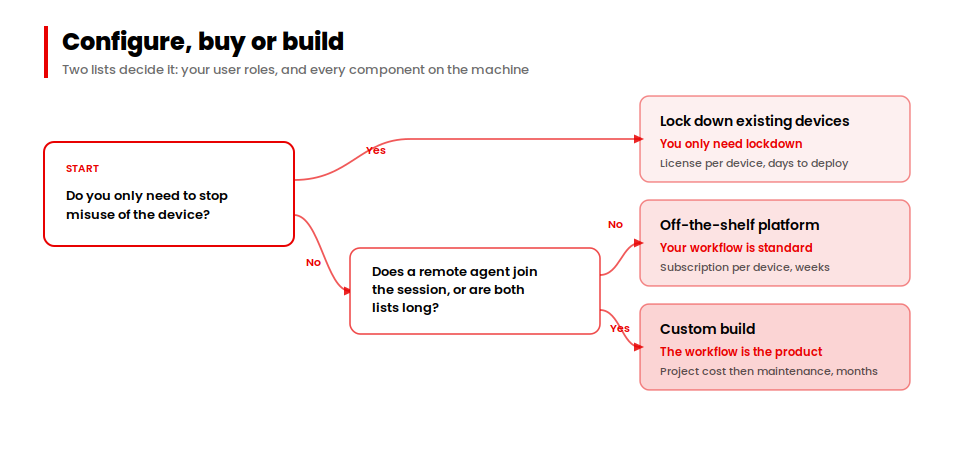
Three routes exist and only one of them is a development project. Picking correctly is worth more than picking a good developer.
| Criterion | Lock Down Existing Devices | Off-the-Shelf Kiosk Platform | Custom Build |
|---|---|---|---|
| Cost shape | Licence per device | Subscription per device | Project cost, then maintenance |
| Time to deploy | Days | Weeks | Months |
| Workflow fit | None, you adapt to the tool | Partial, configurable | Exact |
| Peripheral flexibility | Whatever the OS supports | Vendor’s supported list | Anything you can source |
| Attended session support | No | Rare | Yes |
| Fleet management | Via MDM | Included | Built to your structure |
| Right when | You only need lockdown | Your workflow is standard | The workflow is the product |
What to ask kiosk software companies before you sign
Whichever kiosk software development company you shortlist, these five questions separate the answers quickly:
- Which peripherals on my list have you shipped before, and on what hardware?
- How does your build recover a device remotely, and what still needs a visit?
- How would you model my roles and sites, and when in the project does that happen?
- What does the update path look like once machines are in the field?
- Which parts of my requirement would you tell me to buy rather than build?
That last one matters most. Kiosk software developers who will talk you out of scope are the ones worth briefing.
Where to Start With Your Kiosk Software Project
Before you brief anyone, write two lists. Every user role in your operation and what each one needs to do. Every physical component on the machine and what happens when it fails.
Those two lists set most of your budget. They will also tell you quickly whether you need a build at all, because a short role list and a short peripheral list usually points at an off-the-shelf platform.
If both lists are long, or a remote person has to join the session, you are looking at a development project. That is the point to start a conversation.
→ Planning a kiosk build?
We provide kiosk software development services end to end: kiosk clients, management portals, role models designed before the screens, peripheral integration and remote recovery.
Talk to our teamWorking in healthcare? See our healthcare app development services.
















