













 ChatGPT
 Perplexity
 Claude
 Google AI
HIPAA compliant app development means building a healthcare application so that every point where protected health information (PHI) is created, stored, transmitted, or accessed is covered by the safeguards the HIPAA Security Rule requires, encryption (AES-256 at rest, TLS 1.2 or higher in transit), unique user authentication with multi-factor login, role-based access control, and tamper-evident audit logging, each backed by a signed Business Associate Agreement (BAA) with every vendor that touches PHI.
What that definition hides is the part that actually decides your build: those controls aren’t one job, they’re owned by different parties. Some are inherited from your hosting platform (the infrastructure layer), some you have to write into your own code (the application layer), and some never leave your hands at all as the covered entity.
So if you’re trying to put a healthcare app into production; a patient portal, a telemedicine tool, an MVP that touches real patient data, without it failing a security review or turning into an expensive rebuild, and you need to know which controls you own, what it’ll cost, and where these builds tend to break, this guide is for you.
Key Takeaways
- HIPAA compliance isn’t one job, it splits across three owners: your cloud platform (infrastructure), your code (application layer), and you (workforce training, policies, accountability). Map who owns each control before your first sprint.
- There’s no such thing as “HIPAA certified” software. You demonstrate compliance through a documented risk analysis, implemented controls, and audits like SOC 2 Type II or HITRUST.
- The biggest scope question is transient vs. persistent: if your app stores PHI, nearly every Security Rule control applies; if it only passes PHI through, far fewer do. This single answer drives your cost and timeline.
- No BAA, no PHI. Handing patient data to any vendor without a signed Business Associate Agreement is a violation on its own, which is why convenient tools like Firebase/Firestore trigger expensive rebuilds.
- Build to the stricter standard now. Treat encryption (AES-256, TLS 1.2+) and MFA as mandatory regardless of the pending Security Rule update, retrofitting later costs 3–5× more.
- Budget realistically: compliant builds run $50k (MVP) to $300k+ (EHR-integrated platforms), add 15–25% for compliance work, and carry low-five-figure annual upkeep that never hits zero.
Who Is Responsible for HIPAA Compliance?
Start with the framework I wish every founder had before their first architecture meeting, because it reframes the entire problem from “am I compliant?”, an unanswerable, anxiety-inducing question into “which layer owns this control, and have we closed it?”, which you can actually answer.
Compliance for an app splits across two layers and one accountable owner.
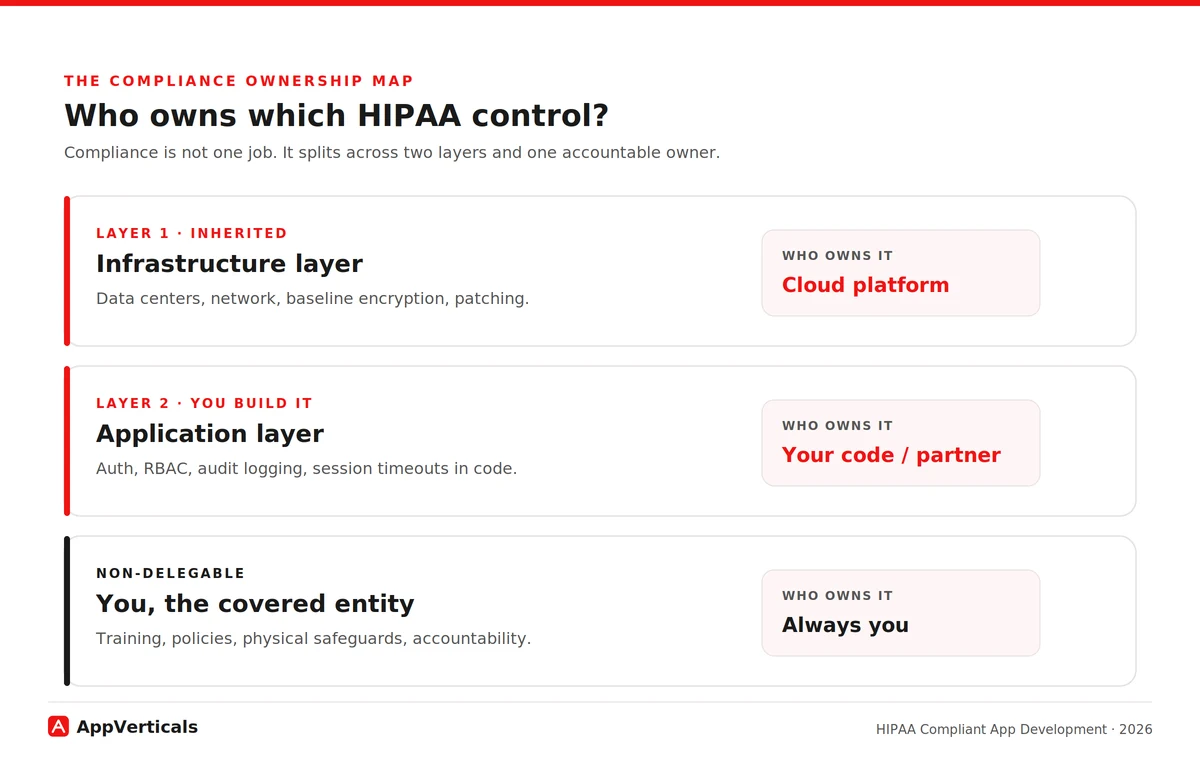
The infrastructure layer is what your cloud platform handles and covers under its BAA: the physical data centers, the underlying network, baseline encryption capabilities, hardware patching. Run on a HIPAA-eligible cloud (AWS, Microsoft Azure, or Google Cloud) under a signed BAA and you inherit these. You don’t build them, you configure and use them correctly.
The application layer is what your own code owns: how users authenticate, who can see which records, whether every PHI access is logged, how sessions time out, how data moves between screens. The cloud gives you the ability to encrypt and to control access; your application has to actually use it. This is the layer where compliance is won or lost, and the layer your hosting provider’s BAA explicitly does not cover for you.
And the owner who can never delegate the whole thing away: you, the covered entity or business associate. Workforce training, administrative policies, physical safeguards in your own offices, and ultimate accountability for the PHI stay with you no matter how good your cloud or your developer is.
This is also where two pieces of “what HIPAA means” actually matter to a buyer.
HHS and its Office for Civil Rights (OCR), the enforcer, don’t certify or “approve” any app or company. A vendor waving a “HIPAA certified” badge is misreading the rules.
What exists instead is demonstrated compliance: a documented risk analysis, the controls you’ve actually implemented across these layers, and third-party audits like SOC 2 Type II or HITRUST that enterprise buyers now expect.
Eligible is raw material; compliant is what you do with it. Both ideas only make sense once you see compliance as ownership of controls, which is why they live here, not in a definitions chapter.
Here’s how the controls typically fall. The exact lines shift per build, which is precisely why a competent partner draws this map with you at the start rather than leaving it vague:
| Control | Infrastructure layer (platform/BAA) | Application layer (your code / partner) | You, as covered entity |
|---|---|---|---|
| Encryption at rest | Provides encrypted storage & key management | Enables it correctly for all PHI stores | Sets the policy requiring it |
| Encryption in transit | Provides TLS-capable endpoints | Enforces TLS 1.2+ on every PHI connection | — |
| Network isolation | Provides VPC / private networking | Configures isolation around PHI services | — |
| Patch management (infra) | Patches hardware & managed services | Patches app dependencies & libraries | — |
| Unique user authentication | Provides identity tooling | Implements unique logins + MFA | Enforces account policy |
| Automatic logoff / timeout | — | Builds session timeout into the app | Sets the timeout policy |
| Role-based access (RBAC) | Provides IAM primitives | Implements least-privilege roles in app | Defines who gets which role |
| PHI audit logging | Provides logging infrastructure | Logs every PHI access event in-app | Reviews the logs |
| Integrity controls | Provides storage integrity | Validates data isn’t improperly altered | — |
| Emergency access | — | Builds break-glass procedures | Authorizes who may use it |
| Workforce training | — | — | Trains all staff who touch PHI |
| Physical safeguards | Secures the data center | — | Secures your own premises/devices |
Keep that table in your head for the rest of this guide. Every section below is really about one of its columns, and the single most common reason a build fails review is that nobody decided who owned a row until it was too late.
Scoping a HIPAA-compliant build
Discuss your ideas and requirements with our experts to get a detailed scope ready.
Do All Healthcare Apps Need To Be HIPAA Compliant?
Before you budget a single control from that table, size the problem, because the same table can describe a four-month MVP or a two-year platform depending on one question most teams never ask.
HIPAA applies when your app handles PHI for a covered entity (a provider, health plan, or clearinghouse) or as their business associate. A direct-to-consumer fitness or general-wellness app a person uses on their own, with no provider connection and no clinical record, generally falls outside it, that data can be sensitive and other privacy laws may apply, but it isn’t PHI under HIPAA.
The lens that actually sizes your build is the transient versus persistent test, and it’s one almost no build-intent guide explains. Does your app merely pass PHI through, briefly, in transit, without storing it, or does it hold PHI at rest in your systems?
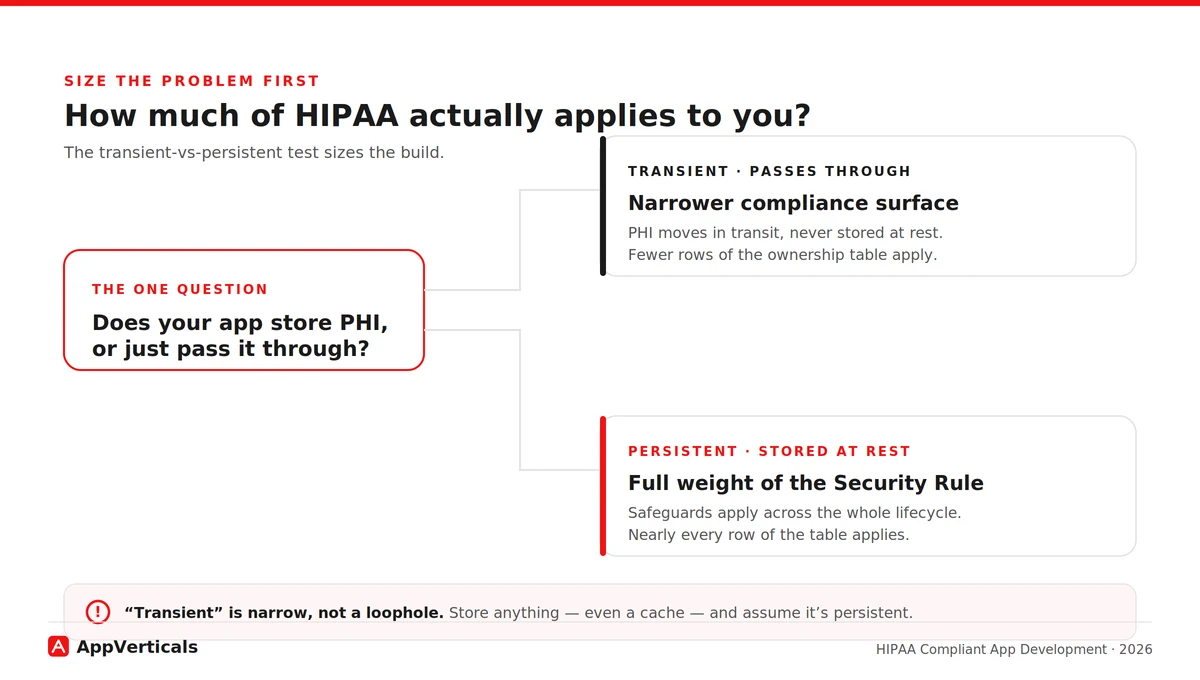
Persistent storage pulls the full weight of the Security Rule across the whole data lifecycle, lighting up nearly every row of the ownership table. A genuinely transient path may light up far fewer. This one answer determines how much of HIPAA lands on you, and therefore how much it costs.
Is Firebase HIPAA Compliant? The BAA Blocker That Forces Rebuilds
If I had to name the single issue that derails more early healthcare builds than any other, it’s this one. Start with the mechanics, because they’re the reason the trap is so costly.
A Business Associate Agreement is the legal instrument that lets a vendor handle PHI on your behalf. Without a signed BAA, handing PHI to a vendor is itself a HIPAA violation, regardless of how secure that vendor’s technology is. The BAA is the line; the technology is secondary to whether the line exists. You need one with every vendor that touches PHI, across every layer of that ownership table.
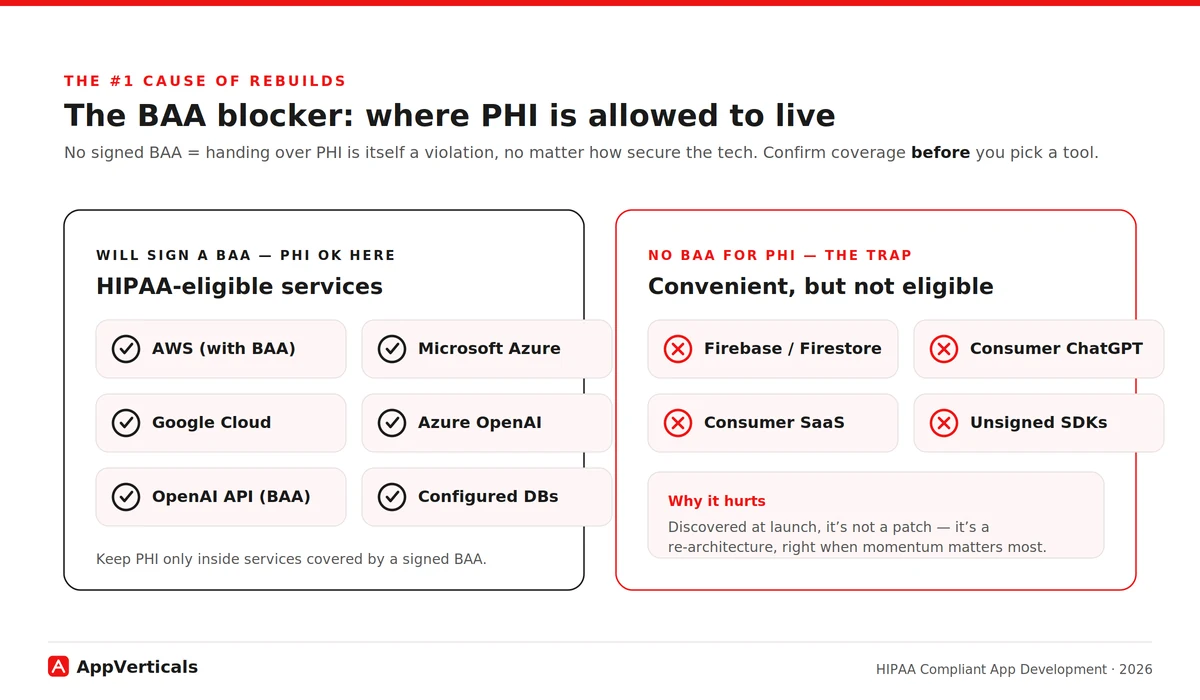
The fix is simple once you know to look: keep PHI only in HIPAA-eligible services. The major clouds, AWS, Azure, Google Cloud, will sign a BAA and offer eligible services to build on. The discipline is to confirm BAA coverage before you pick a tool, and to make sure PHI never lands in a convenient service outside that coverage.
Tie it back to the scope test: a tool that only ever sees PHI in transit carries different exposure than your primary datastore, but the safe default is, if it touches PHI at all, it needs a BAA.
What Technical Safeguards Does The HIPAA Security Rule Require?
Now we can put real context behind the application-layer column of the table, because that’s what the Security Rule’s technical safeguards are, once you translate them out of regulatory language. These are the controls your code owns, not your cloud:
- Access control: unique user IDs and a break-glass path for emergencies that doesn’t weaken normal security. No shared logins, ever.
- Authentication: proving users are who they claim to be, which in 2026 means multi-factor authentication as the baseline, not a nice-to-have.
- Encryption: AES-256 at rest and TLS 1.2+ in transit, everywhere PHI lives or moves.
- Audit controls: recording who accessed which PHI and when, in logs that can’t be quietly altered.
- Automatic logoff: sessions that time out so an unattended device isn’t an open door.
- Integrity controls: ensuring PHI isn’t improperly altered or destroyed. Each of these is one of the architecture decisions compliance forces on you early, because none of them can be added cleanly once the data model and auth flow are set.
Where the regulation is heading matters for how you build today (part of a broader shift we cover in our healthcare software development trends guide). In January 2025, OCR published a proposed Security Rule overhaul, its first major update since 2013 that would make controls like encryption and MFA explicitly mandatory (removing the old “addressable” flexibility) and add requirements such as a written asset inventory and network map.
As of mid-2026 it remains proposed, not final: OCR is still working through thousands of comments, and the timing and final shape are uncertain. The current rule stays in effect meanwhile.
How Much Does HIPAA Compliant App Development Cost In 2026?
The cost of building a HIPAA compliant app comes down to scope, the two things we’ve already covered: how much of the ownership table you have to build (persistent vs transient), and how deep your integrations with clinical systems run. Compliance work itself typically adds 15–25% on top of a comparable non-regulated build, plus annual upkeep most first-time founders forget.
Here’s a quick breakdown:
| App type | Typical timeline | Cost range (2026) | Main cost drivers |
|---|---|---|---|
| MVP (single feature, real PHI) | 3–4 months | $50k–$90k | Compliance baked in from sprint one |
| Telemedicine app | 6–9 months | $70k–$250k | Real-time video encryption, scheduling |
| Patient portal + EHR companion | 8–12 months | $80k–$300k | HL7/FHIR integration, RBAC, audit trails |
| Enterprise multi-site platform | 12–24 months | $250k–$600k+ | Multi-tenant isolation, ongoing validation |
Read these ranges through the ownership lens.
The biggest single lever is EHR/EMR integration depth, connecting to clinical records via HL7/FHIR is where the hardest interoperability and security work lives, so it stretches both timeline and budget.
The second lever is when compliance entered the design. Retrofitting it onto an app that wasn’t built for it typically costs three to five times what building it in from day one would have, because the safeguards are architectural, shaping your data model, auth flow, and infrastructure from the first decision.
That’s the same reason the timelines run longer than equivalent consumer apps: you can’t sprinkle encryption and access control on at the end. And the recurring line nobody budgets: annual upkeep, audits, penetration testing, monitoring, commonly runs in the low five figures and never hits zero.
And the cost that dwarfs all of these if you get it wrong: the penalty. As of the January 2026 inflation adjustment, HIPAA civil monetary penalties run from $145 to $2,190,294 per violation, tiered by culpability, with that ceiling reserved for willful neglect left uncorrected. Those are per-violation figures, and a single breach often counts as many. Budgeting compliance is cheaply measured against that.
To pressure-test a number for your own scope, estimate your build before you talk to anyone, and our full healthcare app cost breakdown goes deeper to assist you with that.
CPCG: A Real HIPAA-Compliant App We Build
To see the ownership map in practice, let’s dig through an actual app we build.
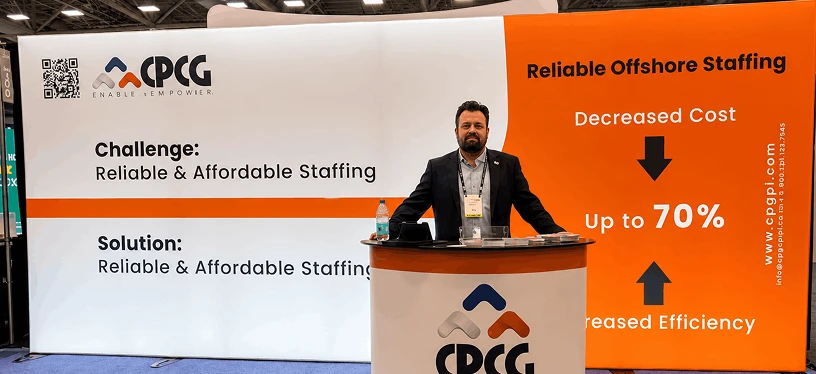
Collaborative Patient Care Group (CPCG), a Washington, DC–based healthcare operations firm, came to us with a connectivity problem that was quietly a compliance problem. Their offshore on-screen customer representatives (OCSRs) needed to operate unattended kiosks sitting inside medical supply stores and healthcare facilities, scanning patient documents and running local applications on those machines remotely, without anyone physically present to grant access.
To do it, they had stitched together off-the-shelf remote-access tools; Microsoft Teams, AnyDesk, Splashtop. It worked, loosely, but it was exactly the fragmented arrangement that creates operational and security gaps: no unified control over who could reach a kiosk, when, or what they did once connected. On systems touching patient documents, that’s the kind of setup a reviewer flags immediately.
The rebuild came down to three decisions, each mapping straight onto a layer of the ownership table. On the infrastructure layer, the platform ran on a HIPAA-eligible cloud (AWS), so those controls sat under a proper BAA: inherited rather than reinvented.
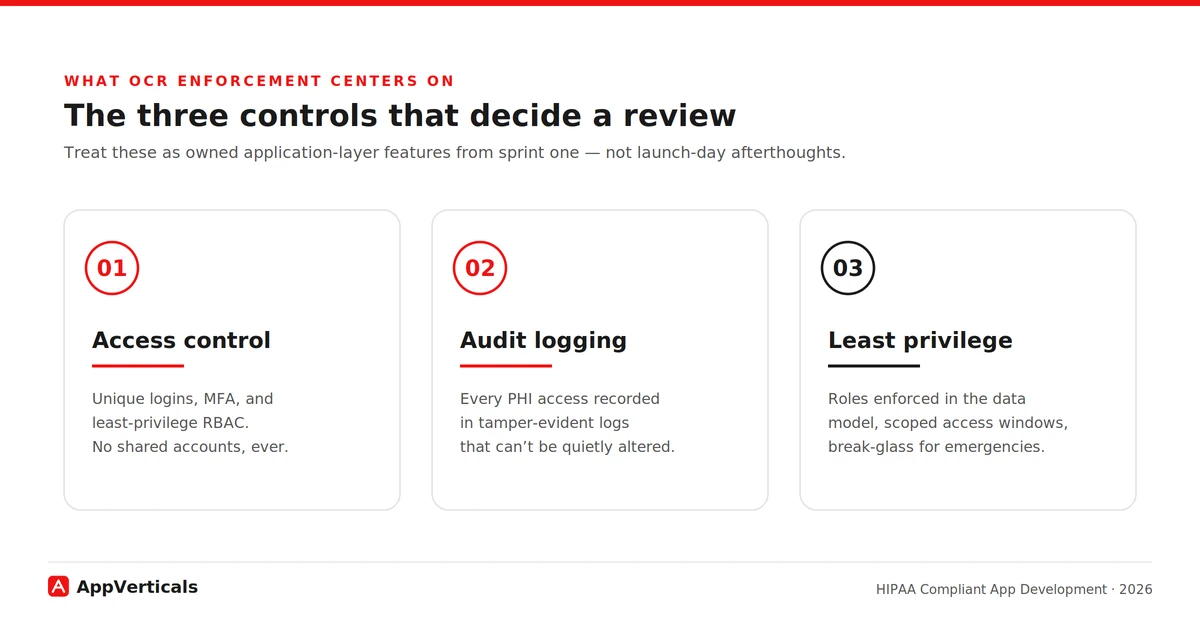
On the application layer, access control replaced open-ended remote access with schedule-bound access: an OCSR could log in and operate a kiosk only during their assigned shift hours, over role-based access spanning OCSR, store-manager, organization-admin, and CPCG super-admin tiers. Least privilege wasn’t a slogan; it was enforced in the data model.
Also on the application layer, audit logging captured sessions, and a dedicated audit module let super admins silently join an active session for quality assurance without notifying the representative or the kiosk, the kind of tamper-evident oversight the Security Rule expects.
The all-in-one platform replaced the fragmented toolset with controlled login windows, complete audit trails, and tiered role-based access, the exact triad (access control, audit logging, least privilege) that OCR enforcement now centers on.
Compliant AI and LLM Features: Can You Use ChatGPT or AI APIs With Patient Data?
Almost every healthcare product I advise now wants an AI feature, summarizing records, drafting patient messages, triaging. It’s doable, and it’s really just the BAA rule applied to one more vendor in your ownership map.
You can only send PHI to an AI service that will sign a BAA for that use. As of 2026 the major providers offer eligible paths: OpenAI signs a BAA for its API platform (covering zero-retention-eligible endpoints), and Microsoft’s Azure OpenAI Service and the major clouds’ AI offerings are available under their BAAs.
The trap mirrors Firebase: consumer tiers aren’t covered. A clinician pasting notes into a standard consumer ChatGPT subscription is a violation no matter how careful they are, no BAA sits behind the consumer product. API and enterprise tiers are different products with different contractual protection.
How Do You Choose a HIPAA-Compliant App Development Partner
This is the decision that makes every other one easier. The real challenge is: everyone claims HIPAA experience. The fastest way to tell real from rehearsed is to ask them to do, on the spot, the thing this whole guide is built on: draw the ownership map for your build. These are the questions to ask before you sign:
- Can you draw the two-layer ownership map for our build: who owns which control? (If they can’t, stop here.)
- Can you show me a HIPAA build you’ve shipped: walk me through a real one, not a claim?
- Will you sign a BAA with us, and help manage BAAs with our other vendors?
- Do you hold SOC 2 Type II or HITRUST, or can you help us get there?
- What’s your HL7/FHIR track record if we need EHR integration?
- Will you deliver a documented risk analysis as a project artifact?
- What’s your policy on PHI on devices and in local caches?
- What does your post-launch compliance support actually include?
A partner who answers the first one crisply has actually done this. One who gets vague about layer ownership or waves off the risk-analysis deliverable is telling you something. Listen to it.
Conclusion
If your app touches PHI, it has to be HIPAA compliant, that part isn’t up for debate. What you do get to decide is whether you walk into the build knowing which controls your platform inherits, which your code must carry, and which stay with you, or whether you find out the hard way.
Settle that map before the first sprint and compliance becomes an architecture decision you make calmly, not a launch-day emergency you scramble through. So if you’re scoping a build now, map your PHI first. Then bring your questions to a team that’s shipped compliant healthcare products before.
Build It Compliant From Sprint One
Bring us your scope and we’ll map which controls your platform inherits, which your code carries, and what it’ll cost; before the first sprint.
Explore our healthcare app development services
Read: Healthcare App Development Cost in 2026: A Full Breakdown to pressure-test a number for your own scope before you brief a single developer.