ChatGPT
 Perplexity
 Claude
 Google AI
Web application architecture is the way a web app’s browser side, servers and database are set up and work together, and the choice this guide helps you make is whether to start with a monolith or with microservices. My advice is to start with one deployable app built from clear modules and to split a part into a service only when a measured need appears. This guide covers the path of one request, the client side and server side components, three tiers, six modern patterns, a decision table for team size, release pace, scaling, budget and launch time, the Nokia Al-Saudia platform as a worked example, a four step move to services, and where AI fits. If you want a team that plans the architecture before it writes code, talk to a web application development company that has built both styles.
| Start with one app built from clear modules and split into services only when a measured need appears. |
Key Takeaways
- One request follows five steps: browser, DNS, web server, app server with database, and a response back to the browser.
- The client side holds the browser, frontend and CDN. The server side holds the web server, app server, database, cache and APIs.
- A three tier build separates presentation, logic and data, so each layer changes on its own.
- Six patterns fit different stages, and the comparison table shows which one suits your team.
- Team size, release pace, scaling needs, budget and time to launch decide between a monolith and microservices.
- Martin Fowler’s Monolith First advice supports a simple start, and the CNCF’s 2026 survey, where 47% of respondents named cultural change within the development team as their main challenge, shows why team size drives the decision.
- AI features run as a separate service that calls a model.
How web application architecture works
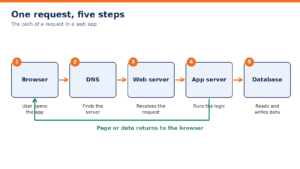
Web application architecture is the path a request travels between a browser and the servers behind it, and one request follows five short steps.
- The user opens the app in a browser, which sends a request.
- DNS translates the domain name into the address of the server.
- The web server receives the request and passes it on.
- The app server runs the business logic and reads or writes the database.
- The page or data goes back to the browser, which draws it on screen.
A web application architecture diagram makes these steps easy to review with a team. I draw it first on every project, because each arrow marks a place where a delay or a failure can occur.
Core web application architecture components
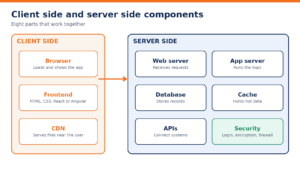
Web application architecture components fall into two groups: three on the client side (browser, frontend and CDN) and five on the server side (web server, app server, database, cache and APIs).
Client side
The client side is everything that runs in the user’s browser. The browser loads and displays the app. The frontend, built with HTML, CSS and a JavaScript framework such as React or Angular, draws the screens and reacts to clicks. A content delivery network (CDN) stores copies of static files close to each user, so pages load fast in every region.
Server side
The server side holds the logic and the data. The web server, such as Nginx, receives each request. The app server runs the business rules. The database stores records, and a cache such as Redis keeps frequent answers in memory to reduce database load. APIs let the frontend and other systems talk to the app in a fixed format. Security basics apply to every part: secure login, encrypted data in transit and at rest, and a firewall at the network edge.
Each part has a failure mode worth planning for. A CDN outage slows static files, a cache miss shifts load to the database, and a slow API call stalls the screen that waits for it.
3 tier web application architecture
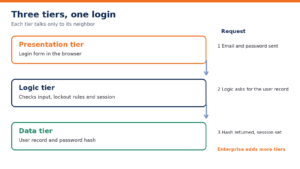
A 3 tier web application architecture splits the app into a presentation tier, a logic tier and a data tier, and each tier talks only to its neighbor.
Take a login as an example. The presentation tier shows the form and sends the email and password. The logic tier checks the format, applies lockout rules and asks the data tier for the matching user record. The data tier returns the stored password hash. The logic tier compares it, creates a session and tells the presentation tier to show the dashboard. This split lets a team change the login screen without touching the database and swap the database without rewriting the screens.
Large enterprise web application architecture adds more tiers, such as an integration tier for ERP and identity systems and a separate caching tier.
Modern web application architecture patterns
Modern web application architecture offers six patterns, and the table shows what each one is and where it fits.
| Pattern | What it is | Best for |
| Single page app | One page that loads once and updates its content with JavaScript | Dashboards and tools with heavy interaction |
| Progressive web app | A web app that installs on a phone and works on weak connections | Teams that want app-like access without app store builds |
| Monolith | One codebase deployed as one unit | New products and small teams |
| Modular monolith | One deployable app split into clear business modules | Growing products that need order without extra servers |
| Microservices | Small services that each own one function and their own data, deployed on their own | Large products with several teams and uneven load |
| Serverless | Functions that a cloud provider runs on demand | Spiky workloads and event driven tasks |
Single page apps and progressive web apps shape the client side, while the other four shape the server side. Our types of web applications post covers the first two in more detail.
Pick a pattern by stage. A seed stage product fits a monolith with clear modules, because one team ships quickly and changes direction without coordinating releases across services. A product with several teams and uneven load fits microservices. Serverless fits workloads that sit idle for long stretches and then spike.
Monolith vs microservices: how to choose
Start with a monolith built as clear modules and split a part into a service later, when a real need shows up.
Martin Fowler’s Monolith First view backs this order: teams that begin with microservices carry the cost of a distributed system before they know where the boundaries belong. The CNCF’s 2026 survey supports the people side of this advice, with 47% of respondents naming cultural change within the development team as their main challenge.
| Factor | Monolith | Microservices |
| Team size | One team works in one codebase | Several teams each own a service |
| Release pace | The whole app deploys together | Each service deploys on its own schedule |
| Scaling needs | Scale the whole app as one unit | Scale only the busy service |
| Budget | One pipeline and one environment keep spend low (see our web app development cost guide) | Extra pipelines, monitoring and platform work raise spend |
| Time to launch | Fast, because there is one codebase to build and test | Slower, because service contracts and infrastructure come first |
Your pattern choice sets your team size, hosting and release costs. See what a monolith, a modular monolith and a microservices build cost in practice, with the factors that move the budget.Know what your architecture will cost before you commit
Some teams phrase the choice as microservices vs monolith, but the order matters: the monolith comes first and the services follow.
Read the table row by row. If only one row favors microservices for your product, such as scaling needs, split only that part and keep the rest together. If three or more rows favor microservices, plan the move in stages instead of all at once.
Our Nokia Al-Saudia training platform shows this path at work. We built it on Laravel and MySQL as one app, and it has onboarded 10,000+ learners with 35% less admin time. One codebase carries that load, so a monolith is a safe place to start. If you are still validating the idea, an MVP development company can scope the first version around a single deployable app.
Modular monolith and moving to microservices later
A modular monolith is one app split into clear modules, one per business area, so the code stays organized while it deploys as a single unit.
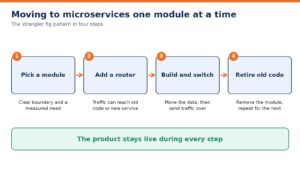
Shopify’s engineering post on its monolith explains how the company enforces module boundaries inside one large codebase. When a module needs its own scaling or release pace, move it out with the strangler fig pattern, one module at a time:
- Pick one module with clear boundaries and a measured need, such as heavy load.
- Put a routing layer in front of the app so traffic can reach the old code or the new service.
- Build the module as a service, move its data and send traffic to it.
- Remove the old module code and repeat for the next module.
Module boundaries matter more than the number of modules. Give each module its own folder, its own tests and a defined interface, and forbid other modules from reading its tables directly. These rules make a later split cheap, because the interface already exists. Our application modernization strategy post explains how to plan this move across a larger system.
Where AI fits in web application architecture
AI features such as chatbots or smart search run as a separate service that calls an AI model.
The web app sends the user’s question to this service, which adds context, for example from a vector database that stores company knowledge as searchable embeddings, and returns the answer through an API. Keeping AI in its own service keeps the rest of the web application architecture stable when models change, and it lets you scale the AI layer on its own. Our AI integration services team builds this layer for existing apps.
Choosing a partner to build your web app
Choose a partner that plans the architecture before it writes code. Look for experience with both monoliths and microservices, cloud skills on AWS, Azure or Google Cloud, and a record of shipping live products. A web app development company with these traits will tell you which pattern fits your stage. Share your goals with our team and we will map your architecture before the first sprint.
Get a cost and timeline estimate for your web app, with an architecture recommendation matched to your team size, release pace and launch date.Plan your build with an expert