















 ChatGPT
 Perplexity
 Claude
 Google AI
Enterprise mobile app development helps Dallas businesses connect employees, field operations, and existing systems through secure mobile applications. These apps integrate with ERP, CRM, inventory, and financial platforms to automate workflows, reduce manual work, and improve operational visibility.
For businesses working with an app development company in Dallas, the focus extends beyond building a mobile interface to ensuring the application integrates with existing systems and supports daily operations.
Unlike consumer apps, enterprise applications handle complex workflows, multiple user roles, sensitive data, and integrations that support daily business operations.
According to the City of Dallas Office of Economic Development, more than 62,000 businesses operate in Dallas, including eight Fortune 500 headquarters. The wider Dallas-Fort Worth region had 21 Fortune 500 headquarters on the 2025 list, according to the Federal Reserve Bank of Dallas.
For a Dallas company managing warehouses, delivery teams, and regional offices, the harder problem is keeping information accurate as work moves between locations and systems.
Key Takeaways
|
What Is Enterprise Mobile App Development?
Enterprise mobile app development is the process of designing and building secure mobile applications that streamline business operations, support employee workflows, and integrate with existing enterprise systems such as ERP, CRM, and inventory management platforms.
For example, a maintenance technician can receive a work order, complete an inspection, upload photographs, and update the company’s ERP system directly from a mobile device.
Unlike consumer apps, enterprise applications are built around specific business processes, with functionality and access permissions tailored to the employees and departments using them.
Enterprise Mobile App Use Cases by Dallas Industry
Dallas businesses use enterprise mobile apps to reduce operational delays, connect distributed teams, and keep information consistent across locations.
Industries such as finance, healthcare, logistics, telecommunications, real estate, and manufacturing depend on timely communication between field employees and back-office systems.
| Industry | Enterprise mobile use case |
| Finance | Transaction monitoring and approvals |
| Healthcare | Staff scheduling and patient workflows |
| Logistics | Dispatch and proof of delivery |
| Real estate | Property inspections and maintenance |
| Telecommunications | Technician assignments and service reporting |
| Manufacturing | Inventory and equipment monitoring |
Consider a logistics company operating warehouses and delivery teams across Dallas, Plano, and Fort Worth.
Each location handles dispatch, inventory updates, and delivery confirmations. When these activities rely on phone calls or disconnected software, dispatchers spend additional time reconciling records across locations.
An enterprise mobile app connected to the transportation management system allows drivers to confirm deliveries, update shipment statuses, and share information with dispatchers and customer service teams through a single workflow.
How Do Enterprise Apps Connect With Existing Systems?
Enterprise application integration allows mobile apps to exchange information with ERP, CRM, accounting, inventory, and other internal platforms without manual re-entry.
Most integrations rely on three technologies:
- APIs: Exchange information directly between applications and backend systems.
- Webhooks: Notify connected platforms when events occur.
- Event queues: Process transactions when systems are busy or temporarily unavailable.
For example, when a sales representative submits an order through a mobile app, the ERP can validate inventory, record the transaction, and return the order status.
But what happens when the ERP is unavailable?
The mobile application should not confirm the order as completed when the backend hasn’t accepted it. It must preserve the request, report its status accurately, and retry safely when appropriate.
Integration planning must define data ownership, validation rules, synchronization, and error handling.
Businesses using older software can use enterprise application integration services or legacy application modernization to connect existing infrastructure while retaining functional systems.
5 Layers of Enterprise Mobile App Architecture
Enterprise mobile app architecture typically consists of five connected layers that separate the user experience from business logic, security, integrations, and data management.
| Architecture layer | Responsibility |
| Mobile interface | Screens and employee interactions |
| Backend and APIs | Business rules and transaction processing |
| Identity and permissions | Authentication and authorized access |
| Enterprise integrations | Connections with existing systems |
| Data and monitoring | Storage, audit logs, and performance |
Enterprise mobile architecture must support consistent access across devices, locations, and network conditions.
Backend services enforce business rules and access permissions, while offline storage lets employees complete supported tasks during connectivity interruptions.
Caching reduces repeated requests, and monitoring helps IT teams identify performance issues across locations. Separating these responsibilities also makes individual components easier to update as operational requirements change.
How To Secure Enterprise Mobile Apps?
Securing enterprise mobile apps requires implementing authentication, role-based access controls, encryption, and continuous monitoring to protect sensitive business data and prevent unauthorized access.
A regional manager should only access records within their responsibilities, while administrative employees should not automatically receive access to confidential financial or clinical information.
Essential security controls include:
- Single sign-on and multifactor authentication.
- Role-based permissions and API authorization.
- Encryption and secure token storage.
- Session revocation and mobile device management.
- Audit logs and data retention policies.
The OWASP Mobile Application Security Cheat Sheet provides guidance on protecting sensitive data and securing application communication.
Adding permission controls after development can require changes to backend APIs, databases, and user workflows. Defining them early reduces rework and prevents avoidable security gaps.
Enterprise Mobile App Development Platform Comparison
The right enterprise mobile app development platform depends on device requirements, operational complexity, integrations, and long-term maintenance costs.
| Approach | Best suited for |
| Native iOS or Android | Hardware-intensive and platform-specific workflows |
| Flutter or React Native | Custom applications sharing workflows across iOS and Android |
| Low-code | Standardized forms, approvals, and simple internal processes |
| Custom development | Complex integrations and proprietary workflows |
For standard employee-facing applications, cross-platform development is a strong starting point because it reduces duplicated work across operating systems.
Native development becomes more appropriate when the application depends heavily on specialized hardware or platform-specific performance.
Low-code tools simplify basic workflows but introduce limitations when applications require extensive customization or complex integrations.
Selecting a framework before assessing technical requirements can create expensive workarounds during development.
What Is the Enterprise App Development Process?
The enterprise app development process is a structured approach that involves discovery, system assessment, architecture planning, prototyping, development, testing, and phased deployment to build secure applications that support business operations.
Each stage addresses a specific part of the development lifecycle:
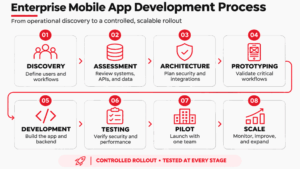
For businesses operating across multiple Dallas locations, a pilot should begin with one representative team or facility before expanding company-wide.
Employees should test the application using actual devices, workflows, and network conditions. The pilot should identify usability gaps, security issues, and performance limitations before deployment across additional teams.
What Enterprise Projects Has AppVerticals Delivered?
AppVerticals’ experience spans mobile application development, connected business platforms, and enterprise system integration. Projects for Coca-Cola, Spruce, and CPCG demonstrate how these capabilities address different operational challenges.
Coca-Cola: Connected B2B Operations
Coca-Cola’s UAE trade network relied on manual ordering, invoicing, and account coordination across restaurants, hotels, and retailers.
AppVerticals developed a React Native commerce platform that connected these activities while supporting high transaction volumes.
The Coca-Cola case study reports more than 2 million peak users, 99.98% platform uptime, and 45% faster user journeys.
Spruce: Unified Property Operations
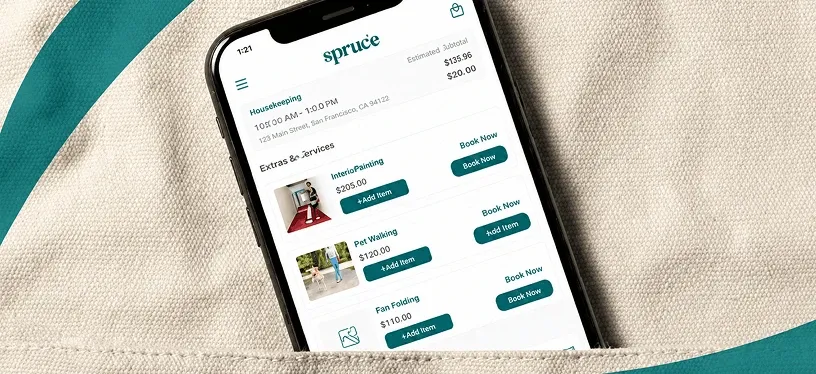
Spruce needed to modernize its property services platform serving residents, property managers, and service professionals.
AppVerticals rebuilt the platform around connected workflows and role-based permissions, allowing different users to manage their responsibilities within a shared system.
According to the Spruce case study, the platform supports more than 685,000 customers, 6,477 properties, and 7,581 property management companies.
CPCG: Healthcare System Consolidation
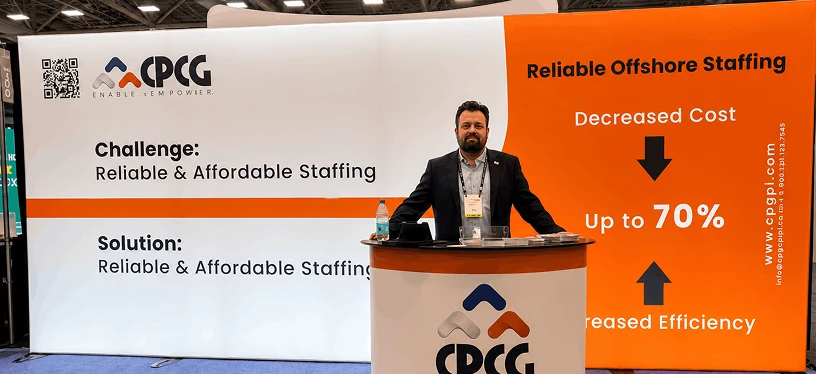
Collaborative Patient Care Group relied on five disconnected tools to manage its remote healthcare kiosk operations.
AppVerticals consolidated these tools into a centralized enterprise platform with four permission levels, operational monitoring, and audit trails.
The CPCG case study reports approximately three hours saved per customer service representative each week.
How Do You Choose an Enterprise App Development Company?
Dallas businesses should evaluate enterprise app development companies based on integration expertise, security practices, relevant project experience, and post-launch responsibility.
Before selecting a provider, ask:
- Have they integrated applications with ERP, CRM, or legacy platforms?
- How do they define data ownership and user permissions?
- Can they demonstrate measurable results from comparable projects?
- Who owns the source code, infrastructure, and documentation?
- How are integration failures, security updates, and maintenance handled?
Companies considering app development in Dallas should assess a provider’s ability to integrate existing systems, manage access across departments, and scale applications as operational demands increase.
Ask potential providers how they handle changes to third-party APIs, failed integrations, and production incidents. Their answers should identify who monitors these issues, how changes are tested, and who is responsible for resolving them after launch.
Frequently Asked Questions
How much does enterprise mobile app development cost?
Enterprise mobile app development costs depend on system integrations, security requirements, supported platforms, and workflow complexity. Based on typical app development costs, complex applications range from $180,000 to $400,000, while large enterprise or regulated builds start at $400,000. Smaller departmental applications can cost less, depending on integrations, security requirements, and scope.
How long does enterprise app development take?
Enterprise app development timelines depend on application complexity, integration requirements, and security needs. AppVerticals estimates 9–15 months for complex applications and 12–24 months for enterprise or regulated platforms. Projects involving legacy systems or extensive integrations require additional planning and testing. A phased rollout allows businesses to validate critical workflows before expanding across departments.
Can an enterprise app connect with ERP and CRM systems?
Yes. Enterprise mobile apps can connect with ERP and CRM platforms through APIs, middleware, webhooks, and other integration technologies. These connections allow employees to access customer records, update inventory, process orders, and manage approvals from mobile devices. Reliable integration also requires clear data ownership, secure access, and synchronization rules to prevent inconsistent records across systems.
How are enterprise mobile applications secured?
Enterprise mobile applications use multiple security controls to protect business information and restrict unauthorized access. These include single sign-on, multifactor authentication, role-based permissions, encryption, secure token storage, and audit logs. Businesses should also implement API authorization, session management, and data retention policies. Security requirements must be defined during planning and validated through testing before deployment.
How should a Dallas company select an enterprise app development company?
Dallas businesses should request relevant case studies, an integration assessment, an outline of security controls, and a breakdown of development and support responsibilities. The proposal should identify who owns the source code, infrastructure, and documentation. It should also explain how the provider handles third-party API changes, production incidents, and ongoing maintenance after launch.
Build Enterprise Apps Around Your Operations
A successful enterprise mobile app starts with aligning technology investments with operational priorities, system integration needs, and long-term business goals.
Work with our Dallas app development team to assess your technical requirements, identify integration challenges, and plan a secure, scalable solution built around your operations.