ChatGPT
 Perplexity
 Claude
 Google AI
An offline field service app stores work orders, forms and captured evidence in a small database on the technician’s own phone or tablet, then sends them to the server once a connection comes back. It does not need live internet to do its job. The difference that matters is architectural: an offline-first app writes to the device by default and treats the network as a bonus, while an online app with an offline mode drops features in ways nobody can predict. That difference decides whether a crew in a basement, a rural substation or a storm-damaged street finishes the job or repeats it.
I have watched both patterns ship. The failures are rarely loud. A form submits, the queue empties, and a supervisor’s correction quietly disappears underneath a technician’s older copy.
This article covers what breaks when the signal drops, how sync and conflict handling decide the outcome, what offline-first costs to build compared with adding it later, and how to score an app before you commit.
What Is an Offline Field Service App?
People use these two phrases interchangeably. They describe very different builds, and the gap shows up on the worst possible day.
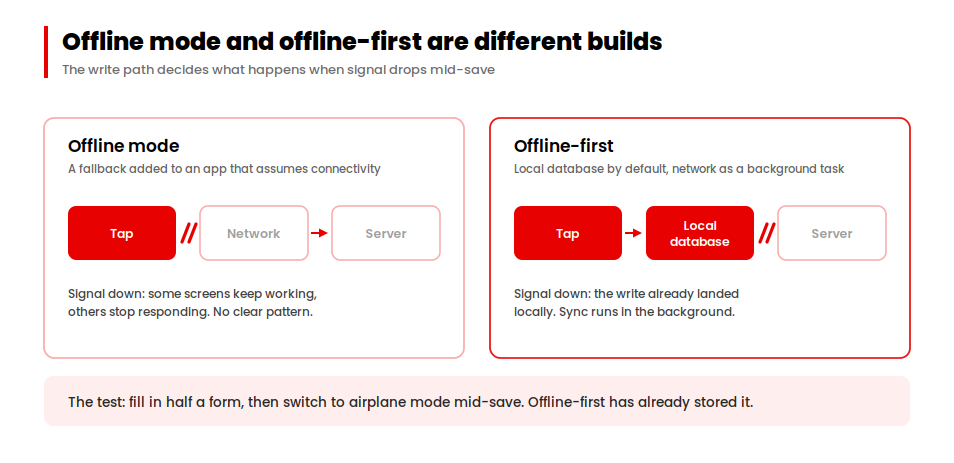
Offline mode: a fallback added after the fact
Offline mode is a fallback bolted onto an app that assumes it has internet. Some screens keep working and others grey out, depending on how each feature was written. Technicians learn the pattern by trial and error, which is a poor way to run a shift.
Offline-first: local storage by default
Offline-first means the app saves to a local database the moment a technician taps anything, and syncs quietly in the background whenever a connection appears. It never asks anyone to wait for signal, because it was never waiting.
Here is the test I give teams. Start a job, fill in half a form, then switch the device to airplane mode mid-save. An offline-first app has already written that data locally and shows it back to you.
Our guide to enterprise mobile app development makes the case that offline sync is a real cost driver. Here I want to go past that premise and into the mechanism.
4 Ways a Field Service App Fails Without Internet
When someone asks me for a field service app that works offline, they are usually reacting to one of four failures. Each has a different fix.
1. Silent partial saves: which half of the form survived?
Some fields save locally and others need the server. The technician fills in the form, hits submit, gets an error, and cannot tell which half survived. This erodes trust fastest, because the app has effectively lied.
2. Read-only degradation: technicians can look but not work
The app shows job details offline but refuses to accept anything new. Technicians can look but cannot work, which turns a digital tool into an expensive reference card.
3. Lost writes when the app reconnects
Work is captured, the device comes back online, sync runs, and something vanishes. Usually the cause is a conflict resolved badly, not a network fault.
4. Stale reference data on the device
Prices, asset histories and safety checklists were pulled down two weeks ago and nobody noticed. The job then completes against information that is no longer true.
Which features work offline, and which fail quietly
Map what your own app does in each state. Anything landing in the last column deserves attention first.
| Capability | Works Fully Offline | Degrades (and How) | Fails Silently |
|---|---|---|---|
| View assigned work orders | Expected | Only jobs inside the pre-load window appear | Empty list reads as “no jobs today” |
| Update job status | Expected | — | Status reverts after sync |
| Complete forms and checklists | Expected | Conditional logic stops working | Partial save |
| Capture photos | Expected | Compressed or capped in number | Photo lost on app restart |
| Capture customer signature | Expected | — | Signature saved without job link |
| Scan barcode | Expected | Unknown codes cannot be validated | — |
| GPS position fix | Expected (satellite, no data needed) | Slower first fix | — |
| Map tiles and routing | Only if cached | Blank map | — |
| Push notification of reassignment | Never | — | Technician drives to a cancelled job |
| Team chat or messaging | Rarely | Queued and delivered late | Message appears sent |
| Time entry | Expected | — | Recorded at sync time, not capture time |
| Parts and inventory lookup | Only if cached | Stock levels stale | — |
Teams searching for a field service app with offline mode for group chat are usually trying to solve a coordination problem that sync cannot fix, because messages queued in a dead zone are not communication. And geofencing, which triggers an action when a device crosses a boundary you have drawn on a map, keeps working offline as long as the boundary was downloaded first.
How Sync Works in an Offline Field Service Management App
Most conversations about an offline field service management app stop at “it saves locally and syncs later.” The detail inside these four stages decides whether a build works.
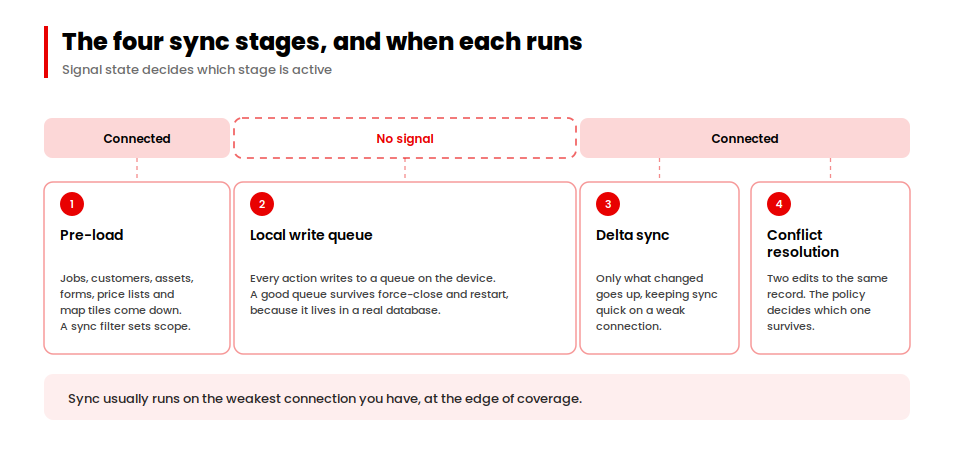
Stage 1: Pre-loading job data before the crew leaves signal
Before the crew leaves signal, the app downloads what the day needs: assigned jobs, customer and asset history, forms, price lists and often map tiles. A sync filter, meaning a rule about which records come down, controls how much arrives.
Set that window too narrow and technicians hit missing data. Set it too wide and the first sync crawls.
Stage 2: The local write queue on the device
Every action writes to a queue on the device. A good queue survives the app being force-closed and the phone restarting, because it lives in a real database instead of in memory.
Test this yourself. Complete a job offline, force-quit the app, reboot the device, and check the work is still there.
Stage 3: Delta sync, or sending only what changed
When connectivity returns, the app sends only what changed instead of re-uploading everything. That keeps sync quick on the weak connection at the edge of coverage, where sync usually runs.
Stage 4: Conflict resolution when two people edit the same work order
A conflict happens when the same record was edited in two places while the device was offline. A technician updates a work order in the field, a dispatcher updates the same one at the desk, and the system has to pick
 There are three common policies:
- Last-write-wins. The most recent edit overwrites the other. Simple to build, and it will eventually overwrite something important.
- Field-level merge. Each field is tracked separately, so two edits to different fields both survive and only real collisions get flagged.
- Queue for review. Conflicts go to a supervisor before anything commits.
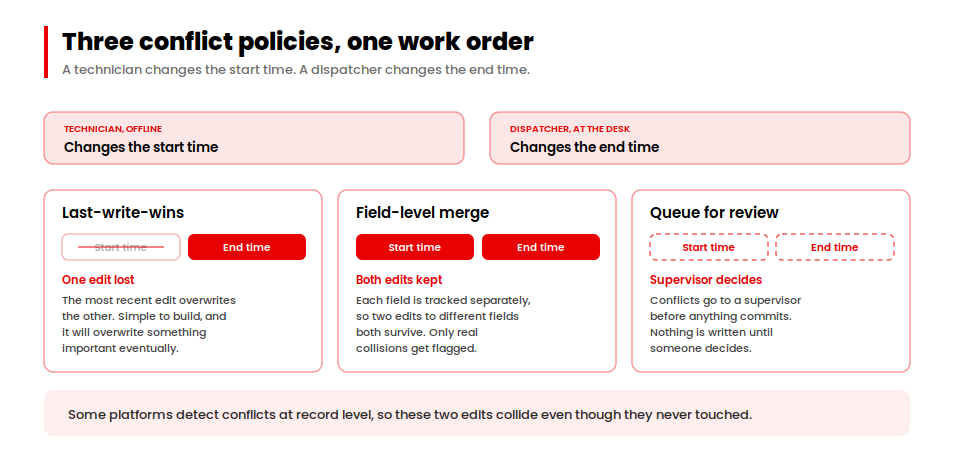
One detail catches teams out. Some platforms detect conflicts at record level, so a technician changing the start time and a dispatcher changing the end time counts as a collision even though the edits never touched. Microsoft documents this for Dynamics 365, along with the admin setting deciding whether the field edit or the desk edit wins, in its offline data synchronization guidance.
What Happens to Your Audit Trail When Data Is Captured Offline
Almost every conversation about offline capability frames it around productivity: first-time fix rate, technician utilisation, fewer truck rolls. That framing is fine, and it misses the risk that costs real money.
In a lot of field work, the record is the deliverable. Inspection results support a compliance filing, time and materials support an invoice, and damage documentation supports a reimbursement claim. When the offline record has a hole in it, the hole has a price.
Capture time and sync time are different timestamps
This is the detail I push hardest on. If your audit trail records when data reached the server instead of when the technician captured it, every offline entry carries the wrong time.
On a productivity dashboard nobody notices. On a disputed invoice, an insurance claim or a safety investigation, the timestamp is the whole argument.
What a gap in the offline record actually costs
A missing photo is an unprovable job. An unsynced signature is an unbillable visit. A sequence of edits nobody can reconstruct is a chain of custody that fails under challenge.
Offline design and audit design are one requirement wearing two hats. Teams who split them tend to ship one and discover the other during their first dispute.
Offline Support in Dynamics 365 Field Service, Salesforce and NetSuite
If you already run a field service platform, start by finding out what it does before you consider building anything. The three most common platforms handle offline quite differently, and all three publish the detail.
| Capability | Dynamics 365 Field Service | Salesforce Field Service | NetSuite FSM |
|---|---|---|---|
| Offline by default | Yes, via a mobile offline profile | Yes, positioned as offline-first | Not documented as offline-first |
| Configurable pre-load scope | Yes, through offline sync filters | Yes | Not documented |
| Conflict detection granularity | Record level, documented | Not publicly documented | Not documented |
| Who wins a conflict | Configurable by admin (field or desk) | Not publicly documented | Not documented |
| Custom components offline | Yes, with offline JavaScript | Yes, via offline-capable Lightning Web Components | Not documented |
| Documented offline limitations | Yes, published openly | Partial | Not published |
Dynamics 365 field service mobile app offline: what Microsoft publishes
One note on reading that table. “Not documented” means the vendor does not publish the behaviour, so treat it as a question for your account team, not as an absence of capability.
If you are chasing Dynamics 365 field service mobile app offline behaviour specifically, Microsoft’s offline profile setup guide and its documented limitations page are the two worth reading before you scope anything custom. Salesforce sets out its approach on its field service management page, and Oracle covers the technician-side feature set for the NetSuite field service mobile app.
How Much Does Custom Field Service App Development Cost With Offline Support?
Let me give you the shape of this decision. Three variables drive the cost of an offline field service app, and you can assess all three yourself before you speak to anyone.
3 variables that move the cost of offline
- How many record types must work offline. An app where technicians only update job status is a different build from one handling jobs, assets, parts, forms, photos, signatures and time entries. Each type needs its own local structure, sync rule and conflict policy.
- Whether writes are single-user or shared. If one technician owns a job for its whole life, a simple conflict policy covers it. Once dispatchers, supervisors and several crew members touch the same record, you need real merge logic, and that is a large step up in effort.
- How long the app must survive without signal. A one-day window is simple to support. A fourteen-day window changes your storage strategy, first-sync time and conflict probability at once.
Why retrofitting offline costs more than building it in
Retrofitting is rarely a feature addition. It means putting a local data layer, a write queue and a conflict policy underneath code that assumes a live server is always there, which touches the data model and every write path in the app.
Teams budget it as a feature and find it behaves like a rewrite of the data layer.
Not sure which band your build falls into?
Our app cost calculator gives you a starting estimate before you scope the offline work.
Find your cost band herePlatform choice moves the number too. A cross-platform build shares one offline data layer across iOS and Android instead of maintaining two, which usually helps on this type of app.
Case Study: An Offline Field Service App for Disaster-Response Crews
Volkert is a national civil engineering firm with roots going back to 1925, more than 1,700 employees and over 60 offices, consistently ranked among the top 100 engineering firms in the United States. One arm of the business is disaster response, so crews work tornado, hurricane and superstorm sites.
That is the definitive dead zone. The crew is not in an area with weak coverage. They are somewhere the infrastructure itself is down.
We built a mobile app and web portal for that work. The module list shows what the environment demanded: route management and status, tickets, pay items, mission setup, roles and permissions, offline-to-online syncing, reporting, exports, map and GPS integration, equipment and inventory, audit logs, invoicing, daily reports, sites and an approval centre.
Look at three of those together. Offline sync, GPS integration and audit logs shipped in the same build.
That pairing is the argument of this article. In disaster response the field record supports cost documentation and reimbursement, so an offline entry carrying the wrong timestamp or losing its place in the sequence becomes a weakened claim.
Sync integrity and audit integrity were one requirement on that project. I would treat them as one requirement anywhere the record has to stand up to scrutiny later.
Field Service Mobile App Development: Scoring Offline Readiness before You Build
Configuring a platform, extending one, and commissioning custom field service app development all need the same thing first: a way to judge offline capability without relying on a vendor’s description of it. This is the scorecard we use at the start of any field service mobile app development engagement.
The Dead Zone Readiness Score: 10 criteria
Score each criterion 0 to 3, where 0 is absent, 1 partial, 2 present, and 3 present and verified by your own testing. Thirty points available.
| # | Criterion | Score 0–3 |
|---|---|---|
| 1 | Writes commit to a local database by default, without user action | 0–3 |
| 2 | The write queue survives app force-close and device restart | 0–3 |
| 3 | Conflict policy is defined per field rather than per record | 0–3 |
| 4 | The sync window is configurable to your longest realistic outage | 0–3 |
| 5 | Sync status is visible to the technician at all times | 0–3 |
| 6 | A failed sync escalates to a supervisor instead of dying on the device | 0–3 |
| 7 | Photos and signatures persist while unsynced | 0–3 |
| 8 | Reference data staleness is bounded and shown in the interface | 0–3 |
| 9 | Offline behaviour is covered by automated tests, not manual spot checks | 0–3 |
| 10 | Audit entries carry capture timestamps, not sync timestamps | 0–3 |
How to read your score
24 to 30. Solid. Spot-check the rows you scored 2 by testing them yourself.
15 to 23. Workable with fixes. Find where the low scores cluster before deciding what to do.
Below 15. The gaps are architectural, and configuration changes will not reach them.
That clustering test is the useful part. Low scores in rows 1, 2, 3 and 10 put the problem in the data layer, which needs engineering. Low scores in rows 4, 5 and 8 point to configuration and interface work, which is a far smaller job.
Should You Configure, Extend or Build a Field Service App?
The decision in front of you is how much of the job has to survive without a connection, and how much of the record has to survive with it. Most teams answer the first during scoping and the second during their first dispute.
Score your offline field service app against the ten criteria above before your next vendor conversation. If the failures cluster in the sync and audit rows instead of the capture rows, the problem is architectural, and no configuration setting will reach it.
That is the point where it makes sense to talk about building something.
Building for crews who work where the signal doesn't reach?
We handle field application development end to end: offline-first data layers, conflict policies that hold on to supervisor edits, and audit trails that survive the sync.
Talk to our mobile team