ChatGPT
 Perplexity
 Claude
 Google AI
By Zaid Tirmizi, Technical Architecture and Costing Strategist at AppVerticals
SwiftUI is the better starting point for a new application targeting modern Apple operating systems, particularly when the product uses standard interface patterns. UIKit remains valuable for mature applications, complex custom interfaces and features requiring granular rendering or lifecycle control. Existing UIKit applications can adopt SwiftUI incrementally instead of undergoing a complete rewrite.
This SwiftUI vs UIKit guide covers framework basics, performance, development time, cost, architecture, testing and team skills, then gives a nine-step plan to migrate UIKit to SwiftUI. It also uses 2026 data from Apple on iOS 26 adoption and App Store SDK requirements. Choosing SwiftUI or UIKit depends on your deployment target, your interface and your team, and our iOS app development services team can review all three with you.
| Start with your deployment target, your team and your riskiest screen. The framework choice follows from those three. |
Key Takeaways
- SwiftUI is a strong default for new apps that target modern iOS versions.
- UIKit is not deprecated, and Apple’s WWDC26 UIKit session adds new APIs for the 2026 releases.
- Both frameworks can run in one app through UIHostingController and the representable protocols.
- As of June 7, 2026, 86% of iPhones introduced in the last four years ran iOS 26, according to Apple.
- Starting April 2027, App Store uploads need the iOS 27 SDK, so budget an SDK upgrade into every maintenance plan.
SwiftUI vs UIKit at a Glance
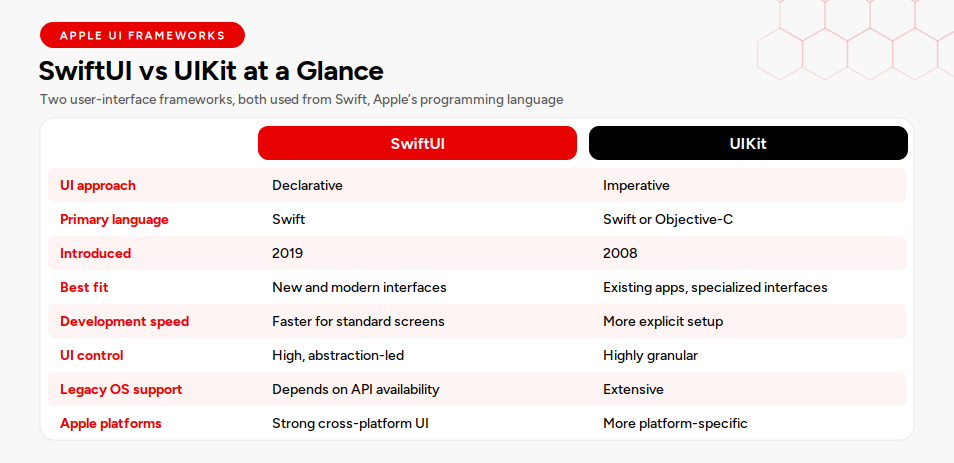
SwiftUI is a declarative, state-driven interface framework, and UIKit is an imperative framework that offers granular control and broad legacy support.
Swift is Apple’s programming language. SwiftUI and UIKit are the two user-interface frameworks you use to build screens with it, and Apple supports using both in one application. The table below shows the SwiftUI vs UIKit pros and cons I review with clients first.
| Factor | SwiftUI | UIKit |
|---|---|---|
| UI approach | Declarative | Imperative |
| Primary language | Swift | Swift or Objective-C |
| Introduced | 2019 | 2008 |
| Best fit | New and modern interfaces | Existing apps and specialized interfaces |
| Development speed | Faster for standard screens | More explicit setup |
| UI control | High, but abstraction-led | Highly granular |
| Legacy support | Depends on API availability | Extensive |
| Cross-Apple-platform UI | Strong | More platform-specific |
| Interoperability | Can wrap UIKit | Can host SwiftUI |
| Production use | Suitable with proper architecture and testing | Mature and widely proven |
For the wider picture of how a native build fits together, see our iOS app development guide.
What Is SwiftUI?
SwiftUI is Apple’s declarative UI framework: you describe the screen for a given state, and the framework redraws it when that state changes.
SwiftUI is a framework, and Swift is the language you write it in. Views are small and reusable, Xcode previews show a screen as you edit it, and animations attach to state changes with little code. Standard controls support accessibility labels and Dynamic Type, the system setting that scales text.
One codebase can serve iOS, iPadOS, macOS, watchOS, tvOS, and visionOS, and you can adopt SwiftUI incrementally by adding a single screen to an existing app.
What Is UIKit?
UIKit is Apple’s imperative UI framework, introduced in 2008, where you create views and view controllers and write the code that updates them.
A view controller is the object that manages one screen. Delegates and data sources connect your logic to table views and collection views, Auto Layout positions elements with constraints, and navigation controllers manage screen stacks.
UIKit is not deprecated. Apple’s WWDC26 session, Modernize Your UIKit App, covers new UIKit APIs, including sidebar placement for tab bars and navigation bar minimization, and UIKit interoperates with SwiftUI in the same application.
Key Differences Between SwiftUI and UIKit
Five differences shape daily engineering work: declarative versus imperative code, state handling, layout, navigation, and lifecycle. The UIKit vs SwiftUI comparison matters more in how a team plans, reviews, and debugs than in any headline benchmark.
Declarative vs. imperative development
In UIKit, you tell the system how to change the screen. In SwiftUI, you describe the result for each state, and the framework works out the changes.
| // UIKit: imperative
errorLabel.isHidden = (error == nil) errorLabel.text = error?.message
// SwiftUI: declarative if let error { Text(error.message) } |
The SwiftUI version has no step that can forget to hide the label, while UIKit gives you precise control over timing.
State and data flow
SwiftUI ties views to state, so the screen updates when a value the view depends on changes. UIKit relies on explicit updates, delegate callbacks, and closures that you wire yourself. Declarative flow removes a category of synchronization bugs, but a view that depends on too much state updates more often than intended.
Layout and reusable components
SwiftUI composes layouts with stacks, grids, and containers, and UIKit uses Auto Layout constraints and compositional collection-view layouts. Forms, settings, and dashboards come together quickly in SwiftUI, and dense custom layouts are often easier to control in UIKit.
Navigation
UIKit navigation controllers and coordinators own the screen stack imperatively, while SwiftUI describes navigation as data through navigation stacks and path values. Apps with many entry points, such as push notifications and universal links, need a deliberate navigation design in either framework.
Application lifecycle
UIKit exposes the app delegate, the scene delegate, and the full view-controller lifecycle, while SwiftUI offers a declarative app structure and scene phases that cover most needs with less code. Apple’s WWDC26 UIKit session states that scene lifecycle is required when building with the latest SDKs and that apps without it no longer launch. Plan that work early.
SwiftUI vs UIKit Performance
SwiftUI vs UIKit performance depends on implementation, workload, device, and OS version, and neither framework is fast or slow by default.
UIKit provides more direct performance control, because you decide exactly when views update. SwiftUI performs well when view identity and state dependencies are managed properly. Excessive view updates create hitches, which are visible stutters that appear when the app misses a frame deadline.
| Area | What to consider |
|---|---|
| Application launch | Driven by app initialization, networking, and asset loading in both |
| Initial rendering | SwiftUI builds views from state, so large, deeply nested bodies cost more. |
| Scrolling and long lists | Both perform well with lightweight cells, and UIKit collection views give direct control over prefetching and reuse. |
| Frequent state updates and animation | SwiftUI redraws dependent views, so broad dependencies cause extra work, and both use Core Animation underneath. |
| Memory and energy use | Depend on image handling, update frequency, and background work more than on the framework. |
| Older devices | More sensitive to excess view updates and heavy layouts |
| Custom drawing, video, and graphics | UIKit with Core Graphics, Metal, or AVFoundation offers the most direct control. |
Apple’s 2026 releases touch performance directly. The WWDC26 session What’s new in SwiftUI says AsyncImage now uses standard HTTP caching by default, and that @State properties initialize lazily, once per view, with the change backported to iOS 17 and macOS 14.
Synthetic benchmarks deserve caution, because a test that animates thousands of rectangles tells you little about a banking dashboard or a media feed. For deeper tuning, see our guide to iOS app performance optimization.
How to benchmark them fairly
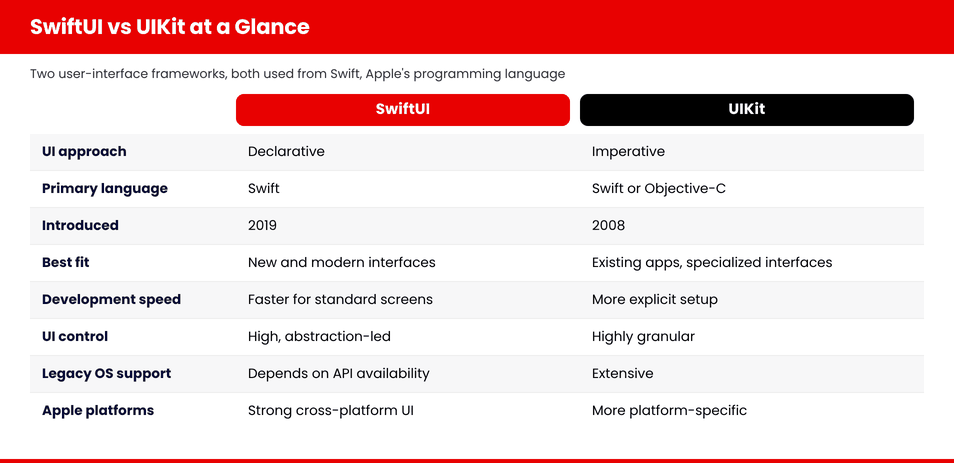
When a decision depends on speed, measure both approaches under identical conditions.
- Device and OS: the same device, OS, and Xcode version for both builds, plus one older supported device.
- Build: release configuration only, since debug builds distort results.
- Behavior: identical content, screens, and interactions.
- Launch: cold and warm launches measured separately.
- Resources: CPU, memory, and energy impact in Instruments, Apple’s profiling tool.
- Smoothness: frame hitches counted while scrolling and animating.
- Duration and repetition: long enough to expose memory growth, with the median of repeated runs.
SwiftUI vs UIKit Development Time
SwiftUI vs UIKit development time favors SwiftUI on standard screens, and the advantage shrinks on custom behavior, older deployment targets, and heavily mixed codebases.
Standard layouts, reusable components, and state-bound interfaces take less code in SwiftUI, previews shorten the loop between a change and a result, and teams building for several Apple platforms reuse more of the interface. The advantage shrinks when:
- The screen needs complex custom behavior.
- A required capability is missing at your deployment target.
- The app supports older iOS versions with limited SwiftUI APIs.
- Existing UIKit dependencies must stay in place.
- The team is new to declarative state architecture.
- Interoperability code grows as more screens mix both frameworks.
Expect the speed benefit on standard screens, and plan separately for the more challenging ones.
Development and Maintenance Cost
Framework choice affects cost through team skill, design complexity, OS support, SDKs, migration scope, testing and upkeep, and I avoid quoting percentage savings because no figure transfers between projects.
| Cost factor | How it affects the budget |
|---|---|
| New build vs. existing app | A new build can start with SwiftUI, while an existing app carries migration work. |
| Team expertise | Engineers new to a framework take longer and cause more rework. |
| Design complexity | Custom interfaces raise effort in either framework |
| OS support | Older deployment targets limit available SwiftUI APIs |
| Third-party SDKs | Some ship UIKit views that need wrappers |
| Migration scope | Each migrated screen needs design, coding and regression testing |
| Performance requirements | Strict targets add profiling and tuning time |
| Long-term maintenance | Less boilerplate and consistent architecture lower upkeep |
Maintenance follows Apple’s calendar. Apple’s developer news of February 3, 2026 set April 28, 2026, as the date when apps uploaded to App Store Connect must be built with the iOS 26 SDK or later, and the September 9, 2026, announcement sets the iOS 27 SDK as the minimum starting in April 2027.
The SDK you build with and the minimum iOS version you support are separate settings, so an SDK upgrade does not force you to drop older devices. Our iPhone app development cost guide covers the full budget.
SwiftUI vs UIKit for New App Development: Which Framework Fits?
For a new app, I start with SwiftUI and look for reasons to leave it, and Apple’s own 2026 numbers show that a modern deployment target is realistic for many products.
Apple reported that on June 7, 2026, 86% of iPhones introduced in the past four years and 79% of all iPhones that transacted on the App Store ran iOS 26. A newer deployment target gives you access to more SwiftUI APIs. I have led stack evaluation across more than 30 projects, and I treat the minimum iOS version as the first input to every one.
Choose a SwiftUI-first approach when:
- The app targets modern OS versions.
- The interface uses standard patterns.
- Rapid iteration is important.
- Sharing UI across Apple platforms is valuable.
- The team understands declarative state management.
Evaluate UIKit or a hybrid approach when:
- The product needs unusually granular behavior.
- Advanced media, graphics, or text handling is central.
- Mature UIKit components already solve difficult requirements.
- Older operating systems must be supported.
- A technical prototype reveals meaningful SwiftUI limitations.
Build the riskiest screen in both frameworks before you commit, because the prototype settles the argument.
Should You Rewrite an Existing UIKit App?
My default answer is no: incremental modernization carries less risk than a full rewrite, and UIKit remains a supported, actively updated framework.
A working UIKit app holds years of edge-case handling, accessibility fixes, and business rules. A rewrite puts all of it at risk, and Apple keeps adding UIKit APIs, as the WWDC26 session Modernize your UIKit app shows.
A full rewrite brings these risks:
- Regression defects in flows that used to work.
- Delayed product work and lost edge-case knowledge.
- New navigation and state-management problems.
- Accessibility regressions in rebuilt screens.
- A large testing requirement before release.
- An uncertain business return.
A rewrite can be justified when the current product is structurally unmaintainable and the measurable business benefits outweigh the risk. A rewrite proposed only because SwiftUI is newer fails that test. Our guide to iOS app modernization covers the incremental route.
Using UIKit and SwiftUI Together
UIKit and SwiftUI together is a first-class strategy that Apple documents, built on three bridging types and four practices that keep a hybrid app healthy.
Apple’s UIKit integration documentation covers both directions. Three types connect the frameworks:
- UIHostingController embeds a SwiftUI view inside a UIKit view controller hierarchy.
- UIViewRepresentable wraps a UIKit view so SwiftUI can display it.
- UIViewControllerRepresentable wraps an entire UIKit view controller for use in SwiftUI.
Four practices keep a hybrid app healthy:
- Shared business logic: keep networking, persistence and rules in plain Swift types that neither framework owns.
- Navigation ownership: pick one framework to own the stack, because two owners create bugs.
- State synchronization: pass state across the boundary in one direction with a single source of truth.
- Design-system consistency: share color, type and spacing tokens across both frameworks.
Test boundaries need attention too, because a screen that works alone can fail when hosted.
SwiftUI vs UIKit Architecture and State Management
SwiftUI vs UIKit architecture does not dictate a pattern, so choose one that separates business logic from views and apply it consistently.
UIKit apps succeed with MVC (model, view, controller), MVVM (model, view, view model) or coordinators, and SwiftUI apps succeed with view models, unidirectional data flow or lighter patterns. Neither framework requires a specific one. What matters is that business logic stays out of views, so you can test it without the interface.
Use dependency injection, which means passing a screen its dependencies instead of creating them inside it, so a screen can run with test data. Modularize the app, pick one observation pattern per layer, and decide navigation ownership early. Our guide to iOS app architecture goes deeper.
Testing and Debugging
Both frameworks support unit, UI, snapshot, and accessibility testing, and hybrid apps add three extra checks at the framework boundary.
Snapshot tests catch visual regressions, accessibility audits catch missing labels, and SwiftUI previews add a quick visual check during development. Instruments cover memory, CPU, energy, and hitches in both frameworks, and UIKit teams also use the view debugger and memory graph.
Hybrid and migrating apps need these extra checks:
- Navigation tests across the boundary.
- State-restoration tests after backgrounding.
- Mixed-framework integration tests for every hosted screen.
Our guide to iOS app testing covers the wider picture.
Team and Hiring Requirements
A production iOS team needs more than Swift syntax: it needs framework experience, architecture, profiling, accessibility, testing, and release skills.
Knowing Swift syntax does not demonstrate production experience with either framework. A capable team covers this list:
- Swift, including concurrency.
- SwiftUI state and lifecycle.
- UIKit lifecycle and interoperability.
- Application architecture.
- Performance profiling.
- Accessibility.
- Automated testing.
- App Store deployment.
- OS-version compatibility.
When I evaluate a team, I ask how they would profile a hitch and what they would change. Our guide on how to hire iOS developers covers what to look for, and an experienced iOS development team can also extend yours.
How to Migrate UIKit to SwiftUI Step by Step
To migrate UIKit to SwiftUI safely, follow nine steps that start with an audit and a measurable goal, then expand only after production evidence supports it.
| Step | Action |
|---|---|
| 1 | Audit screens, dependencies, and custom components. |
| 2 | Define a measurable reason for migration. |
| 3 | Separate business logic from presentation. |
| 4 | Select a low-risk feature or redesigned screen. |
| 5 | Define state and navigation ownership. |
| 6 | Embed SwiftUI in the existing application. |
| 7 | Measure performance and regressions. |
| 8 | Collect production evidence. |
| 9 | Expand only when the approach delivers value. |
Step 2 is the one teams skip, and without a measurable reason, nobody can tell later whether the migration worked.
SwiftUI or UIKit: Decision Matrix by Situation
This matrix maps ten common situations to a recommendation, and you should validate it against your deployment target and a prototype.
| Situation | Recommendation |
|---|---|
| New app with a current deployment target | Start with SwiftUI evaluation. |
| Stable UIKit application | Retain working UIKit. |
| New screen in an existing UIKit app | Consider SwiftUI. |
| Complex media or graphics product | Prototype both approaches |
| Standard forms and dashboards | SwiftUI is a strong candidate. |
| Mature custom UIKit design system | Migrate selectively |
| Multiple Apple-platform interfaces | Favor SwiftUI where requirements align. |
| Support for older OS versions | Review SwiftUI API availability. |
| Performance-sensitive custom component | Benchmark or retain UIKit. |
| Rewrite proposed only because SwiftUI is newer. | Reconsider the business justification. |
FAQs
Is SwiftUI better than UIKit?
In the UIKit vs SwiftUI comparison, neither framework is better in every case. SwiftUI suits new apps on modern iOS versions with standard interface patterns. UIKit suits mature codebases, older deployment targets, and interfaces needing granular rendering or lifecycle control. Match the framework to your requirements, team skills, and minimum iOS version.
Is UIKit deprecated?
No. UIKit remains supported by Apple and keeps receiving new APIs. The WWDC26 session Modernize Your UIKit App covers new tab bar and navigation bar features for 2026 releases and states that scene lifecycle is required with the latest SDKs. Many production apps depend on UIKit, and it works alongside SwiftUI.
Will SwiftUI replace UIKit?
Apple has not announced a replacement, and the two frameworks are designed to work together. SwiftUI keeps gaining capabilities, yet UIKit also receives new APIs and underpins many existing apps. Plan for coexistence: adopt SwiftUI for new screens and keep stable UIKit code until a measurable reason justifies migration.
Is SwiftUI ready for production?
Yes, with proper architecture and testing. Check API availability against your minimum iOS version first, because newer SwiftUI features need newer operating systems. Prototype your most demanding screen, profile it in Instruments, and confirm every capability your product needs exists at your deployment target before committing the whole app.
Is SwiftUI faster than UIKit?
It depends on the implementation. UIKit offers more direct control over when views update, while SwiftUI can perform well when view identity and state dependencies are managed carefully. Excessive view updates cause hitches in either framework. Benchmark release builds on identical hardware and compare median results from repeated runs.
Should a new app use SwiftUI or UIKit?
For most new apps targeting modern iOS versions with standard patterns, start with SwiftUI. Apple reported that 79% of all iPhones and 86% of recent iPhones ran iOS 26 on June 7, 2026. Evaluate UIKit or a hybrid approach for unusually granular behavior, advanced media or graphics, or older operating systems.
Can SwiftUI and UIKit be used together?
Yes, and Apple documents the interoperability. UIHostingController embeds a SwiftUI view inside UIKit, while UIViewRepresentable and UIViewControllerRepresentable wrap UIKit views and view controllers for SwiftUI. Keep business logic in shared Swift types, decide which framework owns navigation, and test every screen that crosses the boundary.
Should an existing UIKit application be rewritten?
Rarely. Incremental modernization carries less risk because a working app holds years of edge-case handling, accessibility fixes and business rules. Add SwiftUI to new or redesigned screens first and measure the results. Reserve a full rewrite for structurally unmaintainable products where measurable business benefits outweigh the regression risk.
Is SwiftUI suitable for enterprise applications?
It can be. Enterprise apps need disciplined architecture, strong automated testing, accessibility coverage and a deployment target that supports the SwiftUI APIs you rely on. Many enterprise products run a hybrid of both frameworks, keeping mature UIKit components where they solve hard problems and using SwiftUI for new features.
Which framework is easier to maintain?
Maintainability follows architecture more than framework choice. SwiftUI usually needs less boilerplate, and UIKit offers explicit, familiar control. In both, separating business logic from views and writing tests keeps upkeep manageable. Apple raised the minimum SDK in April 2026 and will again in April 2027, so budget upgrade time either way.
Is UIKit still worth learning?
Yes. Most existing iOS codebases contain UIKit; hybrid apps need engineers who can bridge both frameworks, and UIKit still offers the most granular control over rendering and lifecycle. Learn SwiftUI first for new work, then study view controllers, Auto Layout, and collection views to maintain and modernize established products.
Does SwiftUI reduce development cost?
It can reduce effort on standard screens through reusable views, previews, and less boilerplate, but the saving depends on team skill, design complexity, OS support, and testing. Complex custom screens, older deployment targets, and heavy interoperability code can erase the advantage. Evaluate cost with a prototype and avoid assuming a percentage.
Final Verdict: SwiftUI vs UIKit
The SwiftUI vs UIKit decision has a different answer for each product. SwiftUI is a strong default candidate for modern new interfaces. UIKit remains appropriate for existing code and specialized requirements. Hybrid development is a first-class strategy, and migration should be driven by measurable product and engineering value.
Start from your deployment target, prototype the riskiest screen, and keep the code that works. For a second opinion on your own codebase, our experienced iOS development team can help.
test
test
Keep reading: iOS App Development Guide: How to Build, Launch, and Maintain an iPhone App.