


















 ChatGPT
 Perplexity
 Claude
 Google AI
ľPWA vs native app comes down to five constraints: hardware access, iPhone behavior, app store presence, offline depth, and budget. A progressive web app runs in the browser. It installs from a URL, updates without review, and uses one codebase across iOS and Android. A native app ships through the App Store and Google Play. It is built in Swift or Kotlin and reaches every device API. Most content, commerce, and booking products run well as a PWA. Products that need Bluetooth, NFC, background processing, or heavy graphics need native. That distinction sounds technical, and it decides your budget. The choice usually breaks on iPhone behavior rather than on raw features. What follows covers the capability gaps, real cost and timeline bands, and the iOS limits that catch teams late. A five-gate test at the end tells you which one your product actually needs.
Apple added Web Push for Home Screen web apps in iOS 16.4, per Apple Developer documentation, which removed the loudest technical objection to shipping a PWA.
Key Takeaways
- A PWA installs from a URL and runs on one codebase.
- A native app installs from a store and reaches every device API.
- Push notifications reach iPhone users only after a Home Screen install.
- Safari deletes script-writable storage after seven days without interaction.
- Home Screen web apps are exempt from that seven-day cap.
- Bluetooth, NFC, and background sync stay out of reach on iPhone.
- Store fees run $99 per year on Apple and $25 once on Google Play.
- The PWA Viability Test settles the decision in five questions.
PWA vs Native App: The Short Answer
The native app vs PWA decision is a distribution question with an engineering bill attached. Reach costs less and installs faster. Hardware depth and store presence cost more and take longer. We build both routes at AppVerticals, and the deciding factor is rarely which technology looks more modern. It is which one matches how the business already sells and supports the product.
What Separates a Progressive Web App From a Native App
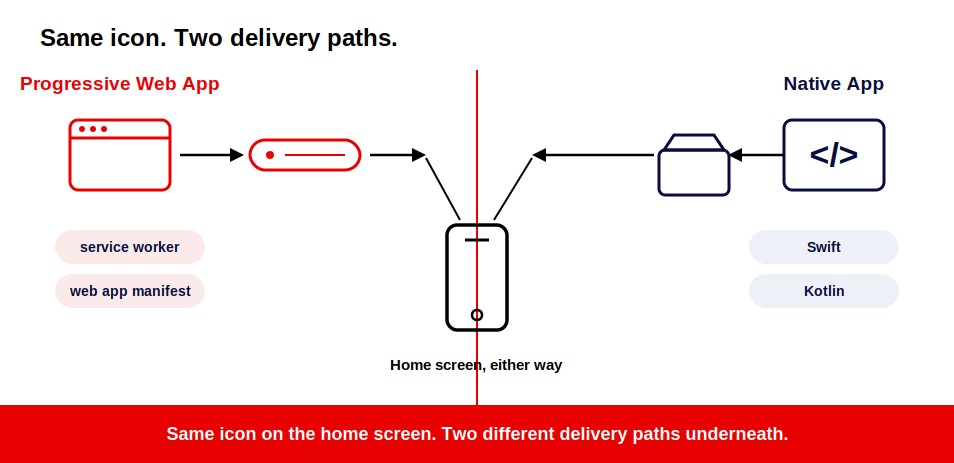
The difference between a PWA and a native app sits in delivery. A PWA is delivered over the web. A native app is delivered as an installable package through a store. The difference between PWA and native app development also shows up in hardware access, offline behavior, updates, and the number of platform-specific builds your team has to maintain.
A progressive web app is a website with two extra pieces. The service worker caches assets and intercepts network requests. The web app manifest supplies the name, icon, and display mode that make installation possible. Those two files turn a site into something a phone treats as an app. Several production examples already run this way, and we cover them in our roundup of PWAs already running in production.
A native app is compiled for one operating system. Teams build it in Swift for Apple platforms and Kotlin for Android. The binary installs on the device and calls platform SDKs directly. That direct access is what buys hardware depth.
PWA vs Native App: The Side-by-Side Comparison
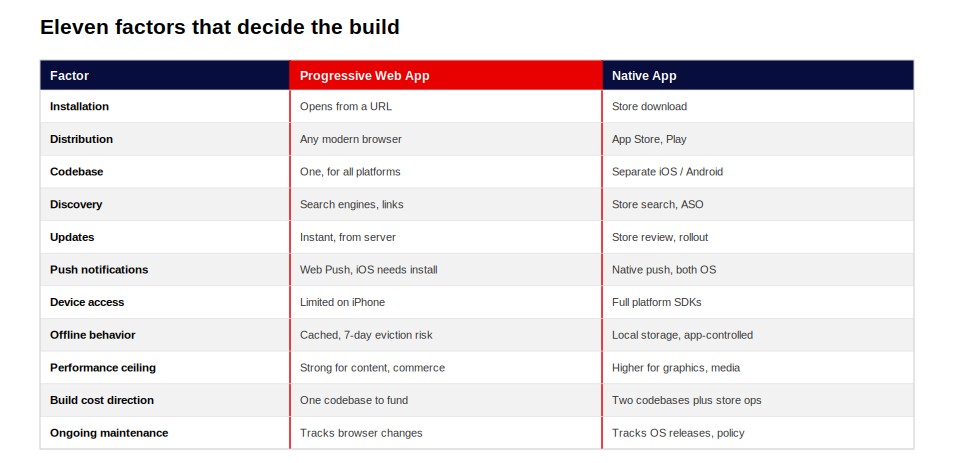
Comparing progressive web apps vs native app options comes down to eleven factors in practice. The table below states what each one does rather than which one wins.
| Factor | Progressive Web App | Native App |
|---|---|---|
| Installation | Opens from a URL. Installs through the browser or the Share menu. | Downloads and installs as a package from a store. |
| Distribution | Any device with a modern browser. Google Play and Microsoft Store accept wrapped versions. | Apple App Store and Google Play. |
| Codebase | One web codebase serves every platform. | Separate iOS and Android builds, plus the web presence. |
| Discovery | Search engines index the pages. Links and ads route straight in. | Store search, App Store Optimization, and install campaigns. |
| Updates | Ship from the server. Users receive them on next load. | Ship through store review and a staged rollout. |
| Push notifications | Web Push. iPhone requires a Home Screen install first. | Native push through Apple and Android notification services. |
| Device and hardware access | Limited to what browsers expose. Bluetooth and NFC are unavailable on iPhone. | Full platform SDK access, subject to permissions. |
| Offline behavior | Service worker caching. Storage is evicted after seven days without interaction. | Local storage and background sync under app control. |
| Performance ceiling | Strong for content, commerce, and booking flows. | Higher for graphics, media processing, and sustained background work. |
| Build cost direction | One codebase to fund and maintain. | Two mobile codebases plus store operations. |
| Ongoing maintenance | Tracks browser and standards changes. | Tracks annual OS releases and store policy changes. |
Three rows decide most projects, and they are exactly where a pwa vs native mobile app comparison earns its keep. Push notifications decide retention strategy. Device access decides feasibility. Codebase count decides budget.
On pwa vs native app performance, the gap narrowed for standard product work. Rendering a catalog, a booking flow, or an account dashboard runs well on the web. Real-time graphics and media processing still favor native.
The pwa vs mobile app comparison confuses teams because a PWA is a mobile app to the person using it. The icon looks the same. The delivery path underneath is completely different. We walk every client through this exact table before we scope a project, because it kills the assumption that one option is simply better than the other.
What a PWA Cannot Do on an iPhone
Four iPhone constraints decide this choice, and storage eviction is the one that surprises teams. Safari deletes all script-writable storage for a site after seven days of browser use without interaction, per WebKit tracking prevention documentation. That covers IndexedDB, localStorage, the Cache API, and service worker registrations.
Home Screen web apps are exempt from that seven-day cap. Installation is what protects the offline data. Data can still be evicted under storage pressure unless the origin requests persistent storage, per the WebKit storage policy and MDN storage documentation.
I have watched teams discover this seven-day rule only after launch, when support tickets start asking why a saved cart or a half-finished form disappeared.
The second constraint follows from the first. Web Push reaches an iPhone only after the user adds the app to the Home Screen. A PWA sitting in a Safari tab receives nothing, even with permission granted.
The third constraint is the install path itself. Safari shows no browser-led install prompt. The user opens the Share menu, scrolls, and taps Add to Home Screen. Chrome and Edge on Android surface a prompt automatically, per the web.dev install criteria.
The fourth constraint is engine policy. Every browser on iOS renders through WebKit under App Store Review Guideline 2.5.6. Installing Chrome on an iPhone changes nothing about PWA capability.
These four constraints carry a cost, and it lands in acquisition. Both offline persistence and push depend on an install that iPhone hides behind a menu. Every gate between arrival and activation removes a share of your audience.
We measured that effect on ParentPass, the family resources platform we built for The Miles Foundation. The app drew more than 17,000 users, of whom 12,439 registered and 4,580 stayed as guests. Roughly one in four users declined a sign-up step inside an app they had already installed.
Adding a hidden install step in front of that gate compounds the loss on iPhone.
What Each One Costs to Build and Run
Cost separates on codebase count and store operations. A PWA funds one codebase. A native launch funds an iOS build, an Android build, and the web presence you keep anyway.
Two costs are fixed and public. The Apple Developer Program charges $99 per year, and that membership must stay active for your app to remain listed. Google Play developer registration charges $25 once, with no renewal. A PWA distributed over the web carries neither.
| Project Scope | PWA Build | Native Build | PWA Weeks | Native Weeks | Annual Run Cost |
|---|---|---|---|---|---|
| Content or catalog product | $15,000–$40,000 | $40,000–$100,000+ | 6–12 weeks | 12–24 weeks | Hosting and browser-compatibility work |
| Transactional product with accounts and payments | $40,000–$100,000+ | $100,000–$250,000+ | 12–24 weeks | 24–40 weeks | Store fees, release cycles, OS upgrade work |
| Product with hardware or deep offline requirements | $75,000–$150,000+ | $150,000–$400,000+ | 20–36 weeks | 36–60+ weeks | Device QA plus annual SDK migration |
Integration surface drives the variance far more than the platform label. A booking flow touching one system costs a fraction of a product wired into inventory, payments, and identity. Run your own scope through our app development cost calculator before you set a budget. We do not quote a blanket percentage difference between the two, because scope moves the number far more than the platform label does.
When a PWA Is the Right Call
The progressive web app vs native app question tips toward a PWA when acquisition matters more than hardware. Content products, catalogs, booking flows, and internal tools all sit in that category.
The mechanism is the missing install step. A link opens the working product immediately. Search results, email, and paid traffic land users inside the experience on the first tap.
That matters most for first-visit conversion. A native app asks a stranger to install before they see value. A PWA delivers value first and asks later.
Internal tools gain the most. Distribution runs through a link, updates ship the same day, and no store review sits between a fix and the people waiting for it. As a web application development company, we build internal tools this way for exactly those reasons.
Choose a PWA or native app by asking which side of that gate your growth depends on.
The PWA Viability Test: Five Gates
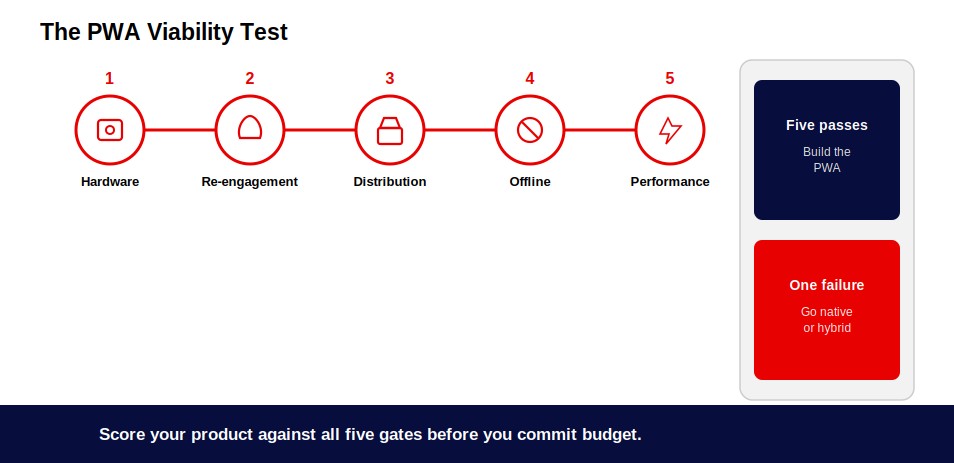
Five questions settle this decision. Answer yes to any one of them and the product needs native or a hybrid shell.
| Gate | The Question to Ask | Answer That Forces Native |
|---|---|---|
| Hardware | Does the product need Bluetooth, NFC, advanced camera control, or connected peripherals? | Yes. iPhone does not expose these to the web. |
| Re-engagement | Does the business case depend on push reaching users who install nothing? | Yes. iOS push requires a Home Screen install. |
| Distribution | Do buyers, procurement, or the market expect an App Store listing? | Yes. Apple does not accept standalone PWAs. |
| Offline depth | Do users create and queue data offline for long periods? | Yes. Storage eviction and background sync limits apply. |
| Performance class | Does the product need sustained graphics, media processing, or background computation? | Yes. Native holds a clear ceiling advantage. |
Five passes mean a PWA covers the requirement, and you should build one. A single failure means native or a hybrid shell around the web app.
Confused between swift and react?
Evaluate native and cross-platform performance under real-world app loads.
Read the Comparison Guide! →When You Need to Go Native
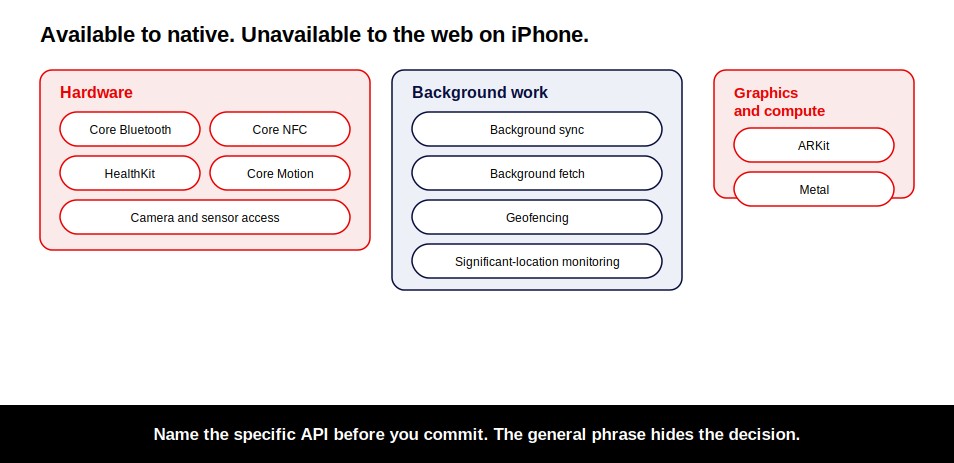
The pwa vs native question tips toward native when the product touches the device itself. Name the specific API before you commit, because the general phrase hides the decision.
Core Bluetooth and Core NFC for peripherals, tags, and payments hardware.
Background sync and background fetch for work that continues after the app closes.
ARKit and Metal for augmented reality and GPU-bound rendering.
HealthKit and Core Motion for sensor streams and health data.
Geofencing and significant-location monitoring for location-triggered behavior.
Store distribution belongs on this list. Enterprise buyers and regulated sectors treat an App Store listing as a procurement requirement. That expectation settles the decision on its own.
Retention-led products belong here too. When repeat use drives the revenue, the install becomes an asset rather than a barrier. I tell clients to name the exact API they need before we scope anything because “device features” as a phrase has cost more budgets than any single line item.
Where Cross-Platform Fits
Cross-platform sits between the two sides of the progressive web app vs native debate. Frameworks such as React Native and Flutter compile one codebase into installed iOS and Android apps.
That path keeps store distribution and most device access while funding a single mobile codebase. Our cross-platform app development team scopes these builds, and our breakdown of native vs cross-platform development covers the trade-off in full.
Starting With a PWA and Adding Native Later
Sequencing a PWA and native app rollout works, and it costs more than a single build. The question is what carries over and what you fund twice.
Your backend, APIs, data model, design system, and business logic all carry over. Those represent the larger share of a build. The client layer does not carry over, and neither does mobile QA, store setup, release engineering, or a second round of accessibility work.
We ran this split for Shop Local Delmarva. That platform pairs a mobile app for discovery with a web portal for business enrollment and management. Each surface serves a different audience, so each earned its own build.
Sequencing stops being cheaper when you already know a gate will fail. A product that needs Bluetooth on day one should start native. Building the web version first adds a codebase you will replace.
Google Play accepts a wrapped PWA through a Trusted Web Activity, which buys Android store presence without a rebuild. Apple offers no equivalent route. For the wider delivery process, see our mobile app development guide.
Conclusion
A PWA vs native app decision is not about choosing the newer technology. It is about choosing the delivery model your product can succeed with.
If your priority is faster reach, lower upfront cost, and one codebase across platforms, a PWA removes unnecessary friction. If your product depends on hardware access, deep offline capability, App Store discovery, or high-frequency engagement, native earns its additional cost and complexity.
The mistake is starting with the platform. Start with the user behavior, device requirements, and business model. Run the five-gate viability test against those requirements, and the right path usually becomes clear.
Still deciding between a PWA and a native build?
Tell us what you are looking for. We will tailor a solution based on your business needs.
Talk to Experts →Need a shared-codebase approach instead? Explore our native vs cross-platform development guide to understand where that option fits.
















