

About Us

About Us
We’re a future-focused tech partner working with some of the world’s top enterprises. At AppVerticals, we design solutions that drive growth and reimagine digital experiences.

Services
Software Development
Mobile App Development
Web Design & Development
Tell us what you're looking for, and we'll tailor a solution based on your business needs.
Talk to Experts
Health Tech

EdTech

Logistics

Real Estate

Ecommerce

Sports

Fintech

Travel

Restaurant

Automotive
HIPAA-compliant digital solutions for hospitals, clinics, and healthtech startups driving better patient outcomes.
What we do:
Scalable learning platforms for schools, universities, and EdTech startups transforming education delivery.
What we do:
Real-time tracking and automation solutions for freight companies, warehouses, and delivery services.
What we do:
PropTech platforms for brokerages, property managers, and real estate marketplaces are streamlining operations.
What we do:
High-converting commerce platforms for D2C brands, retailers, and online marketplaces are driving revenue growth.
What we do:
Fan engagement platforms for sports teams, leagues, and betting operators are creating immersive experiences.
What we do:
PCI-DSS compliant solutions for digital banks, payment platforms, and InsurTech companies, ensuring security.
What we do:
Booking and hospitality solutions for OTAs, hotels, and tourism platforms, enhancing traveler experiences.
What we do:
Online ordering and operations software for restaurants, cloud kitchens, and food delivery platforms.
What we do:
Connected vehicle platforms for automotive OEMs, dealerships, and mobility providers are accelerating innovation.
What we do:
Portfolio

AppVerticals was featured in Inc. 5000 as
America’s Fastest Growing Tech Company
See what it might cost to bring your app idea to life. Our calculator gives you a quick, simple estimate based on what you need.



 verified expert
Senior Writer and Editor - App, AI, and Software
Muhammad Adnan is a Senior Writer and Editor at AppVerticals, specializing in apps, AI, software, and EdTech, with work featured on DZone, BuiltIn, CEO Magazine, HackerNoon, and other leading tech publications. Over the past 6...
See Full Bio22 minutes read
When I talk with teams preparing for an LMS rollout, I hear the same mix of urgency and uncertainty. To be honest, many leaders tell me they feel the pressure to move fast, but they are not fully sure how the project will play out.
The concern is valid. More than half of LMS implementations fall short, mostly because integrations, data flow, and ownership are not planned with enough depth.
At the same time, the need for a reliable learning system keeps climbing. Fortune Business Insights noted that the LMS market passed 23 billion dollars last year, with companies investing heavily in onboarding, compliance, and skill development.
If you are asking yourself questions like What should the roadmap look like? How do we choose the right architecture? How long will this take? Where do teams run into trouble? What will this cost us beyond the licensing fee? You are asking the right things. I hear these questions in almost every consultation.
My goal in this guide is simple. I want to give you clear answers, practical steps, and a path that supports growth without unnecessary stress.
Let’s get started!
North America accounted for more than 36% of the LMS market revenue in 2025, making it the largest regional share globally.
When teams ask me for the most practical LMS implementation roadmap, they expect a template or a fixed sequence of steps.
The truth is, mid-size tech companies share similar patterns, but the right roadmap depends on how your data is structured, how fast your teams move, and the level of engineering support you actually have. Still, there is a clear path that consistently works in real projects, and this is the one I guide clients through.
Industry data supports taking a phased approach. Structured digital learning projects are approx 30 percent more likely to succeed when organizations follow a staged rollout with early testing and cross-functional alignment.
Based on what I have seen across tech companies that scale quickly, the most reliable roadmap follows five phases. Each phase reduces risk and builds the foundation for the next. Skipping any of them usually leads to rework, integration issues, or stalled adoption later.
Here is the roadmap I advise teams to follow:
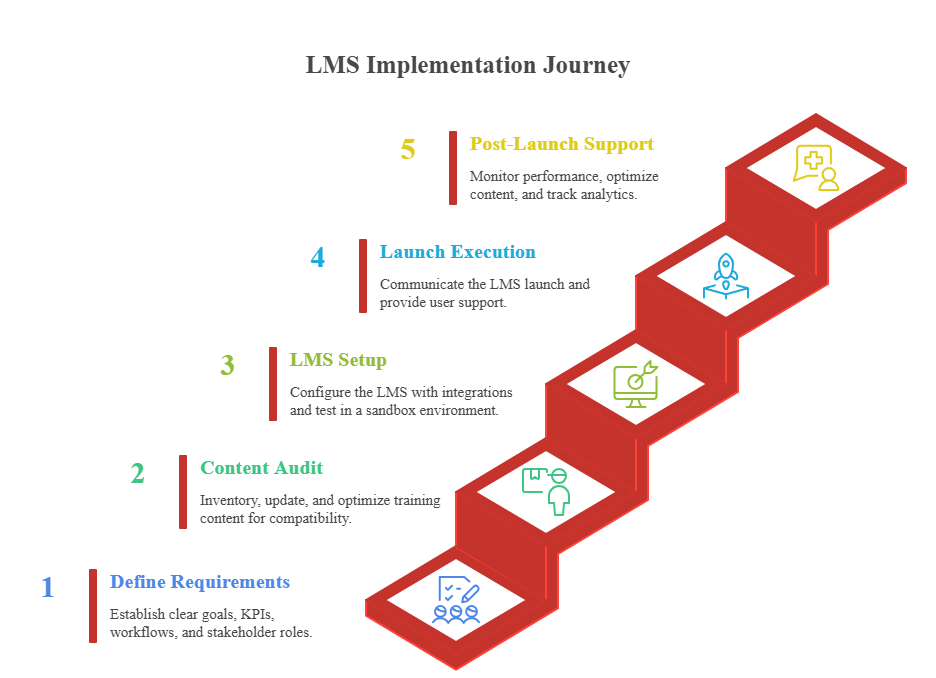
Let’s break down each phase so you understand what it takes, the decisions that matter, and the points where teams often run into avoidable trouble.
Whenever I help a team plan an LMS, this is the first place we start because everything else hangs off it. In most failed rollouts, the root cause is not the tool. It is unclear goals, unclear ownership, and fuzzy expectations.
Here is how I like to structure this phase:
If this phase is vague, every later step gets harder and more expensive. When it is clear, the rest of the project tends to move with far less friction.
This is the phase most teams underestimate. On paper, “move content into the new LMS” sounds simple. In practice, this is where legacy formats, broken SCORM files, unclear ownership, and missing pieces show up.
A practical approach looks like this:
If content is scattered, the LMS will feel scattered. Cleaning this up before launch gives learners a coherent experience and prevents “where is that course?” chaos later.
This is the phase where the LMS stops being an abstract purchase and becomes a working system. The goal is to configure it to reflect how your company operates, without exposing real users to half-baked setups.
A solid setup and testing flow usually includes:
Catching problems here is much cheaper than discovering them after launch when real learners are stuck or confused.
A good platform can still struggle if the launch is weak. Launch is not “flip the switch and hope for the best.” It is a communication and change moment. How you handle it decides whether the LMS feels like a useful tool or another system people are forced to use.
A launch that works usually has:
Common pitfalls to avoid:
The goal of launch is simple: make the first experience so clear and useful that people are willing to come back.
The corporate LMS segment is a major driver of growth, with nearly 57% of LMS revenue coming from corporate training use cases.
After launch, the question shifts from “Is this live?” to “Is this working?” This is the phase where data matters. The LMS starts to show how people learn, where they get stuck, and how managers use the system.
A simple KPI set you can track looks like this:
| KPI | What it tells you | Why it matters |
|---|---|---|
| Completion rate | How many people finish the assigned courses | Signals engagement and clarity of required paths |
| Onboarding duration | Time from hire date to basic productivity | Connects directly to hiring and ramp-up efficiency |
| Compliance completion | Coverage and pass rates for required training | Critical for audits, safety, and legal exposure |
| Early drop-off points | Where learners leave courses | Shows where content or structure needs improvement |
| Manager activity | How often managers log in, assign, and review | Indicates leadership buy-in and ongoing adoption |
| Integration stability | Health of HRIS, SSO, CRM syncs | Predicts admin workload and data reliability |
| Monthly active learners | Ongoing engagement with the LMS | Shows whether the platform has become part of work |
Regular reviews of these signals help refine content, adjust learning paths, and improve the overall experience. The LMS then becomes a living system that supports growth rather than a static repository of courses.
Get a quick technical assessment and discover where improvements in integration, content, and workflow design can deliver the fastest gains.
Acquire NowMost LMS buyers focus on licensing first, but licensing is rarely the cost that shapes the project. The real cost shows up in the work your teams must absorb: content cleanup, integrations, internal approvals, user setup, and long-term support.
Over the years, I have seen cost confusion slow projects that should have moved quickly. Once teams see a realistic breakdown, the project becomes easier to plan and far easier to defend to leadership.
Below is the model I use to help organizations get a clear, grounded view of the investment required.
| Cost Area | What It Covers | Typical Impact on Effort |
|---|---|---|
| Licensing | Platform subscription based on users | Predictable, but varies by growth rate |
| Content migration | Cleaning, converting, and rebuilding training assets | Often larger than expected, especially if content is outdated |
| Integrations | HRIS, SSO, CRM, LRS, BI tools | Requires engineering time and testing |
| Configuration | Roles, permissions, learning paths, reporting | Medium effort depending on complexity |
| Data migration | History, compliance records, user mapping | Adds time if data quality is inconsistent |
| Internal labor | HR, IT, engineering, L&D involvement | Frequently underestimated |
| Support and maintenance | Post-launch fixes and updates | Grows with user volume |
| Content development | Creating new modules or replacing weak ones | Highly variable across organizations |
This table reflects the real work behind an LMS, not just the platform fee. Once teams see this, planning becomes far more grounded, especially when working with an edtech software development company that understands the full implementation effort.

An LMS only succeeds when it reflects how a company truly operates. The real wins come from clean workflows, strong integrations, and an implementation built around the moments that matter.
– Kazim Qazi, CEO, AppVerticals
If you have never launched an LMS before, some costs may not appear until the project is already underway. These are the areas that most often surprise teams:
These hidden costs do not mean the LMS is expensive. They simply reflect the real work behind building a smooth ecosystem.
Timelines vary widely, and the differences rarely come from the platform. They come from your workflow, your data, and your internal availability. Here are the factors that extend timelines the most:
A realistic timeline is not about speed. It is about setting the right expectations so the LMS lands with the impact it should.
Read also: Enterprise learning management system
The online learning market is projected to reach USD 203.81 billion in 2026, highlighting rapid growth in eLearning and LMS technologies
Most teams reach this question after reviewing several platforms and realizing the decision is less about features and more about fit. The real choice depends on your goals, your growth plan, and how much internal engineering support you can realistically commit.
Every company believes their training needs are unique, but in practice, patterns appear quickly once you look at the operational reality.
Below is the decision model I use with companies when we sit down and evaluate this choice honestly.
| Option | Best Fit | Why It Works |
|---|---|---|
| Buy (SaaS LMS) | Standard onboarding, compliance, skills, partner training | Fastest path to launch, fewer unknowns, minimal engineering involvement |
| Extend (Hybrid LMS) | Existing LMS covers basics but falls short in reporting, UX, automation | Cheaper than replacing everything, avoids disruption, adds missing capability |
| Build (Custom LMS) | Complex workflows, product-linked training, large scale, or unique data needs | Full control, deep integration, supports long-term strategy |
This framework helps teams see themselves quickly without debating features for hours.
Buying makes sense when speed, stability, and predictable cost matter more than deep customization.
Here are real scenarios where buying is the smart call:
Buying works best when your training model is similar to what thousands of companies already do.
Some companies already have an LMS that does 60 to 70 percent of what they need. Replacing it would cost time and momentum. Extending is often the smarter path.
Here are practical situations where extending wins:
Extending works when the foundation is solid, but the edge cases are holding you back.
A custom LMS is the right decision when learning is tied directly to your business strategy, product experience, or revenue model.
Here are realistic situations where companies choose to build:
Building makes sense when training is part of the value you deliver, not just an internal function.
Buy if you want predictability and fast deployment.
Extend if your current LMS is workable but missing a few key capabilities.
Build if your training model is unique or tied directly to your product or customer experience.
This is how companies avoid overspending, delays, and future rework.
US companies spent an average of $774 per learner on online learning tools in 2025.
If you have ever been part of a system rollout, you already know that things usually go off track when teams assume someone else handled a detail. This checklist prevents that. It is the one I rely on when helping companies get their LMS live without a pile of surprises two days before launch.
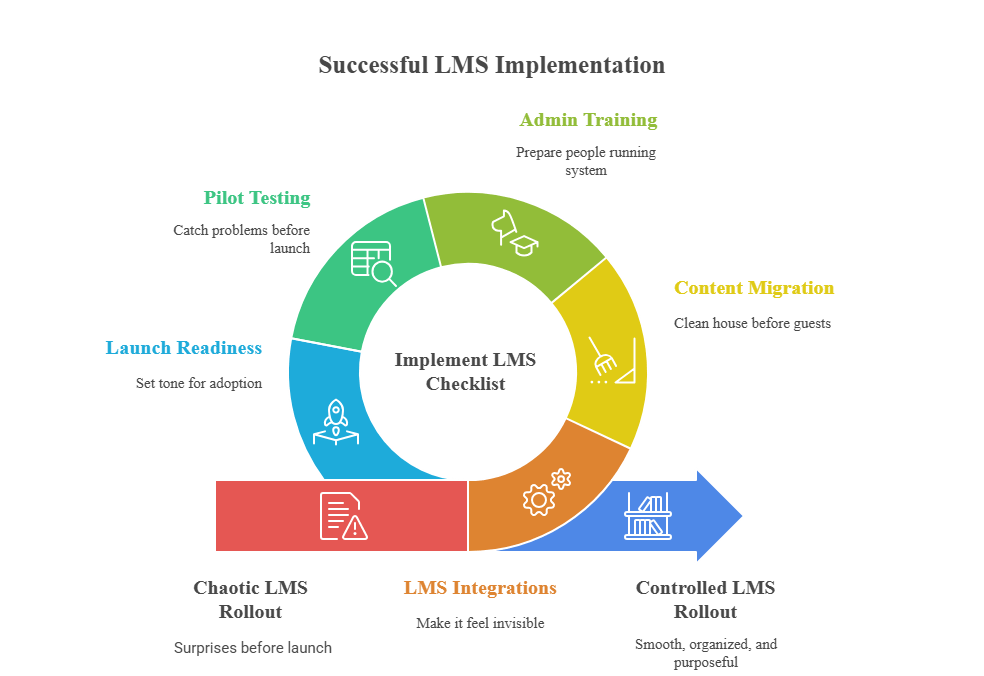
Use this as your north star. If these items are in place, your rollout will feel controlled instead of chaotic.
When integrations work well, people barely notice the LMS as a separate tool. It blends into everyday operations.
If these pieces are unstable, the LMS will constantly need manual cleanup. Get them right early.
Content is what people actually interact with, so this phase influences adoption more than any feature.
A clean library makes your LMS feel organized, purposeful, and easy to navigate.
If admins and managers are confused, learners will feel it instantly.
This internal readiness often decides whether the LMS becomes part of the culture or fades into the background.
A small pilot group reveals problems that documentation never will.
A good pilot prevents those embarrassing launch-day messages like “Why can’t I log in?”
Launch is not a technical moment. It is a communication moment.
A strong launch gives the LMS momentum. A weak launch forces you to chase users for months.
To be honest, most LMS projects fail long after launch, not on day one. The system goes live, people log in once, and then engagement fades because no one built a strategy that survives real operational pressure.
Over the years, one approach has consistently outperformed everything else, especially in mid-size tech teams trying to scale learning without drowning in complexity.
Here is the strategy that works:
Build the LMS around moments that matter, not modules. The teams that win don’t start with course lists. They start with turning points in the employee or customer journey and design the LMS around those moments.
The framework looks like this:
When you anchor the LMS to these high-impact moments, the system becomes something people rely on, not something they tolerate.
That is the difference between an LMS that looks good on launch day and an LMS that delivers results for years.
AppVerticals approaches LMS implementation with the same discipline used in scalable product development. Instead of forcing your team to adapt to a generic system, we shape the LMS around your workflows, growth targets, and daily realities. Organizations choose AppVerticals because they value:
The result is an LMS ecosystem that supports your roadmap and delivers meaningful, long-term impact.
A strong example of AppVerticals’ capability is the Nokia Al-Saudia Training Center.
If you’re still with me, you already understand that LMS success isn’t about choosing a feature-heavy platform. It’s about how clearly you define the purpose, how well you prepare your content, how clean your integrations are, and how consistently you support the system after launch.
A strong LMS implementation builds on those elements, not on features alone. I’ve seen teams transform onboarding, compliance, and role-readiness simply by treating their LMS as part of their operating system instead of a one-time project.
If you’re ready to shape an LMS that reduces friction, helps people perform better, and grows with your organization, I’d be glad to help you turn this guide into a clear, actionable plan.
Share your goals, and I’ll help you build a learning environment that delivers real impact, not complications.
Whether you need a clean rollout, custom features, or a learning platform built around your teams, AppVerticals can help you deliver measurable improvement without unnecessary complexity.
Talk to an LMS Specialist
verified expert
Muhammad Adnan is a Senior Writer and Editor at AppVerticals, specializing in apps, AI, software, and EdTech, with work featured on DZone, BuiltIn, CEO Magazine, HackerNoon, and other leading tech publications. Over the past 6 years, he’s known for turning intricate ideas into practical guidance. He creates in-depth guides, tutorials, and analyses that support tech teams, business leaders, and decision-makers in tech-focused domains.
 We’re AppVerticals
AppVerticals is where innovative startups and Fortune 500s come for transformation.
View About Us Healthcare
Telemedicine has evolved far beyond its initial role as a pandemic stopgap, establishing itself as a permanent and transformative care channel, with t...

15 min read
 EdTech
By 2027, most education apps are turning into AI-powered SaaS products with real-time data pipelines, video, personalization engines, and regulatory o...

20 min read
 Industry
Ever waited hours for a truck to arrive, only to find out the shipment was delayed, rerouted, or worse, lost in paperwork? Frustrating, isn’t it? That...
14 min read
Discover how our team can help you transform your ideas into powerful Tech experiences.
AppVerticals © 2026 | All Rights Reserved

Get In Touch.














 ChatGPT
 Perplexity
 Google AI













