Ali is a product strategist specializing in early stage scoping and client engagement strategy. With over 12 years in product strategy and client delivery, including defining product strategy for more than 50 digital products, he...
The best corporate training apps in 2026 include platforms like Docebo, TalentLMS, Absorb LMS, SAP SuccessFactors Learning, and Cornerstone, each with different strengths in scale, analytics, integrations, and admin control.
When I talk to enterprise teams comparing corporate training apps, the problem is whether the platform can scale without breaking adoption, reporting, or integrations. Slide decks, workshops, and legacy LMS tools fail once headcount grows, teams globalize, or compliance becomes non-negotiable.
The best corporate training apps solve this by combining mobile-first learning, role-based delivery, analytics, and HR/LMS integrations into a single system. That’s why enterprises prioritize them.
According to LinkedIn’s Workplace Learning insights, 88% of organizations see retention as a critical risk, with learning and development as the top strategy to address it.
This comparison focuses on which corporate training apps actually hold up at scale, and where each one fits best.
Key Takeaways
The best corporate training apps for mid-to-large companies are Docebo, SAP SuccessFactors Learning, Cornerstone, Absorb LMS, and TalentLMS, each suited to different scale, compliance, and integration needs.
SaaS platforms are faster to launch, but custom training apps scale better long-term when analytics, workflows, and data ownership matter.
Key features to prioritize: mobile-first microlearning, role-based learning paths, decision-grade analytics, and enterprise-level security.
Costs diverge at scale: SaaS pricing compounds with headcount, while custom builds have higher upfront cost but lower long-term TCO.
Most failures come from architecture and integrations, not missing features, like systems that isolate analytics, scale media independently, and integrate cleanly hold up as teams grow.
Best Corporate Training Apps
The best corporate training apps for mid-to-large companies are Docebo, SAP SuccessFactors, Cornerstone, Absorb LMS, and TalentLMS, because they consistently support scale, integrations, and operational reliability beyond pilot deployments.
When I evaluate corporate training apps for companies with 200 to 5,000+ employees, I don’t look at feature lists first.
I look at where systems fail after rollout: onboarding spikes that break performance, analytics that can’t answer leadership questions, integrations that require constant workarounds, and learning experiences employees quietly abandon.
According to the World Economic Forum, 39% of workers’ core skills are expected to change by 2030, forcing organizations to rethink how fast and flexible training systems can evolve.
Corporate training apps that can’t support rapid updates, role-based learning, and measurable outcomes quickly become blockers instead of enablers.
Below is how the leading platforms actually perform when used at scale.
1. Docebo
Docebo is often chosen by fast-growing SaaS and technology companies that need learning systems to evolve quickly. Its strength lies in handling complex learning paths, automation, and personalization without becoming operationally heavy.
At scale, Docebo performs well in environments where learning content changes frequently, like product updates, sales enablement, compliance refreshers, and role-based onboarding.
Its analytics capabilities go beyond completion rates, making it easier for leadership teams to understand engagement and skill coverage.
Where teams struggle is customization depth. When organizations need proprietary workflows, deeply custom dashboards, or non-standard learning logic, they often extend Docebo with custom components.
Best fit: SaaS, tech, and product-led companies with frequent training updates Watch out for: Advanced customization requires external development
2. SAP SuccessFactors Learning
SAP SuccessFactors Learning is typically selected by large enterprises that already run SAP across HR, finance, or operations. Its biggest advantage is ecosystem alignment, like identity, reporting, compliance, and governance all sit within an enterprise-grade framework.
This platform excels in regulated industries, global organizations, and environments where compliance reporting and auditability matter more than UX polish. It scales reliably across regions and large employee populations.
The downside is flexibility. Teams looking for modern learning experiences or rapid iteration often find SuccessFactors rigid. Many enterprises use it as the system of record for training, while layering modern learning experiences on top using custom development.
Best fit: Enterprises with SAP-centric HR and compliance needs Watch out for: Slower iteration and limited UX flexibility
3. Cornerstone
Cornerstone is widely used in industries where learning paths, certifications, and compliance requirements are non-negotiable. It handles complex hierarchies, role-based permissions, and audit-ready reporting well.
For organizations running long-term capability programs, leadership development, regulated training, certification tracking, Cornerstone provides stability and depth. It scales well, but implementation and configuration often require careful planning and experienced partners.
The trade-off is speed. Cornerstone is not optimized for rapid experimentation or lightweight onboarding experiences. Teams prioritizing agility often combine it with custom tools built externally.
Best fit: Regulated industries, enterprise L&D programs Watch out for: Heavier setup and longer time to value
4. Absorb LMS
Absorb LMS is frequently chosen by mid-to-large organizations that want a balance between enterprise features and faster deployment. It supports integrations, analytics, and scalability without the complexity of full enterprise suites.
In practice, Absorb works well for companies modernizing away from legacy LMS tools. It handles onboarding, internal training, and partner education effectively, especially when teams want predictable administration and reporting.
Its limitation appears when organizations need highly differentiated learning experiences or product-like behavior. At that point, custom extensions become necessary.
Best fit: Mid-market to upper-mid enterprises seeking speed and stability Watch out for: Limited flexibility for highly bespoke learning models
5. TalentLMS
TalentLMS is often adopted by growing teams that need to move fast without enterprise overhead. It offers solid core LMS functionality, straightforward integrations, and relatively quick implementation.
For SaaS teams scaling from 100 to 500 employees, TalentLMS can be a practical choice. However, as organizations grow beyond that, reporting depth, customization, and multi-tenant complexity can become constraints.
Best fit: Growing companies prioritizing speed and simplicity Watch out for: May require replacement or extension at larger scale
If you need custom workflows (role-based training triggers, multi-tenant experiences, proprietary analytics, or deep integration logic), the winning pattern is often platform + extensions, build the differentiators around the LMS with an elearning app development company, instead of forcing the LMS to become your product.
Not sure which corporate training app actually fits your scale?
Get an independent technical review of your training requirements, covering platform fit, integration risks, cost at scale, and whether SaaS or custom makes more sense for your organization.
What Key Features Should Enterprises Evaluate When Comparing Corporate Training Apps?
The key features enterprises should look for in corporate training apps are mobile-first delivery, intelligent personalization with analytics, and enterprise-grade security with centralized user management.
After evaluating training platforms in real environments, I’ve learned this: most tools lack features, because they don’t align with how modern teams actually work.
Enterprise training today is continuous, distributed, and data-driven. If a platform can’t adapt to that reality, adoption drops fast, no matter how strong the content is.
Below are the features that consistently separate platforms that scale from those that stall.
Mobile-First & Microlearning
Enterprise training apps must be designed for how employees consume learning today: on mobile, in short sessions, and between real work.
From experience, platforms that rely on long-form desktop courses see lower completion and engagement rates as teams grow.
Mobile-first design enables just-in-time learning, such as short modules, quick refreshers, and contextual training tied to real workflows. Microlearning also makes content easier to update, which is critical when products, compliance rules, or processes change frequently.
What to check
Native or responsive mobile experience
Short, modular content formats
Offline or low-bandwidth support for global teams
AI-Driven Learning Paths & Analytics
This shift reflects how AI in edtech is being applied today, not as a novelty, but to make learning paths more relevant, measurable, and responsive to real user behavior.
At scale, manual learning paths don’t work. The strongest corporate training apps use AI to adapt learning based on role, behavior, and progress, while giving leadership visibility into outcomes.
In practice, analytics matter more than automation. Completion rates alone are meaningless. What decision-makers need is insight into skill coverage, learning velocity, and gaps by role or team.
When platforms fall short here, organizations often supplement them with custom dashboards built through AI app development or external data pipelines.
What to check
Role-based or adaptive learning paths
Cohort and skill-level analytics
Exportable data or API access
Security, Compliance, and User Management
For enterprises, training apps are no longer “tools”—they are systems of record. That makes security and access control non-negotiable.
Based on long-term deployments, the biggest risks appear during growth: inconsistent permissions, weak identity management, and limited audit trails.
Platforms must support enterprise SSO, role-based access, compliance reporting, and data governance from day one.
What to check
SSO, SCIM, and role-based permissions
Compliance reporting and audit logs
Data isolation for multi-team or multi-region use
If a corporate training app doesn’t meet all three areas, like delivery, intelligence, and governance, it will eventually slow the organization down. This is often the point where enterprises extend platforms with custom components or replace them entirely to regain control at scale.
Should Enterprises Build a Custom Corporate Training App or Buy an Off-the-Shelf Platform?
You should build a custom corporate training app when off-the-shelf platforms start limiting scale, integrations, data ownership, or learning logic, and buy when speed and standardization matter more than differentiation.
After decades of working with enterprise training systems, I’ve seen this decision repeat itself across SaaS, EdTech, and large organizations. Teams usually start by buying. It’s faster, cheaper upfront, and “good enough” early on. The problem appears later, when training becomes tied to performance, compliance, and business outcomes.
The real question isn’t build or buy. It’s when buying stops working.
When Off-the-Shelf Platforms Break
Most corporate training platforms fail quietly, not catastrophically. The cracks show up as workarounds.
Integrations with HRIS, product, or analytics become brittle
Learning paths don’t adapt to role changes or scale
UX friction lowers adoption as teams grow
Vendor roadmaps lag behind business needs
At this stage, teams spend more time managing the platform than enabling learning. That’s usually the signal that the tool is no longer aligned with the organization’s operating model.
When Custom Development Makes Sense
Custom development makes sense when training becomes infrastructure, not tooling.
From experience, building a custom corporate training app is justified when:
Training logic is tightly coupled with internal workflows
Learning data must integrate deeply with business systems
You need full control over analytics, permissions, and content models
Scale, multi-tenancy, or regional rules exceed SaaS limits
Training is a competitive or operational differentiator
Many enterprises take a hybrid path, keeping a core LMS while building custom layers around it. Done right, this delivers speed without sacrificing control.
Expert takeaway: Buy to validate. Build when training becomes mission-critical. The costliest mistake isn’t building too early—it’s staying locked into platforms that can’t grow with the business.
How Much Does It Cost to Build a Corporate Training App Compared to SaaS Pricing Over Time?
SaaS corporate training platforms are cheaper to start; custom corporate training apps are cheaper to own once scale, integrations, and control matter.
That’s the real comparison enterprises miss.
Below is a practical, apples-to-apples breakdown based on how these systems behave in real organizations, not brochure pricing.
SaaS Corporate Training Apps: Real Pricing vs Real Capabilities
Most enterprises evaluating SaaS options end up shortlisting platforms like Docebo, Cornerstone, SAP SuccessFactors, Absorb LMS, and TalentLMS.
Typical SaaS Pricing (Enterprise Reality)
Platform
Public / Market Pricing Range
What’s Included
What’s Extra or Limited
Docebo
~$6–$10/user/month
Core LMS, basic analytics, AI recommendations
Advanced reporting, integrations, customization
Cornerstone
Custom (often $8–$15/user/month equivalent)
Compliance, certifications, reporting
UX flexibility, speed, customization
SAP SuccessFactors
Enterprise contract (bundled)
HR-aligned learning, compliance
Agility, modern UX, fast changes
Absorb LMS
~$6–$12/user/month
Corporate LMS, reporting
Deep customization, proprietary workflows
TalentLMS
~$4–$8/user/month
Fast setup, core LMS
Scale, advanced analytics, multi-tenant logic
What SaaS Does Well
Fast rollout (weeks, not months)
Predictable upfront cost
Maintenance handled by vendor
Works well for standardized training
Where SaaS Breaks at Scale
Cost compounds linearly with headcount
Limited control over analytics and data models
Integrations become brittle or expensive
Learning logic must fit vendor constraints
Roadmap dictated by vendor, not business
At 3,000 employees, even a modest $7/user/month SaaS plan becomes $252,000 over three years, before add-ons, integrations, or admin overhead.
Custom Corporate Training App: Cost vs Control
A custom corporate training app follows a fixed build cost + predictable operating cost model. This is where education app development cost becomes a strategic discussion, not just a budget line.
Realistic Custom Build Cost by Capability
Capability
Custom Build Cost
What You Get
Authentication, SSO, roles
$10k–$25k
Full control, enterprise IAM
Course & content management
$20k–$50k
Custom learning models
Video & media delivery
$15k–$40k
Optimized for your usage
Assessments & certifications
$15k–$35k
Business-specific logic
Advanced analytics & dashboards
$20k–$45k
Role- and skill-based insights
HRIS / LMS / API integrations
$20k–$60k
Tight system alignment
Security, audit, compliance
$15k–$40k
Ownership + governance
Total realistic range:
Mid-scale enterprise: $80k–$150k
Large enterprise / multi-region: $200k–$400k+
What Custom Does Better
No per-user licensing tax
Full data ownership
Learning logic matches workflows
Analytics tied to business KPIs
Easier long-term evolution
Where Custom Requires Discipline
Higher upfront investment
Requires product ownership
Needs clear scope and roadmap
Which (SaaS vs Custom) Delivers More ROI
Dimension
SaaS Training Platforms
Custom Corporate Training App
Upfront cost
Low
Medium–High
Cost at scale
High (recurring)
Stable
Custom workflows
Limited
Full
Analytics depth
Vendor-defined
Business-defined
Integrations
Add-ons / constraints
Native & flexible
Data ownership
Vendor-controlled
Fully owned
Long-term ROI
Declines with scale
Improves with scale
Choose SaaS if training is standardized, headcount is stable, and speed matters more than control. Choose custom when training affects performance, compliance, or revenue—and when scale makes per-user pricing inefficient.
The biggest mistake isn’t building too early. It’s paying SaaS pricing for years while bending your operations to fit someone else’s product.
This is where education app development cost becomes a strategic consideration, especially when long-term scalability, integrations, and data ownership start outweighing short-term licensing convenience.
What Architecture Is Required to Scale a Corporate Training App to Thousands of Users?
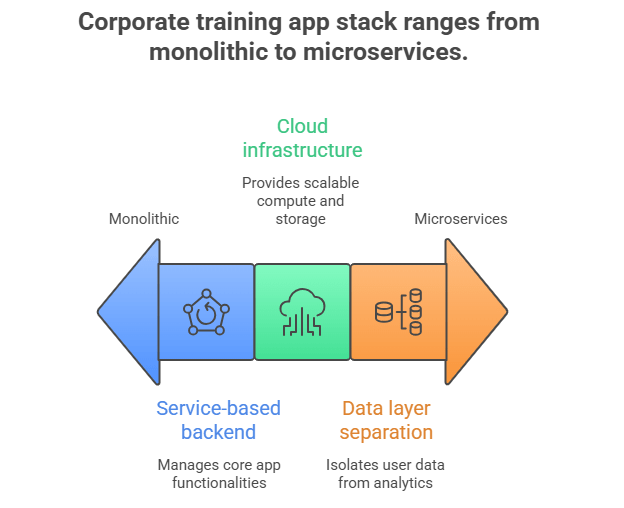
The recommended architecture for scalable corporate training apps is a modular, cloud-native system that separates learning delivery, analytics, and integrations, so the platform can scale to thousands of users without performance or reporting failures.
From decades of hands-on work, this is where most training platforms either hold up, or quietly collapse. Features don’t break first. Architecture does. Especially during onboarding spikes, global rollouts, or compliance audits.
Backend, Cloud, and Data Stack
At scale, corporate training apps must handle bursty traffic, media-heavy workloads, and analytics queries without slowing learners down.
A proven backend setup looks like this:
Service-based backend (modular monolith or microservices)
User & role management
Learning content & progress
Assessments & certifications
Analytics & reporting
Cloud infrastructure (AWS / Azure / GCP)
Auto-scaling compute for onboarding waves
Object storage + CDN for video and content
Managed databases for reliability
Data layer separation
Relational DB for users, permissions, progress
Analytics/event store for learning activity
Cost reality:
Cloud + backend setup for enterprise scale typically runs $2k–$6k/month in infrastructure at 3k–5k users
Analytics-heavy workloads increase this by 20–30% if not isolated properly
The biggest architectural mistake I see is mixing reporting and user traffic in the same data layer. That’s what causes timeouts and “slow LMS” complaints.
Integrations with LMS, HRIS, Analytics
At enterprise level, training apps are never standalone systems.
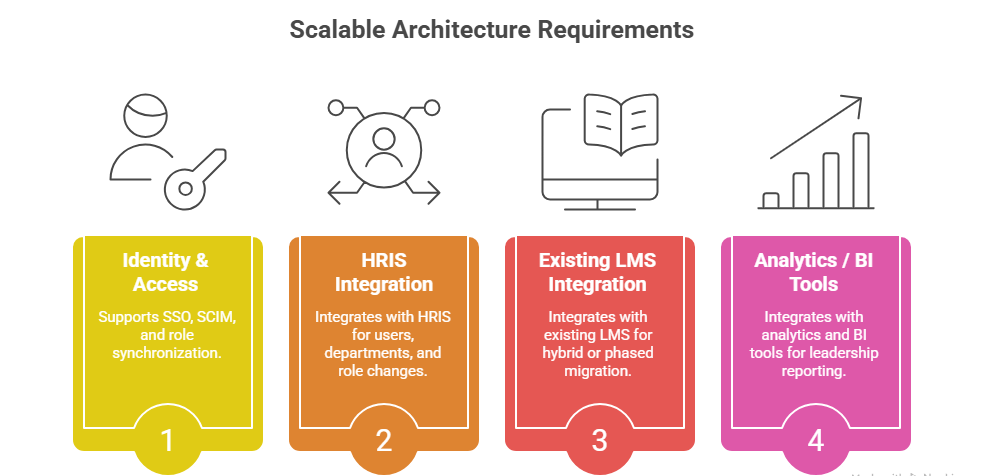
A scalable architecture must support:
Identity & access (SSO, SCIM, role sync)
HRIS integration (users, departments, role changes)
Existing LMS (for hybrid or phased migration)
Analytics / BI tools (leadership reporting)
From experience, integrations, not features, drive long-term cost. Fragile or undocumented APIs lead to constant fixes, manual syncs, and reporting disputes.
Integration cost reality:
Basic HRIS + SSO integration: $10k–$20k
Multi-system sync (HRIS + LMS + BI): $25k–$60k
Ongoing maintenance: 10–15% of initial build annually
Teams that underinvest here usually pay more later in workarounds.
Expert Takeaway
Scalable corporate training apps aren’t built around courses. They’re built around systems behavior under growth.
If your architecture:
isolates analytics from learning traffic
scales media independently
treats integrations as first-class components
you avoid the rebuild most enterprises face at 2–3× growth.
This is the difference between a training platform that supports the business, and one that becomes technical debt the moment headcount accelerates.
What Are the Biggest Risks and Failure Points with Corporate Training Apps at Scale?
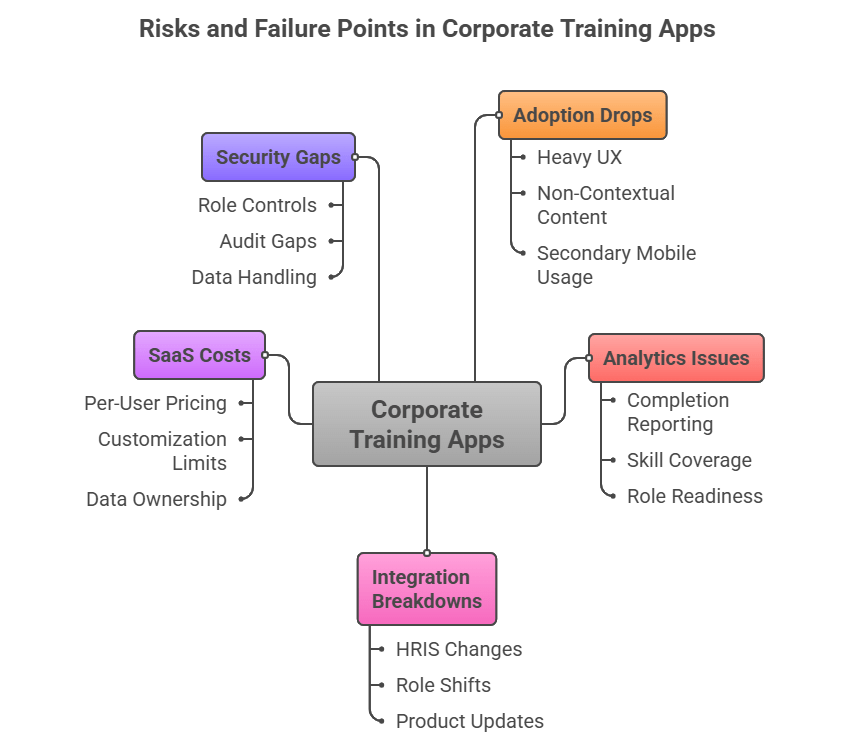
The biggest risks with corporate training apps are low adoption, brittle integrations, shallow analytics, and escalating long-term costs once the platform hits real scale.
After decades of auditing training systems, failures almost never come from missing features. They come from misalignment between the platform and how the business actually operates. Below are the failure points I see most often, and what they really cost.
1) Adoption Drops After Initial Rollout
Training apps often launch strong and fade fast. Employees disengage when UX is heavy, content isn’t contextual, or mobile usage feels secondary.
Hidden cost:
Rebuilding content + re-onboarding efforts: $10k–$30k per cycle
Lost productivity during repeated training resets
If adoption isn’t designed in from day one, no feature set fixes it later.
2) Analytics That Don’t Answer Executive Questions
Many platforms report completions, but can’t show skill coverage, role readiness, or learning impact. Leadership asks questions the system can’t answer.
Hidden cost:
Custom reporting workarounds: $15k–$40k
Ongoing manual analysis by ops teams
This is where teams realize training data isn’t decision-grade.
3) Integrations Break as Systems Evolve
HRIS changes, roles shift, products update. Training apps with weak APIs or rigid schemas start desyncing users, permissions, and progress.
Hidden cost:
Emergency integration fixes: $10k–$25k per incident
Long-term maintenance overhead: 10–15% of build cost annually
Most replacements happen because integrations rot, not because features are missing.
4) SaaS Costs Outpace Value at Scale
Per-user pricing feels manageable until headcount grows. Add analytics, compliance modules, and integrations, and costs accelerate.
Real-world impact:
3,000 users at $8/user/month = $288k over 3 years
Still limited customization and data ownership
This is where SaaS becomes an operational tax.
5) Security and Access Gaps Appear Too Late
Training apps quietly become systems of record. Weak role controls, audit gaps, or region-specific data handling issues surface during audits, not demos.
Hidden cost:
Retrofitting security & audit trails: $20k–$50k
Compliance delays and risk exposure
Security added late is always more expensive.
Many of these issues reflect broader challenges in education app development, particularly when platforms are designed for content delivery rather than operational scale.
Most corporate training app failures are predictable. They happen when platforms are selected for speed, not scale, and never re-evaluated as training becomes business-critical.
Why Choose AppVerticals for Building a Corporate Training App?
AppVerticals has real experience building enterprise-grade learning and training platforms that go beyond typical LMS constraints.
A prime example is the Nokia Al-Saudia Training Center platform, where AppVerticals engineered a unified digital learning system that automated course enrollment, certification, scheduling, and hybrid delivery for over 10,000 learners across telecom, AI, and IT training, helping the organization scale training operations far beyond manual tools.
This case shows how custom learning systems, the sort AppVerticals specializes in alongside education app development services, can transform fragmented training workflows into scalable, measurable, and enterprise-ready systems.
Partnering with experts like AppVerticals can make the difference between a training tool that “works for now” and one that becomes the backbone of organizational learning strategy.
Wrapping it Up
Choosing the right corporate training app is a strategic decision that affects performance, retention, and long-term operational effectiveness. Off-the-shelf SaaS solutions like Docebo, SAP SuccessFactors Learning, Cornerstone, Absorb LMS, and TalentLMS are excellent starting points for many organizations.
But as training becomes mission-critical, scalability, integrations, and analytics drive the need for custom solutions that align with your workflows and data ownership requirements.
The decision isn’t just build or buy. It’s about where your organization will be in 12–36 months, and which system can grow with you without becoming technical debt.
Planning to scale training beyond what off-the-shelf platforms allow?
Work with engineers who design corporate training systems around real workflows, analytics, and long-term scalability, not demos.
The best corporate training apps for enterprises include Docebo, SAP SuccessFactors Learning, Cornerstone, Absorb LMS, and TalentLMS, depending on scale, compliance needs, integrations, and analytics depth.
Choose based on employee count, regulatory requirements, integration complexity, and how often training content changes. SaaS and tech companies usually prioritize speed and onboarding, while regulated or EdTech organizations prioritize structured learning paths, certifications, and auditability.
Companies typically outgrow SaaS training platforms when per-user pricing escalates, analytics don’t support executive decision-making, or integrations with HRIS, product, and BI systems become brittle or expensive to maintain.
Using an off-the-shelf LMS is faster and cheaper early on, but building a custom corporate training app makes sense when training becomes mission-critical, requires custom workflows, deeper analytics, or full data ownership at scale.
The most important features are mobile-first microlearning, role-based or adaptive learning paths, decision-grade analytics, enterprise SSO and access control, and reliable integrations with HR, LMS, and analytics systems.
Ali is a product strategist specializing in early stage scoping and client engagement strategy. With over 12 years in product strategy and client delivery, including defining product strategy for more than 50 digital products, he currently leads Product Strategy and Client Success at AppVerticals, scoping MVPs and managing delivery from kickoff through launch. He has also spoken on AI and digital transformation at GITEX AI Europe.
Share This Blog
We’re AppVerticals
AppVerticals is where innovative startups and Fortune 500s come for transformation.
If your logistics team is still juggling spreadsheets, emails, and disconnected tools, you’re already at a disadvantage. Today’s customers expect real...
Sometimes, the most ambitious ideas don’t start in boardrooms. They start with legacy. For Francine Haughton Adam, RxPak wasn’t just an app—it was the...
HIPAA compliant app development means building a healthcare application so that every point where protected health information (PHI) is created, store...
Zaid Tirmizi
18 min read
Contact Us
Let’s Build Your Digital Future Great
Wait! You're So Close to Something Great
AppVerticals has developed 2000+ apps and digital products. Our experts are ready to help you build something amazing.
Still Thinking It Over?
Submit your details, and our team will reach out to explore how we can bring your idea to life.
A Technology Partner You Can Rely On
1000+ brands trust AppVerticals to create high-performing digital solutions.
Catherine
Founder, Real Estate Agency
They delivered a top-tier solution that’s fast, user-friendly, and packed with features tailored to the real estate industry. The team was professional, detail-oriented, and easy to work with from start to finish.
Bruce Wilson
CEO, Logistics SaaS Startup
The app came together exactly how we hoped. If you're looking for a team that knows what they’re doing and respects your time, they’re a solid choice.
Amit Chopra
Head of Marketing, Al Rostamani Group
Successfully delivered the project on time and within budget. They remained flexible and cooperative with backend content organization, and their support, company culture, and client-centric approach truly stood out.
Trusted by Global Industry Leaders
Your Next Big Idea Needs the Right Team
Share a few details and get a clear timeline, cost estimate, and technical roadmap, tailored to your idea.

















 ChatGPT
 Perplexity
 Claude
 Google AI