



















 ChatGPT
 Perplexity
 Claude
 Google AI
On demand app development is the process of building software that connects customers who need a service or product immediately with the providers who can deliver it. These apps sit at the center of industries like delivery, ride booking, home services, healthcare, and beauty, matching demand and supply in real time through a mobile or web interface.
A complete on demand solution includes three connected experiences: a customer app for browsing and booking, a provider app for accepting and completing jobs, and an admin dashboard for managing users, payments, and operations. The main app types include marketplace platforms, single vendor apps, and aggregator models, each suited to a different business structure.
Building one well means combining the right features, a scalable backend, secure payments, and reliable third party integrations. This guide walks through how these apps work, what they cost, and how to choose the right development partner.
What Is On-Demand App Development?
On demand app development refers to building mobile and web applications that let customers request a service or product and receive it within a short, defined window, often minutes or hours rather than days. The model grew out of ride hailing and food delivery, but has since expanded into home services, healthcare, logistics, laundry, pet care, and business to business use cases.
At its core, an on demand app removes the wait between deciding you need something and actually getting it. A customer opens the app, browses available services or products, places a request, and gets matched with a nearby provider almost immediately. Behind that simple interaction sits a more complex system: location tracking, provider matching logic, payment processing, and a backend that keeps every transaction synced across customer, provider, and admin views.
Businesses build on demand apps for two main reasons. Some are creating a new service from scratch, using the app as the product itself. Others are digitizing an existing service business, such as a cleaning company or a local repair shop, so customers can book and pay without a phone call. Either way, the goal is the same: reduce friction between the moment a customer wants something and the moment they get it.
Working with an experienced mobile app development company helps at this stage, since the technical decisions made early, like choosing a single app with role based views versus separate apps for each user type, shape the cost and timeline for everything that follows.
Types of On-Demand Apps Businesses Can Build
The right model depends on how many providers you plan to onboard, whether you already run a service business, and how much control you want over quality and pricing. Choosing the wrong model early often means rebuilding core features later, so it helps to compare the main types before committing to a build.
| App Type | How It Works | Common Examples | Best For |
|---|---|---|---|
| Marketplace platform | Connects multiple independent providers with customers through one app, with the platform earning a commission on each transaction | Ride booking, food delivery, freelance services | Businesses building a new two-sided marketplace from scratch |
| Single vendor app | Represents one business only, letting that business manage its own bookings, staff, and service area | A cleaning company or salon chain with its own booking app | Existing service businesses digitizing operations without opening the platform to competitors |
| Aggregator app | Pulls listings from multiple existing vendors into one app without owning service delivery itself | Grocery or restaurant discovery apps that link out to individual vendors | Businesses that want to offer variety without managing providers directly |
| On-demand delivery app | Focuses on moving goods from one point to another, with dispatch and route optimization | Courier, parcel, and last-mile delivery services | Logistics and delivery-focused business models |
| Service booking app | Lets customers schedule appointments with providers in advance or on demand, often with in-app payments | Home repair, healthcare, personal care bookings | Businesses offering scheduled rather than instant services |
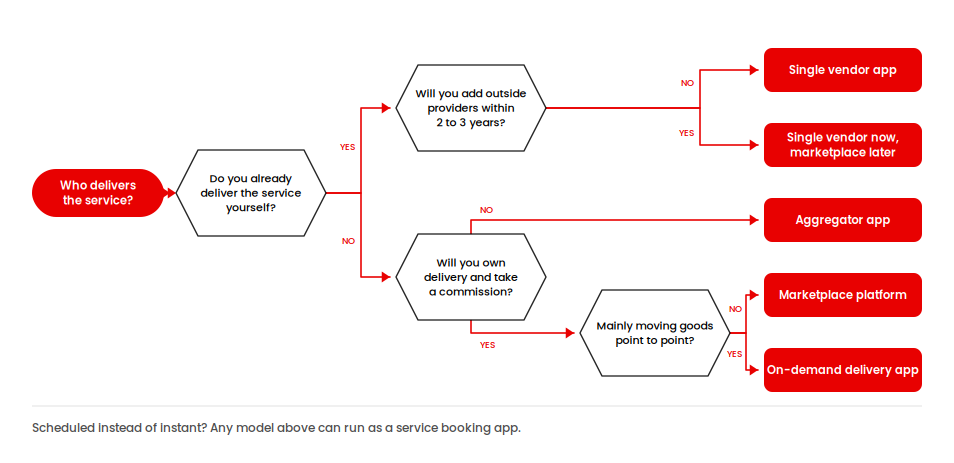
Some businesses blend these models. A home services company might start as a single vendor app, then open the platform to independent contractors once demand grows, effectively becoming a marketplace.
Others launch as an aggregator to test demand before investing in full marketplace infrastructure. There is no single right answer. What matters is matching the model to your current business structure, your growth plan for the next two to three years, and how much operational control you want over the people delivering the service.
How Do On-Demand Apps Work?
An on demand app works by connecting three groups of users through one shared system: customers, service providers, and administrators. Each group interacts with the platform differently, but all three depend on the same backend to keep information accurate and current.
The typical flow looks like this:
1. Customers Request a Service
The process starts when a customer opens the app and searches for a service, whether that is a ride, a meal, a plumber, or a cleaning appointment. The app displays available options based on factors such as location, availability, and sometimes price. Once the customer selects a service and places a request, the platform sends that request to its matching system.
2. The Platform Matches the Right Provider
The platform’s matching engine identifies a suitable service provider based on factors such as distance, rating, availability, and current workload. The goal is to assign the request to a provider who can complete the job efficiently. The selected provider receives the request through their own app and can accept or decline it. Once accepted, the customer receives confirmation and can follow the service status.
3. Service Delivery Happens in Real Time
Real time communication keeps both sides updated throughout the service. For example, a customer ordering food may watch the delivery move across a map, while someone booking a plumber may see status updates change from confirmed to in progress to complete. Push notifications alert customers and providers about important events, such as new requests, acceptance, delays, arrival, and completion.
4. Payment and Reviews Complete the Transaction
Once the service is delivered, payment is processed automatically through an integrated payment gateway. Depending on the business model, the system can also handle refunds, provider payouts, invoices, and transaction records. After the transaction, both the customer and provider can leave ratings or reviews. These interactions help businesses monitor service quality and give future customers more information when choosing a provider.
5. What Happens Behind the Scenes?
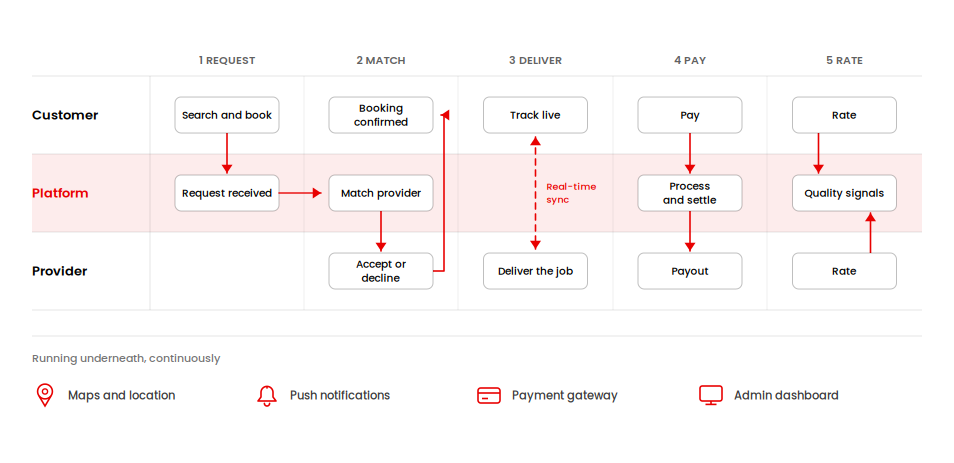
Several systems work together continuously to make this experience possible. A location and mapping service tracks providers and calculates routes. A notification system sends real time updates. A payment gateway handles transactions, refunds, and payouts. An admin dashboard gives the business visibility into bookings, provider performance, disputes, and revenue.
What makes on demand apps different from standard apps is this constant real time coordination between multiple users. A static app might simply display information, but an on demand app has to synchronize location, availability, payments, and status changes across users without noticeable delays.
That is why the backend architecture and API design matter as much as the interface people see on screen. The user experience may look simple, but behind every booking or service request is a system coordinating multiple processes at the same time.
Essential Features of an On-Demand App
A complete on demand app is really three connected applications working as one. Each interface, customer, provider, and admin, needs its own set of features to keep the platform functional. Skipping features on any one side creates gaps that show up later as support tickets, disputes, or lost bookings.
Customer App Features
- Registration and profile setup, including saved addresses and payment methods
- Service or product search with filters for location, price, and availability
- Real time booking and scheduling
- Live tracking of the provider or delivery
- In app chat or calling with the provider
- Multiple payment options, including cards, wallets, and cash on delivery where relevant
- Push notifications for booking updates
- Ratings and reviews after service completion
- Order or booking history
Provider App Features
- Provider registration and verification
- Availability and schedule management
- Job or request acceptance and rejection
- Navigation and route guidance
- Earnings dashboard and payout tracking
- In app communication with customers
- Status updates, such as marking a job in progress or complete
- Access to ratings and customer feedback
Admin Dashboard Features
- User and provider management, including verification and suspension
- Booking and transaction oversight across the platform
- Commission and payout management
- Analytics on bookings, revenue, and provider performance
- Dispute resolution tools
- Content and pricing management
- Push notification and promotion controls
A focused MVP might launch with basic booking, tracking, and payments, then add features like in app chat or loyalty programs once the core experience is validated with real users. The features chosen at this stage directly affect development cost and timeline, which is why defining the MVP scope carefully, before writing any code, saves both money and time later.
How to Develop an On-Demand App
Developing an on demand app follows a repeatable sequence, but the businesses that build successful platforms treat it as a connected framework rather than a checklist to complete in isolation. Below is the framework AppVerticals uses when planning custom on demand builds, followed by what happens at each stage.
1. Define the Business Model
Decide whether you are building a marketplace, single vendor, aggregator, or delivery focused app. This decision shapes the platform’s user roles, revenue model, workflows, and integrations. For example, a marketplace may need separate customer and provider experiences, while a single vendor app may require only one service provider account.
2. Map User Roles
Outline exactly what customers, providers, and admins need to do inside the app. Map each user’s journey from registration and service discovery to booking, payment, completion, and reviews. Also account for edge cases such as cancellations, refunds, failed payments, disputes, unavailable providers, and no show situations.
3. Scope MVP Features
Select the smallest set of features that lets real users complete a full booking cycle, from search and provider matching to payment and review. Core features might include user registration, service listings, booking, real time tracking, notifications, payments, ratings, and an admin panel. Avoid adding advanced features until you have validated the basic user journey.
4. Design the UX/UI
Build wireframes and interface designs for all three user types, focusing on clear navigation and the fewest steps needed to book or accept a job. The customer should be able to find and request a service quickly, while providers need an equally simple way to manage requests and availability. The admin interface should prioritize visibility into bookings, users, payments, and platform activity.
5. Plan Backend and Integrations
Architect the backend, database, APIs, and core infrastructure before writing application code. Plan how the system will handle user data, bookings, provider availability, payments, location updates, and real time communication. Identify required third party integrations, such as payment gateways, mapping services, SMS or push notifications, and analytics tools.
6. Develop the Application
Build the customer app, provider app, and admin dashboard based on the approved designs and technical architecture. Depending on the project scope, you can use cross platform frameworks to reduce development time or native technologies when platform specific performance and capabilities are priorities. Development should happen in manageable iterations so features can be tested as they are completed.
7. Test Across Scenarios
Run functional, performance, load, and security testing before launch. Test common user journeys as well as less predictable situations, such as multiple providers competing for the same request, sudden location changes, failed payments, cancellations, and poor network conditions. Pay particular attention to real time features like tracking and matching because they can behave differently when the platform experiences high traffic.
8. Launch and Monitor
Release the application through the appropriate app stores or web platform and closely monitor its performance after launch. Track metrics such as booking completion rate, provider response time, cancellation rate, payment failures, and user retention. Early monitoring helps identify technical problems and user experience issues before they affect a larger customer base.
9. Scale and Support
Continue improving the platform based on real usage data and customer feedback rather than assumptions made before launch. Add new features, improve performance, expand into additional locations, and optimize the provider network as demand grows. Ongoing maintenance should also cover security updates, bug fixes, third party integrations, infrastructure costs, and compatibility with newer operating system versions.
Scope your MVP before you build the full platform
Most on-demand builds run over budget because every feature ships at once. We help you define the smallest version that lets real customers, providers, and admins complete a full booking cycle, then add from there.
Explore MVP Development →How Much Does On-Demand App Development Cost?
On demand app development cost depends heavily on scope, feature complexity, platform choice, and where the development team is based. Based on current market data and AppVerticals project experience, most on demand apps fall into three cost tiers, from a lean MVP to a full enterprise platform. These figures are planning ranges rather than fixed prices, since the exact cost depends on the specific features, integrations, and user roles included in the build.
| Tier | Typical Cost Range | What It Includes |
|---|---|---|
| MVP | $15,000 to $50,000 | Core booking flow, basic customer and provider apps, one payment gateway, standard notifications, single platform (iOS or Android) |
| Mid-tier platform | $50,000 to $150,000 | Full customer, provider, and admin apps, multiple payment options, in-app chat, ratings and reviews, both iOS and Android |
| Enterprise platform | $150,000 to $400,000 or more | Advanced dispatch and matching logic, multi-city support, AI-based features, custom integrations with existing business systems, dedicated support |
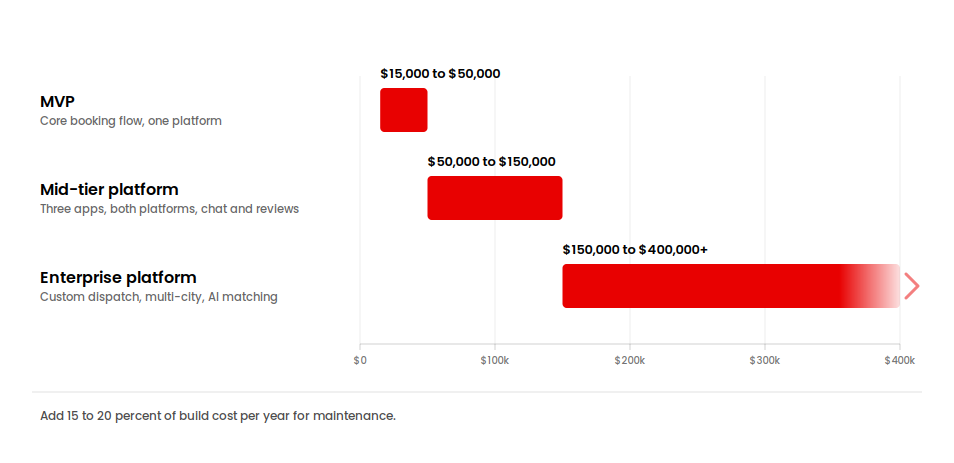
Several factors move a project up or down within these ranges. Real time features, including live tracking, dispatch, and dynamic pricing, add development time because they require constant data synchronization rather than simple display logic.
Some platforms also add AI based matching or demand prediction as part of a broader AI development engagement, which adds cost but can improve match quality over time. Third party integrations for payments, maps, and notifications each carry their own setup time and ongoing subscription costs.
Team location matters as well, since development teams in North America and Western Europe typically charge more per hour than teams in South Asia or Eastern Europe, though total project cost depends on efficiency and communication as much as hourly rate. Post launch maintenance is often overlooked in early budgeting, but businesses should plan to spend around 15 to 20 percent of the initial development cost each year on updates, bug fixes, security patches, and server monitoring.
The demand for these platforms is not slowing down. The global app development market was valued at roughly 305 billion dollars in 2026 and is projected to grow at a compound annual rate above 15 percent through 2031, driven in part by service based and on demand business models. For a broader view of where that growth is coming from, see our breakdown of global mobile app development market statistics.
How to Choose an On-Demand App Development Company
When choosing a custom app development company, look for experience coordinating customer bookings, provider availability, and payments in real time. Ask how the team handles failed payments, cancellations, and conflicting requests these scenarios reveal more about its capabilities than a polished demo.
- Ask to see relevant experience. A company that has built marketplace or booking platforms before will already understand the tradeoffs between features, cost, and timeline, and can point to specific projects rather than general capabilities.
- Look at how they handle architecture decisions. A strong partner will ask about your business model, user roles, and growth plans before recommending a tech stack, rather than defaulting to the same template for every client.
- Check their approach to third party integrations. Payment gateways, mapping services, and notification systems each come with their own setup requirements and edge cases. A company that has integrated these before will flag potential issues early instead of discovering them during testing.
- Confirm what happens after launch. On demand apps need ongoing support, monitoring, and updates, so ask directly what post launch support is included and what it costs once the initial contract ends.
- Finally, review how they scope MVPs. A development partner that pushes back on unnecessary features early, rather than agreeing to build everything at once, is usually more focused on your business outcome than on billable hours. Our MVP development page covers how AppVerticals approaches this stage in more depth, including how we help founders separate must-have features from features that can wait.
Final Thoughts
Building a successful on demand app takes more than a customer facing screen. The customer experience, the provider workflow, and the admin operations all have to work together, supported by a backend that can handle real time updates, secure payments, and growing transaction volume without slowing down.
Before choosing a development approach or a partner, define your business model and your MVP requirements. Know which user roles you need to support, which features are essential for launch, and which can wait until you have real usage data. That clarity makes every decision after it, from choosing a tech stack to setting a budget, considerably easier.
Put a number on your scope before you budget
Answer a few questions about your business model, user roles, and feature set. You get a cost range and timeline based on your actual scope.
Calculate Your App Cost →















