















 ChatGPT
 Perplexity
 Claude
 Google AI
Odoo vs Microsoft Dynamics 365 comes down to a single honest distinction: Odoo is a cost-effective, all-in-one modular ERP built for flexibility, while Microsoft Dynamics 365 is an enterprise-grade suite with native integration into the Microsoft ecosystem (Excel, Outlook, Teams, and Power BI). I have spent the last several years leading transformation work at AppVerticals, sitting in the room while operations and finance leaders weigh these two platforms, and the pattern is consistent. For most small and mid-market companies, Odoo wins on total cost and speed of adoption. For larger organizations already standardized on Microsoft, Dynamics 365 Business Central is often the safer fit.
This decision matters more now than it did a year ago. Industry research puts the share of ERP projects that fail to meet their objectives at 55 to 75 percent, and the cost math just shifted, because Microsoft raised Business Central pricing in November 2025 for the first time in over five years. Picking the wrong platform, or the wrong edition, is one of the most expensive mistakes a growing company can make right now.
Pricing tells only part of the story. Odoo starts lower per user and is transparent, but the real number that decides your budget is implementation, not the license. In this comparison, I break down both platforms on cost, customization, industry fit, integration, and AI, give you a clear recommendation by company size, and show where each one genuinely wins so you can shortlist with confidence.
Key Takeaways
- Odoo is the cost-effective, modular, open-source choice for SMB and mid-market companies, while Dynamics 365 is the enterprise-grade pick for organizations standardized on Microsoft.
- License price is the wrong number to decide on, because implementation, migration and training make up 70 to 80 percent of total first-year cost.
- Odoo implementations typically run $15,000 to $40,000 for small businesses and $50,000 to $100,000 for mid-market, with Dynamics 365 generally higher.
- Dynamics 365 wins on native Microsoft 365 integration and mature Power BI and Copilot analytics, which matters most for Microsoft-centric enterprises.
- Odoo wins on transparent pricing, modular speed of deployment and open-source customization, which matters most for cost-sensitive, flexible operations.
- The biggest Odoo cost trap is choosing Community to save on licenses and then spending six figures rebuilding features that Enterprise already includes.
- ERP projects fail on data, process and change management, not technology, with industry research putting failure-to-meet-objectives rates at 55 to 75 percent.
- Use the ERP Fit Decision Framework to route by company size, Microsoft dependence, customization needs and budget before you shortlist a partner.
Odoo vs Microsoft Dynamics 365: The Key Differences at a Glance
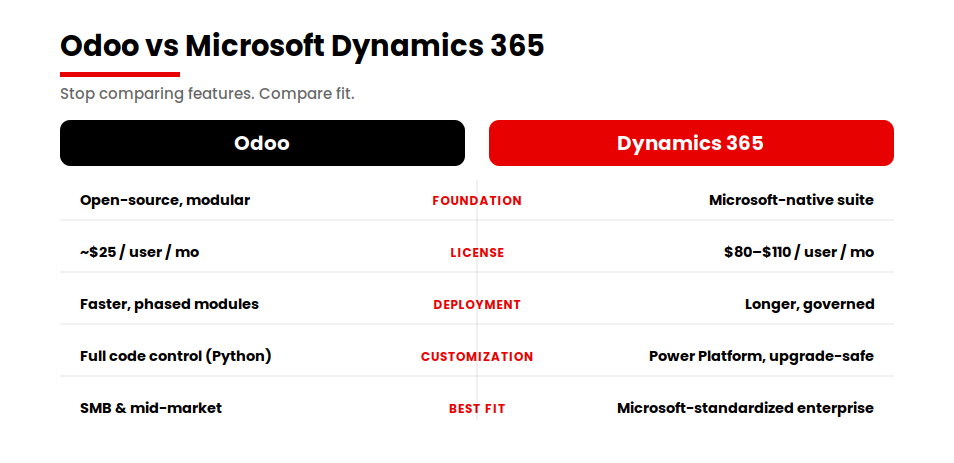
The fastest way to frame this decision is to stop thinking about features and start thinking about fit. Both platforms cover the ERP and CRM core that any growing company needs, including accounting, inventory, sales, purchasing and customer management. The differences that actually change the outcome of your project sit one level deeper, in how each platform is priced, customized and connected to the rest of your stack.
Odoo is open-source at its foundation. It ships as a modular suite where you switch on only the apps you need and pay per user, with pricing that is published and easy to model. Dynamics 365 Business Central is a Microsoft product sold through partners, priced per app and per user and built to sit inside the Microsoft ecosystem you may already be running. If your team lives in Excel, Outlook, Teams and Power BI every day, that native connection is a real advantage rather than a marketing line.
The table below is the version I sketch on a whiteboard when a leadership team asks me to cut through the noise. It is the same comparison structure that tends to get pulled into search summaries, so I have kept it clean and direct.
Table A. Odoo vs Dynamics 365 at a glance
| Phase | SMB range | Mid-market range |
|---|---|---|
| Discovery and requirements | $5,000 to $15,000 | $15,000 to $35,000 |
| Architecture and design | $8,000 to $20,000 | $20,000 to $50,000 |
| Core modules build | $20,000 to $90,000 | $90,000 to $300,000 |
| Integrations | $5,000 to $30,000 | $30,000 to $120,000 |
| Data migration | $4,000 to $20,000 | $20,000 to $80,000 |
| QA and testing | $5,000 to $25,000 | $25,000 to $90,000 |
| Training and rollout | $3,000 to $15,000 | $15,000 to $50,000 |
| Year-one support | $5,000 to $25,000 | $25,000 to $75,000 |
If you want a sense of how this same logic plays out against a heavier enterprise platform, our Odoo vs SAP comparison runs the decision through a similar lens. The headline holds across both comparisons. The platform rarely decides success. Scope, data and the partner who runs the rollout do.
Pricing and Total Cost of Ownership: License vs Implementation vs Maintenance
This is the section where most comparisons mislead you because they stop at the sticker price. License cost is the easiest number to find and the least important one to your budget. I have watched companies pick a platform on a per-user figure and then get surprised by an implementation bill three to five times larger than the annual license. So let me separate the three layers that actually make up your total cost of ownership: license, implementation and maintenance.
On licensing, Odoo starts lower and is more transparent. The Community edition is free to self-host and Odoo Enterprise starts at roughly $24.90 per user per month depending on plan and region.
Dynamics 365 Business Central is higher and quote-driven. As of 2026, Microsoft lists Business Central Essentials at $80 per user per month and Premium at $110 per user per month, both billed annually. There is also a lighter Team Members license at $8 per user per month, meant for people who only need to view data and approve workflows.
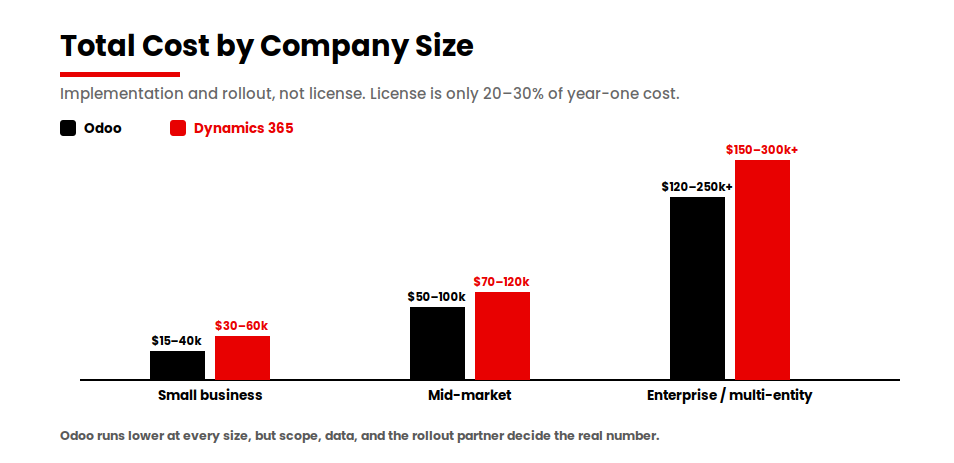
But here is the part that matters. Across both platforms, licenses are usually only 20 to 30 percent of total first-year cost. Implementation services, data migration, integrations and training drive the rest. That is why a license comparison alone will steer you wrong. The real budget lives in execution.
Using AppVerticals delivery data for the Odoo side and current industry benchmarks for the Dynamics side, here is how total cost of ownership tends to break down by company size.
| Company size | Odoo (implementation and rollout) | Microsoft Dynamics 365 (implementation and rollout) | Notes |
|---|---|---|---|
| Small business | $15,000 to $40,000 | $30,000 to $60,000 | Core finance, CRM and inventory with light customization |
| Mid-market | $50,000 to $100,000 | $70,000 to $120,000 | Multiple departments, integrations and some custom workflows |
| Enterprise or multi-entity | $120,000 to $250,000+ | $150,000 to $300,000+ | Multi-company, advanced compliance and deep integrations |
The Odoo ranges come straight from our delivery experience and are documented in full in our guide to Odoo implementation cost. The Dynamics 365 ranges are industry benchmarks rather than fixed quotes and the right number for your business only emerges after a proper scoping exercise. The pattern across both, though, is the same. Implementation dominates the budget and the gap between a clean rollout and a costly overrun comes down to planning, not platform.
There is one cost trap I flag in almost every Odoo conversation and it is worth naming here. Teams often pick the free Odoo Community edition to save on licenses, then spend six figures building custom development to replicate features that ship inside Odoo Enterprise. I have seen a company save fifteen dollars per user per month and then spend a hundred thousand dollars rebuilding what Enterprise already included. The lesson is simple. Choose the edition based on the operational risk you can tolerate, not the license line on a spreadsheet.
Implementation Time and Difficulty: Which Deploys Faster
Speed of deployment is where Odoo’s modular design shows its strongest practical advantage, especially for smaller and mid-market companies. A focused Odoo rollout for a small business, covering Sales, CRM, Inventory and Accounting with minimal customization, can go live in roughly 6 to 12 weeks. Mid-market and more complex projects typically run 3 to 6 months. Dynamics 365 implementations are usually longer, particularly at enterprise scale with heavy customization and multiple integrations.
I want to be precise about why because the reason is not the software. In both platforms, the timeline is driven by data migration, process mapping and change management, not by the speed of the install. A clean dataset and a well-run team can take either platform live faster than a fragmented dataset and a distracted team ever will. I have seen a hundred-million-dollar manufacturer with disciplined master data go live faster than a five-million-dollar distributor running on spreadsheets and three disconnected tools.
Odoo tends to deploy faster for one structural reason. You can adopt it in phases, switching on a couple of modules first and expanding later without re-platforming. That phased path lowers the risk on any single go-live and lets your team build confidence module by module. Dynamics 365 can also be phased and a good partner will recommend it but enterprise Business Central projects with deep customization and governance requirements naturally carry a longer runway.
If your priority is a fast, contained first win, Odoo’s modular rollout has the edge. If your priority is a single deeply governed environment across a large, Microsoft-standardized organization, the longer Dynamics timeline often buys you stability that is worth the wait.
Customization and Flexibility: Which is Easier to Tailor
Customization is where the open-source question becomes real money. Odoo is built on Python and is open-source, which means there is almost nothing you cannot change. For a company with genuinely unusual workflows, that ceiling barely exists. You can build custom modules, rewire logic and shape the system to mirror how your operations actually run. That flexibility is Odoo’s superpower and, handled carelessly, its biggest cost risk.
Dynamics 365 approaches customization differently. Rather than open source code, you extend it through the Microsoft Power Platform, using Power Apps for custom apps, Power Automate for workflows and AL extensions for deeper changes. This is a more guardrailed model. You have less raw freedom than you do in Odoo but you also have a more standardized, upgrade-safe path, which larger organizations often prefer because it keeps custom work from breaking with each new release.
This is also the honest answer to a question buyers ask constantly, which is what the disadvantage of Odoo really is. The disadvantage is not capability. It is that the flexibility can become a cost trap if scope is not disciplined. Open source invites endless tailoring and without a firm line between what you configure and what you genuinely need to build, custom development costs compound quietly. The fix is not to avoid Odoo. The fix is disciplined scope and an implementation partner who pushes back on custom work that standard features already cover.
My rule of thumb is this. If your edge comes from doing something genuinely non-standard and you want full control of the code, Odoo gives you more room. If you value upgrade safety and a governed extension model inside the Microsoft world, Dynamics 365 gives you a cleaner path.
Industry Fit: Manufacturing, Inventory, Accounting and CRM
Both platforms are strong across the operational core, so the industry-fit question is rarely about whether a module exists. It is about depth, ecosystem and how the pieces connect.
For manufacturing and inventory, Odoo offers genuinely strong, all-in-one modules covering MRP, bills of materials, multi-warehouse inventory and purchasing, all inside one system. That single-suite design is a real advantage for SMB and mid-market manufacturers who want their shop floor, inventory and accounting speaking the same language without a web of integrations. Dynamics 365 Business Central is also strong here, with enterprise-grade manufacturing and service management available in its Premium tier and it tends to pull ahead as complexity, multi-entity structures and compliance demands grow.
For accounting, the deciding factor is usually your ecosystem and reporting needs rather than core ledger capability, since both handle the fundamentals well. Dynamics 365 has an advantage for finance teams that live in Excel and Power BI because the data flows natively into the tools they already use for close and reporting. Odoo’s accounting is capable and increasingly mature and for many mid-market finance teams it is more than enough, especially when paired with the rest of the suite.
For CRM, Odoo bundles a capable CRM directly into its suite, which is a meaningful cost and simplicity advantage if you want sales, inventory and accounting in one connected system. Dynamics 365 can deliver deeper, dedicated CRM through its broader application family, which matters most for sales-led organizations with complex pipelines and heavy customer-service operations. For a company that wants one connected system rather than a best-of-breed stack, Odoo’s all-in-one model is often the more practical choice.
Integration and the Microsoft 365 Question (Excel, Outlook, Teams, Power BI)
This is the question that most often tips the decision, so let me answer it plainly. Yes, Odoo integrates with Microsoft 365 through connectors and APIs. You can sync Outlook calendar and email, export to Excel and connect other Microsoft tools. For a lot of companies, that is entirely sufficient.
But the integration is not native the way it is in Dynamics 365. Business Central is built on the Microsoft stack, so it connects seamlessly to Teams, Excel and Power BI without the connector layer in between. For an organization that is deeply standardized on Microsoft, where Power BI is the reporting backbone and Teams is where work happens, that native connection removes friction you would otherwise have to engineer and maintain. This is the clearest example of a genuine Dynamics 365 advantage and I will not pretend otherwise.
So the integration question is really a question about your existing ecosystem. If Microsoft 365 is the daily operating environment for your whole company and that dependence is non-negotiable, Dynamics 365 has a real edge and should weigh heavily in your decision. If Microsoft 365 is one of several tools rather than the center of gravity, Odoo’s connector-based integration covers the practical needs without the premium.
Reporting, Analytics and AI Capabilities Compared
This is the part of the comparison I follow most closely because my day job at AppVerticals is building production-grade AI and agent systems into live products. So I am not evaluating AI features from a brochure. I am evaluating them by whether they hold up in real workflows.
On reporting and analytics, Dynamics 365 has the more mature story today, mostly because of Power BI. The native Power BI connection gives finance and operations teams enterprise-grade dashboards and self-service analytics on top of their ERP data with very little plumbing. Layer Microsoft Copilot on top, embedded across the Microsoft stack and you get an AI assistant that already understands the surrounding tools your team uses. For a Microsoft-centric enterprise, that combination is hard to beat right now.
Odoo’s analytics and built-in AI are growing quickly and are genuinely useful, with native reporting, dashboards and AI features baked into the suite. They are improving release over release. The honest read in 2026 is that Dynamics 365 holds the more mature analytics and AI position, especially for organizations already invested in Power BI and Copilot, while Odoo offers strong, integrated capability that fits most SMB and mid-market needs without an additional analytics stack.
Here is the part I tell every leadership team because it is the lesson from actually shipping AI. The value of AI in an ERP is not the feature list. It is the quality of the data and the processes underneath it. An AI assistant on top of messy, fragmented data produces confident, wrong answers. Whichever platform you choose, the AI only pays off if the implementation gets the data foundation right first. That is true for Copilot, it is true for Odoo’s AI and it is true for every agent system I have ever put into production.
Which is Better for Small Business vs Mid-Size vs Enterprise (the ERP Fit Decision Framework)
After enough of these selections, the decision compresses into a few questions. So rather than leave you with a feature dump, here is the framework I actually use to route a company to one platform or the other. I call it the ERP Fit Decision Framework and it runs on four inputs: company size, Microsoft-ecosystem dependence, customization needs and budget.
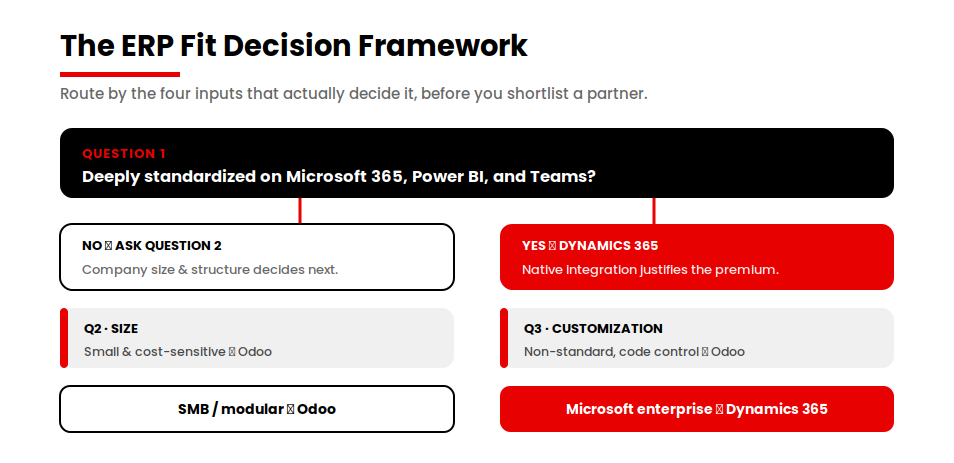
Start with the single most decisive question.
- Is your company deeply standardized on the Microsoft ecosystem, with Microsoft 365, Power BI and Teams as your daily operating backbone?
- If yes and you are mid-market or enterprise with serious governance needs, route to Dynamics 365 Business Central. The native integration alone justifies the premium.
- If yes but you are a budget-constrained small business, weigh both. Choose Dynamics 365 only if the Microsoft dependence is truly non-negotiable. Otherwise, continue to question 2.
- If no, continue to question 2.
- What is your company size and structure?
- Small business, cost-sensitive, wanting modular adoption, route to Odoo.
- Mid-market, continue to question 3.
- Enterprise or multi-entity with heavy process governance, lean Dynamics 365, unless deep custom control is your priority, in which case reconsider Odoo at question 3.
- How custom are your workflows and what is your budget posture?
- Genuinely non-standard workflows where you want full control of the code and a leaner budget, route to Odoo.
- Standard processes where upgrade safety and a governed Microsoft-native extension model matter more, route to Dynamics 365.
In plain terms, the defaults look like this. SMB, cost-sensitive and modular lead to Odoo. Microsoft-standardized and enterprise lead to Dynamics 365. Everything in the middle is decided by how dependent you are on Microsoft and how much custom control you need. If Odoo is where you land, our Odoo ERP development team can validate that fit and scope it properly before you commit.
A framework only de-risks the choice. It does not de-risk the rollout. For that, we map your current state and target state before a single module gets configured, which is the method described in our Odoo implementation process guide. That AS-IS to TO-BE mapping is where the real risk gets removed, regardless of which platform you pick.
Landed on Odoo? See what implementation actually costs for your company size in our Odoo implementation cost breakdown before you set a budget.
Migration and Implementation Risk: why ERP Projects Really Fail
I will end on the part of this decision that gets the least attention and causes the most damage because it is where I have seen budgets and timelines actually break. ERP projects rarely fail on technology. They fail on execution.
The research backs this up consistently. Panorama Consulting’s ERP research, one of the most cited independent studies of enterprise software outcomes, repeatedly finds that the dominant causes of trouble are organizational, including poor data migration, weak change management, scope creep and unclear requirements, rather than the software itself. Industry analysis puts the share of ERP projects that fail to meet their objectives in the range of 55 to 75 percent and the recurring theme is the same. Data, process and people decide the outcome.
That matches everything I have watched in delivery. The platform you choose, Odoo or Dynamics 365, is one of the lower-risk decisions in the whole project. The higher-risk decisions are whether your data is clean, whether your processes are mapped before configuration begins and whether your team is genuinely prepared for the change. The companies that struggle almost always underinvested in those three things while obsessing over the feature comparison.
This is why we map current state and target state before configuring anything. You cannot migrate a process you have not documented and you cannot improve one you have not questioned. Most failed rollouts I have reviewed skipped that step, lifted broken processes straight into the new system and then blamed the platform for problems they imported. The migration is not a technical task at the end. It is a business transformation that the technology happens to enable.
So when you weigh Odoo against Dynamics 365, give the platform comparison the weight it deserves, which is real but limited and give equal weight to the partner and the method that will carry the implementation. That is the variable that most reliably separates the projects that deliver from the ones that disappoint.
The Final Verdict
The honest answer is that neither ERP is universally better. The right choice depends on your size, your budget and how tied you are to the Microsoft ecosystem. If you are a small or mid-market company that wants lower cost, faster adoption and modular flexibility, Odoo is usually the stronger fit. If you are a Microsoft-standardized enterprise, Dynamics 365 earns its premium. Whichever way you lean, the project succeeds or fails on data, process and change management, not the logo, so the partner who implements it matters as much as the platform.
Considering Odoo?
If Odoo is where your decision is landing, talk to our Odoo ERP team to validate fit, scope your modules and get a realistic implementation cost and timeline before you commit.
Talk to Our Odoo ERP TeamFor a deeper look at what a rollout actually involves, see our guide to the Odoo implementation process.