











 ChatGPT
 Perplexity
 Claude
 Google AI
Custom ERP development is the process of building an enterprise resource planning system around one company’s exact workflows, instead of bending the business to fit an off-the-shelf platform like SAP, Oracle NetSuite, Microsoft Dynamics 365, or Odoo. A full custom build usually costs $50,000 to $250,000 for a small-to-mid business and runs 6 to 12 months. Enterprise systems land between $250,000 and $750,000 over 12 to 24 months.
That is the answer most people arrive looking for. I want to give you something more useful.
By the time a company reaches me, they have usually decided they want a custom ERP and they want to know what it costs. The harder conversation, the one that actually saves them money, is whether they should build the whole thing at all. For a lot of teams the right answer is to buy and configure, or to build a hybrid on top of Odoo (check Odoo build cost) or ERPNext, and commit real custom development only to the parts that make them money. This guide gives you a scored way to decide, real cost and timeline ranges, and a clear test for when custom actually wins.
The demand context is real. Grand View Research puts the global ERP software market at $77.08 billion in 2025, growing to $157.07 billion by 2033. More companies are committing budget to this decision every year, which is exactly why getting the build-versus-buy call right matters before the spending starts.
Key Takeaways
- Custom ERP development runs $50,000 to $250,000 and 6 to 12 months for a small-to-mid business; $250,000 to $750,000 and 12 to 24 months for an enterprise.
- The real decision has three paths, not two: buy and configure off-the-shelf, build a hybrid on Odoo or ERPNext, or commit to full custom.
- Score your situation on the six-factor ERP Build-vs-Buy Scorecard before spending anything. Most mid-market companies land on hybrid.
- Custom wins when your core processes are a competitive advantage, when compliance or integration needs exceed configuration, and when you can maintain the system after launch.
- Most ERP projects fail on over-customization, unclear requirements, and poor adoption, rather than on code.
- Model five-year total cost of ownership, not just the upfront price. Off-the-shelf and custom trade places over time.
What custom ERP development actually means
An ERP is the system that runs the back of your business: finance, inventory, procurement, production, HR, and the reporting that sits on top. Enterprise resource planning earns its name because it ties those functions to one source of data instead of leaving them scattered across spreadsheets and disconnected apps.
Custom ERP development means building that system to match how your business already runs. Off-the-shelf software gives you a fixed set of modules and asks your team to adapt. A custom build inverts that: the software models your workflow, your approval chains, your product logic.
I want to be precise about a word people misuse, though. “Custom” rarely means writing every line from scratch anymore. In practice it sits on a spectrum, and knowing where you fall on that spectrum is the whole game.
Custom vs off-the-shelf vs hybrid: the real choice
The decision is almost never a clean binary. There are three paths, and most of the mistakes I see come from teams thinking they only had two.
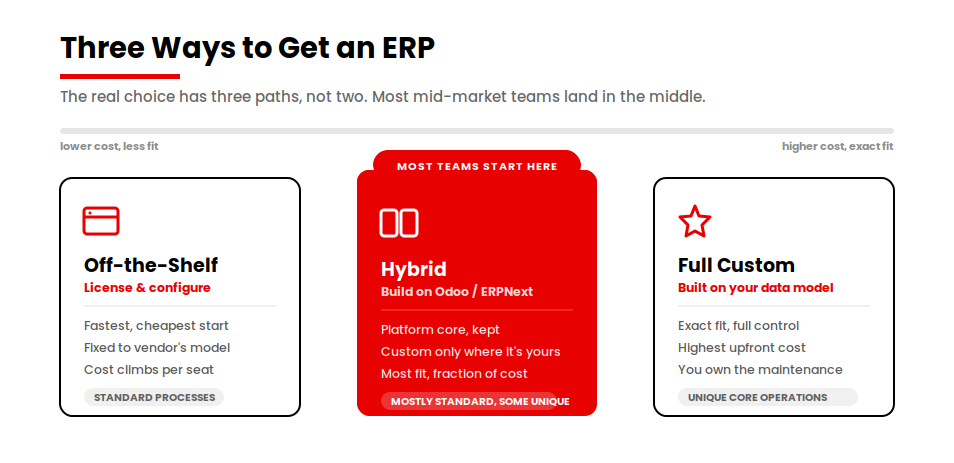
Off-the-shelf means you license a platform and configure it. Fast and cheap to start. You live inside the vendor’s assumptions about how a business should work.
Full custom means you build the system on your own data model and codebase. Maximum fit, maximum control, highest upfront cost and longest timeline. You own it, and you own its maintenance.
Hybrid means you take a proven platform like Odoo or ERPNext for the parts every business shares (the ledger, the inventory tables, payroll) and build custom only on top, for the workflows that are actually yours. For a large share of the mid-market companies I talk to, this is the smartest path, and it is the one that gets skipped most often.
Here is how the three compare on the factors that decide cost and risk.
| Factor | Off-the-shelf | Hybrid (build on Odoo/ERPNext) | Full custom |
|---|---|---|---|
| Functionality fit | Fixed to vendor’s model | Platform core plus your custom workflows | Exact fit to your business |
| Upfront cost | Lowest | Moderate | Highest |
| 5-year TCO | Rises with per-seat licensing | Moderate, fewer seats at premium tiers | High upfront, flattens over time |
| Time to production | Fastest | Faster than full custom | Slowest |
| Scalability | Bounded by the platform | Strong, platform plus custom layers | Whatever you engineer |
| Integration | Limited to supported connectors | Platform connectors plus custom APIs | Built to your stack |
| Ownership and control | Vendor-dependent | Shared: platform plus your code | Full ownership |
| Maintenance burden | Vendor handles core | You maintain the custom layer | You maintain everything |
| Best fit | Standard processes | Mostly standard, a few unique workflows | Genuinely unique core operations |
The ERP Build-vs-Buy Scorecard
I built this scorecard because the “should we build” conversation kept coming down to instinct, and instinct is expensive when the bill is six figures. Score your situation on six factors, one to five each, then add them up.
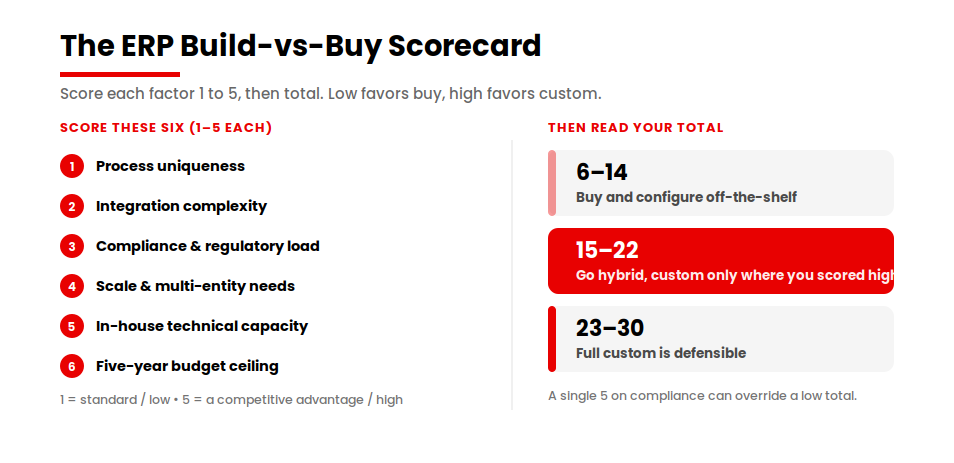
- Process uniqueness. How much of your core operation is genuinely different from your peers? A 1 means your processes are standard. A 5 means your way of working is a competitive advantage you would protect.
- Integration complexity. How many systems must this talk to, and how custom are those connections? A 1 is a couple of standard connectors. A 5 is a web of legacy systems and third-party APIs with no off-the-shelf integration.
- Compliance and regulatory load. How heavy are your audit, data-residency, or industry-compliance requirements? A 1 is light. A 5 is the kind of regime where a missed control is a real liability.
- Scale and multi-entity needs. Multiple companies, currencies, warehouses, or regions? A 1 is a single entity. A 5 is complex multi-entity consolidation.
- In-house technical capacity. Can you support and extend a system after launch? A 1 means no technical team. A 5 means a capable engineering function that can own software long term.
- Five-year budget ceiling. What can you actually spend over five years, including maintenance? A 1 is a tight budget that favours licensing. A 5 is a budget that can absorb a build and its upkeep.
| Total score | What it usually means |
|---|---|
| 6 to 14 | Buy and configure off-the-shelf. Building would be over-engineering. |
| 15 to 22 | Go hybrid. Adopt a platform, build custom only where you scored high. |
| 23 to 30 | Full custom is defensible. Your fit, scale, or compliance needs justify it. |
The scorecard is a starting point, not a verdict. A single 5 on compliance can override a low total if a control requirement simply cannot be met inside a packaged product. Use it to make the conversation honest, not to outsource the judgment.
Not sure where your score lands?
A 30-minute scoping call will tell you whether your situation points to buy, hybrid, or full custom, before you commit a budget.
When custom ERP actually wins
Custom wins when your core processes are a real competitive advantage. If the way you schedule production, price a job, or route an order is something you would not want a competitor to copy, a packaged product will flatten it into a generic workflow. That flattening is the hidden cost of buying.
I saw this clearly on a manufacturing project. The client, a fiberglass travel-trailer maker, was running inventory, production scheduling, and finance on manual, paper-based ledgers. Warehouse managers had no real-time stock visibility, so they swung between stockouts and over-ordering. Production managers scheduled by hand, which meant idle labor and missed deadlines. Finance reconciled everything manually, which meant the numbers were always late.
No off-the-shelf ERP models a custom trailer configurator tied to a production line. That is the part of their business that is genuinely theirs. So the build centered on exactly that: a complete custom ERP with a trailer configurator and production-line management, with inventory and forecasting underneath it. The point of going custom was not the finance module, which any platform has. It was the 20 percent no platform could give them.
Custom also wins when compliance or integration needs exceed what configuration can handle, and when you have the budget and the technical capacity to own the system after launch. That last condition matters more than people expect. A custom ERP you cannot maintain becomes a liability the moment the team that built it moves on.
When you should buy or go hybrid instead
If your processes are fairly standard, building from scratch is usually the most expensive way to get something you could have licensed. Every business runs a general ledger, accounts payable, and basic inventory the same way at the core. Rebuilding that is paying to reinvent a solved problem.
The hybrid path is where most mid-market companies should look first, and I do not see it discussed enough. You adopt a platform like Odoo or ERPNext for the proven foundation, then build custom workflows and integrations on top for the parts that are yours. You get most of the fit of a full build at a fraction of the cost and risk, because the database, the finance engine, and the inventory tables already exist and are already tested.
I watched the hybrid logic play out on a B2B automotive-parts platform we built. The client needed custom customer and admin portals, automated invoicing, and a clean order lifecycle. They did not need to rebuild an ERP underneath it. We synced the platform to NetSuite for live inventory and transaction data instead. The custom effort went into the portals and the order experience, the part the buyer actually touches. The ERP stayed the ERP.
Buying or going hybrid is the honest recommendation more often than a development shop will admit. If your scorecard total lands below the low-twenties, that is your signal.
How much does custom ERP development cost?
Cost tracks scope, and scope tracks the modules, the integrations, and how much of the system is genuinely custom. Here is the range I work with for a full custom build, broken down by phase so you can see where the money goes.
| Phase | SMB range | Mid-market range |
|---|---|---|
| Discovery and requirements | $5,000 to $15,000 | $15,000 to $35,000 |
| Architecture and design | $8,000 to $20,000 | $20,000 to $50,000 |
| Core modules build | $20,000 to $90,000 | $90,000 to $300,000 |
| Integrations | $5,000 to $30,000 | $30,000 to $120,000 |
| Data migration | $4,000 to $20,000 | $20,000 to $80,000 |
| QA and testing | $5,000 to $25,000 | $25,000 to $90,000 |
| Training and rollout | $3,000 to $15,000 | $15,000 to $50,000 |
| Year-one support | $5,000 to $25,000 | $25,000 to $75,000 |
A full custom build for a small-to-mid business typically totals $50,000 to $250,000. Mid-to-large enterprises run $250,000 to $750,000, and genuinely complex enterprise systems go past that. A hybrid build on Odoo or ERPNext usually lands lower than a full custom equivalent, because you are paying to extend a platform, not to recreate one.
The build cost is rarely what should worry you most. The bigger risk is spending it on the wrong thing, or building far more than you needed.
Five-year total cost of ownership
Upfront cost is the number everyone compares. Five-year total cost of ownership is the number that should actually drive the decision, because it is where off-the-shelf and custom trade places.
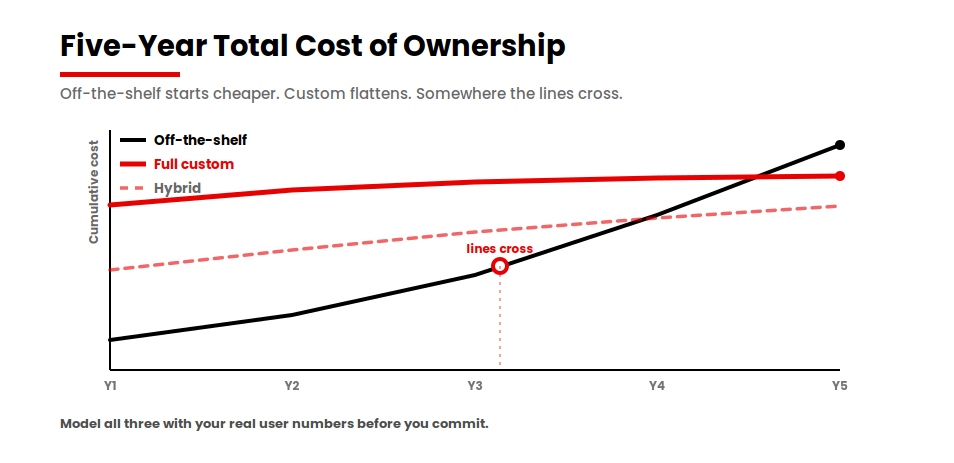
Off-the-shelf is cheaper to start and stays cheap while your team is small. The cost climbs with per-seat licensing as you add users, and climbs again when you pay for customizations to force the platform to do something it was not designed for. A custom build is the reverse: heavy upfront, then it flattens, because you are not paying per seat to use software you own.
Somewhere in those five years the two lines cross. Where they cross depends on your user count and how hard you are pushing the platform past its defaults. A hybrid build usually sits between them, lower upfront than full custom and lower long-run than heavy per-seat licensing.
The practical move is to model all three over five years before you commit, with your real user numbers. A build that looks expensive in year one can be the cheaper option by year four. A license that looks cheap in year one can quietly become the most expensive line in your operations budget.
The return justifies the modeling work. Industry analyses of well-run ERP programs report operational cost reductions in the range of 20 to 30 percent within about two years of a proper implementation, as reporting cycles compress and inventory accuracy tightens. That return only shows up when the system fits the business and people actually use it, which is the whole point of getting the build-versus-buy call right first.
How long does it take?
Timeline tracks scope the same way cost does. A full custom ERP for a small-to-mid business usually takes 6 to 12 months. A large enterprise system runs 12 to 24 months, because the integration surface and the testing load grow with every entity, currency, and legacy system you connect.
A hybrid build reaches production faster. The finance, inventory, and HR modules already exist on the platform, so you are only building and testing the workflows that are unique to you. I have seen that cut months off a comparable full-custom timeline.
The phases that quietly stretch a schedule are data migration and user acceptance testing. Moving years of transactional data into a new system, cleanly, is slow and unglamorous, and skipping the validation is how projects go live with broken numbers. Budget real time for both.
The custom ERP development process, step by step
The process matters because most failed ERP projects do not fail at the coding stage. They fail at the start, when nobody mapped what the system actually had to do.
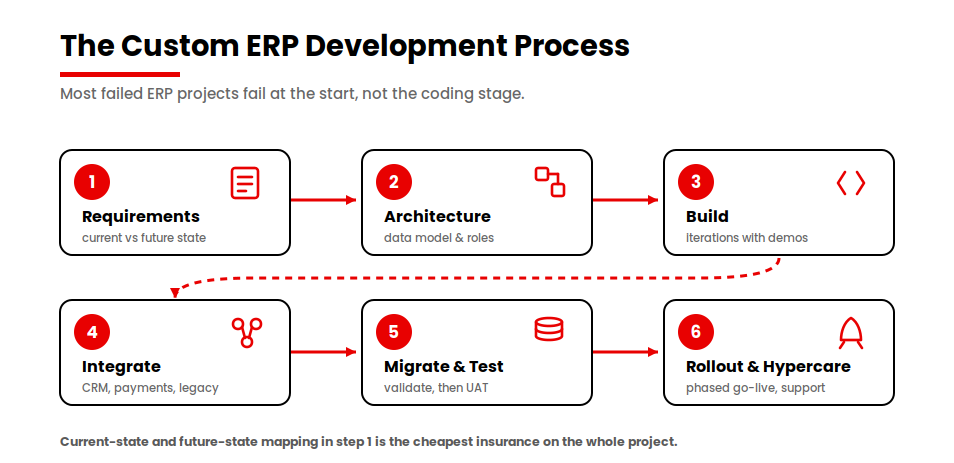
- Requirements, mapped as current-state and future-state. Before anything gets designed, we document how each department works today and how it should work after launch. The gap between those two pictures is where you discover what needs custom work, what needs configuration, and what needs to change in the business itself.
- Architecture and design. The data model, the integration boundaries, the user roles, and the interface. This is where scalability and compliance get engineered in, not bolted on later.
- Build. The modules get developed against the approved design, in iterations with regular demos so the system stays aligned with what the business needs as it takes shape.
- Integrate. The ERP connects to the other systems it has to live with: payments, CRM, legacy databases, third-party APIs. Integration in SaaS is the work that decides whether anyone trusts the system enough to use it.
- Migrate and test. Transactional data moves across, gets validated for accuracy, and the whole system goes through functional, performance, and user-acceptance testing before anyone depends on it.
- Rollout and hypercare. Phased go-live, training, and a support window after launch when issues surface and get resolved fast while the team is still close to the build.
Core modules to scope, and which to skip first
A custom ERP can include almost anything. That is exactly why projects bloat. The discipline is deciding what to build first and what to leave for later.
The modules most builds genuinely need are financial management and the general ledger, inventory and supply-chain tracking, procurement, reporting and dashboards, and role-based access control so the right people see the right data. For many businesses, HR and payroll, CRM, and production or project management follow close behind.
The trap is building modules nobody asked for. I have seen teams commission elaborate features that sit unused because the actual users never needed them. A bloated system with low adoption is worse than a lean one people rely on, because the cost was real and the return never arrived.
My rule: build the modules that map to a workflow someone uses every day. Defer anything you are adding “because an ERP should have it.” You can always extend later, and a system people actually use is the only kind that returns its investment.
Why custom ERP projects fail, and how to de-risk
Most ERP projects that fail do not fail on code. They fail on over-customization, unclear requirements, and poor adoption. Independent ERP research done by the likes of Panorama Consulting consistently points to the same culprits: underestimating data-migration complexity, failing to map integrations upfront, and neglecting change management, with user-adoption failure often costing more than the implementation itself.
Over-customization is the most expensive one. Every custom module you build is something you then have to maintain, test against every update, and document. A useful discipline is to keep custom logic to a minority of the total system and lean on configuration wherever you can. The more of the platform you bend, the more fragile and costly it gets over its life.
Unclear requirements are the next killer. When nobody mapped current-state and future-state workflows properly, the build chases a moving target and the budget follows it. Treat the current-state and future-state mapping in step one as the cheapest insurance you can buy on the whole project.
Poor adoption is the quiet one. A technically perfect system that intimidates its users, or digitizes a broken process instead of fixing it first, will sit unused. Fix the process before you automate it, keep the interface clean, and train people properly. Adoption is what turns the build into a return. Read more on legacy system migration guide here.
How to choose a custom ERP development company
When you evaluate a partner, look past the portfolio gloss at a few specific things.
Ask how they handle the requirements phase. A partner who wants to start building before mapping your workflows is a partner who will build the wrong thing efficiently. Ask what they would advise you *not* to build, and whether they will recommend a hybrid or off-the-shelf path when that is the honest answer. A partner who only ever recommends full custom is selling, not advising.
Ask about their experience with the platforms in play, Odoo, NetSuite, Dynamics, whichever fits, because hybrid competence is what lets them save you money instead of defaulting to a from-scratch build. And ask about life after launch: maintenance, support, and how they hand the system over so you are not dependent on them forever or stranded when they leave.
The right partner will tell you when not to build. That is the test.
The decision in front of you
The real choice runs across three paths, not two: buy and configure, build a hybrid on Odoo or ERPNext, or commit to full custom. Which one fits comes down to your process complexity, your budget, and your team. Run your situation through the scorecard before you spend anything. Most teams find their answer is the hybrid path, and that is a good outcome, because it means you are spending custom money only where it earns its keep.
If custom or hybrid clears the bar, the next step is scoping it with people who will tell you honestly when not to build.
Talk to our ERP team about your build
We will help you decide whether to build, buy, or go hybrid before you spend a dollar on development.
Keep reading
If you are weighing this decision, these go deeper on the pieces that matter most: how an Odoo implementation actually runs, the SaaS vs custom software buyer’s guide for the same build-versus-buy logic applied to SaaS, and connecting an ERP to the rest of your stack.