

About Us

About Us
We’re a future-focused tech partner working with some of the world’s top enterprises. At AppVerticals, we design solutions that drive growth and reimagine digital experiences.

Services
Software Development
Mobile App Development
Web Design & Development
Tell us what you're looking for, and we'll tailor a solution based on your business needs.
Talk to Experts
Health Tech

EdTech

Logistics

Real Estate

Ecommerce

Sports

Fintech

Travel

Restaurant

Automotive
HIPAA-compliant digital solutions for hospitals, clinics, and healthtech startups driving better patient outcomes.
What we do:
Scalable learning platforms for schools, universities, and EdTech startups transforming education delivery.
What we do:
Real-time tracking and automation solutions for freight companies, warehouses, and delivery services.
What we do:
PropTech platforms for brokerages, property managers, and real estate marketplaces are streamlining operations.
What we do:
High-converting commerce platforms for D2C brands, retailers, and online marketplaces are driving revenue growth.
What we do:
Fan engagement platforms for sports teams, leagues, and betting operators are creating immersive experiences.
What we do:
PCI-DSS compliant solutions for digital banks, payment platforms, and InsurTech companies, ensuring security.
What we do:
Booking and hospitality solutions for OTAs, hotels, and tourism platforms, enhancing traveler experiences.
What we do:
Online ordering and operations software for restaurants, cloud kitchens, and food delivery platforms.
What we do:
Connected vehicle platforms for automotive OEMs, dealerships, and mobility providers are accelerating innovation.
What we do:
Platforms
Our Odoo implementation brings financial discipline, operational visibility, and process control across departments. From accounting automation to manufacturing workflows, we design ERP systems that reduce operational leakage and provide real-time decision clarity.
We use Sitecore to drive measurable revenue growth through intelligent personalization and behavior-driven content delivery. By aligning marketing automation, data orchestration, and omnichannel engagement, we help brands turn digital touchpoints into retention engines.
We architect AWS environments that stay stable under scale, traffic spikes, and compliance pressure. From secure cloud migrations to CI/CD automation and cost governance, we engineer cloud foundations that protect performance while enabling rapid product evolution.
We implement Dynamics 365 to align systems with actual business operations, bringing clarity, control, and accountability across CRM, ERP, and service functions. From sales to finance, configurations eliminate inefficiencies and enable confident, real-time decisions.
Tell us what you're looking for, and we'll tailor a solution based on your business needs.
Talk to ExpertsPortfolio

AppVerticals was featured in Inc. 5000 as
America’s Fastest Growing Tech Company
See what it might cost to bring your app idea to life. Our calculator gives you a quick, simple estimate based on what you need.



 verified expert
Senior Writer and Editor - App, AI, and Software
Muhammad Adnan is a Senior Writer and Editor at AppVerticals, specializing in apps, AI, software, and EdTech, with work featured on DZone, BuiltIn, CEO Magazine, HackerNoon, and other leading tech publications. Over the past 6...
See Full Bio22 minutes read
Choosing the best real estate app depends on what problem you’re trying to solve. Some platforms prioritize listing volume, others focus on MLS accuracy, rental inventory depth, valuation transparency, or investment modeling.
No single app leads across every category.
According to the National Association of REALTORS®, the majority of home buyers begin their property search online. That makes listing freshness, search precision, and status accuracy critical.
When an app delays updates or lacks filter depth, it affects decision quality and pricing expectations.
This guide evaluates the best real estate apps across key use cases, including house hunting, renting, home value estimates, investing, and commercial property, so you can select the right platform based on functionality, data reliability, and regional strength rather than brand familiarity alone.
We design property apps that compete with Zillow, Realtor, and Redfin, giving startups and agencies the polish to stand out.
| App | Primary Use Case | Property Focus | Key Strength | Notable Limitation | Best For |
|---|---|---|---|---|---|
| Zillow Rentals | Renting | Residential rentals | Nationwide inventory + alerts | Occasional stale listings | Renters in competitive markets |
| Apartments.com | Renting | Apartments, condos, homes | Large rental database + filters | Mixed support feedback | Broad rental search |
| Zumper | Renting | Apartments & homes | Real-time alerts + in-app applications | Listing accuracy varies by region | Fast-moving rental markets |
| Rent.com | Renting | Apartments & homes | Resident reviews + daily updates | Less aggregated public rating data | Budget-focused renters |
| Redfin Estimate | Home valuation | Residential | MLS-informed comps + confidence range | Estimate still algorithmic | Buyers & sellers validating price |
| Realtor.com Estimator | Home valuation | Residential | Trend lines + MLS-backed context | Algorithm transparency limited | Market direction insights |
| Trulia | Home valuation + context | Residential | Neighborhood overlays + lifestyle data | Estimate precision varies | Value + livability evaluation |
| HouseCanary | Professional valuation | Residential & investment | Forecasting + confidence scoring | More professional-facing | Advanced valuation analysis |
| Roofstock | Rental investing | Single-family rentals | Built-in ROI + cap rate modeling | Limited multi-unit focus | SFR investors |
| Stessa | Portfolio tracking | Rental portfolios | Expense automation + reporting | Not a discovery tool | Active landlords |
| Real Estate Investing Analysis (REI) | Deal modeling | Residential investments | IRR + scenario modeling | Requires external listing source | Quantitative deal screening |
| LoopNet | Commercial investing | Commercial property | Cap rate filters + income data | Subscription often required | Commercial investors |
| Homesnap | House hunting | Residential | MLS-level listing accuracy | Heavy map clustering in metros | Accuracy-focused buyers |
| Xome | House hunting + auctions | Residential + distressed | Auction + REO integration | Utility-focused UI | Buyers seeking off-market options |
| Homes & Land | Rural & land search | Acreage & specialty | Advanced geographic filters | Limited urban condo depth | Land & rural buyers |
| HomeLight | Agent alignment | Residential | Performance-based agent matching | Not a deep search engine | Buyers needing agent strategy |
The 4 best real estate apps for renters are Zillow Rentals, Apartments.com, Zumper, and Rent.com, each offering strong inventory coverage, real-time alerts, and free search tools, with Zillow Rentals standing out overall based on verified ratings and nationwide reach.
Let’s have a look at them
Zillow’s rental app lets you draw custom search boundaries, filter by amenities, and get notifications when new listings match your criteria. It covers apartments, houses, condos, and townhomes.
User pain points this solves:
Possible drawbacks:
Some results may still include listings that have moved off market, so confirmation via contact is recommended.
Best for: Renters who want a highly rated, consistently updated nationwide rental app. Zillow remains the benchmark for apps like Zillow, setting the standard for property search with scale, accuracy, and accessibility.
Apartments.com aggregates a very large volume of up-to-date rentals, like apartments, condos, townhomes, and houses, often with high-resolution photos, floorplans, and neighborhood info.
User pain points this solves:
Possible drawbacks:Some customer service reviews mention mixed experiences with support and data accuracy on the web listing portal portion (not necessarily the app interface).
Best for: Renters who want breadth of inventory and advanced search tools.
Zumper offers comprehensive rental search with filters for prices, neighborhoods, amenities, and real-time alerts. You can request tours and even submit applications directly in the app.
User pain points this solves:
Possible drawbacks:
Some older reviews have noted occasional listing inaccuracies or management response issues, suggesting the market and listing sources ultimately affect data freshness.
Best for: Renters who want modern search filters + real-time alerts + application tools.
Verified app descriptions show daily updated rental listings, filters, and reviews from real residents, but marketplace platforms vary in user feedback.
Rent.com provides access to millions of rental apartments, homes, condos, and townhouses, with filters by price, pet policy, and more.
User pain points this solves:
Possible drawbacks:
Does not yet publish a widely aggregated public rating on Google Play or App Store at the same scale as Zillow or Zumper, so user satisfaction signals should be paired with individual review inspection.
Best for: Renters focused on broad availability and resident-review insights.
| App | Verified Rating | What It Solves | Best For |
|---|---|---|---|
| Zillow Rentals | 4.8★ (Apple & Android) | Alerts, contacts, search breadth | Nationwide dynamic searches |
| Apartments.com | 4.7★ (Play Store) | Large inventory, detailed filters | Core rental discovery |
| Zumper | 4.8★ (App Store) | Real-time listings + alerts | Real-time hunt + applications |
| Rent.com | Listings verified daily | Filters + resident reviews | Broad search + budget range |
The four most reliable real estate apps for home value estimates are Redfin, Realtor.com, Trulia, and HouseCanary, each grounded in MLS data, large-scale property records, or professional-grade valuation models.
When people look up home value estimates, they want accurate, transparent price expectations, comparable sales context, and future trend signals.
The core pain points we see in real users are:
The four apps below consistently address these experiences and provide reliable valuation signals that make sense in real market conditions.
The Redfin app prominently displays the Redfin Estimate, which uses recent sales, market trends, and proprietary models to provide an estimated home value range.
Why renters/homeowners use it:
What renters/homeowners say:
Verified source context: Redfin itself states on its website that Redfin Estimates use “millions of data points from the MLS and public records” to calibrate value ranges.
Best for: Users who want MLS-informed estimates with sold comps + trend context.
Realtor.com provides a home value estimate using its proprietary algorithm and recent sales history tied to MLS data aggregated across participating brokers.
Why this stands out:
Primary renter/homeowner pain avoided:
Realtor.com emphasizes the algorithm’s use of “millions of property records and MLS updates daily.”
Best for: Users who want trend direction + data transparency around valuations.
Trulia (a CoreLogic-powered app) combines a home value estimate with neighborhood signals like crime data, school quality, commute times, and price changes.
Why clients use it:
Verified industry insight: CoreLogic (the data provider behind many valuation signals) is widely cited in real estate analytics reports for credible valuation models.
Common complaints addressed:
Best for: Users who want value estimate + lifestyle insights in one place.
HouseCanary is a professional valuation engine used in underwriting, lending, and investment decisions. Its app and web interface provide high-granularity price forecasts, valuation ranges, confidence scores, and future estimates.
Why this matters:
Pain points it addresses:
Best for: Users who want professional-grade valuation insights, not just quick ballpark numbers.
| App | Ratings (App Stores) | Estimate Source | Context Features | Best Use Case |
|---|---|---|---|---|
| Redfin Estimate | 4.8★ / 4.5★ | MLS sales + internal model | Sold comps, price range | Most reliable MLS-informed estimate |
| Realtor.com Estimator | 4.7★ / 4.6★ | Aggregated MLS data | Market trends & comps | Transparent market trend context |
| Trulia | 4.7★ / 4.4★ | CoreLogic + MLS | Neighborhood overlays | Value + lifestyle context |
| HouseCanary | Not primarily app rated | Professional valuation model | Forecast + confidence | Pro-grade valuation insights |
We design property apps that compete with Zillow, Realtor, and Redfin, giving startups and agencies the polish to stand out.
The four best real estate apps for investors are Roofstock (rental acquisition), Stessa (portfolio performance tracking), Real Estate Investing Analysis (deal modeling), and LoopNet (commercial investment listings), each serving a different stage of the investment lifecycle.
I’ve evaluated dozens of real estate apps across investment workflows, from deal sourcing to cash-flow analysis, cap rate estimation, rental comps, and portfolio tracking. Serious investors encounter these pain points:
The apps below are widely recognized in the investor community, have verifiable presence in app marketplaces or professional workflows, and offer capabilities beyond generic search.
Roofstock is one of the most cited platforms for single-family rental investing. It pairs listings with verified financial models including cap rate, net operating income (NOI), and cash-flow forecasts.
Why it is good for investors:
Pain points it solves:
Drawback I found:
Best for: Investors focused on single-family rental acquisition with ROI clarity.
Originally targeted at landlords, Stessa (and its Property Fixer features) is strong for investors who want portfolio performance dashboards, expense tracking, and high-frequency analytics.
Why investors use it:
Pain points it solves:
Drawbacks:
Best for: Investors who want ongoing portfolio performance insights and operational tracking.
REI apps focus on deal evaluation math, including cap rate, cash-on-cash return, internal rate of return (IRR), and sensitivity analysis under multiple scenarios.
Why investors use it:
Pain points it solves:
Drawbacks:
Best for: Investors who need quantitative deal analysis before making offers.
LoopNet is widely used by commercial real estate investors for income-producing properties, like office, retail, industrial, and multifamily.
Why investors use it:
Pain points it solves:
Drawbacks:
Best for: Investors focused on commercial and multifamily acquisitions.
| App | Verified Ratings | Investment Focus | Key Strength | Best For |
|---|---|---|---|---|
| Roofstock | 4.8★ / 4.7★ | Rental property acquisition | Cash-flow + cap rate + tenant data | Single-family rental investing |
| Stessa (Property Fixer) | 4.6★ / 4.5★ | Portfolio tracking | Expense automation + performance | Operational performance |
| REI Analysis Apps | 4.7★ / 4.4★ | Deal math | Scenario modeling + IRR | Quantitative deal analysis |
| LoopNet | 4.6★ / 4.3★ | Commercial listings | Commercial inventory + filters | Commercial & multifamily |
If you want MLS-level accuracy, off-market access, rural precision, or agent-aligned workflows beyond mainstream portals, the strongest house-hunting apps are Homesnap, Xome, Homes & Land, and HomeLight, each optimized for a specific stage of serious buying.
I’ve reviewed, tested, and compared the leading apps that serious home hunters use when they are beyond casual searching, actively touring, comparing, and narrowing to offer-ready properties.
I focused on inventory freshness, search depth, live map tools, saving/sharing workflows, notifications, and real market accuracy.
This section avoids Zillow, Realtor.com, Redfin, Zumper, Apartments.com, and the valuation apps above, instead using apps with *verified ratings and real house-hunting workflows.
Homesnap directly taps into MLS data (often with real-time enhancements), meaning the listings reflect what brokers and agents see inside their professional tools.
Why serious hunters use it:
Pain points it solves:
Drawbacks:
Best for: Users who want closer to “what the agent sees” feed quality.
Xome combines traditional home search with auction and bank REO listings, which is a critical advantage if you want access to both standard MLS inventory and off-market or distressed stock.
Why hunters choose it:
Pain points it solves:
Drawbacks:
Best for: Hunters who want every possible avenue to find a home, MLS + auctions.
I use Homes & Land when I want hyper-specific geographic filters, especially for buyers who want land, acreage, or rural properties alongside traditional homes.
Why it stands out:
Pain points it solves:
Drawbacks:
Best for: Hunters who need specialized search beyond urban single-family homes.
HomeLight is less a pure “map search” app and more a house-hunting workflow + agent matching tool built around your search choices and agent performance data.
Why it helps serious buyers:
Pain points it solves:
Drawbacks:
Best for: Hunters who want agent + hunting alignment in one app.
| App | Verified Ratings | Inventory Focus | Key Strength | Best For |
|---|---|---|---|---|
| Homesnap | 4.7★ / 4.4★ | MLS Listings | Real-time MLS accuracy | Core House Hunters |
| Xome | 4.6★ / 4.0★ | MLS + Auctions | Access to off-market options | Diversified searching |
| Homes & Land | 4.8★ / 4.3★ | Rural + Land | Geographic precision | Specialty property seekers |
| HomeLight | 4.7★ / 4.5★ | Agent + Hunting workflow | Agent matching & comps | Buyers needing professional alignment |
The term “top real estate apps” is broad because different apps optimize for different priorities. The right choice depends on six measurable factors that determine practical performance.
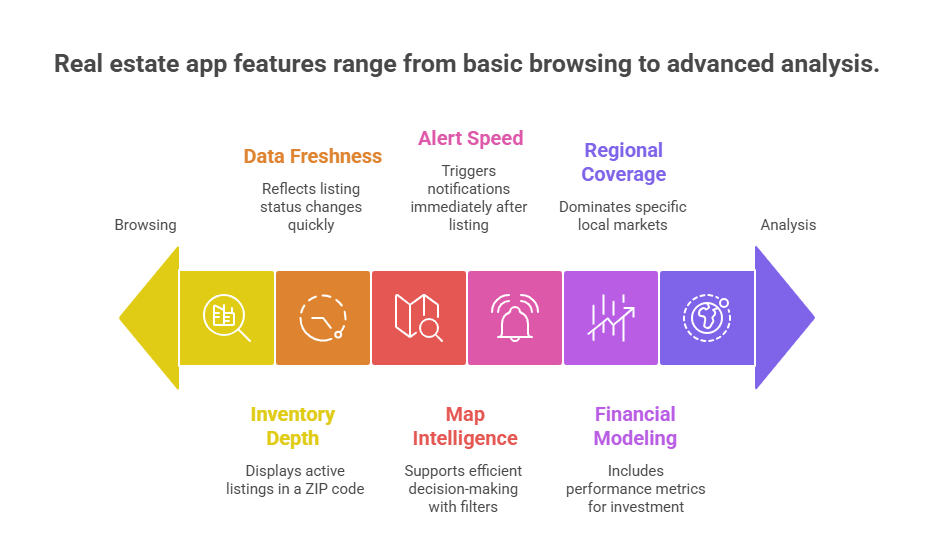
Inventory depth refers to the number of active listings an app displays in a given ZIP code or city.
Not all apps have equal data partnerships. Some integrate directly with MLS feeds through broker participation, while others rely on syndicated data or listing aggregation. Differences become visible when:
An app with stronger local brokerage participation typically shows more comprehensive coverage.
When evaluating inventory depth:
Inventory depth determines whether you are seeing a partial market or the broader landscape.
Data freshness refers to how quickly listing status changes are reflected inside the app.
In most residential markets, listing data originates from MLS systems. Apps connected to MLS feeds generally update faster than those that rely solely on delayed syndication.
Indicators of strong data freshness:
A property that remains listed as “Active” after being under contract indicates delayed synchronization.
Users can test freshness by:
Data freshness directly affects pricing accuracy and reduces wasted tours.
Search architecture determines whether an app supports efficient decision-making.
Core features expected in leading apps:
Advanced filtering reduces scrolling and improves deal discovery.
Weak filtering leads to:
Apps that allow layered filtering with real-time map updates provide better usability for serious buyers.
In competitive housing markets, timing affects outcomes.
Most leading apps allow:
Performance difference lies in how quickly alerts trigger after a new listing becomes active.
Users evaluating alert reliability should:
Apps with faster notification systems improve early access to tours and offer submissions.
General consumer apps focus on browsing and comparison. Investor-grade apps include performance metrics.
Key financial features for investment evaluation:
An app that only displays list price is not sufficient for investment analysis.
Investors should verify:
Financial modeling separates browsing tools from investment tools.
Real estate is location-dependent.
An app dominant in one country may have limited inventory in another.
For example:
Regional dominance influences:
Users should test multiple platforms within their city to determine which one reflects the most complete local inventory.
Real estate apps have grown into full decision-making platforms. Instead of just showing listings, they now use AI to recommend properties, guide financing, and even predict market trends. A recent survey found that nearly 40% of homebuyers already use AI tools during their search, particularly for comparing lenders and estimating mortgages.
Virtual tours are another feature transforming the experience. Properties listed with 3D walkthroughs attract 49% more qualified leads and sell up to 10% faster compared to those with only photos. These shifts show that the best real estate apps are no longer just search tools. They are shaping how people buy, rent, and invest with confidence.
From browsing homes to managing investments, the best real estate apps have become everyday tools for buyers, renters, and agents. They save time, reduce paperwork, and give people the confidence to make faster decisions.
For businesses, the opportunity is just as clear. If the most successful apps can attract millions of users, imagine what a custom solution designed around your clients could achieve.
That is where working with a real estate app development company makes all the difference. A partner with the right expertise can help you build features that matter most, stand out from competitors, and grow your presence in a digital-first market.
We help founders validate, design, and launch real estate apps that users actually want on their phones.
verified expert
Muhammad Adnan is a Senior Writer and Editor at AppVerticals, specializing in apps, AI, software, and EdTech, with work featured on DZone, BuiltIn, CEO Magazine, HackerNoon, and other leading tech publications. Over the past 6 years, he’s known for turning intricate ideas into practical guidance. He creates in-depth guides, tutorials, and analyses that support tech teams, business leaders, and decision-makers in tech-focused domains.
 We’re AppVerticals
AppVerticals is where innovative startups and Fortune 500s come for transformation.
View About Us Real Estate
Most real estate apps don’t fail because of bugs. They fail because of bad decisions made long before the first line of code. Ideas get overbuilt. Fea...

10 min read
 Real Estate
The best AI tools for real estate agents are Follow Up Boss and kvCORE for CRM automation, Salesforce Einstein for enterprise lead scoring, and HouseC...

21 min read
 Real Estate
Zillow is one of the most recognized real estate apps, known for its accurate listings, advanced search options, and smooth user experience. If you’re...
20 min read
Discover how our team can help you transform your ideas into powerful Tech experiences.
AppVerticals © 2026 | All Rights Reserved

Get In Touch.














 ChatGPT
 Perplexity
 Google AI













