













 ChatGPT
 Perplexity
 Google AI
Discover essential steps, strategies and best practices in this comprehensive mobile app development guide to build user-friendly, secure, and scalable apps in 2026.

About Us

About Us
We’re a future-focused tech partner working with some of the world’s top enterprises. At AppVerticals, we design solutions that drive growth and reimagine digital experiences.

Services
Software Development
Mobile App Development
Web Design & Development
Tell us what you're looking for, and we'll tailor a solution based on your business needs.
Talk to Experts
Health Tech

EdTech

Logistics

Real Estate

Ecommerce

Sports

Fintech

Travel

Restaurant

Automotive
HIPAA-compliant digital solutions for hospitals, clinics, and healthtech startups driving better patient outcomes.
What we do:
Scalable learning platforms for schools, universities, and EdTech startups transforming education delivery.
What we do:
Real-time tracking and automation solutions for freight companies, warehouses, and delivery services.
What we do:
PropTech platforms for brokerages, property managers, and real estate marketplaces are streamlining operations.
What we do:
High-converting commerce platforms for D2C brands, retailers, and online marketplaces are driving revenue growth.
What we do:
Fan engagement platforms for sports teams, leagues, and betting operators are creating immersive experiences.
What we do:
PCI-DSS compliant solutions for digital banks, payment platforms, and InsurTech companies, ensuring security.
What we do:
Booking and hospitality solutions for OTAs, hotels, and tourism platforms, enhancing traveler experiences.
What we do:
Online ordering and operations software for restaurants, cloud kitchens, and food delivery platforms.
What we do:
Connected vehicle platforms for automotive OEMs, dealerships, and mobility providers are accelerating innovation.
What we do:
Platforms
Our Odoo implementation brings financial discipline, operational visibility, and process control across departments. From accounting automation to manufacturing workflows, we design ERP systems that reduce operational leakage and provide real-time decision clarity.
We use Sitecore to drive measurable revenue growth through intelligent personalization and behavior-driven content delivery. By aligning marketing automation, data orchestration, and omnichannel engagement, we help brands turn digital touchpoints into retention engines.
We architect AWS environments that stay stable under scale, traffic spikes, and compliance pressure. From secure cloud migrations to CI/CD automation and cost governance, we engineer cloud foundations that protect performance while enabling rapid product evolution.
We implement Dynamics 365 to align systems with actual business operations, bringing clarity, control, and accountability across CRM, ERP, and service functions. From sales to finance, configurations eliminate inefficiencies and enable confident, real-time decisions.
Tell us what you're looking for, and we'll tailor a solution based on your business needs.
Talk to ExpertsPortfolio

AppVerticals was featured in Inc. 5000 as
America’s Fastest Growing Tech Company
See what it might cost to bring your app idea to life. Our calculator gives you a quick, simple estimate based on what you need.



 verified expert
Senior Content Writer — Mobile & Software Development, AI
Zainab helps tech brands sound more human. She takes app ideas, features, and updates and turns them into content people actually want to read. Whether it’s for a launch, a campaign, or just making things...
See Full Bio25 minutes read
The mobile app market is expected to reach $585 billion in 2025, with over 181 billion global app downloads in 2026. As businesses shift to mobile-first strategies, apps have become crucial for engagement and revenue growth.
Consumers spend an average of 4.8 hours per day in apps, interacting with 9 apps daily. This presents a huge opportunity for businesses to tap into mobile-driven success, but it also comes with challenges like high churn rates and retention struggles.
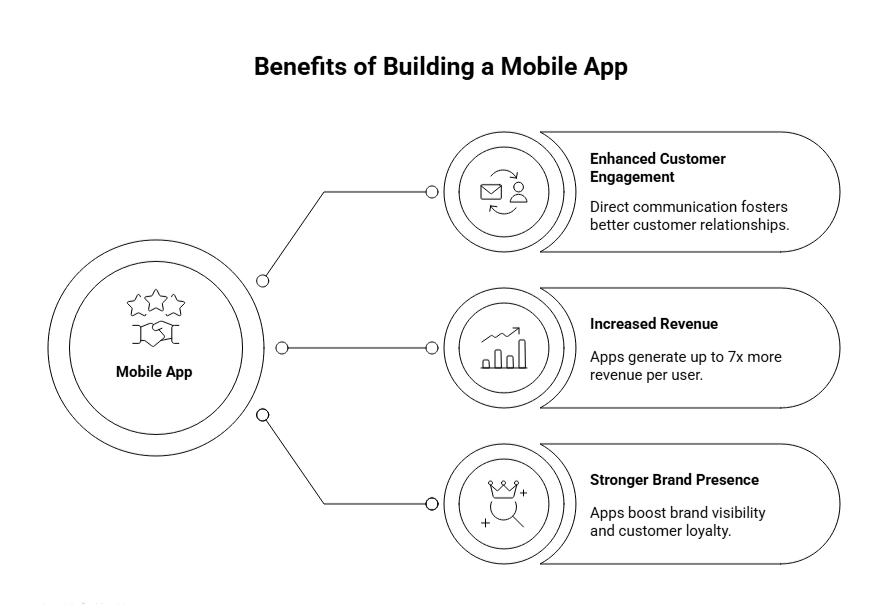
Building a successful app can benefit businesses in many ways, they include:
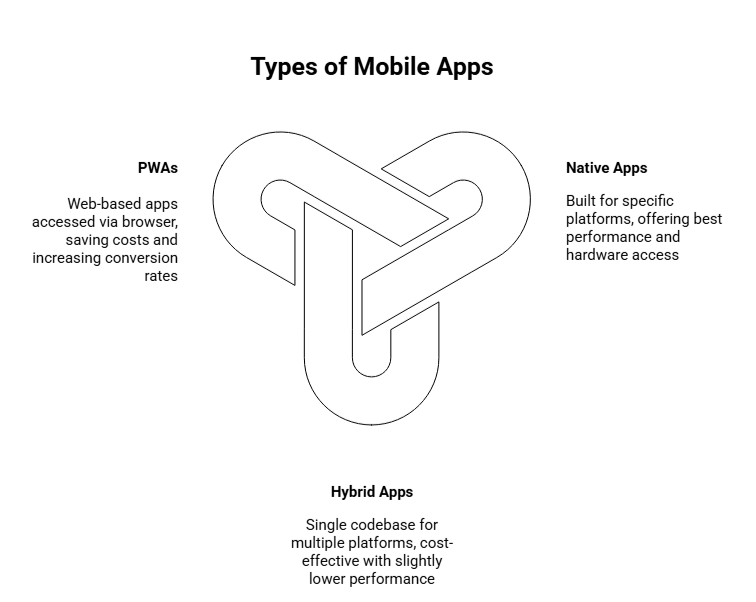
Choosing the right type of mobile app is crucial for aligning with your business goals and target audience. Below, we break down the key app types to help you make an informed decision based on performance, cost, and functionality.
Native Apps
While development costs are higher due to platform-specific code, the high performance, speed, and ability to leverage device features (like cameras, sensors, etc.) make it ideal for complex apps that need to deliver a seamless user experience.
Hybrid Apps
Hybrid apps offer a cost-effective solution, making them a great choice for businesses looking to quickly reach both iOS and Android users without duplicating development efforts. However, the trade-off is slightly lower performance compared to native apps.
Progressive Web Apps (PWAs)
They can save 30-70% in development costs and offer faster time-to-market. They can lead to up to 76% higher mobile conversion rates and are a good budget-friendly option for businesses with limited resources or those targeting markets with lower smartphone penetration.
Whether you’re developing for a startup or enterprise, understanding each phase is essential. Below is an actionable roadmap designed for founders and investors to understand each key phase in mobile app development, helping you make informed decisions about the process.
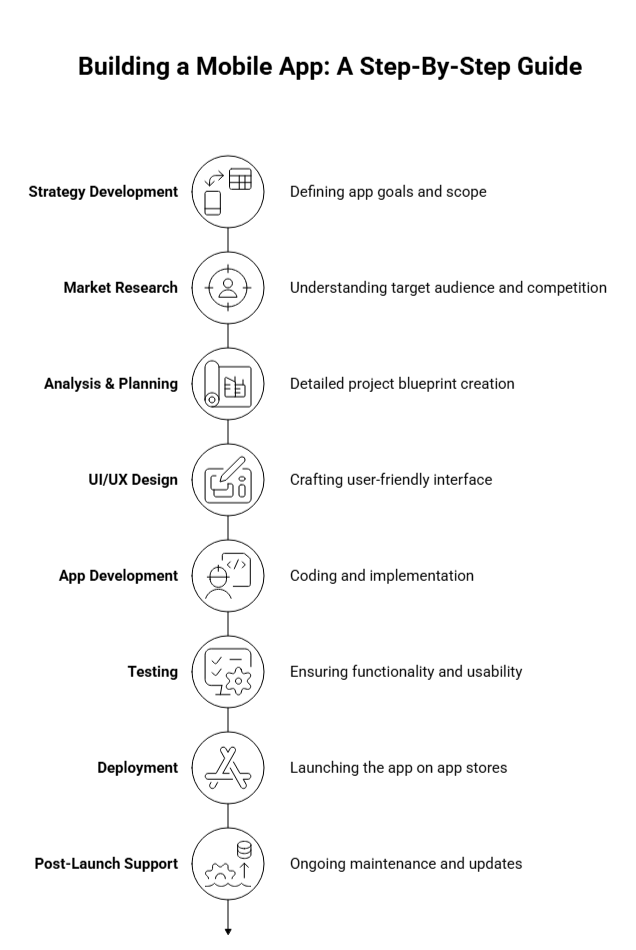
The first and most crucial step is to define the strategy behind the app. This includes identifying the problem your app will solve, its target audience, and clear objectives. Answer the following questions to lay the groundwork:
Additionally, research competitors in the space to see where you can differentiate. Consider how your app stands out and its monetization strategy, whether through in-app purchases, subscriptions, or ads.
Platform Selection: Decide whether to develop a native app for iOS or Android, a cross-platform app, or a hybrid solution, based on your goals and budget. For enterprise mobile app development, ensuring scalability and integration with existing enterprise systems is crucial.
Before jumping into development, it’s essential to validate the market for your app idea. Research competitors and identify your unique selling proposition (USP).
Research the needs of your target audience, and assess the best platform for launching your app: iOS, Android, or both.
At this stage, define the functional and non-functional requirements for your app. Understand the core features your app needs to include to meet business objectives.
Product Roadmap: Outline the MVP (Minimum Viable Product) with prioritized features. The MVP focuses on delivering just enough value to users, allowing you to test your core assumptions without a full-scale launch.
Technology Stack: Identify the right technologies for your project, whether you’re building on native, hybrid, or cross-platform frameworks. This decision will determine your development approach.
Project Estimation: Accurately estimate the cost and time required for development. Setting a realistic budget and timeline prevents scope creep and ensures your app stays on track.
The design phase is critical to user retention. A seamless user experience (UX) ensures users will return to your app.
Mobile App Design: UX vs. UI
Understanding the difference between UX and UI design is key to creating an engaging mobile experience.
Best Practices for Designing an Engaging User Experience
This is the core phase where front-end (what users interact with) and back-end (server-side) development take place.
Development Method: Depending on your platform decision, choose the right development method. Native apps are platform-specific, while cross-platform and hybrid approaches offer more flexibility and cost-effectiveness.
Testing is a critical part of the development process to ensure your app is bug-free, secure, and performs well.
Once tested, it’s time to deploy your app on the App Store (iOS) or Google Play (Android). The deployment stage involves:
A successful launch requires a solid marketing plan. You’ll need a strategy for user acquisition, including digital ads, influencer marketing, and leveraging early adopters.
Once your app is live, post-launch monitoring ensures it continues to meet user needs and business goals.
Understanding these stages in detail can help you make informed decisions, whether it’s about resource allocation, team selection, or long-term strategy.
Whether you’re launching your first app or scaling globally, we’ve got the tools and expertise to ensure your success.
AppVerticals partnered with Coca-Cola Dubai to create a mobile-first platform capable of supporting over 2 million users with 99.98% uptime and lightning-fast performance. We focused on redesigning their user journeys to be 45% faster, while ensuring compliance with global accessibility standards (AA).
Here’s how we executed:
We’re able to deliver:
Talk to our app development experts and discuss your goals.
Here’s an overview of the main technologies you’ll need to consider for both the front-end and back-end, as well as cloud infrastructure and databases.

React Native: Allows you to develop for both iOS and Android using a single codebase. It’s fast, efficient, and has a huge developer community. With 42% market share, it’s one of the most popular choices for businesses looking to save time and resources on development.
Flutter: Known for its beautiful designs and seamless cross-platform capabilities. It allows developers to create a smooth, responsive experience across devices. Great for businesses aiming for a unique, engaging user interface while still supporting both iOS and Android platforms with a single codebase.
Swift (for iOS): When you need to build an app specifically for iPhone or iPad users. Swift offers high performance and native integration with the iOS ecosystem. If your app will be exclusively for iOS users, Swift is the go-to language to ensure an optimal user experience and performance.
Kotlin (for Android): Kotlin is the preferred language for building apps that need to run exclusively on Android. It offers more concise code than Java while maintaining Android’s performance standards. For apps targeting Android users, Kotlin ensures a reliable and scalable experience, and is supported by Google for Android development.

Node.js: Great for building fast, scalable back-ends. It’s built on JavaScript, making it ideal for apps that need real-time capabilities like chats, live updates, or notifications. Popular for its speed and scalability, making it a top choice for apps requiring fast data processing, such as social media or e-commerce apps.
Ruby on Rails: Known for getting apps up and running quickly, Ruby on Rails is a full-stack framework that can handle everything from the back-end to the front-end. If you are considering a quick MVP development with solid foundation, Ruby on Rails offers a fast development cycle while ensuring robust features.
Django (Python): If your app relies heavily on data or scientific computations, Django offers a clean and efficient way to manage the back-end with Python. Django is ideal for apps with complex data structures or requirements for security, like financial apps or apps with large datasets.
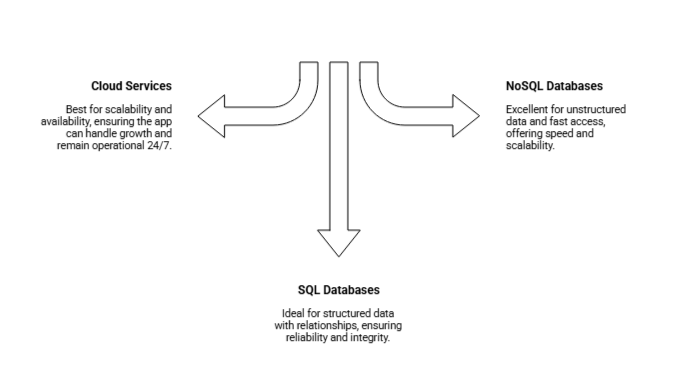
Cloud Services (AWS, Google Cloud): Cloud providers like AWS and Google Cloud ensure that your app can scale as it grows, providing storage, computing power, and tools to manage users. Cloud services offer reliability and high availability, ensuring that your app can handle traffic spikes, keep data secure, and remain operational 24/7.
SQL Databases (MySQL, PostgreSQL): SQL databases are ideal for applications that require relational data models (e.g., customers, orders, or transactions). If your app needs to manage structured data with relationships between entities, SQL is the best choice for reliability and integrity.
NoSQL Databases (MongoDB, Firebase): NoSQL databases are excellent for apps that require fast access to data without complex relationships, such as social media posts or sensor data. If your app will handle high volumes of data and requires flexibility in storing and retrieving that data, NoSQL databases offer speed and scalability.
Ultimately, selecting the right technology stack for your mobile app is a key factor in ensuring long-term success. Each choice should align with your app’s goals, target users, and growth potential.
Submitting your mobile app to the Apple App Store and Google Play Store is essential for distributing your app to users. Additionally, Progressive Web Apps (PWAs) offer a unique approach to reach your audience directly via web browsers.
Here’s a detailed guide to help you navigate the submission process for each platform.
Unlike native apps, PWAs do not require submission to app stores. Instead, they are hosted on the web and accessed through a URL. Here’s how to get started:
The rejection rate for app submissions has risen, with 15% of apps being rejected, often due to stricter Apple guidelines. Nearly 40% of iOS submissions face delays or rejections due to common, avoidable errors.
ASO Best Practices
Target Long-Tail Keywords: Focus on longer, specific phrases to reduce competition and drive more targeted traffic.
Optimize Key Metadata: This includes:
App development costs can vary based on app complexity and the development team’s expertise.
| Factor | Estimated Range |
|---|---|
| App Complexity | Simple apps: $5,000 – $50,000; Complex apps: $100,000+ |
| Technology Stack | Native apps: Higher costs; Hybrid apps: More cost-effective |
| Platform | iOS-only apps: Costlier than cross-platform solutions |
| Design Requirements | Basic design: Lower cost; High-end design: Higher cost |
| App Complexity | Estimated Cost | Development Time |
|---|---|---|
| Simple App | $5,000 – $50,000 | 1-3 months |
| Medium Complexity | $50,000 – $120,000 | 4-7 months |
| Complex App | $100,000+ | 8+ months |
Here are the most essential practices to keep in mind during the development process:
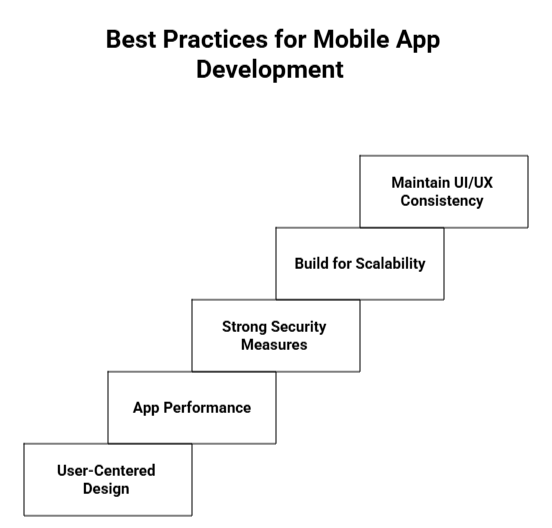
By focusing on these best practices, you’ll be well on your way to developing an app that not only meets user expectations but also scales effectively as your business grows.
Leverage our proven mobile app development strategies to boost user engagement, revenue, and scalability.
Here’s a snapshot of the key trends:
Mobile app monetization statistics reveal that developers are increasingly adopting diverse strategies to tap into this potential. To capitalize on this, app developers are increasingly adopting diverse monetization strategies:
Over 60% of top-grossing apps combine in-app advertising, purchases, and subscriptions to maximize revenue. This hybrid model ensures a steady income stream across multiple channels.
The most effective monetization method, contributing to 48.2% of total app revenue. IAPs are particularly successful in gaming and lifestyle apps.
Subscriptions remain a strong revenue driver, especially for content-driven or service-based apps. With ongoing content updates, users are more likely to pay for regular access.
Here are some key factors to help you choose the right mobile app development company for your needs:
There’s a lot to consider when it comes to mobile app development, but at the core of it all is the user experience. Whether you’re developing a native app or considering a cross-platform app development solution, ensuring that your app is intuitive, functional, and responsive should be your primary focus.
Choosing the right development path, whether it’s hybrid, native, or PWA, depends on your unique goals, budget, and timeline. While there are numerous options available, the expertise of a trusted app development partner like AppVerticals can guide you to the best solution for your needs.
Partner with AppVerticals and enroute towards building the best app.
Mobile App Development Strategy: Offers actionable insights on crafting a development strategy for startups, covering trends and best practices for 2025.
Mobile App Startup Guide for Beginners: A step-by-step guide for beginners, taking them from initial concept to successfully launching their mobile app.
Top Mobile App Development Frameworks: Explores popular frameworks to help developers choose the right technology for building high-performance mobile apps.
How Much Does It Cost to Hire an App Developer: Breaks down the costs associated with hiring app developers, helping startups plan their budgets effectively.
verified expert
Zainab helps tech brands sound more human. She takes app ideas, features, and updates and turns them into content people actually want to read. Whether it’s for a launch, a campaign, or just making things clearer, she’s all about simple words put together to form stories that stick.
 We’re AppVerticals
AppVerticals is where innovative startups and Fortune 500s come for transformation.
View About Us Android
The Apple vs Android debate isn’t just about brand loyalty, it's about what your app needs to deliver and to whom. For Highlights, a sports app design...

16 min read
 Mobile App
In 2026, the average mobile app development cost ranges from $40,000 to $400,000 or more, depending on complexity, platform, and features. Mobile app...
22 min read
 Mobile App
Orlando’s tech workforce hit 77,700 in 2024, growing 2.3% year-over-year and ranking among the fastest growing tech metro areas in the U.S. This growt...
7 min read
Discover how our team can help you transform your ideas into powerful Tech experiences.
AppVerticals © 2026 | All Rights Reserved

Get In Touch.













