













 ChatGPT
 Perplexity
 Claude
 Google AI
To build a real estate app in 2026, make three decisions before design starts: what type of app you are building, where your listing data comes from, and what your MVP needs to prove. Get those wrong and the architecture that follows becomes expensive to fix.
In a real build discussion, a serious real estate app development company would not start with “which screens do you need?” It would start with the constraint that usually decides cost: can the app surface the right property from reliable inventory, fast enough to create a qualified lead?
NAR’s buyer profile says 52% of buyers found the home they purchased online, while 56% said finding the right property was the hardest step, which makes search quality, listing freshness, and lead routing product-critical, not optional.
This guide breaks down the technical process, core features, cost drivers, MLS/IDX or API decisions, and architecture choices that shape launch and scale.
What Does It Take to Build a Real Estate App?
To build a real estate app properly, you usually need several connected systems working together
| Product Layer | What It Actually Controls |
|---|---|
| Listing data | Where properties come from, how fields are normalized, how prices and statuses update |
| Search | How users filter by location, price, type, beds, baths, amenities, status, and relevance |
| Maps | How addresses become coordinates, how radius search works, how nearby context is shown |
| Media | How images, floor plans, videos, and virtual tours load without slowing the app |
| Lead capture | How inquiries, tour requests, and contact forms reach the right person |
| Admin operations | How listings are approved, edited, removed, merged, audited, and reported |
This is why real estate app development is closer to building a data-driven marketplace than a simple mobile app. Rent.com.au, for example, uses Google Geocoding API to pin property locations and support radius filters.
The same applies to lead flow. Zillow’s Premier Agent product does not treat inquiries as a basic form submission. Its lead routing rules can assign leads by location, price, lead type, MLS number, and day or time availability.
Who Uses a Real Estate App?
A real estate app has multiple user groups, and each one needs a different workflow. If these roles are not defined early, the MVP scope, permission model, lead flow, and admin dashboard will need rework later.
| User Type | Workflow They Need | Product Impact |
|---|---|---|
| Buyers/renters | Search, save, inquire, apply | Search, listing detail, inquiry/application flow |
| Agents | Manage listings and leads | Agent dashboard, lead ownership |
| Brokers | Manage teams and performance | Role-based access, reporting |
| Property managers | Handle tenants, payments, maintenance | Tenant portal, requests, documents |
| Admins | Control users, listings, approvals | Admin panel, permissions, moderation |
The same “property listing” may be viewed by a buyer, edited by an agent, approved by an admin, and reported on by a broker.
Those permissions and workflows should be planned before development starts.
What Makes Real Estate App Development Different?
Real estate app development depends on three production layers: listing data, location search, and lead operations.
If any one of these is weak, the app may still look complete, but it will not support serious users or business workflows.
1. MLS Access Can Change the Build Plan
MLS data is not something developers can simply pull from RESO. RESO creates data standards, but it does not provide MLS data, API access, property records, or credentials. Access comes from the MLS or data provider after data-use and licensing approval.
That affects architecture, timeline, allowed fields, refresh rules, and display permissions before development starts.
2. Listing Data Needs Cleanup Before It Becomes Useful
Real estate apps are only as good as the data users search through. Homesearch is a clear example. Google Cloud reports that Homesearch carries data on 28.8 million UK properties, but the platform had to deal with duplicates, misspellings, inconsistencies, and missing data before that information became usable in a map-led product.
Build Implication: Plan data validation, duplicate control, field normalization, and update rules early.
3. Map Search Is an Engineering Layer, Not a UI Element
Map search depends on address quality, coordinates, radius logic, clustering, and location context. For apps where users search by area, commute, nearby places, or distance, the map is part of the core search system, not a visual add-on.
4. Lead Routing Must Be Configurable
A real estate inquiry needs ownership. If you are building an app like Zillow, the lead flow must define who receives each inquiry and why. For example, Zillow’s lead routing allows teams to route leads by location, price, lead type, MLS number, and day/time availability.
That shows how mature real estate platforms handle inquiries as operational workflows, not basic email notifications.
Turn your real estate idea into a revenue-driving product.
From strategy to launch, we build apps, websites, and software that scale.
What Type of Real Estate App Should You Build First?
The first product decision is not “mobile app or web app.” It is which real estate workflow you want to own first. A property listing marketplace, rental app, brokerage app, and property management app may all show properties, but they need different data models, user roles, integrations, and admin workflows.
A good rule: choose the app type based on the inventory source, the primary user action, and the business outcome you need to prove.
| App Type | Build This First When | Core Workflow to Validate |
|---|---|---|
| Property listing marketplace | You need buyers or renters to search large inventory | Search → compare → save → inquire |
| Rental property app | You manage or aggregate rentals | Search → apply → screen → lease/contact |
| Agent or brokerage app | You need to generate and manage agent-led leads | Listing → inquiry → lead routing → follow-up |
| Property management app | You manage tenants, units, rent, maintenance, and documents | Tenant request → operational task → resolution |
1. Property Listing Marketplace
Best when: users need to search large property inventory.
MVP must prove: users can search, compare, save, and inquire from reliable listings.
2. Rental Property App
Best when: the product needs to manage rental discovery, applications, and renter qualification.
MVP must prove: renters can find a property, apply, submit required information, and move through the rental process.
3. Agent or Brokerage App
Best when: the business needs to capture, route, and manage real estate leads.
MVP must prove: every inquiry has an owner, a source, a status, and a follow-up path.
4. Property Management App
Best when: the product manages units, residents, owners, rent, maintenance, vendors, or documents.
MVP must prove: tenants or property teams can submit, assign, track, and resolve operational requests.
How Do You Build a Real Estate App Step by Step?
The real estate app development process should follow a fixed order: define the product model, confirm the listing source, scope the MVP, design the workflows, build the system, test the critical paths, and launch with monitoring.
Most cost issues appear when teams start UI design before confirming the data model, integrations, and user roles.
Step 1: Define the Business Model and Target Users
Use the selected app type to define the users, revenue model, permissions, and primary workflow. The output of this step should be a product requirements document covering
| Decision | What It Defines |
|---|---|
| App model | Marketplace, rental, brokerage, or property management |
| Target users | Buyers, renters, agents, brokers, landlords, property managers, admins |
| Revenue model | Lead fees, subscriptions, commissions, listings, payments, or SaaS |
| Primary workflow | Search, inquire, apply, schedule, pay, or manage requests |
| User permissions | Who can view, edit, approve, assign, publish, or manage data |
Step 2: Prioritize the MVP Scope
The MVP should validate one workflow end to end, not compress every planned feature into a smaller release.
| App Type | MVP Should Prove |
|---|---|
| Marketplace app | Users can search, compare, save, and inquire |
| Rental app | Users can find, apply, and submit required information |
| Brokerage app | Leads can be captured, assigned, and followed up |
| Property management app | Tenants or managers can submit, track, and resolve requests |
This keeps the first release focused. Advanced features like AI recommendations, valuation tools, virtual tours, CRM automation, and deep reporting should come later unless they are required for the first workflow to work.
Step 3: Plan Data Sources and Integrations
Before development starts, confirm where the app’s data will come from and how it will move through the system.
The integration plan should define:
| Area | What to Confirm |
|---|---|
| Listing source | MLS/IDX, RESO Web API, broker uploads, third-party APIs, or manual entry |
| Data access | Credentials, licensing, allowed fields, and display rules |
| Sync logic | Refresh frequency, failed updates, duplicate records, and status changes |
| Maps | Geocoding, coordinates, radius search, and location filtering |
| CRM | Lead assignment, source tracking, follow-up status, and reporting |
| Payments | Rent, deposits, subscriptions, application fees, or listing upgrades |
| Analytics | Searches, listing views, saves, inquiries, applications, and conversions |
Step 4: Design User Flows, Admin Flows, and Data Model
Design should not start with isolated screens. It should start with workflows.
Map the flows that matter:
- Search → listing detail → inquiry
- Saved property → alert or follow-up
- Listing upload → admin approval → published listing
- Inquiry → lead assignment → follow-up
- Tenant request → work order → resolution
The data model should support these flows before the interface is finalized.
Step 5: Build the Backend, App, Admin Panel, and Integrations
Development should be split into four workstreams:
| Workstream | What It Includes |
|---|---|
| Backend | Users, roles, listings, search, permissions, APIs, notifications |
| Web/mobile frontend | Search, listing pages, saved properties, inquiries, user accounts |
| Admin panel | Listings, approvals, users, roles, leads, reports |
| Integrations | MLS/IDX/API, maps, CRM, payments, analytics, notifications |
A polished interface without backend, admin, and integration depth will create operational issues after launch.
Step 6: Test the Workflows That Affect Trust
Testing should focus on the parts that affect trust, conversion, and operations.
| Test Area | What to Check |
|---|---|
| Listing data | Missing fields, wrong status, duplicate listings, stale prices |
| Search | Filter accuracy, response speed, relevance, empty states |
| Maps | Pin accuracy, radius logic, clustering, mobile performance |
| Lead flow | Inquiry capture, assignment, notification, CRM sync |
| Permissions | Buyer, renter, agent, broker, landlord, admin access |
| Security | Authentication, authorization, API access, role abuse, sensitive data handling |
| Media | Uploads, compression, loading speed, CDN delivery |
Step 7: Launch With Monitoring and Post-Launch Optimization
Launch is not only publishing the app. The team needs monitoring, analytics, admin ownership, and a process for improving the product after real users start using it.
Before launch, confirm:
- Privacy policy and terms
- App store assets
- Support contact
- Crash monitoring
- Analytics events
- Admin training
- Listing update process
- Bug response plan
- Post-launch roadmap
After launch, review search gaps, inquiry quality, listing performance, conversion paths, and user drop-off points.
How Much Does It Cost to Build a Real Estate App in 2026?
A production-grade real estate app can range from roughly $50,000 to $300,000+, depending on scope, platforms, data source, integrations, search complexity, and admin workflows.
| Scope | Estimated Cost |
|---|---|
| Basic MVP | $50,000–$90,000 |
| Standard app | $90,000–$170,000 |
| Advanced platform | $170,000–$300,000+ |
The biggest cost drivers are IDX/MLS integration, map-based search, CRM sync, payments, admin controls, AI recommendations, valuation tools, and virtual tours. MLS/IDX integration alone can add around $15,000–$40,000, depending on feed complexity and market requirements.
What Real Estate App Development Features Should You Include?
The right real estate app development features depend on what the first version needs to prove. A marketplace must prove property discovery. A rental app must prove application flow. A brokerage app must prove lead capture and follow-up. A property management app must prove operational control.
| Feature Area | MVP Acceptance Criteria | Add Later |
|---|---|---|
| Search and filters | Users can narrow listings by location, price, property type, beds, baths, and availability | AI ranking, saved searches, advanced personalization |
| Listing detail page | Users can evaluate price, media, property facts, status, location, and contact option | 3D tours, video tours, valuation data, market insights |
| Inquiry or application flow | The app captures user details, listing ID, source, inquiry type, and owner | CRM automation, lead scoring, pipeline reporting |
| Saved properties | Users can return to shortlisted listings without repeating the search | Behavioral recommendations, personalized alerts |
| Agent or broker tools | Agents can view assigned leads, listings, and lead status | Team dashboards, response SLAs, performance reporting |
| Admin panel | Internal teams can manage listings, users, approvals, roles, and leads | Audit logs, duplicate detection, branch-level permissions |
| Rental or property management workflows | Users can submit applications, requests, documents, or payments | Screening, work orders, inspections, vendor workflows |
The first version should focus on features that make the product usable, measurable, and manageable. Search, listing pages, inquiries, saved properties, agent visibility, admin controls, and analytics are usually enough to validate the core workflow.
Advanced features should be tied to usage evidence. AI recommendations need enough search and saved-property data.
Virtual tours make sense when media quality affects inquiry quality. Mortgage calculators help when affordability is part of the buying journey. CRM automation is useful when manual follow-up starts slowing conversion.
How Do Real Estate Apps Get Property Listings and Data?
Real estate apps get property data through MLS/IDX feeds, RESO Web API, third-party property APIs, or manual listing management. The right source depends on your market, app type, listing ownership, and how often the data needs to update.
| Data Source | Best For | Main Concern |
|---|---|---|
| MLS/IDX | Public listing apps and brokerage platforms | Access, display rules, refresh limits |
| RESO Web API | Standardized MLS data exchange | Field mapping and sync logic |
| Third-party APIs | Valuations, tax data, schools, market insights | Coverage and licensing |
| Manual listings | Developers, private inventory, niche marketplaces | Admin control and data quality |
MLS, IDX, and RESO Web API
MLS is usually the listing source. IDX allows approved listings to be displayed on a website or app. RESO Web API is a standard for moving real estate data between systems.
RESO does not provide MLS data or credentials. Access comes from the MLS or data provider. So before development starts, confirm approved fields, refresh frequency, attribution rules, listing status rules, and display permissions.
Third-Party Property Data APIs
Third-party APIs add context beyond active listings. They can provide property records, valuation data, tax history, school data, neighborhood insights, boundaries, and market trends.
Use them when the app needs more decision support, such as investor analysis, buyer research, valuation tools, or neighborhood comparison.
Manual Listing Management
Manual listing management works when you control the inventory, such as developer projects, brokerage exclusives, rental units, or private marketplaces.
It avoids MLS dependency, but it needs a strong admin panel for listing upload, approval, status changes, duplicate checks, role permissions, and audit history.
What Tech Stack Is Best for Real Estate App Development?
The best tech stack for real estate app development depends on the app type, listing volume, search complexity, and integrations. A simple brokerage or rental MVP can use a lighter stack.
A marketplace with MLS/IDX data, map search, saved searches, media-heavy listings, and lead routing needs stronger backend, search, and monitoring infrastructure.
| Layer | Best Options | Use Case |
|---|---|---|
| Mobile app | Flutter, React Native, Swift, Kotlin | iOS and Android apps |
| Backend | Node.js, Python, Laravel, .NET | APIs, users, listings, leads, integrations |
| Database | PostgreSQL, MongoDB | Listing data, users, saved properties |
| Search | Elasticsearch, OpenSearch, PostgreSQL search | Fast filters, geospatial search, ranking |
| Maps | Google Maps, Mapbox | Geocoding, pins, radius search |
| Media | Cloud storage, CDN, compression | Images, videos, floor plans, virtual tours |
| Security | OAuth/JWT, RBAC, rate limits | Login, permissions, API protection |
Real Estate App Development Checklist Before You Start
Use this checklist before development starts. It helps confirm whether the app is ready to move from idea to technical planning. It also helps avoid common real estate app development mistakes around unclear scope, weak data planning, missing admin controls, and untested workflows.
Business Checklist
- Define the app type: marketplace, rental, brokerage, or property management.
- Identify the primary users and roles.
- Confirm the launch market and listing coverage.
- Define the monetization model.
- Decide what the MVP must prove.
Product Checklist
- Finalize MVP features.
- Map the main workflow: search, inquiry, application, payment, or request.
- Define required search filters and listing fields.
- Plan agent, broker, landlord, or property manager workflows.
- Define admin panel requirements.
- Set key analytics events: searches, views, saves, inquiries, applications, and conversions.
Technical Checklist
- Confirm listing source: MLS/IDX, RESO Web API, third-party API, broker upload, or manual entry.
- Confirm API access, credentials, allowed fields, and refresh rules.
- Plan database structure for users, listings, leads, roles, and activity.
- Define map, geocoding, media, and hosting requirements.
- Plan authentication, role-based access, API security, backups, and monitoring.
- Prepare QA plan for listings, search, maps, leads, permissions, and performance.
Launch Checklist
- Test the MVP with real users or internal teams.
- Validate listing accuracy and search results.
- Test inquiry, application, or request workflows.
- Confirm the admin team can manage listings and users without developer help.
- Set up analytics, crash reporting, and performance monitoring.
- Prepare app store assets or web deployment checklist.
- Add privacy policy, terms, support contact, and data handling disclosures.
- Prioritize the post-launch roadmap based on usage data.
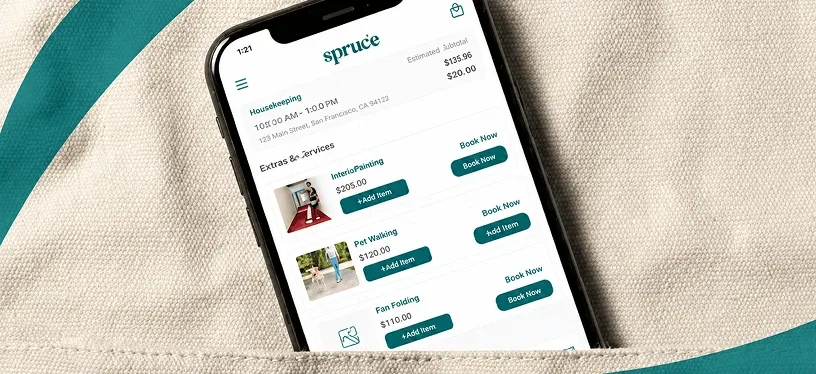
Spruce Case Study: How AppVerticals Built a Property Operations Platform at Scale
The results show AppVerticals’ experience in building real estate-adjacent systems at scale: 685K+ customers onboarded, 6,477+ properties managed, and 7,581+ property management companies supported.
The platform was built with React Native, Node.js, PostgreSQL, AWS, Firebase, Braze, Braintree, and Slack, which makes it a strong example of AppVerticals’ expertise in mobile app development, backend engineering, workflow automation, dashboard development, payment integration, and property operations software.
Wrapping it Up
To build a real estate app in 2026, the real work starts before development. You need to define the app model, confirm the listing data source, scope the MVP, plan integrations, and build the right backend, search, map, lead, and admin workflows from the start.
The strongest real estate apps are the ones with accurate listings, fast discovery, reliable data sync, clean inquiry flow, and operational control after launch.
Your users expect speed, security, and seamless experiences.
We develop real estate platforms that deliver on all three.