

About Us

About Us
We’re a future-focused tech partner working with some of the world’s top enterprises. At AppVerticals, we design solutions that drive growth and reimagine digital experiences.

Services
Software Development
Mobile App Development
Web Design & Development
Tell us what you're looking for, and we'll tailor a solution based on your business needs.
Talk to Experts
Health Tech

EdTech

Logistics

Real Estate

Ecommerce

Sports

Fintech

Travel

Restaurant

Automotive
HIPAA-compliant digital solutions for hospitals, clinics, and healthtech startups driving better patient outcomes.
What we do:
Scalable learning platforms for schools, universities, and EdTech startups transforming education delivery.
What we do:
Real-time tracking and automation solutions for freight companies, warehouses, and delivery services.
What we do:
PropTech platforms for brokerages, property managers, and real estate marketplaces are streamlining operations.
What we do:
High-converting commerce platforms for D2C brands, retailers, and online marketplaces are driving revenue growth.
What we do:
Fan engagement platforms for sports teams, leagues, and betting operators are creating immersive experiences.
What we do:
PCI-DSS compliant solutions for digital banks, payment platforms, and InsurTech companies, ensuring security.
What we do:
Booking and hospitality solutions for OTAs, hotels, and tourism platforms, enhancing traveler experiences.
What we do:
Online ordering and operations software for restaurants, cloud kitchens, and food delivery platforms.
What we do:
Connected vehicle platforms for automotive OEMs, dealerships, and mobility providers are accelerating innovation.
What we do:
Our Odoo implementation brings financial discipline, operational visibility, and process control across departments. From accounting automation to manufacturing workflows, we design ERP systems that reduce operational leakage and provide real-time decision clarity.
We use Sitecore to drive measurable revenue growth through intelligent personalization and behavior-driven content delivery. By aligning marketing automation, data orchestration, and omnichannel engagement, we help brands turn digital touchpoints into retention engines.
We architect AWS environments that stay stable under scale, traffic spikes, and compliance pressure. From secure cloud migrations to CI/CD automation and cost governance, we engineer cloud foundations that protect performance while enabling rapid product evolution.
We implement Dynamics 365 to align systems with actual business operations, bringing clarity, control, and accountability across CRM, ERP, and service functions. From sales to finance, configurations eliminate inefficiencies and enable confident, real-time decisions.
Tell us what you're looking for, and we'll tailor a solution based on your business needs.
Talk to ExpertsPortfolio

AppVerticals was featured in Inc. 5000 as
America’s Fastest Growing Tech Company
See what it might cost to bring your app idea to life. Our calculator gives you a quick, simple estimate based on what you need.



 verified expert
Technical Writer — Platforms, SaaS & Digital Products
Vareesha writes about platforms and SaaS with a clear, experience-led approach. With 3+ years in technical writing, she translates complex business and technical concepts into structured, actionable content for founders and product teams. Having worked...
See Full Bio15 minutes read
Dynamics 365 Copilot is Microsoft’s embedded AI layer across ERP and CRM (Sales, Finance, Supply Chain, Business Central). In 2026, it has evolved from a prompt-based assistant into AI agents that execute multi-step workflows using natural language goals on live ERP data.
Microsoft reports up to 50% faster invoice processing and 25–30% faster period-end close in fully deployed setups, though most organizations still see partial gains due to 40–60% rollout maturity and data readiness gaps.
Organizations evaluating Microsoft Dynamics consulting support often ask the same question: what does Copilot actually change for our team?
The honest answer requires distinguishing between what shipped in 2024 and what is genuinely new in 2026, and between what Copilot does well and what still requires human oversight or third-party tools.
Copilot value depends on data quality, integration depth, and governance. We help enterprises assess gaps and prepare their Dynamics 365 setup for reliable AI execution.
Get Copilot AssessmentDynamics 365 Copilot in 2026 is a Microsoft enterprise AI system that enables goal-based execution across CRM and ERP workflows using AI agents grounded in Dataverse and Microsoft Graph. Instead of static prompt-response interactions, it supports structured, multi-step workflow execution under enterprise governance controls.
Copilot operates as a three-layer enterprise system combining interface, reasoning, and execution:
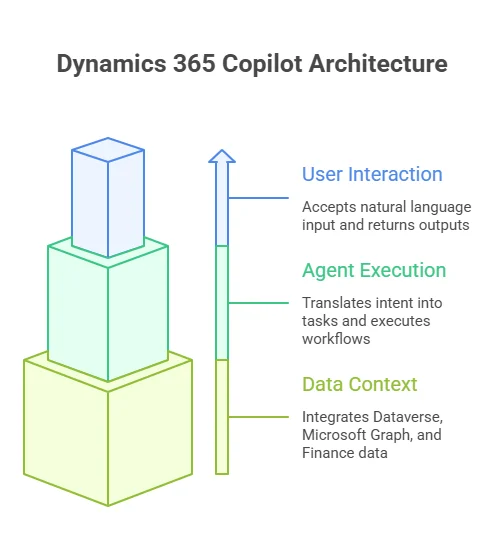
This layered execution model is typically implemented through structured platform partnerships for greater clarity and control.
Microsoft leadership has positioned this as a structural change, not an incremental upgrade.
Satya Nadella, CEO of Microsoft, describes the direction as a collapse of traditional business applications into agent-driven systems:
The evolution can be understood across three execution models:
| System Type | Logic Model | Flexibility | Business Behavior |
|---|---|---|---|
| Traditional Automation | Rule-based | Low | Executes predefined triggers |
| Copilot (pre-2026) | Prompt-based | Medium | Generates responses and drafts |
| AI Agents (2026) | Goal-based execution | High | Executes multi-step outcomes |
Three structural shifts define the 2026 release cycle:
Despite its capabilities, Copilot in 2026 still operates within three core constraints:
From my perspective across similar deployments, the gap between expected and actual value is almost always less about AI capability and more about how structured the underlying data and governance model is.
This is a recurring pattern in enterprise Artificial Intelligence adoption, where execution readiness consistently determines ROI.
Dynamics 365 Copilot in 2026 turns sales workflows into a decision-triggered system by converting CRM and Microsoft 365 signals into prioritized actions. It surfaces stalled deals, engagement drops, and follow-up needs directly in Outlook and Teams, along with suggested next steps.
The core shift is simple: sales teams stop searching for context and start responding to pre-structured triggers.
| Sales Task | Before Copilot | With Copilot (2026) |
|---|---|---|
| Pre-call prep | Manual CRM + email review | Auto-compiled deal + interaction summary |
| Opportunity update | Manual logging | AI-drafted from meetings |
| Pipeline review | Scheduled CRM reporting | Real-time risk & stall triggers |
| Follow-ups | Written manually | AI-generated contextual drafts |
Copilot impacts sales execution in three practical ways:
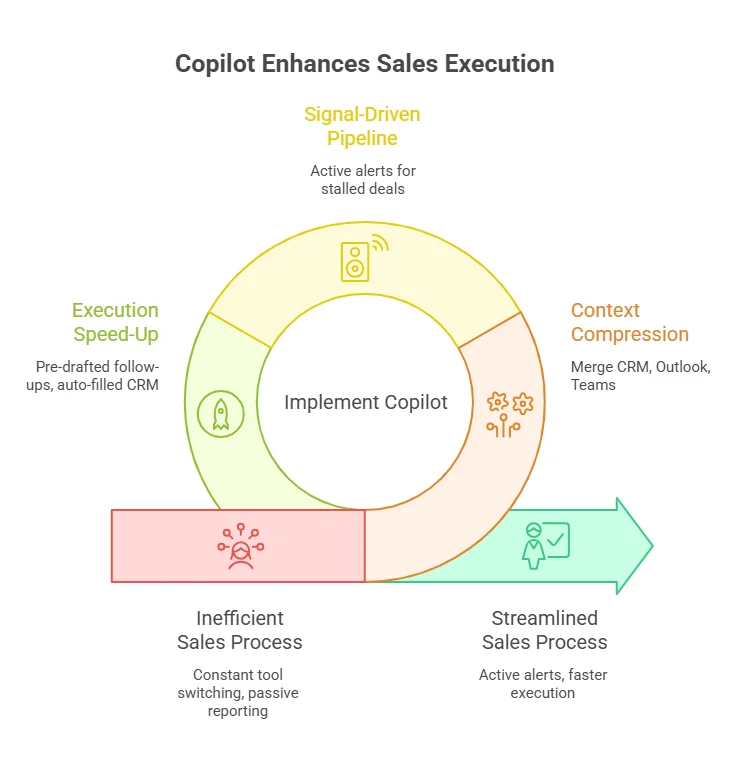
1. Context Compression
CRM, Outlook, and Teams context is merged into one view, covering deal history, communication threads, meeting notes, and pipeline signals. This reduces constant switching between tools.
2. Pipeline Becomes Signal-Driver
Instead of passive reporting, CRM becomes an active alert system highlighting stalled deals, missed follow-ups, competitor mentions, and momentum shifts.
3. Execution Speeds Up
Follow-ups are pre-drafted, CRM updates are auto-filled from meetings, and outreach is suggested based on engagement history. Final approval still stays with the sales rep.
Decision Insight: Data-Driven Output Dependency
Copilot output quality is directly tied to CRM hygiene. Weak data leads to generic triggers, poor prioritization, and low trust in outputs. In most deployments, these issues typically surface during mid-stage rollouts, when data and process maturity are still being stabilized.
Dynamics 365 Copilot in finance reduces manual effort in reconciliation, invoicing, and close activities, but governance, approvals, and audit accountability remain unchanged.
| Finance Task | Before Copilot | With Copilot (2026) |
|---|---|---|
| Invoice processing | Manual ERP coding | AI suggests coding from vendor history |
| Reconciliation | Spreadsheet matching | Auto-flagged mismatches + suggested fixes |
| Month-end close | Manual coordination | Auto-surfaced tasks + variances |
| Variance analysis | Analyst-led reporting | AI-generated first-pass explanations |
The shift is not automation of finance, it is exception-driven execution + faster decision cycles.
Finance teams stop reviewing everything and start acting only on AI-triggered exceptions.
Copilot surfaces:
Close cycles shift from manual tracking to system-driven visibility.
Copilot automatically:
Finance users can query live ERP data directly:
At month-end, instead of navigating multiple ERP dashboards, Copilot surfaces a unified finance workspace with:
Most routine entries are already pre-coded. The controller’s focus shifts to validating exceptions and approving adjustments, reducing repeated manual review cycles and compressing the month-end close process.
Microsoft benchmarks show:
But these results depend heavily on deployment maturity.
| Deployment Stage | Real Outcome |
|---|---|
| 0–30% | Minimal impact (pilot stage) |
| 40–60% | Partial gains (inconsistent data usage) |
| 80–100% | Full ROI (clean data + governed workflows) |
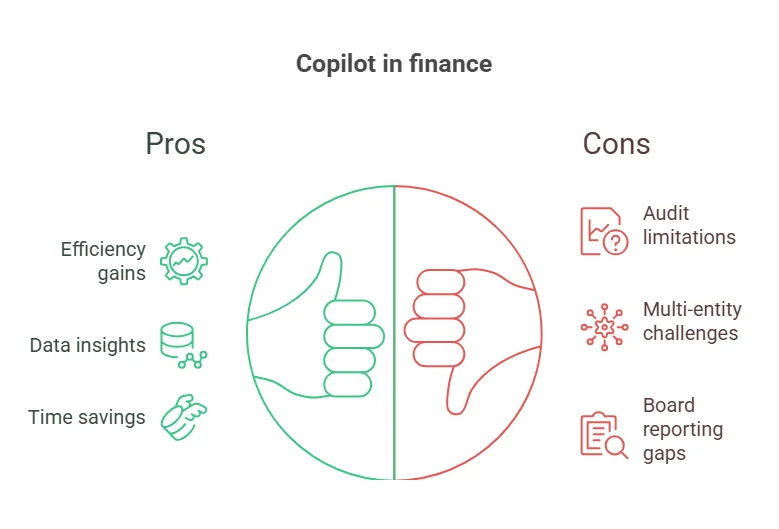
Decision trigger: If your operating model requires audit-grade autonomy or cross-ERP financial consolidation without human validation, Copilot should be positioned as a decision-support layer, not an execution authority.
Without structured data and aligned workflows, Copilot remains limited in impact. We help fix ERP and CRM foundations so Copilot can operate at scale.
Fix Your SetupInstead of relying on dashboards and scheduled reports, Copilot continuously surfaces operational triggers such as:
Teams no longer search for issues; they respond to prioritized operational signals.
Supplier communication is no longer manually tracked across email and ERP systems.
Copilot now:
Procurement cycles shift from manual coordination to AI-prepared actions.
Instead of fragmented system views, Copilot consolidates:
Enterprise confusion often comes from treating all AI tools as equal. In reality, they operate at different execution authority levels.
| Tool | Role | Limitation |
|---|---|---|
| Power Automate | Rule-based execution | Cannot handle dynamic goals |
| Dynamics 365 Copilot | Decision support + recommendations | Requires human approval |
| AI Agents (2026) | Goal-driven execution | Bound by governance rules |
| ChatGPT | General reasoning tool | Not ERP-native |
| Copilot Tier | What is included | Cost |
|---|---|---|
| Microsoft 365 Copilot (Enterprise) | Dynamics 365 Sales, Service, Business Central Copilot + Microsoft 365 app Copilot | $30 / user / month |
| Dynamics 365 Finance & SCM Copilot | Finance agents, MCP gateway, Immersive Home | Included in Dynamics 365 Finance license |
| PAYG Model (Wave 1 2026) | Consumption-based Copilot credit billing with admin-configured usage caps | Variable (credit-based) |
The pay-as-you-go (PAYG) model introduced in Wave 1 2026 is relevant for organizations that want consumption-based billing rather than per-seat commitments. It requires admin configuration in the Power Platform Admin Center to set credit caps and monitor usage.
Note: Microsoft 365 suite pricing increases take effect July 1, 2026. Organizations on annual renewal cycles may want to review timing.
Across enterprise deployments, there is a consistent gap between Copilot availability and sustained daily usage. While Dynamics 365 Copilot is widely enabled, active usage remains closer to ~34% of licensed users in day-to-day workflows.
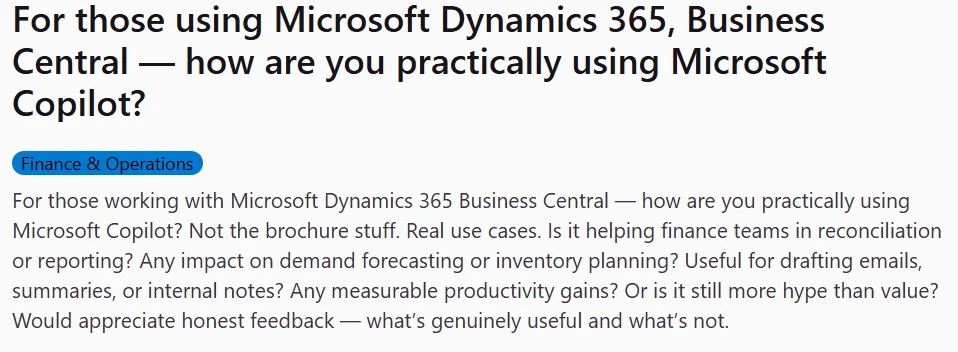
What makes this interesting in 2026 is that practitioner validation no longer comes only from analyst reports; it increasingly shows up in public Reddit threads, Microsoft community forums, and peer discussion spaces, where implementation reality is being documented in real time.
Across these sources, three themes repeat:
In practice, most mature environments converge on a simple operating model: Copilot drafts, humans verify. This is not a limitation; it is the governance layer that keeps AI usable in finance, legal, and sales-critical workflows.
From what is repeatedly visible in practitioner discussions (especially Reddit-based threads on Dynamics 365 and Business Central Copilot usage), the sentiment is not rejection of AI; it is frustration with “AI working fine only after cleanup work is done.”
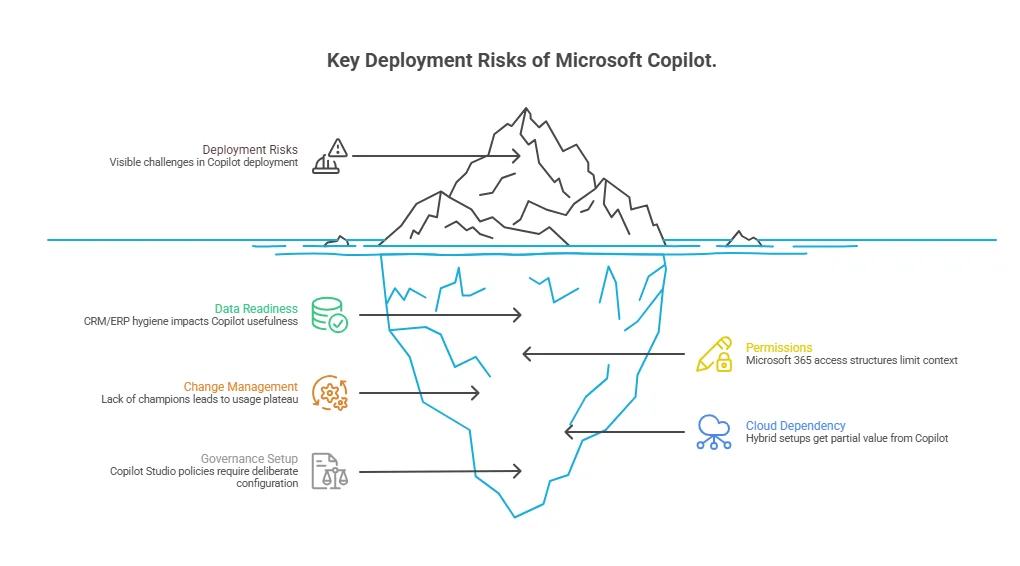
Copilot delivers strongest performance when the stack is aligned:
Integration becomes fragmented when:
Copilot then operates on partial or replicated context, reducing reliability and action precision.
Copilot in 2026 does not replace workflows; it executes within them under human governance.
These remain human-led due to risk, accountability, and judgment requirements.
Copilot operates on a hybrid execution model:
The answer depends on ecosystem maturity rather than just licensing.
| Situation | Practical Outcome |
|---|---|
| Full Microsoft stack + clean data | High ROI potential (start with Sales + Finance agents) |
| Mixed ecosystem (Salesforce / Google + D365) | Partial value, requires integration strategy |
| On-prem or legacy ERP (AX, etc.) | Limited access to agent features, cloud migration needed |
| Small org (<1,000 users, Business Central) | Low-friction adoption, start with built-in Copilot workflows |
Dynamics 365 Copilot in 2026 shifts execution speed, but outcomes depend on how well data, permissions, and workflows are already structured.
Teams with clean inputs and clear ownership see immediate efficiency gains. In fragmented environments, most of the effort shifts to fixing data and process gaps before value shows up.
We help leadership teams translate Dynamics 365 Copilot capabilities into a structured adoption roadmap aligned with business priorities.
Build Adoption Strategy
verified expert
Vareesha writes about platforms and SaaS with a clear, experience-led approach. With 3+ years in technical writing, she translates complex business and technical concepts into structured, actionable content for founders and product teams. Having worked closely on platform implementation and documentation, she brings real-world insight into how these systems function beyond the surface.
 We’re AppVerticals
AppVerticals is where innovative startups and Fortune 500s come for transformation.
View About Us Microsoft
Microsoft Dynamics 365 is best for faster, lower-risk, modular ERP adoption, while SAP S/4HANA is better suited for large enterprises with deep proces...

15 min read
 Microsoft
Microsoft Dynamics 365 implementation is the end-to-end process of designing, configuring, integrating, and deploying Microsoft’s ERP and CRM ecosyste...
16 min read
Discover how our team can help you transform your ideas into powerful Tech experiences.
AppVerticals © 2026 | All Rights Reserved

Get In Touch.













 ChatGPT
 Perplexity
 Google AI













