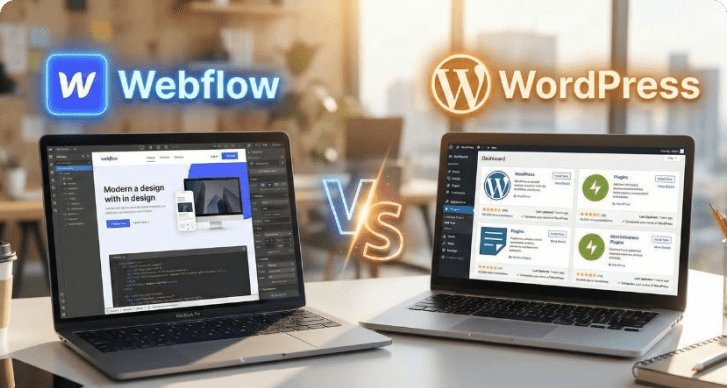
Content management systems power most of the modern web. According to W3Techs, about 73% of all websites use a CMS, making it the dominant way to build and manage digital content. WordPress alone runs over 43% of all websites worldwide.
At the same time, the global CMS market is projected to reach more than $123 billion by 2032.
This is why many organizations work with a CMS development company to build scalable content platforms tailored to their workflows.
I’ve seen that the CMS you choose directly affects SEO, scalability, and publishing speed. In this guide, I break down the best content management systems in 2026 using market data, capabilities, and real-world use cases.
Best Content Management Systems in 2026 at a Glance
| Website Type |
Best CMS |
Why It Fits |
| Blogs & Content Websites |
WordPress |
Built for publishing workflows, SEO control, and large content libraries |
| eCommerce Websites |
Shopify |
Native commerce tools including payments, inventory, and storefront management |
| Enterprise Websites |
Sitecore / Adobe Experience Manager |
Enterprise-grade personalization, governance, and integration with digital experience platforms |
| Startup & Marketing Websites |
Webflow |
Visual design control with fast deployment for marketing teams |
| Headless Architecture & Applications |
Contentful |
API-first content delivery for apps, SaaS platforms, and multi-channel systems |
What Is a Content Management System (CMS)?
A content management system (CMS) is software that lets teams create, manage, and publish website content without manually coding every page.
CMS platforms became the backbone of modern publishing because websites now require constant updates, multiple contributors, and structured content workflows. According to BuiltWith, more than 76 million websites currently run on CMS platforms worldwide.
In practice, a CMS manages four core operations:
- Create content – write articles, landing pages, or product pages
- Manage media – organize images, videos, and files in one library
- Publish pages – push structured content live through templates
- Control permissions – assign roles for writers, editors, and admins
That’s why most organizations rely on best CMS software today: they allow teams to update and scale websites without touching the underlying codebase.
How I Evaluated the Best Content Management Systems
Not every CMS fits every website. Some are designed for content-heavy blogs. Others focus on enterprise infrastructure or eCommerce.
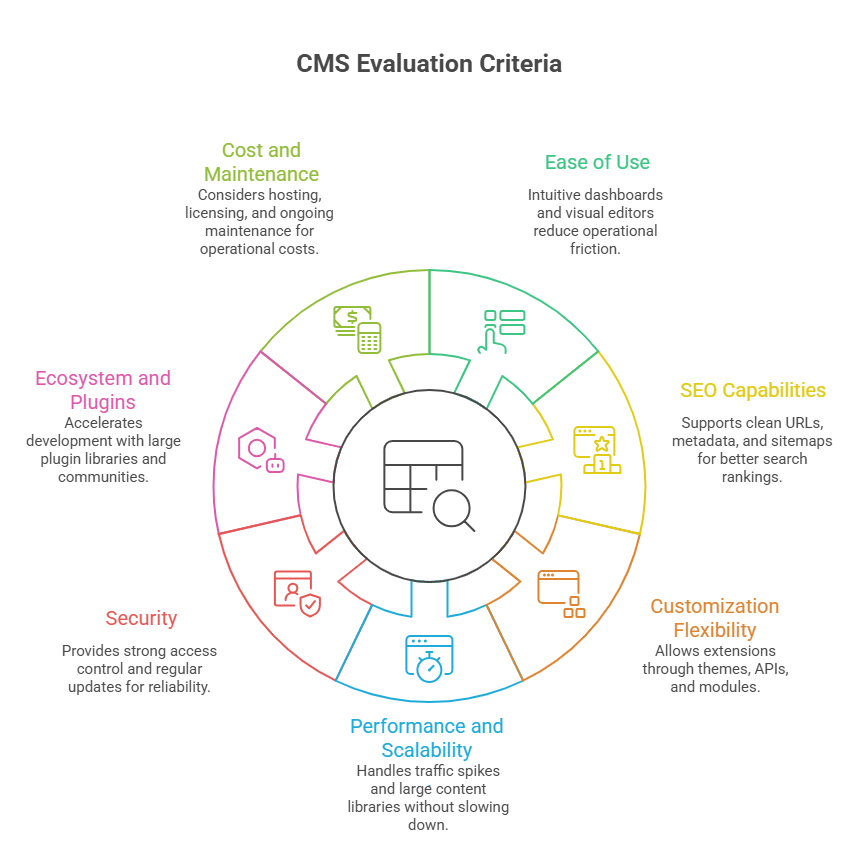
To identify the best content management systems, I evaluated each platform using practical criteria that directly affect how teams build, manage, and scale websites.
Ease of Use
A CMS should allow teams to publish content quickly without relying on developers for every change. Platforms with intuitive dashboards, visual editors, and structured workflows score higher because they reduce operational friction.
SEO Capabilities
SEO features are critical for visibility. I looked at how well each CMS supports clean URLs, metadata control, schema implementation, XML sitemaps, and content structuring, which directly influence search rankings. So, here in this list, you’ll also get an answer of: what is the best CMS for SEO?
Customization Flexibility
Websites rarely stay static. The best CMS platforms allow developers to extend functionality through themes, APIs, integrations, and custom modules without rebuilding the entire system.
Performance and Scalability
A CMS must support growth. I evaluated how well platforms handle traffic spikes, large content libraries, and complex digital experiences without slowing down site performance.
Security
Websites handle sensitive data and user interactions. Platforms with strong access control, regular security updates, and enterprise-grade infrastructure provide better long-term reliability.
Ecosystem and Plugins
A strong ecosystem accelerates development. CMS platforms with large plugin libraries, developer communities, and third-party integrations allow teams to add features faster.
Cost and Long-Term Maintenance
Beyond initial setup, I considered hosting costs, licensing fees, developer requirements, and ongoing maintenance to understand the real operational cost of each CMS.
Using these criteria helps separate popular CMS platforms from the ones that actually perform well in real-world website management and digital growth scenarios.
Best Content Management Systems in 2026 (Top Platforms Compared)
Based on usability, flexibility, ecosystem strength, and real-world adoption, these are the best content management systems businesses are using in 2026.
1. WordPress — Best CMS for Flexibility and Global Adoption
WordPress dominates as the best CMS because of its scale and adaptability. WordPress powers over 43% of all websites and more than 62% of websites that use a CMS, making it the most widely used content management system globally.
Key Strengths
- Native support for clean URLs, metadata, schema, and structured content architecture
- The official directory hosts 59,000+ plugins that extend functionality without rebuilding core systems
- Supports blogs, enterprise publishing platforms, membership sites, and marketplaces
Limitations
- Performance can degrade with excessive plugins
- Security requires active maintenance and updates
Real-World Usage
Large organizations including TechCrunch, Sony Music, and The Walt Disney Company rely on WordPress for high-volume content publishing.
In practice, WordPress works best when a website requires content scalability, strong SEO control, and long-term customization flexibility.
2. Shopify — Best CMS for eCommerce Websites
Shopify has become the leading CMS for online stores because it combines content management with built-in commerce infrastructure. According to BuiltWith, Shopify powers over 4.8 million live websites globally, making it one of the most widely used eCommerce platforms. It is the best content management system for ecommerce.
Key Strengths
- Built-in commerce tools, like product management, order processing, discount systems, and storefront themes are native to the platform
- Shopify Payments supports major payment methods, along with integrations for PayPal, Stripe, and regional gateways
- Centralized dashboards track products, stock levels, and fulfillment across channels
- A simplified admin interface allows non-technical teams to launch and manage stores without custom development
Limitations
- Transaction fees apply when using external payment gateways
- Deep customization often requires Shopify’s Liquid framework
Real-World Usage
Global brands such as Gymshark, Kylie Cosmetics, and Allbirds use Shopify to run large-scale eCommerce storefronts.
Shopify dominates eCommerce CMS adoption because it combines website management, payments, and inventory into one managed platform.
3. Drupal — Best CMS for Enterprise Security
Drupal is widely trusted for environments where security, governance, and structured content architecture are critical.
According to W3Techs, Drupal powers around 1.2% of all websites and about 2% of CMS-based websites, with strong adoption in government and enterprise sectors. This is the its best CMS for enterprise.
Key Strengths
- Drupal has a dedicated security team and regular vulnerability disclosure processes, making it a preferred choice for high-security environments
- Powerful taxonomy and content modeling capabilities support complex digital platforms
- Built to handle large content libraries, heavy traffic, and multi-site infrastructures
Limitations
- Requires experienced developers to implement and maintain
- Steeper learning curve compared to simpler CMS platforms
Real-World Usage
If you are looking for CMS for agencies, then Drupal is the convenint option. It is widely used by government agencies, universities, and large organizations. Platforms such as NASA, the Australian Government, and many university websites rely on Drupal for secure content management.
4. Webflow — Best CMS for Designers and Visual Development
Webflow bridges the gap between design and development by allowing teams to design, build, and manage websites visually without relying heavily on code.
The platform has grown rapidly, with over 3.5 million designers and teams using Webflow to build websites.
Key Strengths
- Designers can build complex layouts visually while developers can extend functionality with custom code
- Real-time page editing allows teams to design and publish content without touching the underlying structure
- Webflow provides built-in hosting on global infrastructure, helping deliver fast loading speeds and simplified deployment
Limitations
- Advanced custom features may still require development work
- CMS content structures can be restrictive for very large content platforms
Real-World Usage
Companies such as Dell, Zendesk, and Rakuten use Webflow for marketing websites and landing page ecosystems.
5. Joomla — Best CMS for Structured Content Websites
Joomla sits between beginner-friendly CMS platforms and developer-heavy systems. It offers strong content structuring and built-in features without relying heavily on external plugins.
Joomla powers around 1.5% of all websites and about 2.6% of CMS-based websites globally.
Key Strengths
- Websites can manage multiple languages natively without additional extensions
- Granular access control allows administrators to manage complex editorial workflows
- Thousands of extensions and templates are maintained by an active global developer community
Limitations
- Smaller extension ecosystem compared to WordPress
- Interface can feel complex for beginners
Real-World Usage
Joomla is commonly used by government portals, community platforms, and organizational websites that require structured content management.
6. Adobe Experience Manager — Best Enterprise CMS Platform
Adobe Experience Manager (AEM) is designed for organizations managing large-scale digital experiences across multiple channels. It is part of the Adobe Experience Cloud, which integrates content management with analytics, personalization, and marketing automation.
According to BuiltWith, thousands of large organizations run websites on Adobe Experience Manager infrastructure.
Key Strengths
- Digital experience platform: combines CMS capabilities with asset management, workflow automation, and omnichannel publishing
- Personalization engine: integrates with Adobe Target and Adobe Analytics to deliver personalized content experiences
- Deep ecosystem integration: connects directly with Adobe tools such as Creative Cloud, Analytics, and Marketing Cloud
Limitations
- High implementation and licensing costs
- Requires experienced development teams and enterprise infrastructure
Real-World Usage
Global brands such as Nike, Cisco, and Mastercard use Adobe Experience Manager to manage complex digital ecosystems.
7. Contentful — Best Headless CMS for Modern Applications
Contentful is one of the leading headless CMS platforms, designed for teams building content-driven products across websites, apps, and digital services. Approx. tens of thousands of websites use Contentful, particularly in modern SaaS and application-driven environments.
Key Strengths
- API-first architecture: content is delivered through APIs, allowing developers to connect websites, mobile apps, and digital products from a single backend
- Omnichannel content delivery: the same content can power websites, apps, smart devices, and digital platforms
- Developer-friendly model: structured content and flexible APIs make it easy to integrate with modern frameworks such as React, Next.js, and mobile apps
Limitations
- Requires development resources to implement front-end systems
- Content editing workflows can feel technical for non-developers
Real-World Usage
Companies such as Spotify, IKEA, and Atlassian use Contentful to manage structured content across digital platforms.
Build a CMS That Scales With Your Business
Struggling with slow publishing workflows or limited CMS flexibility? Our team helps businesses design scalable CMS platforms built for performance, SEO, and long-term growth.
Talk to a CMS Expert
Traditional CMS vs Headless CMS: What’s the Difference?
A traditional CMS combines the backend (content management) and frontend (website presentation) in a single system. A headless CMS separates content management from the presentation layer.
Platforms like WordPress, Joomla, and Drupal manage content and render webpages together. Systems like Contentful store content in structured formats and deliver it through APIs, allowing developers to display it on websites, mobile apps, or other digital platforms.
According to Grand View Research, the headless CMS market is projected to grow at a CAGR of about 20% from 2023 to 2030, driven by demand for multi-channel content delivery.
Traditional CMS vs Headless CMS
| Factor |
What to Consider |
Practical Example |
| Website Type |
Identify whether the site is content-heavy, commerce-driven, or application-based. |
Blogs and publishing platforms typically use WordPress, while online stores often choose Shopify. |
| Technical Resources |
Consider whether your team has developers available for customization and maintenance. |
Marketing teams without developers often prefer Webflow or Wix, while engineering teams may choose Drupal or headless CMS platforms. |
| Scalability Needs |
Evaluate how much content, traffic, and functionality the website will need over time. |
Large enterprise ecosystems with multiple sites often use Adobe Experience Manager or Sitecore. |
| SEO Requirements |
Ensure the CMS supports structured content, metadata control, and technical SEO capabilities. |
Content-driven businesses rely on platforms like WordPress because of strong SEO customization. |
| Budget |
Compare licensing, hosting, development, and long-term maintenance costs. |
Startups often select open-source CMS platforms, while large enterprises invest in enterprise digital experience platforms. |
Why Headless CMS Adoption Is Growing
Organizations increasingly deliver content across multiple digital touchpoints. Mobile apps, SaaS platforms, smart devices, and APIs all require the same content to be reused in different formats. A headless CMS solves this by allowing teams to create content once and distribute it anywhere through APIs.
How to Choose the Best CMS for Your Website
Choosing the CMS depends less on popularity and more on how your website will operate, scale, and be managed over time.
Different platforms solve different operational problems, so the decision should align with business needs rather than features alone.
According to Market Reports World, around 72% of U.S. enterprises already use CMS platforms, with millions of employees interacting with CMS systems every month.
Decision Framework for Choosing a CMS
| Factor |
What to Consider |
Practical Example |
| Website Type |
Identify whether the site is content-heavy, commerce-driven, or application-based. |
Blogs and publishing platforms typically use WordPress, while online stores often choose Shopify. |
| Technical Resources |
Consider whether your team has developers available for customization and maintenance. |
Marketing teams without developers often prefer Webflow or Wix, while engineering teams may choose Drupal or headless CMS platforms. |
| Scalability Needs |
Evaluate how much content, traffic, and functionality the website will need over time. |
Large enterprise ecosystems with multiple sites often use Adobe Experience Manager or Sitecore. |
| SEO Requirements |
Ensure the CMS supports structured content, metadata control, and technical SEO capabilities. |
Content-driven businesses rely on platforms like WordPress because of strong SEO customization. |
| Budget |
Compare licensing, hosting, development, and long-term maintenance costs. |
Startups often select open-source CMS platforms, while large enterprises invest in enterprise digital experience platforms. |
What This Means in Practice
The best CMS is the one that aligns with how your team publishes, manages, and scales content. A startup launching a marketing website may prioritize speed and ease of use, while an enterprise managing multiple digital products will prioritize governance, integrations, and scalability.
What Are the Common CMS Mistakes Businesses Make
Choosing a CMS is often treated as a quick technical decision, but mistakes at this stage can affect SEO performance, scalability, and long-term website. This is why businesses often consult teams offering custom web development services to build CMS architectures that align with long-term digital goals.management.
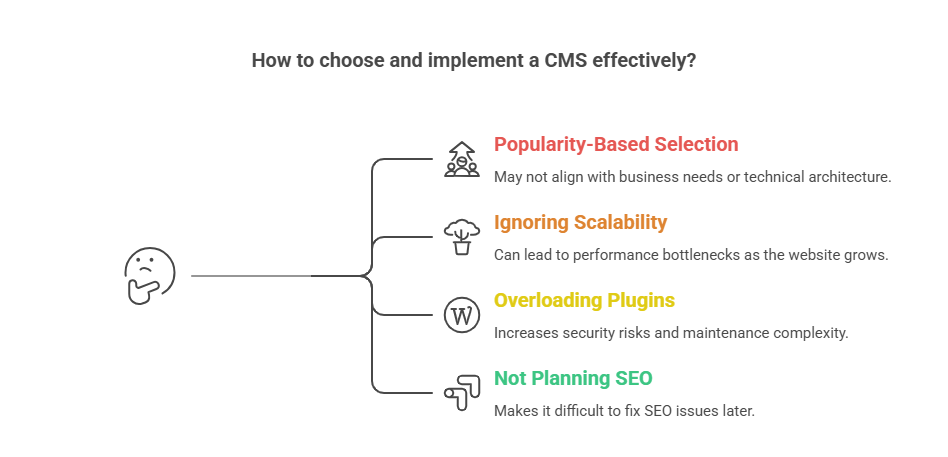
Here are some of the most common CMS mistakes businesses make.
Choosing a CMS Based Only on Popularity
Many companies pick a CMS simply because it’s widely used. Popular platforms work well in many scenarios, but they may not match the technical architecture or business model of the website.
Ignoring Scalability
Websites often start small but grow quickly. A CMS that cannot scale with traffic or content growth becomes a long-term bottleneck.
Overloading Plugins and Extensions
Plugins extend functionality, but excessive reliance on them increases security risks, maintenance complexity, and performance issues. Many performance problems in CMS-based websites come from poorly optimized third-party extensions.
Not Planning SEO Structure Early
SEO architecture should be planned before publishing large volumes of content. URL structure, taxonomy, internal linking, and metadata management are easier to design at the beginning than to fix later.
Businesses that plan CMS architecture properly avoid these issues early. Many companies work with experienced development teams such as AppVerticals to design scalable CMS platforms that support long-term content management and digital growth.
Wrapping it Up
Choosing the best content management system ultimately depends on how your website creates, manages, and scales content. Platforms like WordPress lead for content-driven websites, Shopify dominates eCommerce, and enterprise CMS platforms such as Adobe Experience Manager support large digital ecosystems.
The key is selecting a CMS that aligns with your content strategy, technical resources, and long-term scalability needs. When chosen correctly, a CMS becomes the foundation that supports publishing efficiency, search visibility, and digital growth.
Need the Right CMS for Your Website?
Choosing the wrong CMS can limit your growth. Work with experienced developers to build a content platform that supports scalability, integrations, and seamless content management.
Start Your CMS Project
Related Guides
Outource Web Development
Angular vs React
How to Build a Real Estate Website
Ecommerce Website Development
Website Design Cost in 2026

































 ChatGPT
 Perplexity
 Google AI