

About Us

About Us
We’re a future-focused tech partner working with some of the world’s top enterprises. At AppVerticals, we design solutions that drive growth and reimagine digital experiences.

Services
Software Development
Mobile App Development
Web Design & Development
Tell us what you're looking for, and we'll tailor a solution based on your business needs.
Talk to Experts
Health Tech

EdTech

Logistics

Real Estate

Ecommerce

Sports

Fintech

Travel

Restaurant

Automotive
HIPAA-compliant digital solutions for hospitals, clinics, and healthtech startups driving better patient outcomes.
What we do:
Scalable learning platforms for schools, universities, and EdTech startups transforming education delivery.
What we do:
Real-time tracking and automation solutions for freight companies, warehouses, and delivery services.
What we do:
PropTech platforms for brokerages, property managers, and real estate marketplaces are streamlining operations.
What we do:
High-converting commerce platforms for D2C brands, retailers, and online marketplaces are driving revenue growth.
What we do:
Fan engagement platforms for sports teams, leagues, and betting operators are creating immersive experiences.
What we do:
PCI-DSS compliant solutions for digital banks, payment platforms, and InsurTech companies, ensuring security.
What we do:
Booking and hospitality solutions for OTAs, hotels, and tourism platforms, enhancing traveler experiences.
What we do:
Online ordering and operations software for restaurants, cloud kitchens, and food delivery platforms.
What we do:
Connected vehicle platforms for automotive OEMs, dealerships, and mobility providers are accelerating innovation.
What we do:
Our Odoo implementation brings financial discipline, operational visibility, and process control across departments. From accounting automation to manufacturing workflows, we design ERP systems that reduce operational leakage and provide real-time decision clarity.
We use Sitecore to drive measurable revenue growth through intelligent personalization and behavior-driven content delivery. By aligning marketing automation, data orchestration, and omnichannel engagement, we help brands turn digital touchpoints into retention engines.
We architect AWS environments that stay stable under scale, traffic spikes, and compliance pressure. From secure cloud migrations to CI/CD automation and cost governance, we engineer cloud foundations that protect performance while enabling rapid product evolution.
We implement Dynamics 365 to align systems with actual business operations, bringing clarity, control, and accountability across CRM, ERP, and service functions. From sales to finance, configurations eliminate inefficiencies and enable confident, real-time decisions.
Tell us what you're looking for, and we'll tailor a solution based on your business needs.
Talk to ExpertsPortfolio

AppVerticals was featured in Inc. 5000 as
America’s Fastest Growing Tech Company
See what it might cost to bring your app idea to life. Our calculator gives you a quick, simple estimate based on what you need.



 verified expert
Head of Mobile at Aetherius
Aleksa has over 8 years of experience building and scaling mobile apps. His focus has always been on quality and performance, which has led him to develop numerous native iOS and KMP applications, with some...
See Full Bio7 minutes read
Kotlin Multiplatform is a Kotlin-based framework developed by JetBrains that enables developers to share code across multiple platforms. With KMP, it is possible to write a single codebase for common functionality and run it on different environments.
Although Kotlin Multiplatform supports development for web, desktop, and server-side applications, its most common use today is in mobile development.
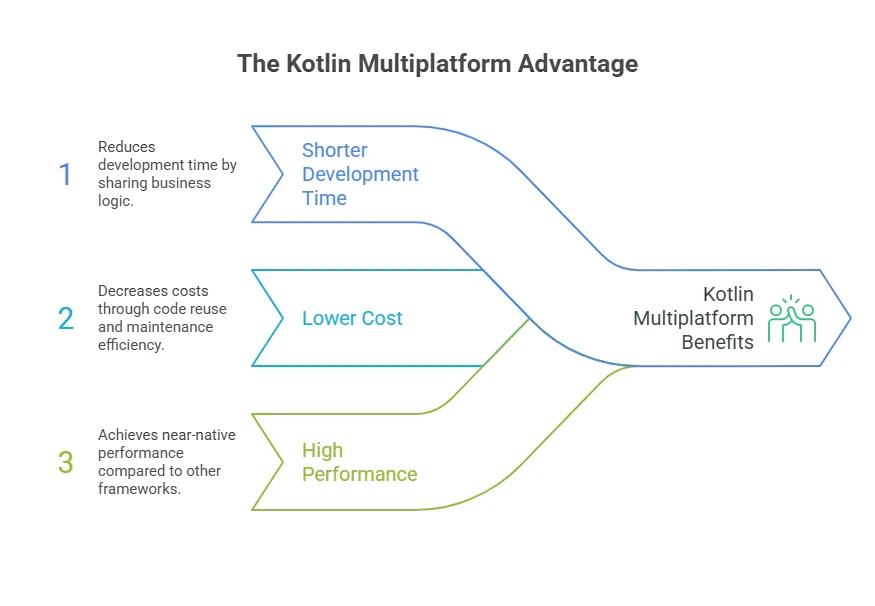
When developing an iOS mobile app or even Android, you typically need separate developers to build the business logic and UI for each platform. With KMP, you write the shared business logic once in Kotlin.
This can reduce total development time by up to 30%, allowing your team to focus on creating a polished user experience rather than duplicating code.
From a development perspective, fewer duplicated components usually mean fewer development hours. When the core business logic is shared between Android and iOS using Kotlin Multiplatform, developers don’t need to write the same business logic twice.
| Metric | Native Development | Kotlin Multiplatform |
|---|---|---|
| Development Time | Full duplication | Shared logic (~30% faster) |
| Development Cost | $50k–$150k | ~20–25% lower |
| Maintenance | Separate fixes per platform | Single update across platforms |
| Performance | Native speed | Near-native |
The savings are not limited to the initial development phase. Maintenance also becomes simpler because fixes and updates to the shared business logic only need to be implemented once. This reduces duplicated work across platforms and helps keep both applications consistent over time.
Cross-platform development can also be achieved using other frameworks, such as Flutter and React Native. However, they don’t always deliver the same level of performance as fully native applications.
| Feature / Framework | Kotlin Multiplatform | React Native | Flutter |
|---|---|---|---|
| Shared Business Logic | Full Kotlin code | JS bridge, some overhead | Dart bridge, extra rendering overhead |
| UI Rendering | Native | Native via bridge | Custom rendering engine (Skia/Impeller) |
| Performance | Near-native | Moderate overhead | Slight GPU & startup latency |
| Concurrency | Native multithreading | Single-threaded JS | Isolates, message-passing |
| Maintenance | One codebase | Two sets of fixes | Two sets of fixes |
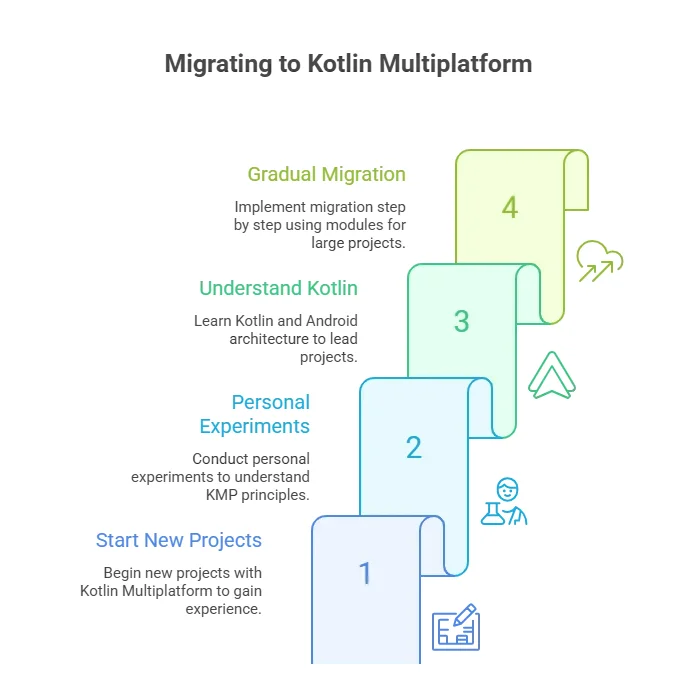
As someone who has been working with Kotlin Multiplatform for three years, I always recommend people start new projects with it.
Honestly, my first KMP projects were personal experiments where I tested how everything worked. This experience later helped me understand Kotlin (which I hadn’t used before), as well as the main principles and architecture of Android.
This is important because, in KMP development, Android developers are often the main players who lead the project.
If I had to start without any previous experience, I believe it wouldn’t have been that easy. That’s why I highly recommend having a native Android developer on your team when you start the migration.
A module is a self-contained part of the application that encapsulates a specific feature, piece of business logic, or functionality.
Instead of keeping all code tightly coupled in one large codebase, modularization separates the app into smaller, independent components with clearly defined responsibilities and interfaces.
Benefits of Modularization:
One of the common concerns about KMP is the maturity of its ecosystem. Compared to Flutter and React Native, KMP is still a relatively new framework, which historically raised questions about library support and compatibility.
Today, the KMP ecosystem has reached a turning point:
Disclaimer: This article is part of AppVerticals’ Industry Expert Insights series, where leaders and practitioners share their perspectives on emerging technologies, software development, and digital transformation.
Our experts can guide you through a Kotlin-powered solution that makes iOS and Android apps easier to maintain and scale.
Get Started Today
verified expert
Aleksa has over 8 years of experience building and scaling mobile apps. His focus has always been on quality and performance, which has led him to develop numerous native iOS and KMP applications, with some reaching over 300 million users. He is now the Technical Director of Aetherius, a company he co-founded with one main goal - to help companies create high-quality mobile apps that users love.
 We’re AppVerticals
AppVerticals is where innovative startups and Fortune 500s come for transformation.
View About Us Industry Expert Insights
Let's start with an uncomfortable truth. Technology rarely fails. Leadership does. The system works. The platform integrates. The data migrates. The d...

5 min read
 Industry Expert Insights
They are one of the most visible forms of artificial intelligence in modern organizations. In contrast to previous AIs, which sat silently in the back...

7 min read
 Industry Expert Insights
Your biggest AI bottleneck in 2026 isn’t infrastructure, it’s your workforce. And this blog gives you the roadmap to fix it. We all agree that AI is a...

6 min read
Discover how our team can help you transform your ideas into powerful Tech experiences.
AppVerticals © 2026 | All Rights Reserved

Get In Touch.













 ChatGPT
 Perplexity
 Google AI













