logo
Summarize with AI:
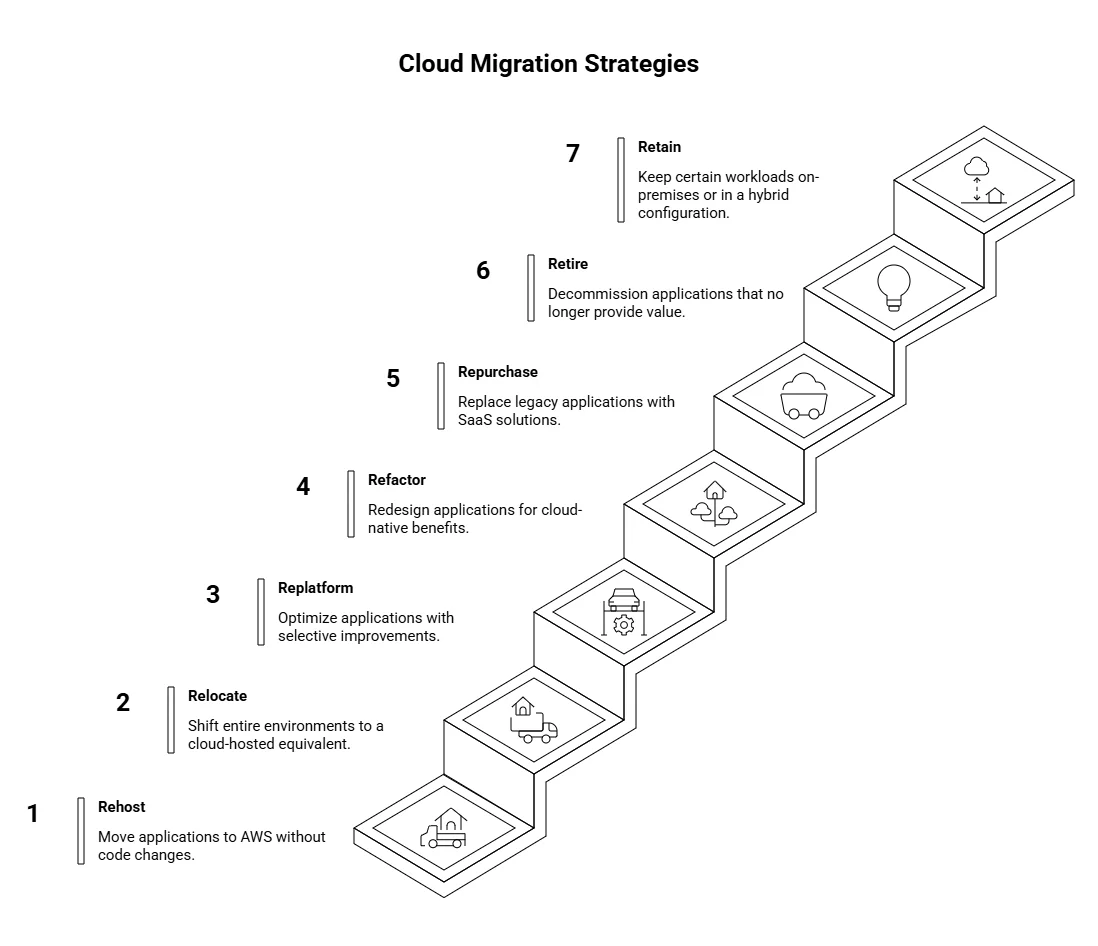
AWS Cloud Migration Strategy is the structured approach organizations use to move workloads to AWS while balancing speed, cost, risk, and long-term value. The AWS 7 Rs framework, such as Rehost, Relocate, Replatform, Refactor, Repurchase, Retire, and Retain, provides a practical model to guide these decisions.

Since its introduction, the 7 Rs have evolved from a conceptual taxonomy to an operational framework. Early migrations focused on lift-and-shift, but AWS now emphasizes strategy selection at the workload and component level, incorporating optimization, modernization, and hybrid flexibility.

By 2026, the framework is essential for execution. 84% of organizations cite managing cloud spend as their top cloud challenge, making the right migration approach critical to avoid stalled projects. Many companies rely on AWS consulting services to align these decisions with enterprise strategy and operational realities.

At a Glance: 7 Rs of AWS Cloud Migration Strategy

  • Rehost: Fastest path for data center exit; ideal for low-risk workloads where speed matters more than optimization.
  • Relocate: Shift infrastructure without redesign; best for VMware-heavy environments or complex legacy systems.
  • Replatform: Optimize without full rebuild; improves cost and performance while maintaining momentum.
  • Refactor (Re-architect): Maximize long-term value; redesign applications for scalability, agility, and cloud-native benefits.
  • Repurchase (Drop & Shop): Replace with SaaS solutions; accelerates outcomes but introduces vendor dependency.
  • Retire: Eliminate unused workloads; reduces cost, complexity, and operational overhead.
  • Retain: Keep or hybridize systems; necessary for compliance, dependencies, or low ROI modernization cases.
What is AWS cloud migration?
AWS cloud migration is the process of moving applications, data, and infrastructure from on-premises or legacy environments to Amazon Web Services, with the goal of improving scalability, cost efficiency, performance, and operational agility.

Need Expert AWS Migration Guidance?

Work with our cloud consultants to align workloads with the right 7 Rs strategy and maximize ROI.

Schedule a consultation

Why does the 7 Rs framework matter for AWS cloud migrations in 2026?

The 7 Rs framework provides a workload-specific guide for migrating applications to AWS, balancing speed, cost, risk, and modernization potential. 

It ensures migration decisions align with business priorities, enforces financial governance, and reduces operational risk by matching each workload to the most suitable strategy. The framework also supports scalable, phased migrations across large enterprise estates.

Key Statistics (2026):

  • Cloud budgets exceeded limits by 17% in 2025, showing why Replatform is increasingly replacing Rehost in cost-sensitive migrations, enterprises can achieve operational efficiency without overspending.
  • Workloads migrated as a KPI rose from 36% → 78% (2024–2025), emphasizing the importance of scalable execution and wave planning over theoretical 7 Rs checklists.
  • According to Flexera 2025 State of the Cloud Report, only 21% of workloads have been repatriated, highlighting the growing relevance of Retain and Relocate strategies for compliance-heavy or hybrid workloads.
  • 25% of organizations will face dissatisfaction with cloud adoption by 2028, due to unrealistic expectations, suboptimal implementation, or uncontrolled costs, stressing the need for early FinOps integration and accurate TCO modeling.
  • By 2029, 50% of cloud compute resources are expected to support AI workloads, highlighting the importance of AI-readiness in migration planning, with significant implications for AI cloud cost management.
Expert Insight:In the cloud, what you can’t measure, you can’t manage.” – Nicola Sfondrini, PwC

This reinforces the importance of FinOps maturity in guiding 7 Rs decisions, beyond purely technical considerations.

What are the 7 AWS migration strategies (R’s) and how do they compare?

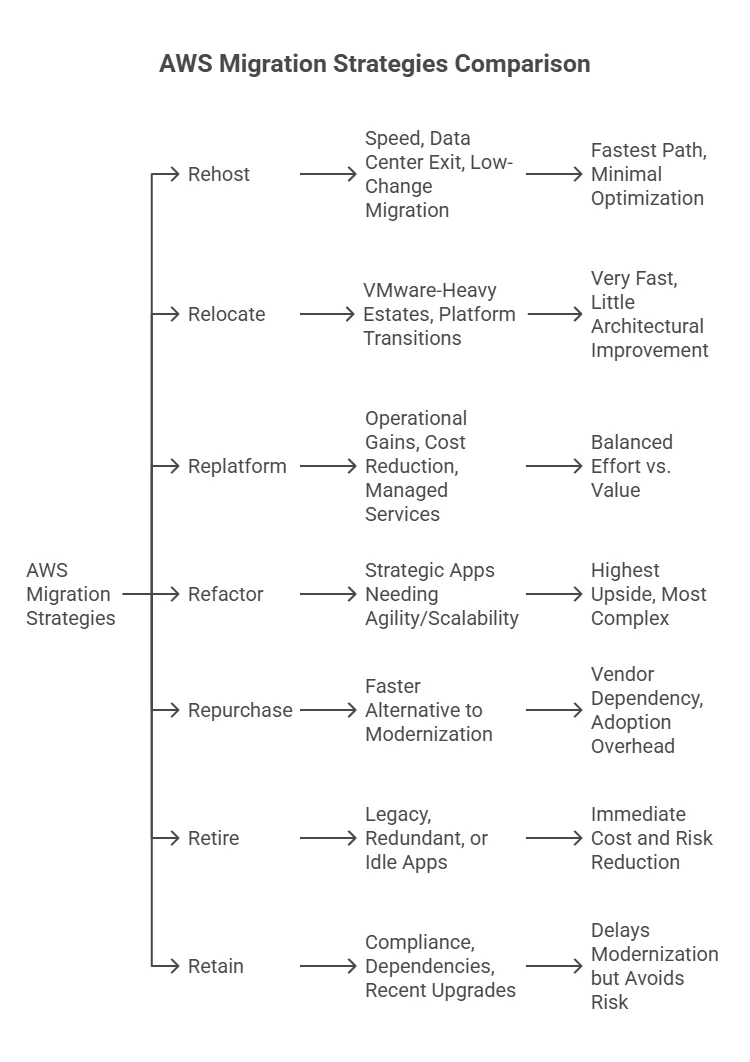
Before diving into each R, it’s helpful to see a high-level comparison table:

AWS 7 Rs Migration Strategy Comparison

A practical breakdown of each migration strategy, when to use it, and the trade-offs involved.

Strategy What it Means Best-Fit Scenario Practical Trade-Off
Rehost Move workloads as-is to AWS Speed-focused migrations, data center exit Fastest approach, limited optimization
Relocate Move to cloud-based version of same platform VMware-heavy environments, platform shifts Very fast, minimal architectural gains
Replatform Lift and optimize selected components Cost reduction, operational improvements Balanced effort vs. return
Refactor Re-architect for cloud-native design Strategic, high-growth applications High complexity, maximum long-term value
Repurchase Replace with SaaS/commercial solution Faster alternative to rebuilding systems Vendor lock-in, adoption overhead
Retire Decommission unused workloads Legacy, redundant, or idle systems Immediate cost and risk reduction
Retain Keep workloads on-prem or hybrid Compliance, dependencies, recent upgrades Delays modernization, reduces immediate risk

This table serves as a roadmap for CTOs and tech directors, giving a quick operational view of each R, the business rationale, and the expected trade-offs

AWS cloud migration strategies: 7 Rs

Rehost: What it is, when to choose it?

Rehost, commonly known as lift and shift, is the process of moving applications to AWS without modifying the code or underlying architecture. In most large migrations I’ve worked on, this is the fastest way to move workloads when the priority is execution, not optimization.

This approach works best when organizations need to exit data centers quickly or reduce AWS cloud migration complexity. By avoiding architectural changes during migration, teams can maintain predictability and avoid introducing new risks. 

When Rehost makes sense:

  • Workloads are stable but not immediate candidates for modernization
  • Dependencies are well understood and easy to replicate
  • Migration timelines are aggressive, and risk tolerance is low
  • Optimization can be planned for later phases

A common pattern in enterprise migrations is to use Rehost as an initial step rather than a final state

Industry Takeaway: 3M migrated 2200+ applications using AWS Application Migration Service with minimal downtime, then selectively modernized workloads using Amazon RDS and AWS Lambda.
Community (Reddit) Insight: Lift-and-shift is often misunderstood as modernization. Simply moving workloads to EC2 without redesign leads to poor performance and higher costs.” — AWS Engineers

Relocate: How is it different from Rehost?

Relocate moves workloads without changing how they operate, but unlike Rehost, it shifts the underlying platform or environment, such as moving VMware-based systems to a cloud-hosted equivalent. The application architecture remains intact, while the infrastructure layer changes.

The distinction is critical:

  • Rehost moves applications into AWS infrastructure
  • Relocate moves entire environments (e.g., VMware stacks) into a cloud version of the same platform

This makes Relocate particularly effective for platform-level migrations, where speed is required but architectural change is not feasible during the initial phase.

When Relocate makes sense:

  • Large VMware or virtualized estates
  • Tight timelines with limited capacity for redesign
  • Need to preserve existing tooling and operational workflows
  • Migration is part of a phased modernization strategy

Real-world example (Shutterfly):

Shutterfly followed a phased relocation strategy, moving from on-prem VMware to VMware Cloud on AWS before transitioning to native AWS services.

  • Reduced VM footprint from 2,000 → 1,200 systems
  • Migrated ~800 systems and 400 TB of data
  • Shifted 80% of workloads to Amazon ECS
  • Achieved 25% operating cost reduction
  • Reported no high-severity incidents post-migration

Replatform: What optimizations matter most?

Replatform, or “lift, tinker, shift,” moves workloads to the cloud with selective improvements instead of a full redesign. It balances speed and modernization, delivering operational gains without the complexity of a full refactor.

Key considerations:

  • Optimize cost and performance with managed services.
  • Reduce operational overhead via containerization, database modernization, or serverless functions.
  • Focus on components where modest changes provide high efficiency.

Case Study – Sports App:
At AppVerticals, we helped a sports tech client replatform their Highlights App, which generates 40-second game highlights using on-field cameras and a physical trigger button. Key achievements included:

  • Migrated backend to AWS using NodeJS and React Native.
  • Implemented load balancing and auto-scaling to handle variable traffic and optimize video streaming.
  • Optimized infrastructure costs from $800 to $450 per month.
  • Ensured highlights are available to users within 5–10 minutes without disrupting app performance.

Outcome: The project delivered operational efficiency, cost savings, and a faster, more reliable highlight delivery system. 

Refactor (Re-architect): Why it’s complex but valuable?

Refactor means redesigning applications to achieve cloud-native benefits such as scalability, resilience, and operational agility.

Why it’s challenging:

  • Involves deep engineering effort and careful planning.
  • Can take up to 20× longer than Rehost or Replatform.
  • Requires expertise in microservices, serverless, and cloud-native patterns.

Best practices:

  • Target strategic workloads with high technical debt or growth potential.
  • Apply incremental modernization: modernize features gradually, not all at once.
  • Prioritize ROI and long-term business value over speed.
Example: A+E Networks modernized critical workloads with serverless and microservices, improving disaster recovery times and accelerating release cycles.

Repurchase (Drop & Shop): What to consider before swapping?

Repurchase replaces legacy applications with SaaS or commercial solutions, ideal for non-core workloads where maintaining in-house systems adds limited value. It accelerates delivery, reduces maintenance, and can provide AI-ready features.

Decision Checklist (2026 Edition):

  • Business vs. Customization: Use SaaS when off-the-shelf features meet or exceed legacy functionality; avoid if heavy customization is key.
  • Vendor & Compliance: Check stability, SLAs, security certifications, and plan exit strategies to avoid lock-in.
  • Cost Comparison: Consider subscription, implementation, integration, and training versus legacy TCO. Selective repurchase improves ROI over rehosting alone (~40% lower ROI for pure rehost).
  • Integration & Data: Ensure compatibility with the remaining estate; complex systems may take 4-16 weeks to migrate.
  • Change & Adoption: Plan workflows, training, and stakeholder alignment for smooth uptake.
  • Portfolio Fit & AI Readiness: Typically 10% of workloads are repurchased in large migrations, complementing rehost and replatform while strategic apps remain for refactor.
Expert Insight: IBM notes, “Repurchasing makes sense for applications where commercial SaaS provides equivalent or better features.” Future Processing adds, “Repurchase reduces total cost of ownership while providing continuously updated functionality”.

Retire: How to rationalize legacy workloads?

Retire means decommissioning or archiving applications that no longer provide business value. It’s a cost- and risk-driven decision rather than a technical exercise.

Operational Guidance:

  • Cost vs. Risk: Retire idle, redundant, or unsupported applications to cut operational overhead.
  • Compliance Check: Ensure regulatory or contractual obligations are met before removal.
  • Portfolio Prioritization: Focus on workloads that free budget for the modernization of strategic apps.
CTO Insight: Retiring non-strategic workloads enables IT teams to concentrate on high-value migrations, reducing complexity and operational overhead. It ensures that resources are dedicated to initiatives that deliver measurable business impact.

Retain: When should you postpone or hybridize migration?

Retain involves keeping certain workloads on-premises or in a hybrid configuration when immediate AWS cloud migration is impractical or risky.

Decision Flow:

  • Compliance & Regulation: Retain workloads that have strict regulatory or audit requirements.
  • Incomplete Discovery: Hybridize if application dependencies are not fully mapped.
  • Planned Revisit: Schedule migration in the next wave once modernization and risk assessments are complete.
CEO Insight: Retain (revisit) is a deliberate strategy, not inaction. It keeps certain workloads in place due to compliance, dependencies, or business value considerations, enabling teams to optimize efforts on workloads that deliver faster ROI.

7 Rs framework of AWS cloud migration

How do you choose the right R for each workload?

Selecting the optimal AWS cloud migration strategy requires portfolio-level analysis, balancing business value, technical feasibility, and risk.

CTO Decision Matrix:

Evaluate these factors to determine the most suitable migration strategy for each workload.

Factor Weight Key Considerations
Business Criticality High Core applications vs. non-core workloads
Dependencies Medium Upstream and downstream integrations
Compliance High Regulatory, legal, and data governance requirements
Cloud Readiness Medium OS compatibility, technical debt, managed service fit
Migration Speed Medium Timelines, resources, and operational impact

Key Questions:

  • Which workloads deliver immediate value if moved quickly?
  • Which apps are strategically important and justify refactoring?
  • Which workloads carry compliance or operational risk?
  • Can migration be phased to reduce impact and maintain continuity?
Operational Insight: Apply strategies at the component level, not just the application level. For multi-tier apps, the front-end, application layer, and database may each require a different R. Wave planning with small, controlled batches reduces cutover risk and ensures predictable outcomes.

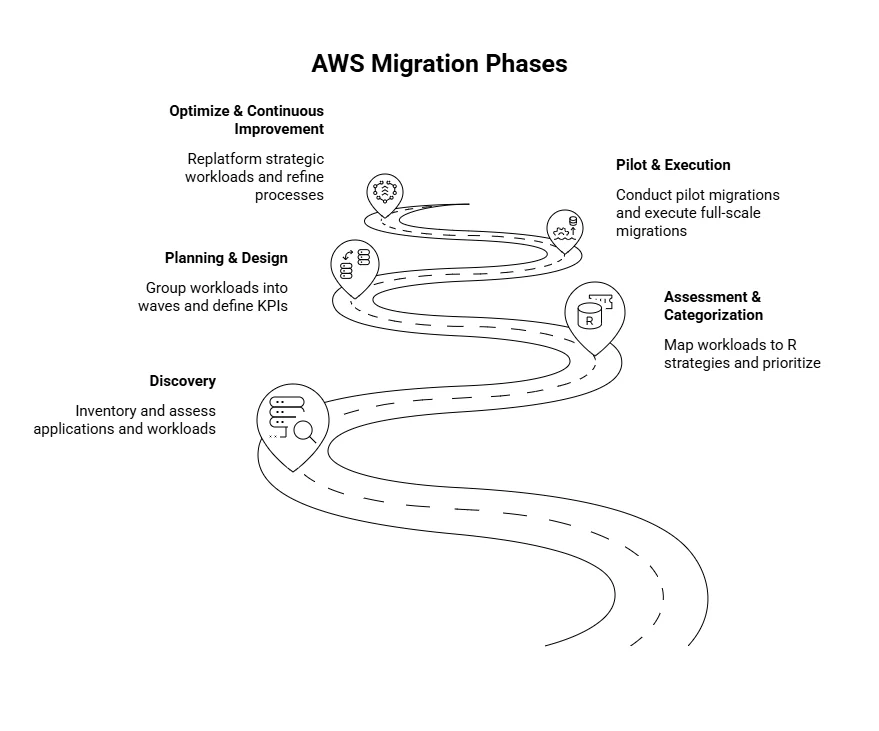
What are the AWS Migration Phases?

These are the sequential phases enterprises follow to apply the 7 Rs effectively across workloads, balancing speed, optimization, and cost.

Phase 1: Discovery

  • Inventory all applications, workloads, dependencies, and technical environments.
  • Assess business criticality, compliance, cloud readiness, and technical fit.
  • Outcome: Complete understanding of the portfolio and initial risk mapping.

Phase 2: Assessment & Categorization

  • Map each workload or component to the optimal R (Rehost, Relocate, Replatform, Refactor, Repurchase, Retire, Retain).
  • Prioritize workloads based on value, complexity, and risk.
  • Outcome: Workload classification and prioritization for migration waves.

Phase 3: Planning & Design

  • Group workloads into waves by risk, dependencies, and strategic importance.
  • Assign R strategies at the component level (front-end, app layer, database).
  • Define KPIs: expected spend, ROI, operational metrics, and performance benchmarks.
  • Outcome: Detailed migration plan with timelines, resources, and cost forecasts.

Phase 4: Pilot & Execution

  • Conduct pilot migrations to validate R choices, integrations, and cutover procedures.
  • Use AWS services aligned with each R (e.g., AWS Application Migration Service for Rehost, RDS/Fargate for Replatform).
  • Monitor performance, costs, and operational stability in real-time.
  • Outcome: Confirmed migration approach and low-risk full-scale execution.

Phase 5: Optimize & Continuous Improvement
  • Post-migration, selectively replatform or refactor strategic workloads, especially AI-ready ones.
  • Apply lessons learned to future waves and refine governance/FinOps processes.
  • Outcome: A cost-efficient, scalable, and business-aligned cloud estate.

AWS migration phases

Accelerate Your AWS Migration Safely

Partner with our experts to optimize migration speed while ensuring stability and cost efficiency.

Plan Your Migration

What AWS tools support each R strategy?

AWS provides specialized services to simplify migration execution and monitoring:

AWS Tools for Each Migration Strategy

Key AWS services aligned with each of the 7 Rs to enable effective migration and modernization.

Strategy AWS Tools Key Benefit
Rehost AWS Application Migration Service Rapid lift-and-shift with minimal disruption
Relocate VMware Cloud on AWS, AWS Migration Hub (legacy projects) Fastest path for VMware-heavy estates
Replatform Amazon RDS, ECS, AWS Fargate, Graviton Cost/performance optimization with minimal redesign
Refactor AWS Lambda, ECS, API Gateway, CloudFormation Cloud-native scalability and agility
Repurchase AWS Marketplace SaaS integrations Accelerates vendor swaps and modern applications
Retire AWS Systems Manager, Backup, S3 Glacier Controlled decommissioning and archiving
Retain Hybrid solutions, AWS Outposts Maintain critical workloads in place temporarily

How much will each strategy cost, and what are the typical trade-offs?

Cost varies depending on workload complexity, migration scale, and post-migration optimization.

Estimated Costs and Key Trade-Offs for AWS Migration Strategies

Understand typical investment ranges and the trade-offs of each migration approach.

Strategy Estimated Cost Key Trade-Offs
Rehost / Relocate $5k–$15k Fastest approach, minimal optimization, low cloud-native benefit
Replatform $15k–$40k Moderate operational gains, medium effort
Refactor $50k–$150k High agility and cloud-native benefits, long timeline, high cost
Repurchase $10k–$50k Faster outcomes, lower maintenance, vendor-dependent
Retire <$1k Immediate savings, no migration effort
Retain Varies Deferred cost, potential compliance or technical debt risk

Disclaimer: These figures are illustrative averages. Actual migration costs vary widely by workload complexity, compliance needs, and vendor contracts.

Scenario Examples:

  • 500 apps bulk Rehost → ~$5–10M, 90% done in 6 months.
  • 50 apps Refactor + Replatform → ~$4–6M, 12 months, measurable ROI.
  • 20 apps Repurchase → ~$300k, 6–8 weeks, faster features, lower maintenance.

Calculate Your AWS Migration Costs

Let our experts evaluate your workloads and estimate savings from Replatforming or Repurchasing for maximum efficiency.

Get Cost Estimate

What Most Enterprises Get Wrong About the 7 Rs

Many organizations treat the 7 Rs as a simple checklist instead of a strategic framework, which often leads to delays, overspend, and partial rollbacks. In 2026, cloud budgets are exceeding limits by 17%, over a quarter of migrations run slower than planned, and nearly 70% of projects see partial or full reversals within two years.

Key Pitfalls and How to Avoid Them:

  • Applying one-size-fits-all R or over-refactoring: Blanket Rehost or Refactor can slow migration and increase costs, sometimes raising AWS bills above on-prem levels.

Mitigation: Assess workloads individually, apply Rehost/Relocate for quick wins, reserve Refactor for strategic or AI-critical apps, and retire low-value workloads.

  • Weak dependency discovery and flawed wave planning: Hidden interdependencies cause emergency rollbacks and extend timelines.

Mitigation: Map all upstream/downstream connections, group workloads into logical waves, pilot a few apps first, and keep fallback environments ready.

  • Poor workload-to-strategy fit: Choosing R based on speed alone or delaying FinOps creates waste.

Mitigation: Model TCO for each workload, embed FinOps early, monitor usage continuously, and adjust resources post-migration.

  • Mismanaging Retain or Repurchase: Treating Retain as permanent or rushing SaaS swaps can increase lock-in and integration risk.

Mitigation: Reassess retained workloads regularly, pilot Repurchase applications, and involve stakeholders early.

  • Unclear ownership and misaligned incentives: Lack of accountability or relying solely on external advisors can derail projects.

Mitigation: Assign clear RACI for every wave, maintain internal migration owners, and set measurable success metrics (speed, cost, AI readiness).

Key Insight: The 7 Rs only deliver value when applied as a dynamic, workload-specific decision engine. Combining early discovery, selective application, disciplined wave planning, and embedded FinOps reduces delays, controls costs, and builds an AI-ready cloud estate.

Final Words: Building an AWS Cloud Migration Strategy That Delivers Real Value

From my experience guiding enterprises through cloud transformations, the most successful AWS migrations start with clear, portfolio-level decisions. Here’s how to approach it:

  • Set portfolio goals for speed, cost, risk, and modernization.
  • Assign the right R to each workload or component.
  • Plan in waves to reduce risk and ease execution.
  • Monitor continuously to control costs and performance.
  • Modernize selectively, focusing on high-value workloads.
  • Iterate and adapt as workloads and cloud capabilities evolve.

Applying the 7 Rs this way helps unlock faster value, control spend, and prepare for cloud-native and AI-ready workloads.


Frequently Asked Questions

Rehost (lift-and-shift), Relocate (move across platforms/accounts), Replatform (targeted optimization), Refactor (cloud-native redesign), Repurchase (SaaS swap), Retire (decommission low-value apps), Retain (keep on-premises or hybrid).

Rehost/Relocate has low upfront cost but minimal optimization. Replatform improves efficiency at moderate cost. Refactor requires significant investment but unlocks cloud-native agility. Repurchase accelerates outcomes with vendor dependency. Retire saves immediately, and Retain defers cost but may carry compliance or performance risks.

Over-refactoring too early, weak dependency mapping, and poor wave planning can delay value. Mitigate by prioritizing bulk migrations, validating dependencies with AWS tools, and monitoring cost and performance with FinOps practices.

Repurchase is ideal for non-core apps where SaaS provides faster implementation. Retire idle or redundant workloads to free resources. Retain workloads needing high compliance, specialized hardware, or phased modernization.

Define portfolio goals, categorize workloads with the 7 Rs, apply wave-based component-level planning, monitor costs and performance in real time, and modernize strategically post-migration. Iteration and FinOps practices help maximize value.

Author Bio

Photo of Vareesha Siddiqui

Vareesha Siddiqui

verified badge verified expert

Technical Writer — Platforms, SaaS & Digital Products

Vareesha writes about platforms and SaaS with a clear, experience-led approach. With 3+ years in technical writing, she translates complex business and technical concepts into structured, actionable content for founders and product teams. Having worked closely on platform implementation and documentation, she brings real-world insight into how these systems function beyond the surface.

Share This Blog

Book Your Free Growth Call with
Our Digital Experts

Discover how our team can help you transform your ideas into powerful Tech experiences.

This field is for validation purposes and should be left unchanged.