












 ChatGPT
 Perplexity
 Google AI
At AppVerticals, we help businesses with CMS development, guiding them to choose and build the right solution for their needs.

About Us

About Us
We’re a future-focused tech partner working with some of the world’s top enterprises. At AppVerticals, we design solutions that drive growth and reimagine digital experiences.

Services
Software Development
Mobile App Development
Web Design & Development
Tell us what you're looking for, and we'll tailor a solution based on your business needs.
Talk to Experts
Health Tech

EdTech

Logistics

Real Estate

Ecommerce

Sports

Fintech

Travel

Restaurant

Automotive
HIPAA-compliant digital solutions for hospitals, clinics, and healthtech startups driving better patient outcomes.
What we do:
Scalable learning platforms for schools, universities, and EdTech startups transforming education delivery.
What we do:
Real-time tracking and automation solutions for freight companies, warehouses, and delivery services.
What we do:
PropTech platforms for brokerages, property managers, and real estate marketplaces are streamlining operations.
What we do:
High-converting commerce platforms for D2C brands, retailers, and online marketplaces are driving revenue growth.
What we do:
Fan engagement platforms for sports teams, leagues, and betting operators are creating immersive experiences.
What we do:
PCI-DSS compliant solutions for digital banks, payment platforms, and InsurTech companies, ensuring security.
What we do:
Booking and hospitality solutions for OTAs, hotels, and tourism platforms, enhancing traveler experiences.
What we do:
Online ordering and operations software for restaurants, cloud kitchens, and food delivery platforms.
What we do:
Connected vehicle platforms for automotive OEMs, dealerships, and mobility providers are accelerating innovation.
What we do:
Portfolio

AppVerticals was featured in Inc. 5000 as
America’s Fastest Growing Tech Company
See what it might cost to bring your app idea to life. Our calculator gives you a quick, simple estimate based on what you need.



 verified expert
AI & Data-Driven Content Strategist
Writes stat-driven, expert-backed blogs that simplify complex AI products and forecast what’s next.
See Full Bio9 minutes read
Your CMS choice, Webflow or WordPress, shapes more than your site’s look; it impacts SEO, growth potential, budgets, workflows, and upkeep. At AppVerticals, we’ve helped dozens of startups, agencies, and enterprises select and build CMS architectures that maximize SEO, performance, and growth.
I have compared both platforms using practical criteria that founders, marketers, and agencies actually care about: setup speed, SEO control, pricing, usability, collaboration, and future trends. No hype. No assumptions. Just clear comparisons so you can choose the right CMS for your business goals.
| Feature | Webflow | WordPress |
|---|---|---|
| Setup & Onboarding | Faster visual setup (minutes to hours); all-in-one platform with hosting included | Requires hosting, domain configuration, and installation (hours to days) |
| Design Flexibility | Visual-first, pixel-perfect design control; no-code canvas with real CSS/HTML output | Theme-dependent or requires custom development; visual builders via plugins (Elementor, Divi) |
| Learning Curve | Steeper initial learning curve; understanding web design concepts needed | Easier for beginners; extensive documentation and community tutorials |
| Customization | Limited to Webflow’s framework; custom code possible but constrained | Virtually unlimited via 60,000+ plugins and themes; full code access |
| SEO Capabilities | Built-in SEO tools (meta tags, structured data, clean code) | Plugin-driven (Yoast, RankMath); granular control but requires configuration |
| Performance & Speed | Managed hosting optimized for speed; average load <2s | Depends on hosting, theme, and plugins; can be optimized but requires effort |
| E-commerce | Native e-commerce, max 15,000 SKUs | WooCommerce, unlimited SKUs; more payment gateways & extensions |
Whether you’re scaling a content-heavy site or optimizing for marketing agility, our CMS development team at AppVerticals helps businesses implement solutions that perform and scale efficiently
Both platforms support strong SEO practices, but the approach differs.
Webflow
WordPress
In 2026, WordPress continues to dominate in terms of global website share, CMS adoption, and enterprise usage, powering millions of sites with a mature developer ecosystem.
Webflow, while smaller, is rapidly growing with 23% CAGR, a strong presence among design-focused brands, and impressive e-commerce growth. Both platforms serve distinct needs. WordPress excels in content-heavy and complex deployments, while Webflow offers speed, visual control, and streamlined management.
| Metric | WordPress | Webflow |
|---|---|---|
| Global Website Share | 43.5% of all websites | 0.8% (rapidly growing) |
| CMS Market Share | 61.7% of known CMS websites | N/A |
| Total Sites | 861 million | 524,000+ |
| Paying Customers | N/A (open-source model) | 100,000+ |
| E-commerce Presence | 17% powered by WooCommerce | 647% e-commerce growth (2020–2023) |
| Developer Growth | Mature global ecosystem | 23% CAGR |
| Enterprise / Major Users | The Wall Street Journal, The New York Times, CNN, Microsoft News, Coca-Cola, The Walt Disney Company, Meta | Discord, Slack (Brand Center), Dropbox (Dropbox Sign), Dell Technologies, Jasper |
Key Insight:
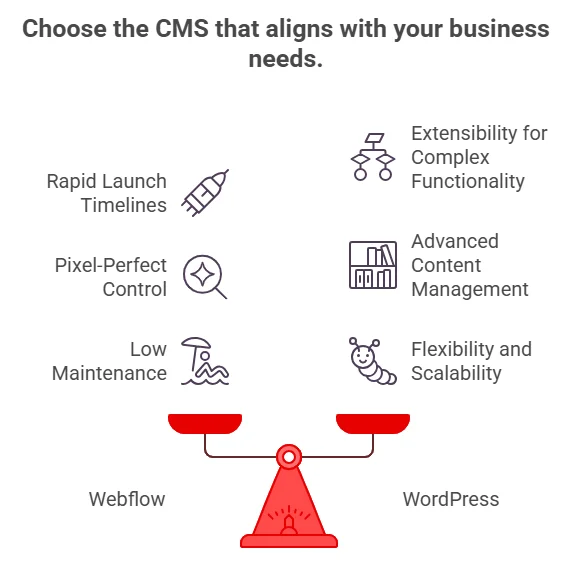
| If You Are… | You Should Choose | Why You Should Choose It |
|---|---|---|
| Startup / Early-Stage SaaS | Webflow | Faster time-to-market, built-in hosting, predictable pricing, minimal maintenance burden. Ideal for marketing-led growth. |
| Product-Driven SaaS with Complex Features | WordPress | Greater extensibility, 60,000+ plugin ecosystem, and easier integration with memberships, portals, or custom functionality. |
| Design-Focused Agency | Webflow | Pixel-level visual control, faster client launches, and built-in collaboration and staging tools. |
| Development Agency | WordPress | Full code access, unlimited customization, scalable architecture for complex builds. |
| Content-Heavy Blog / Publisher | WordPress | Unlimited posts, advanced taxonomies, stronger editorial workflows, proven at enterprise publishing scale. |
| Marketing Team with Limited Technical Resources | Webflow | Managed infrastructure, security handled by the platform, no plugin maintenance. |
| Enterprise with Large-Scale Content & Integrations | WordPress | Low vendor lock-in, deep integration flexibility, proven scalability across high-traffic environments. |
Pricing differences are less about subscription fees and more about long-term maintenance.
| Cost Factor | Webflow | WordPress |
|---|---|---|
| Hosting | Included | Separate |
| Maintenance | Platform-managed | Ongoing updates required |
| Plugins | Limited external tools | Many paid plugins are possible |
| Development | Lower initial design cost | Variable depending on build |
| Scaling | Predictable subscription | Hosting + dev cost increases |
| Business Stage | Webflow – Estimated Annual Cost | WordPress – Estimated Annual Cost |
|---|---|---|
| Small Business | $444–$624 / year | $500–$2,000 / year |
| Growing Business | $900–$1,800 / year | $2,000–$10,000 / year |
| Enterprise | $12,000–$60,000+ / year | $10,000–$100,000+ / year |
| Cost Insight | Often 4–5× cheaper than hiring a custom developer for comparable builds | “Free” core software, but higher hidden costs in hosting, premium plugins, security, and ongoing development |
Key insight: Webflow often offers predictable pricing. WordPress can be cheaper initially, but it may require higher maintenance and development costs over time.
Reality check: Neither platform is completely “no-skill.” Content creators still need basic UX and structure knowledge.
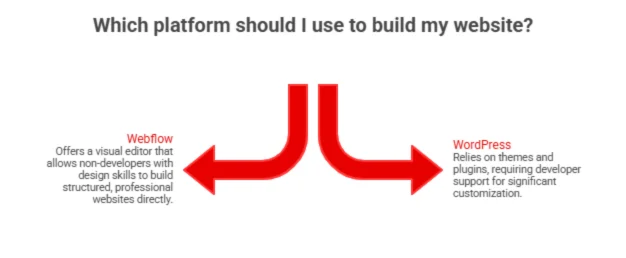
There is no evidence that one platform is replacing the other. Instead, both are evolving toward different roles.
Observed trends
Expected direction
From WordPress to Webflow, our experts handle everything from design to deployment.
After building CMS architectures for startups, agencies, and enterprise teams, our perspective is clear: the right choice depends on how your business grows. If your website is a marketing engine that needs speed, design precision, and minimal maintenance, Webflow is the smarter move.
If your roadmap includes complex functionality, deep integrations, or large-scale content operations, WordPress offers the flexibility and long-term control you’ll need. The best CMS isn’t the most popular one; it’s the one aligned with your team structure, technical capacity, and growth strategy.
verified expert
Writes stat-driven, expert-backed blogs that simplify complex AI products and forecast what’s next.
 We’re AppVerticals
AppVerticals is where innovative startups and Fortune 500s come for transformation.
View About Us Web App
By 2026, more than 70% of new enterprise applications will include components built with low-code or no-code platforms, a structural shift in how soft...

19 min read
 eCommerce Web
Ecommerce website development stops being simple the moment your business stops being simple. More products, more regions, more systems, more edge cas...
15 min read
 Web App
Angular vs React is a strategic decision that affects scalability, hiring, and long-term maintainability. Whether you're building in-house or workin...
19 min read
Discover how our team can help you transform your ideas into powerful Tech experiences.
AppVerticals © 2026 | All Rights Reserved

Get In Touch.













