

About Us

About Us
We’re a future-focused tech partner working with some of the world’s top enterprises. At AppVerticals, we design solutions that drive growth and reimagine digital experiences.

Services
Software Development
Mobile App Development
Web Design & Development
Tell us what you're looking for, and we'll tailor a solution based on your business needs.
Talk to Experts
Health Tech

EdTech

Logistics

Real Estate

Ecommerce

Sports

Fintech

Travel

Restaurant

Automotive
HIPAA-compliant digital solutions for hospitals, clinics, and healthtech startups driving better patient outcomes.
What we do:
Scalable learning platforms for schools, universities, and EdTech startups transforming education delivery.
What we do:
Real-time tracking and automation solutions for freight companies, warehouses, and delivery services.
What we do:
PropTech platforms for brokerages, property managers, and real estate marketplaces are streamlining operations.
What we do:
High-converting commerce platforms for D2C brands, retailers, and online marketplaces are driving revenue growth.
What we do:
Fan engagement platforms for sports teams, leagues, and betting operators are creating immersive experiences.
What we do:
PCI-DSS compliant solutions for digital banks, payment platforms, and InsurTech companies, ensuring security.
What we do:
Booking and hospitality solutions for OTAs, hotels, and tourism platforms, enhancing traveler experiences.
What we do:
Online ordering and operations software for restaurants, cloud kitchens, and food delivery platforms.
What we do:
Connected vehicle platforms for automotive OEMs, dealerships, and mobility providers are accelerating innovation.
What we do:
Our Odoo implementation brings financial discipline, operational visibility, and process control across departments. From accounting automation to manufacturing workflows, we design ERP systems that reduce operational leakage and provide real-time decision clarity.
We use Sitecore to drive measurable revenue growth through intelligent personalization and behavior-driven content delivery. By aligning marketing automation, data orchestration, and omnichannel engagement, we help brands turn digital touchpoints into retention engines.
We architect AWS environments that stay stable under scale, traffic spikes, and compliance pressure. From secure cloud migrations to CI/CD automation and cost governance, we engineer cloud foundations that protect performance while enabling rapid product evolution.
We implement Dynamics 365 to align systems with actual business operations, bringing clarity, control, and accountability across CRM, ERP, and service functions. From sales to finance, configurations eliminate inefficiencies and enable confident, real-time decisions.
Tell us what you're looking for, and we'll tailor a solution based on your business needs.
Talk to ExpertsPortfolio

AppVerticals was featured in Inc. 5000 as
America’s Fastest Growing Tech Company
See what it might cost to bring your app idea to life. Our calculator gives you a quick, simple estimate based on what you need.



 verified expert
Senior Writer and Editor - App, AI, and Software
Muhammad Adnan is a Senior Writer and Editor at AppVerticals, specializing in apps, AI, software, and EdTech, with work featured on DZone, BuiltIn, CEO Magazine, HackerNoon, and other leading tech publications. Over the past 6...
See Full Bio19 minutes read
By 2026, more than 70% of new enterprise applications will include components built with low-code or no-code platforms, a structural shift in how software gets delivered in real business contexts.
I’ve evaluated and delivered web apps and custom web development services across SaaS, FinTech, healthcare, and enterprise modernization, and the pattern is consistent: speed alone doesn’t win, like architecture, risk, and long-term scalability do.
The real question isn’t whether to use low-code or no-code, but where each fits safely inside a modern web stack.
Low-code vs no-code is now a core web development decision because engineering capacity can’t keep up with web product demand, and not every web app problem justifies full custom build anymore.
Over 87% of enterprise developers use low-code in active application delivery workflows, not experiments or side projects.
Low-code accelerates web application development using visual tooling while still exposing code, APIs, and data models, so engineers retain architectural control.
No-code enables web apps through configuration alone, abstracting execution, integrations, and authentication to maximize speed at the cost of control.
The difference matters when scalability, security, integrations, or long-term change become requirements, not after they break.
From what I see in real web and web-app programs, this decision shows up when teams hit the same wall: backlogs grow, releases slow down, and hiring doesn’t fix it fast enough. Low-code and no-code enter the conversation not as shortcuts, but as delivery pressure valves.
Low-code scales web apps by preserving architectural control over data, logic, and integrations, while no-code scales delivery speed by abstracting those layers away. As complexity grows, low-code bends; no-code breaks.
Here’s the simplest way to understand this as a web decision.
A production web app is not a UI problem. It’s an API, identity, and data-flow problem. Most web apps today depend on internal services, third-party APIs, background jobs, and role-based access rules.
Over 60% of organizations manage more than 100 APIs, which explains why integration control becomes a scaling bottleneck very quickly.
Architecturally, the split is clear:
No-code web apps handle scale by constraining customization, not by optimizing system behavior.
They work well when:
They fail when web apps require:
Authentication is usually the first failure point.
Low-code reduces how fast you write code, not who owns architectural responsibility.
In real web apps, full-stack engineers are still needed to:
Low-code accelerates delivery, but engineering judgment still governs scalability, security, and control. Teams that ignore this don’t fail immediately. They fail later, when change becomes expensive.
At different budget levels, low-code and no-code don’t just change what you build; they change how long the solution survives before rework, migration, or replacement becomes unavoidable.
In 2026, website design cost is tightly coupled with delivery model, integration depth, and architectural ownership. Budget determines whether you’re buying speed, flexibility, or long-term control, and you rarely get all three.
Here’s how this plays out in real web and web app delivery.
At $50k, teams are buying speed, not architecture. No-code typically delivers faster outcomes here: internal tools, admin panels, simple customer portals, or workflow-driven web apps.
Low-code and no-code adoption is strongest in departmental and tactical use cases, where time-to-value outweighs long-term extensibility.
At this level, no-code can be the right call, but only if the web app has a clear lifespan and limited integration scope.
At $100k, the trade-off shifts. Web teams start needing:
This is where no-code begins to strain, and low-code becomes more viable. Organizations using low-code at scale cite better alignment between delivery speed and architectural control compared to no-code-only approaches.
At this budget, teams often mix low-code with traditional development, accelerating delivery while retaining control over critical web app layers.
At $500k, the conversation changes entirely. This is about platform longevity. Web apps at this level involve:
Large digital transformation programs fail more often due to execution and architectural rigidity than technology choice, which is why higher-budget teams prioritize flexibility and exit options over raw speed.
At this tier, low-code can still play a role, but no-code is usually relegated to peripheral systems, not the core web platform.
Budgets don’t just buy features. They buy tolerance for risk and change, and that’s what should guide low-code vs no-code decisions in serious web development.
Most teams fail because they apply them in the wrong places. If you’re weighing low-code, no-code, or full-stack for a real web app, get a second opinion before architecture locks you in.
Get an Architecture Check
Low-code supports web app modernization by allowing legacy systems to run in parallel while new components are introduced incrementally; no-code works only when legacy systems can be bypassed or fully replaced.
In real modernization and website redesign programs, parallel operation is the rule, not the exception. That single constraint explains most success and failure patterns.
Modern web app modernization usually looks like this:
This is why modernization fails so often. Low-code and no-code behave very differently under these conditions.
Think in layers, not tools:
Low-code can live in the transition and modern layers. No-code assumes the transition layer is thin or unnecessary. That assumption is where most projects break.
Modernization fails when one of these three risks is underestimated.
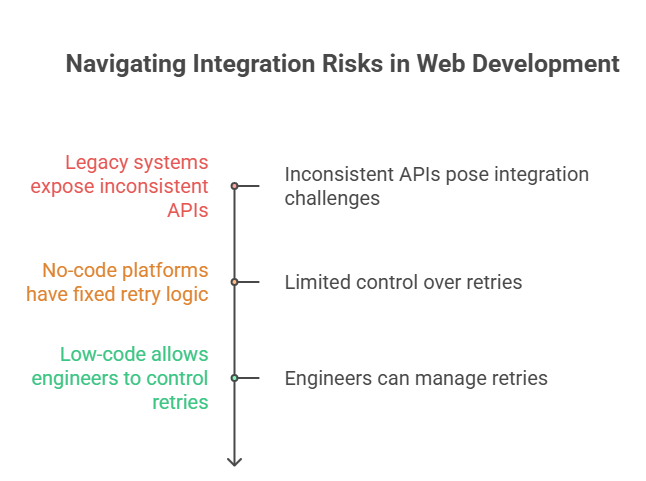
Legacy systems expose APIs that are:
In no-code platforms:
In low-code:
This is the difference between temporary instability and chronic outages.
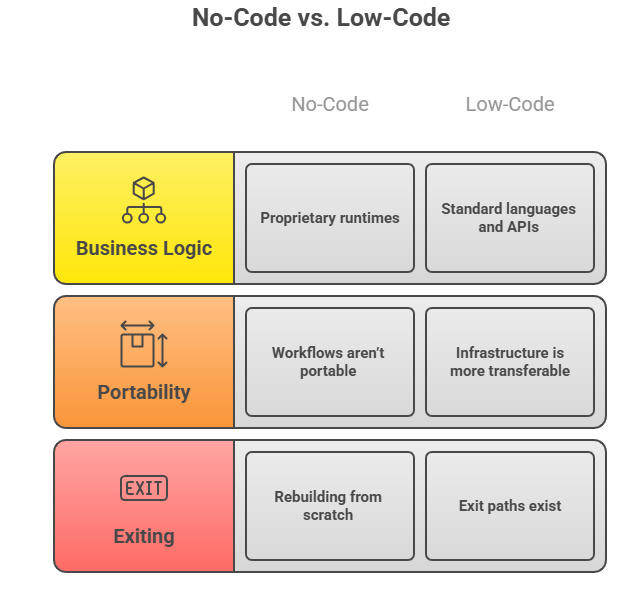
Modernization almost always requires:
Data integration and data quality as top failure points in modernization, especially when platforms restrict direct access to schemas and transformations.
No-code platforms abstract data models. That speeds initial setup but blocks:
Low-code allows teams to design data as a migration asset, not a liability.
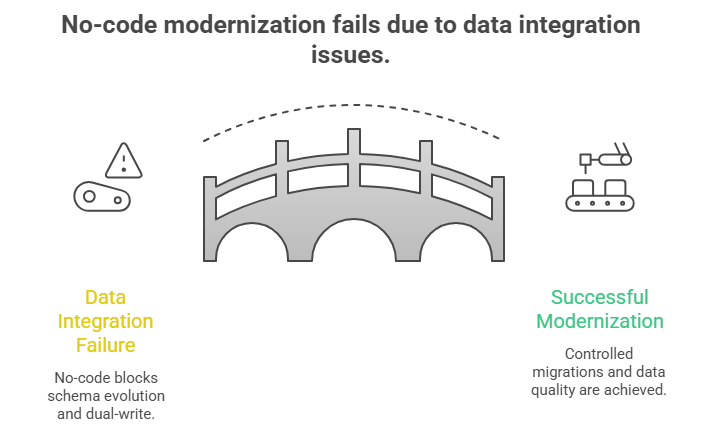
This doesn’t show up in month three.
It shows up in year two.
With no-code:
With low-code:
Modernization is about optionality, not speed alone.
Use no-code if:
Use low-code if:
You can’t reliably build core, long-lived web platforms with complex security models, high-throughput integrations, or evolving business logic using low-code or no-code alone.
These approaches fail when precision, performance, and change tolerance become non-negotiable.
Here’s why
Modern web apps hit limits when they must coordinate many systems at once. According to Cloudflare, Enterprises increasingly operate hundreds of APIs, which raises the bar for error handling, retries, rate limits, and observability.
Low-code/no-code platforms abstract these mechanics. That’s fine until you need deterministic behavior under load. When you can’t tune timeouts, control concurrency, or inspect failures deeply, reliability degrades in ways teams can’t quickly fix.
Security is another hard stop. The OWASP Top 10 consistently shows that access control and auth logic failures dominate real incidents, not UI bugs.
| Requirement | Why It Breaks |
|---|---|
| Complex authentication (custom SSO, conditional access) | Limited control over token lifecycles and auth flows |
| High-volume, bursty API traffic | Fixed retries, opaque throttling, weak observability |
| Asynchronous processing (queues, workers) | Poor control over concurrency and failure recovery |
| Evolving data models | Abstracted schemas block safe refactoring |
| Long-term platform ownership | Proprietary runtimes increase exit cost |
Low-code and no-code are effective accelerators, not foundations, for:
The best low-code platforms are the ones that let teams accelerate delivery without surrendering architectural control or locking themselves into brittle abstractions. “Best” here means survivable under change, not flashy in demos.
Below are five low-code platforms that consistently show up in real web application programs, not just comparison blogs, each for different reasons.
Best for: Large-scale, long-lived web platforms
OutSystems is built for enterprises that need performance, scalability, and governance without writing everything from scratch. It works best when teams still want engineers deeply involved but need to compress delivery cycles.
Use it when:
Best for: Domain-heavy applications and structured workflows
Mendix shines where business rules are complex and need to be modeled clearly. It’s often chosen in manufacturing, logistics, and regulated environments where process clarity matters more than UI polish.
Use it when:
Best for: Organizations already deep in the Microsoft ecosystem
Power Apps works best when web apps are tightly coupled with Microsoft 365, Azure, and Dynamics. It’s a practical choice for internal tools and workflow-driven apps that don’t need full platform independence.
Use it when:
Best for: Process-driven, compliance-heavy web applications
Appian is less about UI freedom and more about process orchestration and governance. It’s strong in finance, healthcare, and government-style workflows where traceability is non-negotiable.
Use it when:
Best for: Engineering-led internal web apps and admin panels
Retool sits close to code and is favored by developers who want speed without losing visibility. It’s not for customer-facing products, but it’s excellent for internal systems that still need reliability.
Use it when:
The best no-code platforms are the ones that let teams ship fast in tightly scoped scenarios without pretending to replace real engineering. “Best” here means low blast radius, not long-term architectural strength.
These platforms succeed when the web app is contained, replaceable, and non-core.
Best for: Fast MVPs and simple customer-facing web apps
Bubble is the most flexible no-code platform for UI-heavy apps, which is why it’s popular with startups testing ideas quickly.
Use it when:
Best for: Marketing sites and content-driven web experiences
Webflow excels at frontend control without backend complexity. It’s not an application platform, and that’s exactly why it works.
Use it when:
Best for: Lightweight internal tools and operational systems
Airtable is powerful when teams need structured data and simple workflows without standing up a full backend.
Use it when:
Best for: Glue logic and automation between systems
Zapier isn’t a web app platform. It’s an orchestration layer. That’s why it works well alongside other tools.
Use it when:
Best for: Simple portals and mobile-first internal apps
Glide is effective for turning structured data into usable interfaces quickly.
Use it when:
The “best” platform depends entirely on what part of the web app you’re building and how long it needs to live. No-code wins for speed and containment; low-code wins when ownership, integration depth, and future change matter.
Here’s the correct way to think about it.
| Web App Use Case | No-Code Fit | Low-Code Fit | Why |
|---|---|---|---|
| Internal dashboards & admin tools | Strong | Strong | Limited users, predictable logic |
| Workflow portals (ops, HR, CRM overlays) | Strong | Strong | CRUD + rules-based logic |
| Customer-facing MVPs | Short-term | Better | MVPs evolve quickly |
| API-heavy SaaS products | Weak | Strong | Integration control required |
| Regulated or secure platforms | Risky | Conditional | Security precision needed |
| Long-lived core web platforms | Not suitable | Partial | Custom code unavoidable |
Now let’s break this down clearly.
No-code makes sense when the web app is contained, replaceable, and non-core.
Good no-code use cases:
Platforms like Bubble, Retool, and Airtable work well here because:
If the app can be rebuilt in 6–12 months without business disruption, no-code is usually fine.
Low-code is the better choice when the web app must grow, integrate, and survive change.
Low-code fits when:
Platforms like OutSystems, Mendix, and Microsoft Power Apps succeed here because:
Low-code doesn’t replace serious web development, but compresses the time spent on repeatable work, while custom code still governs the parts that must be precise.
Teams that succeed don’t ask “Which platform is best?” They ask “Which parts of this web app can we afford not to own?”
CTOs should choose based on how much of the web application they can afford not to own and how expensive change will be over the next 24–36 months.
The wrong choice doesn’t fail immediately, but when requirements change, and this is often the point teams evaluate whether an experienced web app development company is needed to own architecture, security, and integration decisions.
Here’s the decision logic that actually holds up in real organizations.
The mistake most teams make is asking “Which approach is faster?” Speed only matters at the start. The real question is where flexibility, risk, and control must live as the product evolves.
Think of the decision in three layers.
If failure or downtime affects revenue or trust, abstraction becomes a liability.
Change tolerance is more important than initial delivery speed.
If you can’t explain how auth, permissions, and data access work, you don’t control them.
Exit cost is the hidden variable most teams ignore.
The best teams don’t pick one approach; they compose them:
This hybrid model keeps delivery fast without surrendering control where it matters.
AppVerticals is specialized in custom web application strategy, modernization, and execution that balance speed, control, and long-term scalability rather than chasing buzzwords or shortcuts.
A strong example is our work with Collaborative Patient Care Group (CPCG), where they engineered a secure remote support hub to replace a patchwork of disconnected tools with a unified platform for scheduling, kiosk access, monitoring, and collaboration.
This project tackled challenges like legacy fragmentation, integration complexity, and the need for precise control without sacrificing delivery pace.
This kind of work, from legacy system modernization to high-traffic web experiences, exemplifies how AppVerticals helps teams choose and execute the right mix of low-code, no-code, and full-stack strategies based on real constraints, not buzz.
Low-code vs no-code isn’t about speed; it’s about where failure is acceptable. This article showed where no-code breaks (auth, APIs, data, modernization), where low-code still needs engineers, how budgets ($50k–$500k) change outcomes, and why website redesigns fail without parallel architectures.
Now, for you, the focus is simple: protect the core, accelerate the edges, and plan exits before scale forces them.
We help teams define ownership boundaries that scale, without locking themselves into the wrong platforms.
Talk to a Web Specialist
verified expert
Muhammad Adnan is a Senior Writer and Editor at AppVerticals, specializing in apps, AI, software, and EdTech, with work featured on DZone, BuiltIn, CEO Magazine, HackerNoon, and other leading tech publications. Over the past 6 years, he’s known for turning intricate ideas into practical guidance. He creates in-depth guides, tutorials, and analyses that support tech teams, business leaders, and decision-makers in tech-focused domains.
 We’re AppVerticals
AppVerticals is where innovative startups and Fortune 500s come for transformation.
View About Us Web Development
To outsource web development strategically, scale delivery, reduce fixed hiring risk, and accelerate product execution by partnering with an external...

15 min read
 Web Development
Website design cost in 2026 typically ranges from $15,000 to $80,000 for most businesses, with higher budgets tied to performance standards, UX depth,...
17 min read
 Web App
In 2025, web applications are no longer optional, they’re the core of digital strategy. But most projects fail not due to bad code, but because the te...
8 min read
Discover how our team can help you transform your ideas into powerful Tech experiences.
AppVerticals © 2026 | All Rights Reserved

Get In Touch.













 ChatGPT
 Perplexity
 Google AI













